world-use
Health Warn
- License — License: Apache-2.0
- Description — Repository has a description
- Active repo — Last push 0 days ago
- Low visibility — Only 6 GitHub stars
Code Pass
- Code scan — Scanned 12 files during light audit, no dangerous patterns found
Permissions Pass
- Permissions — No dangerous permissions requested
No AI report is available for this listing yet.
Run frontier models as robot policies: a safety kernel, checked plans and compact context for LLM-operated robots.

world-use
Tools that let AI agents operate robot arms.
The agent looks at camera images, picks out objects and decides what to do. world-use follows the objects
with EdgeTAM, measures where they are, checks each motion against the robot's limits, runs it in a 100 Hz
control loop and reports what happened. Use it over MCP, from Python or with the wu CLI.
Start in MuJoCo, no robot needed. Tested in simulation and on a Seeed reBot arm.
LIBERO-10 · Demos · Quickstart · Give it to an agent · Documentation
LIBERO-10
GPT-6.2 Sol, driving a simulated Franka Panda, solves 30 of 50 episodes with world-use vs 15 alone, with
74% fewer model calls. Both arms of a pair start from the same state; 30 of the 50 pairs are held-out states,
run once.
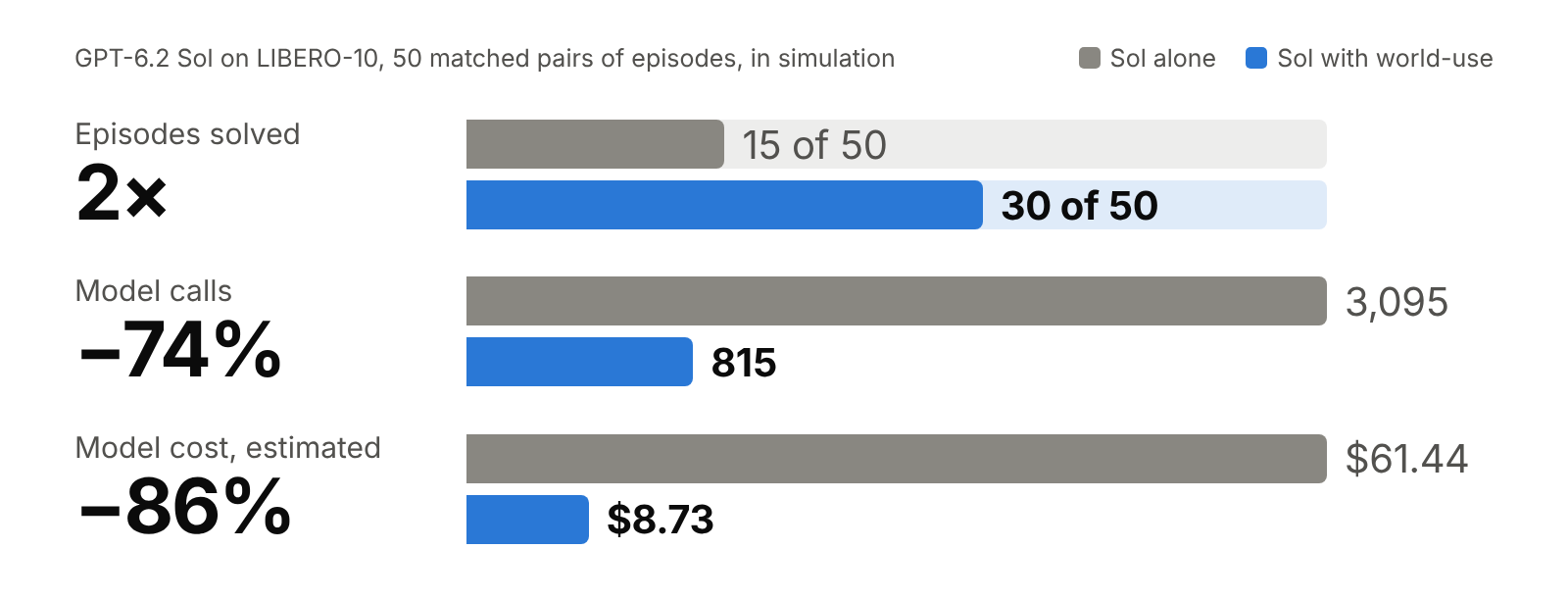
Alone, the model picks hand poses from camera images. With world-use it also gets EdgeTAM tracking,
wrist-camera positions without depth, and grasp, place and push tools that report position error, contact
and grip. Setup, per-task results and limits
GPT-6.2 Astra, on the same cases and with a grasp that can lean the hand to take a mug by its handle,
solves 43 of 50 with world-use vs 19 alone.
Demos
Selected simulation runs. The kitchen demos were developed with scene knowledge and human feedback.
Shape sorting
GPT-6.1 Sol sorts 4/4 pieces with world-use vs 3/4 raw, with estimated episode costs of $1.30 vs $2.02.
https://github.com/user-attachments/assets/43a2caa8-aa29-41d6-84be-64477883f4d9
Lunchbox packing
An LLM-written program uses EdgeTAM, depth and measured alignment to pack two snacks compactly, then verifies each placement.
https://github.com/user-attachments/assets/f714e092-69e5-40ac-b7f6-bdeac1f4f6b9
Oven dial
The LLM selects the temperature dial. Measured landmarks guide the turn to 180°C and the check after release.
https://github.com/user-attachments/assets/7dfb024d-f794-41f6-bd02-47260d103639
How it works
An agent calls tools one at a time, or writes a Python task that takes fresh observations on each run.
| Step | What world-use provides |
|---|---|
| Observe | Camera frames, and EdgeTAM masks of objects the agent marks with a point or a box. |
| Measure | Positions in metres from depth, or from two looks with a camera on the hand; plane fits and alignment from matching landmarks. |
| Move | Plans checked against the robot's limits, optionally rehearsed in a MuJoCo copy of the scene, run by a 100 Hz control loop that reports arrival, contact and grip. |
| Verify | New pictures to check the result, and a flight record of plans, measurements and telemetry. |
The agent decides what to grasp, where things are and whether the task succeeded. Rehearsal only knows the
objects the agent has described, and what is sensed depends on the robot's driver: the kitchen demos run
without rehearsal and without joint torque sensing. Design and perception
have the details.
Quickstart
Install with uv:
uv tool install --python 3.13 --with-executables-from rerun-sdk "world-use[mcp,rerun]"
This installs wu, the Rerun viewer and Python 3.13 if needed. Add vision to the extras for EdgeTAM orrebot for the reBot driver.
Run a complete scripted task in simulation, without an LLM or robot:
wu demo
wu inspect runs/block-demo
wu view runs/block-demo
A script moves a block 10 cm along a tray, checks in the simulator that it stands where it should,
switches torque off and saves a record and an animation.
Later runs go to numbered folders; use the path your run prints. Cameras need
OpenGL. wu demo --scenario missing shows a missed grasp and the
recovery. The block example shows how to adapt the task.
Give it to an agent
Start the simulation with wu up --workcell block, then give a shell-based agent this task:
Run `wu policy` and follow it. A simulated robot arm is running. Move the orange
block to F=0.34, L=-0.07 in the work frame, standing on the tray. Verify placement,
then go home, switch torque off and report what you did and observed.
wu policy prints the operating brief. For MCP, keep the daemon running and
configure your client to launch wu mcp:
{
  "mcpServers": {
    "world-use": {"command": "wu", "args": ["mcp"]}
  }
}
For EdgeTAM, include vision in the install extras and use "args": ["mcp", "--vision"].
The tracking guide covers model weights and device selection.
Python
With the simulated daemon running and torque enabled, submit a phase:
from world_use import Client, Plan

robot = Client()
phase = Plan("lift and open").line(up=0.06).gripper(aperture_mm=60)
result = robot.run(phase.spec(), wait=60)
print(result["status"])
Save it as task.py. The tool install is isolated from your projects, so run it with:
uv run --with world-use python task.py
Go home and switch torque off afterwards. The perception example is a complete task;
task programs record code and inputs for repeated runs.
Documentation
| Guide | Use it to |
|---|---|
| LIBERO-10 | Reproduce the benchmark comparison or run another model on it. |
| Perception | Measure from camera pixels, locate objects with a wrist camera and align landmarks. |
| Tracking | Download EdgeTAM and choose the device it runs on. |
| Records and replay | Inspect runs, references and named evaluations together in Rerun. |
| Simulation | Configure scenes, validate references and run comparable evaluations. |
| RoboCasa setup | Build the shared Panda kitchen used by the packing and dial demos. |
| Letter pushing | Run a camera-feedback pushing policy, change starts or friction, and audit the physics. |
| Robot adapters | Connect another arm through a URDF, a description and a driver. |
| reBot setup | Configure CAN, cameras and supervised hardware operation. |
| Hardware records | Read what worked, what failed and what changed on the physical arm. |
| Design · Changelog | Understand the architecture and follow changes. |
Contributing
Bug reports, examples and tested adapters are welcome. Include steps to reproduce and the relevant flight
records, with credentials and private images removed.
git clone https://github.com/anyact-ai/world-use.git
cd world-use
uv sync --locked
uv run pytest
uv run ruff check .
uv run ty check src
See AGENTS.md for conventions and simulation for test setup.
License
Code: Apache-2.0. The bundled Seeed reBot model is CERN-OHL-W-2.0; see its
notice. The kitchen demos use upstream assets with
separate attribution.
Reviews (0)
Sign in to leave a review.
Leave a reviewNo results found