graphmind
Health Gecti
- License — License: MIT
- Description — Repository has a description
- Active repo — Last push 0 days ago
- Community trust — 23 GitHub stars
Code Gecti
- Code scan — Scanned 12 files during light audit, no dangerous patterns found
Permissions Gecti
- Permissions — No dangerous permissions requested
Bu listing icin henuz AI raporu yok.
Local-first code intelligence for AI assistants. Turns your codebase into a knowledge graph your AI can query, navigate, and remember. 25 MCP tools.
graphmind


Your codebase has a shape. Now your AI can see it. And remember it.
GraphMind turns your codebase into a knowledge graph your AI can query, navigate, and remember. Ask about dead code, dependencies, or blast radius — and get answers grounded in your actual architecture.
Up to 5,700× fewer tokens than raw search (~10M tokens saved per session). Works with Claude Code, Cursor, Windsurf, Cline, Zed, Continue, and any MCP-compatible AI assistant.
Why GraphMind
Every new AI session starts from zero. Your assistant re-reads the entire codebase, re-discovers architecture, and forgets every decision you explained last time. Across multiple projects, there's zero visibility into shared dependencies.
graphmind fixes this with four layers:
- Structural graph — function-level knowledge graph per repo (AST-based, tree-sitter, 30+ languages)
- Semantic embeddings — vector search over symbols (local ONNX, OpenAI, or Voyage AI)
- Persistent memory — declarative store for decisions, patterns, conventions — survives across sessions
- Cross-project links — dependencies and relationships between registered repos
Everything runs locally. No cloud. No open ports by default. No telemetry.
Benchmark
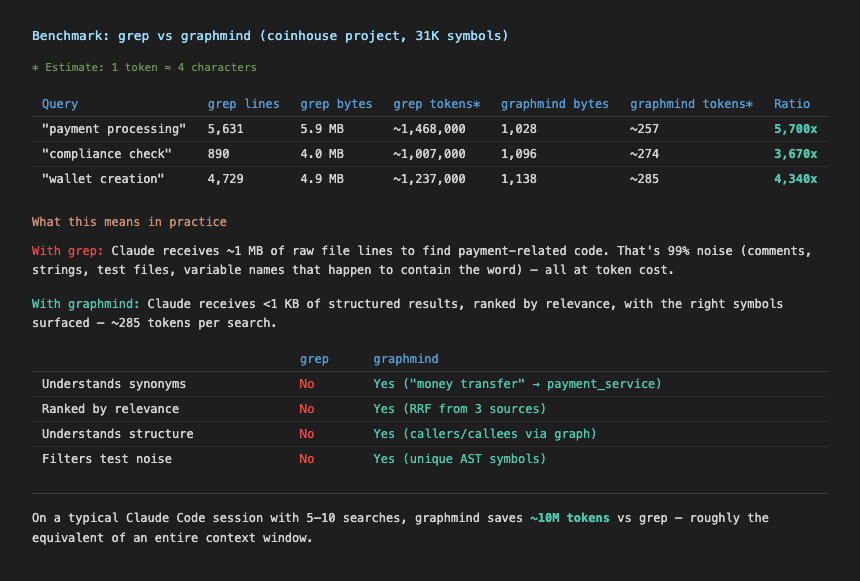
Comparison of token usage: grep -r (raw file search) vs graphmind search for the same query on a ~100k LOC codebase. graphmind returns ranked, structured results in under 300 tokens vs 1.5M+ for raw grep output.
Install
Desktop app (macOS) — recommended
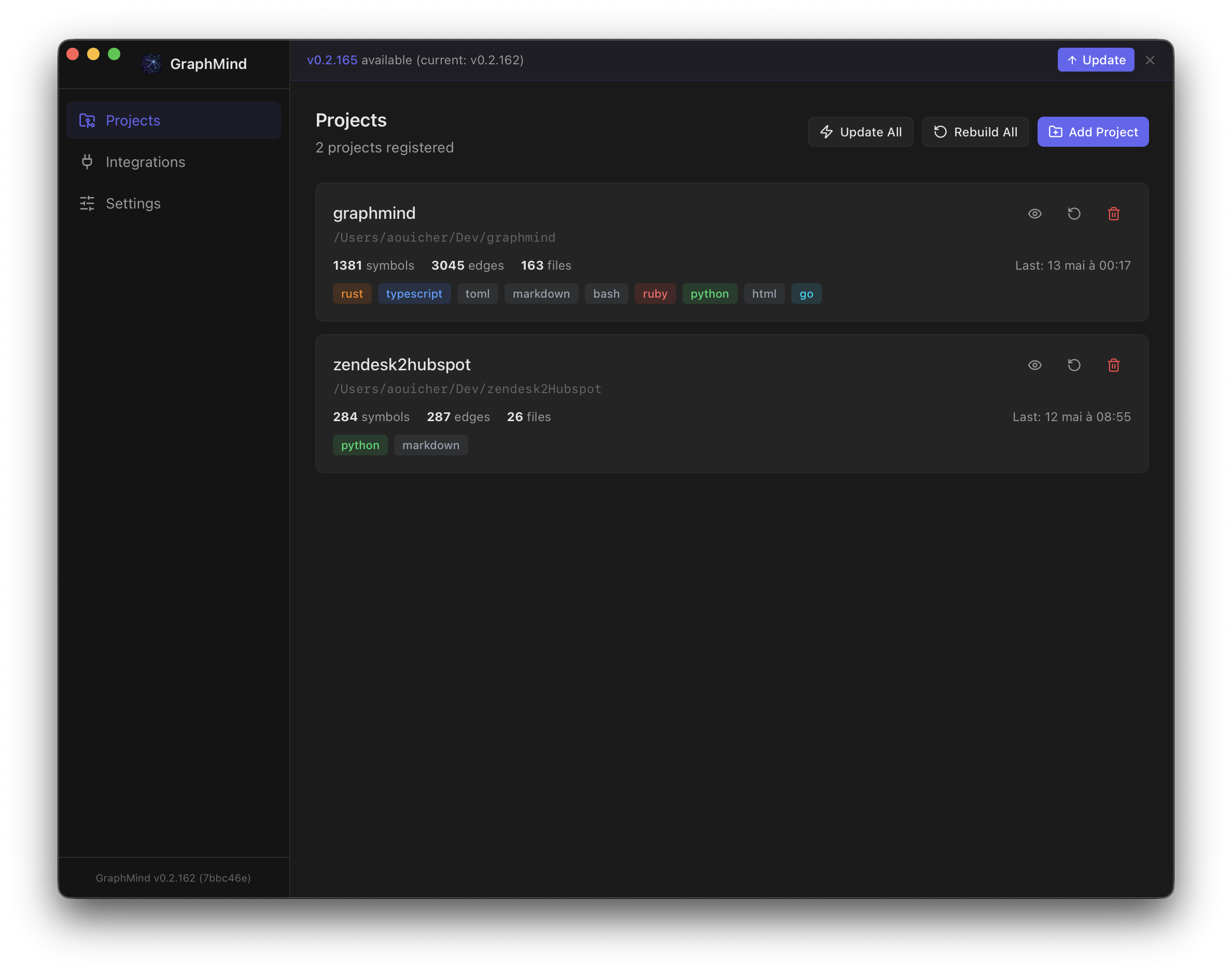
Download the .dmg from Releases. The app installs the CLI for you and runs a guided onboarding that configures MCP, hooks, skill, and embeddings — no terminal needed.
| Platform | Asset |
|---|---|
| macOS (Apple Silicon) | GraphMind-macos-arm64.dmg |
| macOS (Intel) | GraphMind-macos-x64.dmg |
Linux / Windows: CLI only — use the shell script or direct download below.
CLI — shell script (macOS/Linux)
curl -fsSL https://raw.githubusercontent.com/aouicher/graphmind/main/scripts/install.sh | bash
Then run graphmind setup once to configure Claude Code, hooks, and skill.
CLI — Homebrew (macOS/Linux)
brew install aouicher/graphmind/graphmind
CLI — Linux (direct download)
curl -fsSL https://github.com/aouicher/graphmind/releases/latest/download/graphmind-cli-linux-x64 -o ~/.local/bin/graphmind
chmod +x ~/.local/bin/graphmind
From source
git clone https://github.com/aouicher/graphmind
cd graphmind
cargo build --release -p graphmind-cli
cp target/release/graphmind ~/.local/bin/
Quick Start
graphmind setup          # once — configures Claude Code, Claude Desktop, hooks, skill
cd ~/projects/myapp
graphmind init           # per project — registers, installs git hooks, builds graph
That's it. Claude Code and Claude Desktop will use graphmind automatically.
graphmind setup (once, global)
Configures your machine so all AI tools can use graphmind:
- Claude Code hooks (rewrites grep/find, injects session context, pre-fetches on prompts)
- Claude Code skill (3-layer rule: graph → memory → raw files)
- Claude Desktop MCP (
~/Library/Application Support/Claude/claude_desktop_config.json) - Claude Code MCP (
~/.claude/settings.json)
graphmind init (per project)
Registers and indexes a project:
- Registers current directory
- Installs git hooks (auto-rebuild on commit, impact check on push)
- Builds the code graph
cd ~/projects/api && graphmind init
cd ~/projects/web && graphmind init
cd ~/projects/lib && graphmind init
Both commands are idempotent — safe to re-run.
Manual setup (if you prefer granular control)
Click to expandMCP server for Claude Code
claude mcp add graphmind -- graphmind mcp
Or manually in ~/.claude/settings.json:
{
  "mcpServers": {
    "graphmind": {
      "command": "graphmind",
      "args": ["mcp"]
    }
  }
}
MCP server for Claude Desktop
Claude Desktop does not inherit your shell PATH. Use the full path:
{
  "mcpServers": {
    "graphmind": {
      "command": "/opt/homebrew/bin/graphmind",
      "args": ["mcp"]
    }
  }
}
Config file location:
- macOS:
~/Library/Application Support/Claude/claude_desktop_config.json - Windows:
%APPDATA%\Claude\claude_desktop_config.json
Tip: Run
which graphmindto find the correct path on your system.
Per-project .mcp.json (optional)
{
  "mcpServers": {
    "graphmind": {
      "command": "graphmind",
      "args": ["mcp"]
    }
  }
}
Picked up automatically by Claude Code when you open the project.
Claude Code search hook
graphmind install hook-claude
Registers hooks in ~/.claude/settings.json for:
- PreToolUse — rewrites grep/find/rg to
graphmind search, provides graph results for Grep/Glob/LS tools - SessionStart — loads project context (stats, structure) at session start
- UserPromptSubmit — pre-fetches relevant graph context based on the user's prompt
- PostToolUse — enriches results with graph-aware suggestions
Built-in intelligence:
- Exhaustive search bypass — detects "find all occurrences",
grep -c, pipes towc/sortand lets them through - Cache deduplication — identical searches within 5 minutes are skipped (0 tokens cost)
- Pattern extraction — extracts meaningful search terms from grep, find, fd, rg commands and Agent prompts
Claude Code skill
graphmind install skill
CLAUDE.md sync
graphmind sync                # updates CLAUDE.md in current project
graphmind sync --all          # updates CLAUDE.md for all registered projects
Git hooks
graphmind install hook-git
Architecture
┌─────────────────────────────────────────────┐
│  Claude Code / MCP Client                    │
├─────────────────────────────────────────────┤
│  MCP Server (rmcp SDK, stdio) — 27 tools     │
│  gm_query · gm_fn · gm_file · gm_deps      │
│  gm_outline · gm_who_calls_chain · gm_dead  │
│  gm_export · gm_similar · gm_listeners      │
│  gm_memory_search · gm_cross_query          │
│  gm_status · gm_context · gm_diff_impact    │
├─────────────────────────────────────────────┤
│  Layer 1: Structural Graph (SQLite + FTS5)   │
│  Symbols · Edges · Call sites                │
├─────────────────────────────────────────────┤
│  Layer 2: Semantic Embeddings (SQLite)       │
│  Cosine search · Graph expansion · RRF      │
├─────────────────────────────────────────────┤
│  Layer 3: Semantic Memory (JSONL)            │
│  Decisions · Patterns · Conventions          │
├─────────────────────────────────────────────┤
│  Layer 4: Cross-Project Links (JSONL)        │
│  Shared symbols · Inferred relationships     │
├─────────────────────────────────────────────┤
│  Rust Core (tree-sitter + napi-rs)           │
│  Multi-language parsing · Symbol extraction  │
└─────────────────────────────────────────────┘
Search & Embeddings
graphmind search combines three retrieval strategies into a single ranked result:
graphmind search "<query>"          # hybrid search (FTS + semantic + graph)
graphmind search "<q1>; <q2>"       # multi-query with RRF ranking
graphmind search "<query>" --kind function
How search works
- FTS5 — exact text matching on symbol names, signatures, docs
- Semantic embeddings — cosine similarity finds conceptually related symbols (e.g. "money transfer" →
payment_service) - Graph expansion — top results are expanded with 1-hop callers/callees from the structural graph
Results are fused via Reciprocal Rank Fusion (RRF, k=60). Each result shows its source: [FTS], [SEM], [GRAPH], or combinations like [FTS+SEM+G].
Embedding providers
Configured in ~/.graphmind/config.json:
{
  "embedding": {
    "mode": "voyage",
    "model": "voyage-code-3",
    "api_keys": {
      "voyage": "pa-..."
    }
  }
}
| Mode | Model (default) | Notes |
|---|---|---|
local |
nomic-embed-text-v1.5 (768d) |
ONNX, no API key needed |
openai |
text-embedding-3-small (1536d) |
Supports custom openai_base_url |
voyage |
voyage-code-3 (1024d) |
Code-specialized, recommended |
disabled |
— | No embeddings (default) |
Embeddings are computed automatically during graphmind build when a provider is configured. If the model changes, the embedding index is rebuilt automatically.
OpenAI-compatible providers (Azure, proxies) can set a custom base URL:
{
  "embedding": {
    "mode": "openai",
    "model": "text-embedding-3-large",
    "openai_base_url": "https://your-proxy.example.com/v1",
    "api_keys": { "openai": "sk-..." }
  }
}
Persistent Memory
graphmind gives Claude persistent memory across sessions — not just code, but decisions, patterns, conventions, and context.
How it works
Memory is fully automatic:
- Auto-recall — at each prompt, the hook searches memory for relevant context and injects it into the conversation. No action needed.
- Auto-save — Claude proactively saves important facts (decisions, patterns, conventions, bugs, context) without asking. You'll see a brief mention of what was saved.
This works for both Claude Code (via hooks) and Claude Desktop (via MCP instructions).
What gets saved
| Type | Examples |
|---|---|
decision |
Architecture choices, tech decisions, trade-off resolutions |
pattern |
Recurring approaches, solutions, code patterns |
convention |
Naming rules, workflow conventions, style guides |
bug |
Known issues, workarounds, gotchas |
context |
Business context, project goals, user preferences |
Storage
Memories are stored as JSONL files in ~/.graphmind/memory/:
global.jsonl— cross-project knowledge (user preferences, team conventions)<project-slug>.jsonl— project-specific facts
Manual control
graphmind memory add "<fact>" [--project <slug>] [--global]
graphmind memory search "<query>"
graphmind memory list
graphmind memory delete <id>
Memories persist indefinitely until explicitly deleted. They are recalled automatically — you never need to ask "do you remember X?".
Commands
Setup & Init
graphmind setup                   # global one-time (hooks, MCP, skill)
graphmind init [path]             # per-project (register, git hooks, build)
graphmind init --skip-build       # per-project without building
Registry
graphmind register [path]     # register current dir
graphmind unregister <slug>   # remove project
graphmind list                # all projects
graphmind status              # health check
Build
graphmind build [slug]        # incremental build
graphmind build --all         # all projects
graphmind build --full        # force full rebuild
graphmind build --watch       # watch mode (debounced 2s)
graphmind clean [slug]        # remove graph cache (forces full rebuild)
graphmind clean --all         # clean all projects
Query
graphmind query <symbol>                          # find symbol + connections
graphmind query <symbol> --file <path>            # filter to a specific file
graphmind query <symbol> --kind function          # filter by kind
graphmind query <symbol> --limit 20 --offset 0   # paginate callers/callees
graphmind fn <symbol>                             # full detail with source + callers/callees
graphmind fn <symbol> --file <path>               # disambiguate by file
graphmind fn <symbol> --kind function             # filter by kind
graphmind fn <symbol> --limit 20 --offset 0      # paginate callers/callees
graphmind fn <symbol> --include-content           # include source code in output
graphmind fn <symbol> --no-tests                  # skip test files
graphmind deps <file>                             # file dependency map
graphmind impact <file>                           # transitive reverse deps
graphmind fn-impact <symbol>                      # blast radius
graphmind diff-impact                             # impact of current git changes
graphmind diff-impact --staged
graphmind map [slug]                              # most-connected files
graphmind cycles [slug]                           # circular dependencies
graphmind outline <file>                          # hierarchical symbol tree for a file
graphmind file <file>                             # raw file content from project root
graphmind who-calls <symbol>                      # transitive caller chain (BFS)
graphmind who-calls <symbol> --depth 5            # limit traversal depth
graphmind dead-code                               # symbols with no incoming edges
graphmind dead-code --kind function               # filter by kind
graphmind dead-code --limit 50                    # cap results
graphmind similar <symbol>                        # structurally similar symbols
graphmind similar <symbol> --limit 10             # cap results
graphmind listeners <event>                       # find listeners for an event name
Search
graphmind search "<query>"                        # hybrid FTS + semantic + graph
graphmind search "<q1>; <q2>"                     # multi-query
graphmind search "<query>" --kind class
graphmind search "<query>" --offset 10            # paginate results
graphmind search "<query>" --include-content      # include source code in output
Embeddings
graphmind embed                     # show embedding index status
graphmind embed --run               # generate embeddings for current project
graphmind embed --run --all         # generate embeddings for all projects
Memory
graphmind memory add "<fact>" [--project <slug>] [--global]
graphmind memory search "<query>"
graphmind memory list
graphmind memory delete <id>
Cross-Project
graphmind cross query <symbol>      # search across ALL projects
graphmind cross deps <slug>         # who depends on this project
graphmind cross links               # all cross-project relationships
graphmind cross link add <a> <b>    # manual link
graphmind cross link infer          # auto-detect shared symbols
Export
graphmind export [slug] -f dot            # Graphviz dot format
graphmind export [slug] -f mermaid        # Mermaid diagram
graphmind export [slug] -f json           # JSON graph
graphmind export --cross -f mermaid       # cross-project diagram
graphmind export --obsidian ~/vault/      # Obsidian vault with [[wikilinks]]
Exclude
graphmind exclude list                    # show all patterns
graphmind exclude add grafana-data        # exclude from current project
graphmind exclude add grafana-data --global
graphmind exclude remove grafana-data
Team Sync (Pro/Team tiers)
Share your code graph and architectural memories across your team. Every member gets the same structural understanding without re-indexing.
graphmind team init [--team-id <id>]   # connect to a team
graphmind team push [slug]             # push graph + shared memories
graphmind team push --memories-only    # push memories only
graphmind team push --graph-only       # push graph only
graphmind team push --all              # push all projects
graphmind team pull [slug]             # pull latest from team
graphmind team status                  # sync status per project
- Auto-sync (Team tier): graph is pushed automatically after each
graphmind build - Memory privacy: memories marked private (
is_shared: false) never leave the machine - MCP tools:
gm_team_memories(shared context) ·gm_team_who_knows(who documented a symbol)
Sessions
graphmind session start [slug]      # log session start
graphmind session save ["message"]  # save session summary
graphmind session history [slug]    # recent sessions
Install / Uninstall
graphmind install hook-claude     # Claude Code search hook
graphmind install hook-git        # git hooks (post-commit + pre-push)
graphmind install skill           # Claude Code skill
graphmind uninstall hook-claude   # remove Claude Code hook
graphmind uninstall hook-git      # remove git hooks
graphmind sync [slug]             # inject graph context into CLAUDE.md
graphmind sync --all              # update CLAUDE.md for all projects
Update
graphmind update                  # download and install latest version
graphmind update --check          # check for updates without installing
If installed via Homebrew, use brew upgrade graphmind instead. The desktop app also checks for CLI updates at startup and offers one-click update.
Token Optimization
MCP responses are optimized for LLM consumption — minimal tokens, maximum signal.
Compact format (default): One-line-per-symbol text output instead of verbose JSON. Example:
>> 5 result(s) for "auth" [FTS+semantic+graph]:

  AuthService [Class] src/services/auth.ts:3 (0.95) [FTS+SEM]
    implements Service
  validate_token [Function] src/services/auth.ts:15 (0.82) [FTS+G]
    (token: string, scope?: string) -> TokenResult
Field pruning: No id, no null signature/doc/content, no redundant total_found/projects_searched fields. Only useful information is returned.
Smart limits: Default 15 results (not 50). Truncation indicators (+N more...) shown only when results are capped.
Content opt-in: Symbol source code is omitted by default. Pass include_content: true to any tool to get it.
JSON mode: Pass format: "json" to any tool to get structured JSON output instead of compact text.
Hook cache deduplication: The Claude Code hook skips duplicate searches within a 5-minute window. Same query → instant skip (0 tokens). Cache is per-session at /tmp/graphmind-hook-cache.txt.
MCP Tools Reference
graphmind exposes 25 tools via MCP (Model Context Protocol):
| Tool | Description |
|---|---|
gm_query |
Find symbol and its connections |
gm_fn |
Function detail with source + callers/callees |
gm_deps |
File-level dependency map |
gm_impact |
Transitive reverse dependencies |
gm_fn_impact |
Blast radius for a symbol |
gm_diff_impact |
Impact of current git changes |
gm_map |
Most-connected files |
gm_cycles |
Circular dependency detection |
gm_search |
Hybrid search (FTS + semantic + graph) |
gm_listeners |
Find event listeners by event name |
gm_outline |
Hierarchical file structure with qualified names |
gm_file |
Raw source content of a file |
gm_who_calls_chain |
Transitive caller chain (BFS) |
gm_dead_code |
Find symbols with no incoming edges |
gm_export |
Export subgraph as Mermaid/DOT |
gm_similar |
Find structurally similar symbols |
gm_memory_search |
Search stored decisions/patterns |
gm_memory_add |
Store a fact (requires confirmation) |
gm_memory_list |
List memory entries |
gm_cross_query |
Symbol search across all projects |
gm_cross_deps |
Cross-project dependency graph |
gm_cross_links |
List all cross-project links |
gm_status |
Project health and stats |
gm_context |
Full project context for session start |
gm_list_projects |
All registered projects |
gm_team_memories |
Shared team memories and context (Pro/Team) |
gm_team_who_knows |
Who documented a given symbol (Pro/Team) |
Security
- No open ports by default — MCP uses stdio.
- Path traversal protection — all file ops restricted to registered paths +
~/.graphmind/. - No network calls by default — everything runs locally. Embedding API calls only when explicitly configured. Team sync (Pro/Team tiers) is opt-in and never runs automatically on Free.
- API keys stored locally — in
~/.graphmind/config.json, never sent anywhere except the configured provider. - Atomic writes — memory JSONL writes use tmp+rename to prevent corruption.
- MCP write confirmation —
gm_memory_addrequires explicit confirmation.
Language Support
| Language | Extensions | Status |
|---|---|---|
| TypeScript | .ts, .tsx |
Stable |
| JavaScript | .js, .jsx, .mjs |
Stable |
| Python | .py |
Stable |
| Go | .go |
Stable |
| Rust | .rs |
Stable |
| Ruby | .rb |
Stable |
| Terraform (HCL) | .tf, .tfvars |
Stable |
| YAML | .yml, .yaml |
Stable |
| Markdown | .md |
Stable |
| C | .c, .h |
Stable |
| Objective-C | .m, .mm |
Stable |
| Java | .java |
Stable |
| PHP | .php |
Stable |
| Swift | .swift |
Stable |
| Bash | .sh, .bash, .zsh |
Stable |
| Perl | .pl, .pm |
Stable |
| CSS | .css |
Stable |
| SCSS | .scss, .sass |
Stable |
| HTML | .html, .htm |
Stable |
| TOML | .toml |
Stable |
| Dockerfile | Dockerfile |
Stable |
| SQL | .sql |
Stable |
| C++ | .cpp, .cc, .cxx, .hpp |
Stable |
| C# | .cs |
Stable |
| Kotlin | .kt, .kts |
Stable |
| Dart | .dart |
Stable |
| Scala | .scala, .sc |
Stable |
| R | .r, .R |
Stable |
| GraphQL | .graphql, .gql |
Stable |
| PowerShell | .ps1, .psm1 |
Stable |
Data Storage
All data lives in ~/.graphmind/:
~/.graphmind/
├── config.json          # registered projects + embedding settings
├── memory/              # JSONL memory files
├── graphs/<slug>/
│   ├── graph.db         # structural graph (SQLite + FTS5)
│   ├── embeddings.db    # vector embeddings (SQLite)
│   ├── meta.json        # build stats
│   └── cache/           # incremental build cache
├── cross-links/         # cross-project relationships
└── sessions/            # daily session logs
Everything is plaintext or SQLite — fully inspectable with standard tools.
Contributing
Contributions are welcome. graphmind is MIT licensed.
Setup
git clone https://github.com/aouicher/graphmind
cd graphmind
cargo build --release -p graphmind-cli
cargo clippy --workspace -- -D warnings
cargo test --workspace
Branch model
| Branch | Purpose |
|---|---|
main |
Stable, protected. Only maintainers merge here. |
feat/<name> |
New features |
fix/<name> |
Bug fixes |
chore/<name> |
Tooling, deps, CI |
All changes go through a pull request targeting main. Direct pushes to main are blocked.
Opening a PR
- Fork the repo and create a branch from
main - Make your changes — keep commits atomic and descriptive
- Run
cargo clippy --workspace -- -D warningsandcargo test --workspace— both must pass - Open a PR against
mainwith a clear description of what and why - One maintainer review required before merge
Tagging and releases
Releases are triggered by pushing a semver tag:
git tag v0.3.0
git push origin v0.3.0
The CI will build binaries for macOS (arm64, x64) and Linux (x64), create a GitHub release, update the Homebrew formula, and publish the Tauri auto-updater manifest — all automatically.
Use -rc suffix for pre-releases: v0.3.0-rc1 (published as pre-release, skipped by Homebrew).
Reporting issues
Open a GitHub issue with steps to reproduce, your OS, and the output of graphmind status.
For security vulnerabilities, see SECURITY.md.
Yorumlar (0)
Yorum birakmak icin giris yap.
Yorum birakSonuc bulunamadi