plank
Health Gecti
- License — License: MIT
- Description — Repository has a description
- Active repo — Last push 0 days ago
- Community trust — 14 GitHub stars
Code Gecti
- Code scan — Scanned 5 files during light audit, no dangerous patterns found
Permissions Gecti
- Permissions — No dangerous permissions requested
Bu listing icin henuz AI raporu yok.
Interactive terminal coding agent in Rust — runs the DeepSeek V4 Flash model locally on macOS (Metal), with a Ratatui TUI, a full tool suite, MCP, and persistent sessions.
plank

Plank is a fast-moving agent harness built on the ds4 C reference (ds4_agent). It was ported functionality-by-functionality (not line-by-line), with each C section becoming an idiomatic Rust module, so changes landing in ds4_agent stay easy to port over — the upstream remains the source of truth for wire formats and prompt text, while plank iterates quickly on everything around it.
Plank is an interactive coding agent with a Ratatui TUI, a plain terminal REPL, a one-shot headless mode, and a set of built-in tools (shell, file read/edit, web).
macOS only. Plank targets macOS exclusively: inference uses the original ds4 C engine with the Metal backend, linked via the
refs/ds4submodule. Other platforms are not supported.
Installing
Homebrew is the only distribution channel (plank is not on crates.io):
brew tap aovestdipaperino/tap
brew install plank-agent         # stable channel
brew install plank-agent-beta    # beta channel
Or in one step without a prior tap: brew install aovestdipaperino/tap/plank-agent. Prebuilt bottles exist for Apple Silicon and Intel Macs; on other setups Homebrew builds from source (requires Rust). Upgrade with brew upgrade plank-agent.
Note — formula naming. The Homebrew formulas are
plank-agent/plank-agent-beta, notplank, because aplankformula already exists in Homebrew and the bare name collides. The installed binary is still justplank— you runplank, only thebrew installname carries the-agentsuffix.
Releases follow a two-channel scheme: the highest MAJOR.MINOR series is always the beta, and every release within it is a patch bump. When a beta series is promoted to stable, the next minor opens as the new (initially empty) beta — e.g. promoting the v2.0 series to stable creates v2.1.0 as the new beta. The two formulas conflict since both install a plank binary, so switch channels with brew uninstall plank-agent && brew install plank-agent-beta (or the reverse). See VERSIONING.md for the channel model and the promote-to-stable process.
Building
Requires macOS (Apple Silicon or Intel) with the Xcode command line tools. Clone with the submodule to get the ds4 engine:
git clone --recurse-submodules https://github.com/aovestdipaperino/plank
cd plank
cargo build --release
- With
refs/ds4present:build.rsbuildslibds4core.afrom the Metal-backend objects and links the required frameworks, enabling theds4_enginecfg. - Missing submodule: plank still builds, but without the native engine it uses the echo engine only (useful for development/CI).
You will also need a GGUF model file (e.g. ds4flash.gguf) for real inference; see the download_model.sh script in refs/ds4.
Usage
plank            # interactive REPL
plank --help     # full option list
Run with a prompt argument for one-shot headless mode.
Model download
Real inference needs the DeepSeek V4 Flash GGUF. You can point plank at any copy with -m <path>, but with no flag it looks in the default location (~/.plank/ds4flash.gguf) and, when nothing is there, offers to fetch the quantized model (~87 GB) from Hugging Face — one keypress and it downloads in place with live progress:

Details worth knowing:
- Resumable. The download streams to a
.partfile next to the destination; if it's interrupted (Ctrl-C, network drop), the next launch detects the partial file and resumes from where it stopped instead of starting over. - Guarded. The default quant needs ~82 GB resident, so plank refuses to download or load on machines with less than 96 GB of RAM — you find out before spending hours on the transfer, not after.
- Honest about the wait. An 87 GB download takes a while; the progress bar keeps you company with size/rate counters and a rotation of two hundred status messages ("Almost sentient. Please hold." among them).
- Headless-safe. With stdin not attached to a terminal there is no prompt to answer, so plank exits with instructions instead of hanging a script.
Without a model (or on non-macOS platforms) plank still runs against a built-in echo stub — useful for developing the UI and tools, not for real inference.
Plank-only features
plank tracks ds4_agent for the core agent loop but moves faster on the user-facing side. A few of the things that exist only in plank:
- Full-screen Ratatui TUI — markdown rendering with syntax-highlighted code, mouse-wheel scrollback, and an animated status bar that shows the working directory and git branch; the C reference is a plain line REPL. Resumed sessions replay through the same renderer, so history comes back as markdown with thinking dimmed, not flat text.
- Type while it thinks — each turn runs on a worker thread, so the prompt stays live during generation and you can queue the next message.
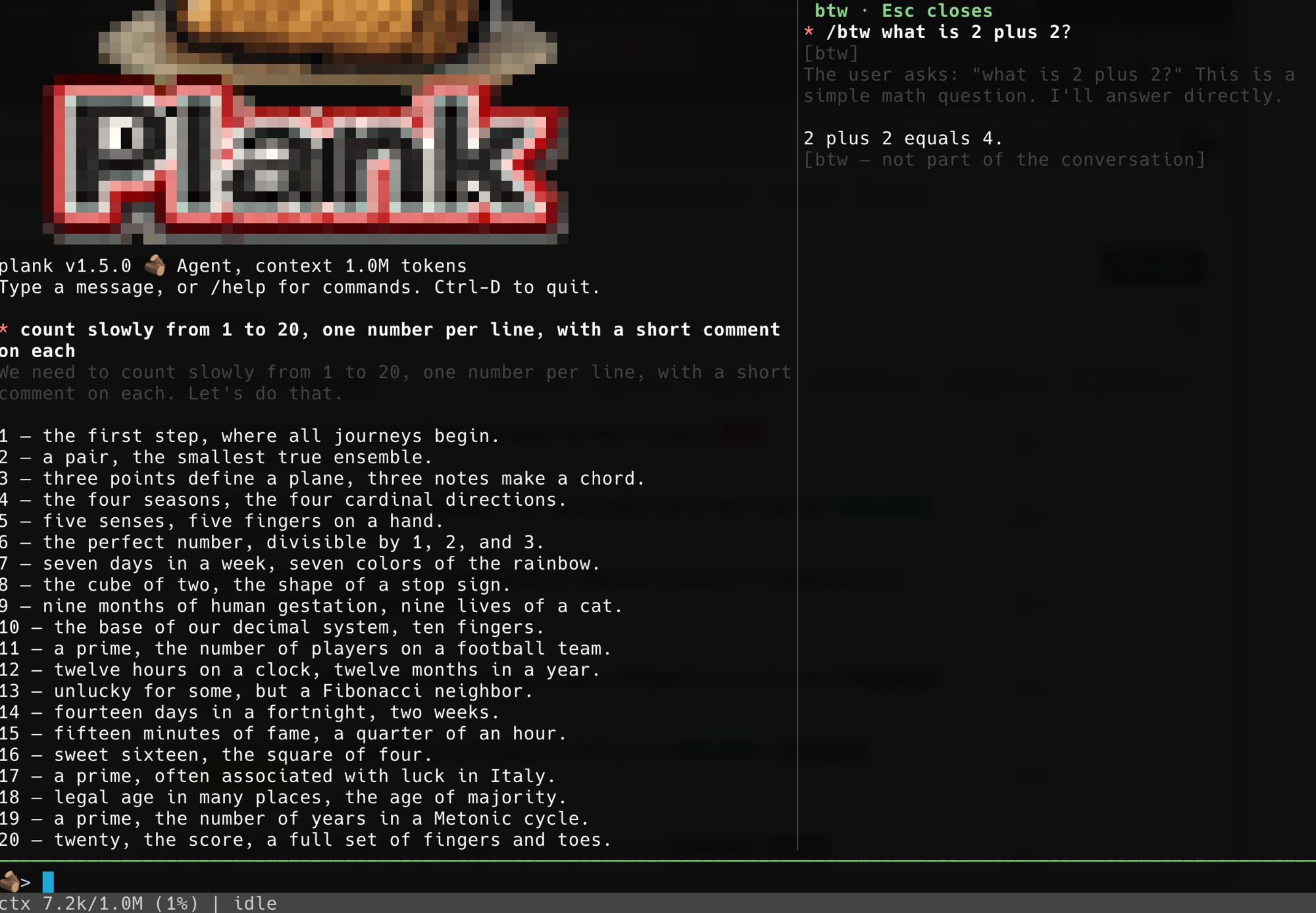
/btwside questions — ask something mid-task; the running generation genuinely suspends, answers in a split panel, and resumes byte-for-byte with no re-prefill.- Checkpoints, resume, and instant KV restore —
/checkpoint//rollbackand/resumesnapshot the live engine KV alongside the transcript, so returning to a conversation skips re-prefilling it. - Git-style diff cards — an
edit(or an overwritingwrite) renders as a change card with anUpdate(path)header, an added/removed summary, and red/green@@hunks; a brand-new file streams its content dimmed as it is written. agentsub-agent tool — the model delegates a bounded task to a fresh scoped sub-agent and gets back only its conclusion, keeping the main transcript clean; bounded so a sub-agent can't itself delegate.- Plan mode —
EnterPlanModeholds the model read-only (research only) until it proposes a plan you approve withExitPlanMode, before any edits land. @file completion,glob, and a model-visible task list that survives compaction.- Extensible — skills (user- and model-invoked), named subagents, an expanded hook system, MCP tools and resources, and a
settings.jsonfor durable preferences. asktool — when a turn is genuinely ambiguous the model can pose a multiple-choice question instead of guessing; you pick in a panel (or numbered list in the REPL), and it degrades cleanly when there's no user to ask.
See docs/FEATURES.md for the complete list.
Highlights
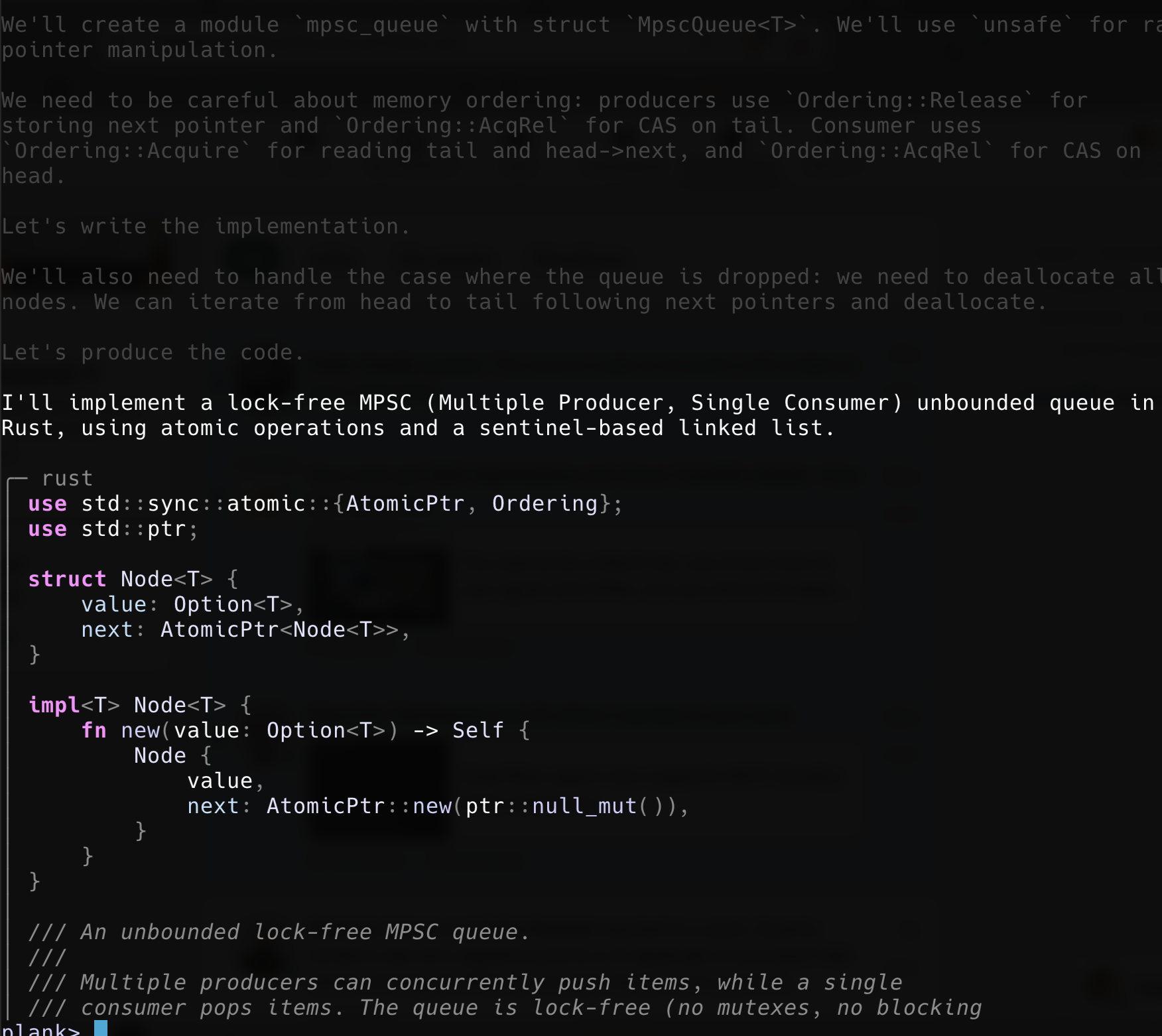
Assistant replies render as markdown in the TUI, with tree-sitter syntax highlighting for fenced code blocks:
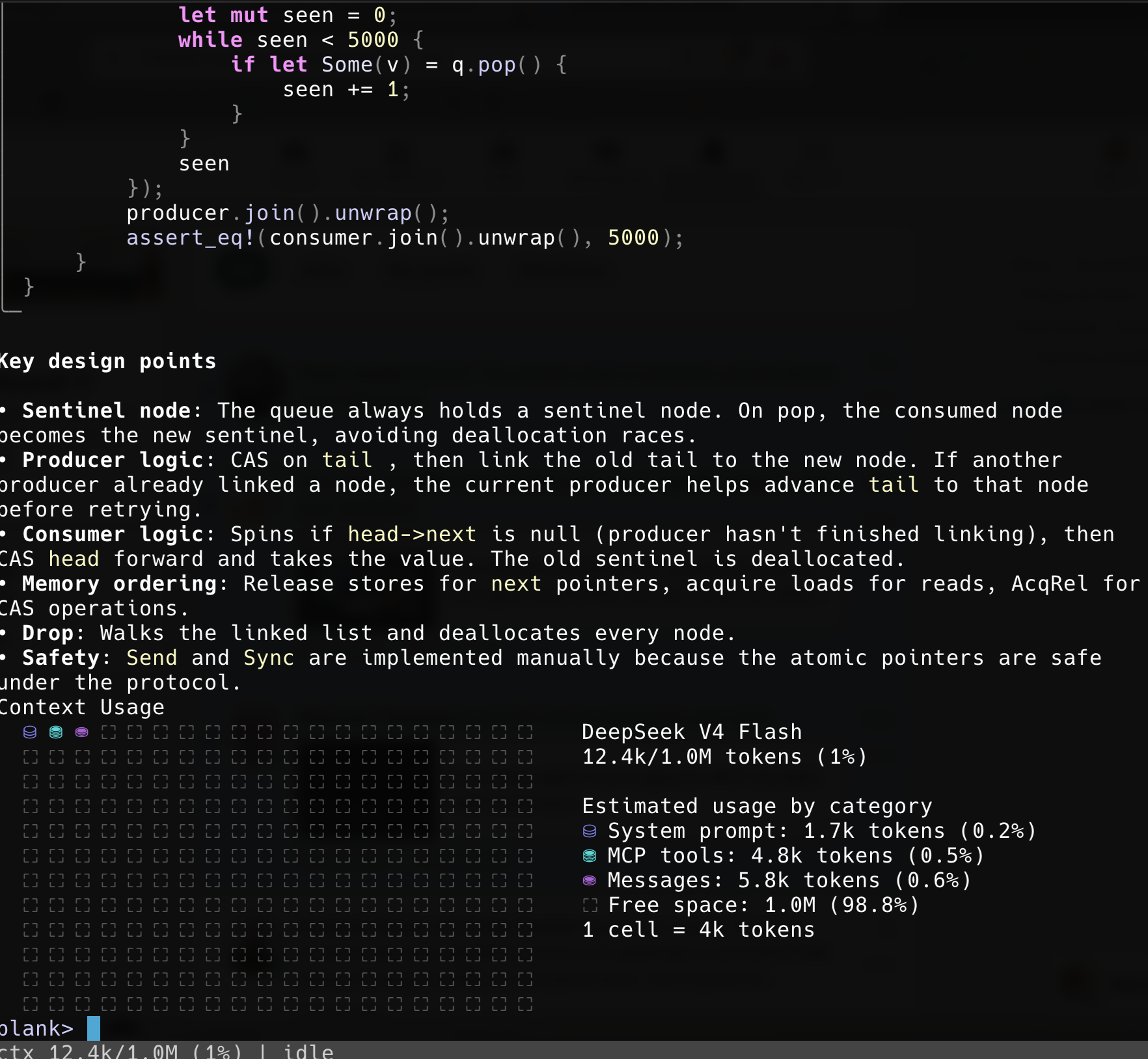
The /context command visualizes context-window usage by category:
/btw answers a side question in a split panel while the main task keeps its place — here the model counts to 20 on the left while a /btw what is 2 plus 2? is answered on the right, with nothing written to the conversation:
Settings file
Preferences you'd otherwise retype every launch live in settings.json, hierarchical like the MCP configs: ~/.plank/settings.json applies globally, ./.plank/settings.json in the working directory overrides it key by key. Everything is optional — the file need not exist, and any subset of keys works. Edit it in-session with /config (an interactive TUI form, or /config <section>.<key> <value> from the prompt, e.g. /config ui.showThinking false); changes write ./.plank/settings.json and apply immediately.
{
  "engine": { "model": "~/models/ds4.gguf", "threads": 8,
              "backend": "metal", "power": 80, "ctx": 262144 },
  "ui":     { "respectGitignore": true, "popupRows": 15, "indexRefreshSecs": 5,
              "historySize": 512, "showToolCalls": false, "showToolResults": false,
              "showThinking": true },
  "tools":  { "task": false, "agent": false, "planMode": false },
  "safety": { "sandbox": true, "btwSuspend": true },
  "mcp":    { "timeoutSecs": 30 },
  "ask":    { "maxOptions": 7 }
}
| Group | Key | Default | What it does |
|---|---|---|---|
engine |
model |
~/.plank/ds4flash.gguf |
Model file to load (~ expanded). Same as -m. |
threads |
engine default | Worker threads. Same as -t. |
|
backend |
platform default | metal, cuda, or cpu. Same as --backend. |
|
power |
unset | GPU power cap percent. Same as --power. |
|
ctx |
1048576 | Context window in tokens. Same as -c. |
|
ui |
respectGitignore |
true |
Whether @ completion honours .gitignore for untracked files. |
popupRows |
15 | Rows the @ completion popup offers. |
|
indexRefreshSecs |
5 | How long the file index is trusted before a rebuild. | |
historySize |
512 | Prompt history entries retained. | |
showToolCalls |
false |
Show the model's 🛠️ tool-call banners. Off keeps the UI uncluttered; the tools still run. |
|
showToolResults |
false |
Echo tool result text into the scrollback. Off keeps the UI clean; the model still receives the results. | |
showThinking |
true |
Render the model's thinking (dimmed) in the scrollback. Off hides it from the display; the model still produces it. | |
safety |
sandbox |
off | Default for the bash write sandbox. Same as --sandbox/--no-sandbox. |
btwSuspend |
true |
Default for /btw mid-generation suspend. Same as --btw-suspend/--disable-btw-suspend. |
|
mcp |
timeoutSecs |
30 | How long an MCP server has to answer before it's considered dead. Raise it for a slow-starting server, since a server that misses the deadline is dropped along with all of its tools. |
ask |
maxOptions |
7 | Most options the ask tool may offer in one question (minimum is fixed at 2). |
tools |
task |
false |
Enable the task todo-list tool. Off by default — it, like agent/planMode, has no counterpart in the C reference the model was trained on, so a small model tends to misuse it. |
agent |
false |
Enable the agent sub-agent delegation tool. |
|
planMode |
false |
Enable plan mode (EnterPlanMode/ExitPlanMode). |
Precedence runs left to right, each layer overriding the one before:
built-in defaults → ~/.plank/settings.json → ./.plank/settings.json → environment → command-line flags
Because a settings file can move you off Metal or shrink the context — and both are invisible once the UI is up, showing only as "plank got slow" — plank prints one line at startup naming what is in force:
plank: settings in effect (/path/to/.plank/settings.json): threads=3, backend=cpu, ctx=65536
It lists only settings actually in effect: a value a command-line flag overrode is not mentioned, and with no settings file (or one that changes nothing) there is no line at all.
Two things the file deliberately does not do:
- It holds no secrets.
./.plank/settings.jsonsits inside your working tree and is easy to commit by accident, so there is no API-key setting — keep it on--api-keyor the provider's environment variable. - It holds no per-run choices.
--prompt,--non-interactive,--ui-remote,--trace,--chdir,--seed, and the serve/control options describe one invocation rather than a preference, so they have no settings key.
A broken settings file never stops plank from starting: malformed JSON, a wrongly-typed value, an unknown key, or an unrecognised backend name each fall back to that key's default. (The same unrecognised name passed to --backend is still an error — a flag is an explicit instruction, a config file is a preference.) One limitation: settings are read from the directory plank launches in, so project-scoped settings do not follow --chdir.
MCP servers
Plank can load external tools from stdio MCP servers. Configs are hierarchical like Claude Code's user and project scopes: ~/.plank/.mcp.json applies globally, and ./.mcp.json in the working directory (or the file given with --mcp-config) overrides same-named servers and adds new ones. Both use the standard mcpServers format:
{
  "mcpServers": {
    "demo": {
      "command": "some-mcp-server",
      "args": ["--flag"],
      "env": {"KEY": "value"},
      "primaryTools": ["tool_a"]
    }
  }
}
Tools are exposed to the model as mcp__<server>__<tool>. The optional primaryTools list controls prompt size: listed tools get their full schema in the system prompt, the rest appear in a compact directory and are described on demand via the built-in mcp_describe tool. Omit the key to make every tool primary.
Remote, hosted, and shared engines (beta)
The v2 beta channel extends plank past a single local process. All of it is off by default; a plain plank still runs the local Metal engine exactly as before.
- Serve and connect —
plank servehosts the local ds4 engine over HTTP+SSE so another machine can use it;plank --remote <url>points a thin client at that host (drive from a laptop, infer on the Metal box). The transport is synchronous, adds no async runtime, and streams tokens as they generate. Token auth via--remote-token/$PLANK_REMOTE_TOKEN; keep it behind an SSH tunnel or a TLS reverse proxy. - Hosted providers — behind the same
Enginetrait,--provider openai --model <name>targets any OpenAI-compatible endpoint (--base-url,--api-key/$OPENAI_API_KEY; covers vLLM, Ollama, OpenRouter, Together) and--provider anthropictargets the Anthropic Messages API ($ANTHROPIC_API_KEY). Native provider tool calls are synthesized back into plank's DSML tool syntax, so tools dispatch identically regardless of backend, and multi-turn tool-call ids are threaded through. Anthropic prompt caching (cache_control) is on by default (--provider-cache). - Shared engine —
plank serve --shared-engineloads the weights once and serves many concurrent sessions from a single cooperative GPU thread (round-robin at token granularity; the one Metal queue means time-sliced, not parallel). A freshly attached session restores the warm system-prompt prefix instead of cold-prefilling it.--max-sessionsand--kv-budget-bytescap admission,--session-ctx-sizesizes each session's context, and--idle-reclaim-secssnapshots idle sessions to disk and restores them on demand;/inforeports live-session and KV accounting. - Remote control —
plank --control[=ADDR]opens a loopback WebSocket so another process, a browser, or theplank remote <url>terminal client can attach to a running instance: it mirrors the output, sends prompts/commands//btw/interrupts, and takes or hands back control (single controller, many mirrors, with a reconnect grace window). A self-contained web client is served at/. Auth is a bearer token (--control-token), with an--control-originallow-list for browsers and--control-queue-maxslow-client eviction. --ui-remote[=PORT]— for driving the TUI from a test harness: opens a127.0.0.1-only listener (bare form picks an ephemeral port,=PORTa fixed one) accepting line-delimited JSONkeypress/snapshot/uitreecommands.snapshot/uitreereplies are held until the screen reflects any keys sent first, so a harness can assert without sleeping. One client at a time; a second simply queues.
Using OpenAI or Anthropic providers
plank can drive a hosted model instead of the local one. The provider sits behind the same Engine trait as the Metal backend, so tools, sessions, /btw, compaction, and the rest of the agent loop behave identically — native provider tool calls are translated back into plank's own tool protocol on the way through.
Pick a provider with --provider and name the model with --model. The API key is read from the provider's environment variable, so you normally do not pass it on the command line:
# OpenAI
export OPENAI_API_KEY=sk-...
plank --provider openai --model gpt-4o

# Anthropic
export ANTHROPIC_API_KEY=sk-ant-...
plank --provider anthropic --model claude-sonnet-4-5
Both providers work with a one-shot prompt too: plank --provider anthropic --model <name> -p "...".
Flags
| Flag | Meaning |
|---|---|
--provider openai|anthropic |
Selects the provider family. openai speaks the OpenAI-compatible Chat Completions API; anthropic speaks the Anthropic Messages API. |
--model NAME |
The provider's model name (not a local GGUF path). Required with --provider. |
--api-key KEY |
The key, if you would rather not use the environment variable. Prefer the env var — a key on the command line lands in your shell history. |
--base-url URL |
Overrides the endpoint. Defaults to https://api.openai.com/v1 and https://api.anthropic.com/v1. |
--provider-cache on|off |
Anthropic prompt caching over the stable prefix (tools + system). On by default; ignored for --provider openai. |
Key resolution — --api-key wins if given, otherwise $OPENAI_API_KEY (openai) or $ANTHROPIC_API_KEY (anthropic). With neither set, startup fails with a clear message rather than a confusing API error.
OpenAI-compatible gateways — --provider openai plus --base-url reaches anything that speaks the OpenAI Chat Completions shape: vLLM, Ollama, OpenRouter, Together, LM Studio, and similar. For example, a local Ollama:
plank --provider openai --model llama3.3 \
      --base-url http://localhost:11434/v1 --api-key ollama
What stays the same — every plank tool (read/edit/bash/glob/search/…), the MCP tools, @ completion, sessions and /resume, /btw, and compaction all work unchanged against a provider. The one difference is the system prompt: a provider gets plank's own prompt with native tool definitions, never the byte-parity DeepSeek prompt (which is meant only for the local model it was trained on).
Notes — --provider cannot be combined with --remote or the local backend selectors (--metal/--cuda/--cpu); it is the engine for that run. /usage reports billed token counts for the session, including Anthropic cache read/write and hit rate. The key is never written to settings.json — it stays on the environment or --api-key by design.
Project layout
Each module in src/ maps to one functional section of the original ds4_agent.c:
engine.rs/ds4engine.rs/ffi.rs— inference engine abstraction and native ds4 bindingssession.rs,compact.rs,sysprompt.rs— conversation state, compaction, system prompttools/— built-in agent tools (bash, edit, files, web) and the MCP clientui.rs,render.rs,statusbar.rs,editor.rs,viz.rs— terminal UIconfig.rs,settings.rs,trace.rs,interrupt.rs,status.rs— configuration, persistent settings, tracing, signal handling
Star History

License
Yorumlar (0)
Yorum birakmak icin giris yap.
Yorum birakSonuc bulunamadi