shield
Health Uyari
- License — License: Apache-2.0
- Description — Repository has a description
- Active repo — Last push 0 days ago
- Low visibility — Only 5 GitHub stars
Code Basarisiz
- rm -rf — Recursive force deletion command in config/shieldset.yaml
- rm -rf — Recursive force deletion command in shield.example.yaml
Permissions Gecti
- Permissions — No dangerous permissions requested
Bu listing icin henuz AI raporu yok.
Local guardrails for AI coding agents. Wraps any MCP server and blocks destructive tool calls — DROP TABLE, rm -rf, force-push, unscoped UPDATE/DELETE — before they execute. Free, open-source, runs entirely on your machine.
aperion-shield — local MCP guardrail for AI coding agents






Works with:






aperion-shield is a tiny, local MCP server that sits between your AI
coding agent (Cursor, Claude Code, …) and the real MCP servers your
agent talks to (postgres, github, shell, filesystem, …). On everytools/call it evaluates 45+ adaptive safety rules across eight
destructive surfaces — SQL, git, filesystem, secrets exfiltration,
supply-chain RCE, reverse shells, sudo / privilege escalation, cloud
(AWS/GCP/Azure), Kubernetes, and Docker — and either blocks the call,
prompts you for approval, or lets it through with a warning banner.
Plus, when you need to prove who approved a destructive call —
not just that someone did — Shield can gate selected rules behind
biometric identity verification (ID.me, or a pluggable OIDC provider).
And when you outgrow the single-machine model, the same binary
enrolls into a Smartflow control plane with one command to pull
org-wide policy, ship audit upstream, and use your existing IdP as
the relying party — no rewrite, no re-install.
What's new in v0.8
Two strong additions that build directly on the v0.7 bypass-closing
story:
Shell shims (
--install-shims) — closes the non-git command
bypass. v0.7 closed the "agent reaches around MCP and lets a
destructive change land in a commit" bypass with git hooks. v0.8
closes the parallel "agent reaches around MCP and runs a
destructive shell command directly" bypass. One command installs
tiny/bin/shwrappers in~/.aperion-shield/bin/for 10
high-blast-radius CLIs (aws,gcloud,az,kubectl,helm,terraform,psql,mongosh,redis-cli,rm). The user puts
that dir first on$PATHand every invocation routes through the
active shieldset before reaching the real binary. Same engine, same
YAML rules, same audit JSONL stream — the shim path reuses theshelltool-call scope that MCP and--check-stagedalready use,
so adding a rule for one surface covers all three.aperion-shield --install-shims --for aws,kubectl,terraform # next destructive call -> refused with rule + safer alternative # $ aws s3 rm --recursive s3://prod-bucket # [aperion-shield/check-cmd] APPROVAL-REQUIRED -- `aws s3 rm --recursive s3://prod-bucket` # rule : cloud.aws_s3_recursive_delete (severity=High) # reason : Bulk S3 delete -- irreversible if versioning is off. # suggest : Enable versioning, then use lifecycle rules to expire ...Bypass for a single invocation:
SHIELD_SHIMS_DISABLE=1 aws ...
(env override, parity with--no-verifyfor hooks). Foreign-file
collisions (you wrote your own~/.aperion-shield/bin/aws
wrapper) are NEVER overwritten — Shield refuses the install with a
non-zero exit and tells you what to do.--explain: first-class decision transparency. Take any
tool-call descriptor and get a complete decision walkthrough:
every rule that matched, every adjustment signal applied
(workspace probe, decision memory, burst detector), the full
severity ladder (raw → composite + points → final), the resolved
decision, and thesafer_alternative. Three output formats —textfor terminals,markdownfor PR review comments,json
with a stable schema for piping into other tooling. The--explain-force-prod/--explain-force-burstflags let you
answer "what would this same call decide in a different context?"
without rebuilding the environment.echo '{"name":"shell","arguments":{"command":"rm -rf /"}}' \ | aperion-shield --explain --input - # ---------------------------------------------------------- # shield --explain # ──────────────── # tool : shell # call : {"command":"rm -rf /"} # # rules matched ............................. 1 # fs.recursive_delete_root Critical pts=8 # ... # decision .................................. BLOCK # rule_id : fs.recursive_delete_root # severity : Critical # reason : rm -rf on filesystem root is forbidden. # suggest : Scope to a specific subdirectory, ...243 tests passing (was 192 in v0.7, 148 in v0.6, 133 in v0.5)
— +51 new tests: 22 in-module + 7 end-to-end for shims (real/bin/shexecution against a fake real binary, foreign-file
collision, bypass env, fall-through when Shield isn't on$PATH,--list-shimsseparation); 15 in-module + 7 end-to-end for--explain(text / markdown / JSON stable-schema format
round-trips, force flags, legacytool/paramsdescriptor shape,
missing-tool refusal).
Heads up: HTTP/SSE MCP transport is the v0.9 headline. The
Streamable HTTP transport (POST + SSE relay with backpressure) is a
meaty piece of work that deserves to be the lead feature of its own
release, not a half-finished breadth bump here. v0.8 is the
"bypass-closing" release; v0.9 will be the "any-transport" release.
What's new in v0.7
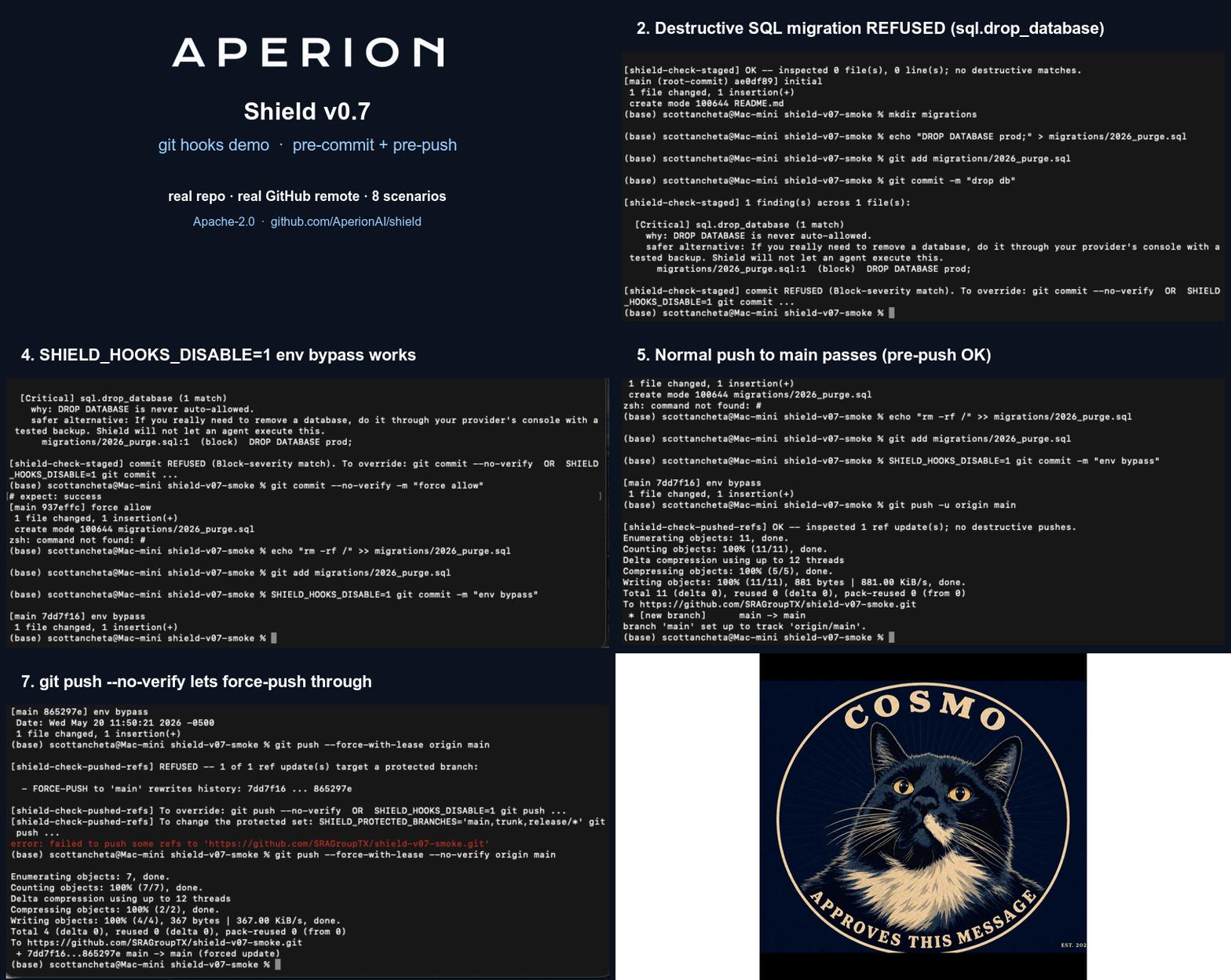
Two big additions and a breadth bump:
Git hooks (
--install-hooks). Closes the most-asked-about
bypass: "what if the agent skips MCP and just commits a destructive
migration / shell script?" One command writes apre-commitandpre-pushhook into your repo. The pre-commit hook scans staged.sql/.sh/Dockerfile/Makefile/ code lines and refuses
the commit if any line trips a Block rule, with file:line
attribution and asafer_alternativehint. The pre-push hook
refuses force-pushes and branch-deletions targeting protected
branches (main,master,prod,release/*, env-overridable).
Idempotent install, husky/lefthook-compatible coexistence
(--chain-existing),--no-verifyandSHIELD_HOOKS_DISABLE=1
bypasses documented in every refusal banner.cd your-repo aperion-shield --install-hooks # next destructive commit -> refused with rule + safer alternative--suggest-rules: tune your shieldset from your own audit log.
Point it at the JSONL audit Shield has been writing and it tells
you which rules never fire, which are consistently demoted by the
adaptive layer (the static severity is probably too high), and
which are stuck in noisy-warn purgatory. Three output formats:text(the default),markdown(paste into a PR), andyaml-patch(splice-ready snippets forshieldset.yaml).# capture audit while you work aperion-shield -- npx @modelcontextprotocol/server-postgres ... \ 2>>~/.aperion-shield/audit.jsonl # later, ask for tuning suggestions aperion-shield --suggest-rules \ --audit-log ~/.aperion-shield/audit.jsonl \ --suggest-format yaml-patchFour new IDEs supported as first-class quickstarts. Cursor and
Claude Code were the launch surface in v0.5/0.6. v0.7 adds
Cline, Continue, Windsurf, and Zed — same drop-in
wrapping pattern, IDE-specific config paths in the quickstart
section below.192 tests passing (was 133 in v0.5, 148 in v0.6) — +44 new
tests covering the git-hooks integration end-to-end against real
tempdir-backed git repos and synthetic-audit-log fixtures for the
suggestion analyzer.
What's new in v0.6
aperion-shield --diffmode (new): native Rust behavior-diff
explainer for shieldset changes. Run the engine over the same
corpus under two different shieldsets and get a per-rule
attribution of which lines flipped. Drop-in CI gate
(--fail-if-loosened,--fail-if-allows-loosened N) for PRs
that touch yourshieldset.yaml. Text / markdown / json output.
Seedocs/shieldset-as-code.md
Layer 4. This is the Rust port ofscripts/shield-diff.py; the
Python script is now a thin wrapper, so existing CI keeps working.- Dependency upgrade closes 3 Dependabot advisories:
reqwest 0.11 → 0.12,rustls 0.21 → 0.23,hyper 0.14 → 1.x,rustls-webpki 0.101.7 → 0.103.13. This closes the three open
RUSTSEC advisories that surfaced againstrustls-webpki 0.101.7
in v0.5.x. None were practically exploitable in Shield's
configuration; the upgrade is hygiene. Full analysis inSECURITY.md§4.cargo auditclean against an
empty ignore list. - OIDC callback server refactored for the hyper 1.x API. The
--identity-*family (ID.me partnership, gated identity
verification rules) continues to work without any user-visible
change. 7 end-to-end identity tests against a mock OIDC provider
still pass post-refactor. - Test count: 148 (was 133 in v0.5.0). The +15 is 4 new unit
tests insrc/diff/render.rsand 11 integration tests intests/diff_integration.rscovering 6 fixture pairs intests/diff/(loosen / tighten / noop / added / removed /
modified).
What's new in v0.5
- Identity gates (new): selected high-blast-radius rules can now require a
cryptographically-fresh proof of human identity before the call is forwarded.
Pluggable providers ship with a mock-friendly default; ID.me OIDC + an
optional local callback server lands behind a feature flag. Ed25519
signatures on every proof; cache lives under~/.aperion-shield/proofs/
(mode 0600). See Identity gates. - Org mode (new, opt-in):
aperion-shield --enroll --smartflow-url <URL> --token <ENROLL_TOKEN>enrolls this Shield against a Smartflow control
plane. On enrollment the client persists an Ed25519 vkey, then every run
pulls policy, streams audit, and lets your existing Smartflow IdP serve as
the relying party for identity gates. The control-plane code path is inert
until you enroll — out-of-the-boxaperion-shieldis standalone and
offline. See Org mode. - Tautological-WHERE detection in
sql.unscoped_update(new): the rule now
catches the agent's favourite work-around — "sure, I'll add aWHERE
clause:WHERE email_verified = FALSEwhen I'mSET email_verified = TRUE"
— which selects exactly the rows theSETwould change. Six tautology
patterns are detected (boolean opposites,IS NULL-vs-SET <value>,
inequality-vs-equality, etc.). Genuine scope-narrowing (WHERE created_at > NOW() - INTERVAL '7 days') passes through. - 0.5 is a strict superset of 0.3: every rule, decision, and corpus
result below still holds; identity gates and org mode are additions, not
replacements, and the v0.3 noise-floor work (below) carries forward.
v0.3 baseline (still in force in v0.5)
Wide-scale validation against 12,912 real Cursor agent commands
(see docs/methodology.md for the
reproducible methodology — corpus, exact command, raw counts,
caveats) — run from a typical project root with no prod-signal files:
 12,708 (98.42%)   allow      <-- legitimate operations pass through
      3 (0.02%)   warn        <-- annotated, agent continues
    191 (1.48%)   approval    <-- pause for human signoff (writes to
                                    /etc, ~/.ssh, /usr/local/bin, etc.)
     10 (0.08%)   block       <-- hard stop (curl|bash, env->curl
                                    exfiltration, reverse-shell patterns)
The single number we publish is 98.4% pass-through — the sum of
the allow and warn columns; the operational definition of "did
not interrupt the developer." Any reader can reproduce this number
on their own machine in under 60 seconds using the methodology doc
linked above. We treat the false-positive rate as the product KPI
and we publish it because a guardrail with a high false-positive
rate gets disabled within a week.
That's a 94% reduction in approval-prompt noise vs v0.2 (which
fired on 73% of commands). The fixes:
- Recognising
ssh -i FILE,kubectl --kubeconfig FILE,KUBECONFIG=FILE,
and 20+ similar tool-flag patterns as identity / config args -- not
write targets. - Gating the
fs.sensitive_path_write_or_deleterule on an actual
write verb being present in the same command (rm,mv,cp,dd,tee,chmod,chown,sed -i,tar -x,kubectl apply,>/>>,
here-docs, ...). Pure reads (grep,cat,head,tail,ls,find -print, ...) no longer trigger. - Narrowing
/usr/**to the genuinely-sensitive subdirs
(/usr/local/bin,/usr/local/sbin,/usr/local/lib,/usr/share/keyrings,/usr/lib/systemd). - Treating
2>/dev/null,1>/dev/null,&>/dev/nullas discard
idioms, not filesystem writes. - Allowing
curl URL | python -c CODE/python -m json.tool/perl -e CODE/node -e CODE-- when the interpreter takes its
code from args, stdin is DATA, not code.
v0.2 added adaptive scoring — Shield doesn't just match regexes. It
sums points across every rule that fires, bumps severity in
prod-looking workspaces, remembers which decisions you've already
approved or denied, and detects destructive bursts in real time. The
result: fewer false-positive prompts on benign repeats, harder gates
on the operations that matter, and a teach-as-you-go safer-alternative
hint on every block.
It is free, open source (Apache 2.0), and standalone. No
cloud account required. The binary is the same size as git and runs
on macOS, Linux, and Windows.
The paid product, Aperion Smartflow, bundles
Shield with a hosted approval queue, tamper-evident audit chain (RFC
3161 timestamps), AI-BOM, EU-AI-Act conformity console, and SOC 2 /
HIPAA / GDPR connectors. The two products share the same rule language
— a shieldset.yaml you write for one works in the other.
Install
Homebrew (macOS / Linux)
brew install AperionAI/tap/aperion-shield
Docker
docker run --rm -i ghcr.io/aperionai/shield:latest --help
Cargo (any platform)
cargo install aperion-shield
Pre-built binaries
Download from GitHub Releases.
Quickstart
Add aperion-shield to your IDE's MCP config. Shield then transparently
wraps your real MCP server.
Cursor (~/.cursor/mcp.json)
Before:
{
  "mcpServers": {
    "postgres": {
      "command": "npx",
      "args": ["-y", "@modelcontextprotocol/server-postgres", "postgres://..."]
    }
  }
}
After:
{
  "mcpServers": {
    "postgres": {
      "command": "aperion-shield",
      "args": [
        "--",
        "npx", "-y", "@modelcontextprotocol/server-postgres", "postgres://..."
      ]
    }
  }
}
That's it. Restart Cursor. Every execute_sql your agent issues now
goes through Shield first.
Claude Code (~/.claude/config.json)
{
  "mcpServers": {
    "shell": {
      "command": "aperion-shield",
      "args": ["--", "claude-mcp-shell"]
    }
  }
}
Cline (workspace .vscode/cline_mcp_settings.json or ~/.cline/mcp_settings.json)
{
  "mcpServers": {
    "postgres": {
      "command": "aperion-shield",
      "args": [
        "--",
        "npx", "-y", "@modelcontextprotocol/server-postgres", "postgres://..."
      ]
    }
  }
}
After saving, ask Cline to "reload MCP servers" (or restart the
VS Code window). Cline reuses the standard mcpServers JSON
schema, so the wrap-with-aperion-shield pattern is identical to
Cursor's.
Continue (~/.continue/config.json)
{
  "mcpServers": [
    {
      "name": "github",
      "command": "aperion-shield",
      "args": [
        "--",
        "npx", "-y", "@modelcontextprotocol/server-github"
      ]
    }
  ]
}
Continue uses an array of server objects (each with a name
field) rather than the keyed map Cursor/Cline use, but the
wrap-with-aperion-shield pattern is otherwise identical. Tested
against Continue v0.9+.
Windsurf (~/.codeium/windsurf/mcp_config.json)
{
  "mcpServers": {
    "filesystem": {
      "command": "aperion-shield",
      "args": [
        "--",
        "npx", "-y", "@modelcontextprotocol/server-filesystem", "/path/to/workspace"
      ]
    }
  }
}
Windsurf reads the same mcpServers schema as Cursor/Cline, so
the wrap-with-aperion-shield pattern is identical. Restart
Windsurf after editing.
Zed (~/.config/zed/settings.json)
Zed calls these context_servers (not mcpServers):
{
  "context_servers": {
    "postgres": {
      "command": {
        "path": "aperion-shield",
        "args": [
          "--",
          "npx", "-y", "@modelcontextprotocol/server-postgres", "postgres://..."
        ]
      }
    }
  }
}
Note the nested command: { path, args } shape — Zed's settings
schema splits the command path from its arguments. Reload Zed
(Cmd-Q and reopen) for the new wrapping to take effect.
For the longer walk-through (combining multiple MCP servers under a
single Shield, IDE-specific tips, troubleshooting), see
docs.aperion.ai/aperion-shield.html.
Git hooks (new in v0.7)
aperion-shield --install-hooks writes pre-commit and pre-push
hooks into your repo. The hooks call back into the binary with--check-staged / --check-pushed-refs and refuse commits / pushes
that match destructive rules — closing the most-asked-about bypass
("what if the agent just commits the destructive thing directly?").
Install
cd your-repo
aperion-shield --install-hooks
# [shield] hooks dir: /path/to/your-repo/.git/hooks
# [shield] installed: pre-commit
# [shield] installed: pre-push
Idempotent — running it twice just refreshes the script body. If a
non-Aperion hook is already present, the installer refuses (safe
default). Pass --chain-existing to coexist with husky / pre-commit
/ lefthook installations: your old hook is moved to<hook>.aperion-backup and re-execed at the end of ours.
What pre-commit blocks
The pre-commit hook scans added or modified lines in staged
files. Only file types that historically generate destructive ops
are inspected (.sql, .sh, .bash, .zsh, Dockerfile,Makefile, plus general code via the llm_response scope) — we
deliberately don't lint every README. Findings group by rule with
file:line context:
[shield-check-staged] 1 finding(s) across 1 file(s):

  [Critical] sql.drop_database (1 match)
    why: DROP DATABASE is never auto-allowed.
    safer alternative: If you really need to remove a database, do it
                       through your provider's console with a tested backup.
      migrations/2026_05_20_purge.sql:2  (block)  DROP DATABASE prod;

[shield-check-staged] commit REFUSED (Block-severity match).
To override: git commit --no-verify  OR  SHIELD_HOOKS_DISABLE=1 git commit ...
What pre-push blocks
The pre-push hook reads git's standard local_ref local_sha remote_ref remote_sha stdin and refuses:
- branch deletions of protected branches
- force-pushes (where the remote sha isn't an ancestor of the
local sha) targeting protected branches
The default protected set is main, master, prod, production,release, release/*, prod/*, hotfix/*. Override at any time
with SHIELD_PROTECTED_BRANCHES='trunk,deploy/*'.
Bypasses
Both hooks honour:
git commit --no-verify/git push --no-verify(built into git)SHIELD_HOOKS_DISABLE=1(env override; useful for CI / automation)
Both options are mentioned in every refusal banner so developers
aren't trained to grep documentation.
Uninstall
aperion-shield --uninstall-hooks
Removes only Aperion-installed hooks (matched by theAPERION-SHIELD-HOOK marker), refuses to touch anything else, and
restores any <hook>.aperion-backup chain partner.
--suggest-rules: tune your shieldset from your own audit log (new in v0.7)
Shields are policy-as-code. The hard part isn't deploying one — it's
keeping it well-fit over months: which rules turned out to be dead
weight, which are noisy, which would be safe to demote. v0.7 ships an
analyzer that reads the same JSONL audit Shield's been writing all
along and tells you what to review.
Capture the audit
In standalone mode Shield writes one JSON line per evaluation to
stderr. Redirect that to a file:
aperion-shield -- npx @modelcontextprotocol/server-postgres ... \
    2>>~/.aperion-shield/audit.jsonl
(Org-mode users already have this server-side via the Smartflow
control plane — --suggest-rules is for the OSS standalone tier.)
Ask for suggestions
aperion-shield --suggest-rules \
    --audit-log ~/.aperion-shield/audit.jsonl
Default output (text):
[shield-suggest-rules] 3 suggestion(s):

  [CONSISTENTLY_DEMOTED] sql.grant_all
    Fired 27 time(s); the adaptive layer demoted EVERY observation
    from `Critical` down to `Low`.
    Suggestion: bump the static `severity:` from Critical to Low (or remove
    `severity:` entirely and let the adaptive layer decide).

  [NOISY_WARN] fs.write_etc
    Fired 14 time(s); every observation resolved to `warn` (never
    escalated). This rule is eating composite-score headroom for
    higher-stakes rules without ever blocking the call.
    Suggestion: consider dropping severity to `Low` so it stops
    contributing composite points OR add an exclude rule for the
    specific call shape that's spamming it.

  [RULE_NEVER_FIRES] supply.npm_install_evil_registry
    Did not fire over the last 30 day(s) of audit log.
    Suggestion: review whether this rule is still needed for your
                environment. Do NOT remove blindly — "never fired"
                can mean "nobody's tried this destructive thing yet,"
                which is exactly the case Shield exists for.
Output formats
| Format | Use for |
|---|---|
text (default) |
reading in your terminal |
markdown (--suggest-format markdown) |
pasting into a PR description or RFC |
yaml-patch (--suggest-format yaml-patch) |
splice-ready snippets you can drop into shieldset.yaml |
The YAML-patch output for the example above:
# CONSISTENTLY_DEMOTED: sql.grant_all
#   rationale: 27 fires; every one demoted from Critical to Low.
- id: sql.grant_all
  severity: Low

# NOISY_WARN: fs.write_etc
#   rationale: 14 fires, all resolving to `warn`. Never escalated.
- id: fs.write_etc
  severity: Low

# RULE_NEVER_FIRES: supply.npm_install_evil_registry
#   rationale: 0 audit rows in the last 30 day(s).
#   action: REVIEW. We do not auto-suggest removal.
What the three suggestion classes mean
| Class | Trigger | Risk if you act on it |
|---|---|---|
RULE_NEVER_FIRES |
Rule loaded but produced 0 audit rows over the window | HIGH — "never fired" often means "nobody's tried this destructive thing yet." We surface for review and explicitly recommend against blind removal. |
CONSISTENTLY_DEMOTED |
Static severity has been higher than the adaptive layer's final severity on every fire (≥ --suggest-min-occurrences, default 5). |
LOW — the adaptive layer is doing the work the static severity wishes it could. Lowering matches reality. |
NOISY_WARN |
Rule fires ≥ threshold times and every observation resolved to warn (never escalated). |
MEDIUM — confirm you actually want this rule informational-only, then drop it to Low. |
Knobs
--audit-log PATH(required) — JSONL file to analyze.--suggest-window-days N— analysis window. Default: 30. Pass 0 for all.--suggest-min-occurrences N— threshold for the two count-based classes. Default: 5.--suggest-format FMT—text(default) /markdown/yaml-patch.--rules PATH— explicit shieldset (so we know the full rule list forRULE_NEVER_FIRES). Defaults to bundled.
Exit codes: 0 = no suggestions (nothing to tune). 1 = at least one
suggestion (useful for CI policy gates that want a heads-up).
What does Shield catch out-of-the-box?
The bundled ruleset covers eight destructive surfaces with 45+ rules:
| Category | Examples |
|---|---|
| SQL | DROP DATABASE, DROP TABLE, TRUNCATE, unscoped UPDATE/DELETE (incl. tautological-WHERE detection — WHERE col = FALSE paired with SET col = TRUE), COPY FROM PROGRAM, LOAD DATA INFILE, GRANT ALL, REVOKE FROM PUBLIC |
| Git | git push --force to protected branches, filter-branch / filter-repo, reset --hard HEAD~, branch -D, clean -fxd, checkout . |
| Filesystem | rm -rf /, dd to /dev/sd*, deletes/writes under /etc, /var/lib, ~/.ssh, ~/.aws; world-writable chmod 777; recursive chown root |
| Secrets exfil | compound (read .env / ~/.aws/credentials / ~/.ssh/id_*) + (curl / wget / nc post) in the same command — near-certain exfiltration |
| Supply chain | curl ... | sh, bash <(curl ...), npm/pip/yarn/gem install --registry <untrusted-host> (allowlist of npmjs / pypi / yarnpkg / rubygems) |
| Reverse shells | bash -i >& /dev/tcp/..., nc -e /bin/sh, mkfifo back-channels, python/perl/ruby one-liners, openssl s_client, socat, PowerShell TCPClient |
| Privilege | sudo-prefixed destructive verbs, setuid grants (chmod u+s, setcap) |
| Cloud / k8s / Docker | aws s3 rm --recursive, aws rds delete-db-instance --skip-final-snapshot, terraform destroy -auto-approve, gcloud sql instances delete, az group delete --yes, kubectl delete namespace, kubectl delete --all, helm uninstall, docker system prune -a --volumes -f |
| LLM plans | Assistant-text mentions of the same destructive patterns above (second-pair-of-eyes) |
| Anomaly | Burst of destructive verbs by the same actor inside a 5-minute window |
How it decides (adaptive scoring, new in v0.2)
A regex-only guardrail is brittle in both directions: it under-fires
when an agent paraphrases its way around a literal pattern, and it
over-fires on legitimate commands that happen to lexically resemble
something dangerous. Shield's design bet is that the decision should
be a composite of multiple weak signals, not a single regex match,
because the false-positive rate is what determines whether the tool
gets deployed at all.
So instead of "did rule X match? — block / allow," Shield runs every
rule in parallel, sums their contributions, and then adjusts the
result against four context signals: the workspace, the user's prior
decisions on similar fingerprints, the rate of destructive operations
in the last five minutes, and the threshold curve in the shieldset
itself. A single Medium-rated match is a warning; three independentMedium matches on the same call stack into a High and trigger a
human approval. A prior denial of the same fingerprint within a week
escalates the next match by one tier; three prior approvals demote
it. A burst of five destructive matches in a 5-minute window bumps
every subsequent match in the window by one tier until the burst
clears.
The result is fewer false-positive prompts on benign repeats, harder
gates on the operations that actually matter, and a teach-as-you-gosafer_alternative hint on every block. The five signals:
| Signal | Effect |
|---|---|
| Raw severity | The highest single rule's tier (Low / Medium / High / Critical) |
| Composite points | Sum of points across every rule that fired — turns multiple Mediums into a High |
| Workspace context | One-tier bump in prod-looking repos (.env.production, kubeconfig, prod/, etc.) |
| Decision memory | Three approvals of the same fingerprint demotes one tier; a denial in the last 7 days escalates one tier |
| Burst detector | While 5+ destructive matches in a 5-minute window are in flight, every match bumps one tier |
Memory lives at .aperion-shield/decisions.jsonl in your project root.
It never leaves your machine; the standalone is offline-only.
You can layer your own rules on top via --rules my.yaml.
Shell shims (new in v0.8)
aperion-shield --install-shims writes tiny /bin/sh wrappers that
route every invocation of selected CLIs through Shield's engine
before the call reaches the real binary. This closes the parallel
bypass surface to v0.7's git hooks: where the hooks catch destructive
code landing in a commit, the shims catch destructive commands the
agent runs directly from a shell.
Install
# install shims for every supported command (10 by default)
aperion-shield --install-shims

# OR pick a subset
aperion-shield --install-shims --for aws,kubectl,terraform

# OR install into a different directory (default: ~/.aperion-shield/bin/)
aperion-shield --install-shims --shim-dir ~/bin/aperion
Shield prints exactly what to add to your shell rc so the shim dir
wins lookup against the system binaries:
zsh   : echo 'export PATH="$HOME/.aperion-shield/bin:$PATH"' >> ~/.zshrc
bash  : echo 'export PATH="$HOME/.aperion-shield/bin:$PATH"' >> ~/.bashrc
fish  : fish_add_path -p '$HOME/.aperion-shield/bin'
Supported commands (out of the box)
| Surface | Commands |
|---|---|
| AWS / GCP / Azure | aws, gcloud, az |
| Kubernetes | kubectl, helm |
| Infra-as-Code | terraform |
| Databases | psql, mongosh, redis-cli |
| Filesystem | rm |
(You can also shim arbitrary commands — the shieldset is the source
of truth for what counts as destructive. Default list just bounds
what --install-shims instruments without a --for filter.)
What happens on a refused call
$ aws s3 rm --recursive s3://prod-bucket
[aperion-shield/check-cmd] APPROVAL-REQUIRED -- `aws s3 rm --recursive s3://prod-bucket`
  rule    : cloud.aws_s3_recursive_delete  (severity=High)
  reason  : Bulk S3 delete -- irreversible if versioning is off.
  suggest : Enable versioning, then use lifecycle rules to expire -- never `--recursive --force`.
  note    : approvals require an MCP-mediated invocation (this shim cannot prompt)

bypass options for a single invocation:
  SHIELD_SHIMS_DISABLE=1 <command> ...   (env override, one-shot)
  aperion-shield --uninstall-shims        (remove all shims)
The real aws binary is never exec'd when Shield refuses. The
exit code propagates so CI scripts notice the refusal.
Bypass / disable
| Knob | Effect |
|---|---|
SHIELD_SHIMS_DISABLE=1 <cmd> |
one-shot bypass; shim execs the real binary directly |
aperion-shield --uninstall-shims |
remove every Shield-managed shim from the dir |
aperion-shield missing on $PATH |
shim fails open and execs the real binary (so teammates without Shield don't have their tooling broken — fail-open by design) |
Exit codes (--check-cmd)
Same table as --check-staged so operators only memorise one set:
| Code | Meaning |
|---|---|
| 0 | engine returned Allow (or shadow) → shim execs the real binary |
| 1 | Block decision → shim refuses, banner on stderr |
| 2 | Approval / IdentityVerification → can't prompt at shim time (no MCP inbox loop), refused with a note pointing the user at MCP-mediated invocation |
| 3 | operational error (couldn't load shieldset, argv empty, ...) |
Coexistence with existing wrappers
If you've hand-rolled a wrapper at ~/.aperion-shield/bin/aws (or
wherever your shim dir is) before installing Shield, --install-shims
refuses to overwrite it — exits 1, leaves your file alone, and
tells you what it found. Pick a different --shim-dir, or delete
your file yourself first.
List / inspect
aperion-shield --list-shims
# /Users/me/.aperion-shield/bin/:
#   [shield ] aws
#   [shield ] kubectl
#   [shield ] terraform
#   [foreign] my-custom-wrapper       <- not Shield-managed
Uninstall
aperion-shield --uninstall-shims
# REMOVED  aws
# REMOVED  kubectl
# REMOVED  terraform
# KEPT     my-custom-wrapper           (no Aperion marker; left alone)
--explain: walk through any decision (new in v0.8)
Shield's adaptive scoring is one of its strengths and one of the
most common sources of "wait, why did that call get gated?"
operator confusion. --explain answers the question in one shot —
which rules tripped, which adjustment signals fired, where the
severity tiers actually chained, and what the safer alternative is.
Run it
# from a file
aperion-shield --explain --input call.json

# from stdin
echo '{"name":"shell","arguments":{"command":"rm -rf /"}}' \
    | aperion-shield --explain --input -

# from a heredoc
aperion-shield --explain --input - <<'EOF'
{"name": "execute_sql", "arguments": {"query": "UPDATE users SET email_verified=TRUE WHERE email_verified=FALSE"}}
EOF
Accepts either descriptor shape:
| Shape | Source |
|---|---|
{"name": ..., "arguments": ...} |
MCP-canonical (Cursor / Claude Code / etc.) |
{"tool": ..., "params": ...} |
legacy / some custom tooling — still accepted |
Output formats
aperion-shield --explain --input call.json                          # text (default)
aperion-shield --explain --input call.json --explain-format markdown # PR-comment friendly
aperion-shield --explain --input call.json --explain-format json    # stable schema
text (default)
shield --explain
────────────────
tool   : shell
call   : {"command":"rm -rf /"}

rules matched ............................. 1
  fs.recursive_delete_root         Critical   pts=8

adjustments applied ....................... 0
  (none)

severities
  raw       : Critical
  composite : High  (composite_points=8)
  final     : Critical

decision .................................. BLOCK
  rule_id  : fs.recursive_delete_root
  severity : Critical
  reason   : rm -rf on filesystem root is forbidden.
  suggest  : Scope to a specific subdirectory, e.g. `rm -rf ./build/`.
markdown — drops cleanly into a PR review comment
### `aperion-shield --explain`

| field | value |
|---|---|
| tool | `shell` |
| call | `{"command":"rm -rf /"}` |
| decision | **BLOCK** |
| final severity | `Critical` |

**Rules matched (1):**

| rule | severity | points | reason |
|---|---|---|---|
| `fs.recursive_delete_root` | `Critical` | 8 | rm -rf on filesystem root is forbidden. |

...
json — stable schema for tooling
{
  "tool": "shell",
  "arguments": {"command": "rm -rf /"},
  "rules_matched": [
    {
      "rule_id": "fs.recursive_delete_root",
      "severity": "Critical",
      "points": 8,
      "reason": "rm -rf on filesystem root is forbidden.",
      "safer_alternative": "Scope to a specific subdirectory, ..."
    }
  ],
  "adjustment_signals": {
    "workspace_is_prod": false,
    "burst_in_progress": false,
    "fingerprint_repeatedly_approved": false,
    "fingerprint_recently_denied": false
  },
  "severity_raw": "Critical",
  "severity_composite": "High",
  "severity_final": "Critical",
  "composite_points": 8,
  "decision": {
    "kind": "block",
    "rule_id": "fs.recursive_delete_root",
    "severity": "Critical",
    "reason": "rm -rf on filesystem root is forbidden.",
    "safer_alternative": "...",
    "contributing_rules": []
  }
}
What-if exploration
The four --explain-force-* flags let you ask "what would the same
call decide in a different context?" without rebuilding the actual
environment:
| Flag | What it does |
|---|---|
--explain-force-prod |
pretend the workspace probe said prod |
--explain-force-burst |
pretend the burst detector is firing |
--explain-force-repeatedly-approved |
demonstrate the decision-memory demotion path |
--explain-force-recently-denied |
demonstrate the decision-memory escalation path |
Use the JSON output + --explain-force-prod together to drive a
"would this break in prod?" status check on a PR.
Exit codes (--explain)
Mirror --check-cmd so the same CI plumbing works:
| Code | Meaning |
|---|---|
| 0 | Allow or Warn |
| 1 | Block |
| 2 | Approval / IdentityVerification |
Identity gates (new in v0.5)
For the highest-blast-radius calls -- DROP DATABASE, force-push to a
protected branch, aws rds delete-db-instance, an unscoped UPDATE on
prod, or whatever you decide is "a human signature should be on this"
-- a block or approval isn't always enough. You want a fresh proof
that the person on the other end of the keyboard is who they claim to
be, right now, before the call is forwarded.
Identity gates do that. Any rule can carry an identity: block:
shieldset:
  version: 1
  rules:
    - id: sql.drop_database
      severity: Critical
      where: tool_call
      match:
        tool: [execute_sql]
        sql_predicate: drop_database
      identity:
        require: true            # gate this rule on a fresh identity proof
        ial: 2                   # NIST IAL2 minimum (in-person or remote biometric)
        aal: 2                   # NIST AAL2 minimum (MFA bound to a hardware token)
        max_age_seconds: 300     # proof must be < 5 min old
        scopes: ["destructive_db"]
      reason: "DROP DATABASE is never auto-allowed."
When that rule fires, Shield emits a Decision::IdentityVerification
to the caller (the agent, surfaced in the IDE), opens a local callback
server, and waits for the user to complete an OIDC flow with the
configured provider. On success it caches an Ed25519-signed proof
in ~/.aperion-shield/proofs/ (mode 0600). Subsequent calls withinmax_age_seconds re-use the cached proof; older proofs force a fresh
verification.
Providers
| Provider | Status | Use it for |
|---|---|---|
mock |
default | Local dev / CI; instantly issues a proof |
idme |
feature-gated | ID.me OIDC, IAL/AAL-graded biometric |
smartflow |
org mode only | Uses your Smartflow tenant's IdP (Okta / Auth0 / Azure AD / Google) as the relying party |
| custom (trait impl) | any | Implement IdentityProvider and link it in |
Config lives at ~/.aperion-shield/identity.yaml (or pass--identity-config path.yaml). An annotated example is atexamples/identity.yaml.
CLI
# Disable identity gating entirely (rules' identity blocks become plain Approval/Block).
aperion-shield --no-identity -- npx ...

# Inspect the cached-proof store.
aperion-shield --identity-list

# Drop every cached proof; forces re-verification on the next gated call.
aperion-shield --identity-flush
ID.me sandbox access is pending; until then the mock provider is the
recommended default and the YAML schema is stable.
Org mode (new in v0.5)
Standalone Shield is single-machine, offline, and never phones home.
That's the right default for individual developers and tight
engineering teams. But once you have ten or a hundred Shields running
across a workforce, you'll want:
- one shieldset for the whole org, versioned centrally
- audit centralised in one place, tamper-evident
- identity gates that lean on your existing IdP, not on per-laptop config
- a kill-switch that disables a compromised laptop in <60s
Org mode is the upgrade path. The same aperion-shield binary in
this repo, when enrolled into a Smartflow control plane, becomes a
tenant-aware client. Out of the box it is dormant. You opt in:
# 1. From a Smartflow admin console: mint an enrollment token (one-shot, scoped).

# 2. On the user's laptop, once:
aperion-shield --enroll \
    --smartflow-url https://shield.your-tenant.smartflow.ai \
    --token sf_enroll_eyJhb...

# Persists an Ed25519 vkey at ~/.aperion-shield/orgmode.json (mode 0600).
# Subsequent `aperion-shield` runs:
#   - pull policy from the control plane on startup
#   - watch a long-poll endpoint for shieldset / killswitch updates
#   - stream every decision as a signed audit record upstream
#   - use the tenant's IdP as the identity-gate relying party
Status:
aperion-shield --status
# Standalone:  prints "standalone (not enrolled)" and exits 0.
# Enrolled:    prints tenant ID, last policy sync, last heartbeat, etc.
The control-plane code path only activates once you enroll. Without
an enrollment token + Smartflow URL the org-mode subsystem stays
inert -- Shield runs identically to the standalone configuration.
Why ship the client code in the OSS binary? Because:
- It's the bridge to the paid product. Engineers exploring the OSS
today should be able to read exactly how the upgrade works -- no
binary swap, no re-install, no surprise dependencies. When their
shop buys Smartflow, the laptops they already have keep running. - Auditability. The wire protocol, the signing scheme, the policy-pull
semantics, and the audit-record format are all insrc/orgmode/. You can review them before adopting. - Inert until enrolled. The code does not initiate any outbound
traffic, look at any env vars, or open any sockets until--enroll
has been run and a vkey is persisted on disk.
Smartflow itself (the control plane, the dashboards, the EU-AI-Act
conformity console, the WORM audit chain) is a separate, commercial
product at aperion.ai. The wire format the
OSS client speaks is documented insrc/orgmode/mod.rs.
Operating modes
Default mode is enforce: Critical-severity decisions hard-block, and
High-severity decisions require human approval before the call is
forwarded.
| Mode | Block | Approval |
|---|---|---|
enforce |
Yes (403) | Wait on local inbox file (60s timeout) |
shadow |
Warn only | Warn only |
| auto-deny | Yes (403) | Auto-deny (--auto-deny-high) |
# Pure observability — never blocks; ideal for the first week
aperion-shield --shadow -- npx @modelcontextprotocol/server-postgres ...

# CI / unattended use — never prompt, deny anything High
aperion-shield --auto-deny-high -- npx @modelcontextprotocol/server-postgres ...
Workspace probe (prod-shaped repos run stricter)
Shield boots a tiny "is this a production-shaped workspace?" probe at
startup. If the CWD contains any of these signals, every match in this
session gets a +1 severity bump -- a warn becomes an approval, an
approval becomes a block, a block stays a block:
.env.production    .env.prod              kubeconfig
prod/              production/            .kube/config
Procfile           production.yml         production.yaml
k8s/prod/          deploy/prod/           .terraform/terraform.tfstate
This is by design: when you're operating an agent in a workspace that
already touches live infrastructure, you want a harder gate. In a
vanilla project root the probe doesn't fire and you see the raw rule
output. The probe also runs at the cwd Shield started in, NOT at$HOME -- so dropping a kubeconfig in your home directory doesn't
affect Shield invocations launched from a clean repo.
Three ways to inspect / control:
# Confirm what the probe sees right now (printed in startup banner).
aperion-shield --check --no-memory < /dev/null
# [shield-check] ... workspace_prod=false signals=[]

# Override the probe root -- useful for batch testing.
aperion-shield --check --workspace /tmp/empty < cases.jsonl

# Disable the probe entirely (raw rule output, no bumps).
aperion-shield --check --no-workspace-probe < cases.jsonl
For interpreting wide-scale runs: anchor on the realistic-project-
root number (probe off OR run from a vanilla repo). The probe-on
number is the "strictest-mode preview" for prod-shaped workspaces.
Mining your own Cursor history as a test corpus
If you use Cursor (or Claude Code), every agent conversation is stored
on disk as JSON-Lines. scripts/extract-cursor-corpus.py walks all of
your transcripts, pulls out shell commands and assistant text, redacts
obvious secrets, deduplicates, and emits the exact JSON-Lines schemaaperion-shield --check expects -- so you can run Shield against your
actual workflow before ever wiring it into the IDE.
# Mine all transcripts under ~/.cursor/projects, then evaluate them all.
python3 scripts/extract-cursor-corpus.py --shell-only \
  | aperion-shield --check --no-memory --no-burst \
  | jq -c 'select(.decision != "allow")'

# Mine just one project, save the corpus for re-use.
python3 scripts/extract-cursor-corpus.py \
    --project Smartflow --shell-only \
    --out my-corpus.jsonl
aperion-shield --check < my-corpus.jsonl > decisions.jsonl

# Include assistant text turns (llm_response scope rules) too.
python3 scripts/extract-cursor-corpus.py > my-corpus.jsonl

# Disable redaction (default-on) only if you've reviewed the patterns.
python3 scripts/extract-cursor-corpus.py --raw ...
The extractor is read-only, reads only your local Cursor transcript
files, redacts AKIA/sk-/ghp_/JWT-shaped tokens before output, and
de-duplicates by command/text. The corpus this produces is exactly
what was used to validate Shield against ~13k real-world commands and
drove the v0.3 rule-quality improvements (false-positive rate dropped
from 73% to 1.5%).
Wide-scale testing without an IDE
Want to throw hundreds of synthetic tool-calls at the engine before
wiring it into Cursor? Shield ships a one-shot --check mode that
reads JSON-Lines from stdin, runs each one through the full engine
(rules + composite scoring + workspace probe + memory + burst), and
emits one decision per line to stdout.
# One-off
echo '{"tool":"execute_sql","params":{"query":"DROP DATABASE x"}}' \
  | aperion-shield --check

# Batch — JSON-Lines in, JSON-Lines out
aperion-shield --check < tests/corpus/golden.jsonl
Input schema per line (the expect field is optional and enables
pass/fail grading + a non-zero exit on any mismatch):
{"tool":"execute_sql","params":{"query":"DROP DATABASE x"},"expect":"block"}
{"text":"I will rm -rf /","expect":"warn"}
The bundled corpus attests/corpus/golden.jsonl
covers every shipping rule (positive + negative cases). Thescripts/check-corpus.sh wrapper formats
the output for humans:
# Build once, run the corpus
cargo build --release
SHIELD_BIN=./target/release/aperion-shield scripts/check-corpus.sh

# Against your own corpus
SHIELD_BIN=./target/release/aperion-shield scripts/check-corpus.sh ./my-cases.jsonl

# With a custom ruleset and a fixtured prod workspace
RULES=my.yaml WORKSPACE=/tmp/fake-prod \
  SHIELD_BIN=./target/release/aperion-shield scripts/check-corpus.sh
--check honours the same --rules, --no-workspace-probe,--no-memory, and --no-burst flags as the MCP-proxy mode. There's
also a --workspace <PATH> flag (check-mode only) that overrides the
prod-probe root so you can simulate "what would happen in a prod repo"
without cd-ing anywhere. Decision memory and burst are auto-disabled
inside check-corpus.sh for deterministic batch runs.
Reviewing shieldset.yaml changes like code
Tightening one regex can add 50 approval prompts to your team's day.
Loosening one can silently let a destructive call through. Neither
outcome should land without PR review and a corpus-level dry-run.
See docs/shieldset-as-code.md for the
full pattern: a four-layer test stack (load → golden corpus → your
team's actual Cursor history → human-readable behavior diff with rule
attribution), a drop-in GitHub Actions workflow that runs all four on
every PR and posts the behavior diff as a PR comment, and a PR review
checklist for both the author and the reviewer.
The behavior-diff explainer
(scripts/shield-diff.py) takes two
shieldsets and a corpus and prints exactly which rule caused which
lines to flip — "supply.curl_pipe_sh fires on 27 new lines, all
allow → approval, expect ~27 more daily prompts" — so the PR
reviewer reads consequences instead of jq diffs.
Approving a request
When a High-severity rule fires, Shield logs a line like:
[shield] APPROVAL REQUIRED rule=sql.unscoped_update ticket=shld_<uuid> tool=execute_sql
[shield] To approve, write 'approve shld_<uuid>' to ./.aperion-shield/inbox  (waiting 60s)
To approve, in a second terminal:
echo "approve shld_<uuid>" >> .aperion-shield/inbox
To deny:
echo "deny shld_<uuid>" >> .aperion-shield/inbox
If 60 seconds pass with no decision, the call is denied.
Custom rules
The full schema lives inconfig/shieldset.yaml. A minimal custom
rule:
shieldset:
  version: 1
  rules:
    - id: company.no_prod_writes
      severity: Critical
      where: tool_call
      match:
        tool: [execute_sql, postgres.query, mysql.query]
        any_param_matches:
          - '(?i)\bUPDATE\s+.*\bprod_'
      reason: "Direct writes to prod_* tables are forbidden."
Drop it in ~/.aperion-shield/shield.yaml (or pass --rules path.yaml)
and restart your IDE.
Compared to
The AI-agent governance space splits into "prove what happened"
(signed audit trails) and "control what happens" (policy enforcement).
Shield is in the control bucket, at the MCP transport layer.
Direct comparators (same problem, different approach)
- SigmaShake — closest direct competitor.
Local CLI + MCP server, signed and versioned ruleset hub athub.sigmashake.com, sub-2ms evaluation, decision verbs
(ALLOW/DENY/BLOCK/ASK/FORCE/LOG). Strengths: signed rule
distribution, multi-IDE support (Cursor / Claude Code / Copilot /
Codex / Gemini), mature web dashboard. How Shield differs:
Apache-2.0 OSS for the full client (SigmaShake's CLI is closed-
source); adaptive composite scoring across five signals vs.
first-match-wins; published, reproducible false-positive rate
against a real-history corpus; embeddable Rust crate for non-MCP
hosts. - Captain Hook by
SecurityReview.ai — Python, Claude-Code-specific, YAML rules at.claude/captain-hook.yaml. Intercepts tool calls, prompts, and
responses; rules for file/network/MCP/bash/prompt-injection.
How Shield differs: generalises to any MCP-speaking agent
(not Claude-Code-only); single Rust binary (no Python runtime);
adaptive scoring; identity-gated tool calls. mcp-context-protector
by Trail of Bits — Python wrapper specifically targeting MCP
prompt-injection and server-configuration-change attacks.
How Shield differs: broader destructive-op coverage (SQL /
filesystem / cloud / secrets / supply chain / privilege), not
prompt-injection-specific; adaptive scoring; Rust performance.mcp-guardianby
EQTY Lab — manages an LLM assistant's access to MCP servers
through real-time ACL-style controls. How Shield differs:
rule-based destructive-op detection in addition to allow-list
ACLs; published false-positive metrics; embedded Rust crate.- MCP Defender —
blocks malicious MCP traffic. How Shield differs: developer-
friendlysafer_alternativetext on every block; reproducible
false-positive measurement; identity gates.
Adjacent (overlapping scope, different layer)
- Microsoft Agent Governance Toolkit
— Policy-as-code with Cedar, multi-language SDKs (Python /
TypeScript / .NET / Rust / Go), 9,500+ tests, the most mature
policy engine in the space. How Shield differs: transport-
level wrapping vs. SDK integration into the agent — Shield works
with any MCP-speaking client without code changes; single binary;
rule language tuned specifically for destructive-op detection
rather than general policy.
Different category (we don't compete here, but people ask)
- NeMo Guardrails —
NVIDIA's Colang DSL for chatbot conversation safety, topic
control, and jailbreak prevention. Designed for the LLM-output
layer of customer-facing chatbots, not agent tool-call enforcement. - Guardrails AI —
output validation and structural guarantees on LLM responses
(schemas, classifiers, validators). Complementary, not competitive. - Open Policy Agent (OPA) —
general-purpose policy engine for Kubernetes / microservices.
Shield could use OPA as a rule backend; we don't compete with it. - asqav,
AgentMint —
cryptographically-signed audit trails (ML-DSA-65 quantum-safe for
asqav, Ed25519 + RFC 3161 for AgentMint). These tools answer
"what happened, and can the auditor trust the log?". Shield
answers "should this call be allowed to happen at all?". Both
layers are required for regulated industries; Shield's
tamper-evident audit chain (SHA-256) is intentionally simpler
than the dedicated audit tools, and signed audit records are on
our v0.7 roadmap.
Honest gaps
| Capability | Shield v0.6 | The competitor that does it best |
|---|---|---|
| Signed audit-record chain | — | asqav (quantum-safe) / AgentMint |
| Quantum-safe signatures | — | asqav (ML-DSA-65) |
| Multi-language SDKs | — | Microsoft AGT (Python / TS / .NET / Rust / Go) |
| Hosted ruleset-distribution hub | — | SigmaShake (hub.sigmashake.com) |
| Conversation-level prompt safety / Colang | — | NeMo Guardrails |
| LLM-output schema validation | — | Guardrails AI |
If your problem is one of the items above, use the named tool. If
your problem is "AI coding agents emit destructive operations and
I need them blocked before they reach my real MCP server, with a
false-positive rate I can verify against my own data," Shield is
the answer.
Free vs paid
| Feature | Free standalone | Smartflow (paid) |
|---|---|---|
| Local rule engine + default ruleset (45+ rules) | ✅ | ✅ |
| Cursor / Claude Code MCP adapter | ✅ | ✅ |
| Custom rules via local YAML | ✅ | ✅ |
| Shadow / enforce / auto-deny modes | ✅ | ✅ |
| Composite scoring + workspace probe + decision memory + burst detector | ✅ | ✅ |
Local stderr audit log + .aperion-shield/decisions.jsonl |
✅ | ✅ |
--check mode (CI / corpus testing) |
✅ | ✅ |
| Identity gates -- mock provider + ID.me provider (feature-gated) | ✅ | ✅ |
Org-mode client (--enroll, policy pull, audit stream, vkey) |
✅ | ✅ |
| Hosted approval queue + dashboard | — | ✅ |
| Org-wide shieldset distribution + versioning | — | ✅ |
| Killswitch + remote-disable a compromised laptop in <60s | — | ✅ |
| Tamper-evident audit chain (RFC 3161) | — | ✅ |
| WORM compliance connectors (S3 Object Lock) | — | ✅ |
| EU AI Act conformity console + AI-BOM | — | ✅ |
| Shared team rules + role-based approval | — | ✅ |
| Tenant IdP as identity-gate relying party (Okta/Auth0/Azure AD/Google) | — | ✅ |
| MCP trust registry (signed servers) | — | ✅ |
| Sigstore-signed binaries + admission policies | — | ✅ |
The free product is governed by Apache 2.0 — including the src/orgmode/
client. The paid product is the Smartflow control plane that the
client talks to: a hosted service, separately licensed. Both halves
share the same shieldset.yaml schema and the same audit-record format,
so policy you author for standalone Shield works unchanged once you
enroll into Smartflow.
Privacy
The free standalone product does not phone home. There is no
telemetry, no usage counters sent anywhere, and no cloud account ever
created. All logs go to your local stderr.
A future optional "public block ticker" (a counter of how many
destructive ops Shield blocked across the entire user base, never
including the actual SQL / prompt / payload) is being designed; if /
when it ships, it will be explicitly opt-in at install time and
gated on legal / DPO review.
Limitations (what Shield is NOT)
A guardrail product should be clear about its scope, because a tool
that claims to defend against everything is also defending against
nothing in particular. The full threat model lives inSECURITY.md §3; the short developer-facing version:
- Shield is not a defence against an adversary with local shell
access. It runs as the local user; anyone who can already run
arbitrary commands on the host can disable Shield, edit its rules,
or replace the binary. Shield is a guardrail for agents, not
for attackers with root. - Shield does not validate the upstream MCP server. If the
postgres MCP server you wired Shield in front of is itself
malicious or compromised, Shield'sallowdecisions send traffic
to a malicious tool. Use a trusted MCP server upstream;
Shield governs what calls reach it, not what it then does. - Shield does not do conversation-level prompt safety. It
evaluatestools/callpayloads and a small set of assistant-text
patterns. It does not enforce topic control, jailbreak detection,
or output schema validation — those are different tools (NeMo
Guardrails, Guardrails AI). See Compared to above for the
honest competitor map. - Shield does not provide cryptographically-signed audit records
yet. The audit chain is SHA-256 hash-chained; signed receipts
are on the v0.7 roadmap. If you need post-quantum-signed audit
trails today, useasqav; if you need Ed25519 receipts, useAgentMint. Both are complementary to Shield, not replacements. - Shield's pass-through rate is workload-specific. The published
98.4% is measured against a real Cursor command corpus with the
workspace probe off and decision memory off, for determinism. A
team running primarily inkubeconfig-containing directories
will see a lower pass-through rate by design (the probe escalates
severity in prod-shaped workspaces — that's the feature, not a
bug). Seedocs/methodology.md. - Shield does not patch your operating system, IDE, or upstream
MCP servers. It governs the boundary between your IDE and your
MCP servers. Vulnerabilities upstream or downstream of that
boundary are outside Shield's scope.
If your problem is on this list, you need a tool other than Shield
(or in addition to Shield). We try to be clear about this because
it's the difference between Shield being useful and Shield being
security theatre.
Security
See SECURITY.md for:
- Our threat model and trust boundaries
- How to report a vulnerability (GitHub Security Advisories or
[email protected], with response targets and safe-harbour terms) - The current open advisories affecting Shield's dependency tree,
our analysis of each, and the release in which they close - Hardening recommendations for enterprise operators
A machine-readable companion at .cargo/audit.toml
documents which advisories cargo audit should treat as known and
analyzed, with a line-by-line justification mapped to the section
numbers in SECURITY.md.
Build from source
git clone https://github.com/AperionAI/shield.git
cd shield
cargo build --release
./target/release/aperion-shield --help
The binary is self-contained: ship just the file. Builds on macOS,
Linux, and Windows with stable Rust (1.75+).
Developer one-pager (PDF)
A self-contained HTML one-pager lives atdocs/aperion-shield-developer-onepager.html
(also published at https://docs.aperion.ai/aperion-shield-developer-onepager.html).
Open the page and use the Save as PDF toolbar at the top — two one-click
options:
| Button | Result |
|---|---|
| Dark (matches site) | PDF preserves the website's dark navy / emerald theme exactly. |
| Light (handout) | White-background, ink-friendly handout for printing & internal hand-out. |
| Copy CLI command | Copies a headless-Chrome command for CI / batch generation. |
When you click "Save as PDF" in the browser dialog, make sure Background
graphics is enabled (Chrome: More settings → Options → Background graphics).
Without it the browser strips colors and you get a faded version.
CLI export (headless Chrome)
For CI, automation, or "just give me the file" use:
# Dark theme (default) — looks identical to the site
./scripts/render-onepager-pdf.sh

# White-background handout
./scripts/render-onepager-pdf.sh --light

# Custom URL / output path
./scripts/render-onepager-pdf.sh --url file://$PWD/docs/aperion-shield-developer-onepager.html \
                                  --out ~/Desktop/shield.pdf
The script auto-detects Chrome, Chromium, Brave, or Edge. Set CHROME_BIN to
override. Append ?theme=dark to the URL manually if you're feeding it to
another PDF renderer — the page's JS picks that up and swaps the print
stylesheet at load time.
License
Apache 2.0 — see LICENSE.
Yorumlar (0)
Yorum birakmak icin giris yap.
Yorum birakSonuc bulunamadi