headroom
Health Gecti
- License — License: NOASSERTION
- Description — Repository has a description
- Active repo — Last push 0 days ago
- Community trust — 23 GitHub stars
Code Basarisiz
- rm -rf — Recursive force deletion command in .github/workflows/release.yml
- process.env — Environment variable access in bin/headroom.js
- network request — Outbound network request in bin/headroom.js
Permissions Gecti
- Permissions — No dangerous permissions requested
Bu listing icin henuz AI raporu yok.
Your agents know their budget: live quota, resets and pace states for every AI subscription and local model, over CLI, daemon and MCP.

Headroom tells your agents how much of each AI subscription is left before they spend it.
One daemon reads quota across Claude, Codex, Antigravity, Grok, Kimi, and local
vLLM or llama.cpp pools. It keeps history, detects resets, and gives cooperating agents a budget
check before they start work. Stale or failed readings stay UNKNOWN. Antigravity support is
experimental; provider-specific limits are described below.
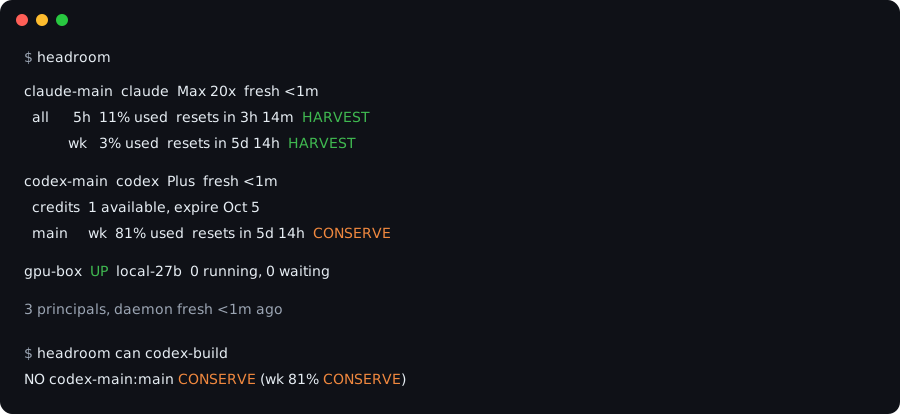
The problem
Before an agent starts several jobs, it needs to know whether the account can afford them and
which other jobs have already reserved capacity. Headroom combines the vendor readings with
cooperative reservations to answer that question. When a reading is stale or failed it says UNKNOWN, and
UNKNOWN never counts as capacity.
A budget check before a job
This synthetic example has 20% usage and another owner reserving 75%. The remaining capacity
cannot cover another 10-point job, so the child command never starts:
$ headroom run --meter claude-main:all --need wk:10 --owner builder -- codex exec "Run the tests"
wk needs 10 more but only 0.0 left after 75.0% already leased before the 10% reserve
When there is enough capacity, run reserves it, starts the command, and releases the reservation
when it finishes. The check and reservation are atomic across processes. A plain can or gate
is advisory; use run or can --lease when starting work. These reservations coordinate agents
that use Headroom; they cannot stop unrelated tools from consuming the subscription.
How it fits together
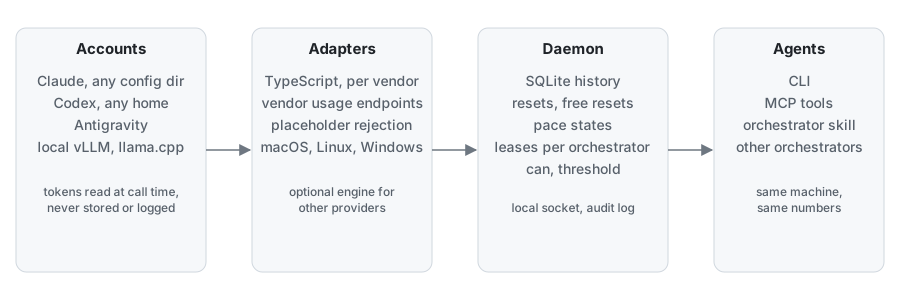
Headroom reads Claude, Codex, Grok and Kimi through native TypeScript adapters.
Antigravity is experimental and supported on macOS 14 or later: it requires a logged-inagy and a running Headroom daemon. The npm and Homebrew packages include a universal
macOS reader, verified by SHA-256 before use. Gemini CLI is not required or supported for consumer subscriptions;
Google retired that access on June 18, 2026.
For Antigravity, Headroom reads agy's local quota summary without reading its token.
Missing or failed summaries stay UNKNOWN. An idle window with real fractions may carry
a doubt marker when its reset time looks synthetic. A five-hour window entirely absent
from an otherwise-successful response (a genuinely idle rolling window) prints n/a
instead of UNKNOWN and does not block a budget check. The endpoint contracts and native
reader build on CodexBar (MIT).
What you get
| Vendors and meters | Claude all, fable, routines and reported scoped meters; Codex main, spark, credits; Antigravity gemini, claude-gpt; Grok, Kimi; and local vLLM or llama.cpp capacity pools |
| Pace | HARVEST, NORMAL, CONSERVE, FREEZE or UNKNOWN per window, from a straight line burn with a grace period after each reset |
| Decisions | can, gate, route, plan, fill, wait, leases, per-meter reserves, and a spend ledger coordinate shared capacity and pacing |
| Views and automation | Terminal status, dashboard/top (and --html <path> browser report), statusline --render, usage --paste or --clipboard, JSON contract output, local daemon, and MCP tools |
| Operations | Interactive setup; the notify configure picker with calm, quiet and everything presets; inbox; export as JSON or CSV; doctor --bundle; update; uninstall; and shell completion |
Headroom is not a router. Which model is good at what is your opinion and changes monthly. Keep it
in ~/.headroom/routing.toml; Headroom only filters your fallback list by budget. It also never sits in
the request path.
Install
Node 22.13 or newer.
npm install -g headroomd
headroom accounts discover   # finds Claude, Codex, Antigravity, Grok and Kimi logins
headroom                     # one line per meter
On macOS and Linux, brew install apertur3/tap/headroom installs the same package and adds abrew services start headroom service.
Already running Claude Code or another agent? Copy skills/headroom/SKILL.md
into its skills directory and say "set up headroom": the agent runs discovery, the doctor, the
background service and the MCP registration for you.
By hand, the same steps are one command:
headroom setup # discovery, doctor, service, MCP registration -- asks before each change
Run headroom notify configure to choose notification channels, a preset and overrides. Runheadroom update only when you choose to install a newer package; headroom uninstall reverses
setup, and headroom completion <bash|zsh|fish|pwsh> prints a shell completion script.
accounts discover prints what it wrote (Wrote ~/.headroom/accounts.toml (4 accounts). Next: headroom doctor) and, the first time, seeds ~/.headroom/policy.toml and routing.toml from examples/ soheadroom can <class> works immediately with the example action classes (claude-fable, codex-build,gemini-bulk) -- edit routing.toml to match your accounts.
Keep an optional second profile that is deliberately logged out without polling it: addenabled = false to its [[accounts]] block, or run headroom accounts disable <name>.
It remains configured and can be restored with headroom accounts enable <name>.
Register the MCP server in each Claude Code profile:
claude mcp add headroom -- npx headroomd mcp
CLAUDE_CONFIG_DIR=~/.claude2 claude mcp add headroom -- npx headroomd mcp
Codex and Gemini agents call the CLI. Copy skills/headroom/SKILL.md into your skills directory.
Full walkthrough, including what each step grants and why: docs/quickstart.md.
status/doctor print a one-line notice when a newer headroomd is out; run headroom update
(never automatic) to install it -- see Staying up to date.
Human dashboard and browser report
Open the terminal overview, or export a local browser snapshot:
headroom dashboard
headroom dashboard --once --ascii
Use Tab to select a meter, v for details, and e for events. Both chart views show
recorded remaining capacity, with gaps where readings are missing or untrusted.
To open the same recorded history in a browser:
headroom dashboard --html report.html
Open the generated file in your browser. The report shows subscription usage and reset times in an overview, with selectable window charts and sample details. It supports light and dark themes and makes no external requests. It is a snapshot: generate it again for newer readings. Existing files are preserved unless you pass --force; new files use mode 0600 on systems that support Unix permissions.
Documentation
- docs/quickstart.md: install to first truthful line, macOS, Linux and Windows
- docs/concepts.md: principal, meter, window, observation, pace states, leases, events
- docs/mcp-and-agents.md: the MCP tools, example calls, and how an orchestrator should use them
- docs/json-contract.md: the versioned field-by-field shape of every
--jsonoutput and MCP tool result, and its compatibility promise - docs/vendors.md: what Headroom reads per vendor, and its known live limitations
Security
No secret touches disk or output. On macOS headroom-claude-probe reads the Claude Keychain token
through /usr/bin/security, which the Keychain item's own access list admits, and makes the usage
request itself, so the token never enters Node or stdout and no dialog is needed. It ships
inside the npm package as a universal binary, verified against a recorded SHA-256 before every use.
Tokens are otherwise read at call time from the Keychain or the vendor's own credential file and
dropped after the request. The daemon listens on a 0600 local
socket on macOS and Linux, or a current-user Windows named pipe. There is no telemetry, the engine
is pinned and checksum verified, and every query lands in an audit log. Details in SECURITY.md.
Status
Stable since 0.1.0 (2026-09-11). Used daily on one macOS machine with two Claude config dirs, one Codex home, one
Antigravity account and two local inference boxes. Every release is installed from the npm
registry into a fresh home on Linux (a Raspberry Pi 5) and Windows 11 (a VM) and walked through
the quickstart by script; CI runs the suite on all three platforms. Vendor endpoints are private and change without notice; Headroom pins, records
fixtures, backs off on 401, 403 and 429, and prints UNKNOWN instead of a stale number. Antigravity requires
macOS and a daemon-kept agy; see vendor setup.
MIT. Third party notices in THIRD_PARTY_NOTICES.md.
Yorumlar (0)
Yorum birakmak icin giris yap.
Yorum birakSonuc bulunamadi