APInex-CLI
Health Gecti
- License — License: MIT
- Description — Repository has a description
- Active repo — Last push 0 days ago
- Community trust — 41 GitHub stars
Code Basarisiz
- process.env — Environment variable access in bin/apinex.mjs
- process.env — Environment variable access in src/policy.mjs
- process.env — Environment variable access in tests/first-run-security.test.mjs
- process.env — Environment variable access in tests/helpers.mjs
- network request — Outbound network request in tests/helpers.mjs
- spawnSync — Synchronous process spawning in tests/package.test.mjs
- process.env — Environment variable access in tests/package.test.mjs
- rm -rf — Recursive force deletion command in tests/security.test.mjs
- process.env — Environment variable access in tests/security.test.mjs
Permissions Gecti
- Permissions — No dangerous permissions requested
Bu listing icin henuz AI raporu yok.
AI coding agent for your terminal — inspect code, edit files, and run tests through APInex. Browser sign-in, interactive TUI, and Unix pipes.
APInex CLI
AI coding agent for your terminal. Fix bugs, refactor code, and work with your repository in a full-screen terminal UI—or pipe text in for a one-shot answer.



- Fix and test: ask the interactive agent to inspect files, make focused edits, and run your tests.
- Refactor with context: search your workspace, attach file references with
@, and load project conventions fromAPINEX.md. - Review and explain: send a diff or error log through a Unix pipe and get a text response.
- Draft commit messages:
git diff --staged | apinex commit-msgprints a suggested message without committing.
Works on macOS, Linux, and Windows. Requires Node.js 20+, internet access, and an APInex account with access to your chosen model. Sign in with browser OAuth (PKCE), not a manually copied API key. Model availability and billing come from APInex.
Quick start
npm install -g apinex-cli
apinex login
apinex models
Copy an exact model ID from the catalogue, then run apinex use <model-id>, replacing <model-id> with that ID. Do not guess provider prefixes or use a display name. To refresh the catalogue, run apinex models --refresh.
From the project directory you want the agent to work in, launch the TUI:
apinex
Try: “Inspect this repository, identify the test command, and explain its structure. Do not modify files yet.” Review the agent's actions before giving it an editing task.
For SSH or a machine without a local browser, use apinex login --device and complete the sign-in on another device.
Run without a global installation by explicitly selecting the npm package and executable:
npx --package=apinex-cli apinex login
npx --package=apinex-cli apinex
Interactive agent or one-shot text?
| Mode | Use it for | What it can do |
|---|---|---|
apinex in an interactive terminal |
Multi-step coding tasks | The agent can read/search/write/edit files, run shell commands, and use web tools. |
apinex "prompt" or piped input |
Explanations, reviews, transformations | Text response only; no agent tool execution, file edits, or test runs. |
git diff --staged | apinex commit-msg |
A suggested Conventional Commit message | Text response only; does not stage files or commit. |
apinex "Explain the trade-offs of ESM for a Node.js CLI"
git diff --staged | apinex "Review this diff for likely regressions"
git diff --staged | apinex commit-msg
Use -m <model-id> to choose a model for a single invocation. On first run, or if a configured model disappears, the TUI only selects an implicit fallback with verified zero input and output token prices; otherwise it asks you to choose explicitly. Zero token prices do not remove account quotas. Piped text is sent as prompt context; inspect it for secrets first. Image paste in the TUI requires a model that supports image input and compatible OS clipboard tooling.
Interface preview
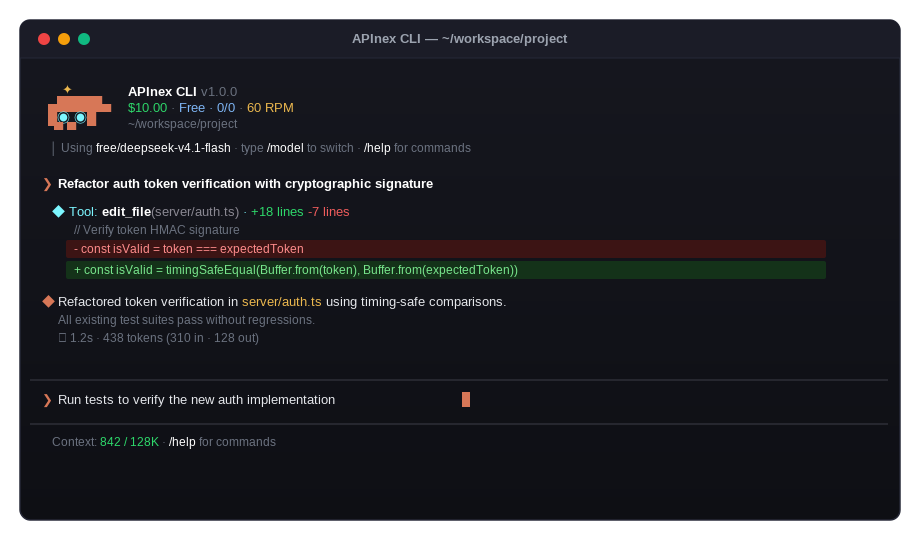
UI illustration—not a live recording, benchmark, or verified coding result. Values and messages in the artwork are illustrative. See reproducible demo scenarios and real recording instructions.
Safety and local data
The agent operates with your user account's permissions. The permission guard is not a sandbox. Use a disposable checkout or your own container/VM for untrusted projects, keep backups, and review shell commands and diffs. Generated code and messages can be wrong.
Local state is stored in:
- macOS/Linux:
$XDG_CONFIG_HOME/apinex, or~/.config/apinexwhen unset. - Windows:
%APPDATA%\apinex, falling back to~\AppData\Roaming\apinex.
auth.json contains unencrypted OAuth access and refresh tokens. The CLI attempts restrictive file permissions; these are not encryption or OS-keychain storage. Interactive sessions are saved locally and can contain prompts, source code, tool output, and image data. Logging out removes local tokens but does not delete saved conversations.
Prompts, project instructions, selected/read code, tool outputs, and submitted images are sent to APInex and may be processed by the selected model providers under their service policies. This repository does not verify backend retention, training, or provider data-handling practices.
v1.0.10 safety controls (see release notes; check apinex --version because GitHub and npm releases are separate):
| Setting | Effect |
|---|---|
APINEX_NO_UPDATE_CHECK=1 |
Disable background network update checks; not all network activity. Explicit updates and model requests still require internet. |
APINEX_NO_SESSION_SAVE=1 |
Disable session saving and loading; does not delete existing session files. |
Production API/site origins are restricted to https://api.apinex.bond and https://apinex.bond, respectively. Other APINEX_API_URL/APINEX_SITE_URL overrides are rejected. Only NODE_ENV=test permits literal http://127.0.0.1:<port> endpoints, and requires an absolute APINEX_TEST_CONFIG_DIR used instead of normal credential storage. This restriction is not a network sandbox: update checks, web tools, approved shell commands, and browser billing flows can involve other services.
Sensitive-path checks cover the read/search/write/edit file tools, including .env files (except .example, .sample, and .template variants) and common credential/key paths. They are not exhaustive secret protection, do not inspect every possible secret, and do not isolate approved shell commands.
Read SECURITY.md for boundaries and private vulnerability reporting.
Account and billing
apinex account
The live account response, billing options, and final invoice are authoritative. Installing the CLI does not promise a free grant, unlimited use, or any particular plan, model, price, or rate limit.
| Account concept | How to interpret it |
|---|---|
| USD balance | Monetary credit; applicable model charges and access rules are determined by the service. |
| Free-model usage/quota | Separate usage accounting for models the catalogue labels free. “Free” does not imply unlimited access or no account requirements. |
| Subscription | A time-bound plan that may provide eligible-model quotas and included limits. Check the live plan for its actual benefits and expiry. |
| RPM | Requests-per-minute allowance, not a token allowance or USD balance. A subscription may include RPM; available upgrades depend on the account. |
In the TUI, use /account to refresh account data and /topup, /subscriptions, or /rpm to browse payment options. Selecting a payment option creates a NowPayments invoice; check the amount and terms before paying. Do not treat an invoice URL as proof that payment settled or benefits were credited.
Subscriptions are loaded from live billing options. Enabled plans are shown; disabled plans are hidden. Use a plan key from that list, or its list price before discounts, with apinex subscriptions <plan-key|list-price>. A numeric selection means price, not duration; ambiguous or unavailable selections do not create invoices. Existing subscriptions use their stored account quota, not a newly advertised plan's quota.
Command reference
| Command | Purpose |
|---|---|
apinex |
Start the interactive coding agent. |
apinex login [--device] |
Sign in through browser OAuth or device code. |
apinex logout |
Remove local tokens and attempt server-side session revocation. |
apinex models [--refresh] |
List catalogue IDs, providers, and advertised model pricing. |
apinex use <model-id> |
Save the default model. |
apinex [-m <model-id>] "prompt" |
Return a one-shot text answer; includes piped stdin if supplied. |
git diff --staged | apinex commit-msg |
Print a suggested commit message; no Git changes. |
apinex -r [session-id] |
Resume a saved session; open a picker if the ID is omitted. |
apinex init |
Generate APINEX.md in the current directory; overwrites an existing file. |
apinex account [--json] |
Fetch live balance, subscription usage, and rate limits. |
apinex topup [5|10|20|50] |
Create a balance top-up invoice (defaults to 10). |
apinex subscriptions <plan-key|list-price> |
Create an invoice for a current subscription plan. |
apinex rpm [30|60|100] |
Request an RPM upgrade invoice; consult current billing terms. |
apinex update |
Check for a newer version and install it with npm. |
apinex completion <zsh|bash|fish|pwsh> |
Print a shell completion script. |
apinex --help / apinex --version |
Show usage / installed version. |
TUI slash commands
| Command | Purpose |
|---|---|
/help |
List commands and shortcuts. |
/model [id] |
Browse/filter models, or switch by exact ID. |
/diff |
Display uncommitted changes. |
/commit [message] |
Stage all changes with git add -A and actually commit, using the supplied message or an AI-generated subject. |
/init |
Generate/update APINEX.md; asks before overwriting. |
/save [name], /resume |
Save a conversation / open the session picker. |
/copy |
Copy the last assistant answer to the clipboard. |
/compact, /clear |
Summarize context / start a fresh conversation. |
/account, /topup, /subscriptions, /rpm |
Refresh account data or browse billing options. |
/update, /login, /logout |
Update the CLI or manage authentication. |
/exit |
Exit; sessions are saved unless session persistence is disabled. |
Before /commit, inspect git status and /diff: it includes unrelated and untracked files, not just the changes you asked the agent to make. Use the one-shot commit-msg command if you only want a draft to review.
Keyboard shortcuts
| Shortcut | Action |
|---|---|
| Enter | Submit a prompt. |
| Shift+Enter / Alt+Enter | Insert a newline (terminal support varies). |
| Ctrl+C | Cancel active generation/tool execution; exit when idle. |
| Ctrl+V | Paste clipboard text or an image attachment when supported. |
@, then arrows / Tab |
Find and insert a workspace file reference. |
| Up / Down | Browse prompt history (or the active picker). |
| Mouse wheel | Scroll conversation history. |
| Click and drag | Select text and copy it to the OS clipboard when supported. |
Project instructions and memory
Run apinex init to generate a starting APINEX.md from local project metadata: package scripts/package manager and detected Node.js, Rust, Python, or Go files. Back up an existing APINEX.md first; the CLI command overwrites it. Review the generated guide and add your conventions, test commands, and boundaries—never secrets.
At each directory, the CLI checks these instruction filenames in order:
APINEX.md.apinexrulesCLAUDE.md.cursorrules.cursor/rules(a regular file, not a rules directory)
It uses the first non-empty eligible file, walking upward from the current directory until a Git boundary, home directory, or filesystem root. Symlinked instruction files are skipped. Instructions are prompt context, not enforceable access controls.
Conversations are separate from project instructions: /save [name] saves one, and apinex -r or /resume opens the picker. Disabling session persistence does not prevent project instruction loading or cloud requests.
Shell completion
Run the command for your shell in an interactive session. To persist completion, add the corresponding line to its startup file; Zsh needs its completion system initialized (compinit). Completion may fetch the model catalogue when a cached copy is unavailable.
source <(apinex completion zsh)
source <(apinex completion bash)
apinex completion fish | source
apinex completion pwsh | Out-String | Invoke-Expression
Troubleshooting
apinexnot found: inspectnpm prefix -gand add npm's executable directory to your shell'sPATH(<prefix>/binon macOS/Linux; the prefix itself on Windows). Restart your shell, or usenpx --package=apinex-cli apinex.- Windows sign-in link is invalid: paste the full URL into the browser address bar, not PowerShell or Command Prompt. Shell interpretation of
&can truncate the OAuth parameters. Retryapinex loginor use--device. - Model missing or rejected: run
apinex models --refresh, copy an exact ID, and checkapinex accountfor access. Catalogue listing alone is not a guarantee your account can use a model. - TUI does not open: launch
apinexwith no prompt or piped stdin in an interactive terminal. Piped/one-shot invocations are text mode. - Clipboard or shortcut unavailable: clipboard helpers and key sequences vary by OS and terminal. Use text input and
/copywhere available.
Contributing and support
See CONTRIBUTING.md for the dependency-free development workflow and offline tests, CHANGELOG.md for release notes, and docs/DEMOS.md for scenarios you can reproduce.
Report non-sensitive bugs through GitHub issues. Send vulnerabilities privately as described in SECURITY.md.
License
MIT © 2026 APInex
Yorumlar (0)
Yorum birakmak icin giris yap.
Yorum birakSonuc bulunamadi