mcp-arr
Health Gecti
- License — License: MIT
- Description — Repository has a description
- Active repo — Last push 10 days ago
- Community trust — 107 GitHub stars
Code Uyari
- network request — Outbound network request in src/arr-client.ts
- process.env — Environment variable access in src/index.ts
- network request — Outbound network request in src/trash-client.ts
Permissions Gecti
- Permissions — No dangerous permissions requested
Bu listing icin henuz AI raporu yok.
MCP server for *arr media management suite
MCP *arr Server
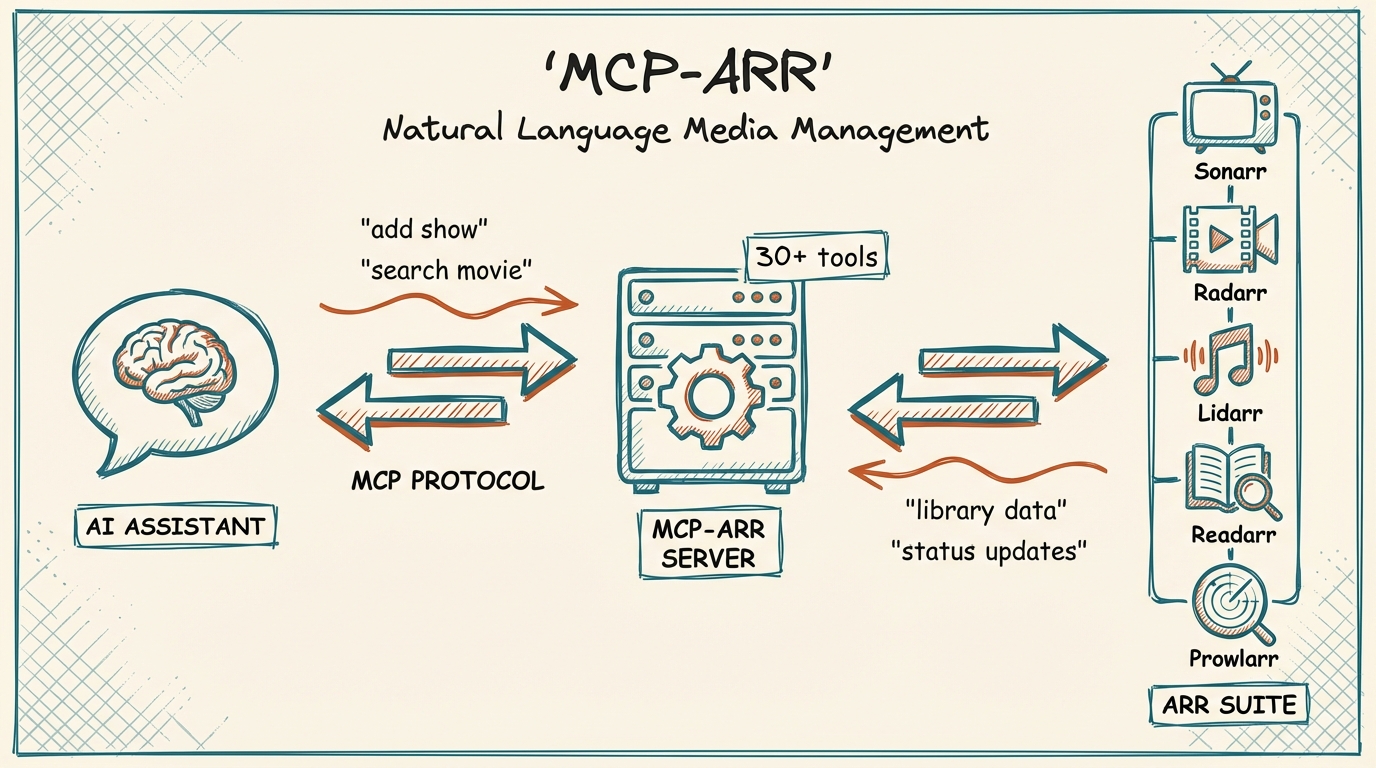




MCP server for the *arr media management suite - Sonarr, Radarr, Lidarr, and Prowlarr.
Why Use This?
- Unified media management - Control all your *arr applications from one interface
- Natural language queries - Ask about your library in plain English
- Cross-service search - Find content across TV, movies, and music simultaneously
- Download monitoring - Check queue status and progress across all services
- Calendar integration - See upcoming releases for all media types
- Configuration review - Get AI-powered suggestions for optimizing your setup
- Flexible configuration - Enable only the services you use
Features
| Category | Capabilities |
|---|---|
| Sonarr (TV) | List series, view episodes, search shows, trigger downloads, check queue, view calendar, review setup |
| Radarr (Movies) | List movies, search films, trigger downloads, check queue, view releases, review setup |
| Lidarr (Music) | List artists, view albums, search musicians, trigger downloads, check queue, view calendar, review setup |
| Prowlarr (Indexers) | List indexers, search across all trackers, test health, view statistics |
| Cross-Service | Status check, unified search across all configured services |
| Configuration | Quality profiles, download clients, naming conventions, health checks, storage info |
| TRaSH Guides | Reference quality profiles, custom formats, naming conventions, compare against recommendations |
Prerequisites
- Node.js 18+
- At least one *arr application running with API access:
Installation
Using npm (Recommended)
npx mcp-arr-server
From Source
git clone https://github.com/aplaceforallmystuff/mcp-arr.git
cd mcp-arr
npm install
npm run build
Configuration
Getting API Keys
Each *arr application has an API key in Settings > General > Security:
- Open your *arr application's web interface
- Go to Settings > General
- Find the API Key under the Security section
- Copy the API key for use in configuration
For Claude Desktop
Add to your Claude Desktop config file:
macOS: ~/Library/Application Support/Claude/claude_desktop_config.json
Windows: %APPDATA%\Claude\claude_desktop_config.json
{
  "mcpServers": {
    "arr": {
      "command": "npx",
      "args": ["-y", "mcp-arr-server"],
      "env": {
        "SONARR_URL": "http://localhost:8989",
        "SONARR_API_KEY": "your-sonarr-api-key",
        "RADARR_URL": "http://localhost:7878",
        "RADARR_API_KEY": "your-radarr-api-key",
        "LIDARR_URL": "http://localhost:8686",
        "LIDARR_API_KEY": "your-lidarr-api-key",
        "PROWLARR_URL": "http://localhost:9696",
        "PROWLARR_API_KEY": "your-prowlarr-api-key"
      }
    }
  }
}
For Claude Code
Add to ~/.claude.json:
{
  "mcpServers": {
    "arr": {
      "command": "npx",
      "args": ["-y", "mcp-arr-server"],
      "env": {
        "SONARR_URL": "http://localhost:8989",
        "SONARR_API_KEY": "your-sonarr-api-key",
        "RADARR_URL": "http://localhost:7878",
        "RADARR_API_KEY": "your-radarr-api-key"
      }
    }
  }
}
Note: Only configure the services you have running. The server automatically detects which services are available based on the environment variables you provide.
Usage Examples
Library Management
- "Show me all my TV series"
- "What movies do I have in Radarr?"
- "List all artists in my music library"
Searching & Adding Content
- "Search for sci-fi shows on Sonarr"
- "Find action movies from the 90s"
- "Add this show to my TV library"
- "Add that movie to Radarr"
- "Search for jazz albums and add this artist"
- "Add this movie with my '4k' tag"
- "What tags do I have in Sonarr?"
Download Queue
- "What's downloading right now?"
- "Check the Sonarr queue"
- "Show Radarr download progress"
Upcoming Releases
- "What TV episodes are coming this week?"
- "Show upcoming movie releases"
- "Any new albums coming out this month?"
Downloading Content
- "What episodes of this show am I missing?"
- "Download the missing episodes for that series"
- "Search for this specific movie"
- "Grab that album I'm missing"
Indexer Management
- "Are my indexers healthy?"
- "How are my indexers performing?"
- "Test all my Prowlarr indexers"
Configuration Review
- "Review my Sonarr setup and suggest improvements"
- "Show me my quality profiles in Radarr"
- "Are there any health issues with my Lidarr?"
- "What naming convention am I using for TV shows?"
- "Help me understand my quality profiles - why am I not getting 4K?"
- "Check my download client configuration"
- "How much free space do I have on my root folders?"
Cross-Service
- "Check status of all my *arr services"
- "Search for 'comedy' across all services"
Available Tools
General Tools
| Tool | Description |
|---|---|
arr_status |
Get connection status for all configured *arr services |
arr_search_all |
Search across all configured services simultaneously |
Sonarr Tools (TV)
| Tool | Description |
|---|---|
sonarr_get_series |
List all TV series in your library |
sonarr_search |
Search for TV series by name (returns tvdbId for adding) |
sonarr_add_series |
Add a TV series to Sonarr (supports tags) |
sonarr_get_root_folders |
Get available root folders for adding series |
sonarr_get_quality_profiles |
Get available quality profiles for adding series |
sonarr_get_queue |
View current download queue |
sonarr_get_calendar |
See upcoming episodes |
sonarr_get_episodes |
List episodes for a series (shows missing vs available) |
sonarr_search_missing |
Trigger search for all missing episodes in a series |
sonarr_search_episode |
Trigger search for specific episode(s) |
Radarr Tools (Movies)
| Tool | Description |
|---|---|
radarr_get_movies |
List all movies in your library |
radarr_search |
Search for movies by name (returns tmdbId for adding) |
radarr_add_movie |
Add a movie to Radarr (supports tags) |
radarr_get_root_folders |
Get available root folders for adding movies |
radarr_get_quality_profiles |
Get available quality profiles for adding movies |
radarr_get_queue |
View current download queue |
radarr_get_calendar |
See upcoming releases |
radarr_search_movie |
Trigger search to download a movie in your library |
Lidarr Tools (Music)
| Tool | Description |
|---|---|
lidarr_get_artists |
List all artists in your library |
lidarr_search |
Search for artists by name (returns foreignArtistId for adding) |
lidarr_add_artist |
Add an artist to Lidarr (supports tags) |
lidarr_get_root_folders |
Get available root folders for adding artists |
lidarr_get_quality_profiles |
Get available quality profiles for adding artists |
lidarr_get_metadata_profiles |
Get available metadata profiles for adding artists |
lidarr_get_queue |
View current download queue |
lidarr_get_albums |
List albums for an artist (shows missing vs available) |
lidarr_search_album |
Trigger search for a specific album |
lidarr_search_missing |
Trigger search for all missing albums for an artist |
lidarr_get_calendar |
See upcoming album releases |
Prowlarr Tools (Indexers)
| Tool | Description |
|---|---|
prowlarr_get_indexers |
List all configured indexers |
prowlarr_search |
Search across all indexers |
prowlarr_test_indexers |
Test all indexers and return health status |
prowlarr_get_stats |
Get indexer statistics (queries, grabs, failures) |
Configuration Review Tools
These tools are available for Sonarr, Radarr, and Lidarr. Replace {service} with the service name (e.g., sonarr_get_quality_profiles).
| Tool | Description |
|---|---|
{service}_get_quality_profiles |
Detailed quality profile information with allowed qualities and custom format scores |
{service}_get_health |
Health check warnings and issues detected by the application |
{service}_get_root_folders |
Storage paths, free space, and accessibility status |
{service}_get_download_clients |
Download client configurations and settings |
{service}_get_naming |
File and folder naming conventions |
{service}_get_tags |
Tag definitions for content organization |
{service}_review_setup |
Comprehensive configuration dump for AI-assisted setup analysis |
The {service}_review_setup tool returns all configuration in a single call, enabling natural language conversations about optimizing your setup. Claude can analyze your quality profiles, suggest improvements, explain why certain content isn't being grabbed, and help configure complex settings like custom formats.
⚠️ Disclaimer: The configuration review tools provide read-only access to your *arr settings. Any changes to your configuration must be made directly in the *arr application interfaces. The AI's suggestions are recommendations only - always back up your configuration before making significant changes. The maintainers are not responsible for any configuration changes, data loss, or other issues that may arise from following AI-generated recommendations.
TRaSH Guides Tools
Access community-curated quality profiles, custom formats, and naming conventions from TRaSH Guides directly through Claude. These tools work without any *arr configuration - they fetch reference data from the TRaSH Guides GitHub repository.
| Tool | Description |
|---|---|
trash_list_profiles |
List available TRaSH quality profiles for Radarr or Sonarr |
trash_get_profile |
Get detailed profile with custom formats, scores, and quality settings |
trash_list_custom_formats |
List custom formats with optional category filter (hdr, audio, resolution, etc.) |
trash_get_naming |
Get recommended naming conventions for Plex, Emby, Jellyfin, or standard |
trash_get_quality_sizes |
Get recommended min/max/preferred sizes for each quality level |
trash_compare_profile |
Compare your profile against TRaSH recommendations (requires *arr configured) |
trash_compare_naming |
Compare your naming config against TRaSH recommendations (requires *arr configured) |
Example usage:
- "What quality profiles does TRaSH recommend for 4K movies?"
- "Show me the remux-web-1080p profile details"
- "Compare my Radarr profile 4 against the TRaSH uhd-bluray-web profile"
- "What naming convention should I use for Plex?"
- "List HDR-related custom formats for Radarr"
Data is cached for 1 hour to minimize GitHub API calls.
Development
# Watch mode for development
npm run watch

# Build TypeScript
npm run build

# Run locally
SONARR_URL="http://localhost:8989" SONARR_API_KEY="your-key" node dist/index.js
Troubleshooting
"No *arr services configured"
Ensure you have set at least one pair of URL and API_KEY environment variables:
SONARR_URL="http://localhost:8989"
SONARR_API_KEY="your-api-key"
"API error: 401 Unauthorized"
The API key is incorrect. Verify it in your *arr application under Settings > General > Security.
"fetch failed" or "ECONNREFUSED"
The *arr application is not running or the URL is incorrect. Verify:
- The application is running
- The URL and port are correct
- There's no firewall blocking the connection
"Sonarr/Radarr/etc not configured"
You tried to use a tool for a service that isn't configured. Add the corresponding URL and API_KEY environment variables.
License
MIT - see LICENSE for details.
Links
- Servarr Wiki - Documentation for all *arr applications
- TRaSH Guides - Quality profiles, custom formats, and setup guides
- Sonarr API Docs
- Model Context Protocol
- GitHub Repository
Yorumlar (0)
Yorum birakmak icin giris yap.
Yorum birakSonuc bulunamadi