shipwright
Health Warn
- License — License: MIT
- Description — Repository has a description
- Active repo — Last push 0 days ago
- Low visibility — Only 5 GitHub stars
Code Pass
- Code scan — Scanned 12 files during light audit, no dangerous patterns found
Permissions Pass
- Permissions — No dangerous permissions requested
No AI report is available for this listing yet.
The open-source autonomous delivery agent for Claude Code.
Shipwright Harness -- autonomous delivery agent for Claude Code




The open-source autonomous delivery agent for Claude Code. A deployable cloud agent and the autonomous coding system that powers it — built on the Shipwright plugin, running on your own codebase.
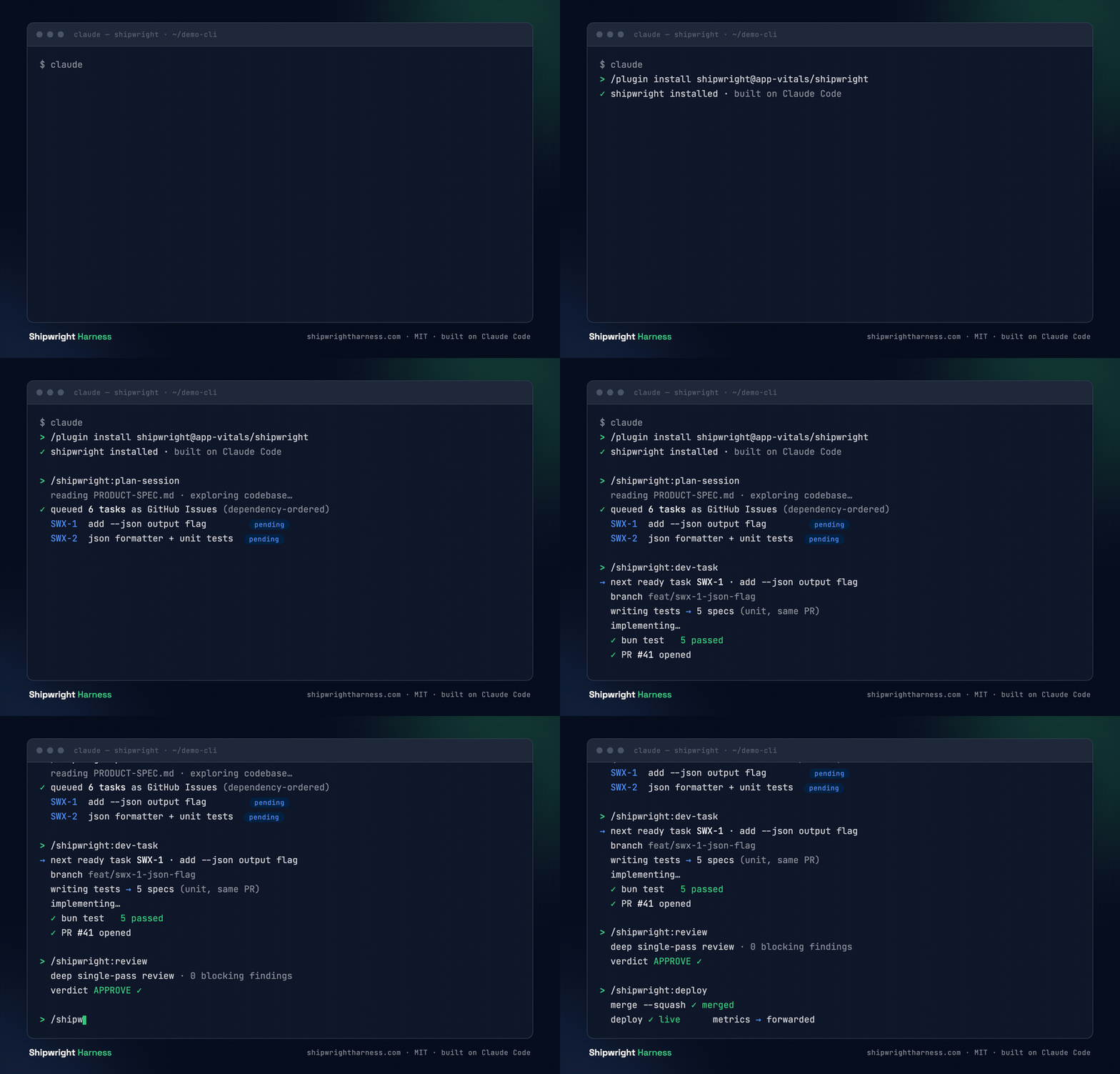
Plan → build → review → ship — one task through the pipeline. (Illustrative.)
Brand vs. package: the project is Shipwright Harness; the plugin/package you install is
shipwright.
Install
/plugin install shipwright@app-vitals/shipwright
Requires Claude Code. Point it at your own repository — Shipwright is repo-agnostic.
Deploying the services to Kubernetes? The shipwright Helm chart is published to a Helm repo on each chart version bump:
helm repo add shipwright https://app-vitals.github.io/shipwright
helm install my-release shipwright/shipwright --namespace shipwright --create-namespace
See docs/deploy-kubernetes.md for end-to-end deployment guides (Minikube / GKE / EKS), and docs/helm-repo.md for the published-repo flow and how publishing is triggered.
Quickstart
You can run the metrics dashboard locally today — offline by default, with no PostHog key, no accounts, and no database. One copy-paste prompt sequences the two execution contexts (terminal shell + an in-session slash command) and opens the dashboard.
Paste this into a Claude Code session:
Set up Shipwright Harness locally and open the metrics dashboard.

1. In a terminal, run:
     git clone https://github.com/app-vitals/shipwright.git && cd shipwright && ./scripts/quickstart.sh
   This checks prerequisites, installs dependencies (task setup), and starts the
   metrics dashboard in offline mode (no accounts or secrets needed). Leave it running.

2. Inside this Claude Code session, install the plugin:
     /plugin install shipwright@app-vitals/shipwright

3. Open the dashboard in your browser:
     http://localhost:3460/dashboard
Step 1 runs in your terminal; step 2 is a slash command that runs inside the Claude Code session. The dashboard comes up at http://localhost:3460/dashboard.
Prerequisites: Claude Code, git, Bun, and go-task. Full details, the QUICKSTART_SKIP_SERVE CI guard, and the offline-default explanation live in docs/quickstart.md.
Full dev stack
Want the complete local stack — metrics dashboard, admin UI, task-store, and the Shipwright agent running in Docker? This requires tmux, Docker, and a local PostgreSQL instance (port 5432). Paste this into a Claude Code session:
Set up the full Shipwright Harness dev stack locally.

Prerequisites: tmux, Docker, PostgreSQL running on localhost:5432, Bun, go-task.

1. In a terminal, clone and set up:
     git clone https://github.com/app-vitals/shipwright.git && cd shipwright && task setup

2. Copy the env example and add your auth token:
     cp state/dev-agent.env.example state/dev-agent.env
   Open state/dev-agent.env and set one of:
     CLAUDE_CODE_OAUTH_TOKEN=<your token>   (run: claude /oauth-token)
     ANTHROPIC_API_KEY=<your key>           (https://console.anthropic.com/ → API Keys)

3. Launch the full stack (6-pane tmux session):
     task stack

   This opens a tmux session named "shipwright" with 6 panes:
     metrics (:3460)  admin (:3001)  task-store (:3002)  chat-svc (:3003)  agent  logs

4. Open the dashboard in your browser:
     http://localhost:3460/dashboard

5. Inside a Claude Code session:
     /plugin install shipwright@app-vitals/shipwright

To stop: tmux kill-session -t shipwright
What is Shipwright Harness?
Two faces, one product:
- The agent — deploy it to your cloud (GitHub Actions or self-hosted). It does autonomous coding on your codebase, held to the same review and test bar as human code.
- The system — the autonomous coding system, built on the Claude Code
shipwrightplugin: plan · build · review · metrics. Use it interactively inside Claude Code, or let the agent run it autonomously.
It runs in your environment, on your codebase — you own it, it's MIT, and it's free.
What it does
Shipwright turns a feature idea into shipped, reviewed code through a sequence of Claude Code commands — each stage producing a durable artifact the next stage consumes:
- Write a PRD for your idea — a structured product spec ready for /plan-session.
- Plan the spec into a queue of well-scoped, dependency-ordered tasks (tracked in the Shipwright task store — a shared queue any agent or contributor can query).
- Execute the next ready task — build, test, and open a PR.
- Review the PR with policy-controlled, inline feedback.
- Ship the merged change.
Why Shipwright Harness
- Free and open-source (MIT) — the own-it alternative to closed, hosted coding agents. No rented infrastructure, no lock-in.
- Runs in your environment, your cloud — your code never leaves your control.
- The same quality bar as human code — tests land with the code, gated by a five-phase test-readiness pipeline, so an autonomous agent can be trusted.
- Metrics on your own pipeline — first-time-quality rate, estimation accuracy, and review-verdict trends, measured on your delivery.
- Built on Claude Code — we use it every day, and Shipwright extends it rather than replacing it.
Components
| Component | What it does | Status |
|---|---|---|
| Plugin (the system) | The shipwright toolchain you /plugin install — planning, queue-based execution, review, a test-readiness pipeline, and deploy commands. |
✅ Available |
| Metrics dashboard | A stateless service that reads pipeline analytics (task throughput, CI first-pass rate, review verdicts, estimation accuracy) and renders a dashboard. Run locally with task api or task ui (offline mode, no secrets needed). |
✅ Available |
| Shipwright agent | A thin autonomous runner that drives the system on a schedule — pick the next ready task → build → ship a PR → forward metrics — deployable to GitHub Actions or self-hosted. | ✅ Available |
The workflow
/shipwright:prd            → a product spec
/shipwright:plan-session   → a dependency-ordered task queue
/shipwright:dev-task       → build + test + open a PR for the next ready task
/shipwright:review         → policy-controlled PR review
/shipwright:patch          → address review findings / failing CI
/shipwright:deploy         → merge + deploy
Tasks are tracked in the Shipwright task store (see docs/task-store.md), so the queue is shared across every agent working the pipeline.
Project status
See it live — Shipwright builds itself. The public metrics dashboard shows live pipeline data for this repo: first-time quality, cycle time, estimation accuracy, and task throughput — all generated by the same agent and plugin you're reading about.
Shipwright Harness is live — plugin, metrics dashboard, and the Shipwright agent all ship with v0.1.0. See the issues for the live roadmap and upcoming improvements.
The metrics dashboard is runnable locally today — the Quickstart wraps this in one copy-paste prompt (./scripts/quickstart.sh). The underlying tasks:
task setup      # bun install
task api        # start metrics dashboard in offline mode → http://localhost:3460/dashboard
task dev        # dev supervisor: starts metrics + Ctrl-C kills all children
task stack      # full dev stack in a tmux session (6 panes) — requires tmux
task stack brings up a single tmux session (shipwright) with a 6-pane dashboard: metrics (SQLite, :3460), admin (CRUD API + UI, :3001), task-store (:3002), chat-svc (the chat service, :3003), the agent in Docker with the chat poll loop enabled, and a scratch logs shell. Chatting with the agent happens in the browser via the admin console's Chat tab (/admin/chat), not a REPL or an endpoint on the agent itself. It runs a Prisma migrate deploy preflight first so the admin service's Postgres schema is up to date; on macOS the preflight checks Postgres is reachable and offers to run the needed brew/createdb commands if it isn't. task stack requires tmux; if it isn't installed, use task dev (the no-tmux fallback that starts the metrics dashboard).
See docs/quickstart.md for the full onboarding prompt and offline-default behavior.
Built on Claude Code
Shipwright Harness is a Claude Code plugin through and through — built on it, for it, and used with it daily. If you already run Claude Code, Shipwright is a /plugin install away.
Test system
Shipwright enforces a four-layer test architecture (unit / integration / smoke / e2e) across all three components. Layer boundaries, per-component run commands, speed budgets, and the test-isolation contract are defined in docs/test-readiness/test-system.md.
Configuration
All configuration options — plugin env vars, agent env vars, and policy fields — are documented in docs/configuration.md.
Observability
Optional Sentry error/log reporting, disabled by default and self-host-friendly. See docs/observability.md for exactly what is collected.
Contributing
Issues and discussion are welcome. See CONTRIBUTING.md for conventions and workflow, and our CODE_OF_CONDUCT.md. This repository is MIT-licensed and public — please keep contributions free of any proprietary or confidential material.
License
MIT © 2026 App Vitals
Reviews (0)
Sign in to leave a review.
Leave a reviewNo results found