iram-os
Health Warn
- License — License: NOASSERTION
- Description — Repository has a description
- Active repo — Last push 0 days ago
- Low visibility — Only 5 GitHub stars
Code Fail
- rm -rf — Recursive force deletion command in .github/workflows/build-iso.yml
- rm -rf — Recursive force deletion command in build/build-iso.sh
- rm -rf — Recursive force deletion command in build/package-deb.sh
Permissions Pass
- Permissions — No dangerous permissions requested
No AI report is available for this listing yet.
🌌 IRAM OS — Turnkey agentic Hyprland desktop operating system with autonomous AI toolchain, 22 themes, Waybar, and live ISO installer.
IRAM OS 🌌
The Autonomous Agentic Desktop Operating System
A high-performance Linux operating system powered by Hyprland, featuring sharp geometric tiling, zero-restart live theme switching, studio-grade PipeWire audio routing, automated multi-display intelligence, and a deeply integrated autonomous AI toolchain.







📸 Desktop Visual Showcase
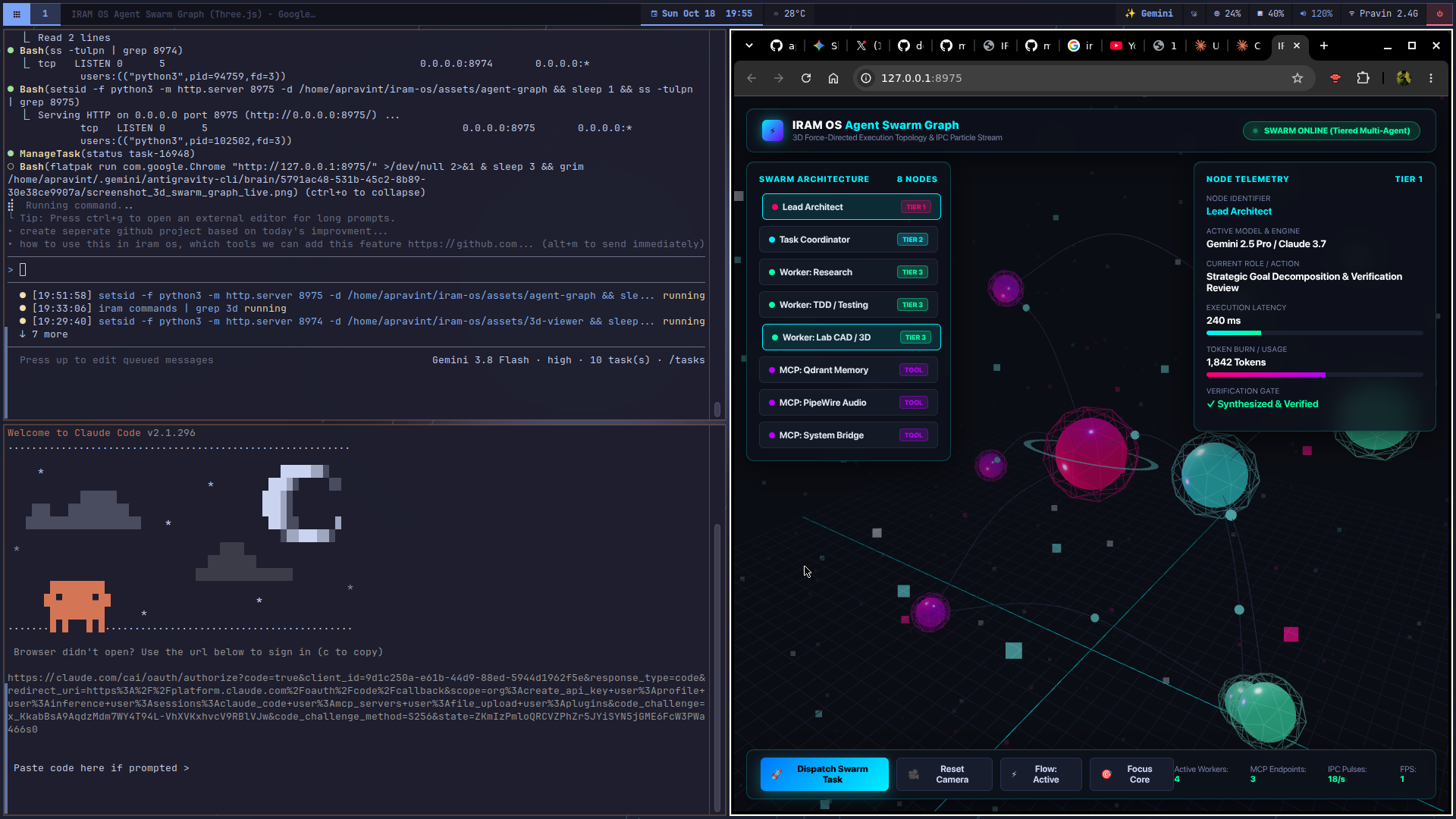
3D Multi-Agent Swarm Topology (Three.js) |
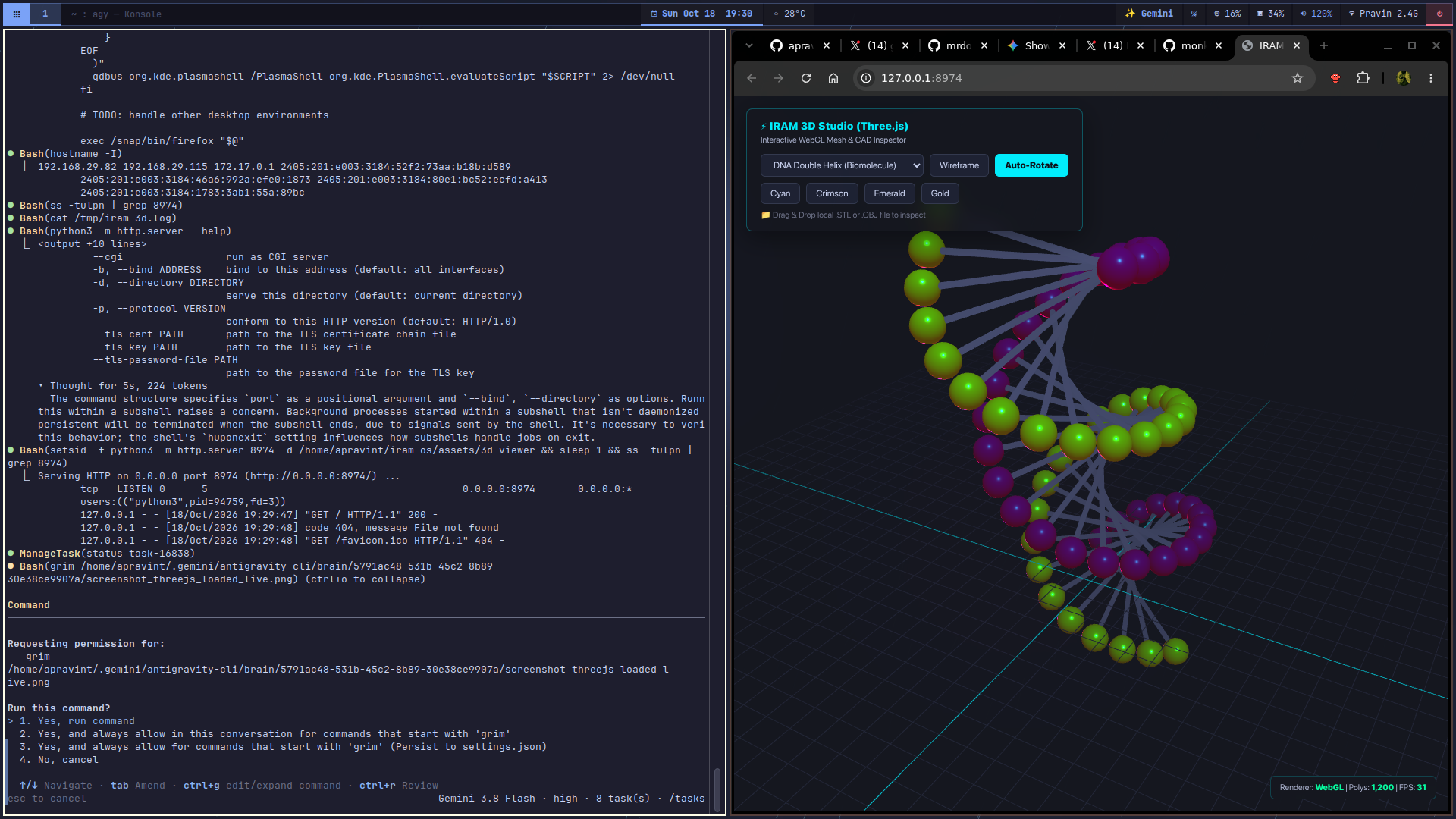
Hardware CAD & Biomolecule Inspector |
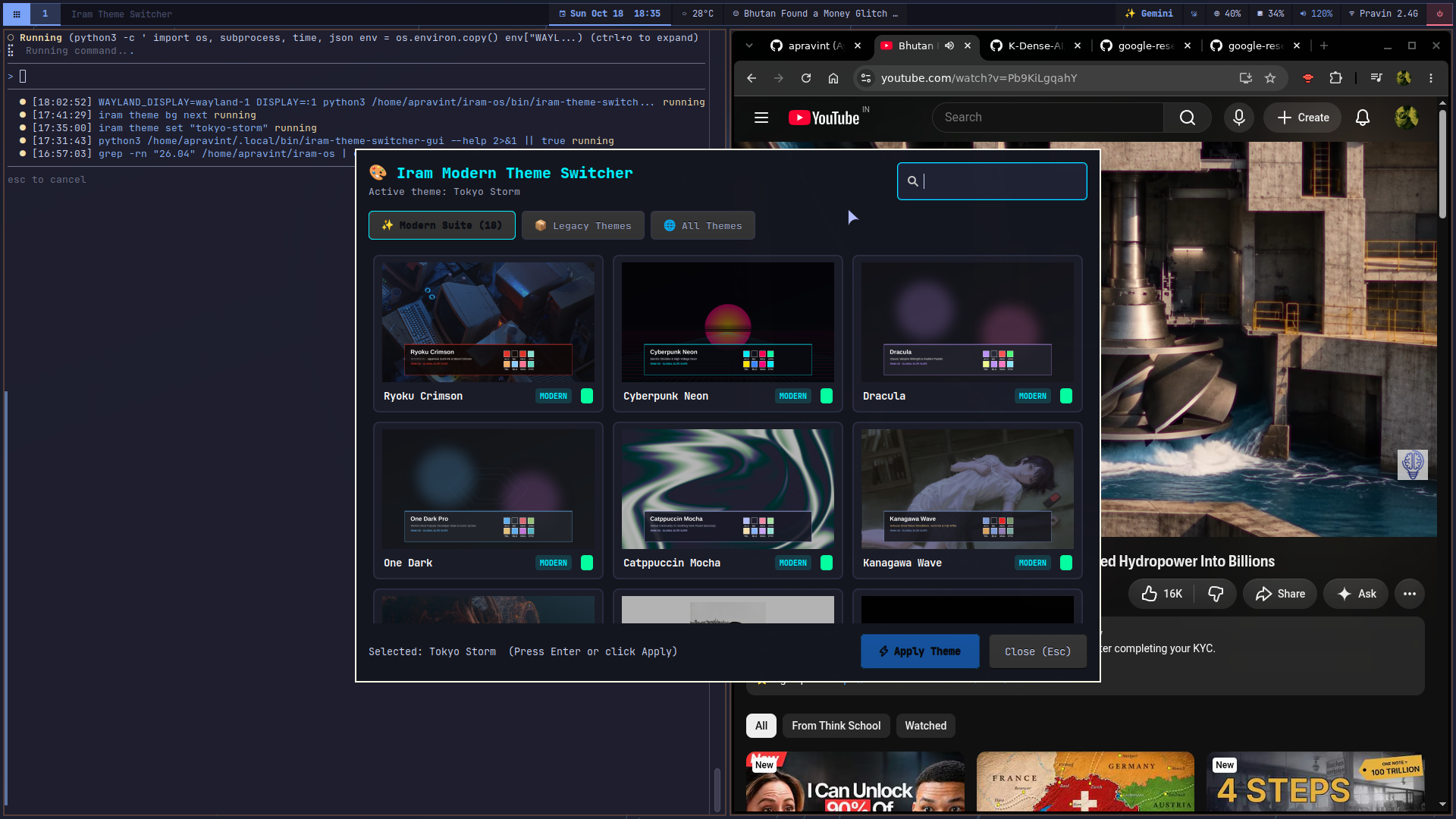
Zero-Restart Theme Switcher (18 Curated Palettes & Live Preview Grid) |
📖 About IRAM OS
What is IRAM OS?
IRAM OS is an independent, turnkey 64-bit Linux operating system distribution engineered from the ground up for modern developers, power users, and AI practitioners. It bridges the gap between ultra-fluid Wayland dynamic tiling and autonomous desktop computing, providing a cohesive environment where the user interface, system hardware, and local/cloud AI agents collaborate seamlessly.
The Vision: The Interface Becomes the API
Traditional operating systems treat artificial intelligence as a passive side-panel chatbot. IRAM OS fundamentally rethinks the desktop by making the system itself agent-controllable:
- Agents can observe and query: Window hierarchy, active workspaces, audio routing topology, system telemetry, and clipboard history.
- Agents can act: Dispatch windows, switch themes, execute sandboxed code-as-action snippets, and diagnose failed services without human friction.
- Zero Configuration Headaches: Multi-monitor overlaps, audio sink stalls, and manual daemon configuration are solved out of the box with intelligent automation.
Project Heritage & Evolution
IRAM OS was originally inspired by the desktop concept of Omarchy authored by David Heinemeier Hansson (DHH). Recognizing the demand for a turnkey, production-grade operating system with native dual-monitor resilience, systemd service supervision, and a full-stack autonomous AI runtime, the project was completely re-architected into an independent distribution:
- Desktop Engine: Engineered sharp 90° geometry (
rounding = 0), a flush edge-to-edge status bar, and custom dual-display collision avoidance (iram-displays-gui). - Audio Stack: Built studio-grade PipeWire/WirePlumber priority rules with instant 1-key output cycling across analog lines, HDMI converters, and Bluetooth.
- Agentic Layer: Integrated embedded vector memory (Qdrant), temporal knowledge graphs (Graphiti), web scrapers (Crawl4AI), document parsers (Docling), code executors (smolagents), and long-running cyclic loops (LangGraph).
- Distribution Pipeline: Built a hybrid UEFI/BIOS bootable Live ISO compiler that produces flashable, autologin media with bare-metal installer capability.
🏛️ Core Architecture
┌────────────────────────────────────────────────────────────────────────┐
│                               IRAM OS                                  │
├────────────────────────────────────────────────────────────────────────┤
│  AUTONOMOUS AGENTIC RUNTIME                                            │
│  FastMCP ── Qdrant ── Graphiti ── Crawl4AI ── Docling ── LangGraph    │
├────────────────────────────────────────────────────────────────────────┤
│  WAYLAND DESKTOP ENVIRONMENT                                          │
│  Hyprland (0px Sharp) ── Waybar (Flush) ── Rofi/Wofi ── Mako ── Swaybg │
├────────────────────────────────────────────────────────────────────────┤
│  CREATIVE PRODUCTIVITY & SERVICES                                      │
│  Storytold Craft Suite ── PipeWire ── 18-Theme Sync ── Wayland OCR     │
├────────────────────────────────────────────────────────────────────────┤
│  LINUX KERNEL & HARDWARE ABSTRACTION                                  │
│  Debian/GNU Core ── systemd Daemons ── Multi-Monitor GPU Pipeline      │
└────────────────────────────────────────────────────────────────────────┘
1. Compositor & Window Mechanics
- Compositor: Hyprland with strict rectangular geometry (
rounding = 0), compact 2px inner window gaps, 4px outer margins, and fluid dwindle layouts. - Status Bar: Waybar designed edge-to-edge with workspace tabs, CPU/RAM telemetry, active audio sink indicators, weather, and power controls.
- Application Launcher: Enhanced launcher with single-instance instant toggle (
iram-app-launcher) and fuzzy keyboard navigation.
2. Multi-Display Intelligence
- Automatically detects connected monitors, television displays, and auxiliary screens.
- Eliminates common
0x0geometry overlapping bugs by calculating offsets dynamically. - Ships with a native GTK display management panel (
iram-displays-gui) to set refresh rates, orientations, and custom resolutions persistently.
3. Studio-Grade Audio Subsystem
- Powered by PipeWire and WirePlumber.
- Automatic HDMI audio converter priority rules to prevent display sleeping stalls.
- Instant 1-touch output toggle shortcut (
Super + Shift + A) that switches streams live across Motherboard 3.5mm jacks, HDMI TV outputs, USB interfaces, and Bluetooth headsets.
4. Zero-Restart Theming Engine (18 Modern Themes)
- 18 hand-curated color palettes: Tokyo Storm, Catppuccin Mocha, Nord Frost, Gruvbox, Everforest, Rose Pine Moon, Dracula, Solarized Dark, Cyberpunk Neon, Oxocarbon, Monokai Pro, Synthwave '84, Kanagawa Wave, Vesper, Ayu Mirage, Material Ocean, Aura Dark, and One Dark.
- Switching themes (
Super + Ctrl + Shift + Spaceoriram theme) instantly updates Hyprland borders, Waybar styling, launcher palettes, terminal colors, and notifications simultaneously with zero session restarts.
5. Storytold Craft Creative Suite
- Integrated pure-Rust creative desktop applications replacing proprietary suites: PhotoCraft (Photoshop alternative), VectorCraft (Illustrator alternative), FilmCraft (Premiere alternative), SoundCraft (DAW alternative), LightCraft (Lightroom alternative), CADCraft (AutoCAD alternative), and WordCraft (Word alternative).
- Launched via the unified command
iram craft [app]or theartcraft-launcherhub.
🤖 The Agentic AI Toolchain
IRAM OS is the first desktop operating system to embed a complete, production-grade autonomous agentic stack directly into the system shell:
| Subsystem | Binary | Description |
|---|---|---|
| Model Context Protocol | iram-mcp-server |
FastMCP desktop server exposing Hyprland window actions, audio sinks, display geometry, theme switcher, and memory tools over stdio MCP |
| Dense Vector Retrieval | iram-qdrant |
Embedded local Qdrant vector database (~/.local/state/iram/qdrant_db) for fast semantic codebase indexing and conversation memory without background daemon overhead |
| Temporal Knowledge Graph | iram-graphiti |
Persistent knowledge graph tracking project entities, chronological decisions, facts, and dependency relationships |
| Web Documentation Scraper | iram-crawl |
Token-efficient web documentation extractor powered by Crawl4AI converting web pages to clean Markdown |
| Document Ingestion | iram-docling |
Multimodal document parser converting PDFs, Office documents, and presentation slides into structured tables and text |
| Code-as-Action Engine | iram-code-agent |
AST sandbox executor powered by smolagents synthesizing atomic Python snippets to accomplish desktop workflows in fewer LLM turns |
| 3D Spatial Computing | iram 3d |
Hardware-accelerated Three.js WebGL studio for 3D CAD (.stl/.obj), biomolecules, and mesh inspection |
| 3D Agent Swarm Graph | iram agent graph |
Force-directed 3D multi-agent swarm visualizer with animated IPC photon conduits and live telemetry |
| VoiceStudio Speech AI | iram voice |
Sovereign zero-shot voice cloning, prompt-to-voice design, video dubbing, and stdio MCP server |
| 3D Theme Studio | iram theme 3d |
Three.js PBR material and lighting simulator for all 18 zero-restart palettes |
| Stateful Cyclic Loops | iram-workflow |
Stateful coding graph powered by Google Research Harness² and LangGraph with Plan → Act → Verify → Reflect stages |
| Telemetry & Observability | iram-trace |
Span and trace instrumentation powered by Arize Phoenix feeding latency and error metrics to the Waybar telemetry HUD |
| Repository Bundler | repomix |
Bundles entire repositories into clean, single-file prompt contexts for LLM analysis |
| Shell Copilot | ?? "<prompt>" |
Real-time CLI copilot converting natural language requests into modern, optimal bash commands |
🚀 Installation
Method 1: Automated Script (Recommended)
Run the automated installer on an existing Linux installation:
# Clone repository
git clone https://github.com/apravint/iram-os.git
cd iram-os

# Launch installer
chmod +x install.sh
./install.sh
Or run directly via curl:
curl -fsSL https://raw.githubusercontent.com/apravint/iram-os/main/install.sh | bash
Launching the Desktop:
- Log out of your current session.
- At the display manager login screen (GDM, SDDM, or LightDM), select IRAM OS (or Hyprland).
- Log in to start the session.
Method 2: Bootable Live ISO
A bootable hybrid UEFI/BIOS ISO is available for bare-metal deployment and testing:
- Download the latest
.isoimage from GitHub Releases. - Flash to a USB drive using Ventoy, BalenaEtcher, or
dd:sudo dd if=iram-os-26.10-amd64.iso of=/dev/sdX bs=4M status=progress oflag=sync - Boot the USB drive and select Start IRAM OS Live.
- Username:
iram - Password:
iram(Passwordless sudo enabled)
- Username:
⌨️ Keyboard Shortcuts
General & Applications
| Shortcut | Action | Description |
|---|---|---|
Super + Return |
Terminal | Opens Alacritty terminal |
Super + Alt + Return |
Tmux Terminal | Opens terminal attached to tmux session |
Super + Space |
App Launcher | Opens Wofi searchable application launcher |
Super + V |
Clipboard History | Search and paste clipboard history (cliphist) |
Super + K |
Keybindings Menu | Displays on-screen interactive shortcut cheat sheet |
Super + Escape |
Power Menu | Lock, Suspend, Reboot, or Shutdown |
Super + Ctrl + T |
Activity Monitor | Opens btop process & resource monitor |
Window & Workspace Tiling
| Shortcut | Action | Description |
|---|---|---|
Super + Q / Super + W |
Close Window | Closes active window |
Super + T |
Toggle Floating | Switches focused window between tiling and floating |
Super + F |
Fullscreen | Toggles true fullscreen mode |
Super + O |
Pin / PiP | Pins floating window across all workspaces (Picture-in-Picture) |
Super + G |
Toggle Tab Group | Groups windows into tabbed containers |
Super + S or Super + Grave |
Scratchpad | Toggles drop-down scratchpad workspace |
Super + 1 .. Super + 0 |
Switch Workspace | Switch to Workspace 1 through 10 |
Super + Shift + 1..0 |
Move Window | Move focused window to Workspace 1 through 10 |
Super + Mouse Drag |
Move / Resize | Left-click drag to move; Right-click drag to resize |
Displays, Audio & Hardware
| Shortcut | Action | Description |
|---|---|---|
Super + Ctrl + D |
Display Settings | Opens iram-displays-gui monitor setup panel |
Super + Shift + A |
Cycle Audio Output | Cycles audio between HDMI, TV, Analog 3.5mm, and Bluetooth |
Super + Ctrl + A |
Volume Mixer | Opens pavucontrol mixer |
Super + Ctrl + B |
Bluetooth Manager | Opens blueman-manager device panel |
Super + Ctrl + W |
Network Settings | Opens network connection manager |
Themes & Status Bar
| Shortcut | Action | Description |
|---|---|---|
Super + Ctrl + Shift + Space |
Theme Switcher | Opens visual card-grid selector for 18 Curated World-Class Modern Themes (Ryoku Crimson, Cyberpunk Neon, One Dark, Catppuccin Mocha, Kanagawa Wave, Nord Frost, Night Owl, Synthwave '84, Dracula, Oxocarbon, Vesper, Ayu Mirage, Material Ocean, Aura Dark, Rose Pine Moon, Monokai Pro, Solarized Dark, Tokyo Storm) |
Super + Ctrl + Space |
Next Wallpaper | Cycles wallpaper within active theme |
Super + Shift + Space |
Toggle Top Bar | Shows / hides Waybar |
Super + Ctrl + Shift + B |
Restart Top Bar | Restarts Waybar and reloads CSS styles |
Screenshots, Recording & OCR
| Shortcut | Action | Description |
|---|---|---|
Print or Super + Shift + S |
Region Screenshot | Drag to snip region; saves to ~/Pictures & clipboard |
Alt + Print |
Screen Recorder | Start / stop screen recording (wf-recorder) |
Super + Ctrl + M or Alt + Shift + Print |
Monologue Screencast | 1-key dedicated dev talking-head & microphone recording (iram-monologue) |
Super + Print |
Color Picker | Eyedropper tool to copy hex color (hyprpicker) |
Super + Ctrl + Print |
OCR Text Snipper | Extracts on-screen text directly to clipboard (tesseract) |
🛠️ CLI Utilities Reference
All tools are located in bin/ and automatically installed to ~/.local/bin/ and /usr/local/bin/:
👑 Unified Command Center
| Command | Description |
|---|---|
iram |
Unified Command Center: One command to control everything (iram theme, iram craft, iram ocr, iram display, iram agent, iram clean, iram info) |
Desktop & Display Management
| Command | Description |
|---|---|
iram-app-launcher |
Single-instance toggle for the Wayland application launcher |
iram-displays-gui |
GTK GUI for configuring monitor positions, resolutions, and refresh rates |
iram-restart-bar |
Cleanly reloads Waybar with display readiness check |
iram-power-menu |
Fast session power menu (lock, sleep, reboot, shutdown) |
iram-emoji-picker |
Wofi-based searchable emoji selector |
Audio, Media & Screen Tools
| Command | Description |
|---|---|
iram-ocr / way-ocr |
Instant region screen OCR using Tesseract, copying text straight to Wayland clipboard |
iram-monologue |
Dedicated lightweight developer screencast recorder (OBS alternative with zero bloat) |
iram-audio-toggle |
Cycles active default audio sink and moves active playback streams |
iram-audio-init |
Startup sound service ensuring HDMI/TV outputs are unmuted and persistent |
iram-screenshot |
Interactive region screenshot utility |
iram-screenrecord |
Screen recorder writing MP4 output to ~/Videos |
iram-color-picker |
Eyedropper tool for copying hex color values |
Creative Productivity (Storytold Craft Suite)
| Command | Description |
|---|---|
artcraft-launcher |
Central launch hub for the entire Storytold pure-Rust creative suite |
craft-app-runner |
High-performance runner with automatic AppImage discovery and updates |
photocraft .. wordcraft |
Direct CLI shortcuts for all 13 pure-Rust creative desktop apps |
Theming Subsystem
| Command | Description |
|---|---|
iram-theme-switch |
CLI theme selector supporting 18 modern curated themes |
iram-theme-switcher-gui |
GTK GUI theme selector with visual color previews |
iram-theme-sync-all |
Re-applies active theme palette across Hyprland, Waybar, Wofi, and Mako |
iram-theme-bg-set |
Wallpaper changer with live compositor refresh |
Autonomous Agentic AI Toolchain
| Command | Description |
|---|---|
iram-agent-tree |
Hierarchical tiered agent engine (Architect reasoning -> Coordinator -> Grunt Workers) |
iram-ai-route |
Intelligent compute router (RouteLLM + GPTCache): routes simple tasks to $0 local models and caches responses |
iram-toolgate |
Tool-call safety firewall (7 risk questions) + Canny evidence verification ledger |
iram-code-review |
$0 open-source pre-push code review gatekeeper with 100+ local scanners & AI audit |
iram-memory |
Unified multi-tier persistent memory (Mem0 preferences, Letta session, Graphiti graph) |
iram-skills |
Modular skill loader executing specialized instructions on demand without context bloat |
iram-mcp-server |
FastMCP desktop server exposing Hyprland, audio, themes, and memory over stdio MCP |
iram-qdrant |
Embedded local Qdrant vector retrieval engine for codebase chunks and memory |
iram-graphiti |
Temporal knowledge graph tracking project decisions, facts, and entity relations |
iram-crawl |
Documentation scraper powered by Crawl4AI converting web pages to clean markdown |
iram-docling |
Document parser powered by Docling converting PDFs and Office files to markdown |
iram-code-agent |
Code-as-action autonomous agent running atomic Python snippets via smolagents |
iram-workflow |
Stateful coding graph with verification and self-healing loops via LangGraph |
iram-trace |
Observability and execution traces layer powered by Arize Phoenix |
repomix |
Single-file AI context bundler for repositories |
?? "<prompt>" |
Shell copilot translating plain English queries to bash commands |
System Health & Maintenance
| Command | Description |
|---|---|
iram-health-agent |
Diagnoses failed systemd services, recovers audio daemons, and frees RAM |
iram-crash-diagnose |
Captures system crash reports and triggers AI root-cause analysis |
iram-update |
Synchronizes repositories and updates desktop components |
iram-repo-traffic |
Real-time clone and traffic analytics for GitHub repositories |
⚙️ Configuration Paths
All configuration files adhere to standard XDG specifications in ~/.config/:
~/.config/
├── hypr/
│   ├── hyprland.conf          # Compositor layout, gaps, keybindings, and window rules
│   └── cursor.conf            # Active cursor theme and size
├── waybar/
│   ├── config.jsonc           # Bar modules, ordering, and exec hooks
│   ├── style.css              # Waybar CSS layout and styling
│   └── colors.css             # Active theme color variables
├── wofi/
│   └── style.css              # Application launcher appearance
├── mako/
│   └── config                 # Desktop notification styling
└── wireplumber/
    └── wireplumber.conf.d/
        └── 50-hdmi-priority.conf # Audio hardware prioritization rules
🌐 Modular Ecosystem Repositories
IRAM OS features modular, standalone open-source companion projects maintained under the same vision:
| Repository | Focus & Role |
|---|---|
| iram-themes | 18 modern, high-fidelity Wayland themes and dynamic multi-app synchronization engine |
| iram-agentic-desktop | Autonomous AI Desktop Framework: terminal copilot, sidecar companion, and model router |
| storytold-craft-linux | First-class Linux desktop packaging and runners for the Storytold pure-Rust creative suite |
| ubuntu-hyprland-iso-builder | Automated toolchain & GitHub Actions CI to compile bootable Ubuntu 26.10 + Hyprland ISOs |
| way-ocr | Lightweight screen OCR and text extractor utility for Wayland and Hyprland |
📚 Developer Knowledge Bases & Blueprints
Preloaded in docs/ and ~/resources/ for both human developers and autonomous AI agents:
- Autonomous Web Application Stack (JSON): 10 open-source repositories to build, deploy, and operate production web apps with foundation models.
- AI Engineering Lab Stack (JSON): 10 open-source repositories for synthetic data generation, specialist fleet fine-tuning, standardized evaluation, and model serving.
- Design Engineering Toolkit (JSON): 23 tools combining the Design Engineer Essential Toolkit (3D, canvas, motion) with 2026 rapid shipping accelerators.
- UI Component Libraries (JSON): 10 premier web animation and modern React component systems.
🏗️ Building the ISO from Source
To compile the bootable Live ISO from source:
# Clone the repository
git clone https://github.com/apravint/iram-os.git
cd iram-os

# Run ISO build engine (requires root)
sudo bash build/build-iso.sh
The build engine outputs the final ISO and SHA-256 checksum in out/.
🧹 Uninstallation
To restore your original configurations and remove installed scripts:
cd iram-os
./uninstall.sh
⚖️ License & Trademarks
This project is open-source software licensed under the MIT License.
Legal & Trademark Notices
- IRAM OS: IRAM OS is an independent open-source desktop operating system project maintained by Ayyappa Pravin.
- Ubuntu: Ubuntu is a registered trademark of Canonical Ltd. IRAM OS is an independent project and is not affiliated with, sponsored by, or endorsed by Canonical Ltd.
- Third-Party Trademarks: All other trademarks, service marks, trade names, product names, and logos appearing in this repository are the property of their respective owners. Use of these names, logos, and brands is for identification purposes only and does not imply endorsement or affiliation.
❤️ Acknowledgments & Special Thanks
IRAM OS stands on the shoulders of brilliant open-source pioneers, communities, and projects:
- Canonical & The Ubuntu Community: For providing the rock-solid Debian-based package ecosystem, hardware drivers, and long-term release foundations that empower our system binaries and live ISO media.
- David Heinemeier Hansson (DHH) & the Omarchy Community: For the foundational desktop concept and aesthetic inspiration that sparked the initial journey.
- Vaxry and the Hyprland Team: For engineering the fluid, dynamic Wayland compositor that powers this desktop.
- Alexays and the Waybar Contributors: For building the modular, flexible status bar framework.
- Wim Taymans, George Kiagiadakis, and the PipeWire / WirePlumber Teams: For creating studio-grade, glitch-free audio routing on Linux.
- The Model Context Protocol (FastMCP) Team: For creating the universal protocol bridging AI models and desktop environments.
- The Qdrant Team: For their embedded, vector search engine.
- The Zep / Graphiti Team: For temporal knowledge graphs that give AI persistent project memory.
- The Crawl4AI Team: For high-speed, LLM-friendly web scraping and content extraction.
- The Docling Team: For document parsing capabilities across PDFs and office documents.
- The Hugging Face / smolagents Team: For code-as-action AST sandboxing.
- Harrison Chase & the LangGraph Team: For resilient, stateful cyclical agent workflows.
- The Arize Phoenix Team: For telemetry, traces, and AI observability.
- The Designers of the 18 Curated Themes: The artists and creators of Tokyo Night, Catppuccin, Nord, Gruvbox, Everforest, Rosé Pine, Dracula, and Kanagawa.
- Every Community Supporter & Tester: To all early testers, stargazers, and contributors who tested ISO builds, reported bugs, and helped refine IRAM OS into what it is today.
Reviews (0)
Sign in to leave a review.
Leave a reviewNo results found