codex-bridge
Health Warn
- License — License: MIT
- Description — Repository has a description
- Active repo — Last push 0 days ago
- Low visibility — Only 5 GitHub stars
Code Pass
- Code scan — Scanned 4 files during light audit, no dangerous patterns found
Permissions Pass
- Permissions — No dangerous permissions requested
No AI report is available for this listing yet.
Bridge to run Codex CLI as a Claude Code native teammate
Codex Bridge
Cross-model multi-agent collaboration from a single orchestrator.
Integrate OpenAI Codex CLI as a native teammate within Claude Code's team system.


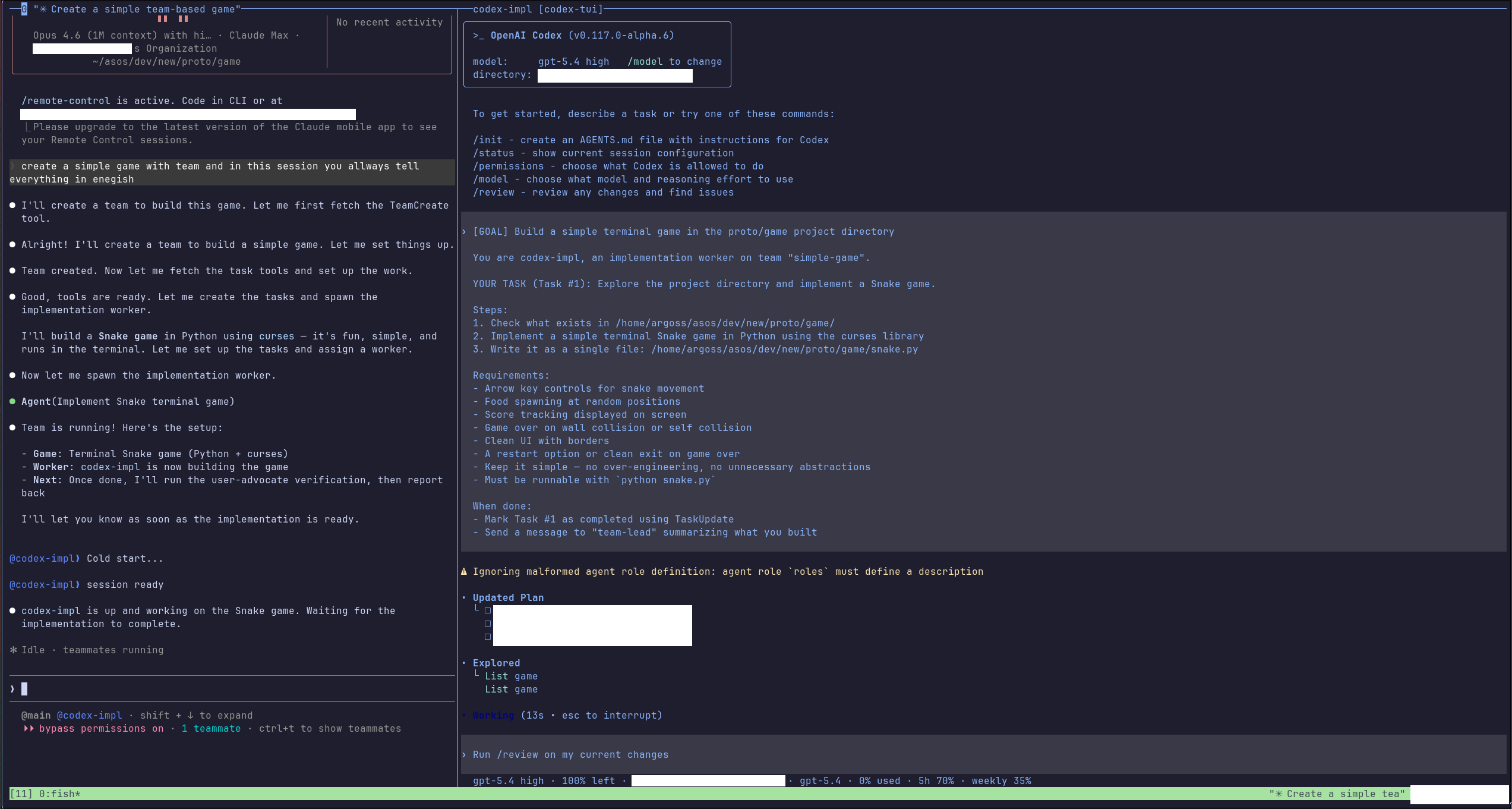
Table of Contents
- What it does
- Requirements
- Installation
- Setup
- Usage
- Routing Rules
- Environment Variables
- Architecture
- Usage Examples
- How Team Communication Works
- License
What it does
Claude Code's TeamCreate system can spawn multiple AI agents that collaborate on tasks. By default, all teammates are Claude instances. codex-bridge lets you mix in Codex (GPT) workers alongside Claude workers, all managed by the same team leader.
┌─────────────────────────────────────────┐
│            Claude Code (Leader)          │
│         TeamCreate / TeamDelete          │
├───────────┬───────────┬─────────────────┤
│ claude-*  │ codex-*   │ codex-*         │
│ Claude    │ Codex CLI │ Codex CLI       │
│ (native)  │ (bridge)  │ (bridge)        │
└───────────┴───────────┴─────────────────┘
Key Features
- Dual routing — Agent name prefix determines the backend:
codex-*→ Codex App Server,claude-*→ Claude Code passthrough, otherwise routes by model name - File-based IPC — Uses
~/.claude/teams/inbox/outbox JSON files withfs.watch+ polling for reliable cross-process communication - Leader outbox batching — Micro-batches leader messages (50ms debounce) to reduce file I/O
- 2-stage result storage — Full output saved to
results/directory; only a preview (500 chars) goes to the inbox, keeping context windows lean - Atomic file locking —
mkdir-based locks with stale detection for safe concurrent reads/writes - TUI viewer — Optional tmux pane with real-time streaming (ANSI fallback by default), plus native Codex TUI when available
- Native TUI recovery — If the in-place native TUI exits unexpectedly, the bridge restarts either the app-server + TUI or just the TUI depending on WebSocket health
- WebSocket recovery — Unexpected WebSocket shutdown triggers a one-shot app-server restart on a fresh port, escalates from
SIGTERMtoSIGKILLif needed, and forceserror-without-closeinto a close path so recovery actually runs - Live steering — Injects new messages into active turns via
turn/steerwithout restarting, with pending queue for failed steers - Goal-aware base instructions — Injects worker behavior rules plus the team
config.jsondescriptionintothread/startbase instructions - Message deduplication — Filters duplicate inbox deliveries with lightweight hash + TTL tracking before they can start or steer duplicate work
- Status and idle protocol — Sends immediate task-accepted ACKs, throttled
[STATUS]progress messages, and structuredidle_notificationupdates for available/completed/error states - Task auto-completion — Marks the worker's own
in_progresstask files ascompletedbefore advertising availability again - Config self-cleanup — Removes the worker from team
config.jsonduring shutdown so stale members do not linger - Graceful shutdown — Coordinates turn interruption, pane cleanup, leader notification, and final config cleanup
Requirements
| Dependency | Version | Required |
|---|---|---|
| Node.js | >= 18 | Yes |
| Claude Code CLI | latest | Yes |
OpenAI Codex CLI (codex) |
latest | Yes (for Codex workers) |
| tmux | any | Optional (for TUI viewer panes) |
Installation
git clone https://github.com/aproto9787/codex-bridge.git
cd codex-bridge
npm ci
Setup
Set the teammate command so Claude Code spawns workers through the bridge:
export CLAUDE_CODE_TEAMMATE_COMMAND="$(pwd)/codex-bridge.mjs"
Or point it at the bundled launcher script:
export CLAUDE_CODE_TEAMMATE_COMMAND="$(pwd)/run-bridge.sh"
run-bridge.sh is a tiny wrapper that resolves the repository directory and executes node codex-bridge.mjs "$@", which is convenient for shell profiles and direct debugging.
Usage
Once configured, use Claude Code's team system as usual. The bridge automatically routes agents based on naming convention:
# Start Claude Code — team workers will route through the bridge
claude

# Inside Claude Code, create a team:
# TeamCreate with agent names like "codex-analyst", "codex-coder" → Codex
# TeamCreate with agent names like "claude-reviewer" → Claude
Routing Rules
| Agent name pattern | Backend | Notes |
|---|---|---|
codex-* |
Codex CLI (App Server) | Always routes to Codex |
claude-* |
Claude Code (passthrough) | Always routes to Claude |
| Other | Auto-detect by model name | Falls back to Codex if not a Claude model |
Direct execution (debugging)
node codex-bridge.mjs --agent-name codex-worker --team-name my-team
Environment Variables
| Variable | Description | Default |
|---|---|---|
CLAUDE_CODE_TEAMMATE_COMMAND |
Path to bridge script (required for auto-spawn) | — |
CODEX_TUI_BIN |
Path to patched codex-tui binary | Search PATH → ANSI fallback |
CLAUDE_BIN |
Path to Claude Code binary | which claude |
CODEX_BRIDGE_TUI |
Set to 1 to enable TUI viewer pane |
0 (ANSI fallback) |
CODEX_BRIDGE_NATIVE_TUI |
Set to 0 to disable native TUI |
Auto-detect |
CODEX_ALPHA_BIN |
Path to codex-alpha binary |
Auto-discover |
CODEX_BRIDGE_VERBOSE |
Set to 1 for verbose logging |
0 |
Architecture
codex-bridge.mjs (single file, ~2750 lines)
├── CLI arg parser & routing logic
├── File-based IPC (inbox/outbox with fs.watch)
├── Leader outbox batcher (micro-batch writes)
├── Codex App Server session (stdio JSON-RPC; WebSocket when native TUI)
├── Claude Code passthrough (stdio forwarding)
├── ANSI renderer (compact/full modes)
├── TUI viewer + native TUI recovery
├── Task management (dedup, idle protocol, auto-complete)
└── Graceful shutdown, signal handling, and config self-cleanup
The bridge uses mostly Node.js built-ins for core functionality — ink and react for the optional TUI viewer, and ws (via transitive dependency) for WebSocket mode.
Usage Examples
Basic: Codex-only team
Spawn a team where all workers run through Codex CLI:
Leader (Claude Code)
├── codex-analyst   → researches codebase
├── codex-impl      → writes the code
└── codex-test      → runs and writes tests
In Claude Code, the leader orchestrates via TeamCreate:
"codex-analyst: explore the auth module and summarize how sessions are managed"
→ codex-impl picks up the findings and implements the fix
→ codex-test validates the result
Mixed team: Codex workers + Claude reviewers
Use Codex for heavy lifting, Claude for judgment calls:
Leader (Claude Code)
├── codex-analyst    → codebase exploration (Codex)
├── codex-impl       → implementation (Codex)
├── claude-reviewer  → code review & design judgment (Claude)
└── claude-architect → architectural decisions (Claude)
Routing is automatic — just name your agents with the right prefix:
codex-*→ routed to Codex CLIclaude-*→ routed to Claude Code passthrough
Common worker roles
| Agent name | Role | Backend |
|---|---|---|
codex-analyst |
Codebase exploration, research | Codex |
codex-impl |
Feature implementation, bug fixes | Codex |
codex-test |
Test writing, test execution | Codex |
codex-reviewer |
Pattern checks, lint-level review | Codex |
claude-reviewer |
Design judgment, complex review | Claude |
claude-architect |
High-level decisions, tradeoffs | Claude |
claude-frontend |
UI/UX implementation | Claude |
Full workflow example
# 1. Set up the bridge
export CLAUDE_CODE_TEAMMATE_COMMAND="/path/to/codex-bridge/run-bridge.sh"

# 2. Start Claude Code
claude

# 3. In Claude Code — the leader spawns a mixed team and delegates:
#    codex-analyst explores the repo
#    codex-impl writes the feature
#    claude-reviewer reviews the result
#    All coordination happens through ~/.claude/teams/ IPC
How Team Communication Works
- Leader writes a task to the worker's inbox (
~/.claude/teams/<team>/inboxes/<worker>.json) - Bridge detects the file change via
fs.watch(with polling fallback), ignores duplicate deliveries, and sends an immediate task-accepted ACK back to the leader - Bridge starts or reuses a Codex App Server session, injecting worker rules and the team goal (
config.jsondescription) intothread/start - Codex processes the task, streaming events back through the bridge over stdio or WebSocket
- Bridge emits
[STATUS]progress updates while the task is running and can steer additional messages into the active turn - Bridge collects the full response, saves it to
results/, and writes only a preview to the leader's inbox - Bridge auto-completes the worker's task file when possible, then sends a structured
idle_notificationdescribing whether it is available, completed, or failed - Leader reads the result and continues orchestration
License
MIT License — Copyright (c) 2025-2026 aproto9787
Reviews (0)
Sign in to leave a review.
Leave a reviewNo results found