PARSE
Health Warn
- License — License: MIT
- Description — Repository has a description
- Active repo — Last push 0 days ago
- Low visibility — Only 5 GitHub stars
Code Fail
- process.env — Environment variable access in .github/workflows/ci.yml
- fs module — File system access in .github/workflows/ci.yml
- child_process — Shell command execution capability in desktop/dev-launch.js
- process.env — Environment variable access in desktop/dev-launch.js
- child_process — Shell command execution capability in desktop/main.js
- process.env — Environment variable access in desktop/main.js
Permissions Pass
- Permissions — No dangerous permissions requested
No AI report is available for this listing yet.
PARSE — Phonetic Analysis & Review Source Explorer. Browser-based dual-mode workstation for linguistic fieldwork: tiered IPA/orthography annotation, cross-speaker cognate adjudication and borrowing detection, LingPy/NEXUS export, and AI-assisted STT via a React + Vite frontend, Python backend, and MCP tool surface.
PARSE — Phonetic Analysis & Review Source Explorer




Browser-based workstation for linguistic fieldwork and comparative analysis.
Transcribe recordings, keep timestamps trustworthy, compare forms across speakers, track borrowing evidence, and export clean datasets for downstream analysis.
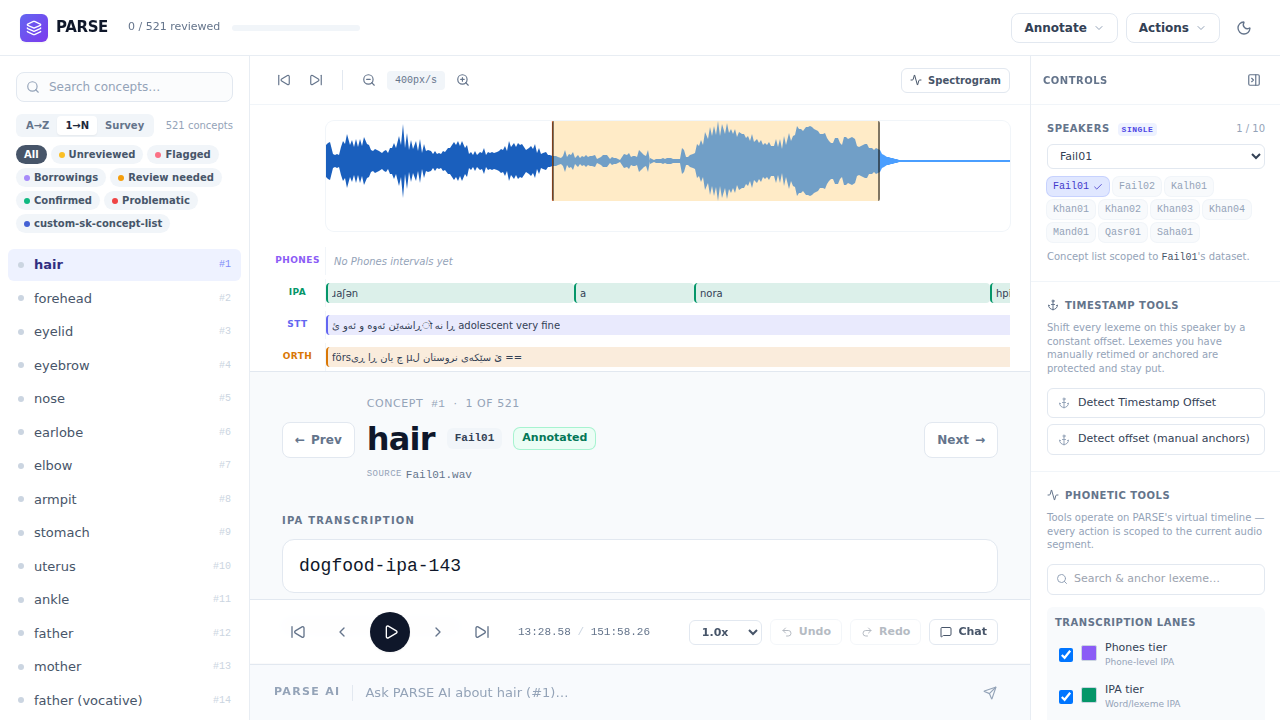
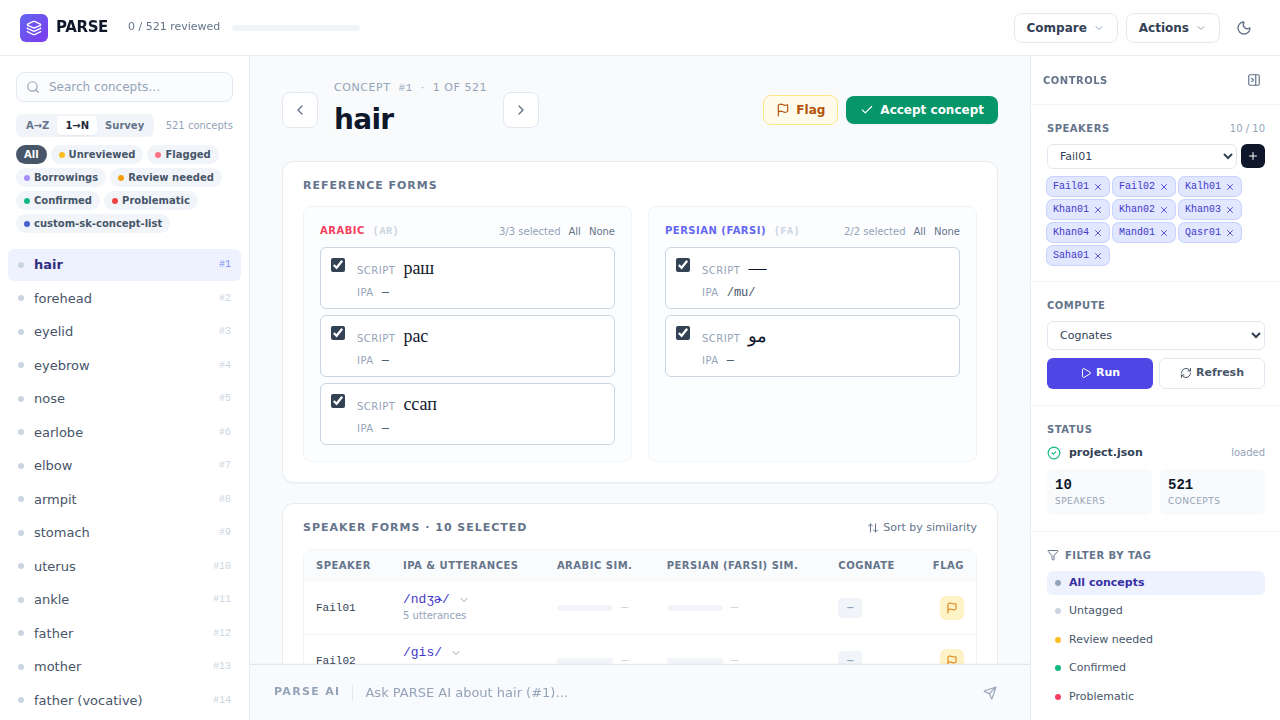
Status: Active research software. Fieldwork-facing features land frequently and file contracts still evolve.
The Problem
Fieldwork data often ends up split across audio editors, spreadsheets, scripts, and notes. That makes it easy to lose track of where a form came from, which timestamp was reviewed, and which comparison decisions are final. PARSE keeps the audio, annotations, comparison table, notes, borrowing evidence, and exports in one workspace.
Who It's For
Fieldwork linguists, comparative and historical linguists, and language-documentation teams working with long recordings, wordlists, and multiple speakers or varieties.
Table of Contents
- What PARSE Does
- How PARSE compares to tools you already use
- Research Workflow
- Quick Start
- Annotate
- Compare
- Use with Claude, Codex, and other AI agents
- Documentation
- Research & Citation
- License
What PARSE Does
- Annotate recordings — listen to long recordings, review each word or phrase, correct IPA and orthography, and keep the timestamps tied to the audio.
- Compare speakers — see the same word or concept across speakers, review variants, and make comparison decisions without rewriting the original data.
- Find words quickly — search across recordings when a target word is buried in hours of audio.
- Track notes and tags — mark forms as confirmed, uncertain, borrowed, dialect-specific, or anything else useful for analysis.
- Check borrowing evidence — bring in contact-language comparison forms with source information and citations.
- Export clean datasets — produce LingPy TSV and NEXUS files for downstream comparative and phylogenetic work.
- Automate repetitive work — use the local API and MCP server when AI agents or scripts need to import speakers, run jobs, or prepare exports.
How PARSE compares to tools you already use
PARSE does not replace ELAN, Praat, FLEx, or LingPy. It connects them and adds the connective tissue that fieldwork-to-phylogenetics workflows usually require manual stitching to achieve. The fit for someone already using those tools:
| Capability | ELAN | Praat | FLEx | LingPy | PARSE |
|---|---|---|---|---|---|
| Audio annotation | Unlimited hierarchical tiers | TextGrids + deep acoustics | Text-linked annotation | — | Modern waveform + spectrogram; 4 core lexeme tiers + sentence/speaker tiers |
| Cross-speaker comparison | Manual | Scripted | Lexicon-focused | LexStat cognate clustering | Dedicated Compare table over the same workspace; runs LingPy LexStat with a tunable threshold |
| Borrowing evidence | Manual | Manual | Manual | Programmatic | Manual flag in Compare; CLEF (Contact Lexeme Fetcher) auto-fetches contact-language forms from Wiktionary, ASJP, and Lexibank so you have something to compare against — the borrowing decision is yours, not algorithmic |
| Phylogenetic export | Custom scripts | Custom scripts | Limited | Native Wordlist | One-click LingPy TSV (ID / CONCEPT / DOCULECT / IPA / COGID / TOKENS / BORROWING) and NEXUS; downstream consumption is not yet covered by integration tests |
| AI / automation | Basic alignment | Powerful scripting | Low | Library scripting | Current Whisper STT via faster-whisper; optional forced alignment; 67-tool MCP agent layer |
| End-to-end workflow | Annotation only | Acoustics only | Lexicon & glossing | Computation only | Audio → annotation → comparison → export in one workspace; multiple WAVs per speaker currently need manual coordination |
| Stack | Java desktop | C / Pascal desktop | C# desktop | Python library | React 18 + Vite browser UI; Python HTTP server (FastAPI / Pydantic); Zustand state |
What this means in practice
- From ELAN or Praat. You will recognise the waveform-and-tier loop. PARSE has fewer fixed tier types than ELAN but adds a dedicated Compare view and one-click export to LingPy and NEXUS. Spectrograms are there for review, but PARSE is not a phonetics lab — no formant or pitch extraction.
- From FLEx. You will find lighter morphology and lexicon tooling, but stronger support for long fieldwork audio, multi-speaker comparison, and phylogenetic export.
- From LingPy. You will no longer rebuild a Wordlist TSV by hand. PARSE writes one directly from fieldwork audio, with LexStat clustering already run inside the Compare view.
PARSE's role is to be the connecting layer between annotation (ELAN / Praat) and phylogenetics (LingPy / BEAST), with a modern web UI and an agent-driven automation layer that the classic desktop tools do not currently provide.
Research Workflow
- Import or open a speaker recording.
- Review the audio, text, IPA, and timestamps in Annotate.
- Compare the same word or concept across speakers.
- Check borrowing evidence when contact influence matters.
- Export LingPy TSV or NEXUS for downstream analysis.
For the long-form walkthrough, see the User Guide.
Quick Start
git clone https://github.com/ArdeleanLucas/PARSE.git
cd PARSE
npm install

python3 -m venv .venv
source .venv/bin/activate
pip install -r python/requirements.txt

./scripts/parse-run.sh
Runs on macOS, Linux, and WSL. A GPU is optional; CPU-only works. Open Annotate at http://localhost:5173/ and Compare at http://localhost:5173/compare.
For environment notes, GPU configuration, workspace layout, and troubleshooting, see Getting Started. Adobe Audition marker CSV onboarding is documented in Audition CSV speaker import. For real fieldwork, point PARSE at a workspace root outside the git checkout.
Annotate
- Review long recordings with a zoomable waveform
- Keep IPA, spelling, meaning, and speaker information together
- Run transcription and alignment help when you need it, then review the result yourself
- Check and correct word boundaries when timing drifts
- Undo mistakes, retime clips, add notes, tag forms, and search for hard-to-find words
Full details in the User Guide.
Compare
- Side-by-side table for comparing the same word or concept across speakers
- Review multiple variants for a speaker and choose the form to use for comparison
- Merge or split analytical rows, add/delete per-speaker elicitation intervals, and preserve the underlying source data
- Survey/source labels and color cues for complex elicitation sets
- Tools for grouping related forms and revising those groups as evidence changes
- Borrowing review with contact-language evidence and citation cards
- Shared tags, speaker flags, and export-ready comparison data
- Export to LingPy-compatible TSV and NEXUS for downstream phylogenetic analysis
Full details in the User Guide.
Use with Claude, Codex, and other AI agents
PARSE can also be driven by scripts and AI agents. That means repetitive tasks — importing speakers, running support jobs, checking annotations, and preparing exports — do not have to happen only through the browser. The in-app assistant uses the same bounded PARSE tool layer.
For setup and the full automation reference, see the MCP Guide and Getting Started with External Agents.
Documentation
Getting Started
Core Concepts
- Architecture Overview — Includes diagrams of the worker system
- How Long-File Processing Works
- Chunking & Subprocess Isolation
- Device Selection (CPU/GPU)
User Guides
Reference
For Developers
Research & Citation
PARSE is general-purpose research software for fieldwork-driven comparative linguistics: long recordings, concept-based wordlists, cognate review, borrowing adjudication, and downstream analysis in LingPy, LexStat, or BEAST 2. It originated in University of Bamberg comparative-linguistics research, but it is not tied to one language family or thesis corpus. If you use PARSE in academic work, cite it as research software via CITATION.cff or GitHub's Cite this repository UI.
Ardelean, L. M. (2026). PARSE: Phonetic Analysis & Review Source Explorer [Computer software]. University of Bamberg. https://github.com/ArdeleanLucas/PARSE
See Research Context for full citation guidance and research framing.
Talks & Presentations
- AI as a scout, not a judge: PARSE & Southern Kurdish dialect phylogenetics (2026) — 15-minute case-study talk showing PARSE applied to one comparative-linguistics project. Slides · Repository
License
Reviews (0)
Sign in to leave a review.
Leave a reviewNo results found