mcp_flutter
Health Gecti
- License — License: MIT
- Description — Repository has a description
- Active repo — Last push 0 days ago
- Community trust — 289 GitHub stars
Code Gecti
- Code scan — Scanned 12 files during light audit, no dangerous patterns found
Permissions Gecti
- Permissions — No dangerous permissions requested
This tool is a Model Context Protocol (MCP) server and toolkit for Dart and Flutter. It allows AI coding assistants (like Claude, Cursor, or Codex) to directly inspect, interact with, debug, and drive a running Flutter application during development.
Security Assessment
Overall Risk: Medium
The static code scan of 12 core files passed with no dangerous patterns, hardcoded secrets, or dangerous permission requests. However, the tool's primary function inherently requires elevated system access to perform its intended job. By design, it can execute local commands, evaluate Dart expressions, and interact directly with your local file system and development environment. Additionally, its quick-start script relies on piping a remote bash script directly to execution (`curl | bash`), which is standard for many development tools but requires caution as it bypasses local review before running.
Quality Assessment
The project demonstrates excellent health and quality. It is actively maintained, with repository updates pushed as recently as today. It uses the permissive and standard MIT license. The project has generated solid community trust for a niche developer tool, currently backed by nearly 300 GitHub stars. Comprehensive documentation, migration guides, and architectural outlines are well-maintained and readily available.
Verdict
Use with caution — while the tool itself is safe, clean, and highly regarded, developers should review the bash installation script before execution and be aware that it grants their AI assistant deep control over their local development environment.
MCP server and MCP Toolkit for Flutter and Dart VM - supports dynamic tooling
flutter-mcp-toolkit
Inspect and drive a running Flutter app from your AI assistant.



flutter-mcp-toolkit is a Dart MCP server + Flutter package that lets AI
assistants (Claude Code, Cursor, Codex, Cline) take (semantic snapshots, tap
widgets, type into forms, hot-reload, and read logs from a Flutter app) or create its own tools and resources at runtime using MCP Toolkit —
without leaving the conversation.
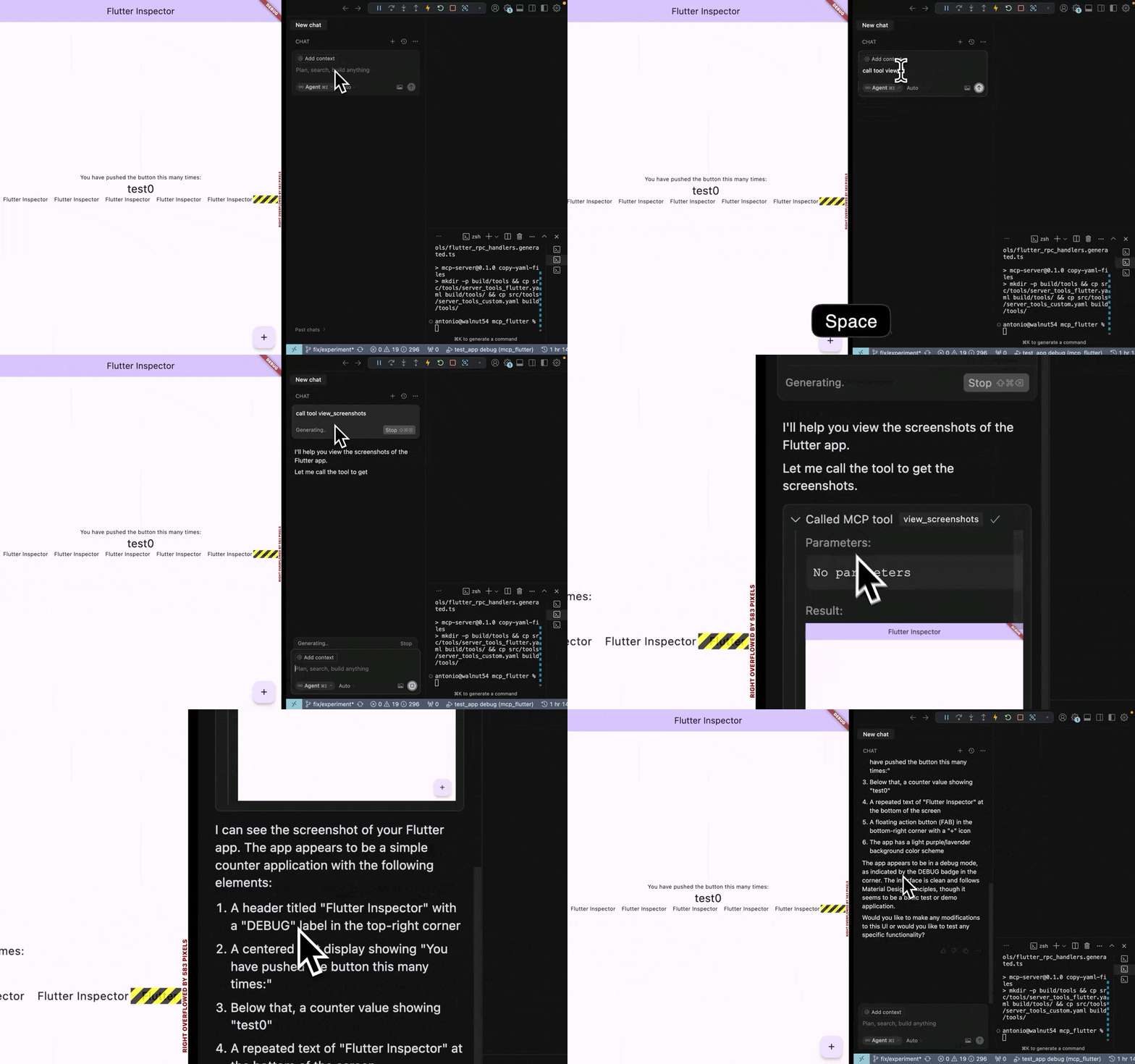
Get started in 4 steps
# 1. Install the binary
curl -fsSL https://raw.githubusercontent.com/Arenukvern/mcp_flutter/main/install.sh | bash

# 2. Add the toolkit to your Flutter app
cd my-flutter-app
flutter-mcp-toolkit codegen-init   # adds flutter_mcp_toolkit + emits main.dart snippet

# 3. Install skills for your AI agent
flutter-mcp-toolkit init claude-code   # or: cursor | codex | cline | all

# 4. Run
flutter run --debug
That's it. Your AI agent can now inspect and drive the running app.
Documentation
- Migrating v2 → v3 —
fmt_*MCP tools, binaries, client config keys,validate-runtime. - Why this repo matters — what it is, why it exists.
- CLI vs MCP — pick the right mode.
- Feature map — the 27 tools.
- AI agent setup — for non-Claude Code agents.
- Architecture — for contributors.
- Quick Start, Configuration, MCP RPC description
What it does
The toolkit exposes 27 MCP tools (under the fmt_* capability prefix) across four categories:
- Inspection — semantic snapshot, view details, errors, screenshots, VM info
- Interaction — tap, scroll, type, fill forms, hot-reload, navigate, wait_for
- Debug — recent logs, evaluate Dart expressions
- Lifecycle — discover apps, hot-reload, hot-restart
See the flutter-mcp-toolkit-{guide,inspect,control,debug} skills for the full
reference (installed by flutter-mcp-toolkit init).
Dynamic Tools Registration
Flutter apps can register custom tools and resources at runtime. See how it
works in this short YouTube video.
The same arguments.connection targeting is supported by the CLI's exec,batch, daemon command/execute, daemon watch/start, and snapshot step args.
⚠️ Note on Dump RPCs
Dump RPC methods (like dump_render_tree) can produce huge token output and
are disabled by default. Enable with --dumps. See
mcp_server_dart README for the full flag surface.
🔒 Security
Generally, since you use MCP server to connect to Flutter app in Debug Mode, it should be safe to use. However, I still recommend to review how it works in ARCHITECTURE.md, how it can be modified to improve security if needed.
This MCP server is verified by MseeP.ai.
🔧 Troubleshooting
Connection Issues
- Ensure your Flutter app is running in debug mode
- Verify the port matches in both Flutter app and MCP server
- Check if the port is not being used by another process
- Safest explicit targeting: use
arguments.connection.uriand paste exact Flutter machineapp.debugPort.wsUri - If response includes
connection_selection_required, retry witharguments.connection.targetIdusing one URI fromavailableTargets(or setarguments.connection.uridirectly)
AI Tool Not Detecting Inspector
- Restart the AI tool after configuration changes
- Verify the configuration JSON syntax
- Check the tool's logs for connection errors
Dynamic Tools Not Appearing
- Ensure
flutter_mcp_toolkitpackage is properly initialized in your Flutter app - Check that tools are registered using
MCPToolkitBinding.instance.addEntries() - Use
fmt_list_client_tools_and_resourcesto verify registration - Hot reload your Flutter app after adding new tools
- Ensure
The Flutter MCP Server is registered with Smithery's registry, making it discoverable and usable by other AI tools through a standardized interface.
Integration Architecture
┌─────────────────┐     ┌───────────────────────┐     ┌─────────────────┐
│                 │     │  Flutter App with     │     │                 │
│  Flutter App    │<--->│  flutter_mcp_toolkit  │<--->│ flutter-mcp-    │
│  (Debug Mode)   │     │  (VM Svc. Extensions  │     │ toolkit-server  │
│                 │     │  + Dynamic Tools)     │     │                 │
└─────────────────┘     └───────────────────────┘     └─────────────────┘
🤝 Contributing
Contributions are welcome! Please feel free to submit pull requests or report issues on the GitHub repository.
✨ Contributors
Huge thanks to all contributors for making this project better!


📖 Learn More
- Flutter DevTools Documentation
- Dart VM Service Protocol
- Flutter DevTools RPC Constants (I guess and hope they are correct:))
Star History
📄 License
MIT - Feel free to use in your projects!
Flutter and Dart are trademarks of Google LLC.
Yorumlar (0)
Yorum birakmak icin giris yap.
Yorum birakSonuc bulunamadi