luffy-arm
Health Pass
- License — License: MIT
- Description — Repository has a description
- Active repo — Last push 0 days ago
- Community trust — 18 GitHub stars
Code Fail
- rm -rf — Recursive force deletion command in install.sh
Permissions Pass
- Permissions — No dangerous permissions requested
No AI report is available for this listing yet.
Give a local AI coding agent a remote hand over SSH: the brain stays local while an SSH tentacle reaches into a remote Linux server to read/run/diagnose, behind tiered safety. Reverse Remote-SSH, packaged as a Claude Code skill.

🦾 Luffy's Arm


Give a local AI coding agent a remote hand. The agent's brain — its process,
config, and memory — stays on your machine; only a single SSH "arm" reaches into a
remote Linux server to read, run, and diagnose, behind tiered safety.
It's the inverse of cloud dev / remote-control tools. Those move the compute to the
server and have you steer a remote agent. luffy-arm keeps the agent home and lets it
reach out — reverse Remote-SSH: brain local, hand remote.
Built entirely from native parts (SSH keys, ~/.ssh/config, ControlMaster, POSIX
ACLs, ssh-agent). No daemon, no custom protocol, nothing to trust beyond OpenSSH.
👉 New here? Start with
TUTORIAL.md— a complete, zero-assumptions
walkthrough (no prior SSH knowledge needed; ~15 minutes from nothing to a working channel).
Why
You write code locally and your data/compute live on a server. You want the agent to go
look at the data and run things there — without shipping your brain, memory, or
credentials to a shared box. luffy-arm is that channel, with guardrails.
When you need this
- A shared/institutional HPC or lab server where you can't install an AI agent — no
root, no outbound network, or policy forbids it; SSH/SFTP is the only way in. luffy-arm
keeps the agent on your laptop and gives it a hand on the server. - Your data is too big to sync down — the agent explores and filters it in place and
pulls back only the results. - You want AI hands on a box, but with OS-enforced guarantees — a dedicated
unprivileged account, read-only ACLs, nosudowithout your password. - One setup serves every agent you use — Claude Code, Codex, Cursor, OpenCode.
How it works
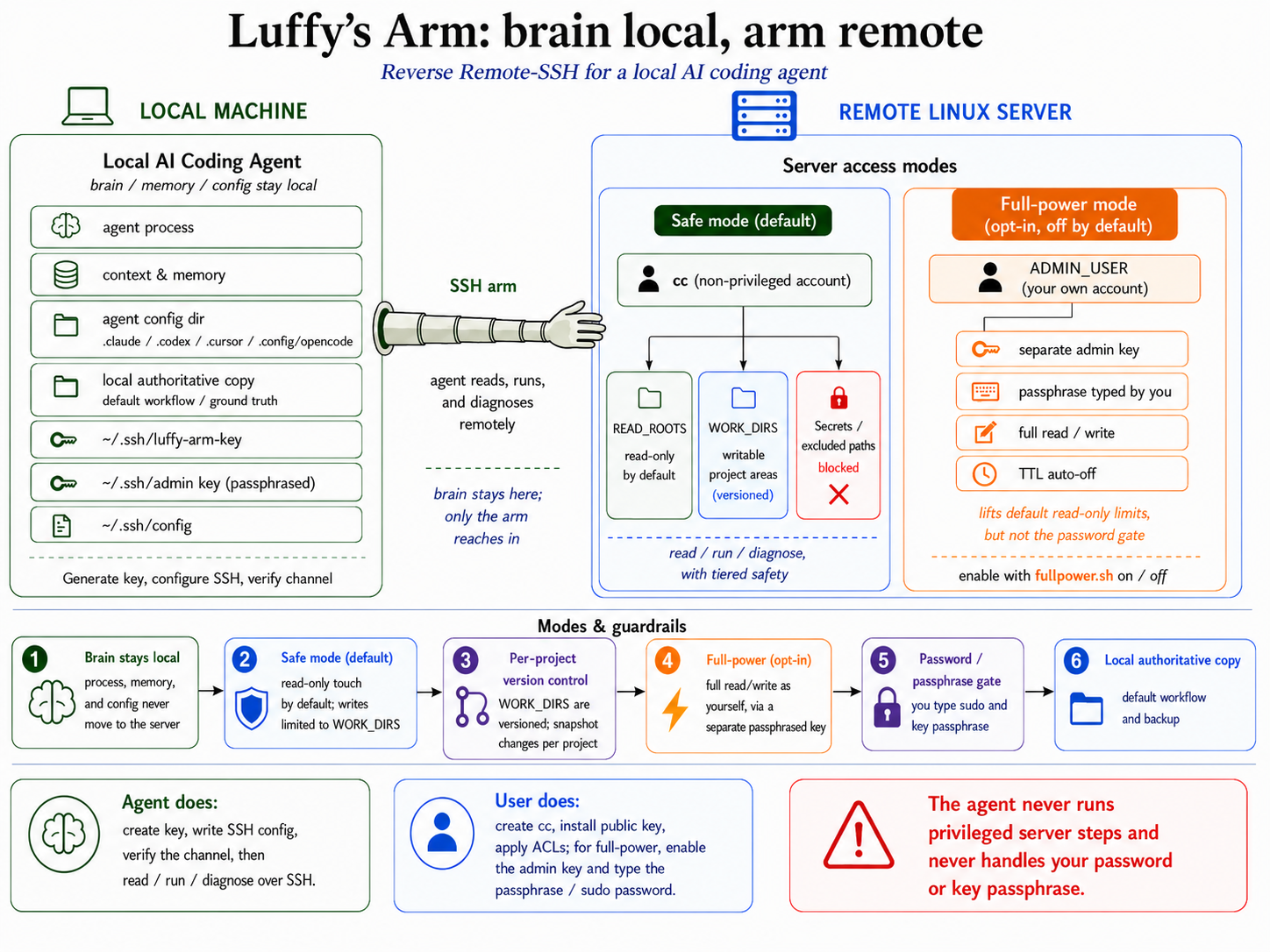
Tiered safety (details in references/security-model.md):
- 🔒 sudo password gate —
ccis non-privileged;sudoneeds a password only you know. - 👁 data read-only (ACL) —
ccreads yourREAD_ROOTS; secrets are carved out. - ♻ per-project version control —
WORK_DIRSare writable; you snapshot per project. - 🗄 local authoritative copy — your local source is the ground truth.
Optional 📓 command auditing (off by default): a server-side sshd wrapper logs every
command the agent runs as cc to the root-owned journal — detect, not prevent. Turn it
on/off with scripts/gen-audit-setup.sh (references/audit-logging.md).
Who does what
| The agent does (💻 local, after you authorize) | You do (🖥 server, with your sudo) |
|---|---|
Generate the SSH key, write ~/.ssh/config, verify the channel, then read/run/diagnose over ssh |
Create the cc account, install the public key, apply the read/write ACLs |
It hands you the exact privileged commands; you run them with your sudo
(security model).
Prerequisites
- Local: an AI CLI agent (Claude Code / Codex / Cursor / OpenCode) + OpenSSH.
- Remote: Linux with
sshd+ theaclpackage + a sudo-capable human (one-time setup only).
Install
Claude Code — via the plugin marketplace (recommended; gets you one-command updates, and
opt-in auto-update):
/plugin marketplace add Ares960826/ares-agent-toolkit
/plugin install luffy-arm@ares-toolkit
Any agent — one command that auto-detects your agent(s) and installs into the right skills
dir for each (Claude Code, Codex, Cursor, OpenCode):
curl -fsSL https://raw.githubusercontent.com/Ares960826/luffy-arm/main/install.sh | bash
From a clone instead: git clone https://github.com/Ares960826/luffy-arm && bash luffy-arm/install.sh
# Claude Code · Cursor · OpenCode (all read ~/.claude/skills/):
git clone https://github.com/Ares960826/luffy-arm ~/.claude/skills/luffy-arm

# Codex (reads ~/.agents/skills/ — NOT ~/.claude):
git clone https://github.com/Ares960826/luffy-arm ~/.agents/skills/luffy-arm
Then just tell your agent what you want — e.g. "set up luffy-arm to my GPU box" or
"use luffy-arm to poke around my server" — and it follows SKILL.md.
First time? The friendly end-to-end walkthrough is TUTORIAL.md.
Cursor note: Cursor is a GUI/IDE, not a headless CLI. The skill installs and works inside
Cursor's agent chat, but each shell step goes through Cursor's command-approval UI — it can't
be driven unattended the way Codex/OpenCode can.
Via the toolkit: it's also referenced fromares-agent-toolkit as a submodule.
Quick start
The easy way — let your agent drive it. After installing, just say:
"Use luffy-arm to set up access to my server."
The agent configures everything local automatically, interviews you for the details, and hands
you one server command to run. You only ever do the parts it can't (type your sudo password
on the server). See SKILL.md for exactly what it does.
# 1. fill in your params (kept OUTSIDE the repo)
mkdir -p ~/.config/luffy-arm && cp scripts/params.example.sh ~/.config/luffy-arm/params.sh
$EDITOR ~/.config/luffy-arm/params.sh

# 2. local: make the key + ssh config
bash scripts/keygen.sh        # prints the public key
bash scripts/ssh-config.sh

# 3. generate the filled-in server script, then run it ON THE SERVER (you, with sudo)
bash scripts/gen-server-setup.sh          # writes luffy-arm-server-setup.sh
#   scp luffy-arm-server-setup.sh you@server:~/ && ssh you@server 'bash luffy-arm-server-setup.sh'

# 4. local: verify the channel + all safety nets
bash scripts/verify.sh        # → 🎉 all passed
Full hand-holding walkthrough: TUTORIAL.md.
Updating
luffy-arm tells you when a newer version is published (verify.sh prints a one-line nudge), and
upgrading is one step:
Claude Code (plugin marketplace):
Org admins: push auto-update to everyone via managed settings/plugin update luffy-arm@ares-toolkit. To keep it
automatic, turn on auto-update once:/plugin→ Marketplaces → select ares-toolkit
→ Enable auto-update. (Third-party marketplaces don't auto-update until you flip that
switch — deliberate, for a tool that touches SSH. Prefer to review changes first? Leave it off
and run/plugin updatewhen you want.)// managed-settings.json (admin/managed scope — NOT user settings.json) { "extraKnownMarketplaces": { "ares-toolkit": { "source": { "source": "github", "repo": "Ares960826/ares-agent-toolkit" }, "autoUpdate": true } } }Codex / Cursor / OpenCode / curl installs:
bash scripts/update.sh(pulls the latest and
re-installs into every detected agent).
Fetching data to your machine
Pulling server data down to where the brain lives is a core use — anything cc can read
(your READ_ROOTS, minus the READ_EXCLUDES secrets) comes down over the same host alias:
scp mybox:/data/run42/metrics.json ./                        # one file
rsync -avz --partial --progress mybox:/data/run42/ ./run42/  # a directory (resumable)
ssh mybox "tar czf - /data/run42" | tar xzf -                # stream a whole tree, no temp files
Secrets in READ_EXCLUDES can't be read, so they can't be pulled; uploads land only inWORK_DIRS.
The luffy-arm command (optional shortcut)
install.sh also drops a luffy-arm command into ~/.local/bin — a thin wrapper so you can
type short subcommands instead of full script paths:
luffy-arm help                 # list everything
luffy-arm verify               # safe-mode channel + safety-net check
luffy-arm fullpower on|off     # opt-in write-as-yourself (you type the passphrase)
luffy-arm audit-gen            # generate the opt-in server audit script
luffy-arm setup | grant | update | …
It forwards to the same scripts/*.sh and changes no behavior — every passphrase and sudo
prompt is exactly as before. It's a symlink, so it tracks updates; remove it withrm ~/.local/bin/luffy-arm. The installer also adds a shorter luffy alias (so luffy verify works too) — but only when no other luffy is already on your PATH, since an unrelated
Homebrew CLI ships that name; if it's taken, the installer says so and you keep luffy-arm. The
AI agent doesn't use this; it calls the scripts directly.
Layout
TUTORIAL.md               # full human walkthrough — start here if you're new
SKILL.md                  # agent playbook (read first if you're an AI agent)
scripts/                  # dispatcher: luffy-arm  (the `luffy-arm <cmd>` command)
                          # safe mode:  keygen.sh · ssh-config.sh · gen-server-setup.sh · verify.sh · grant.sh · params.example.sh
                          # full-power: admin-keygen.sh · fullpower.sh · verify-fullpower.sh
                          # auditing:   gen-audit-setup.sh  (opt-in command log)
                          # upkeep:     update.sh · check-update.sh
references/               # setup-guide.md · server-setup.md · security-model.md · audit-logging.md
Scope
- Safe mode (default):
ccreads your data, writes only inWORK_DIRS. - Full-power mode (opt-in): log in as yourself for full read/write, gated by a
passphrase only you type, TTL auto-off. How & why:references/security-model.md.
Contributing & issues
PRs welcome — see CONTRIBUTING.md. Found a bug or want a
feature? Open an issue — templates guide you. Vulnerabilities: SECURITY.md.
Stuck? Troubleshooting lives in TUTORIAL.md §7 andreferences/setup-guide.md.
License
MIT © Ares960826
Reviews (0)
Sign in to leave a review.
Leave a reviewNo results found