gxworks-agent
Health Warn
- License — License: Apache-2.0
- Description — Repository has a description
- Active repo — Last push 0 days ago
- Low visibility — Only 5 GitHub stars
Code Pass
- Code scan — Scanned 12 files during light audit, no dangerous patterns found
Permissions Pass
- Permissions — No dangerous permissions requested
No AI report is available for this listing yet.
AI engineering agent for Mitsubishi GX Works2 with MCP support for PLC programming, project editing, validation, diagnostics, and external AI agents such as Codex.
GXWorks Agent
简体中文 | English
AI-native engineering workbench and agent runtime for Mitsubishi MELSEC PLC development.
Natural language → confirmed specification → shared generation context → PLC IR → deterministic engineering workflows → GX Works2 / GXW → simulation and validation evidence.




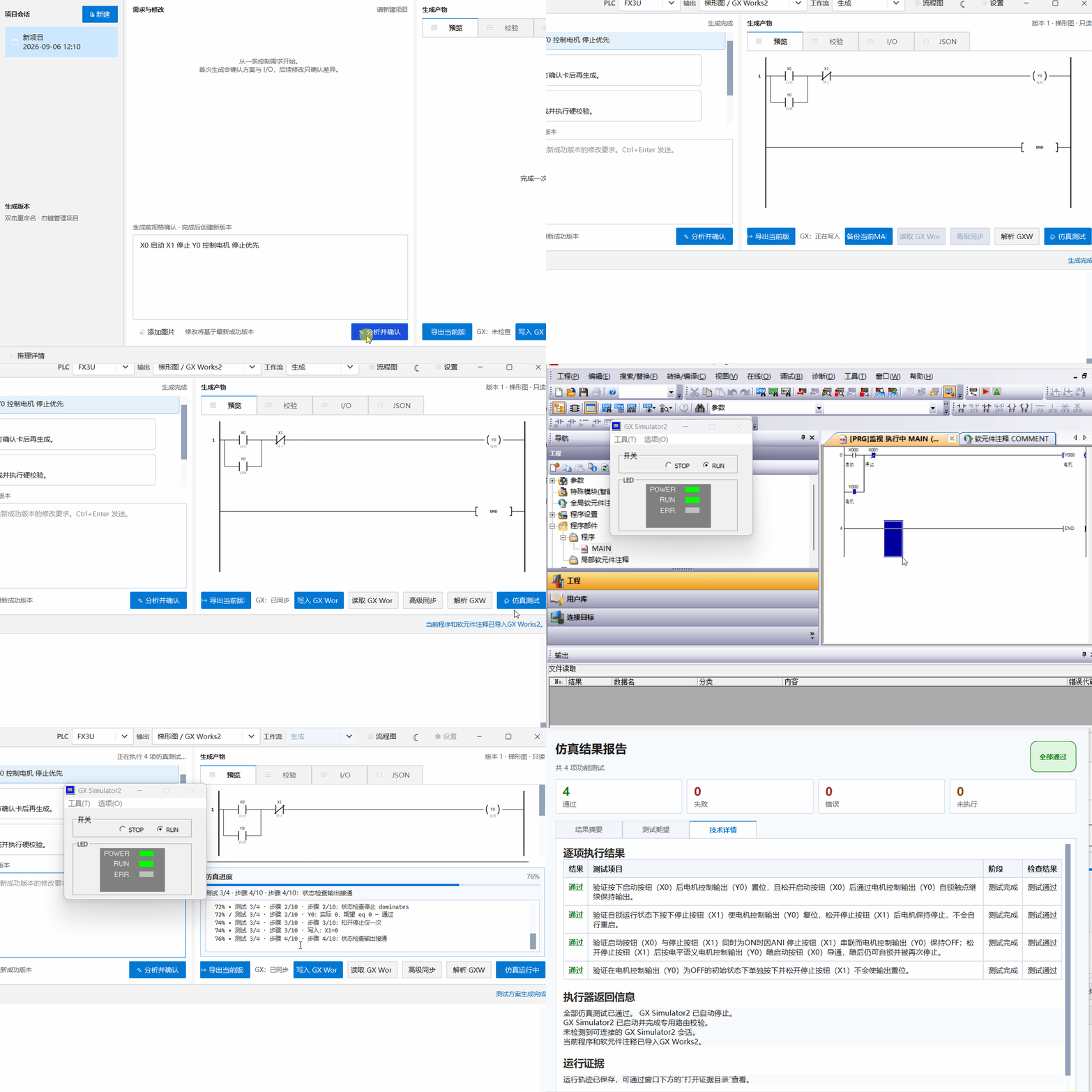
GXWorks Agent is an experimental AI-native engineering workbench for Mitsubishi MELSEC PLC development. It combines natural-language programming, confirmed engineering specifications, deterministic program processing, versioned project state, local knowledge retrieval, simulation workflows, GX Works2 integration, and a shared tool runtime for built-in and external AI agents.
The project follows one core rule: LLM output is not treated as an engineering result by itself. Models propose programs and engineering actions; the application owns project state, PLC IR construction, structural acceptance, scope control, versioning, approvals, evidence, and external side effects.
The current implementation is focused on FX3U + GX Works2. The Ladder CSV workflow is the most mature backend, while native GXW / Structured Ladder / FBD support remains an evidence-backed experimental track.
Quick start
1. Windows Web workbench
For the packaged Windows release, extract the complete GXWorks-Agent-Web directory and double-click:
start-web.cmd
Choose a workspace folder. Validated direct generation and local edits are saved with version history. In Settings → General → Operation approvals, choose Ask for approval (default), Approve for me, or Full access. These modes govern supported external GX / simulation / debug actions; they do not disable PLC validation. Full access requires explicit confirmation. The optional -ReadOnly recovery flag remains available.
The toolbar exposes Export files, Read from GX, Send to GX, a refresh/redraw control, and More for import, conversion, and synchronization. File export does not require a GX connection.
The packaged Web release does not require a separate Python, Node.js, or Qt installation. Starting the workbench does not automatically start GX Works2, GX Simulator2, a simulator gateway, or a physical PLC connection.
See Web workbench guide for source installation, approval boundaries, workspace locking, MCP service mode, and Windows integration details.
2. Connect Codex
GXWorks Agent can expose the currently selected PLC project directly to Codex App through its local MCP engineering interface. Codex CLI is optional.
- Start GXWorks Agent Web and open a PLC project.
- Go to Settings → Model → Integrations / MCP.
- Click Connect Codex.
- Restart Codex App and create a new task.
- Ask for the engineering task directly, for example:
Use gxworks to create a Mitsubishi start/stop latch:
X0 start, X1 stop, Y0 motor.
Codex uses the same selected project, confirmed specification, local PLC knowledge retrieval, candidate processing, PLC IR construction, and engineering core as the built-in generation workflow. No GXWorks client skill is required; MCP is the engineering interface, while optional client prompts or skills are guidance only.
See Codex integration and MCP integration.
3. Source installation
For the Web source build, install the backend runtime once and use the root frontend builder:
git clone https://github.com/Arienax/gxworks-agent.git
cd gxworks-agent

python -m venv .venv
.\.venv\Scripts\Activate.ps1
python -m pip install -r requirements/web.txt

.\build-web.bat --no-pause

$env:PYTHONPATH = (Resolve-Path .\src).Path
python -m integrations.web --workspace "D:\PLCWorkspaces\my-workspace" --port 8765 --open-browser
build-web.bat performs npm ci → npm run types → npm run build and writes the frontend build to web/dist.
The retained Qt development entry is still available:
python -m pip install -r requirements.txt
python src\main.py
Run tests with:
pytest -q
A Windows 7 compatibility dependency set is also retained:
pip install -r requirements/win7.txt
API keys are stored in Windows Credential Manager rather than committed into repository configuration files.
One engineering core, multiple AI entry points
Built-in model providers and external agents are intentionally kept above the same engineering layer instead of receiving separate PLC implementations.
                 ┌─────────────────────────┐
                 │ Built-in ModelProvider  │
                 │ DeepSeek / compatible   │
                 └────────────┬────────────┘
                              │
External AI agents            │
Codex / MCP clients           │
          │                   │
          ▼                   ▼
        MCP          Shared generation context
          │          prompt / spec / RAG / program
          └──────────────┬───────────────┘
                         ▼
                Candidate preparation
          compatibility / scope / structure
                         ▼
                       PLC IR
                         ▼
                 Tool Runtime / PLC Core
              ┌──────────┼───────────┐
              ▼          ▼           ▼
          GX Works2   Simulator    GXW / FBD
For normal Ladder generation and editing, the built-in API and external MCP clients share the same generation instructions, confirmed project context, local RAG policy, compatibility normalization, structural acceptance, PLC IR construction, and artifact renderer.
This avoids a second MCP-only interpretation or validation policy. External agents perform the planning/model role; GXWorks Agent remains responsible for deterministic engineering state and boundaries.
Current capability status
| Area | Status |
|---|---|
| Natural-language analysis and confirmed specification | ✅ Available |
| Ladder generation, partial editing, SVG and CSV artifacts | ✅ Available |
| PLC IR, structural acceptance, static inspection, Diff and versioning | ✅ Available |
| Program Explorer, address/comment search and reference navigation | ✅ Available |
| Scoped program modification and change summaries | ✅ Available |
| GX Works2 Ladder CSV import / export and synchronization | ✅ Available |
| FX3U manual / engineering knowledge retrieval | ✅ Available |
| Local Web engineering workbench and persistent jobs | ✅ Available |
| Built-in engineering agent and structured Tool Runtime | ✅ Available |
| Standalone MCP server and Web service bridge | ✅ Available |
| Codex App MCP onboarding and client-activity visibility | ✅ Available |
| Editable simulation workbench and test-plan workflow | 🧪 Experimental |
| Issue → network → test traceability | 🧪 Experimental |
| GX Simulator2 automated execution and evidence capture | 🧪 Experimental |
| Evidence-bound debug planning and scoped patching | 🧪 Experimental |
| Read-only physical PLC observation for advanced maintenance | 🧪 Experimental |
| GXW inspection and round-trip writing | 🧪 Experimental |
| Structured Ladder / FBD generation and editing | 🧪 Experimental |
| GXW import, preview, local versioning, download and controlled open | 🧪 Experimental |
| Structured Text generation | 🧪 Experimental |
| Native automated GXW compile command | 🚧 Not complete |
| FBD simulation / diagnostics | 🚧 Not complete |
| Full arbitrary GXW / IEC FBD support | 🚧 Not complete |
| GX Works3 adapter | 📋 Planned |
| Physical PLC write path | 📋 Not exposed by the current Web workflow |
Status labels are intentionally conservative. “Experimental” means that a controlled implementation and test evidence exist, not that the capability is a universal production backend across arbitrary PLC programs, GX versions, or CPU models.
Why GXWorks Agent exists
A conventional LLM workflow often stops at:
Prompt
  ↓
LLM
  ↓
PLC code
GXWorks Agent keeps an explicit engineering loop:
Natural-language requirement
          ↓
Requirement analysis
          ↓
Confirmed control specification
          ↓
Shared generation context
          ↓
Candidate program
          ↓
Structural acceptance / PLC IR
          ↓
Versioned project + Diff
       ┌──────┼────────┐
       ▼      ▼        ▼
    Review  Simulation  GX Works2 / GXW
       │      │        │
       └──── evidence ─┘
The goal is not to replace engineering state with chat history. LLM reasoning remains useful for interpretation, planning, review, and diagnosis, while deterministic application code owns project state and execution boundaries.
Example
Describe the required machine behavior directly:
X0 starts the motor.
X1 stops the motor.
Y0 drives the motor contactor.

The motor must latch after the start button is released.
Stop has priority over start.

When X2 detects a workpiece,
stop the motor after 3 seconds.

After power recovery, the motor must not restart automatically.
The analysis stage can turn that request into a reviewable control specification containing programming approaches, clarification questions, parameters, and I/O assignment. Generation begins after the specification is confirmed.
Web engineering workbench
The Web frontend is a local React/Vite interface backed by FastAPI. PLC semantics stay in the Python engineering core; the browser is an operator surface rather than a second implementation of PLC logic.
The workbench currently provides:
- project and version navigation
- Ladder, FBD, ST, diagnostics, review, simulation, and delivery views
- natural-language analysis / generation / agent tasks
- editable confirmed specifications
- persistent job progress and reconnectable event history
- Program Explorer with network selection, address/comment search, reference navigation, zoom, and model-free redraw
- scoped modifications with affected-network / affected-device summaries
- issue cards linked to reports, networks, evidence, and reproduction tests
- editable version-bound simulation plans and run replay
- candidate proposal review and Diff inspection
- automatic validated local saves plus workspace-configured approval for GX import, simulation, and debug execution
- GXW import and FBD editing
- model configuration, Codex/MCP onboarding, service checks, and actual MCP client activity
- advanced read-only PLC observation with bounded station/address/adapter scope
- readable engineering delivery summaries
Jobs continue in the backend if the browser is refreshed or closed. Their project, base version, confirmed specification, model settings, and response-language policy are frozen when submitted.
Proposal approval is version-bound and hash-bound. A stale browser tab cannot silently apply a candidate against a newer active version.
Confirmed specification
GXWorks Agent does not assume that the first natural-language prompt is a complete PLC requirement.
The analysis workflow can produce a specification draft containing:
- requirement summary
- candidate programming approaches
- clarification questions and selectable answers
- parameters and suggested defaults
- I/O assignment
- user notes
The user confirms this specification before generation. Generated candidates are then bound to confirmed engineering context and project/version state.
This reduces a common failure mode of AI-generated PLC programs: producing syntactically plausible logic for an underspecified control problem.
Shared generation context and candidate pipeline
The built-in API and external MCP clients use a shared, model-independent generation layer.
get_generation_context can expose the engineering projection required by an external agent:
- selected project and PLC model
- confirmed specification
- current Ladder program for edits
- generation instructions and output discipline
- local RAG evidence under the same retrieval policy as the built-in API
- the supported candidate output contract
Ordinary first generation and edits then converge on the same candidate pipeline:
Built-in model response OR external agent candidate
                    ↓
        compatibility normalization
                    ↓
        full / partial edit assembly
                    ↓
      structural + address acceptance
                    ↓
   conservative condition normalization
                    ↓
                PLC IR
                    ↓
       JSON / ST / SVG / CSV artifacts
There is no hidden semantic re-generation loop after a confirmed-spec generation. A structurally invalid response fails with diagnostics; explicit Debug/repair remains a separate scoped workflow.
Compatibility normalization handles supported legacy encodings before validation so representational differences do not become artificial model failures. It does not allow unsupported instructions or invalid devices to bypass the PLC instruction/address checks.
PLC Intermediate Representation
The internal PLC IR is the semantic layer between model output and engineering operations.
                    ┌─ Ladder CSV
                    ├─ Structured Text
AI → PLC IR ────────┼─ SVG preview
                    ├─ static inspection
                    ├─ Diff / scoped change analysis
                    ├─ test planning
                    └─ GX Works2 adapters
PLC IR represents networks, instructions, devices, timers/counters, reads/writes, execution triggers, revisions, static findings, I/O mapping, semantic requirements, and deterministic renderable program state.
The model therefore does not need to regenerate the entire project as unstructured text for every engineering operation.
Program inspection, editing and versioning
Ordinary edits use the same candidate pipeline as first generation rather than a separate repair engine. Existing programs can be edited through a compact partial response containing only changed/new complete rungs, comment changes, and explicit deletions.
Current program
      ↓
Modification request
      ↓
Shared generation context
      ↓
Partial candidate
      ↓
Structural acceptance
      ↓
Diff / change summary
      ↓
Version history
For example:
Make the stop logic stop-priority.
Do not modify any other Network.
Explicit evidence-scoped Debug work is different: read_network → patch_program keeps its stricter network/address scope and does not become the normal edit path.
A saved local version does not imply that the program has been imported, natively compiled, simulated, or executed on a PLC.
Validation, review and evidence boundaries
GXWorks Agent deliberately separates different levels of evidence:
- Structural acceptance — the candidate can be represented and processed safely.
- PLC IR consistency — the deterministic internal representation is internally valid.
- Static engineering review — local analyzers and optional AI reviewers report risks and findings.
- Behavior verification — concrete input/timing behavior is checked by an executed test or simulation.
- Native / hardware verification — GX Works2, GX Simulator2, or a physical target actually performed the reported operation.
Passing one level is never reported as proof of later levels.
The review pipeline can check structural validity, devices and addresses, instruction constraints, timer/counter structure, I/O references, read/write dependencies, multiple writers, latch/reset ownership, state behavior, timing paths, and other Ladder risks. Optional AI specialist review can add interpretation while preserving deterministic findings.
Candidate
   ↓
Local deterministic inspection
   ↓
Optional AI specialist review
   ↓
Version-bound evidence report
GX Works2 Ladder integration
The most mature GX Works2 backend remains the Ladder CSV import / export workflow.
Current capabilities include:
- Ladder CSV and device-comment CSV generation
- GX Works2 import / export
- program and comment synchronization
- automatic backup before overwrite
- synchronization baselines
- detection of external manual edits
- conflict protection
- optional round-trip verification
If GXWorks Agent detects that a GX Works2 program changed manually after the last synchronization baseline, it stops rather than silently overwriting the engineer’s changes.
Some GX Works2 operations still depend on GUI automation and therefore remain sensitive to GX version, language, desktop state, and Windows session conditions.
Native GXW / Structured Ladder / FBD workflow
GXWorks Agent contains an experimental native GXW project pipeline for GX Works2 Structured Ladder / FBD.
The work is based on reverse engineering with controlled compile / save / reopen experiments. Unknown structures are preserved rather than guessed, and generation is limited to layouts and ABIs with reproducible evidence.
The current pipeline can inspect selected Program.pou records, preserve unrelated and unknown records, generate supported FX3U Structured Ladder / FBD objects and wires, edit known declarations, keep supported FB instance declarations synchronized, grow required CFB allocations, update known GXW metadata, generate FBD/GXW artifacts and write reports, import GXW into the Web workbench, preview/version/download candidates, and open approved copies through the controlled GX execution queue.
Supported generated templates include normally-open / normally-closed contacts, coils, terminals, MOV, TON, TON_E, CTU, CTU_E, and selected saved Function / Function Block ABI templates.
Important limitations remain:
- arbitrary custom libraries, structures, and unknown FB ABIs are not generically synthesized
- imported GXW CPU identification is incomplete
- arbitrary IEC FBD semantics are not implemented
- multiple independent Ladder-block encoding rules are not fully generalized
- native automatic compile invocation is not complete
- FBD simulation, diagnostics, and CSV synchronization are not yet connected
Engineering evidence and current boundaries:
docs/research/gxw_declarations_allocation_web_fbd_20260910.mddocs/research/gxw_project_write_pipeline_20260910.md
GX Simulator2 testing and evidence-bound debugging
GXWorks Agent can build version-bound simulator test plans from the current PLC program. The editable simulation workbench can represent initial inputs, timed stimuli, expectations, waits, invariants, trace devices, supported fault injections, and requirement/issue links.
PLC program
     ↓
AI / operator test planning
     ↓
Deterministic Test DSL
     ↓
Saved version-bound plan
     ↓
Approved execution
     ↓
GX Simulator2
     ↓
Trace + assertions + saved evidence
Failed runs can feed an evidence-bound debug workflow that loads the exact program version and failure evidence, creates a diagnosis, proposes a scoped patch, validates the plan, and requires the configured execution approval before action.
A fully automatic compile → diagnose → repair → regression loop is not yet complete. Real GX Simulator2 execution requires the supported Windows environment and installed Mitsubishi software.
The simulator gateway remains isolated from physical PLC access. See simulator_gateway/README.md.
FX3U engineering knowledge retrieval
GXWorks Agent includes local retrieval over FX3U manuals and engineering knowledge.
Retrieval is PLC-instruction-aware: Mitsubishi mnemonics, comparison instruction families such as AND<>, stack instructions such as MPS/MRD/MPP, device addresses, manual headings, PLC model scope, and task scope are treated as engineering retrieval signals rather than generic text tokens.
It can support queries about PLC instructions, device constraints, programming rules, and troubleshooting information. The same retrieval policy is available to the built-in generation path and to external agents through get_generation_context / search_plc_manual.
The repository contains a 220-case retrieval benchmark in benchmarks/.
| Metric | Result |
|---|---|
| Cases | 220 |
| Recall@1 | 86.27% |
| Recall@5 | 98.04% |
| Recall@10 | 100% |
| MRR | 0.9033 |
| Negative accuracy | 100% |
| Mean latency | 58.2 ms |
Current report: benchmarks/fx3u_rag_benchmark_report.json
These are internal retrieval metrics. They do not represent end-to-end PLC program correctness or safety on real equipment.
External AI agents and MCP
MCP is the external engineering interface of GXWorks Agent, not the identity of the project itself. External clients do not receive a second simplified PLC backend.
External agents can use the same selected project, confirmed specification, current program, local knowledge retrieval, candidate processing, PLC IR construction, version state, and approval boundaries as the built-in engineering workflow.
A normal generation/edit sequence is:
get_current_project
        ↓
get_generation_context(user_requirement=...)
        ↓
Agent plans a full or partial Ladder candidate
        ↓
search_plc_manual (when specific facts still need evidence)
        ↓
create_program_candidate
The MCP server initialization guidance explicitly tells clients not to scan the source repository or hand-write CSV/GXW files to bypass the engineering tools.
Connection configuration, an MCP service probe, and actual client engineering-tool activity are reported separately. A successful tools/list or launcher check does not claim that Codex actually used the engineering tools.
Two deployment modes remain available:
Web service bridge
Recommended for local product use. Codex or another authorized MCP client connects to the running Web workbench and shares its selected project and approval policy.
Standalone workspace mode
Useful for CI, isolated testing, and headless integrations. It exposes the high-level engineering tools against an explicitly selected workspace without starting the Web UI or a model provider.
External agents cannot change approval settings, approve their own pending proposals, or bypass operator-only routes. No client skill installation is required.
See docs/integrations/codex.md, docs/integrations/mcp.md, and docs/integrations/web.md.
Engineering tool boundary
Representative tools are grouped by purpose:
Project context
  get_current_project
  get_generation_context

Program creation / ordinary editing
  create_program_candidate

Inspection
  get_current_program_info
  read_network
  get_diagnostics

Engineering knowledge
  search_plc_manual

Explicit scoped Debug / repair
  patch_program

Validation / integration
  validate_project
  compile_project
  validate_current_program
  import_current_program_to_gxworks2
The model receives structured engineering tools rather than unrestricted low-level computer control. Arbitrary mouse input, unrestricted file deletion, physical PLC writes, and unrestricted device forcing are not exposed as generic agent primitives.
Model support
The built-in agent uses a provider-independent ModelProvider abstraction.
| Provider | Status |
|---|---|
| DeepSeek via OpenAI-compatible transport | ✅ |
| Zhipu GLM via OpenAI-compatible transport | ✅ |
| Custom OpenAI-compatible API | ✅ |
| Anthropic native API | 🚧 Planned |
| Gemini native API | 🚧 Planned |
External AI systems such as Codex and other MCP-capable clients can use GXWorks Agent without being hard-wired into the PLC core. Model providers are deliberately separated from engineering state, so program versions, validation, approvals, and GX operations do not depend on one LLM vendor.
Safety and approval model
GXWorks Agent separates validated local program state from external execution. Workspace approval modes apply to supported external actions and never bypass PLC validation. See approval modes.
| Approval action | What it authorizes | What it does not prove |
|---|---|---|
accept_local |
Accept the frozen candidate as a local version | No GX import, compile, simulation, or PLC write |
gx_import |
Import Ladder CSV or open an approved GXW copy in GX Works2 | Import/open success is not native compile success |
simulation |
Run a saved version-bound test plan | Only saved execution evidence can be treated as a run result |
debug |
Execute a version/evidence-bound debug plan | Cannot bypass candidate hashes, version binding, or regression checks |
The Web backend serializes real GX desktop operations through a dedicated execution coordinator and cross-process desktop lock. Interrupted external operations are marked as interrupted and require operator inspection; they are not silently replayed after restart.
Read-only physical PLC observation is deliberately separate from write/force/control capabilities and is limited by configured station, address, validity period, and adapter identity.
Current validation boundary
The repository contains extensive automated regression coverage and controlled GXW reverse-engineering experiments, but several claims still require real Windows / Mitsubishi software evidence.
Important remaining acceptance areas include:
- broader end-to-end GX Works2 import / read / synchronization on supported production setups
- real GX Simulator2 execution and saved evidence across more programs
- native GXW compile feedback and broader round-trip coverage
- debug rollback and regression behavior
- lock-screen and RDP interruption cases
- broader GXW / CPU / instruction coverage
- FBD simulation and diagnostics
- any future controlled physical PLC write path
Offline tests, structural acceptance, static analysis, or generated artifacts must not be presented as substitutes for native execution evidence or real-machine validation.
See docs/architecture/workbench-roadmap-acceptance.md and docs/architecture/web-migration-checklist.md for current acceptance records and boundaries.
Repository structure
src/                         PLC core, workflows, adapters, application services
web/                         React/Vite Web workbench
hardware_reader/             restricted read-only PLC observation helper
simulator_gateway/           isolated GX Simulator2 gateway
benchmarks/                  retrieval and agent-routing benchmarks
packaging/pyinstaller/       PyInstaller build specifications
requirements/                Web, MCP, Win7 and GXW-test dependency sets
docs/integrations/           Web, MCP, Codex and integration documentation
docs/architecture/           architecture and acceptance records
docs/research/               GXW reverse-engineering evidence and findings
research/                    controlled GXW models, results, and evidence helpers
scripts/                     launch, build, acceptance and release helpers
tests/                       deterministic regression suite
tools/                       GXW and engineering utilities
Development principles
- LLM reasoning is not engineering proof. Deterministic application code owns engineering state and acceptance boundaries.
- Built-in and external agents share the engineering core. MCP does not introduce a second PLC generation policy.
- Ordinary edits use the generation candidate pipeline. Strict
patch_programbehavior remains reserved for explicit scoped Debug/repair. - Unknown GXW structures are preserved rather than guessed. Native generation is limited to evidence-backed layouts and ABIs.
- Simulation evidence is separate from physical PLC access. The simulator gateway has no physical PLC path.
- Import/open, structural acceptance, simulation, native compile, and hardware execution are distinct claims. Status reporting keeps them separate.
- Unsupported programs fail explicitly. The system does not silently relax engineering boundaries merely to keep an AI workflow running.
Roadmap
Near-term work is concentrated on completing the shared engineering loop rather than multiplying model-specific integrations:
- broader program exploration and dependency navigation
- stronger issue → network → test traceability
- richer editable simulation plans and trace visualization
- native GXW compile feedback and round-trip evidence capture
- broader evidence-backed Structured Ladder / FBD support
- FBD simulation and diagnostics
- safer real-device observation and future controlled PLC integration
- additional external-agent integrations on the shared MCP / ToolRuntime boundary
- GX Works3 adapter
License
This project is licensed under the Apache License 2.0.
Mitsubishi Electric, MELSEC, GX Works2, GX Works3, GX Simulator2, and MX Component are trademarks or products of Mitsubishi Electric Corporation. This repository is not affiliated with or endorsed by Mitsubishi Electric and does not redistribute Mitsubishi proprietary software.
Reviews (0)
Sign in to leave a review.
Leave a reviewNo results found