Cogni
Health Uyari
- License — License: MIT
- Description — Repository has a description
- Active repo — Last push 0 days ago
- Low visibility — Only 5 GitHub stars
Code Uyari
- network request — Outbound network request in app/(shell)/courses/[courseId]/_client.tsx
- network request — Outbound network request in app/(shell)/courses/[courseId]/_grades.tsx
- network request — Outbound network request in app/(shell)/courses/[courseId]/materials/_client.tsx
- network request — Outbound network request in app/(shell)/courses/_client.tsx
Permissions Gecti
- Permissions — No dangerous permissions requested
Bu listing icin henuz AI raporu yok.
AI study app that decides what to study — persistent tutor memory, grade tracking with a 'what do I need on the final' calculator, and study through your own Claude via MCP. BYOK on Next.js + Supabase.










Cogni decides what to study, when to study, and how — so you just show up. Feed it your syllabi, lecture notes, past exams, and course materials. It classifies and processes everything automatically, extracts your topics, maps your professor's grading weights, and generates a prioritized study plan every morning based on your current mastery, upcoming exams, and grade risk. The tutor pulls from your actual course materials and remembers you between sessions. Flashcards are scheduled by FSRS at the card and topic level. It tracks your grades and tells you exactly what you need on the final. You can even study through your own Claude via MCP. All you do is study. Always BYOK on Vercel + Supabase.
Run it two ways: self-hosted for a single user, or hosted multi-tenant — one operator running a public instance for many users (open / invite-code / .edu signup gating, per-user AI quotas, kill-switches, legal pages, and more). Either way it stays BYOK and self-hostable.
v2.1.0 — "Hardening": a deep security + correctness pass — RLS lockdown (browser clients are read-only; all writes go through authorized server routes), race-safety DB constraints, conflict-aware calendar scheduling (study blocks fit the gaps around your real events), restored Canvas sync, fixed spaced-repetition graduation, plus broad input-validation and UI-robustness fixes — backed by 168 unit + integration tests and live end-to-end coverage. Builds on v2.0.0 — "Memory · MCP · Grades" (persistent tutor memory, a built-in MCP server, grade tracking with a "what do I need on the final" calculator, Canvas import, semester standing, mastery decay). Everything is additive and BYOK. Requires running
supabase/big-update.sqlonce before deploying (idempotent). See the CHANGELOG for the full list.
Beta: Cogni is under active development. Expect rough edges, verify important study data, and test thoroughly before relying on it for critical coursework.
🔄 How it works
- Upload your course materials — syllabi, lecture notes, past exams, anything you have. Claude classifies each file, extracts topics with professor weights, exam dates, the grade breakdown, and prerequisite links. Your course is fully mapped in minutes.
- Every morning a plan is generated — the scheduler scores every topic by mastery deficit, professor weight, exam proximity, and grade risk. It allocates your session time, orders your flashcard review, and writes study blocks to your calendar.
- Open the app and study — flashcard review, tutor sessions, and quizzes all update your mastery in real time. The tutor remembers you between sessions and opens with a recap. Tomorrow's plan adapts to what you did today.
- Or study through your own Claude — connect Cogni as an MCP server and review cards, run exam prep, and log sessions from Claude Code / Desktop. It all writes back to your mastery, schedule, and streak.
You don't decide what to study. Cogni does.
📸 Screenshots
 |
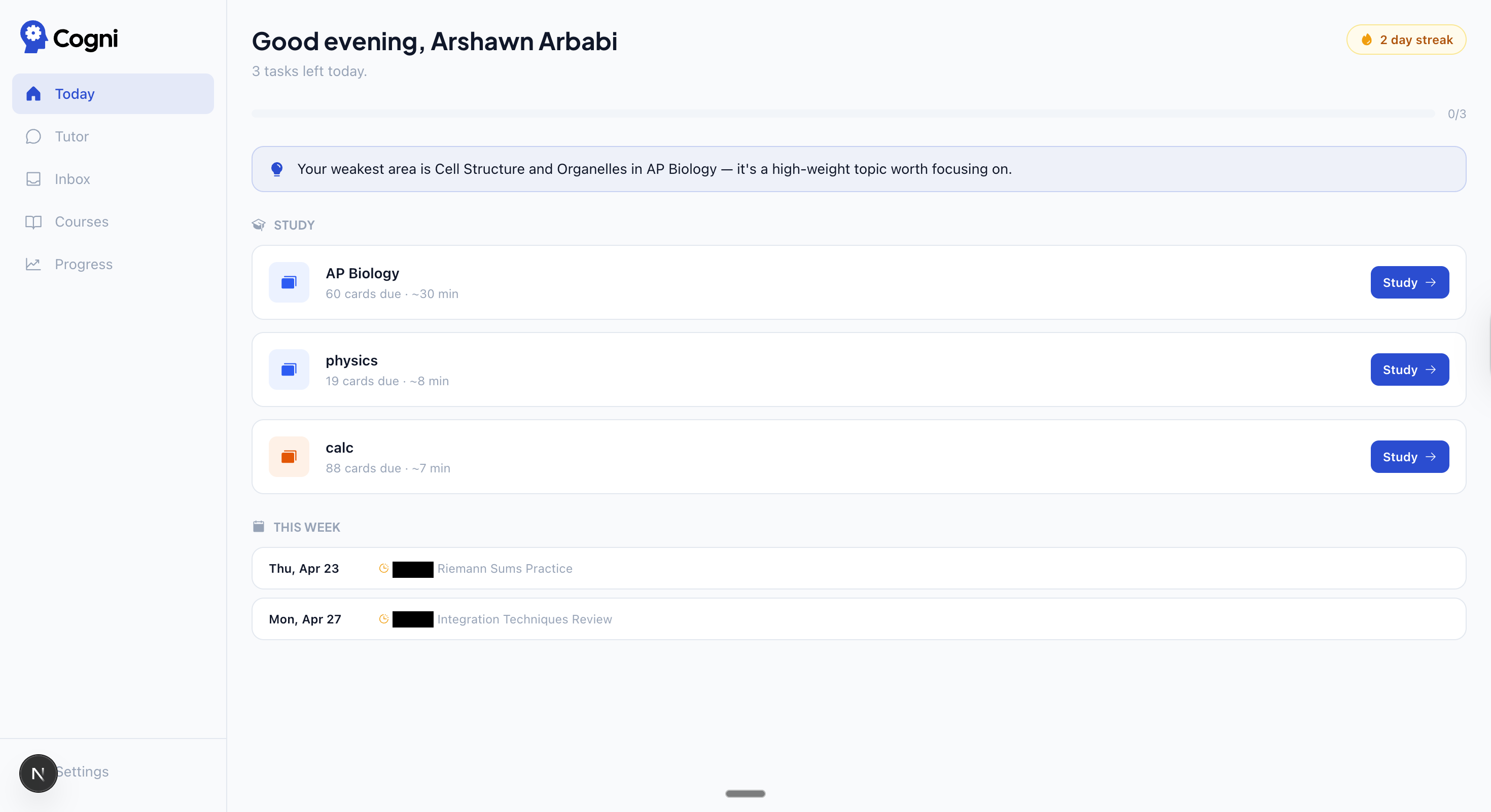 |
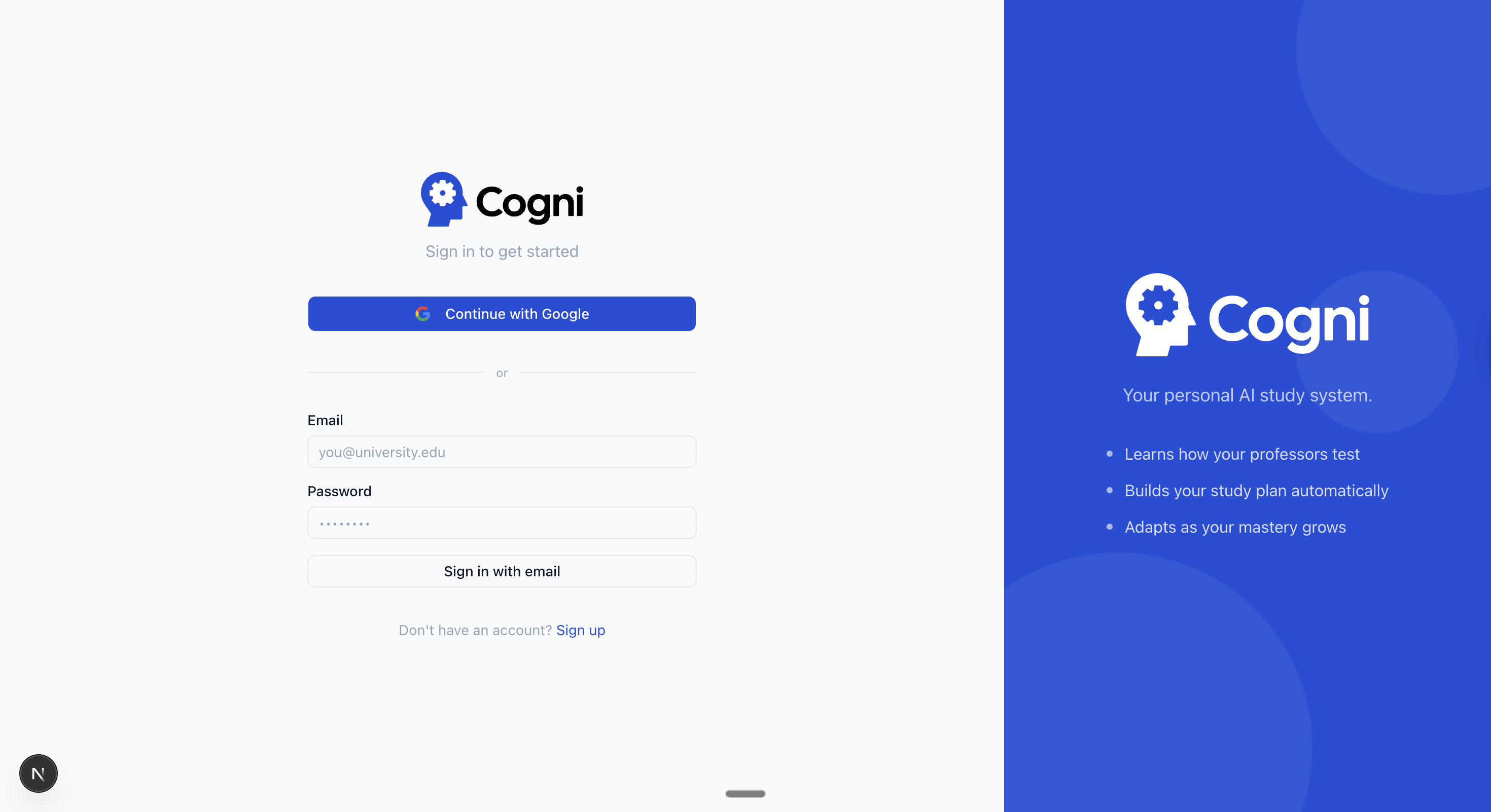
| Sign in — Google OAuth or email/password | Today — AI-generated daily plan with streak, insight, and study tasks |
 |
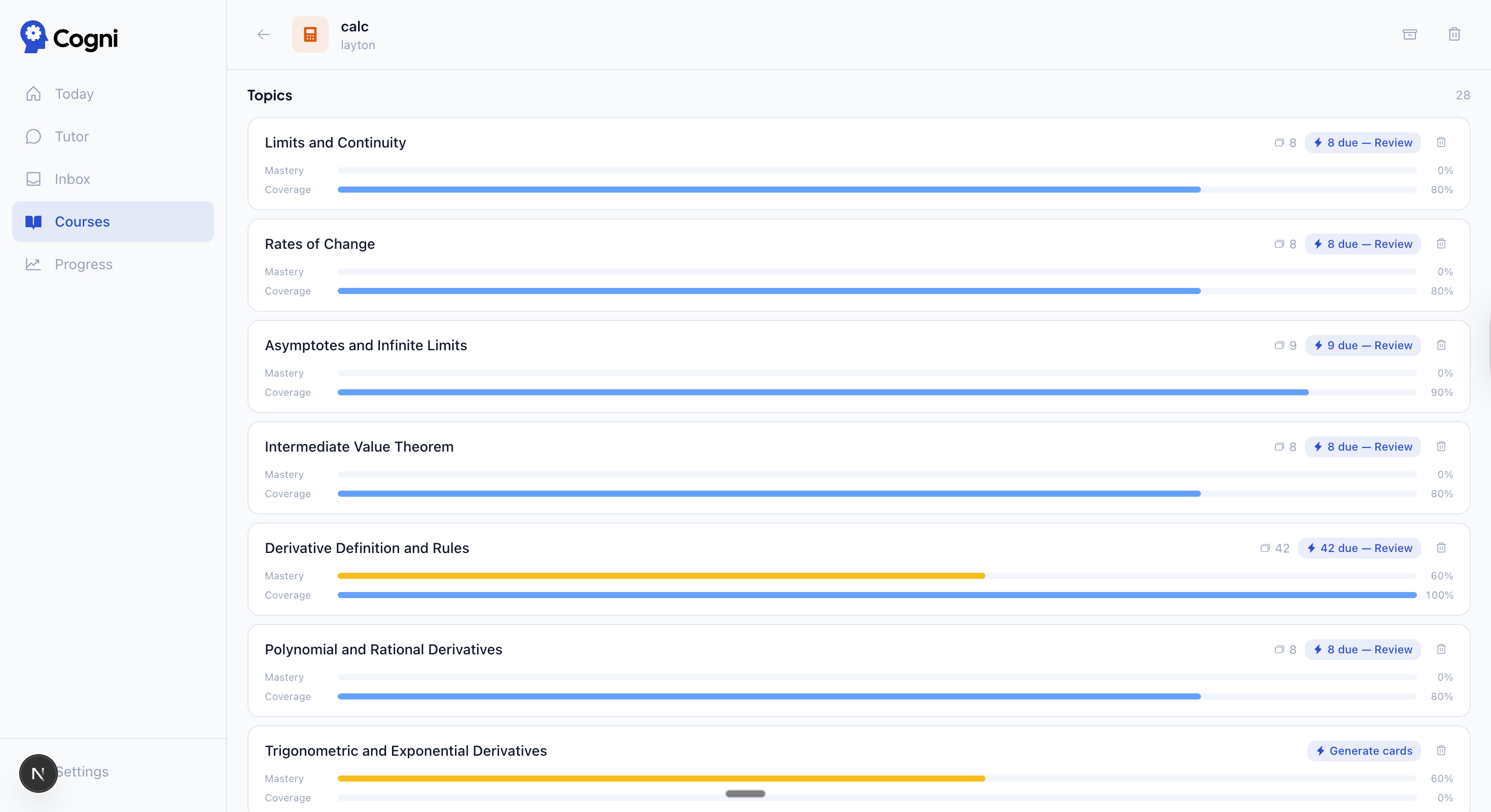 |
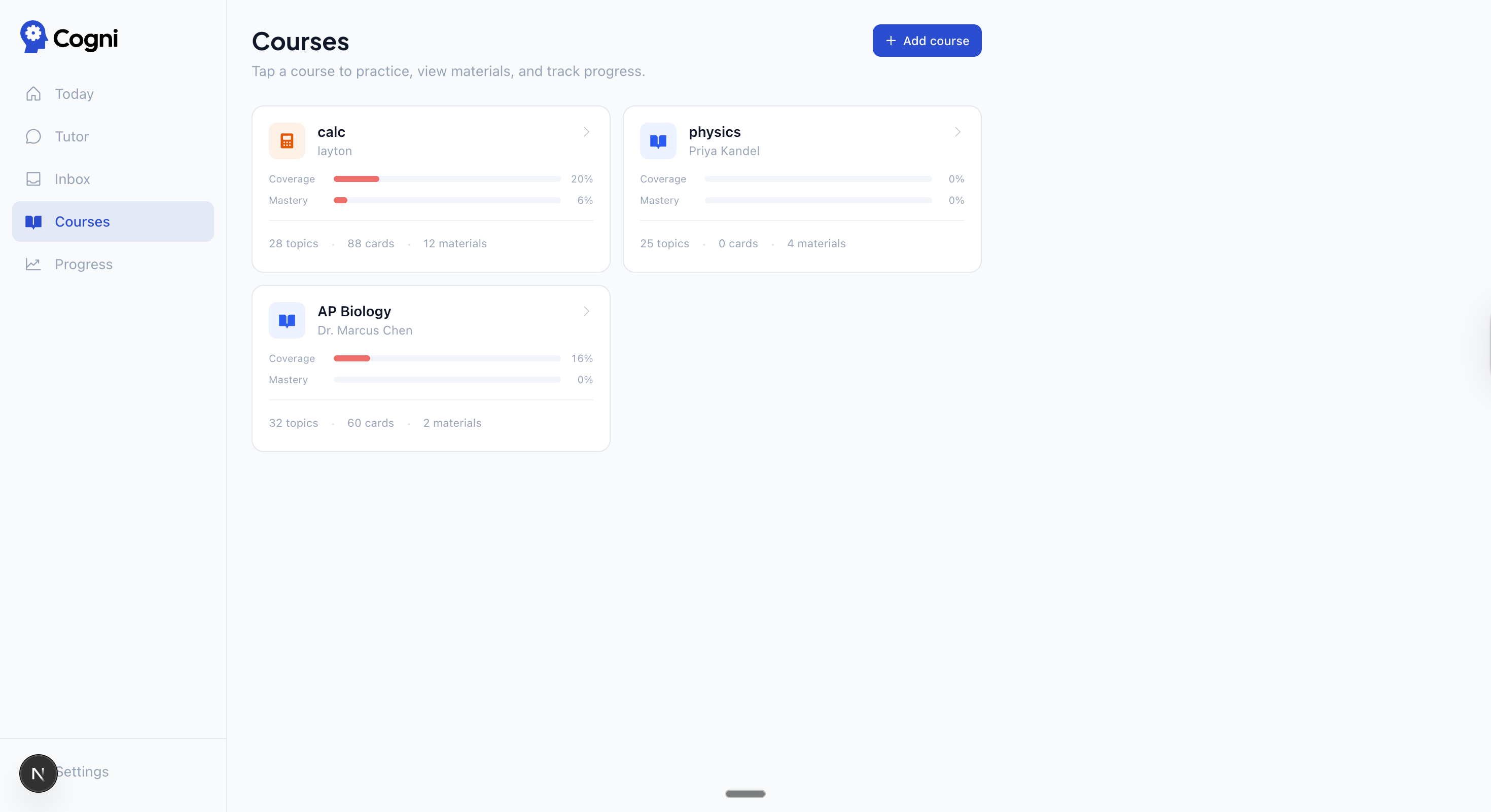
| Courses — coverage and mastery bars per course | Topics — per-topic mastery, coverage, and due card count |
 |
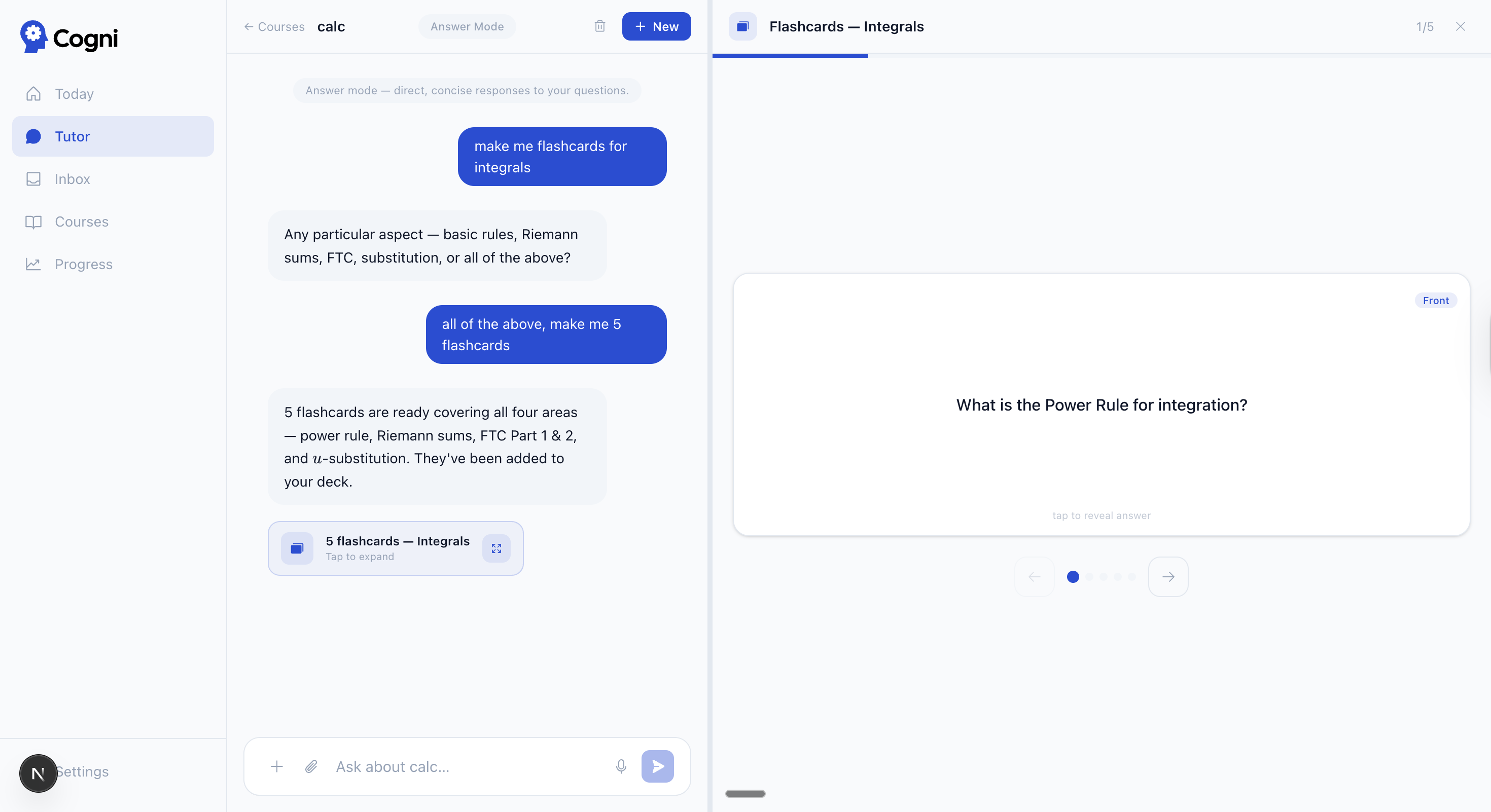 |
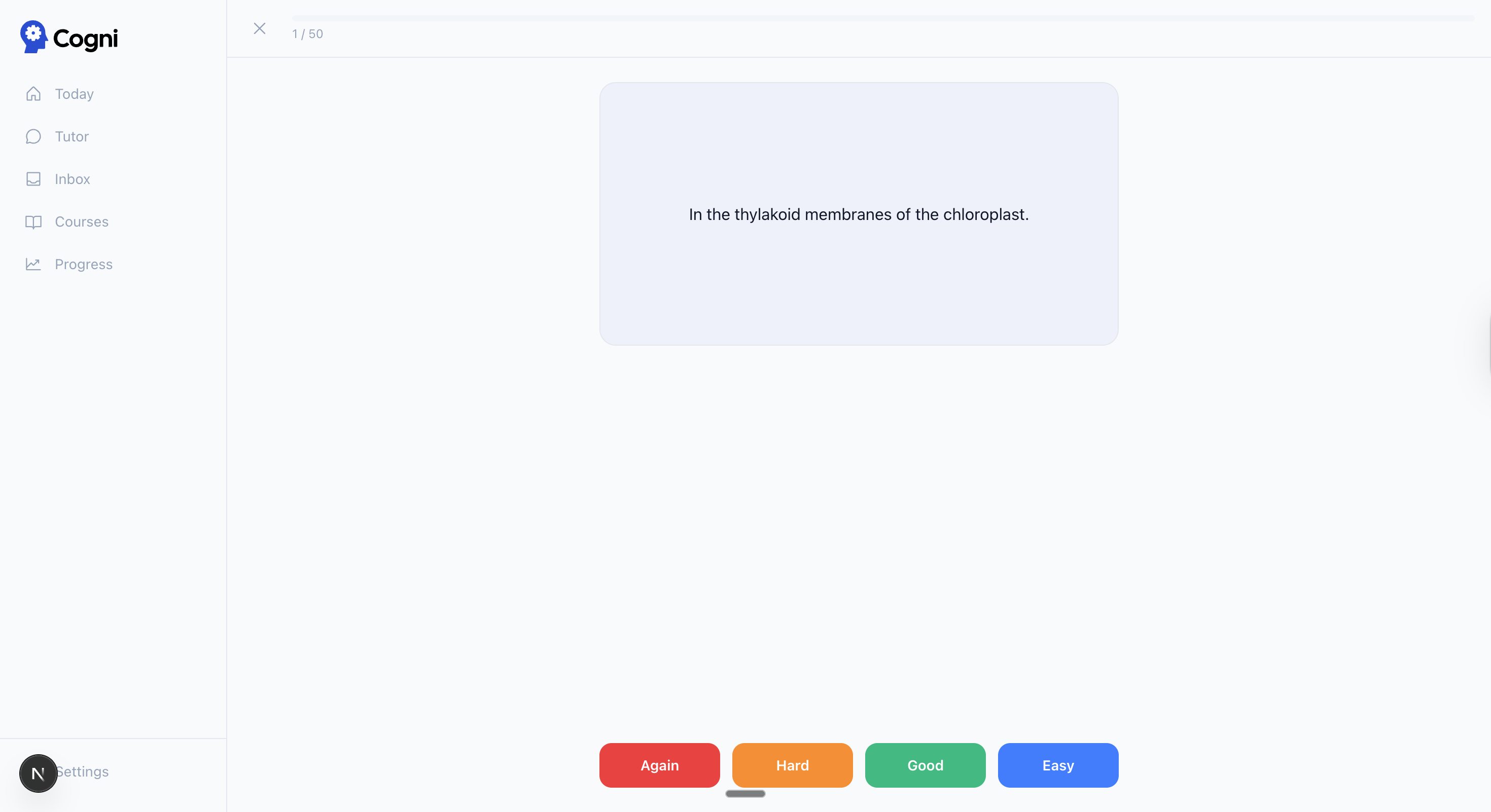
| Flashcard review — FSRS 4-point rating (Again / Hard / Good / Easy) | Tutor → flashcards — inline card generation during a session |
 |
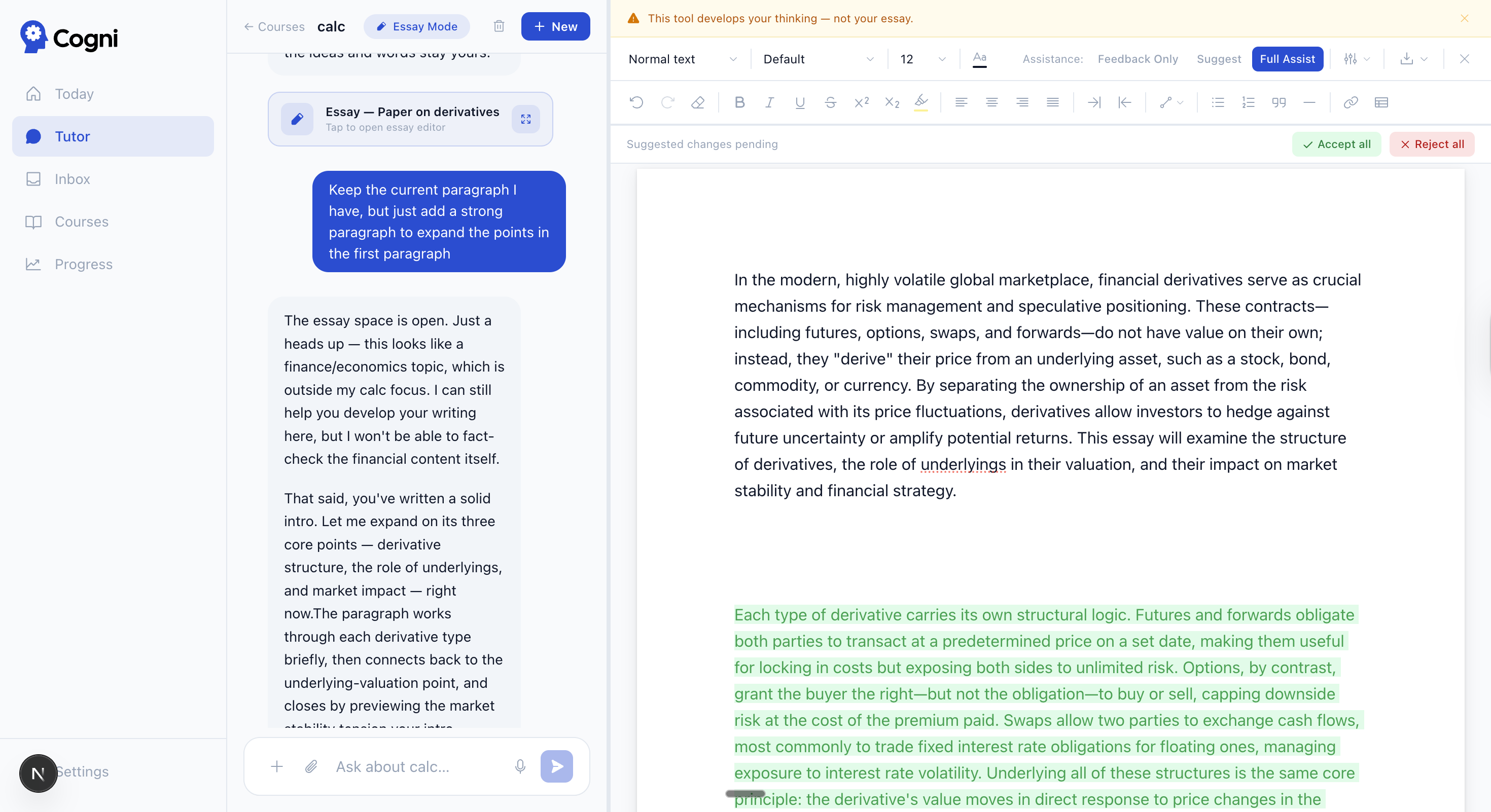 |
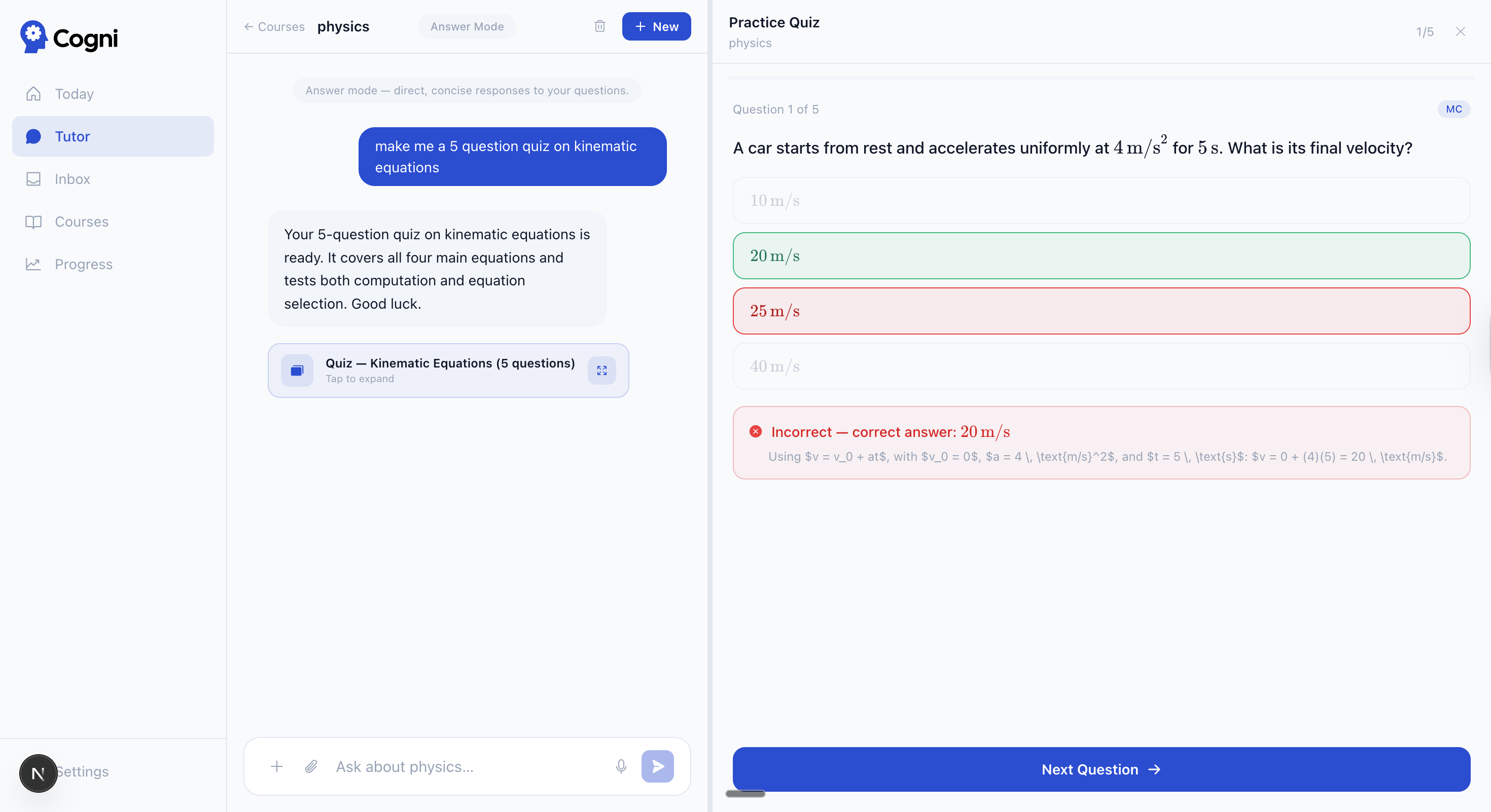
| Tutor → quiz — MC with LaTeX rendering and auto-grading | Essay mode — split-view editor with tracked changes and three assist levels |
 |
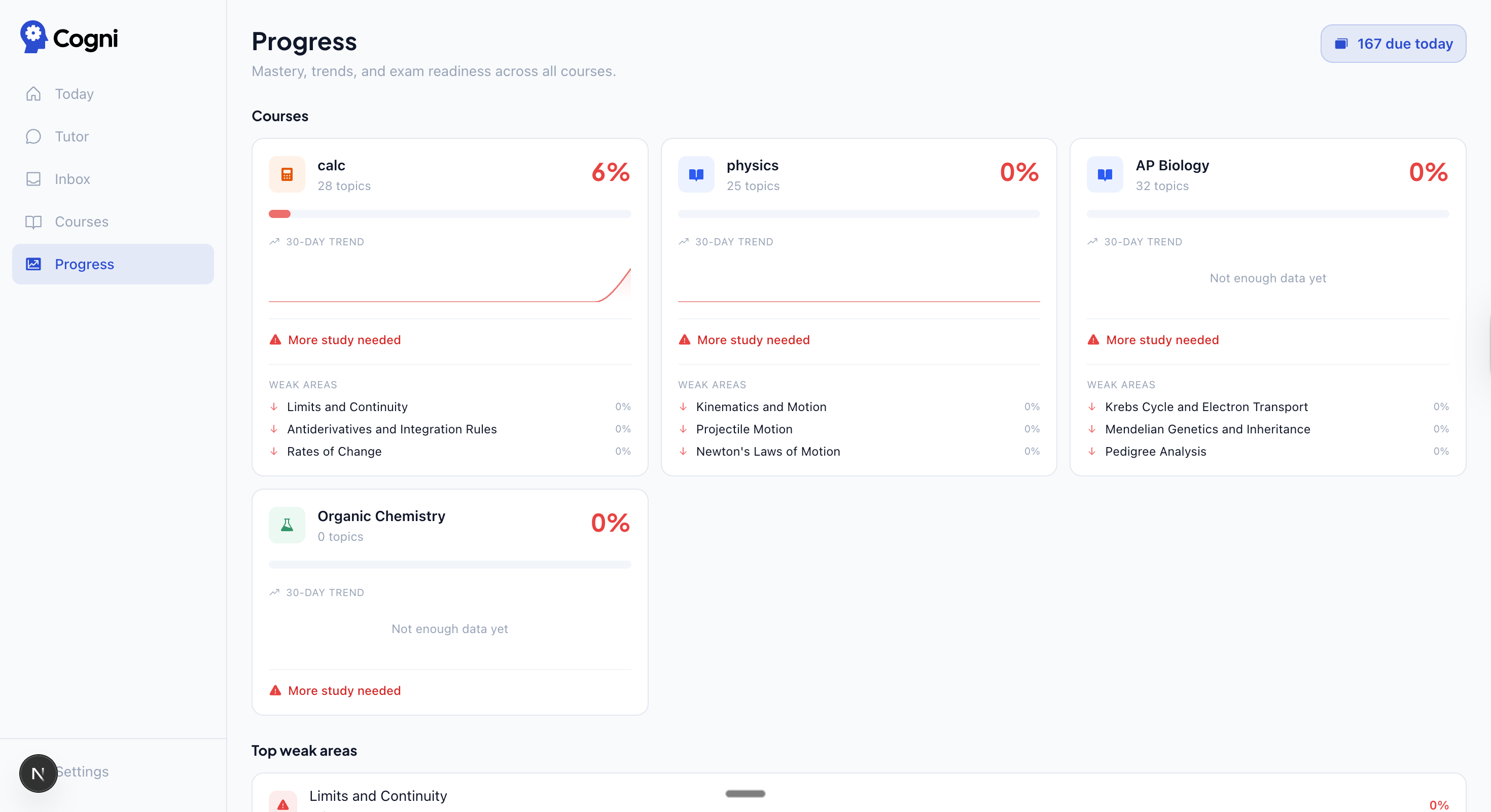 |
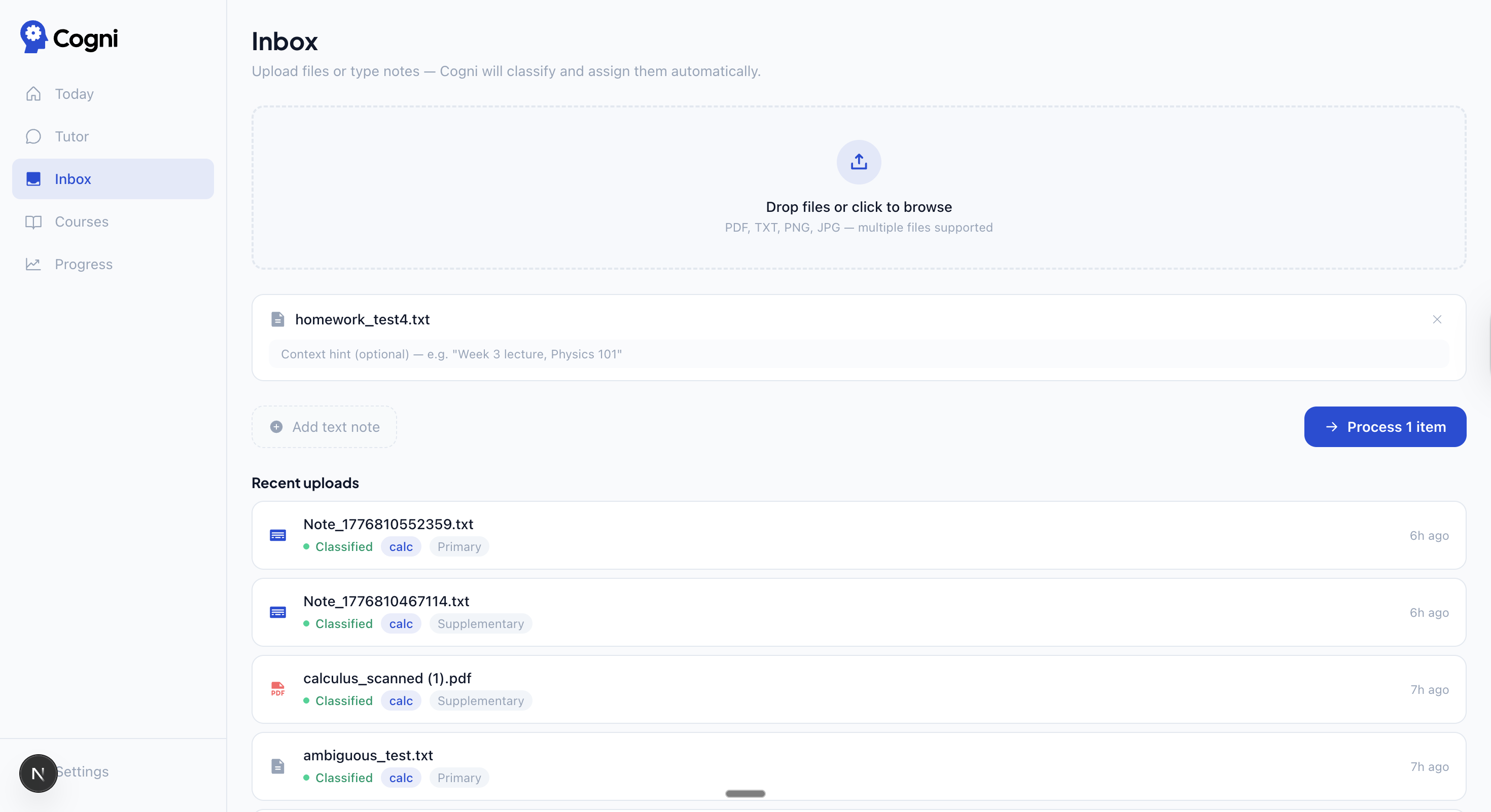
| Inbox — upload files, Haiku classifies and routes them automatically | Progress — 30-day mastery trends and weak areas across all courses |
 |
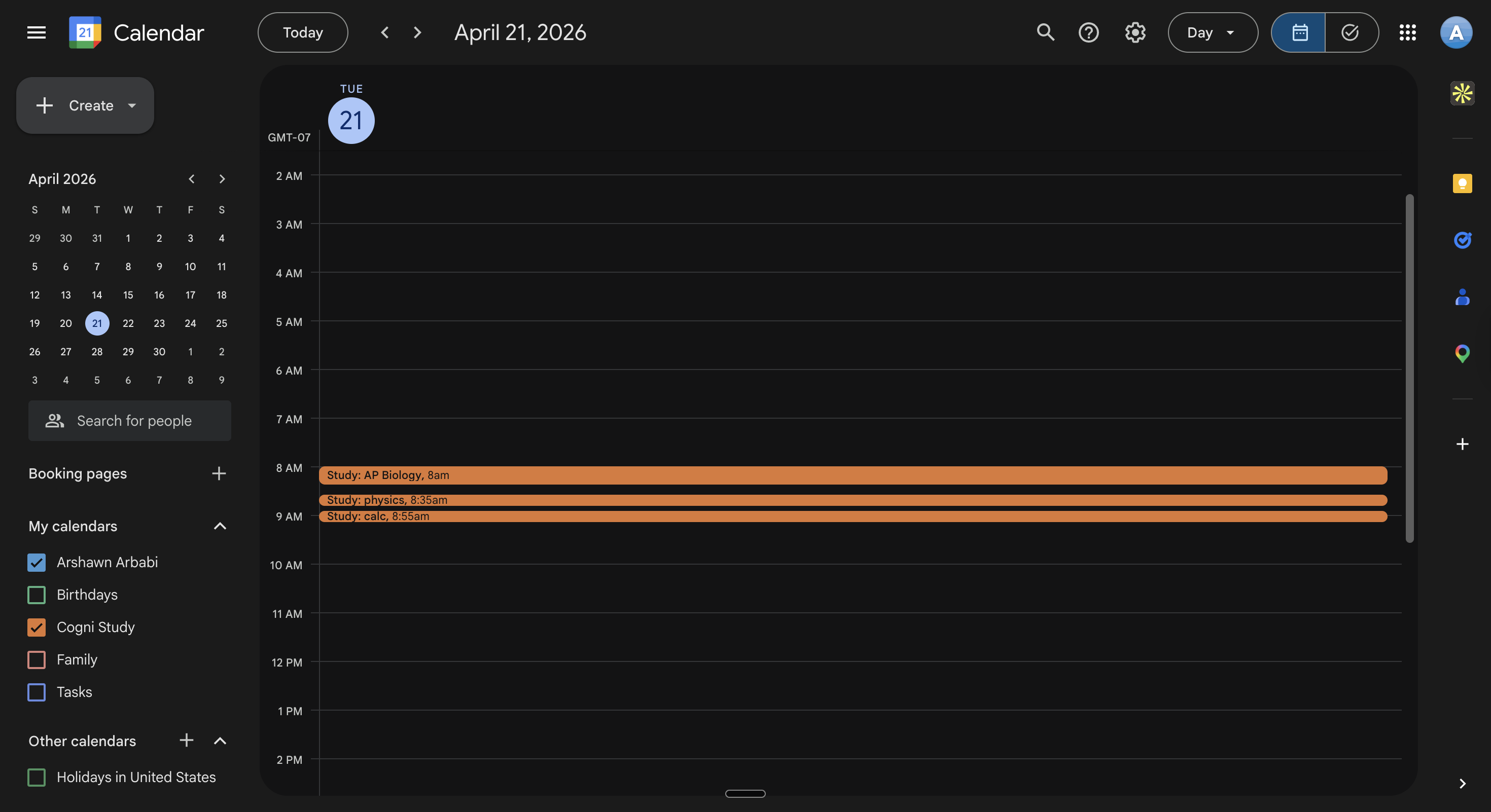 |
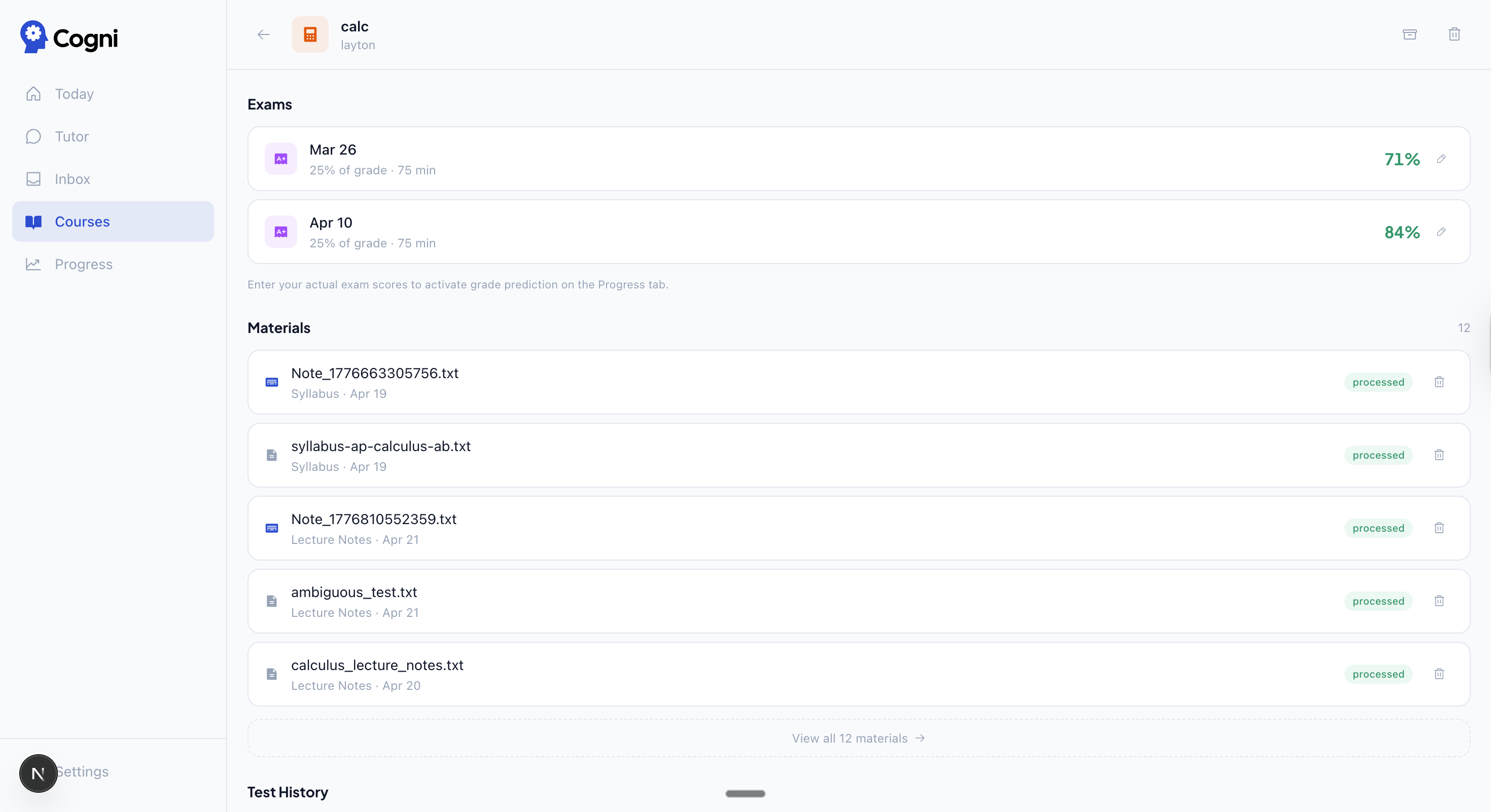
| Exams + materials — scores, processed materials, test history | Calendar — study blocks written to a dedicated Cogni Study calendar |
 |
|
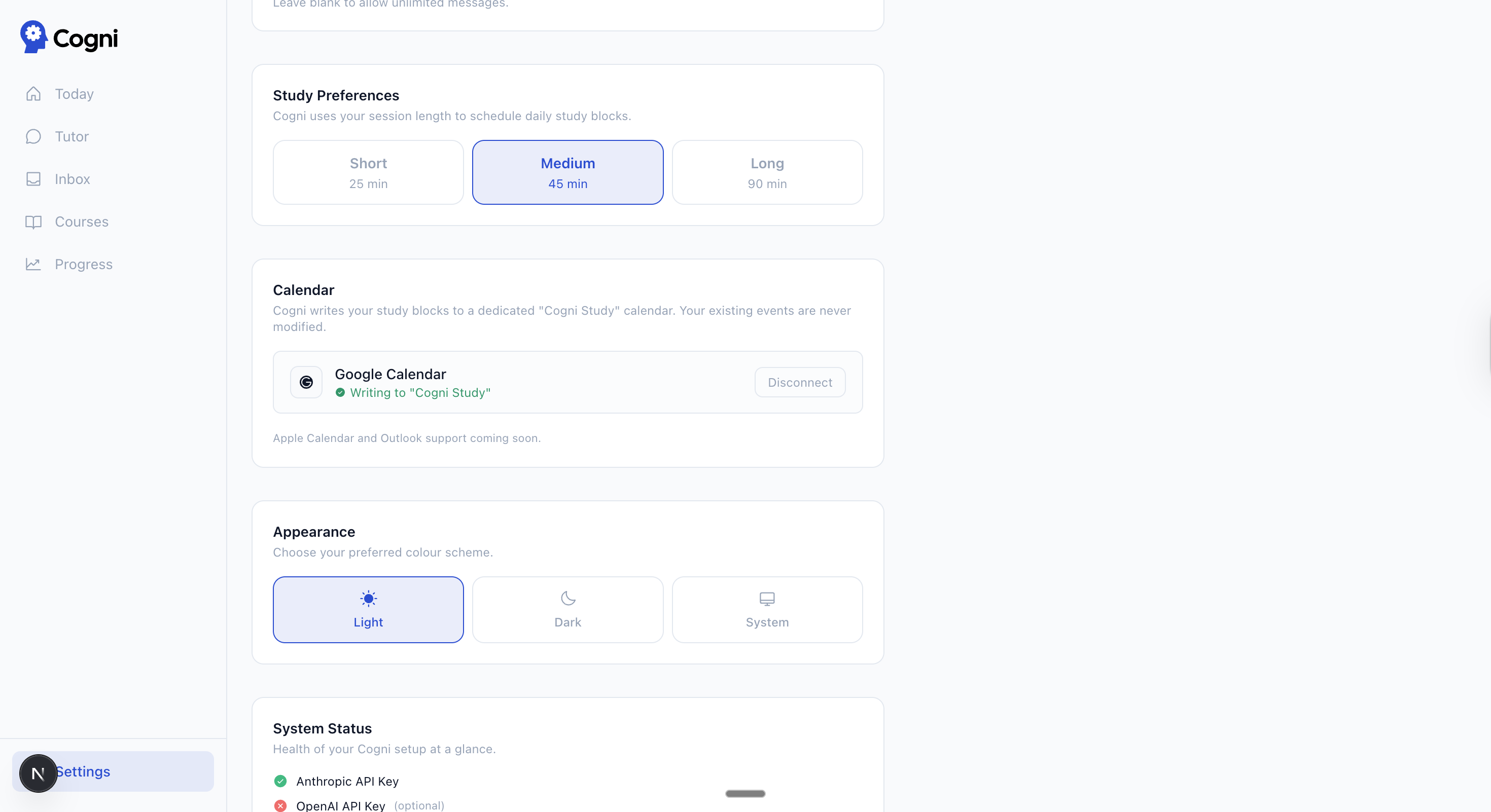
| Settings — BYOK key status, calendar connection, session length, daily message limit |
🧠 Features
- FSRS spaced repetition — full card-level state (stability, difficulty, reps, lapses). 4-point ratings: Again / Hard / Good / Easy. Atomic RPC updates FSRS state and topic mastery in one transaction.
- AI study planner — daily plan prioritized by mastery deficit × professor weight × exam proximity. Generates a 6-day ahead preview. Writes flashcard review blocks to Google Calendar. Plans, streaks, due cards, and calendar blocks all use your local timezone (auto-detected at onboarding).
- Claude-powered tutor — four modes: Answer (direct), Teach (Socratic), Focus (weak-area routing), Essay (split-view editor with tracked changes). Deep thinking mode switches to Claude Opus 4.8 with extended thinking for hard problems. Native web search. Inline flashcard, quiz, chart, and Mermaid-diagram generation. Session persistence with auto-naming.
- Professor profiling — builds a per-professor wiki from past exams, syllabi, and graded materials. Tracks question depth, phrasing style, and topic weights. Persists across semesters — add a new course with the same professor and their profile is already there.
- Syllabus profiler — upload a PDF, Claude extracts topics with professor weights, exam dates, and grade breakdowns. RAG-enriched before extraction.
- RAG over course materials — pgvector with OpenAI text-embedding-3-small (1536 dims). Keyword search fallback if no OpenAI key. Top-5 chunks injected into every tutor context.
- Inbox pipeline — upload files or notes → Haiku (+ vision) classifies tier, course, and due date → auto-triggers profiler (tier 1) and flashcard generation (tier 1–2).
- Persistent tutor memory — after a session ends, a single Haiku call distills it into a session summary, a rolling per-course digest, and typed facts (misconceptions, preferences, goals). The next session opens with a "welcome back — last time…" recap, and the misconceptions feed back into your study plan. Memory is viewable, deletable, and pausable in Settings.
- Wiki memory — the tutor and profiler also write durable insights to per-user markdown files (
learning_profile.md,professor_*.md), loaded verbatim into every session. - Grade tracker + "what do I need?" — a per-course gradebook (scheme auto-extracted from your syllabus, or synced from Canvas). Shows your current weighted grade and the answer to the real question — "I need 84% on the final for an A" — with secured/out-of-reach states.
- Semester standing — one honest verdict per course (on-track / at-risk / critical) composed from grade risk, exam readiness, overdue work, and study consistency, surfaced at the top of Progress.
- Mastery decay — knowledge you crammed and ignored decays over time (read-time, after a 7-day grace, 60-day half-life), so a stale high score resurfaces in your weak areas instead of lying to you.
- Prerequisite graph — the profiler links topics to what they build on; a weak prerequisite (mastery < 40%) boosts its priority and the tutor remediates it before the dependent topic.
- Exam readiness — a 0–100 prep score per upcoming exam (weighted effective mastery + practice-test history + coverage), feeding the daily insight, the study plan, and semester standing.
- Canvas import — paste your school's Canvas URL + a personal access token to pull assignments, due dates, the grading scheme, and your released grades; auto-syncs every morning. (BYO token; nothing stored but the token, in the Vault.)
- Practice quiz + simulated exam — MC and short-answer, auto-graded. Difficulty auto-calibrates to your mastery; missed questions become flashcards. Simulated exams mirror your professor's style and tie to the real exam. Mastery updated on grade.
- Calendar feed (ICS) — subscribe to a read-only feed of exams, due dates, and study blocks from any calendar app — no OAuth. (Google Calendar write integration also available.)
- Usage & cost dashboard — per-surface spend on your own keys, plus a "prompt caching saved you $X" figure.
- Audio overview — Claude scripts a two-host podcast from your materials; OpenAI TTS converts it to audio. Requires both keys.
- BYOK — Anthropic and OpenAI keys stored in Supabase Vault (encrypted). No AI keys in env vars.
🔌 Connect your own Claude (MCP)
Cogni ships a built-in Model Context Protocol server, so you can study through Claude Code or Claude Desktop using your own Claude subscription — and everything writes back to your account.
Generate a token in Settings → Connect your Claude, then claude mcp add the URL it shows. /mcp then exposes 14 tools and 4 prompts:
- Read —
list_courses,get_course_overview(incl. your grade standing),get_weak_topics,search_materials,get_due_cards,get_learning_profile,get_study_plan,research(multi-query, cited) - Write —
review_card(FSRS + mastery),grade_answer,create_flashcards(paced),log_study_session(memory + streak),complete_assignment(replans),record_quiz_result - Prompts —
tutor,exam_prep,review_session,homework_help
Tokens are stored only as SHA-256 hashes with a 180-day expiry. Every call is guarded (fail-closed writes, per-day read/write quotas, ownership-validated) and audited.
⚙️ Architecture
Two-level spaced repetition. Each flashcard carries full FSRS state (stability, difficulty, reps, lapses, state, last_review, next_review_date). Topic mastery is a separate blended score updated on every review, quiz, and exam. The scheduler uses topic mastery to allocate session time; FSRS drives card-level scheduling independently.
Atomic review RPC. review_card_atomic() runs a single Postgres transaction that updates all FSRS fields on the flashcard and applies mastery evidence to topic_mastery (idempotent per rating tap via a client_review_id gate).
Unified mastery model (EWMA). Every source of evidence — flashcard reviews, quizzes, exams, tutor grading, and distilled conversation signals — updates topic mastery through one exponential moving average: next = old + learning_rate × (observed − old) (cold-start adopts the observed value; confidence rises +0.05 per event). Observed level by flashcard rating: Again = 0, Hard = 0.45, Good = 0.75, Easy = 1.0. Learning rates by source: tutor_grade 0.35, quiz_standalone 0.6, quiz_in_session 0.3, exam 0.7, conversation 0.12, and flashcard_base 0.25 scaled by 1/√(cards in topic). The displayed score is no longer path-order-dependent.
Scheduler priority formula.
priority = (deficit) × professor_weight × examProximityMultiplier × gradeRiskBoost × prereqBoost
where deficit = professor_weight − effectiveMastery (+0.15 if the topic has a recently-recorded misconception), prereqBoost = 1.3× for a weak prerequisite (mastery < 0.4), and gradeRiskBoost = 1.25× when the course's grade is at risk. Exam proximity multipliers: >30 days = 1×, >14 = 1.5×, >7 = 2×, >3 = 3×, ≤3 = 5×; a grade-weight multiplier scales by the upcoming exam's share of the final grade. Mastery is read as time-decayed effectiveMastery. Session minutes are allocated proportionally across courses, capped at 4 review blocks/day.
Karpathy wiki pattern. The tutor has a write_wiki_pattern tool that writes markdown to per-user files in Supabase Storage. The profiler writes professor_*.md on every syllabus upload. All wiki files are loaded verbatim into tutor session context on every request — no vector retrieval, just direct inject.
Streaming tutor with native web search. Anthropic Messages API with streaming. Tools: create_flashcards, create_quiz, create_chart, open_essay_mode, grade_answer, suggest_edit, write_wiki_pattern. Real-time web lookup via Anthropic's native web_search_20250305 tool. Markdown answers render LaTeX (KaTeX) and Mermaid diagrams.
RAG pipeline. OpenAI text-embedding-3-small (1536 dims) stored in pgvector with an IVFFlat index. Chunks: 3200 chars, 400-char overlap, split on paragraph/sentence boundaries. Retrieval: top-5 chunks per query, course-scoped. Falls back to LIKE keyword search if no OpenAI key is present.
Inbox classification pipeline. Upload → Haiku (+ vision for PDFs/images) classifies tier (1 = syllabus, 2 = primary, 3 = supplementary, 4 = misc), course, homework status, and due date → triggers profiler for tier-1 materials → triggers flashcard generation for tier-1 and tier-2 materials with fewer than 5 existing cards per topic.
Persistent memory system. ~45 minutes after a session's last message (or lazily on next open), a single Haiku call distills the transcript into a session_summaries row, a rolling course_memory digest (≤3200 chars), and typed student_memory facts. Recorded misconceptions feed the scheduler; the digest is injected into the next session's prompt and surfaced as a recap. Long histories are compacted (cached brief + last 12 verbatim) so the first token is never gated by summarization.
Mastery decay. Mastery is stored as a unified EWMA evidence score, but read everywhere through effectiveMastery = score · exp(−ln2 · (days − 7) / 60) after a 7-day grace — so the scheduler, weak-areas, readiness, and MCP all reflect what you know now, not what you crammed weeks ago.
Durable job substrate. Profiling, embedding, flashcard generation, and memory distillation run as rows in a jobs table claimed via FOR UPDATE SKIP LOCKED (with an expired-lock reaper). Post-response draining (after()) keeps uploads and onboarding fast; a daily cron sweeps anything left.
Grade math. Per-course weighted grade with points-proportional remaining weight, so the "what do I need on the final?" projection works even with a pending final inside an already-graded category. The grade-risk signal feeds the scheduler (priority boost), the daily insight, the tutor's context, and the semester-standing verdict.
Prompt caching. Up to four cache breakpoints (tools, static system, RAG block, last user message) cut repeat-context cost; a per-surface usage ledger estimates spend and cache savings.
🛠️ Tech Stack
| Layer | Tech |
|---|---|
| Framework | Next.js 16, React 19, TypeScript 5 |
| Database | Supabase (PostgreSQL + pgvector + Auth + Storage) |
| AI — reasoning | Claude Sonnet 4.6 (tutor, profiler, exams, web enrichment) |
| AI — deep thinking | Claude Opus 4.8 with extended thinking (tutor deep think mode) |
| AI — lightweight | Claude Haiku 4.5 (flashcards, quizzes, inbox classification, session naming) |
| AI — embeddings | OpenAI text-embedding-3-small (optional; enables RAG) |
| MCP server | @modelcontextprotocol/sdk (bring-your-own-Claude: 14 tools, 4 prompts) |
| Spaced repetition | ts-fsrs 5.3.2 |
| Styling | Tailwind CSS 4, shadcn/ui |
| Animation | Framer Motion |
| Charts | Recharts |
| Rich text | TipTap |
| Math rendering | KaTeX |
| Diagrams | Mermaid |
| Icons | Phosphor Icons |
| File export | @react-pdf/renderer, docx |
🚀 Setup / Deployment
Setup takes ~30–45 minutes. You'll need a Supabase account and a Vercel account. The steps below cover a quick single-user self-host; for production multi-tenant hosting, follow
DEPLOYMENT.md(see Production / multi-tenant hosting).
Step 1 — Fork and deploy
Fork the repo and deploy to Vercel, or run locally with npm run dev. Vercel Hobby (free) is sufficient — Fluid Compute gives crons a 300s duration and 100 crons per project, so you don't need Pro to run the daily scheduler.
Step 2 — Supabase project
Create a new Supabase project, then enable the Vault extension (Dashboard → Database → Extensions → supabase_vault) — it stores your API keys and calendar tokens. Then set up the database:
- Fresh install: paste
supabase/setup.sqlinto the SQL editor and run it once. It bundles every migration (through v2.1.0) in the correct order and is idempotent, so it's safe to re-run. - Upgrading (from v1.3.x or v2.0.0): run
supabase/big-update.sqlonce — it adds everything through v2.1.0 (memory, MCP tokens, grades, Canvas, jobs, semester data, plus the v2.1.0 RLS lockdown and race-safety constraints) and is self-contained + idempotent.setup.sqlandold-prod + big-update.sqlproduce a byte-identical schema. - Manual: run the individual files in the order in
supabase/README.md.
Step 3 — Environment variables
Add these to your Vercel project settings (or .env.local for local dev):
| Variable | Required | Description |
|---|---|---|
NEXT_PUBLIC_SUPABASE_URL |
✅ | Supabase project URL |
NEXT_PUBLIC_SUPABASE_ANON_KEY |
✅ | Supabase anon key |
SUPABASE_SERVICE_ROLE_KEY |
✅ | Supabase service role key |
CRON_SECRET |
✅ | Long random secret used by Vercel cron endpoints |
NEXT_PUBLIC_APP_URL |
✅ | Your deployment URL (e.g. https://your-app.vercel.app) |
GOOGLE_CALENDAR_CLIENT_ID |
Optional | Google Cloud Console — Calendar OAuth |
GOOGLE_CALENDAR_CLIENT_SECRET |
Optional | Google Cloud Console — Calendar OAuth |
NEXT_PUBLIC_TURNSTILE_SITE_KEY |
Optional | Cloudflare Turnstile CAPTCHA — public site key |
TURNSTILE_SECRET_KEY |
Optional | Cloudflare Turnstile CAPTCHA — secret key |
SENTRY_DSN |
Optional | Sentry error monitoring — server DSN |
NEXT_PUBLIC_SENTRY_DSN |
Optional | Sentry error monitoring — client DSN |
SENTRY_ORG / SENTRY_PROJECT / SENTRY_AUTH_TOKEN |
Optional | Sentry source-map upload at build time |
CRON_HEARTBEAT_SCHEDULER_URL |
Optional | Heartbeat alert URL for the scheduler cron |
CRON_HEARTBEAT_NUDGE_URL |
Optional | Heartbeat alert URL for the nudge cron |
CRON_HEARTBEAT_MAINTENANCE_URL |
Optional | Heartbeat alert URL for the maintenance cron |
OPERATOR_SECRET |
Optional | Bearer secret guarding the operator console + audit endpoints |
The optional vars above the calendar row power the production / multi-tenant hardening. Every one is a no-op if unset, so a single-user self-host can ignore them.
Anthropic and OpenAI keys are not env vars. Users add them in Settings after deploying.
Set
CRON_SECRETyourself in Vercel and keep it long and random. It secures the daily scheduler (5am UTC) and nudge check (6am UTC) endpoints so only callers with the bearer token can invoke them.
Email confirmation / password reset uses transactional email via Resend, configured in the Supabase dashboard (Authentication → SMTP), not via env vars.
Step 4 — Google OAuth (sign-in)
First, create OAuth 2.0 credentials in Google Cloud Console → APIs & Services → Credentials → Create OAuth 2.0 Client ID (Web application). Add this as an authorized redirect URI:
https://<your-supabase-ref>.supabase.co/auth/v1/callback
Then in Supabase dashboard → Authentication → Providers → Google:
- Add your client ID and secret
- Set Site URL to
https://your-app.vercel.app - Add
https://your-app.vercel.app/auth/callbackto the Redirect URLs list
Step 5 — Add your Anthropic key
After deploying, go to Settings and add your Anthropic API key. Required for all AI features. Keys are stored in Supabase Vault — never in env vars.
Step 6 — Optional: OpenAI key
Add an OpenAI key in Settings to enable pgvector RAG. Without it, keyword search fallback is active.
Step 7 — Optional: Google Calendar
In Google Cloud Console → APIs & Services:
- Enable the Google Calendar API
- In your OAuth 2.0 credentials, add this as an authorized redirect URI:
https://your-app.vercel.app/api/calendar/callback
Make sure GOOGLE_CALENDAR_CLIENT_ID and GOOGLE_CALENDAR_CLIENT_SECRET are set in your env vars (step 3). Then connect in Cogni Settings → Calendar.
🏢 Production / multi-tenant hosting
Cogni runs two ways:
- Quick self-host (single user) — the 7 steps above. Deploy, add your own key, study. Nothing below is required.
- Production multi-tenant — one operator hosting a public instance for many users. Everything is additive and stays BYOK (each user pays their own Anthropic/OpenAI usage with their own key). Follow
DEPLOYMENT.md— the full production runbook of manual steps.
Free-tier deployable ($0). A full production instance runs on free tiers: Vercel Hobby (Fluid Compute provides 300s cron duration and 100 crons per project — Pro is not needed) + Supabase Free + Resend free email. The operator pays nothing for AI itself, since it's BYOK.
Hardening highlights:
- Bypass-proof signup gating — open / invite-code /
.edumodes enforced at the database layer (trigger onauth.users), so it covers the server route, direct signups, and OAuth. - CAPTCHA — Cloudflare Turnstile on signup.
- Consent + age capture — collected at signup (email + OAuth). Plus a full password-reset flow.
- Legal pages — Terms, Privacy (with AI sub-processor disclosure), and Acceptable-Use.
- Per-user AI quotas + suspend — daily AI quotas and account suspend enforced on every AI route.
- Image moderation — applied on uploads.
- Operator kill-switches — instantly pause signups or disable AI via runtime config, no redeploy.
- Operator console + audit log — operator console with an append-only audit log.
- GDPR data export — per-user data export.
- Observability — Sentry error monitoring, cron heartbeat alerting, and an
/api/healthendpoint. Plus Report-Only CSP and security headers, ~58 raw error leaks sanitized into stable codes, and Vault read-back verification on key storage.
All of the above is wired through the optional env vars in the Setup / Deployment env table (step 3) — every one is a no-op if unset, so existing single-user deployments are unaffected. supabase/setup.sql already bundles the production-hardening migrations (its "section 10" block).
🔑 API Keys
Anthropic (required) — Powers the tutor, profiler, flashcard generation, quizzes, and inbox classification. Get a key at console.anthropic.com. Typical usage for a single student: ~$2–5/month.
OpenAI (optional) — Used only for text-embedding-3-small embeddings. Enables pgvector RAG for richer tutor context and better syllabus profiling. Without it, Cogni falls back to keyword search. Get a key at platform.openai.com.
Both keys are stored in Supabase Vault (encrypted at rest). They are never written to env vars or logs.
💻 Local Development
git clone https://github.com/arshawnarbabi/Cogni
cd Cogni
npm install
cp .env.example .env.local
# fill in .env.local with your Supabase credentials
npm run dev
Vercel Cron Jobs do not run locally (scheduler fires at 5am UTC, nudge at 6am UTC in production — Vercel Hobby/Fluid Compute is enough to run them). The scheduler runs automatically when you navigate to Today if no plan exists for today. In local development (NODE_ENV=development), a Dev Tools section in Settings exposes a reset-account helper.
🧪 Testing
npm test                 # unit tests — timezone/FSRS logic (no setup needed)
npm run test:integration # engine tests vs a local Supabase (review RPC, Vault, RAG)
npm run test:e2e         # Playwright end-to-end vs the running app
Unit tests run anywhere. The integration and end-to-end suites run against a local Supabase stack (supabase start) so your real project is never touched — see test-harness/README.md for the seed/apply scripts and setup.
📄 License
MIT — Copyright (c) 2026 Arshawn Arbabi
⚠️ Active Project
Cogni is an active personal project. Most features work as described, but some may have rough edges or occasional bugs — contributions and bug reports are welcome.
Yorumlar (0)
Yorum birakmak icin giris yap.
Yorum birakSonuc bulunamadi