paneflow
Health Uyari
- License — License: GPL-3.0
- Description — Repository has a description
- Active repo — Last push 0 days ago
- Low visibility — Only 8 GitHub stars
Code Basarisiz
- rm -rf — Recursive force deletion command in .github/workflows/repo_publish.yml
Permissions Gecti
- Permissions — No dangerous permissions requested
Bu listing icin henuz AI raporu yok.
The cross-platform terminal for working with coding agents. Run Claude Code, Codex, OpenCode and any CLI agent in parallel and see the moment one needs you. Native Rust, GPU-rendered, open source. Linux and macOS today, Windows next.
Paneflow
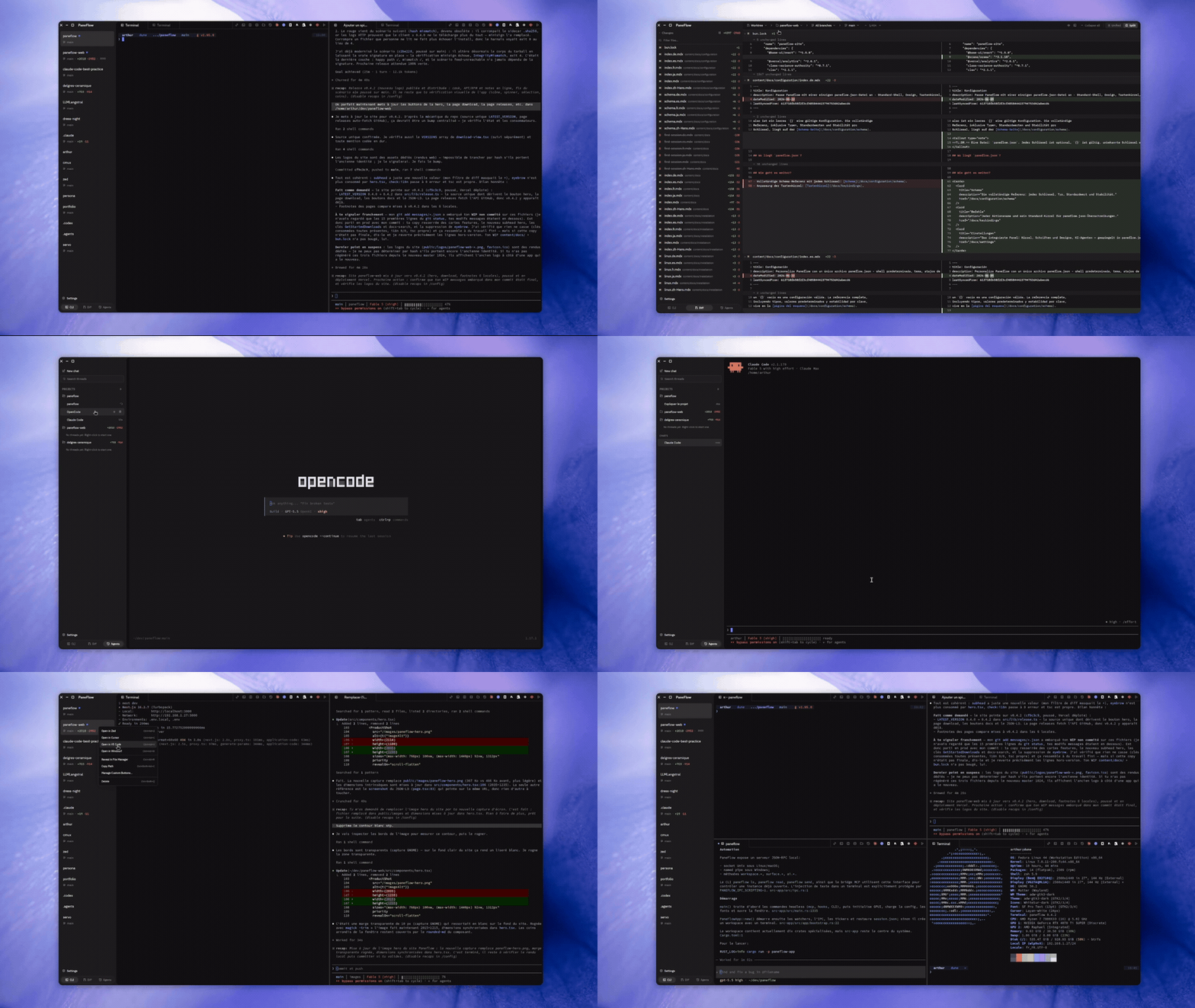
A terminal workspace for orchestrating coding agents. Run Claude Code, Codex, OpenCode, and custom CLI agents side by side with branch-aware workspaces, live dev-server status, session restore, and a JSON-RPC IPC server.
Paneflow is the minimal, native core: pure Rust on top of Zed's GPUI rendering engine, sub-200 ms cold start, sub-4 ms keystroke-to-pixel latency, a single GPL-3.0-licensed binary, built by an indie maintainer who uses it daily. macOS (Apple Silicon) and Linux ship today; native Windows is on the roadmap.
Paneflow's design is openly inspired by cmux, which pioneered the "workspace per project, panes per agent" mental model for agent-first terminal multiplexing. Paneflow is not a fork; it is an independent Rust codebase that takes the workflow idea in a deliberately minimal, native direction. Side-by-side comparison vs cmux and other terminals: paneflow.dev/compare.
Features
- Agent orchestration: Claude Code / Codex / OpenCode launchers in the tab bar, session tracking, and a JSON-RPC event stream downstream tools can subscribe to
- Branch-aware workspaces: up to 20 workspaces with rename, quick-switch (
Ctrl+1-9), undo close; the sidebar surfaces the active git branch per workspace - Parallel panes: horizontal and vertical splits, drag-to-resize, layout presets (even, main+stack, tiled), up to 32 panes
- Dev-server detection: surfaces Vite, Next.js, Webpack, and other local ports in the sidebar with one-click open
- Session restore: save/restore layouts, CWD, workspace names, and custom buttons; resume yesterday's setup with one launch
- Markdown pane: render a Markdown file in-pane next to a terminal (useful for keeping a PRD or README open beside the agent)
- GPU-accelerated rendering: Vulkan on Linux, Metal on macOS, DirectX on Windows (handled by GPUI)
- Find-in-buffer:
Ctrl+Shift+F, regex toggle, match cycling - Hyperlinks: OSC 8 escape sequences + automatic URL detection
- Themes: 2 bundled themes with hot-reload (One Dark, PaneFlow Light)
- Custom keybindings: JSON-configurable override of every default action (57 actions)
- Auto-update: in-app updater for every supported install format
- IPC: JSON-RPC 2.0 over Unix socket (Linux/macOS) or named pipe (Windows)
- Cross-platform: Linux (Wayland + X11), macOS 13 Ventura+ (Apple Silicon today); Windows 10 1809+ planned
Prerequisites
Rust toolchain
Paneflow pins Rust 1.95 via rust-toolchain.toml. rustup installs the exact version automatically the first time you run cargo:
curl --proto '=https' --tlsv1.2 -sSf https://sh.rustup.rs | sh
Linux system dependencies
Install the build libraries for your distribution:
Debian/Ubuntu:
sudo apt install build-essential pkg-config libssl-dev libvulkan-dev \
libwayland-dev libxkbcommon-dev libxkbcommon-x11-dev libx11-dev libxcb1-dev \
libxcb-render0-dev libxcb-shape0-dev libxcb-xfixes0-dev libfontconfig-dev \
libfreetype-dev libdbus-1-dev
Fedora:
sudo dnf install gcc pkgconf-pkg-config openssl-devel vulkan-loader-devel \
wayland-devel libxkbcommon-devel libX11-devel libxcb-devel \
fontconfig-devel freetype-devel dbus-devel
Arch Linux:
sudo pacman -S base-devel pkg-config openssl vulkan-icd-loader wayland \
libxkbcommon libx11 libxcb fontconfig freetype2 dbus
Vulkan GPU driver (Linux only)
# AMD/Intel (Mesa)
sudo apt install mesa-vulkan-drivers # Debian/Ubuntu
sudo dnf install mesa-vulkan-drivers # Fedora
sudo pacman -S vulkan-radeon vulkan-intel # Arch
# NVIDIA
sudo apt install nvidia-vulkan-icd # Debian/Ubuntu
sudo pacman -S nvidia-utils # Arch
# Verify Vulkan works
vulkaninfo --summary
Install
Pick the format that matches your platform. Every format ships the same binary; the differences are how updates arrive and where files land on disk. All artifacts are attached to the latest GitHub release.
Substitute placeholders before running. The commands below use two placeholders:
X.Y.Z: replace with the release version (e.g.,0.2.16). No leadingvin the asset filename.<ARCH>: replace withx86_64oraarch64(check withuname -m).To auto-resolve the latest version:
VER=$(curl -fsSL https://api.github.com/repos/ArthurDEV44/paneflow/releases/latest \ | grep -oE '"tag_name":\s*"v[^"]+"' | cut -d\" -f4 | sed 's/^v//') ARCH=$(uname -m)Then paste
$VERand$ARCHin place of the placeholders below. The Git tag uses avprefix (v0.2.16); the artifact filenames do not (paneflow-0.2.16-x86_64.deb).
Ubuntu / Debian / Mint (apt + repo)
One-shot install of the .deb. The package's postinst automatically wires pkg.paneflow.dev into /etc/apt/sources.list.d/paneflow.list, so apt upgrade pulls subsequent releases:
curl -LO https://github.com/ArthurDEV44/paneflow/releases/latest/download/paneflow-X.Y.Z-<ARCH>.deb
# Verify the signature BEFORE `apt install`: postinst runs as root,
# so an unsigned/tampered .deb could write arbitrary repo sources.
sudo apt install -y dpkg-sig
dpkg-sig --verify paneflow-X.Y.Z-<ARCH>.deb # expect: GOODSIG
sudo apt install ./paneflow-X.Y.Z-<ARCH>.deb
paneflow --version
Future updates:
sudo apt update && sudo apt upgrade paneflow
Fedora / RHEL / Rocky (dnf + repo)
Same pattern with .rpm. The %post scriptlet drops /etc/yum.repos.d/paneflow.repo pointing at pkg.paneflow.dev/rpm:
curl -LO https://github.com/ArthurDEV44/paneflow/releases/latest/download/paneflow-X.Y.Z-<ARCH>.rpm
# Verify the signature BEFORE `dnf install`: %post runs as root.
sudo rpm --import https://pkg.paneflow.dev/gpg # see Troubleshooting for the TOFU caveat
rpm --checksig paneflow-X.Y.Z-<ARCH>.rpm # expect: digests signatures OK
sudo dnf install ./paneflow-X.Y.Z-<ARCH>.rpm
paneflow --version
Future updates:
sudo dnf upgrade paneflow
AppImage (portable, any distro)
Single-file download. No install, no root; double-click to run or launch from the terminal:
curl -LO https://github.com/ArthurDEV44/paneflow/releases/latest/download/paneflow-X.Y.Z-<ARCH>.AppImage
chmod +x paneflow-X.Y.Z-<ARCH>.AppImage
./paneflow-X.Y.Z-<ARCH>.AppImage --version
Ubuntu 24.04+ and Fedora Silverblue ship without FUSE 2 by default; see Troubleshooting > AppImage won't run on Ubuntu 24.04 if the command above fails.
Tarball (immutable distros, no-root installs)
Use this on Fedora Silverblue, SteamOS, NixOS, or any machine where you'd rather not touch /usr. Installs to ~/.local/paneflow.app/ and symlinks ~/.local/bin/paneflow:
curl -LO https://github.com/ArthurDEV44/paneflow/releases/latest/download/paneflow-X.Y.Z-<ARCH>.tar.gz
curl -LO https://github.com/ArthurDEV44/paneflow/releases/latest/download/paneflow-X.Y.Z-<ARCH>.tar.gz.sha256
sha256sum --check paneflow-X.Y.Z-<ARCH>.tar.gz.sha256
tar xzf paneflow-X.Y.Z-<ARCH>.tar.gz
./paneflow.app/install.sh
~/.local/bin/paneflow --version
The in-app updater atomically swaps ~/.local/paneflow.app/ on new releases (no package manager involved).
macOS (Apple Silicon)
The signed + notarized .dmg is published for aarch64-apple-darwin (Apple Silicon). Intel (x86_64-apple-darwin) is currently out of the build matrix and is targeted for re-introduction in a future release.
# Direct download. Drag PaneFlow.app into /Applications from the mounted DMG.
curl -LO https://github.com/ArthurDEV44/paneflow/releases/latest/download/paneflow-X.Y.Z-aarch64-apple-darwin.dmg
open paneflow-X.Y.Z-aarch64-apple-darwin.dmg
A Homebrew cask (brew tap arthurdev44/paneflow && brew install --cask paneflow) is wired into the release pipeline and will publish from v0.3.0 onward. Until then, prefer the direct DMG download.
Gatekeeper accepts the signed DMG offline; no xattr -cr workaround is needed for release builds.
Windows
A signed .msi for x86_64-pc-windows-msvc (Windows 10 1809+ and Windows 11) is on the release roadmap; the Azure Trusted Signing pipeline is in place but the artifact is not yet attached to releases. winget (winget install ArthurDev44.PaneFlow) follows the first signed MSI submission to Microsoft. See docs/WINDOWS.md for the supported-versions matrix and known limitations, and the contributor build instructions below for building locally in the meantime.
Troubleshooting
"No GPU adapter found" / Vulkan unavailable
The most common first-launch error on Linux, especially in VMs, WSL2, or on hosts without an ICD installed. The fix depends on the platform:
# Install a Vulkan ICD (see Prerequisites > Vulkan GPU driver above).
vulkaninfo --summary # should list at least one physicalDevice
# WSL2 / headless / GPU-less hosts: force the lavapipe software ICD.
sudo apt install mesa-vulkan-drivers # Debian/Ubuntu
VK_ICD_FILENAMES=/usr/share/vulkan/icd.d/lvp_icd.x86_64.json paneflow
GPUI auto-selects Wayland or X11 based on WAYLAND_DISPLAY / DISPLAY. To force X11 on a Wayland session: WAYLAND_DISPLAY= paneflow.
AppImage won't run on Ubuntu 24.04
Ubuntu 24.04 and newer don't ship libfuse2 by default. The error looks like dlopen(): error loading libfuse.so.2. Two fixes:
- Preferred: skip FUSE by mounting the AppImage in-process:
./paneflow-X.Y.Z-x86_64.AppImage --appimage-extract-and-run - Alternative: install the compatibility shim
On Ubuntu 22.04 the package issudo apt install libfuse2t64libfuse2instead. Installinglibfuse2on 24.04 can removeubuntu-sessionas a transitive conflict;--appimage-extract-and-runavoids that risk.
Verifying releases
Every Paneflow release is signed and the procedure to verify a downloaded artifact is documented per platform:
- Linux (
.deb/.rpm/.tar.gz/.AppImage):docs/release/linux-signing.md. GPG-signed.deb+.rpm(key:keys/paneflow-release.asc); SHA-256 sidecars on.tar.gzand.AppImage. - macOS (
.dmg/.app):docs/release/macos-signing.md. Apple Developer ID signed + notarized + stapled. - Windows (
.msi):docs/release/windows-signing.md. Azure Trusted Signing; verify viasigntool verify /pa /v paneflow-X.Y.Z-x86_64-pc-windows-msvc.msi.
Quick .deb verification (full procedure, including the mandatory fingerprint cross-check before key import, in the Linux runbook §1; do NOT paste the snippet below until you have verified the key fingerprint matches 9809948F4433CF93DD1329449A252F0C183F2711):
curl -fsSL https://raw.githubusercontent.com/ArthurDEV44/paneflow/main/keys/paneflow-release.asc \
| gpg --dearmor \
| sudo tee /usr/share/keyrings/paneflow-archive.gpg >/dev/null
sudo apt-get install -y dpkg-sig
dpkg-sig --verify paneflow-X.Y.Z-x86_64.deb # expect: GOODSIG
Uninstall
.deb (Ubuntu/Debian):
sudo apt remove paneflow # keep config
sudo apt purge paneflow # remove config too
sudo rm /etc/apt/sources.list.d/paneflow.list # remove APT source
sudo rm /usr/share/keyrings/paneflow-archive.gpg # remove signing key
.rpm (Fedora/RHEL):
sudo dnf remove paneflow
sudo rm /etc/yum.repos.d/paneflow.repo # remove DNF source
AppImage: just rm paneflow-X.Y.Z-<ARCH>.AppImage. Nothing else is installed on disk.
.tar.gz:
rm -rf ~/.local/paneflow.app ~/.local/bin/paneflow \
~/.local/share/applications/paneflow.desktop
for s in 16 32 48 128 256 512; do
rm -f ~/.local/share/icons/hicolor/${s}x${s}/apps/paneflow.png
done
# Optional: remove config and cache
rm -rf ~/.config/paneflow ~/.cache/paneflow
Build from source
Linux
git clone https://github.com/ArthurDEV44/paneflow.git
cd paneflow
cargo build --release -p paneflow-app
bash scripts/bundle-tarball.sh "$(cargo pkgid -p paneflow-app | sed 's/.*#//')"
tar xzf target/bundle/paneflow-*.tar.gz -C /tmp
/tmp/paneflow.app/install.sh
macOS
# 1. Install Xcode Command Line Tools (one-time)
xcode-select --install
# 2. Add the target
rustup target add aarch64-apple-darwin
# 3. Build
cargo build --release -p paneflow-app --target aarch64-apple-darwin
# 4. Bundle into a .app (produces dist/PaneFlow.app)
bash scripts/bundle-macos.sh \
--version "$(cargo pkgid -p paneflow-app | sed 's/.*#//')" \
--arch aarch64
# 5. (Optional) Build a .dmg for local distribution
bash scripts/create-dmg.sh \
--version "$(cargo pkgid -p paneflow-app | sed 's/.*#//')" \
--arch aarch64
Unsigned dev build first-launch: macOS Gatekeeper rejects unsigned builds by default. For locally-built binaries (no Developer ID cert available), strip the quarantine attribute once:
xattr -cr dist/PaneFlow.app
open dist/PaneFlow.app
Windows
# 1. Install the Rust MSVC toolchain target (one-time)
rustup target add x86_64-pc-windows-msvc
# 2. Compile the binary
cargo build --release -p paneflow-app --target x86_64-pc-windows-msvc
# 3. (Optional) Produce an MSI via cargo-wix + WiX 3.14
choco install wixtoolset --version 3.14.1
cargo install cargo-wix --version 0.3.9 --locked
cargo wix build --no-build `
--package paneflow-app `
--target x86_64-pc-windows-msvc `
--install-version "$(cargo pkgid -p paneflow-app | ForEach-Object { $_ -replace '.*#','' })"
Reporting Windows-specific bugs: use the Windows bug report template (captures Windows version + build automatically) and see docs/WINDOWS.md for the full v1 limitations catalog.
Usage
# Launch
paneflow
# With logging
RUST_LOG=info paneflow
# Print version / help
paneflow --version
paneflow --help
# CI self-update harness (exit codes 0-5)
paneflow --update-and-exit
Environment variables
| Variable | Effect |
|---|---|
RUST_LOG |
env_logger filter (e.g. info, paneflow=debug) |
PANEFLOW_LATENCY_PROBE |
Set to 1 to trace keystroke -> pixel latency (debug builds only) |
PANEFLOW_UPDATE_FEED_URL |
Override the update feed URL (testing) |
PANEFLOW_NO_TELEMETRY |
Set to 1 to disable telemetry unconditionally (overrides config) |
Keybindings
All 57 actions are defined in src-app/src/app/actions.rs and bound in src-app/src/keybindings/defaults.rs. Every binding can be overridden via the shortcuts map in paneflow.json.
Window & workspace management
| Key | Action |
|---|---|
Ctrl+Shift+N |
New workspace |
Ctrl+Shift+Q |
Close workspace |
Ctrl+Tab |
Next workspace |
Ctrl+1-Ctrl+9 |
Switch to workspace N |
Ctrl+Shift+Alt+C |
Copy workspace path |
Ctrl+Alt+R |
Reveal workspace in file manager |
Ctrl+Alt+Z |
Open workspace in Zed |
Ctrl+Alt+C |
Open workspace in Cursor |
Ctrl+Alt+V |
Open workspace in VS Code |
Ctrl+Alt+W |
Open workspace in Windsurf |
Pane & layout
| Key | Action |
|---|---|
Ctrl+Shift+D |
Split horizontal (top/bottom) |
Ctrl+Shift+E |
Split vertical (left/right) |
Ctrl+Shift+W |
Close pane |
Ctrl+Shift+T |
Undo close pane |
Ctrl+Alt+T |
New tab |
Ctrl+W |
Close tab |
Alt+Arrow |
Focus adjacent pane |
Ctrl+Shift+Z |
Toggle zoom (maximize active pane) |
Ctrl+Shift+S |
Swap pane |
Ctrl+Shift+= |
Equalize split ratios |
Ctrl+Alt+1 |
Layout preset: even horizontal |
Ctrl+Alt+2 |
Layout preset: even vertical |
Ctrl+Alt+3 |
Layout preset: main + vertical stack |
Ctrl+Alt+4 |
Layout preset: tiled |
Terminal
| Key | Action |
|---|---|
Ctrl+Shift+C |
Copy selection |
Ctrl+Shift+V |
Paste |
Shift+PageUp |
Scroll up |
Shift+PageDown |
Scroll down |
Ctrl+Shift+F |
Open search |
Ctrl+Shift+X |
Toggle copy mode |
Ctrl+Shift+Up |
Jump to previous shell prompt |
Ctrl+Shift+Down |
Jump to next shell prompt |
Search (when search bar is open)
| Key | Action |
|---|---|
Enter |
Next match |
Shift+Enter |
Previous match |
Alt+R |
Toggle regex mode |
Escape |
Dismiss search |
Markdown pane
| Key | Action |
|---|---|
Shift+PageUp / Shift+PageDown |
Scroll markdown |
Ctrl+F |
Open find-in-markdown |
Ctrl+Shift+C |
Copy selection |
macOS
| Key | Action |
|---|---|
Cmd+C / Cmd+V |
Copy / paste (in addition to Ctrl+Shift+C/V) |
Cmd+Q |
Quit |
Configuration
Paneflow reads paneflow.json from a platform-appropriate config directory:
| Platform | Config path |
|---|---|
| Linux | $XDG_CONFIG_HOME/paneflow/paneflow.json (default: ~/.config/paneflow/paneflow.json) |
| macOS | ~/Library/Application Support/paneflow/paneflow.json |
| Windows | %APPDATA%\paneflow\paneflow.json |
{
"$schema": "https://github.com/ArthurDEV44/paneflow/raw/main/schemas/paneflow.schema.json",
"$schemaVersion": "1.0.0",
"default_shell": "/bin/zsh",
"theme": "One Dark",
"font_family": ".PaneflowMono",
"font_size": 14,
"line_height": 1.3,
"window_decorations": "client",
"option_as_meta": true,
"shortcuts": {},
"terminal": {
"ligatures": false
},
"telemetry": {
"enabled": null
},
"claude_code_button_visible": true,
"claude_code_bypass_permissions": false,
"codex_button_visible": true,
"opencode_button_visible": true,
"pi_button_visible": true,
"hermes_agent_button_visible": true,
"commands": []
}
Font
font_family accepts:
".PaneflowMono"(default): alias for the bundled Lilex monospace family".PaneflowSans": alias for the bundled IBM Plex Sans family"Lilex"/"IBM Plex Sans": concrete embedded family names (equivalent to the aliases)- Any installed system monospace family (
"Menlo","Cascadia Mono","DejaVu Sans Mono", etc.): validated against the platform's font registry; falls back to the embedded Lilex with a warning if missing.
Themes
One Dark (default) and PaneFlow Light ship in the binary. Theme changes are hot-reloaded (500 ms mtime poll on the config file).
Window decorations
"client" = CSD (custom title bar), "server" = SSD (compositor-drawn). Read once at startup; changes require a restart.
Alt / Option behavior
option_as_meta defaults to true and makes Alt send an ESC prefix. On macOS, set it to false if you rely on Option to produce Unicode characters.
Terminal options
terminal.ligatures(defaultfalse): whentrue, programming-font ligatures (FiraCode=>!=, JetBrains Mono, Cascadia Code) are rendered through GPUI's text system. Hot-reloaded; takes effect on the next render. Some ligated glyphs span multiple cells, which can shift cell-width measurements compared to default monospaced behavior.
AI agent buttons
The tab bar can launch the Claude Code, Codex, and Opencode CLIs. Each button is gated by a *_button_visible flag (all default true). claude_code_bypass_permissions (default false) controls whether the Claude Code button launches with --permission-mode bypassPermissions; that flag disables every permission prompt and offers no protection against prompt injection; opt in only on machines where that risk is acceptable.
Telemetry
The telemetry block tracks opt-in desktop telemetry consent:
null(block missing orenabledunset): first-run consent modal is pending.enabled: true/false: explicit user answer.PANEFLOW_NO_TELEMETRY=1overrides this unconditionally.
No event is sent unless enabled resolves to true.
Commands & workspaces
The commands array accepts cmux-compatible entries. Each entry has a name, optional description and keywords, and either a workspace definition (layout + cwd + accent color) or a shell command string. See schemas/paneflow.schema.json for the full structure.
Configuration schema
A versioned JSON Schema for paneflow.json lives at schemas/paneflow.schema.json (draft-07). Editors that understand $schema (VS Code, Zed, JetBrains, neovim with coc-json / nvim-lspconfig) give you autocomplete and inline validation when you point at it from your config:
{
"$schema": "https://github.com/ArthurDEV44/paneflow/raw/main/schemas/paneflow.schema.json",
"$schemaVersion": "1.0.0"
}
Both $schema (the editor pointer) and $schemaVersion (the version pin) are optional. Paneflow logs a warning when $schemaVersion is unknown but never refuses to load the file. Schema validation is editor-side; runtime parsing stays tolerant.
IPC
Paneflow exposes a JSON-RPC 2.0 endpoint:
| Platform | Endpoint |
|---|---|
| Linux / macOS | Unix socket at $XDG_RUNTIME_DIR/paneflow/paneflow.sock (or $TMPDIR fallback on macOS) |
| Windows | Named pipe \\.\pipe\paneflow |
The interprocess crate handles the platform dispatch transparently for clients that speak both transports.
# Ping
echo '{"jsonrpc":"2.0","method":"system.ping","id":1}' \
| socat - UNIX-CONNECT:$XDG_RUNTIME_DIR/paneflow/paneflow.sock
# List workspaces
echo '{"jsonrpc":"2.0","method":"workspace.list","id":1}' \
| socat - UNIX-CONNECT:$XDG_RUNTIME_DIR/paneflow/paneflow.sock
# Send text to active pane (or a specific surface)
echo '{"jsonrpc":"2.0","method":"surface.send_text","params":{"text":"ls\n"},"id":1}' \
| socat - UNIX-CONNECT:$XDG_RUNTIME_DIR/paneflow/paneflow.sock
Methods
| Namespace | Method | Purpose |
|---|---|---|
system |
ping |
Stateless health check |
system |
capabilities |
List supported methods and namespaces |
system |
identify |
Return version, build info, PID |
workspace |
list |
List all workspaces |
workspace |
current |
Return the active workspace |
workspace |
create |
Create a new workspace |
workspace |
select |
Switch to a workspace by index or id |
workspace |
close |
Close a workspace |
workspace |
restore_layout |
Apply a LayoutNode JSON tree to a workspace |
surface |
list |
List surfaces in a workspace |
surface |
send_text |
Send text to a surface (params: text, optional surface_id; max 64 KiB) |
surface |
send_keystroke |
Send a keystroke (params: keystroke, optional surface_id) |
surface |
split |
Split a surface |
ai |
session_start |
Notify Paneflow that an AI agent session began |
ai |
prompt_submit |
Record a prompt submission event |
ai |
tool_use |
Record a tool-use event |
ai |
notification |
Surface a notification from the agent |
ai |
stop |
Notify that the agent stopped |
ai |
session_end |
Notify that the session ended |
Stateful methods are dispatched to the GPUI main thread; stateless methods (system.*) reply on the socket thread.
Compare
Honest side-by-side comparisons of Paneflow against the terminals and multiplexers it overlaps with - architecture, feature matrices, performance numbers, when each tool wins:
- Hub: paneflow.dev/compare
- vs cmux - minimal native Rust vs the macOS kitchen-sink toolkit
- vs WezTerm - agent-first workspace vs the Lua-scriptable cross-platform emulator
- vs iTerm2 - agent orchestration vs the long-standing macOS terminal
- vs Warp - native indie tool vs the cloud-backed AI terminal
License
Yorumlar (0)
Yorum birakmak icin giris yap.
Yorum birakSonuc bulunamadi