opencode-team-studio
Health Uyari
- License — License: Apache-2.0
- Description — Repository has a description
- Active repo — Last push 0 days ago
- Low visibility — Only 5 GitHub stars
Code Gecti
- Code scan — Scanned 12 files during light audit, no dangerous patterns found
Permissions Gecti
- Permissions — No dangerous permissions requested
Bu listing icin henuz AI raporu yok.
A visual workspace for designing, configuring, and managing OpenCode agent teams.
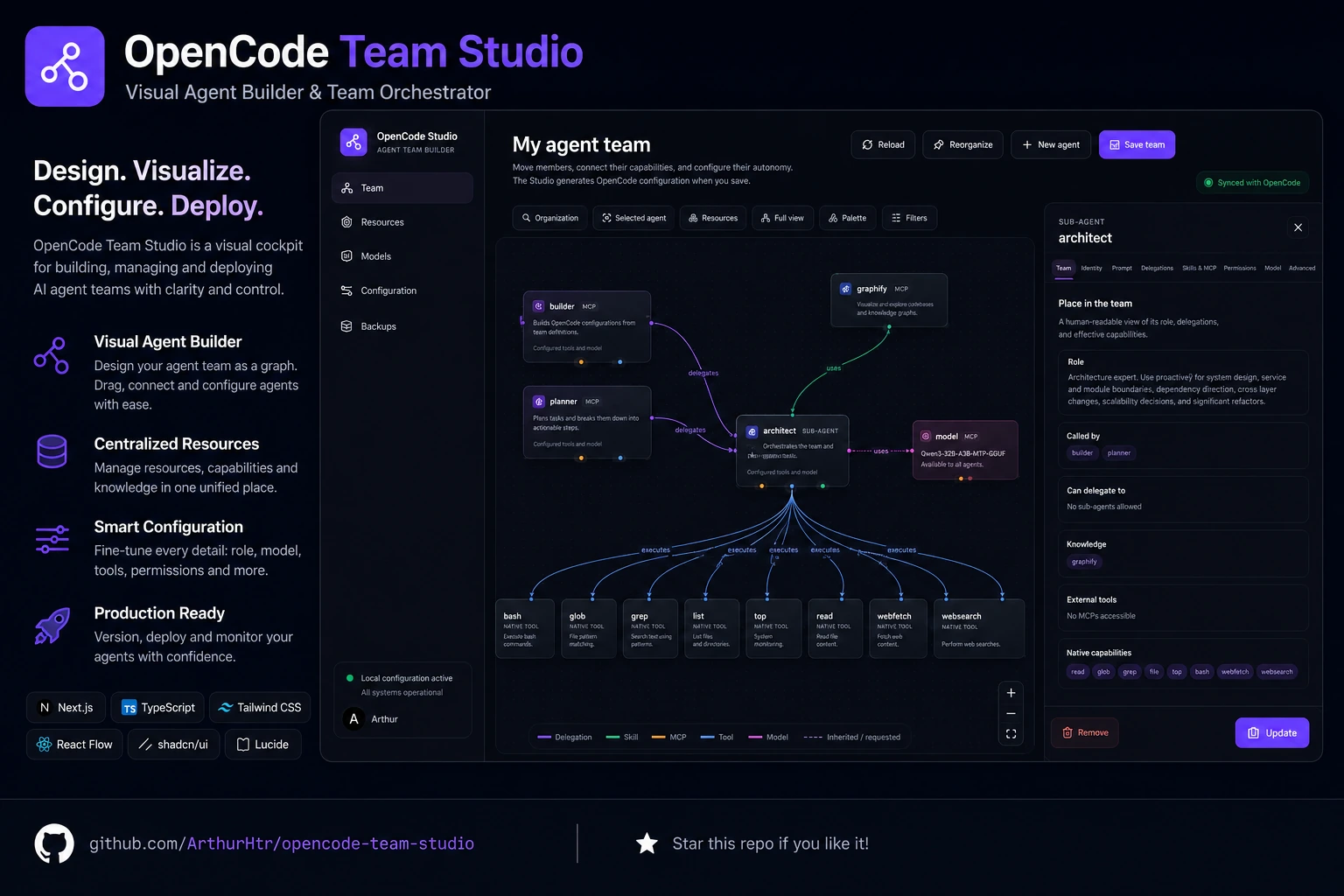
OpenCode Team Studio
A visual workspace for designing, configuring, and managing OpenCode agent teams.
OpenCode Team Studio is an independent community project. It is not built, maintained, endorsed, or officially affiliated with the OpenCode team.





Status
OpenCode Team Studio v1.0.0 is stable.
Back up your OpenCode configuration before use and review generated changes.
Features
- Multi-team profiles — Manage multiple team configurations with activation, duplication, and revision history.
- Visual resource palette — Search and drag agents, skills, and MCP servers onto the canvas.
- Drag-and-drop graph editing — Place nodes freely on the React Flow canvas and connect them with semantic ports.
- Semantic connection ports — Each node exposes type-specific handles: delegations, skills, MCP servers, native tools, and models.
- Four graph views — Organization, selected agent, resource-centric, and complete team views with deterministic semantic layouts.
- Agent hierarchy — Primary agents, sub-agents, and general-purpose agents with delegation configuration.
- Team summary generation — Rendered Markdown preview and raw Markdown view of the entire team configuration.
- Permission editor — Fine-grained
allow,ask,denyrules with inheritance for each agent. - Model configuration — Configure providers, models, variants, temperature, and top-p per agent.
- Transactional backups — Full configuration backup before every apply, with automatic restore on failure.
- Revision history — Automatic and manual revisions with content hashing and restoration.
- Restore workflow — Browse, restore, and delete backups from the dedicated Backups page.
- Docker deployment — Single-container local deployment with volume-mounted configuration.
Demo
The Studio provides an interactive graph workspace where you can:
- Visualize your entire OpenCode agent team as a node graph
- Drag resources from the palette onto the canvas
- Connect agents to skills, MCP servers, tools, and models via semantic ports
- Inspect individual agents, their prompts, permissions, and model settings
- Generate a Markdown summary of your team configuration
Problem
OpenCode configurations grow complex quickly. As the number of agents, skills, MCP servers, tools, models, and permissions increases, understanding the full picture through raw JSON or YAML files becomes difficult.
OpenCode Team Studio provides a visual interface layered on top of your existing OpenCode configuration files. It reads and writes the same files OpenCode uses, preserving comments, unknown properties, and formatting.
Quick Start
Docker (recommended)
docker run -d \
  --name opencode-team-studio \
  --user "$(id -u):$(id -g)" \
  -e HOME=/tmp \
  -e OPENCODE_CONFIG_DIR=/config \
  -p 127.0.0.1:3210:3000 \
  -v "$HOME/.config/opencode:/config" \
 ghcr.io/arthurhtr/opencode-team-studio:v1.0.0
Then open: http://127.0.0.1:3210
Note: Always use the explicit version tag.
Docker Compose
services:
  studio:
    image: ghcr.io/arthurhtr/opencode-team-studio:v1.0.0
    container_name: opencode-team-studio
    restart: unless-stopped
    user: "${LOCAL_UID:-1000}:${LOCAL_GID:-1000}"
    ports:
      - "127.0.0.1:3210:3000"
    environment:
      HOME: /tmp
      OPENCODE_CONFIG_DIR: /config
    volumes:
      - "${OPENCODE_HOST_CONFIG_DIR:-$HOME/.config/opencode}:/config"
Install from sources
npm ci
npm run dev
Build for production:
npm run build
npm run start
Development
npm ci
npm run typecheck
npm run lint
npm run test
npm run build
Security
- The application listens on
localhostby default (port 3000 inside the container) - It mounts your OpenCode configuration directory as a volume — your files stay on your host
- Backups are created before every critical modification, with automatic restore on failure
- You should keep your OpenCode configuration under version control independently
- No telemetry is enabled by default
- No data is sent to external services without explicit user action
- Credential policy: Provider authentication is managed by OpenCode. Run
/connectin OpenCode to authenticate providers. The Studio does not store or verify API keys. Sensitive fields in configuration editors support environment variable references ({env:ANTHROPIC_API_KEY}). - Important: The application works directly on the mounted configuration. For initial testing, use a copy of your configuration directory rather than your production setup.
Limitations
- Local deployment only — This is a single-user, local-only application. It does not support multi-user access or remote deployment.
- Browser compatibility — Tested on recent versions of Chrome and Firefox. Other browsers may have unexpected behavior.
- Large configurations — Teams with many agents (50+) may experience performance degradation on the graph canvas.
Multi-team features
v1.0 introduces multi-team profiles:
- Team profiles — Each team has its own complete configuration (agents, layout, metadata) stored in
studio-data/teams/. - Activation — Switch between teams atomically with transactional backup and restore.
- Revisions — Automatic and manual revisions with content hashing. Up to 3 revisions per team are kept.
- Duplication — Clone a team profile to experiment without affecting the original.
- Migration — Automatic migration from v0.2 single-team configuration to a "Default team" profile.
Migration from v0.2
See the Migration guide below for details on upgrading from the previous public version.
Releases
The current public version is:
v1.0.0- Status: stable release
- Container:
ghcr.io/arthurhtr/opencode-team-studio:v1.0.0
See all published versions in the GitHub Releases page.
Roadmap
See ROADMAP.md for planned features and milestones.
Contribution
See CONTRIBUTING.md for details on how to contribute to this project.
Licence
This project is licensed under the Apache License 2.0.
Migration from v0.2
Data model changes
- Visual clusters removed — The v2 metadata format (
StudioMetadata) no longer stores visual cluster information. Old cluster data from v0.1 is ignored on load. - Layout positions preserved — Graph positions are stored per-view in
studio-data/team-layout.json. Existing positions are preserved when possible. - New metadata file — v2 introduces
studio-data/team-metadata.jsonto track metadata version. This file is excluded from the public API and used internally only.
Configuration compatibility
- Your existing OpenCode configuration (agents, skills, MCP servers, models, permissions) remains fully compatible.
- The Studio reads and writes the same
opencode.jsonc/opencode.jsonfiles that OpenCode uses. - Agent files in
agents/*.mdand skills inskills/*/SKILL.mdare unchanged.
Visual changes
- Palette-driven editing — Resources are now placed from the sidebar palette via drag-and-drop, rather than through inline dialogs.
- Semantic ports — Each node type exposes specific connection handles. Connections must use the correct port for the relation type.
- Four graph views — The single graph view is replaced by organization, agent, resource, and complete views.
Recommendations
Back up your configuration before upgrading:
cp -r ~/.config/opencode ~/.config/opencode.backup-$(date +%Y%m%d)Test with a copy of your configuration before applying changes to your production setup.
Review generated changes — The v2 graph layout algorithm produces different initial positions. Your manual positions may be adjusted on first load.
No automatic migration needed — Your OpenCode configuration files do not need to be modified. The Studio handles backward compatibility internally.
Yorumlar (0)
Yorum birakmak icin giris yap.
Yorum birakSonuc bulunamadi