dvalincode
Health Uyari
- License — License: MIT
- Description — Repository has a description
- Active repo — Last push 0 days ago
- Low visibility — Only 8 GitHub stars
Code Basarisiz
- rm -rf — Recursive force deletion command in scripts/build-binaries.sh
- rm -rf — Recursive force deletion command in scripts/build-release.sh
- execSync — Synchronous shell command execution in scripts/capture-gifs.mjs
- process.env — Environment variable access in scripts/capture-gifs.mjs
- rm -rf — Recursive force deletion command in scripts/install.sh
Permissions Gecti
- Permissions — No dangerous permissions requested
Bu listing icin henuz AI raporu yok.
Local-first CLI agent for coding workflows. Provider-neutral, zero runtime deps, typed tools. Named after Dvalin, the Nordic myth dwarven smith.
English · 中文







A local-first coding agent: any model, safe by default, small enough to audit, open enough to embed.
Three modes — Chat for questions, Cowork for plan-then-execute, Code for autonomous work.
Bring your own model — DeepSeek, OpenAI, Claude (via OpenRouter), Groq, Ollama, or any OpenAI-compatible endpoint. Switch with one click, no code changes, no lock-in.
| 🗨️ Chat mode | Read-only Q&A with one-click prompt templates — explain a codebase, find TODOs, review changes, write tests. The agent can read files and search, but never writes. |
| 👥 Cowork mode | Plan-then-execute. The agent drafts a numbered plan, you click Proceed, and every file write asks for explicit approval — with an inline red/green diff before you say yes. |
| ⚡ Code mode | Autonomous agent with full tool access. Run tests, type-check, build, lint — one click via the Routines panel. macOS shell calls run inside a sandbox-exec profile with network denied. |
| 🛡️ Audit trail | Every run emits a tamper-evident, hash-chained JSONL log — every file read/written, every command, every approval. A Run Report renders it as Markdown; dvalincode report verify proves the chain is intact. Threat model → |
| 🖥️ First-class GUI | Modern web UI with code highlighting, file @-references, / slash commands, Git branch indicator, live token + cost counter, multi-profile LLM config, and a dark / light / system theme switcher. |
| 🖥️ Terminal or web — one binary | Run it bare for an interactive terminal agent (like Claude Code — streaming, inline approvals, red/green diffs), or dvalincode serve to host the web GUI for browser/remote use. Both frontends drive the same agent core. |
| 🪶 Zero-dependency binary | Single ~25MB executable per platform. No Node, no Python, no Docker. |
| 🔐 Local-first | Sessions, config, profiles, and audit logs live in ~/.dvalincode/. .dvalincodeignore blocks the agent from reading sensitive files. AGENTS.md in your repo becomes persistent project instructions. |
🎯 Core Goal
A local-first coding agent: any model, safe by default, small enough to audit, open enough to embed.
DvalinCode is built as an agent runtime, not just another agent app:
- Any model — every OpenAI-compatible endpoint is a first-class citizen, local models included. Your workflow should never be hostage to one vendor's pricing, rate limits, or quality swings.
- Safe by default — three-tier approvals with diff preview, an undo stack, and sandboxed shell execution. An agent you can trust on full-auto.
- Small enough to audit — one ~25MB binary, a handful of runtime dependencies, a codebase you can read in a weekend. Trust through inspection, not promises. As of v0.5, every agent run is auditable too: a tamper-evident, hash-chained log of every action, verifiable after the fact.
- Open enough to embed — the agent core speaks a clean REST + WebSocket API, ready to be wired into your own product, CI, or internal tools.
The bundled web GUI is the runtime's reference implementation and showcase — the first consumer of that public API, demonstrating everything the runtime can do.
⭐ What's New in v0.6.0
- 🖥️ Terminal agent — run
dvalincodebare for an interactive terminal coding agent, Claude-Code-style: streaming responses, inline[y/N]write approvals with red/green diffs,/mode·/clear·/git·/plan·/compact·/undo·/help, Ctrl-C to interrupt, and a guided first-run provider setup. Defaults to read-only Chat, switchable live. - 🌐
dvalincode serve— the web GUI now lives behind a command, so the same binary deploys headless on a server:dvalincode serve --host 0.0.0.0 --no-open. - 🧩 One engine, two frontends — the terminal UI and web GUI both drive a shared, transport-agnostic turn-runner (
src/agent/session.ts), keeping them at feature parity.
- 🛡️ Security-grade audit trail — every Cowork/Code run writes a tamper-evident, hash-chained JSONL log to
~/.dvalincode/audit/(run_start, everytool_call/file_*/shell_exec/approval,run_end). The hash chain makes any after-the-fact edit detectable. No local coding agent ships verifiable behavior logs. Format + threat model → - 📋 Run Report +
dvalincode reportCLI — a Markdown summary of each run (files read/changed, commands, decisions, test result), rendered as a collapsible card in the GUI and from the CLI:dvalincode report --last # render the most recent run dvalincode report <run-id> --format json dvalincode report verify <run-id> # ✓ chain intact / ✗ broken at seq N - 🎨 Theme switcher — choose dark / light / system in Settings.
systemfollows your OS live; the choice persists across sessions.
/compact · dvalin.json team playbook · self-contained binaries
/compact— LLM-based context compaction: replaces conversation history with a structured five-section summary (Goal / Completed / Decisions / Current State / Pending). A divider in the chat thread shows the token reduction (e.g.8,412 → 1,203 tokens −85%).dvalin.jsonteam playbook — commit a shared set of automation prompts to your repo. The sidebar loads them automatically and lets teammates run the same one-click routines without any manual setup. Export button converts your personal routines todvalin.jsonin one click.- Self-contained binaries — single ~25 MB executable per platform; no Node, no Python, no Docker. Auto-opens your browser on launch. Built with
bun --compileso the web UI is bundled alongside the server binary.
- Mode-aware sidebar — Chat shows quick-prompt Templates, Cowork shows a Projects folder tree, Code shows custom Routines (one-click commands like "Run tests" / "Git status" / "Type check"). Add your own routines from the sidebar — they persist in
localStorage. - One-line installer —
curl … | bashauto-detects your OS + arch, drops the binary into~/.dvalincode/, and patches yourPATH. No package manager dependencies. - Multi-profile LLM config — save named (provider, model, API key) sets and switch in one click from the sidebar; live per-session cost counter in the topbar so you can compare providers on the fly.
📸 Preview
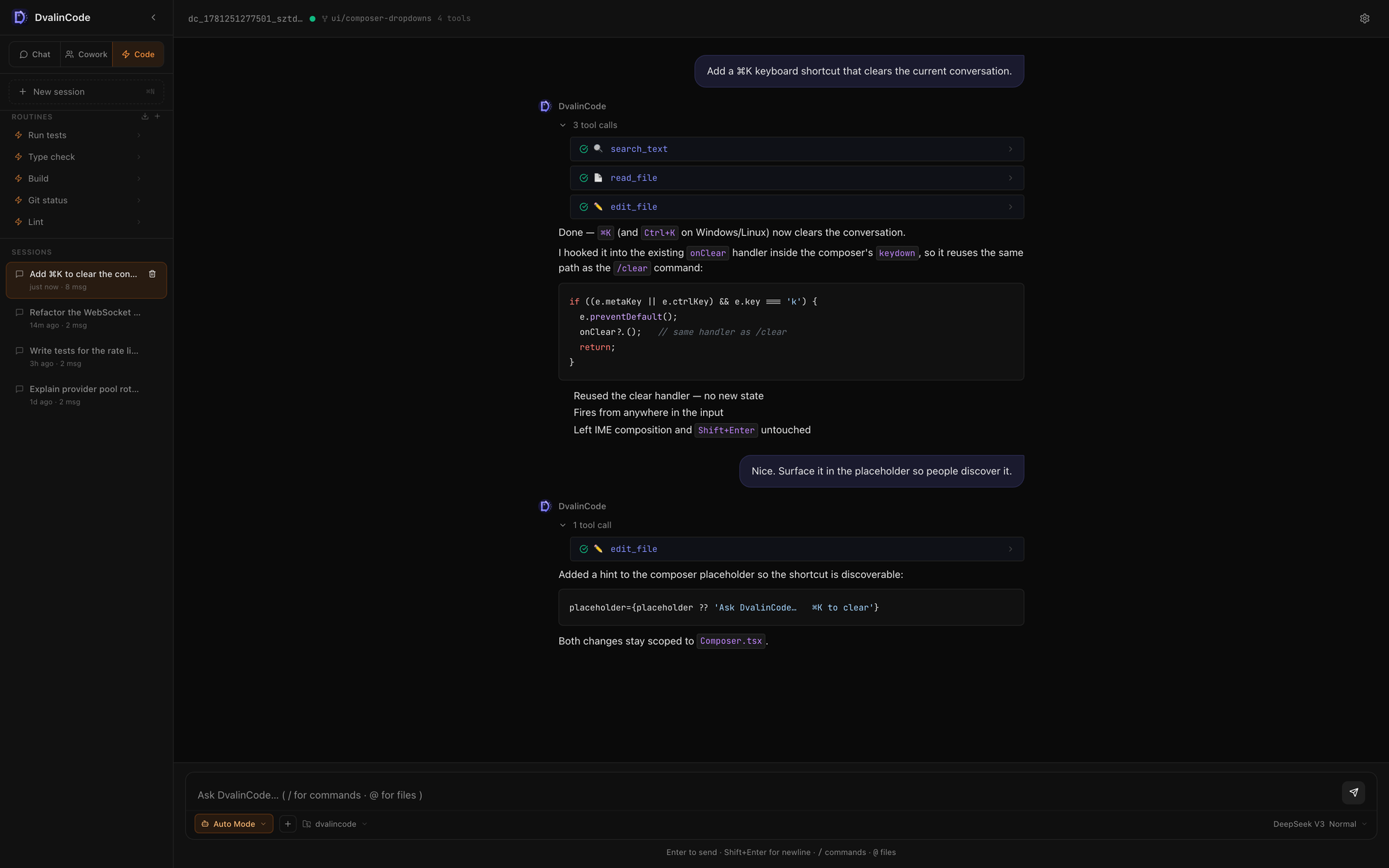
Switching modes — each mode has its own sidebar:
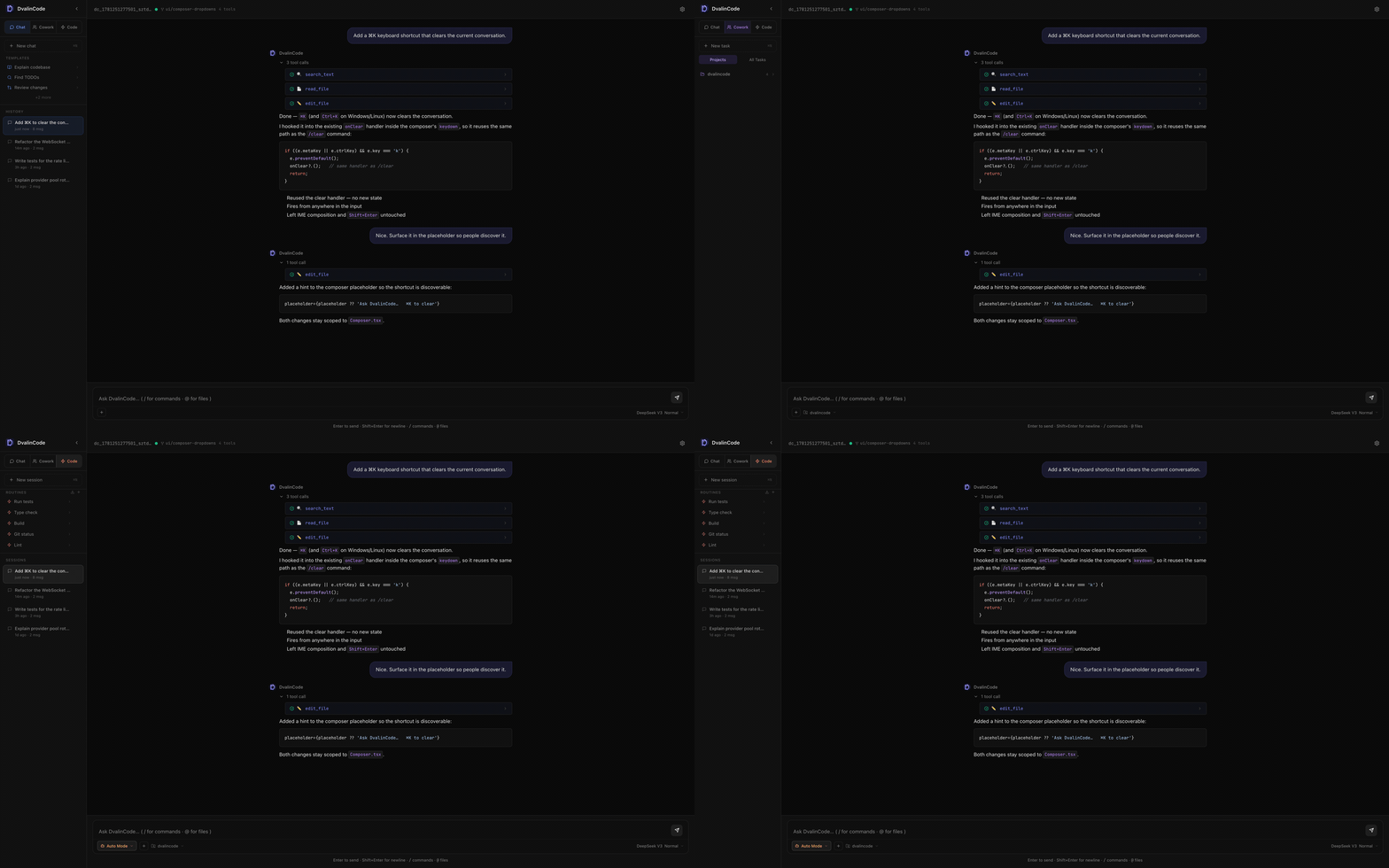
Slash commands & file references in the composer:
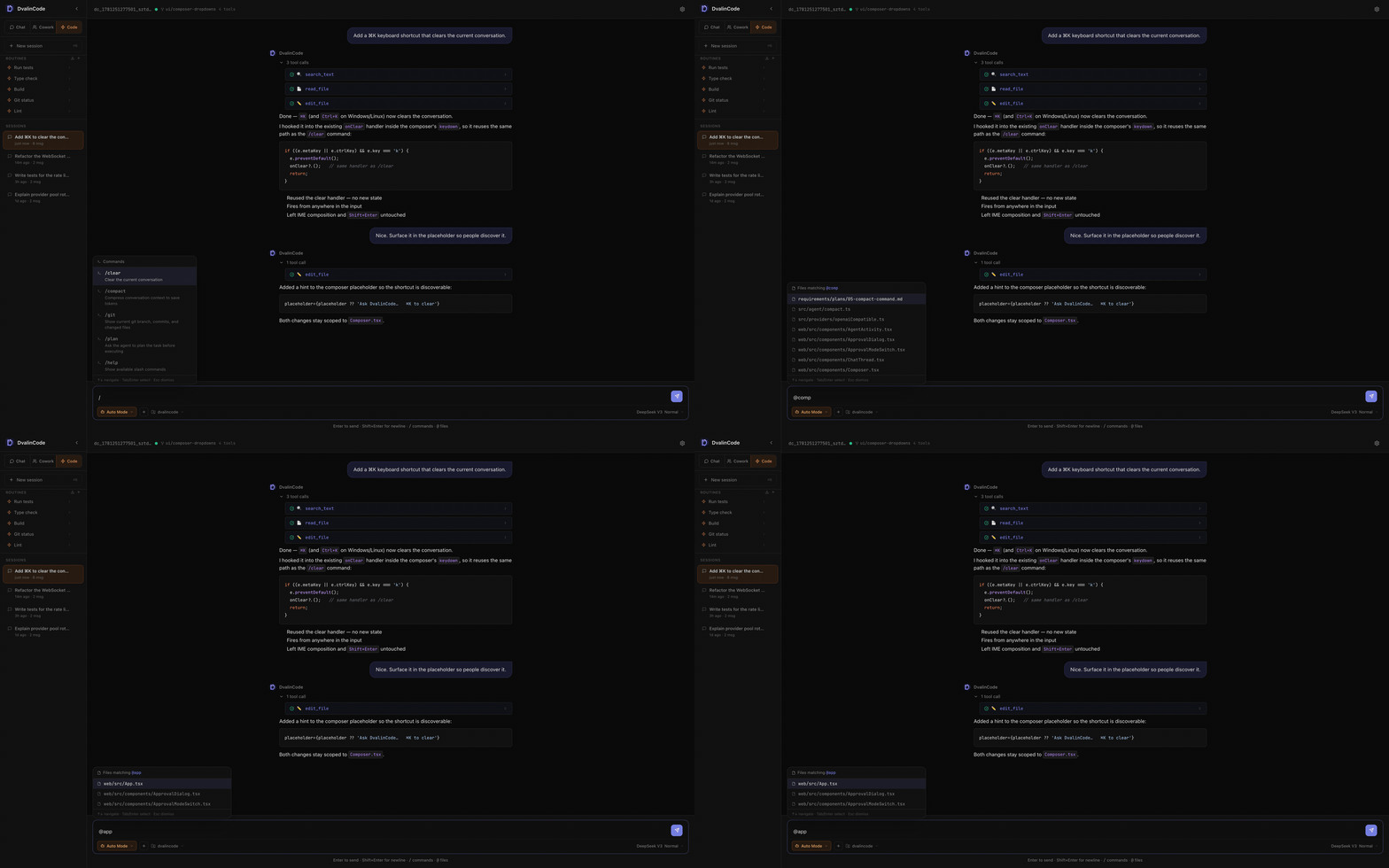
🆚 When to choose DvalinCode
| If you're frustrated by… | DvalinCode's answer |
|---|---|
| Cline / Cursor — IDE-locked, huge install, privacy concerns | Zero-dep binary (~25 MB). Runs anywhere, no IDE required. macOS shell is sandboxed by default — network denied, writes capped to cwd. |
| Claude Code / Aider — pure terminal, diff output is a wall of text, env setup is painful | CLI start → auto-opens a modern Web UI with code highlighting and red/green diff approval. One install command, nothing else needed. |
| Any cloud agent — vendor lock-in, rate limits, can't use a local model | Every OpenAI-compatible endpoint is a first-class citizen. Run Ollama with Qwen2.5-Coder: no key, no internet, no per-token cost. |
| Any agent — new teammate can't reproduce your AI setup, routines are stuck in your IDE | AGENTS.md committed to the repo ships AI context to every clone. dvalin.json ships the team's automation commands the same way — export from the sidebar, commit, done. |
🚀 Quick Install
macOS / Linux (one-liner)
curl -fsSL https://raw.githubusercontent.com/arthurpanhku/dvalincode/main/scripts/install.sh | bash
Detects your OS + arch, downloads the right binary, installs to ~/.dvalincode/, and adds it to your PATH. After reload:
source ~/.zshrc    # or ~/.bashrc
dvalincode                       # interactive terminal agent (like Claude Code)
dvalincode serve                 # start the web GUI, open the browser
dvalincode serve --host 0.0.0.0 --no-open   # host it on a server for remote/browser use
Windows
Download dvalincode-v*-windows-x64.zip from Releases, unzip, then double-click start.bat.
Manual download
Grab the archive for your platform from the Releases page:
| Platform | Archive |
|---|---|
| macOS Apple Silicon (M1/M2/M3) | dvalincode-v*-macos-arm64.tar.gz |
| macOS Intel | dvalincode-v*-macos-x64.tar.gz |
| Windows x64 | dvalincode-v*-windows-x64.zip |
| Linux ARM64 | dvalincode-v*-linux-arm64.tar.gz |
| Linux x64 | dvalincode-v*-linux-x64.tar.gz |
Verify against SHA256SUMS.txt (included in each release).
macOS Gatekeeper: binaries are unsigned. On first run, either clear the quarantine flag with
xattr -dr com.apple.quarantine ~/.dvalincode, or right-click the binary in Finder → Open → confirm.
🎬 First-time setup
Terminal (default): run dvalincode. On first launch it walks you through a one-time provider setup (pick a provider, paste your API key, choose a model) and saves it to ~/.dvalincode/config.json. Then you're at the prompt — type to chat, /mode to switch between Chat / Cowork / Code, /help for commands.
Web GUI: run dvalincode serve and:
- The server starts on
http://localhost:3000and your browser opens automatically. - Click LLM Configuration in the sidebar (bottom-left).
- Pick a provider, paste your API key, choose a model, hit Save.
- Optional: save the current config as a named profile (e.g.
fast,cheap,local-ollama) to switch quickly later.
Both share the same config and sessions in ~/.dvalincode/.
✨ Features
| Category | Feature | Notes |
|---|---|---|
| Modes | Chat / Cowork / Code | Each with a distinct sidebar (Templates / Projects / Routines) and tool-access policy |
| Code permissions | Ask Permissions / Plan Mode / Auto Mode / Bypass permissions | Verified behavior: Ask requests approval before writes/commands, Plan is read-only and does not write files, Auto runs operations automatically, Bypass runs without confirmation prompts |
| Workspaces | Open folder / Import Git / Add worktree | Cowork and Code can switch to a local folder, clone a Git project, or create a Git worktree from the UI |
| Composer | @ file references |
Type @ for a fuzzy file search; selected files get inlined into the prompt |
/ slash commands |
/clear /compact /git /plan /undo /help |
|
| Multiline + interrupt | Shift+Enter for newline, stop button to abort mid-stream | |
| Tool UI | Inline diffs | edit_file and write_file results render as red/green unified diff, default folded |
| Approval dialog with diff | Cowork mode shows the diff before the change is applied | |
| Live tool counter + token + cost | Topbar shows session totals in real time | |
| Agent | LLM-based context compaction | /compact summarises into Goal / Completed / Decisions / Pending |
| Persistent undo stack | /undo [N] reverses the last N tool calls |
|
| Run Report | Markdown summary per run (files, commands, decisions, test result) — GUI card + dvalincode report |
|
| Git awareness | Branch name in topbar; git_status tool; git context auto-injected into prompt |
|
AGENTS.md project memory |
Per-repo persistent instructions, auto-loaded each turn | |
| Security | Tamper-evident audit trail | Hash-chained JSONL per run in ~/.dvalincode/audit/; dvalincode report verify detects edits |
| macOS shell sandbox | sandbox-exec denies network; allows writes only inside cwd + /tmp |
|
.dvalincodeignore |
gitignore-style exclusion; blocks read_file / list_files / search_text |
|
| Per-action approval | Approve/deny each write / delete / shell call in Cowork mode | |
| Appearance | Theme switcher | Dark / light / system, persisted; system follows the OS live |
| Providers | OpenAI-compatible endpoints | DeepSeek · OpenAI · Groq · OpenRouter · Ollama · custom |
| Multi-profile config | Save and switch between named (provider, model, API key) sets | |
| Sessions | Auto-save + restore | All sessions persisted to ~/.dvalincode/sessions/ as JSON |
| LLM summary memory | Cross-session summary keeps the agent oriented after restart |
⌨️ Slash Commands
| Command | Description |
|---|---|
/clear |
Clear the current conversation (client-side, starts a fresh session) |
/compact |
LLM-based context compaction — replaces history with a structured summary |
/undo [N] |
Reverse the last N tool calls (default 1) |
/git |
Run git_status and show branch, recent commits, changed files |
/plan <task> |
Ask the agent to plan the task step-by-step without executing |
/help |
Show all available slash commands |
🛠️ Architecture
┌───────────────────────────┐   ┌─────────────────────────┐
│  Terminal UI (readline)   │   │  Browser GUI (React/Vite)│
│  streaming · approvals    │   │  ChatThread · DiffViewer │
└─────────────┬─────────────┘   └────────────┬────────────┘
              │ in-process          HTTP / WebSocket
              │                ┌───────────────▼─────────────┐
              │                │  Express + ws server         │
              │                │  /api/* · `dvalincode serve` │
              │                └───────────────┬─────────────┘
              └──────────────┬─────────────────┘
┌────────────────────────────▼────────────────────────────┐
│  runAgentTurn — shared turn-runner (src/agent/session)   │
│  provider · prompt (mode · git · AGENTS.md) · session    │
└────────────────────────────┬────────────────────────────┘
                             │
┌────────────────────────────▼────────────────────────────┐
│                    Agent Engine                          │
│  AgentLoop (8-state machine) → AgentRunner              │
│  Streaming · Interrupt · Undo stack · LLM compaction    │
│  run_start / run_end → AuditSink (hash-chained JSONL)   │
└──────────────────────────┬──────────────────────────────┘
                           │ run()
┌──────────────────────────▼──────────────────────────────┐
│  ToolRegistry — Zod schemas + permission gating         │
│  + audit taps: tool_call · file_* · shell_exec          │
│  read_file · list_files · search_text · git_status ·    │
│  write_file · edit_file · delete_file · shell           │
└─────────────────────────────────────────────────────────┘
Agent Loop — 8 States
RESTORE → COMPACT → COMMAND → BUILD → RUN → SAVE → RESPOND → DONE
- RESTORE — Load session from
~/.dvalincode/sessions/ - COMPACT — If context near the limit, compress history (LLM summary)
- COMMAND — Handle built-in slash commands
- BUILD — Assemble system prompt (mode prompt + project + git + AGENTS.md)
- RUN — Delegate to
AgentRunnerfor the LLM tool-calling loop - SAVE — Persist session
- RESPOND — Generate cross-session summary memory
- DONE
🧪 Tests
npm test
81 tests · 14 files · all green.
🏗️ Build from source
Requires Bun (curl -fsSL https://bun.sh/install | bash).
git clone https://github.com/arthurpanhku/dvalincode
cd dvalincode
npm install
npm run dev:all                 # start backend (3001) + Vite (5173)
Build release binaries for every platform:
bash scripts/build-release.sh   # → release/ with tar.gz / zip + SHA256SUMS.txt
bash scripts/build-release.sh darwin    # macOS only
bash scripts/build-release.sh windows   # Windows only
Before publishing a release:
(cd release && shasum -a 256 -c SHA256SUMS.txt)
unzip -l release/dvalincode-v*-windows-x64.zip | grep 'web/dist/index.html'
tar tzf release/dvalincode-v*-macos-arm64.tar.gz | grep 'DvalinCode.app/Contents/Resources/AppIcon.icns'
Windows smoke test: unzip dvalincode-v*-windows-x64.zip on Windows and run start.bat from the extracted folder. The server should open http://localhost:3000. If it reports an ENOENT path under B:\~BUN\root\web\dist, the compiled Bun virtual path detection has regressed; the packaged binary must resolve web/dist beside the extracted executable.
Note: Bun only allows Windows .exe icon/metadata injection when compiling on Windows. macOS/Linux cross-builds still produce a valid Windows archive, but without an embedded .exe icon.
🌐 Providers
DvalinCode supports any OpenAI-compatible endpoint. Built-in presets, sorted by cost:
| Provider | Cheapest model | Input / Output | Notes |
|---|---|---|---|
| Groq | llama-3.1-8b-instant |
Free tier | Fastest open models — Llama 3.3 70B, Mixtral |
| Ollama | qwen2.5-coder |
$0 (local) | No API key needed, runs on your machine |
| DeepSeek | deepseek-chat |
$0.14 / $0.28 per 1M | Cheap and strong; v3 nearly matches GPT-4 quality |
| OpenRouter | google/gemini-2.0-flash-001 |
$0.10 / $0.40 per 1M | 200+ models including Claude, Gemini, Llama |
| OpenAI | gpt-4o-mini |
$0.15 / $0.60 per 1M | Reliable; o1 available for deep reasoning |
| Custom | — | depends | Any OpenAI-compatible base URL |
DvalinCode shows the per-session cost live in the topbar — flip between providers in the LLM Configuration modal, save named profiles, and compare on the fly.
❓ FAQ
Does it send my code to a third party?Only what the agent sends to the LLM you configured. Sessions, configs, and profiles all live on your machine in
~/.dvalincode/. To exclude sensitive files from the agent's view, drop a .dvalincodeignore in your repo root (gitignore-style patterns).
Can I run this without an API key?
Yes — use Ollama. Pull a model (
ollama pull qwen2.5-coder), then in the LLM Configuration modal pick the Ollama provider. No key, no internet, no per-token cost.
Why three modes? Can't I just use one?
Each mode has different tool access and safety defaults: Chat is read-only, Cowork requires approval per write, Code is full-auto. Each also has a different sidebar (Templates / Projects / Routines) optimized for that workflow. You can switch any time — the conversation continues. Is the shell tool sandboxed?
On macOS, yes — every
shell tool invocation is wrapped in sandbox-exec with a profile that denies network access and allows file writes only inside cwd, /tmp, and /var. Linux and Windows sandboxing is planned.
How do I see what the agent actually did — and is the log trustworthy?
Every run writes a JSONL audit log to
~/.dvalincode/audit/run-<timestamp>-<id>.jsonl. Render it with dvalincode report --last (or see the collapsible Run Report card in the GUI). Each record is chained to the previous one with a SHA-256 hash, so any after-the-fact edit is detectable — dvalincode report verify <run-id> reports ✓ chain intact or the exact position of a break. It's tamper-evident, not tamper-proof: a local attacker who can rewrite the whole file could recompute the chain. The value is forensic/accountability. See docs/AUDIT-TRAIL.md for the full threat model.
Will it overwrite my files without asking?
Depends on the mode. Chat never writes. Cowork requires approval per file (with inline red/green diff before you click Allow). Code is full-auto — use it for trusted tasks or in a feature branch. The macOS binary won't open — "unverified developer"
The binary is unsigned. Run this once to clear the quarantine flag:
xattr -dr com.apple.quarantine ~/.dvalincodeSwitch to Code mode, click the + next to "ROUTINES" in the sidebar. Enter a name (e.g. "Deploy preview") and a prompt or slash command (e.g. "
/git" or "Build the project and deploy to staging"). Routines persist in your browser's localStorage.
Does AGENTS.md get sent every turn?
Yes — DvalinCode reads
AGENTS.md from the project root before each turn and injects it under === PROJECT INSTRUCTIONS === in the system prompt. Keep it focused — it counts toward your token budget.
🤝 Contributing
Contributions welcome. The codebase is intentionally small and surgical — see CONTRIBUTING.md.
git clone https://github.com/arthurpanhku/dvalincode
cd dvalincode && npm install
npm test                # 65/65 ✅
npm run typecheck
📄 License
MIT — see LICENSE.
🔗 Independence & Attribution
DvalinCode is not affiliated with Anthropic, Claude, OpenAI, or any other vendor.
The design process included studying common patterns in modern coding agents for architectural learning. The TurnState state-machine design was informed by HKUDS/nanobot (MIT). The agent loop follows the ReAct paradigm (Yao et al., 2022), and the tool-calling interface follows the OpenAI tool_calls format. The implementation — state machine, UI, tool schemas, module layout — is otherwise original; no source code, prompts, or UI text from other projects is copied.
Full source references: docs/REFERENCES.md
Yorumlar (0)
Yorum birakmak icin giris yap.
Yorum birakSonuc bulunamadi