LLMits
Health Warn
- License — License: MIT
- Description — Repository has a description
- Active repo — Last push 0 days ago
- Low visibility — Only 6 GitHub stars
Code Fail
- rm -rf — Recursive force deletion command in Sources/LLMitsApp/Resources/update-helper.sh
- rm -rf — Recursive force deletion command in install.sh
- rm -rf — Recursive force deletion command in scripts/build-dmg.sh
Permissions Pass
- Permissions — No dangerous permissions requested
No AI report is available for this listing yet.
An open-source macOS menu-bar utility for viewing quota utilization from Claude Code and Codex subscriptions



LLMits is an open-source macOS menu-bar utility for viewing quota utilization from Claude and ChatGPT subscriptions. It targets macOS 14+ and keeps credentials and usage data local.
Product preview
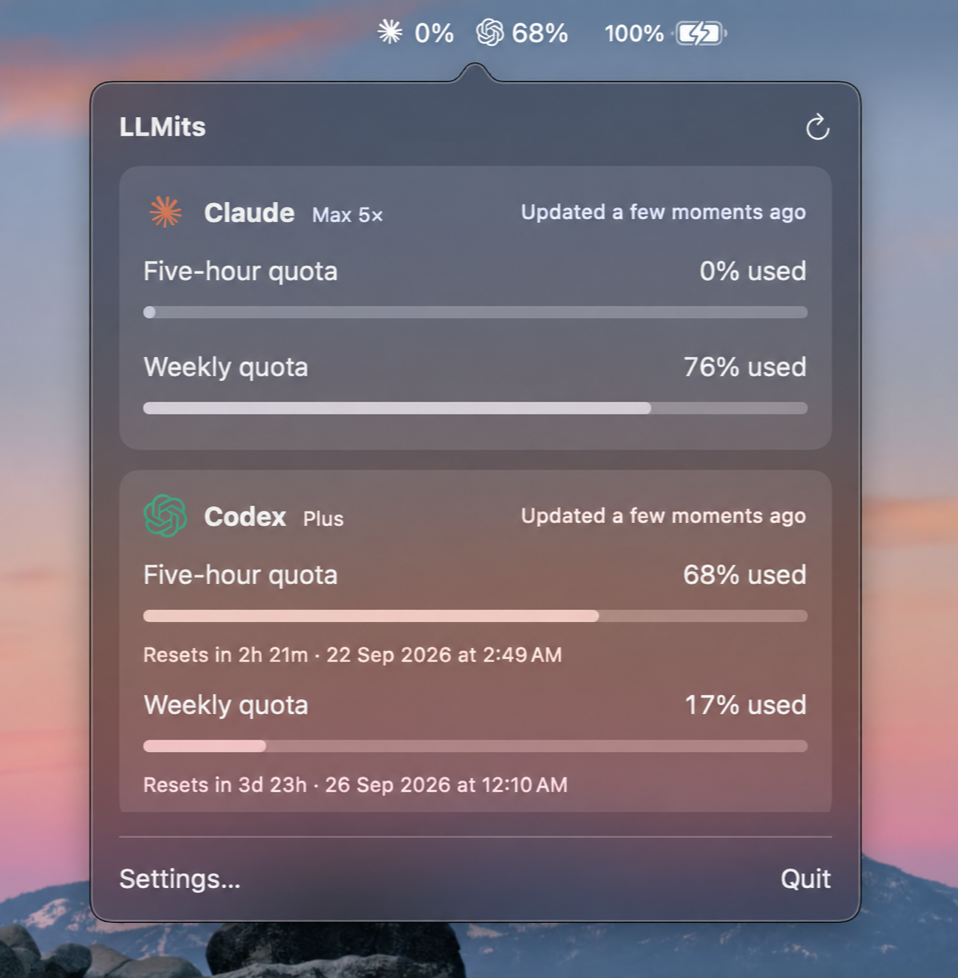
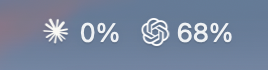
[!IMPORTANT]
LLMits uses provider OAuth and quota endpoints that are not public, supported APIs. Provider-side changes may temporarily break authentication or usage reporting.
Quick install
Install the latest release with one command:
curl -fsSL https://raw.githubusercontent.com/aryan1306/LLMits/main/install.sh | bash
Features
- Live five-hour and weekly quota usage for Claude and ChatGPT
- Claude subscription plan detection, including Pro and Max tiers
- Native menu-bar percentages with Claude and ChatGPT icons
- Used or remaining percentage display modes
- Secure Claude PKCE and ChatGPT device-code sign-in flows
- Credentials stored in macOS Keychain
- Automatic token refresh, configurable polling, and refresh after wake
- Relative freshness labels, reset times, stale-data indicators, and manual refresh
- Local snapshot cache so the latest usage remains visible between launches
- Automatic GitHub release checks with an in-app, user-approved update and relaunch
- No backend, analytics, telemetry, or account-identity data in cached snapshots
Run locally
Requirements:
- macOS 14 or newer
- Xcode 16 or newer, including the command-line tools
Clone and run the project:
git clone https://github.com/aryan1306/LLMits.git
cd LLMits
swift test
swift run LLMits
LLMits runs as a menu-bar accessory without a Dock icon. Click its menu-bar item, open Settings…, then choose Connect beside Claude or ChatGPT:
- Claude: complete authorization in the browser, then paste the authorization code or full callback URL into LLMits.
- ChatGPT: enter the one-time code on the page opened by LLMits and wait for approval.
After connecting, the menu bar shows the configured used or remaining percentage. Open the popover for quota windows, reset times, plan details, and refresh status.
[!NOTE]
Running withswift runproduces an ad-hoc-signed development executable. macOS may ask for Keychain access again after a rebuild because the executable identity changes. Choose Always Allow for the current build, or use a consistently signed app bundle for stable Keychain trust.
Install
To inspect the script before running it:
curl -fsSL https://raw.githubusercontent.com/aryan1306/LLMits/main/install.sh -o install-llmits.sh
less install-llmits.sh
bash install-llmits.sh
Pass options through bash to install into ~/Applications without administrator access or select a specific release:
curl -fsSL https://raw.githubusercontent.com/aryan1306/LLMits/main/install.sh | bash -s -- --user
curl -fsSL https://raw.githubusercontent.com/aryan1306/LLMits/main/install.sh | bash -s -- --version 1.0.0
You can also download LLMits.dmg from the latest release, open it, and drag LLMits into Applications.
Release builds are currently ad-hoc signed. On first launch, macOS may require you to right-click LLMits and choose Open. A future Developer ID-signed and notarized release will remove this extra confirmation.
Packaged apps check GitHub for a newer published release at launch, every six hours, and after wake. When an update is available, the popover's refresh control becomes a small download icon. Click it for Update and Relaunch, Refresh quotas, or Cancel. After confirmation, LLMits downloads and verifies the release, replaces the app in its current location, then relaunches. Updating requires write access to the app's containing folder. Development builds started with swift run do not self-update.
How it works
- AppKit owns the status item and transient popover; SwiftUI renders the popover and settings UI.
LLMitsCorecontains provider-neutral quota models, OAuth flows, endpoint adapters, persistence, formatting, and refresh policy.- Claude usage comes from the OAuth usage endpoint and is enriched with profile data for the plan label.
- ChatGPT usage comes from the Codex usage endpoint associated with the authorized account.
- Quota values are clamped and normalized before display, with a five-hour window preferred in the menu bar and weekly usage used as a fallback.
See Architecture and Roadmap.
Development
Run the complete test suite:
swift test
Build without launching the app:
swift build
Create a universal app and DMG locally:
./scripts/build-dmg.sh 0.1.0
Artifacts are written to dist/. GitHub Actions runs CI on pushes and pull requests. A manual Build DMG workflow run uploads the DMG as a workflow artifact; pushing a tag such as v0.1.0 also creates a GitHub Release with the DMG and SHA-256 checksum.
The test suite covers authorization primitives, credential storage, provider response parsing, quota calculations, persistence, diagnostics, refresh policy, and update detection. The live updater integration test is skipped by default. To run it against the latest GitHub release, build an older packaged version in a temporary directory and run:
TEST_DIST=$(mktemp -d)
DIST_DIR="$TEST_DIST" ./scripts/build-dmg.sh 0.1.0
LLMITS_UPDATE_TEST_CURRENT_APP="$TEST_DIST/LLMits.app" swift test --filter UpdateIntegrationTests
The test copies that app into another temporary directory, then checks download, verification, waiting for the old process, replacement, relaunch, and rollback. It does not modify the app installed in Applications.
Privacy
LLMits has no backend, analytics, telemetry, or crash-reporting service. Packaged apps contact GitHub to check for releases and download an update only after approval. OAuth credentials are stored in macOS Keychain. Cached quota snapshots are written locally and contain neither credentials nor account identity.
License
MIT
Reviews (0)
Sign in to leave a review.
Leave a reviewNo results found