asale
Health Uyari
- License — License: Apache-2.0
- Description — Repository has a description
- Active repo — Last push 0 days ago
- Low visibility — Only 6 GitHub stars
Code Basarisiz
- process.env — Environment variable access in scripts/dev-app.mjs
- rm -rf — Recursive force deletion command in scripts/package.sh
Permissions Gecti
- Permissions — No dangerous permissions requested
Bu listing icin henuz AI raporu yok.
Share the tokens you don't use Turn idle quota into income; when you hit a limit, someone else takes over. Support claude code, chatgpt(codex), google gemini and so on.

Asale Client
Share the tokens you don't use
Turn idle quota into income; when you hit a limit, someone else takes over.
Website · Market ·
Global map · Wallet ·
⬇ Download the client
What is this
You pay for Claude Pro / Max, ChatGPT Plus / Codex — plans billed by subscription.
Quota refreshes per window and whatever you don't use is gone; meanwhile, on the other
side of the planet, someone is stuck at a limit waiting for their window to reset.
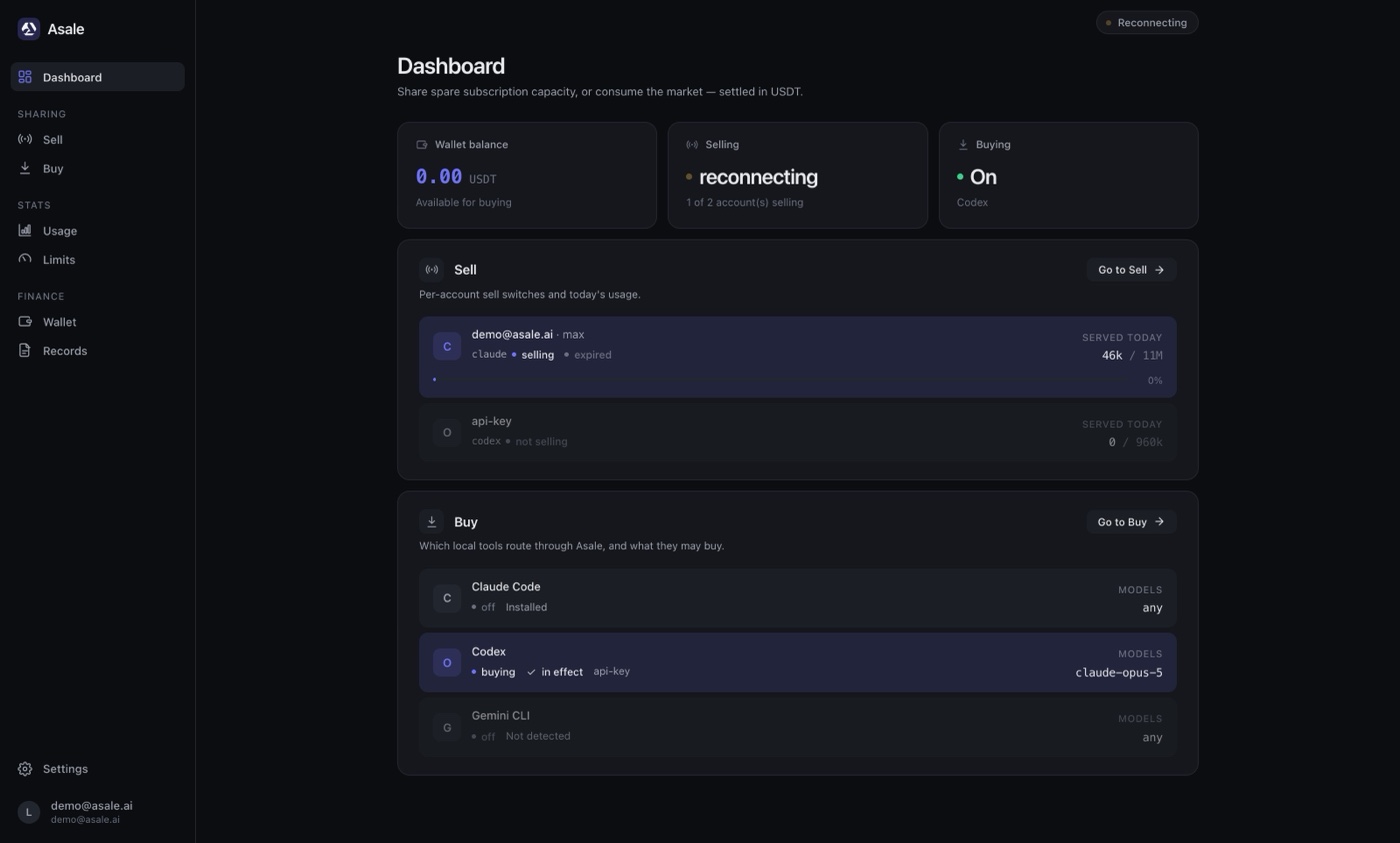
Asale is a token sharing network that connects those two facts:
- Sell — your idle subscription quota goes on the market, someone who hits a limit
picks it up, and you get paid in USDT. - Buy — point your AI CLI at Asale and run on someone else's idle quota, below the
price of the official API.
The platform only does matching, forwarding and billing. Settlement runs once a
minute, in USDT (TRC20).
This repository is the desktop client — selling and buying both live in this one app.
Supported token sources
Claude Pro / Max · ChatGPT / Codex · Google Gemini · Kimi · xAI Grok
All five subscriptions can be sold, and all five sign in. Claude Code, Codex and
Gemini CLI use a browser callback; Kimi Code and Grok CLI use device-code
authorization — you confirm a short code in the browser, with no callback port involved,
which is why those two also work from a remote browser session. Each vendor's metered
platform API key can be connected separately. On the buying side, config switching covers
Claude Code, Codex and Gemini CLI.
Features
Sell · put idle subscriptions on the market
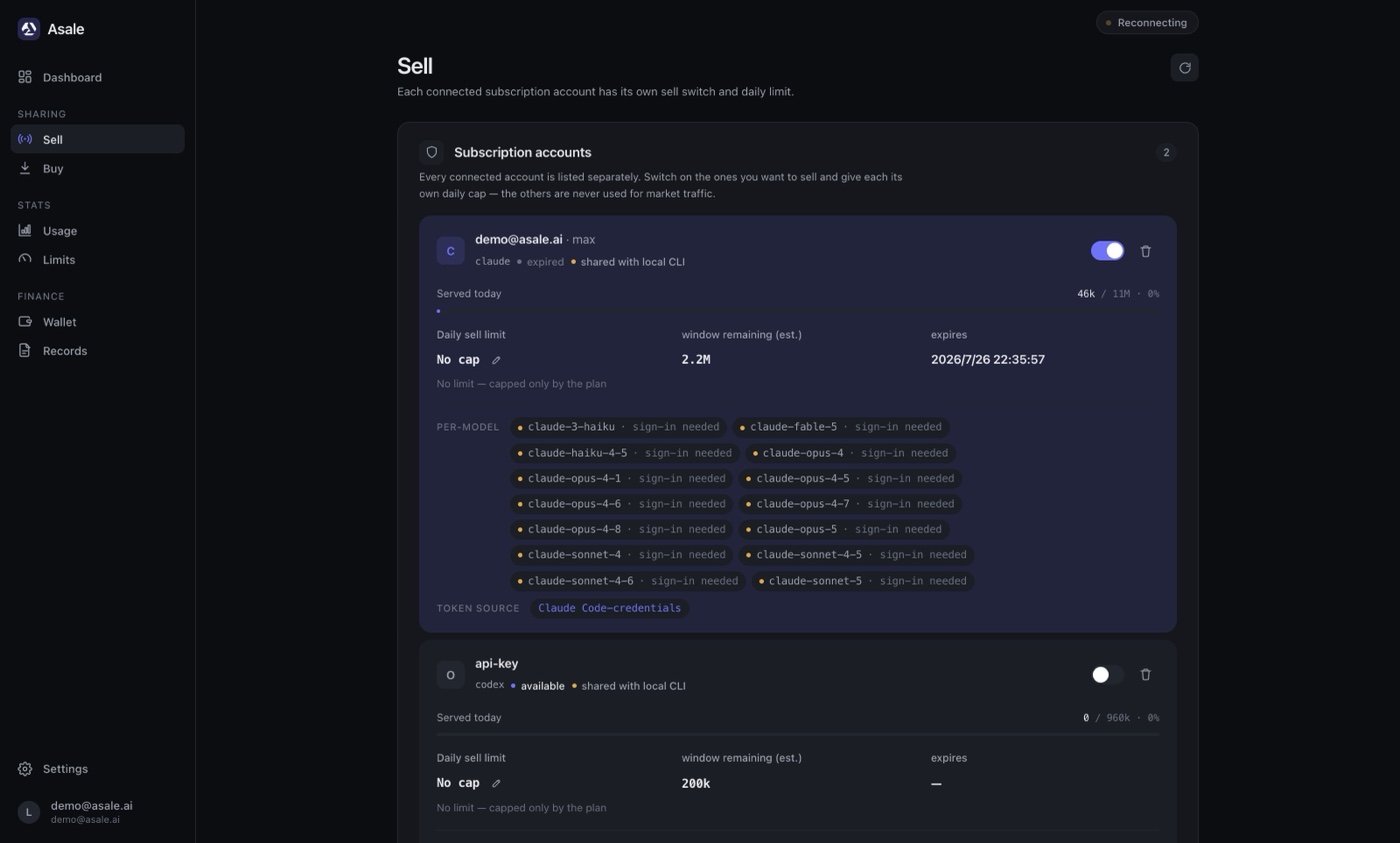
Every connected subscription account gets its own switch — only the accounts you turn
on take market requests. The daily sell limit is set per account and stops automatically
when reached; remaining window quota, expiry and today's sales are all on screen.
Credentials come from the CLIs already logged in on this machine (Claude Code credentials, .codex/auth.json, …), or you can re-run OAuth inside the client.
Credentials never leave your machine — they go into the OS keychain, and the database
only stores a reference.
Buy · route your local AI CLIs through Asale
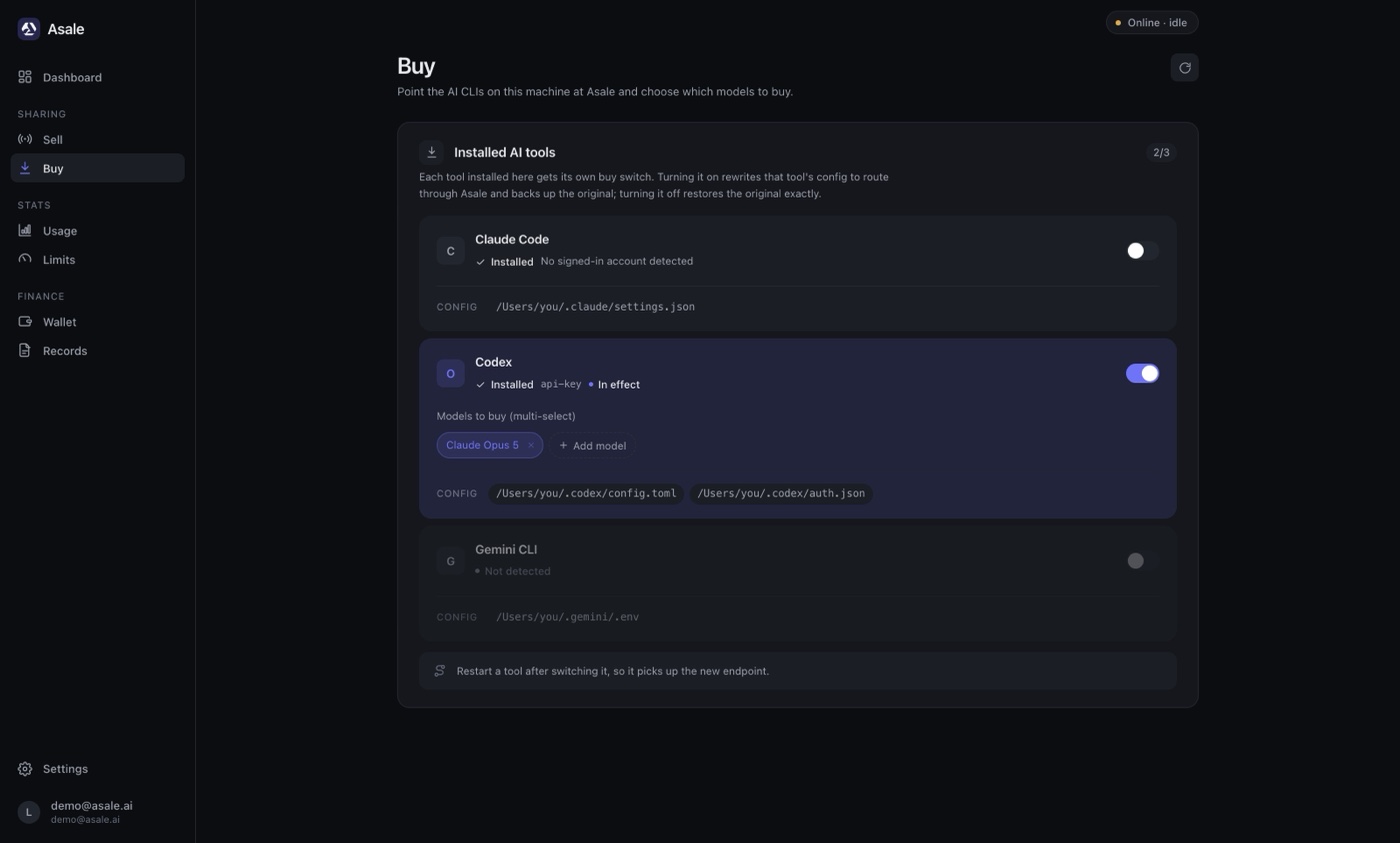
The client detects which tools are installed (Claude Code / Codex / Gemini CLI) and gives
each one a switch. Turning it on rewrites that tool's config to point at Asale and
backs up the original file; turning it off restores it exactly — you can go back to
official at any time. Models to buy are picked per tool, multi-select.
Usage & limits · don't sell away your own daily quota
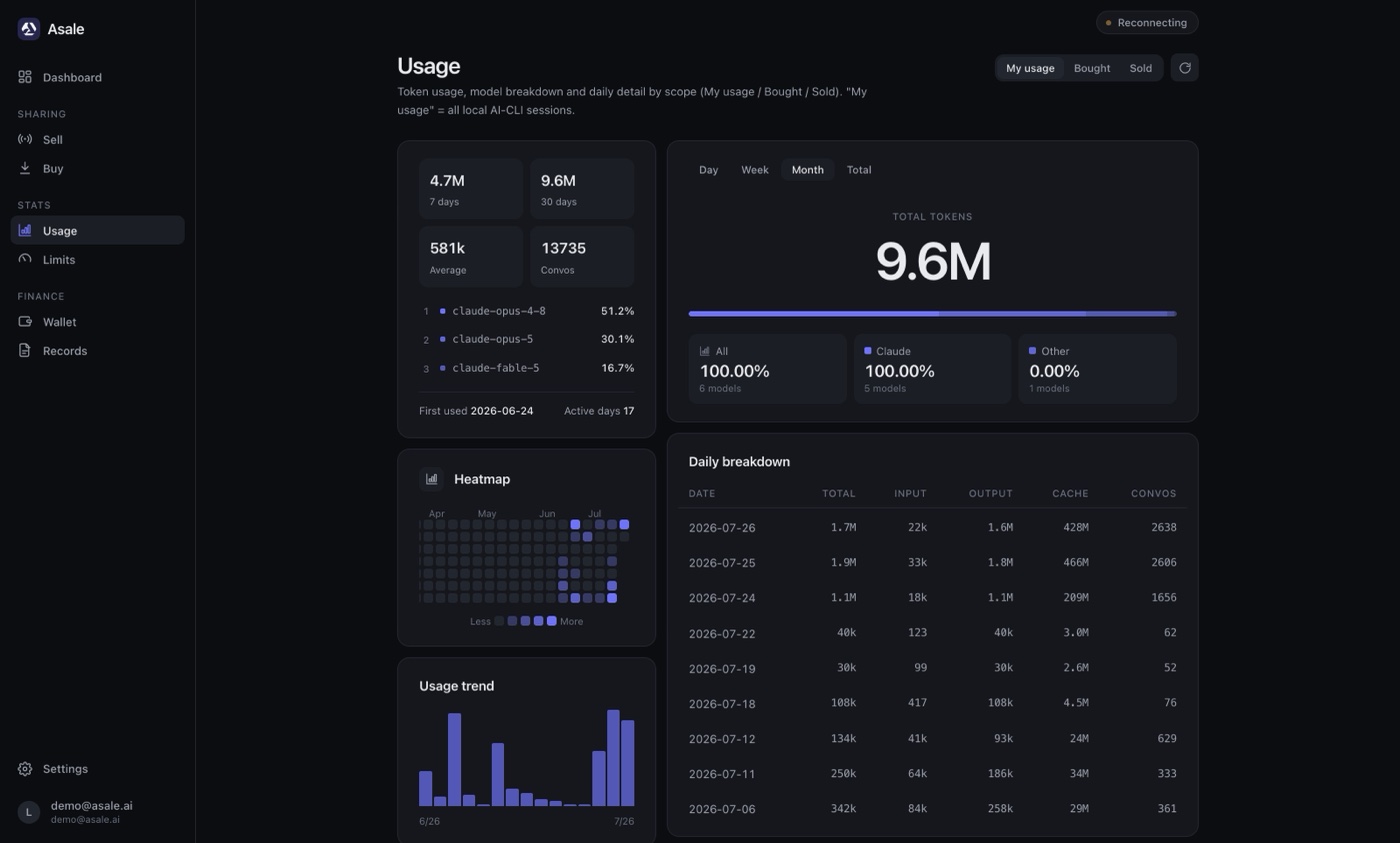
Token usage, model distribution and daily breakdowns are tracked along three axes — used
by me / bought / sold — with a heatmap and trend charts. The limits page expresses
the sell cap as a percentage of your subscription quota, so you always keep headroom
for your own work.
Wallet & records
The wallet page reconciles USDT in and out: available balance, held (pre-authorized) funds
and pending earnings, with deposits and withdrawals over TRON. The records page lists every
relayed request — seller-side and buyer-side records can be cross-checked against each
other, so the platform's fee ratio is verifiable. The same data is available in the
web console.
Download & install

Free. One line does the whole thing — app, plus the asale command line:
curl -fsSL https://asale.ai/dl/install.sh | sh # macOS / Linux
irm https://asale.ai/dl/install.ps1 | iex # Windows
Run the same line again later to upgrade. On a machine with no desktop the script
installs web mode instead of a GUI it could not draw — see
Headless: run it on a server.
Or take the installer by hand from asale.ai, which detects your OS
and hands you the right one. Or go straight at one:
| Platform | Direct link |
|---|---|
| macOS (universal, Apple silicon / Intel) | asale.ai/dl/mac |
| Windows | asale.ai/dl/windows |
| Linux AppImage | asale.ai/dl/linux-appimage |
| Linux .deb | asale.ai/dl/linux-deb |
No version numbers above on purpose: each link is resolved against the newest
GitHub release at the moment you click it, so
nothing here can go stale. A platform that release did not build lands you back on the
download section — Windows and Linux bundles have to be produced on the matching OS
(Tauri cannot cross-compile), see Development · Packaging.
Installing on macOS
- Download the
.dmg, open it and drag Asale into Applications. - There is no step two. Bundles are signed with a Developer ID certificate and notarized
by Apple, so macOS opens them without a warning.
Installing on Windows
- Download the
-setup.exe(or the.msi) and run it. - Installers are Authenticode-signed, so the UAC prompt shows the publisher name. A
freshly issued certificate has not built up SmartScreen reputation yet, so early
releases may still show "Windows protected your PC" — More info → Run anyway. You
can confirm the download is intact first withGet-AuthenticodeSignature .\Asale_x.y.z_x64-setup.exe, which must reportValid. - On first run Windows asks about the firewall: the client listens on localhost only (the
proxy your CLI talks to), so Cancel is fine — allow it only if you intend to run in
remote B/S mode.
Once installed the app stays resident in the background (menu bar icon), supports launch
at login, and updates itself. Closing the window does not quit it — Asale keeps selling
from the tray. Click the tray icon for a small panel with the live figures, a button for
the browser, and a real quit; Settings → Window and tray turns that behaviour off if you
would rather the close button closed.
Headless: run it on a server
The service holds the whole app and serves its own web UI, so a box with no graphical
session is not a lesser install — it is the same client on a port:
curl -fsSL https://asale.ai/dl/install.sh | sh
asale start                # start the service
asale expose on            # allow access from other machines, for good
asale url                  # the URL to open — access token included
asale autostart enable     # come back automatically after a reboot
Open that URL from any browser and you get the full client. The token in it is the entire
authorization — anyone holding it can read your credentials and spend your balance — so
keep the port behind a firewall or a TLS reverse proxy.
If only your own browser needs it, do not open the port at all. An SSH tunnel gives
you the same UI over an already-encrypted link, with expose left off:
ssh -N -L 9800:127.0.0.1:9700 user@your-server   # leave this running
ssh user@your-server 'asale url'                 # the URL, token included
Open that URL with the port changed to 9800 — the desktop app may already hold 9700 on
your own machine.
asale is installed on every platform, not just headless ones: start, stop, restart,status, logs, open, autostart, update, uninstall. Full reference:
docs/CLI.md.
First run
- Open the client and sign in with your Asale account (register at
asale.ai if you don't have one — OAuth supported). - To sell: go to Sell → Connect subscription, pick a platform and complete OAuth;
the client also picks up CLI credentials already present on this machine. Turn the
account switch on, set a daily limit, and once the status reads "online" you start
receiving jobs. - To buy: top up USDT in Wallet, then in Buy turn on the switch for a tool, pick
the models, and restart that CLI so the new endpoint takes effect.
⚠️ Don't flip the Claude Code buy switch from inside a running Claude Code session —
rewriting the config disconnects the session you're in. Flip it, then restart the tool.
Security & privacy
Same claims as the website's security page, mapped to the code:
- No conversation content is stored or cached. The platform only matches, forwards and
bills: there is no body column in the database, chunks are forwarded in memory, nothing
goes into Redis, and logs never print bodies. - Encrypted and signed end to end of every hop. Every hop runs inside TLS 1.2/1.3;
devices sign the handshake with an Ed25519 identity and every dispatch is verified. The
client refuses any plaintext remote address (non-loopback must be https/wss). - No silent collection. The only reported fields are a random UUID device ID, version,
OS name and a heartbeat — no hardware fingerprinting, no IP geolocation, and usage
statistics never leave your machine. - Credentials stay local. Subscription credentials live in the OS keychain and
~/.asale/auths; the server only ever receives a reference.
Stated plainly: a request is ultimately relayed to the upstream provider by another
user's client, and at that moment the body is visible to that client. We do not — and
cannot — offer end-to-end encryption. Do not send confidential material.
The client source is in this repository; every claim above can be checked against it.
Developers
Architecture, local development, packaging and the release process are in
docs/DEVELOPMENT.md.
License & risk
Asale is a technical relay only. Sharing subscription capacity may violate upstream
terms of service — you assume that risk.
Yorumlar (0)
Yorum birakmak icin giris yap.
Yorum birakSonuc bulunamadi