pushover-mcp
Health Gecti
- License — License: MIT
- Description — Repository has a description
- Active repo — Last push 0 days ago
- Community trust — 43 GitHub stars
Code Uyari
- process.env — Environment variable access in src/config.ts
- network request — Outbound network request in src/http.ts
Permissions Gecti
- Permissions — No dangerous permissions requested
Bu listing icin henuz AI raporu yok.
A MCP implementation for sending notifications via Pushover
Pushover MCP


An MCP server that lets AI agents send push notifications to your phone and desktop through Pushover.
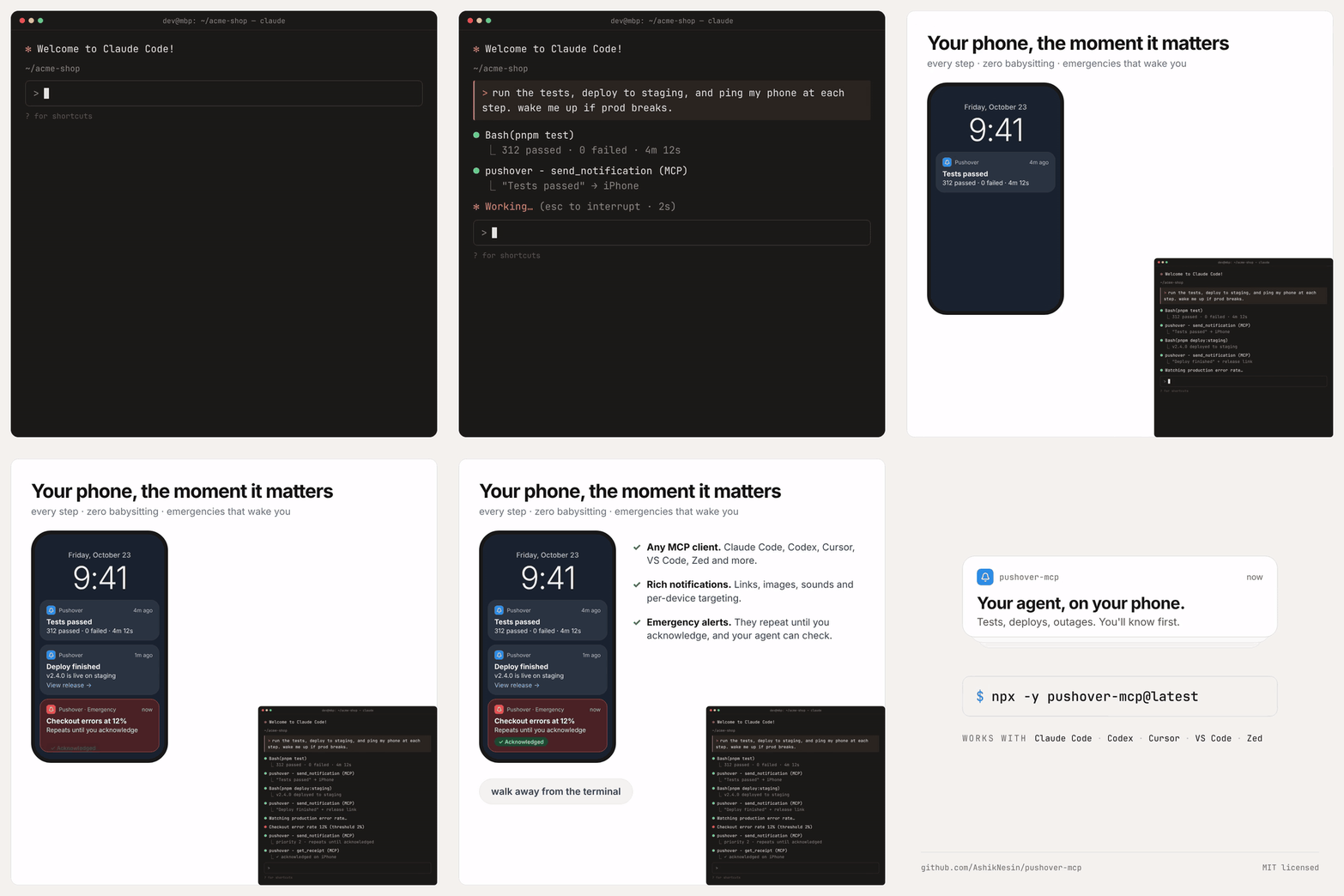
- Rich notifications: title, link, sound, device, HTML or monospace text, image attachments
- Emergency alerts: repeat until acknowledged, then check or cancel them
- Self-correcting: clear tool errors the agent can act on
- stdio or HTTP: runs locally by default, or as a shared HTTP server
Quick start
- Get two keys from Pushover:
- User key: shown on your dashboard.
- App token: create an application.
- Add the server to your client (below), replacing
YOUR_TOKENandYOUR_USER_KEY. - Ask your agent to send you a notification.
Requires Node.js 22 or later.
Setup
Claude Code
claude mcp add pushover -e PUSHOVER_TOKEN=YOUR_TOKEN -e PUSHOVER_USER=YOUR_USER_KEY -- npx -y pushover-mcp@latest
OpenAI Codex
codex mcp add pushover --env PUSHOVER_TOKEN=YOUR_TOKEN --env PUSHOVER_USER=YOUR_USER_KEY -- npx -y pushover-mcp@latest
Claude Desktop, Cursor, Cline
Add this to your client's MCP config file:
{
  "mcpServers": {
    "pushover": {
      "command": "npx",
      "args": ["-y", "pushover-mcp@latest"],
      "env": {
        "PUSHOVER_TOKEN": "YOUR_TOKEN",
        "PUSHOVER_USER": "YOUR_USER_KEY"
      }
    }
  }
}
| Client | Where to find it |
|---|---|
| Claude Desktop | Settings → Developer → Edit Config |
| Cursor | ~/.cursor/mcp.json, or .cursor/mcp.json in a project |
| Cline | MCP Servers → Configure MCP Servers |
VS Code
Add .vscode/mcp.json. VS Code prompts for the keys once and stores them securely:
{
  "inputs": [
    { "type": "promptString", "id": "pushover-token", "description": "Pushover app token", "password": true },
    { "type": "promptString", "id": "pushover-user", "description": "Pushover user key", "password": true }
  ],
  "servers": {
    "pushover": {
      "type": "stdio",
      "command": "npx",
      "args": ["-y", "pushover-mcp@latest"],
      "env": {
        "PUSHOVER_TOKEN": "${input:pushover-token}",
        "PUSHOVER_USER": "${input:pushover-user}"
      }
    }
  }
}
Zed
Add this to your Zed settings.json, or use Settings → AI → MCP Servers → Add Local Server:
{
  "context_servers": {
    "pushover": {
      "command": "npx",
      "args": ["-y", "pushover-mcp@latest"],
      "env": {
        "PUSHOVER_TOKEN": "YOUR_TOKEN",
        "PUSHOVER_USER": "YOUR_USER_KEY"
      }
    }
  }
}
Tools
| Tool | What it does |
|---|---|
send_notification |
Send a notification. Returns a receipt for emergency notifications. |
get_receipt |
Check whether an emergency notification was acknowledged. |
cancel_emergency |
Stop an emergency notification from repeating, by receipt or tag. |
list_sounds |
List available sounds, including your custom ones. |
validate_user |
Check your user key and list your device names. |
get_limits |
Show your monthly message quota and how much is left. |
send_notification parameters
Only message is required.
| Parameter | Description |
|---|---|
message |
Notification body, up to 1024 characters. |
title |
Defaults to your Pushover app's name. |
priority |
-2 silent, -1 quiet, 0 normal, 1 high, 2 emergency. |
sound |
Sound name from list_sounds. |
device |
Device name to target; join several with commas. Defaults to the configured default device, or all devices. |
url, url_title |
A link, and an optional label for it. |
html |
Render <b>, <i>, <u>, <font color> and <a href>. |
monospace |
Render in a monospace font. Can't be combined with html. |
ttl |
Seconds until the notification is deleted from devices. Ignored for emergency (priority 2). |
timestamp |
ISO 8601 time to show instead of the time it was received. |
attachment_path |
Local image to attach (jpg, png, gif, webp, heic), up to 5 MB. stdio only. |
attachment_base64, attachment_type |
Base64 image data and its MIME type. |
retry, expire |
Emergency only. Seconds between repeats (default 60, min 30) and until they stop (default 3600, max 10800). |
callback |
Emergency only. URL Pushover calls when you acknowledge. |
tags |
Emergency only. Labels for cancelling with cancel_emergency. |
Configuration
Set options as environment variables or command-line flags. Flags win, but anyone on the machine can see them in process listings, so prefer environment variables for secrets.
| Environment variable | Flag | Description |
|---|---|---|
PUSHOVER_TOKEN |
--token |
Required. App API token. |
PUSHOVER_USER |
--user |
Required. User or group key. |
PUSHOVER_DEFAULT_DEVICE |
--default-device |
Device to use when a call doesn't name one. |
PUSHOVER_DEFAULT_SOUND |
--default-sound |
Sound to use when a call doesn't name one. |
PUSHOVER_DEFAULT_PRIORITY |
--default-priority |
Priority to use when a call doesn't set one: -2 to 1. |
PUSHOVER_MCP_TRANSPORT |
--transport |
stdio (default) or http. |
PUSHOVER_MCP_HOST |
--host |
HTTP bind address. Default 127.0.0.1. |
PUSHOVER_MCP_PORT or PORT |
--port |
HTTP port. Default 3000. |
PUSHOVER_MCP_AUTH_TOKEN |
--auth-token |
Bearer token HTTP clients must send. |
Run npx pushover-mcp --help for the full list.
HTTP mode
By default each client starts its own server over stdio. HTTP mode instead runs one long-lived server that clients connect to by URL. Use it for hosted platforms or sharing one server between clients.
PUSHOVER_TOKEN=... PUSHOVER_USER=... npx pushover-mcp --transport http
# Listening on http://127.0.0.1:3000/mcp
claude mcp add --transport http pushover http://127.0.0.1:3000/mcp
# With an auth token:
claude mcp add --transport http pushover https://pushover.example.com/mcp --header "Authorization: Bearer YOUR_AUTH_TOKEN"
Anyone who can reach the server can send notifications with your keys, so:
- It listens on
127.0.0.1only, and rejects requests whoseHostorOriginisn't local. - To listen on other interfaces (for example
--host 0.0.0.0), you must set an auth token. Clients then sendAuthorization: Bearer <token>. attachment_pathis turned off, so clients can't read files from the server's disk.- For remote access, put it behind HTTPS.
PUSHOVER_TOKEN=... PUSHOVER_USER=... PUSHOVER_MCP_AUTH_TOKEN=a-long-random-secret npx pushover-mcp --transport http --host 0.0.0.0
Use as a library
import { createServer, PushoverClient } from "pushover-mcp";

// An MCP server to mount on your own transport
const server = createServer({ token, user, defaults: { sound: "bike" } });

// Or call the Pushover API directly
await new PushoverClient({ token, user }).sendMessage({ message: "Deployed" });
Upgrading from v1
Existing v1 configs keep working: start, --token and --user are still accepted. What changed:
- The
sendtool is nowsend_notification. Agents pick up the new name automatically; update any prompts that name it. - Node.js 22 or later is required.
- Library users:
PushoverMCPis replaced bycreateServer().
See the changelog for details.
Development
pnpm install
pnpm dev        # run from source
pnpm check      # lint, typecheck, test
pnpm build
pnpm inspect    # open the server in MCP Inspector
Thanks
To everyone whose reports and pull requests shaped v2:
- @jtenniswood reported the Claude Desktop startup error (#3).
- @bcdonadio proposed the move to the newer MCP spec (#6).
- @craigles75 proposed HTML formatting (#9).
- @webbrain-one proposed the stderr logging fix (#10).
- @punkpeye flagged the Docker setup for the Glama directory (#4).
- @calclavia added the original Docker setup (#2).
License
MIT
Yorumlar (0)
Yorum birakmak icin giris yap.
Yorum birakSonuc bulunamadi