ashlr-md
Health Uyari
- License — License: MIT
- Description — Repository has a description
- Active repo — Last push 0 days ago
- Low visibility — Only 6 GitHub stars
Code Basarisiz
- exec() — Shell command execution in .github/workflows/release-assemble-dispatch.yml
- rm -rf — Recursive force deletion command in .github/workflows/release-publish.yml
Permissions Gecti
- Permissions — No dangerous permissions requested
Bu listing icin henuz AI raporu yok.
An open-source, AI-native Markdown app for macOS, Windows, and Linux. Open any .md and it's instantly beautiful, with free on-device AI and agent (MCP) integration.

Ashlr MD
The Markdown app agents can drive.
Ashlr MD opens .md files on macOS, Windows, and Linux, and it speaks MCP. An agent can install the CLI, open a document, edit it, export it, and wait for a person to approve it.
People get a rendered page instead of raw syntax. Agents get mdopen, mdopener-mcp, and JSON on stdout.





llms.txt ·
llms-full.txt ·
Examples ·
Agent guide ·
Keyboard shortcuts ·
Website
Start
From a checkout, on macOS or Linux. One command builds the CLI and the MCP server, links both onto PATH, and registers Claude Code when claude is already installed.
SKIP_APP_BUILD=1 bash scripts/install.sh
No checkout yet? The script clones the repository into ~/ashlr-md (or updates an existing clone there). Git, curl, Rust, Cargo, and Bun are required.
SKIP_APP_BUILD=1 bash <(curl -fsSL https://raw.githubusercontent.com/ashlrai/ashlr-md/main/scripts/install.sh)
If the linker used ~/.local/bin and your shell cannot find the commands yet: export PATH="$HOME/.local/bin:$PATH".
JSON, from the same machine. These commands exit on their own. They do not download a model and they do not write config.
mdopener-mcp doctor --json
mdopener-mcp setup --local --json
mdopener-mcp --ashlr-handshake --json
mdopener-mcp --export-tool-schema
Connect the server. Each command uses the mdopener-mcp that is on PATH. The Cursor command requires a checkout of this repository.
claude mcp add --scope user ashlr-md "$(command -v mdopener-mcp)"
codex mcp add ashlr-md -- "$(command -v mdopener-mcp)"
python3 scripts/connect-cursor.py
Open a file in the desktop app, after the app itself is installed:
mdopen samples/agent-plan.md
More commands, including Windows: docs/EXAMPLES.md. Every tool, in order: docs/AGENTS.md.
30-second start
For the desktop app, without a terminal.
- Download the latest release for your OS:
.dmg(Apple Silicon),.msi/-setup.exe(Windows),.deb/.rpm/.AppImage(Linux). - Double-click any
.mdfile, or runmdopen notes.mdafter Preferences → Command-line tool → Install mdopen (the app's installers leavemdopenoff yourPATH; see docs/AGENTS.md). - Ask the AI sidebar about it. On a Mac with Apple Silicon and macOS 26 or later, the built-in on-device model needs no account and no API key: turn on Apple Intelligence in System Settings, then restart Ashlr MD. On Windows and Linux, install Ollama for free local AI, or add an Anthropic API key in Preferences.
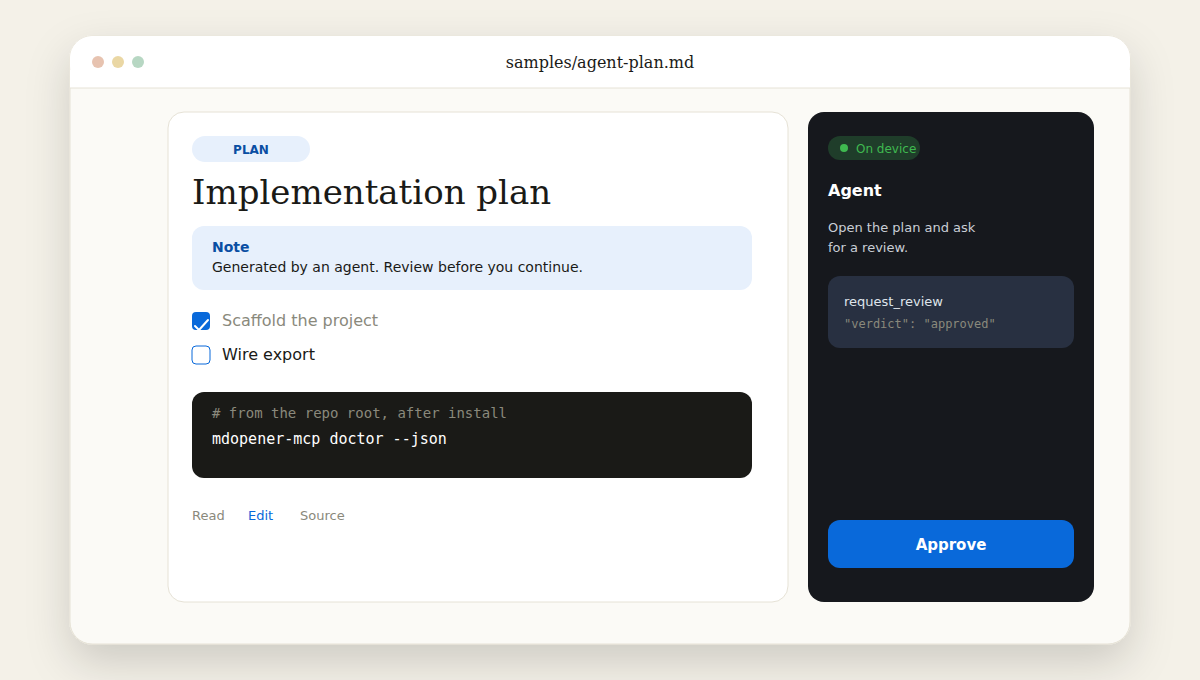
Illustration of the review flow; the app interface may differ.
How it works
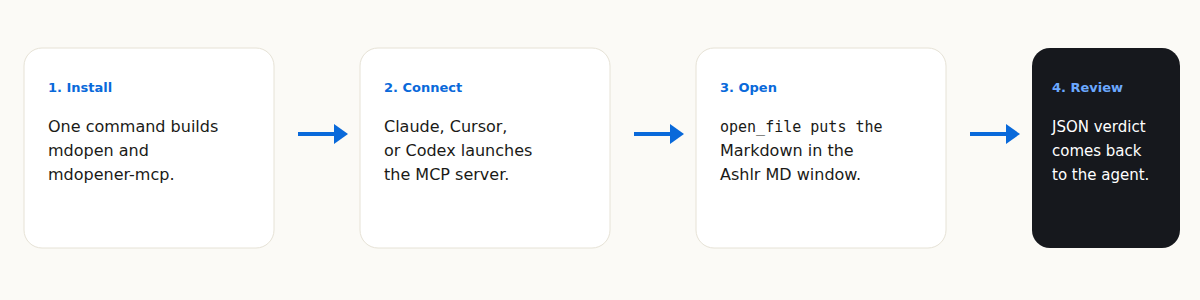
scripts/install.shbuildsmdopenandmdopener-mcpand links them ontoPATH.- Claude Code, Cursor, or Codex launches
mdopener-mcpover stdio. open_fileis the tool that starts the desktop app. The other tools use the document that is already open, or read a Markdown file from disk.request_reviewwaits for a decision, returning JSON. If the call returnspending, resume it by passing the returnedreviewIdasreview_id; reviews can also time out or be superseded.
The server talks to the app on 127.0.0.1 with a token in ~/.mdopener/. Full contract: docs/AGENTS.md.
Features
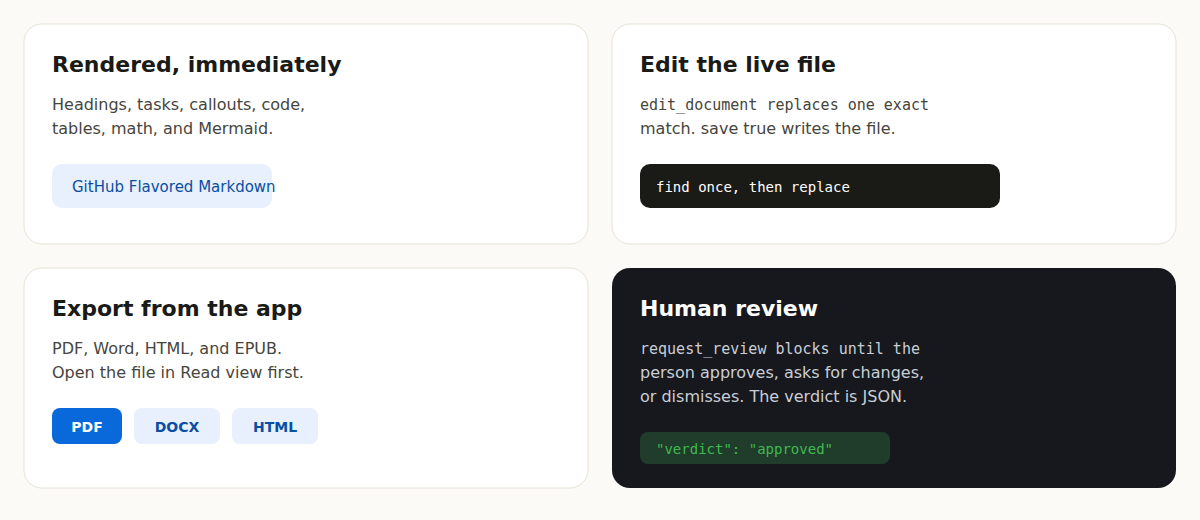
- Render. GitHub Flavored Markdown, highlighted code, Mermaid, KaTeX, callouts, tables, and footnotes.
- Edit. A WYSIWYG editor and a source editor.
edit_documentreplaces one exact match.save: truewrites the file. - Export. PDF, Word, HTML, and EPUB from the app. Call
open_filewith"mode": "read"beforeexport. - Review.
request_reviewwaits for a person by default and can return a pending review to resume.get_user_annotationsreads the verdict and task checkboxes later. - Watch a folder. The activity drawer (Command-B on macOS, Ctrl-B on Windows and Linux) lists new
.mdfiles as they appear. - Search your library. The AI sidebar can retrieve relevant text from Markdown files in watched folders, using keyword search and optional embeddings. See docs/local-ai.md.
- On-device AI. Apple Foundation Models on macOS 26 or later (Apple Silicon), or Ollama. A cloud model runs only if you opt in. Rules: docs/local-ai.md.
- Obsidian, VS Code, and Raycast. Open notes through
mdopener://; VS Code can fall back tomdopen. Notes: docs/OBSIDIAN.md, integrations/vscode, integrations/raycast.
Keyboard shortcuts
Shown with ⌘ on macOS; use Ctrl on Windows and Linux.
| Action | Shortcut |
|---|---|
| Command palette | ⌘K |
| AI assistant | ⌘L |
| Inline AI rewrite (in editor) | ⌘I |
| Cycle theme | ⇧⌘L |
| Open file | ⌘O |
| Save | ⌘S |
| Export | ⌘E |
| Copy as rich text | ⇧⌘C |
| Insert table | ⇧⌘T |
| Read / Edit / Source view | ⌘1 / ⌘2 / ⌘3 |
| Find in document | ⌘F |
| Find & replace (source) | ⌥⌘F |
| Search across files | ⇧⌘F |
| Split preview | ⌘\ |
| Zen mode | ⇧⌘Z |
| Next / Previous tab | ⇧⌘] / ⇧⌘[ |
| Close tab | ⌘W |
| Agent activity drawer | ⌘B |
| Outline | ⇧⌘O |
| Settings | ⌘, |
| Keyboard shortcuts (cheat sheet) | ⌘/ |
FAQ
What do I run first?
SKIP_APP_BUILD=1 bash scripts/install.sh, then mdopener-mcp doctor --json. The desktop app is a separate download: docs/INSTALL.md.
Where is the tool list?
docs/AGENTS.md, or mdopener-mcp --export-tool-schema for JSON.
Does a model upload my files?
Apple's on-device model and a loopback Ollama stay on the machine. Cloud calls happen only after you add a key or turn on a hosted option. "offline": true in ~/.ashlr/config.json refuses cloud calls. Details: docs/local-ai.md.
Which computers have a release build?
Apple Silicon Macs, Windows x64, and Linux x86_64. The current release is unsigned. On macOS, right-click the app and choose Open the first time. Windows may show a SmartScreen warning. There is no Homebrew, winget, or AUR package yet. Intel Macs build from source. Steps: docs/INSTALL.md.
How does Phantom open a file?
How Ashlr MD plugs into Phantom.
Star Ashlr MD
If an agent on your machine should open Markdown in a real window, star the repo so the next person can find it.
Star ashlrai/ashlr-md on GitHub
One-click agent setup
Open the app, then Preferences, then AI agents (MCP). Click Connect to Claude Code, Connect to Cursor, or Connect to Codex. Each button registers this app's mdopener-mcp. The terminal commands that do the same job are in Start.
Discovery metadata: docs/mcp-registry.md.
Download
Release builds are on the latest release. Per-OS steps are in docs/INSTALL.md. The app includes an updater. The installers do not put mdopen on PATH. Use Preferences, Command-line tool, Install mdopen, or the install script on macOS and Linux.
How Ashlr MD plugs into Phantom
Phantom hands Markdown to Ashlr MD (phm inbox show <id> --open, phm digest --open). It calls mdopen when Ashlr MD is installed, and prints in the terminal when it is not. On Phantom's master branch, that inbox and digest handoff is what is merged. The opener for any .md, and the PHANTOM_ASHLR_MD=0 opt-out, are on Phantom's feat/ashlr-md-opener branch.
Three hooks stay stable:
| Hook | What Phantom does with it |
|---|---|
mdopen on PATH |
Means Ashlr MD is installed. mdopen exits 0 only when a viewer accepted the file (exit status) |
mdopener:// |
mdopener://open?path=<url-encoded absolute path> opens a file. Add &mode=edit for the editor |
mdopener-mcp |
Agents call open_file so a person can review the document |
Under phantom exec -- <cmd>, provider keys arrive as phm_ placeholders and ANTHROPIC_BASE_URL points at the session proxy. The sidebar uses the key saved in Settings unless ASHLR_MD_ANTHROPIC_KEY_FROM_ENV=1, which reads ANTHROPIC_API_KEY from the environment. A phm_ placeholder is honored only when the base URL is that proxy. mdopener-mcp sends no Anthropic requests. Ashlr MD never resolves a phm: reference. Do not copy a key into Settings with phantom reveal.
The full contract is in docs/PHANTOM.md. The URL rules are tested. The app has not been tested against a live phantom exec session.
Source: ashlrai/phantom. Placeholders: ashlrai/phantom-secrets.
Local models
Chat can use Apple Foundation Models, Ollama, or a key you add in Preferences. URL rules, the localInference block, and offline mode: docs/local-ai.md. State-folder repairs: docs/doctor-fix.md.
mdopener-mcp doctor --fix --json
Develop
Prerequisites: Rust and Bun. macOS also needs Xcode Command Line Tools (xcode-select --install). Windows needs the MSVC build tools. Linux needs a C toolchain and the Tauri Linux packages.
bun install
bun run tauri dev
bun run typecheck
bun run lint
bun run test
bun run check:doc-links
bun run check:version
bun run fresh:check
bun run doclive:check
bun run check:workflow-bash
python3 scripts/check-docs.py
python3 scripts/test-mcp-setup.py
python3 scripts/test-connect-cursor.py
node --test scripts/check-readme-parity.test.mjs && node scripts/check-readme-parity.mjs
The optional on-device sidecar (macOS 26 or later):
cd src-tauri/bins/mdopener-afm && ./build.sh
| Layer | What |
|---|---|
src/ |
React 19 frontend: renderer, editors, AI sidebar, export |
src-tauri/src/ |
Rust core: files, watcher, deep links, AI proxy, loopback IPC |
src-tauri/bins/ |
mdopen, mdopener-mcp, and the macOS Swift sidecars (mdopener-afm, mdopener-setdefault) |
landing/ |
The marketing site |
Product goal: docs/VISION.md. Releases: docs/RELEASING.md.
Part of Ashlr
Each tool installs on its own.
- Phantom (
phm), the agent workbench. Source: ashlrai/phantom. - Phantom Secrets (
phantom),phm_placeholders. Source: ashlrai/phantom-secrets. - Locus (
locus), one account per agent session. - Lexicon (
lexicon), dictation corrections. - Ashlr Stack (
stack), service provisioning. - ashlr-plugin (
ashlr-plugin), token-efficiency tools.
Cryptography notes, with no quantum-safety claim: docs/PQ-READINESS.md.
Contributing
See CONTRIBUTING.md. Local-first, no GPL in the bundle, and verify in the running app. Security reports: SECURITY.md. Roadmap: ROADMAP.md.
License
MIT © Ashlr MD contributors
Yorumlar (0)
Yorum birakmak icin giris yap.
Yorum birakSonuc bulunamadi