sandtable
Health Warn
- License — License: NOASSERTION
- Description — Repository has a description
- Active repo — Last push 0 days ago
- Low visibility — Only 6 GitHub stars
Code Fail
- spawnSync — Synchronous process spawning in e2e/smoke.spec.ts
- process.env — Environment variable access in e2e/smoke.spec.ts
Permissions Pass
- Permissions — No dangerous permissions requested
No AI report is available for this listing yet.
Ticket board that runs a Claude Code session per ticket

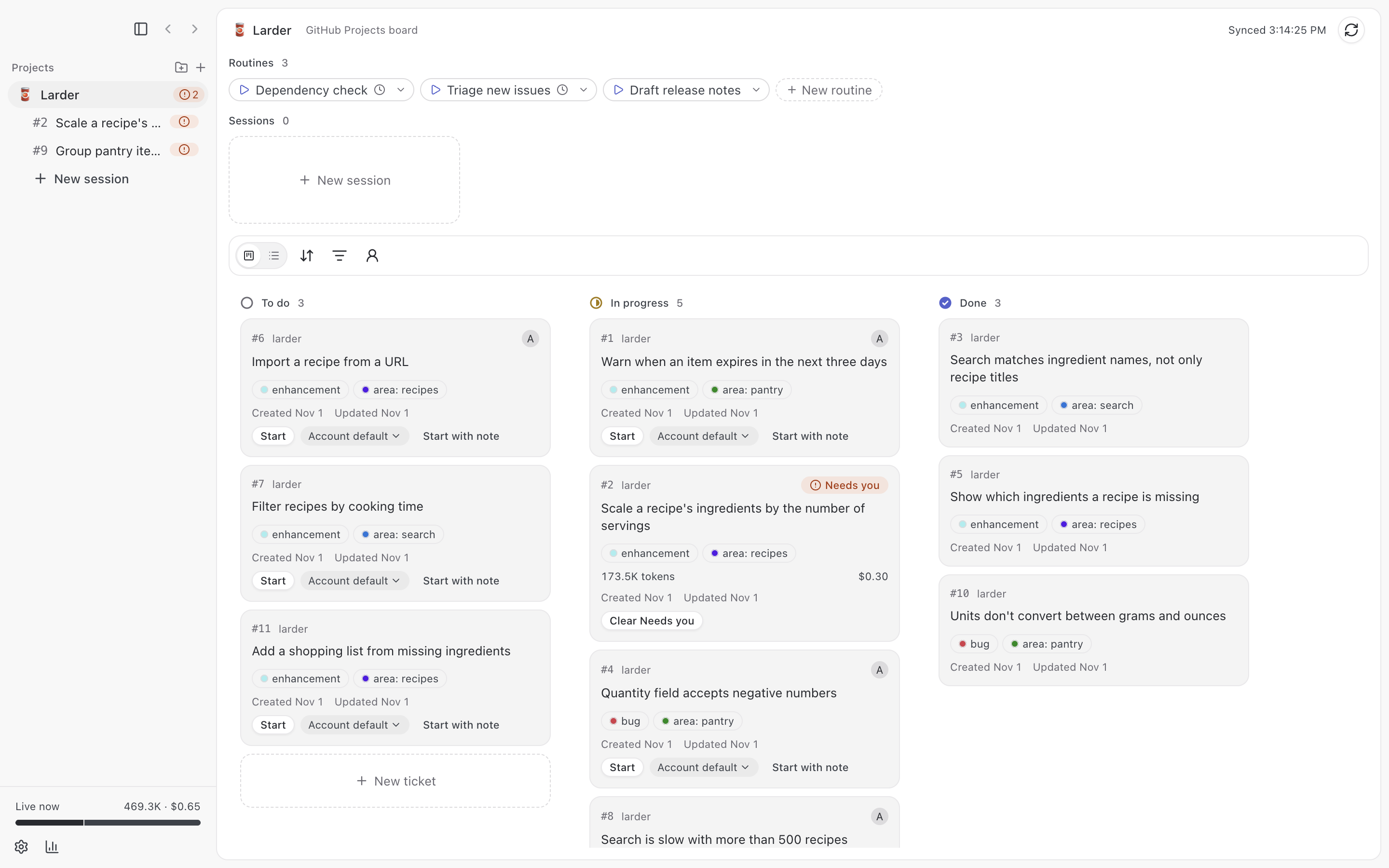
Sandtable is a macOS app that shows a project's tickets on a kanban board and runs one
interactive Claude Code session per ticket, each in its own git worktree and tmux session.
Tickets come from a GitHub Projects board, a set of repos' issues, a Linear team, or a Jira Cloud
project.
Caution: Each session is a Claude Code agent with write access to its worktree, and it can
push branches and open pull requests with your gh login. Review what it does, as you would for
any Claude Code session.
Features
The following list is an overview. For the full list, see What works today.
- A board with To do, In progress, and Done columns, or a list, grouped by assignee or
parent, filtered by label, repo, or assignee, and searched by title or ticket number. Drag a card to change its status or assignee. - Start on a card checks for open blockers, whether the ticket is ready, and whether it
overlaps tickets in the same area that are in progress or have a live session, then starts
Claude Code in a fresh worktree. - Sessions live in tmux, so they keep running after you close Sandtable, and Sandtable reconnects
to them when it opens again. - Session states, Running, Needs you, Idle, Done (routine sessions only), and
Finished, come from Claude Code hooks, with a macOS notification and a Dock count when a
session needs you. Reviewing comes from automatic review while one of its rounds runs.
Limit reached, with its reset time, and API error show when a turn fails on a plan limit
or an API error. - A ticket view with the ticket's details, the live conversation with a composer, a terminal, and
the session's changes. - A review loop: an AI review of the diff against its ticket's Done when, failing checks, and
open review threads, collected as findings you send to the session. With Automatic review on
for a project or a session, the review runs when Claude ends its turn with an open pull request,
sends the High line proposals to the session, and leaves the rest for you, for up to 3
rounds. It also holds back the pull request until the rounds end and you've decided every
proposal, and runs a round when Claude tries to open it. The session shows Reviewing
while a round runs, and the conversation records each round and how it went. - Answer Claude's questions and permission prompts on a card in the conversation.
- A ticket chat that drafts comments, triage that suggests areas and blockers, and a summary draft
when a session finishes. Sandtable posts or applies nothing until you click. - Sessions without a ticket, and routines: saved session starts you can run by hand, on a
schedule, or when a ticket gets a label or its pull request checks fail. - Per-project settings for the Claude Code account, model, token cap, automatic review, sandboxed
commands, worktree setup, and instructions for ticket sessions. - A Usage page with token use, estimated API cost, and ticket throughput by week, and live
token use for running sessions. - Remote Control, so you can use a session from claude.ai or the Claude app.
- Light and dark modes.
Screenshots
The following screenshots show a demo project. More, including project setup, routines, and
ticket drafting, are in the screenshots folder.
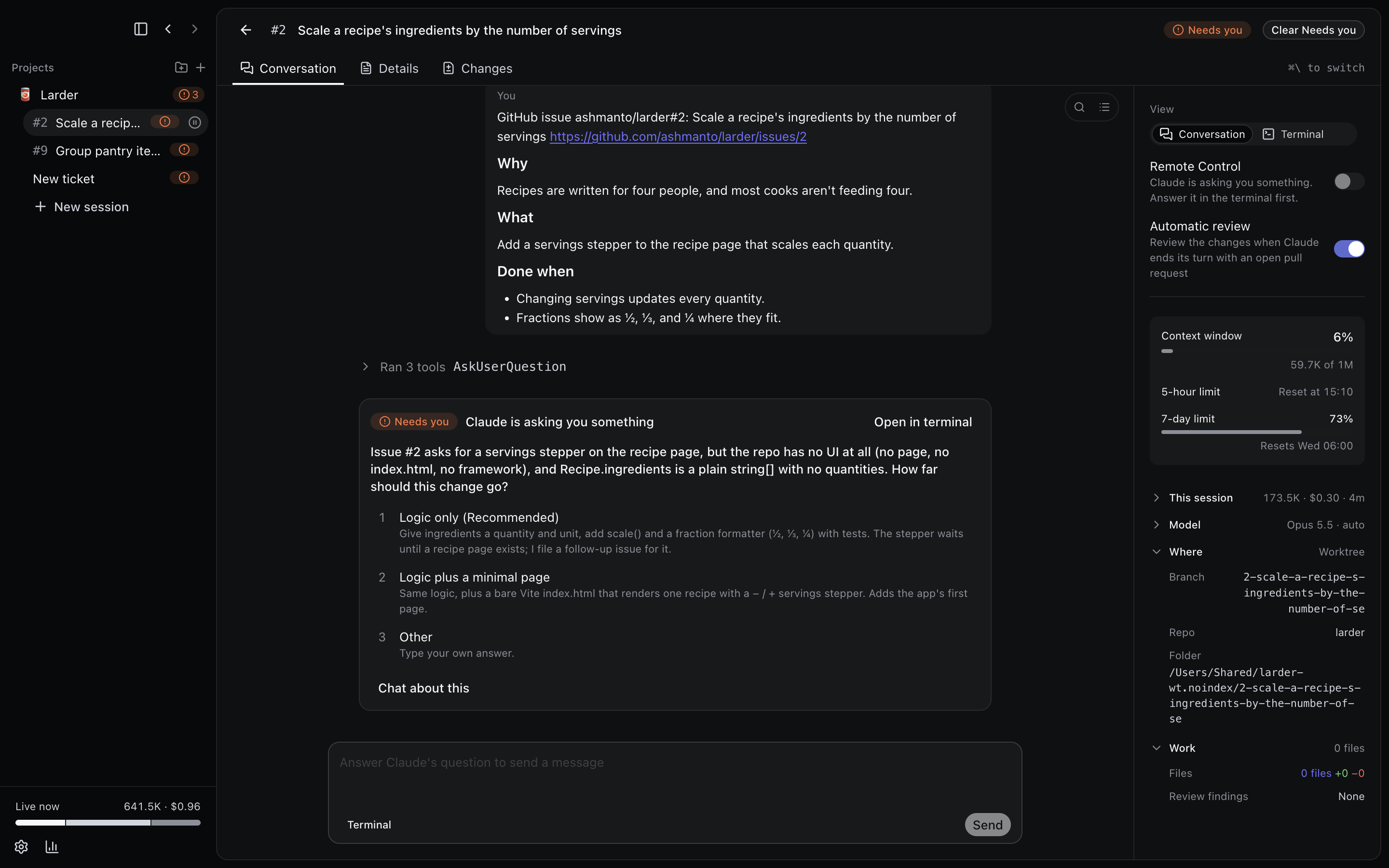 Answer Claude's questions on a card. |
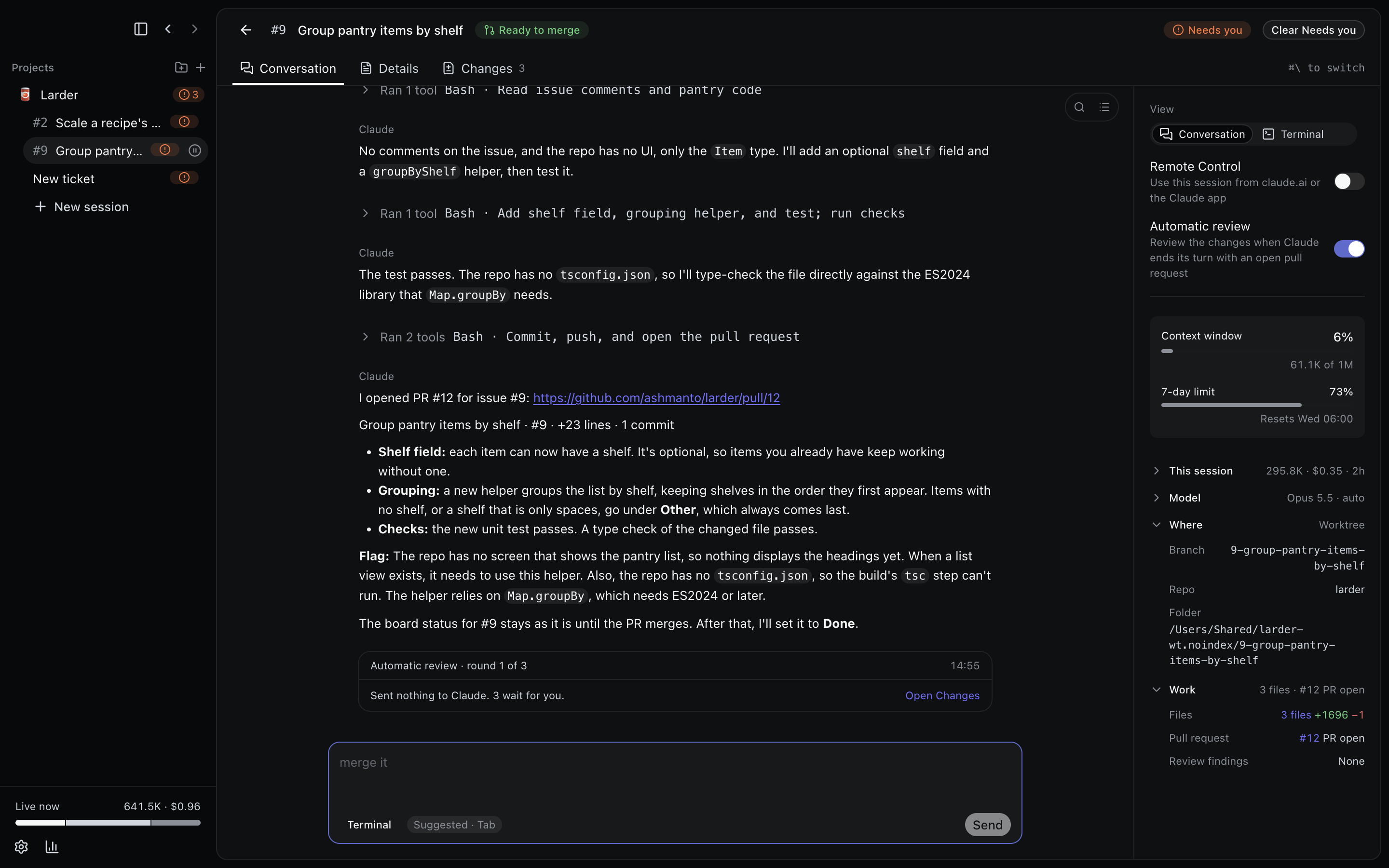 Automatic review runs when Claude opens a pull request. |
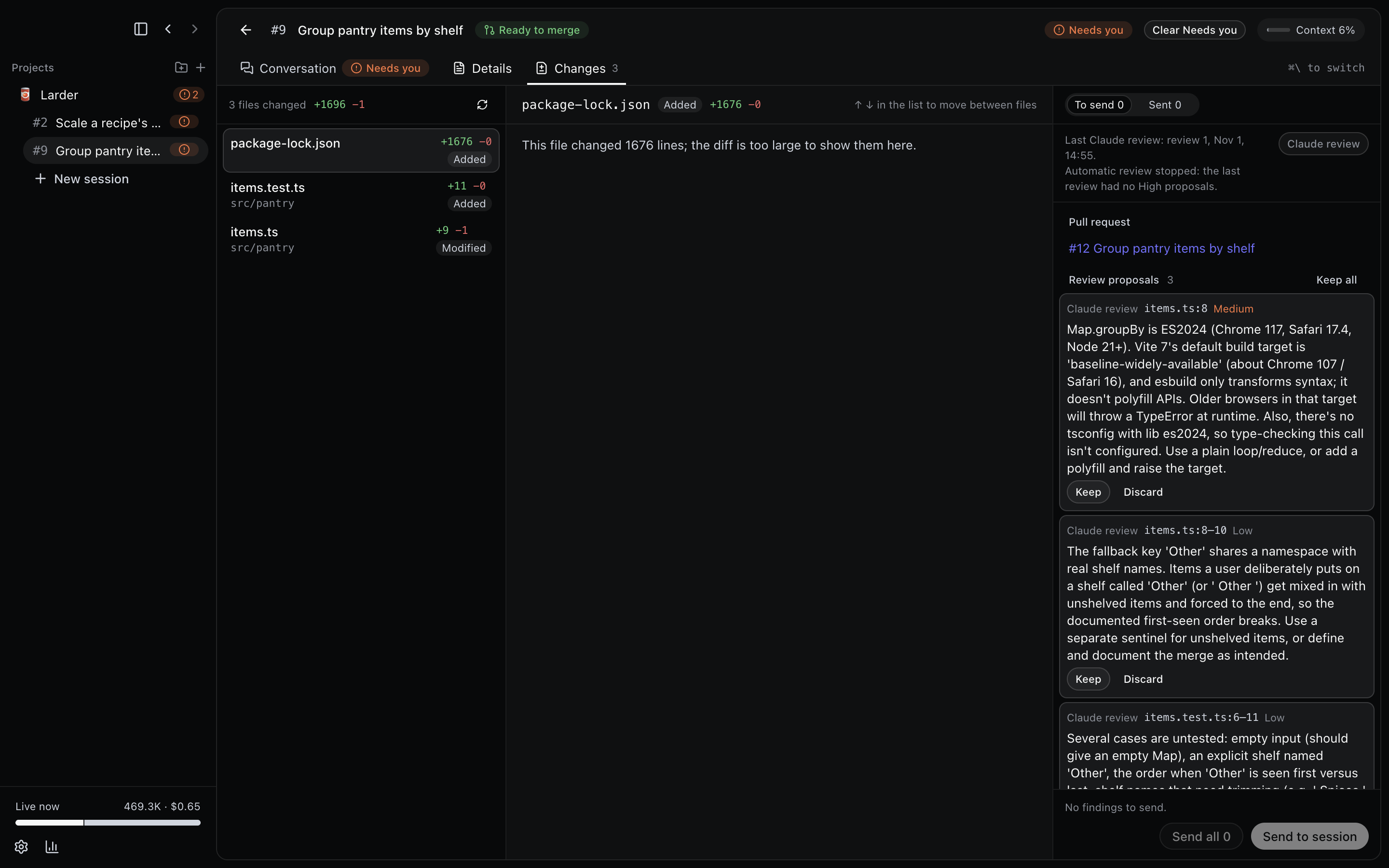 Review a session's changes and send findings to it. |
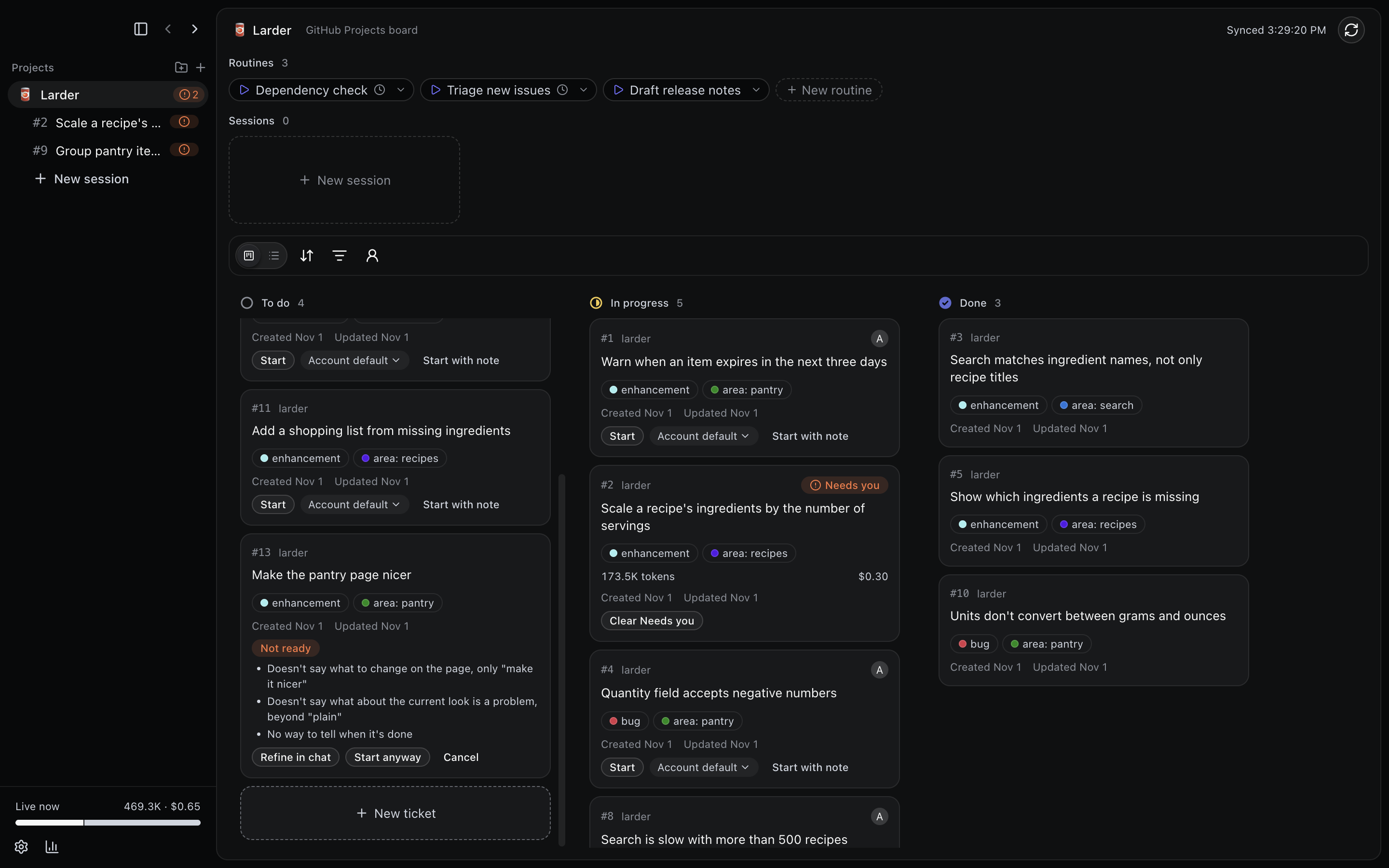 Start checks that a ticket is ready first. |
Requirements
- macOS 13 or later on Apple silicon, and the Node version in
.nvmrcto build it. tmux,claude(Claude Code, logged in),git, andghlogged in with thereposcope,
plus theprojectscope for GitHub Projects boards:gh auth login --scopes project.- For a Linear project: the
linearCLI (brew install schpet/tap/linear), signed in withlinear auth loginto each workspace you use. - For a Jira project: an Atlassian API token for your account on its
<name>.atlassian.netsite,
which you enter in Add project, and, for sessions to file and update issues, theacliJira
CLI (brew tap atlassian/homebrew-acli && brew install acli), signed in withacli jira auth login --web. - For Remote Control:
claudesigned in with a claude.ai subscription, not an API key. - For a Claude Code account other than Default, or when
CLAUDE_CONFIG_DIRis set: tmux 3.2
or later.
Sandtable reads your login shell's PATH to find these tools. On first run, a setup guide checks
them and shows the command that fixes each failed check.
Install
To install Sandtable with Homebrew, run the following commands:
brew tap ashmanto/tap
brew trust ashmanto/tap
brew install --cask sandtable
Homebrew installs casks only from taps you trust. The cask also installs gh and tmux.
You can also download the DMG from the
latest release, open it, and drag
Sandtable to Applications.
The app is signed ad hoc and isn't notarized, so if macOS refuses to open it, click Open
Anyway in System Settings > Privacy & Security.
Build from source
npm install
npm run build:mac
cp -R dist/mac-arm64/Sandtable.app /Applications/
To update a copy you built, run make install on master. It pulls, runs the checks, builds,
runs the end-to-end tests, and replaces the app. Your sessions keep running in tmux.
To build a DMG, run make dmg. It builds dist/Sandtable-<version>-arm64.dmg. Releases are
built in CI instead; see Release a version.
Add a project
Click Add project, the plus beside the sidebar's Projects heading, then follow the four steps:
- Name: enter the name shown in the sidebar and the board header.
- Tickets from: choose GitHub Projects board, Repo issues, Linear team, or Jira
project. For a
board, paste its URL, such ashttps://github.com/users/<you>/projects/2, click Load
board, and pick which Status option means to do, in progress, and done. For a Linear team,
choose the workspace (it starts at the CLI's default one), the team, and, optionally, the
Linear projects whose issues you want. For a Jira project, choose a saved Jira account, or
click Add a Jira account… and enter the site, such asyourteam.atlassian.net, your
Atlassian email, and an API token; then choose the project from the list, which you can
filter, and its board. With one board it's chosen for you; No board (show every issue)
shows the backlog too. - Repos: with a board, include the board's repos you work on; with repo issues, a Linear
team, or a Jira project, enter each repo asowner/name. Then click Choose folder… for each repo and select its local folder.
Sandtable refuses a folder whose git remote doesn't point at that repo. You can also click
Add from a folder… to fill in the repo from a folder's remote. The folder dialog opens in
the folder that holds the last folder you picked, or in your home folder the first time. - Review: check the project, optionally pick an emoji as its icon from a searchable grid,
choose whether its sessions start with Remote Control, which
Claude Code account they use, which model they run on (Model: Account default, the
default, or Fable, Opus, Sonnet, or Haiku), which editor a session's folders
open in (Editor: an app you choose), how long done tickets stay on the board (Keep done
tickets: 1, 3, 7, 14, or 30 days, 7 by default), how many tokens a session may use before
Sandtable stops its tool calls (Token cap: 10M, 25M, 50M, 100M, or 250M, off by default), whether Start first checks that a
ticket is ready (Readiness check, on by default), whether Claude reviews a ticket
session's changes when it ends its turn with an open pull request (Automatic review, off by
default), whether its sessions run Bash in Claude
Code's sandbox (Sandbox commands, off by default, with optional Allowed domains), optionally write Instructions that
ticket sessions get after Sandtable's rules, for every ticket and for tickets with a given
label, and click Save. Add an account on the Settings screen
first to choose it here.
To change a project, click Edit project in its More menu in the sidebar. The same steps open, filled in, on the
Review step, where Delete project is.
Development
To contribute, see Contributing to Sandtable. For commands and conventions,
see CLAUDE.md. For the look, see DESIGN.md. The capability record is docs/features.md.
License
Sandtable is released under the
Functional Source License, Version 1.1, MIT Future License (FSL-1.1-MIT). You can
use, change, and share it for any purpose except offering a commercial product or service that
competes with Sandtable. Each version becomes available under the MIT License two years after its
release.
Reviews (0)
Sign in to leave a review.
Leave a reviewNo results found