ZeroClawAndroid
Health Warn
- License — License: MIT
- Description — Repository has a description
- Active repo — Last push 0 days ago
- Low visibility — Only 8 GitHub stars
Code Pass
- Code scan — Scanned 6 files during light audit, no dangerous patterns found
Permissions Pass
- Permissions — No dangerous permissions requested
This project is an Android application that acts as a continuous 24/7 background AI agent. It connects to multiple messaging platforms, provides an OpenAI-compatible API server, and enables on-device AI inference.
Security Assessment
Overall risk: Medium. The tool inherently handles highly sensitive data, including personal chat messages and local API routing. It makes external network requests to connect with services like Telegram, Discord, and external AI providers (OpenAI, Anthropic). While the light code scan (6 files) found no hardcoded secrets, malicious patterns, or dangerous permission requests, the automated scan coverage is extremely low. A project of this scope requires a much deeper manual review of its networking and background daemon code to guarantee it handles your chat logs and API keys securely.
Quality Assessment
The project is very new and currently has low community visibility, indicated by only 8 GitHub stars. However, it was updated recently (0 days ago) and features a highly detailed README, complete with an open BUGS.md file, which shows the developer is actively maintaining it and transparent about its current issues. It uses the permissive MIT license, making it fully open source. As a personal project, the quality heavily relies on the single developer's dedication.
Verdict
Use with caution — the project is active, licensed, and passed initial automated scans, but its broad access to messaging channels and low community adoption mean you should thoroughly inspect the code before connecting personal accounts or sensitive API keys.
24/7 AI agent daemon for Android — 11 messaging channels, 30 opt-in AI tools, 25+ autonomous agent templates, OpenAI-compatible API server, offline on-device inference. Everything modular.

🦀 ZeroClaw Android
Your phone. Your AI. Always on.




💡 Why This Project Exists
This is a personal project built out of curiosity — to see how far I can push Android as a platform for running AI agents.
🤔 Can a phone run an AI service 24/7? → Yes, with watchdog recovery and Doze awareness.
🤔 Can it serve as an API server? → Yes, on port 8088 — any OpenAI-compatible app can connect.
🤔 Can it run AI offline? → Yes, via LiteRT LM — Gemma 4 with 32K context, streaming, and thinking mode.
🤔 Can it talk to 11 different chat platforms? → Yes, each with its own protocol quirks.
🤔 Can agents auto-monitor websites and push updates? → Yes, with change detection and scheduled delivery.
Every feature started as a question like these. Many didn't work on the first try — the BUGS.md has the full history.
I use Claude as a coding tool the same way I'd use docs or Stack Overflow — to move faster on implementation so I can focus on architecture, debugging real device behavior, and figuring out what Android actually allows.
🦀 What is ZeroClaw?
An Android app that runs AI in the background 24/7. It connects to your chat apps, gives you 30 AI tools, and lets you set up agents that automatically monitor things and send you updates. Everything is modular — you turn on only what you want.
📱 You → Pick your chat apps (Telegram / Discord / Slack / WhatsApp / ...)
                ↓
   🔧 ZeroClaw Service (runs in background)
                ↓
   🤖 AI Router → picks the best AI (Gemini, OpenAI, Anthropic, Ollama...)
                ↓
   🧰 Your enabled tools (web search, translate, image gen, RSS...)
                ↓
   ⚡ Optional add-ons:
       ├── 🕷️ Agents — auto-monitor websites & APIs, send you updates
       ├── 🧪 Playground — test any tool before using it
       ├── 🧠 Memory — AI remembers your conversations
       ├── 🔒 Security — biometric lock, audit log, rate limits
       └── 🔌 Integrations — Composio, MCP servers, A2A protocol
                ↓
   💬 Reply → your chat apps
📸 Screenshots
| Home | Settings | API Keys |
|---|---|---|
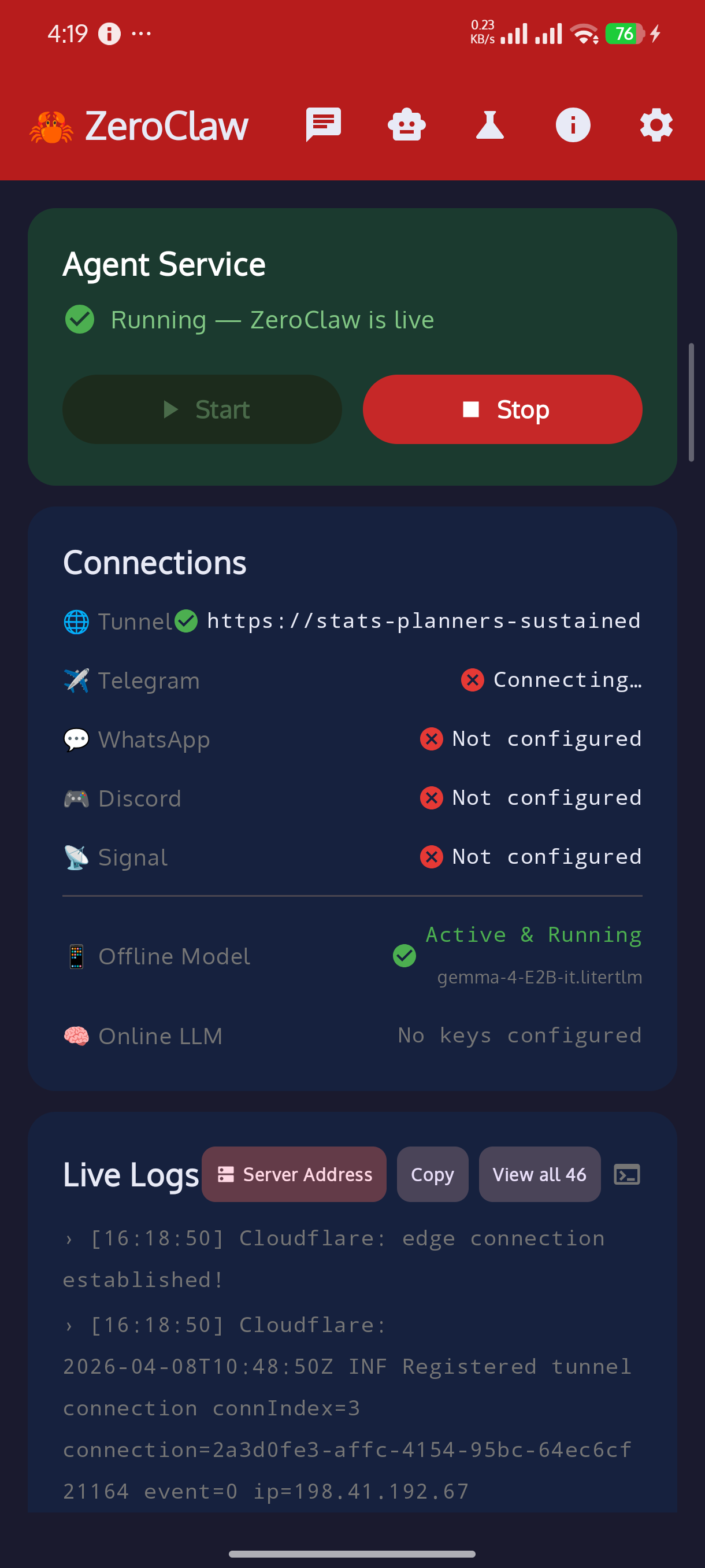 |
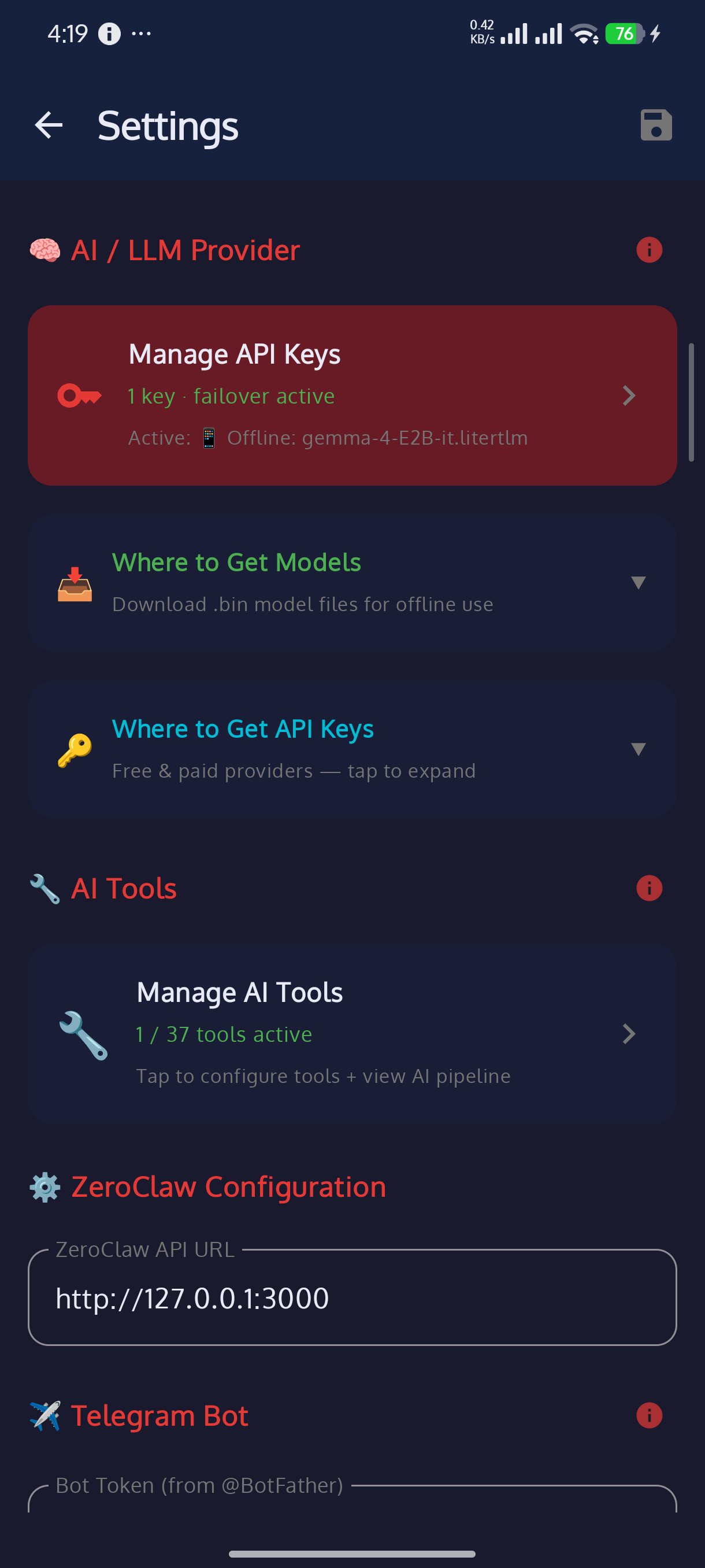 |
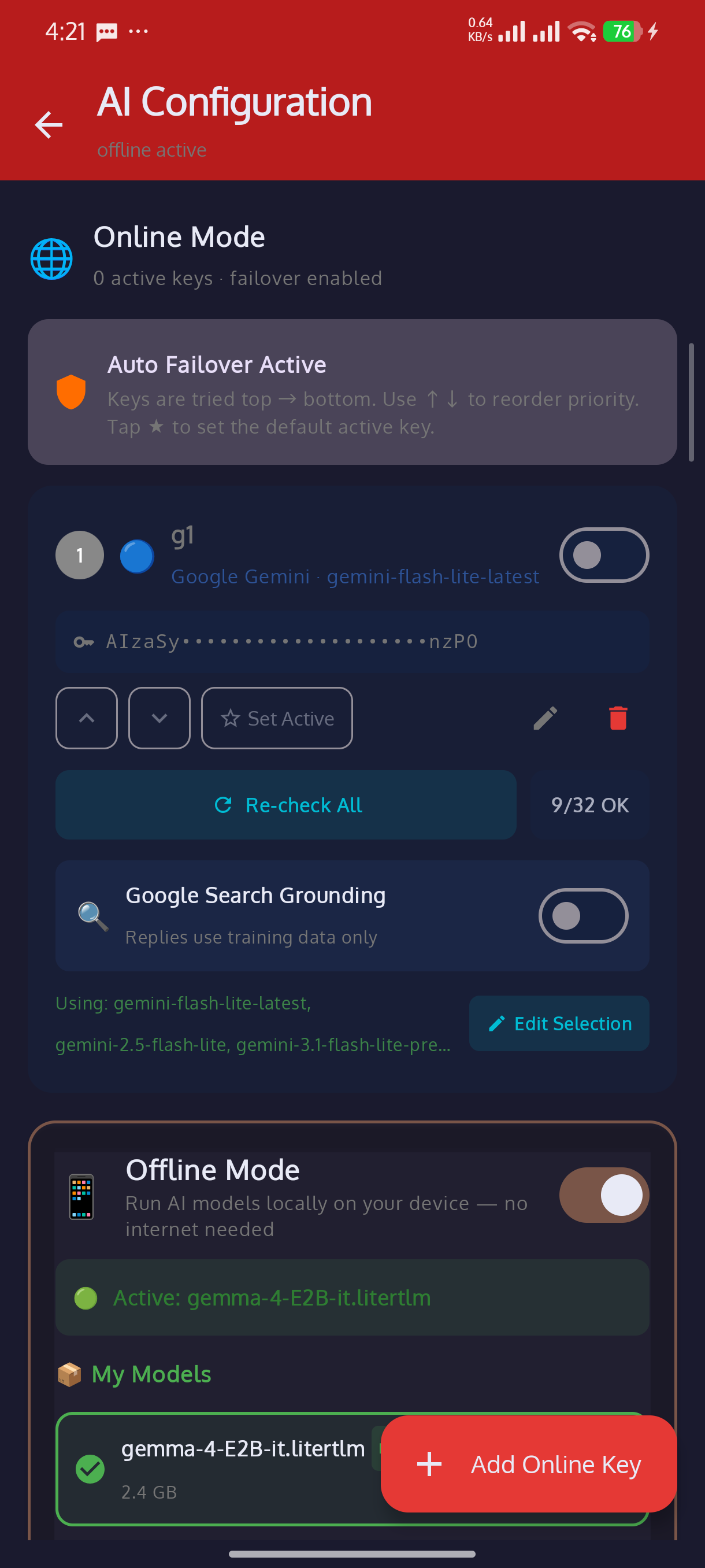 |
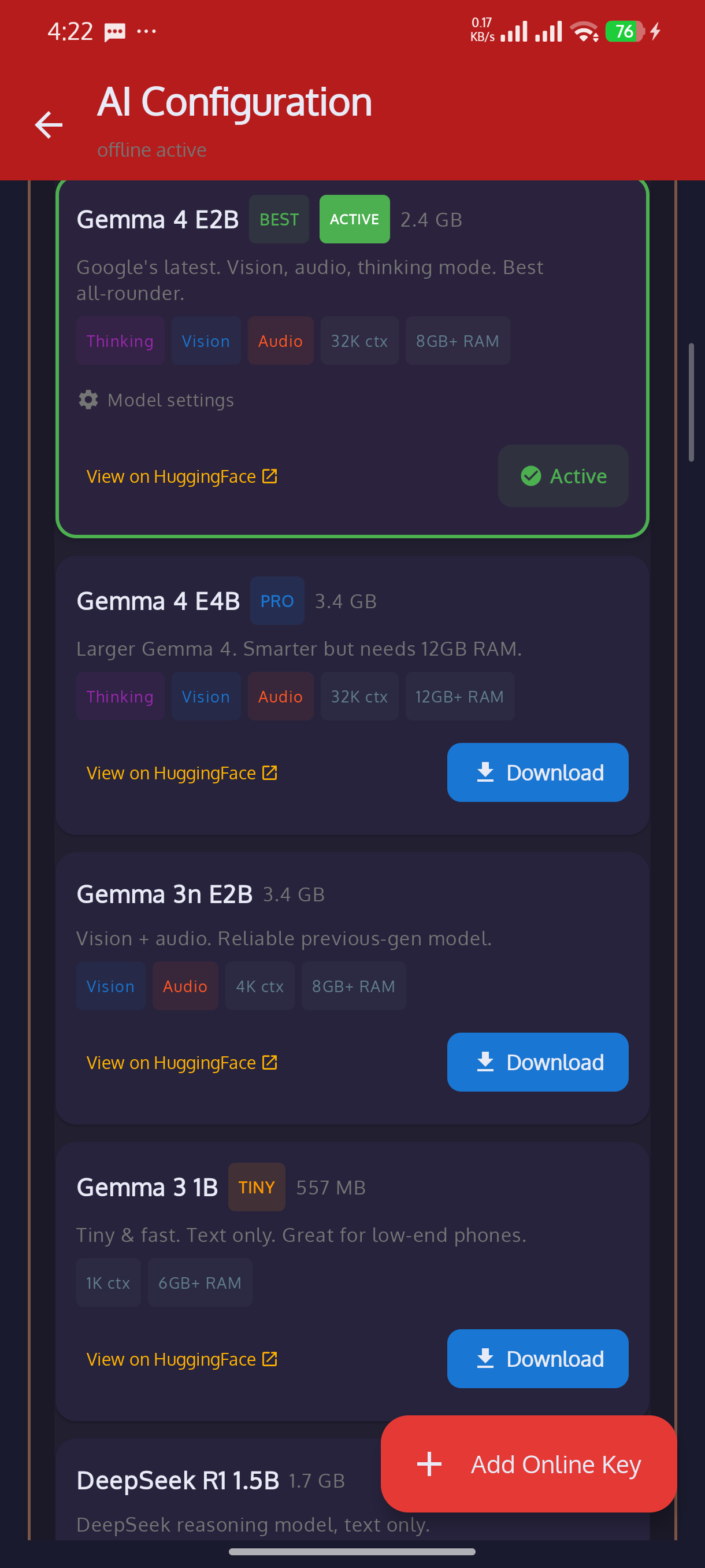
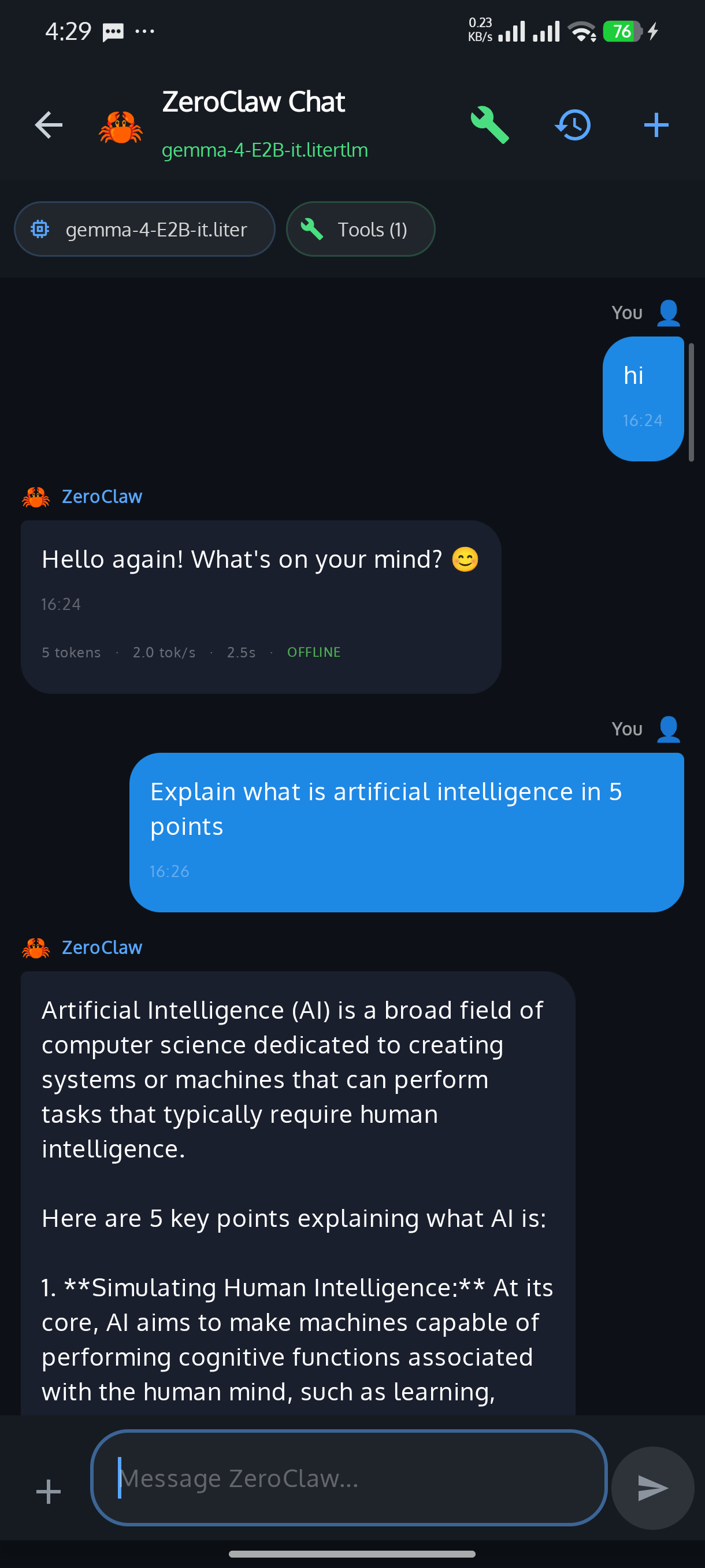
| Model Catalog (Gemma 4) | All Models | Chat + Token Stats |
|---|---|---|
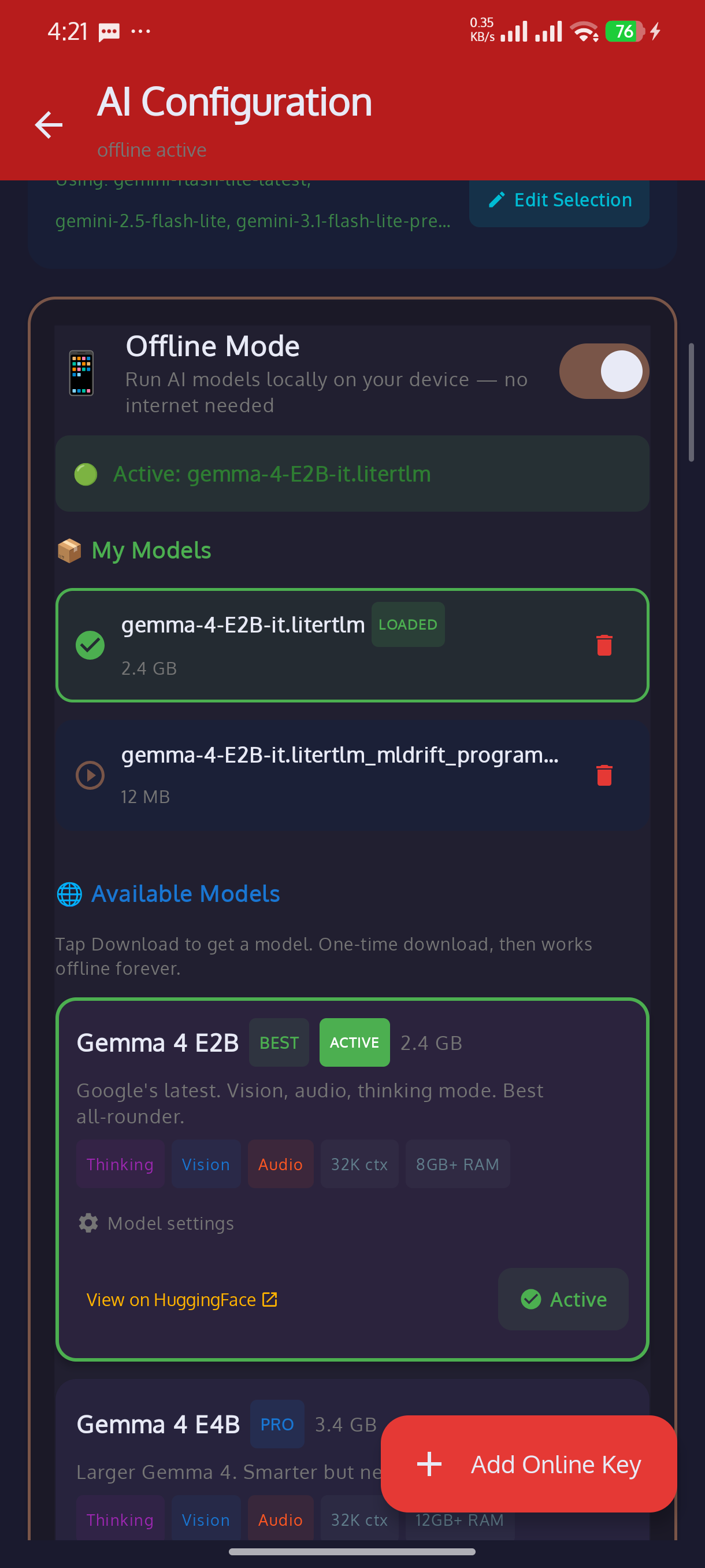 |
 |
 |
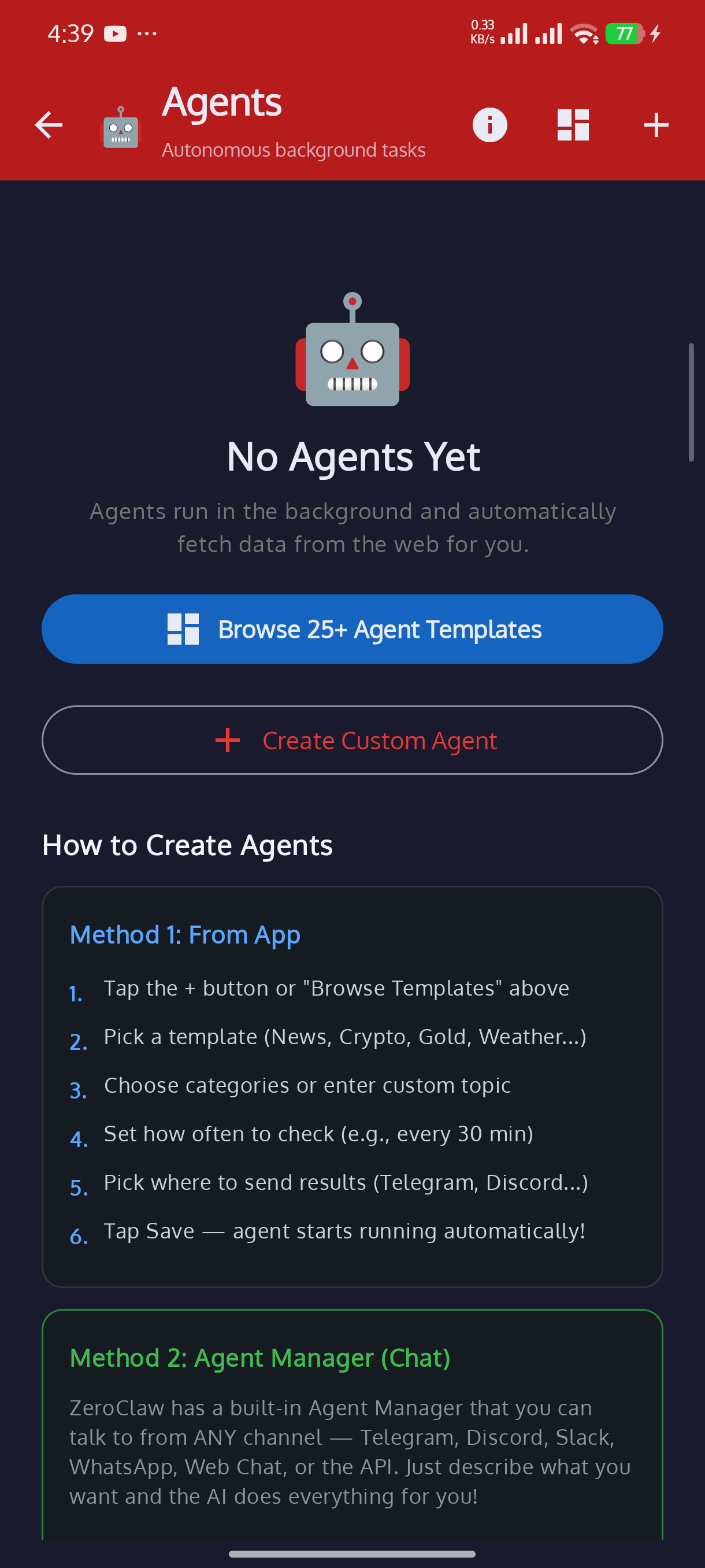
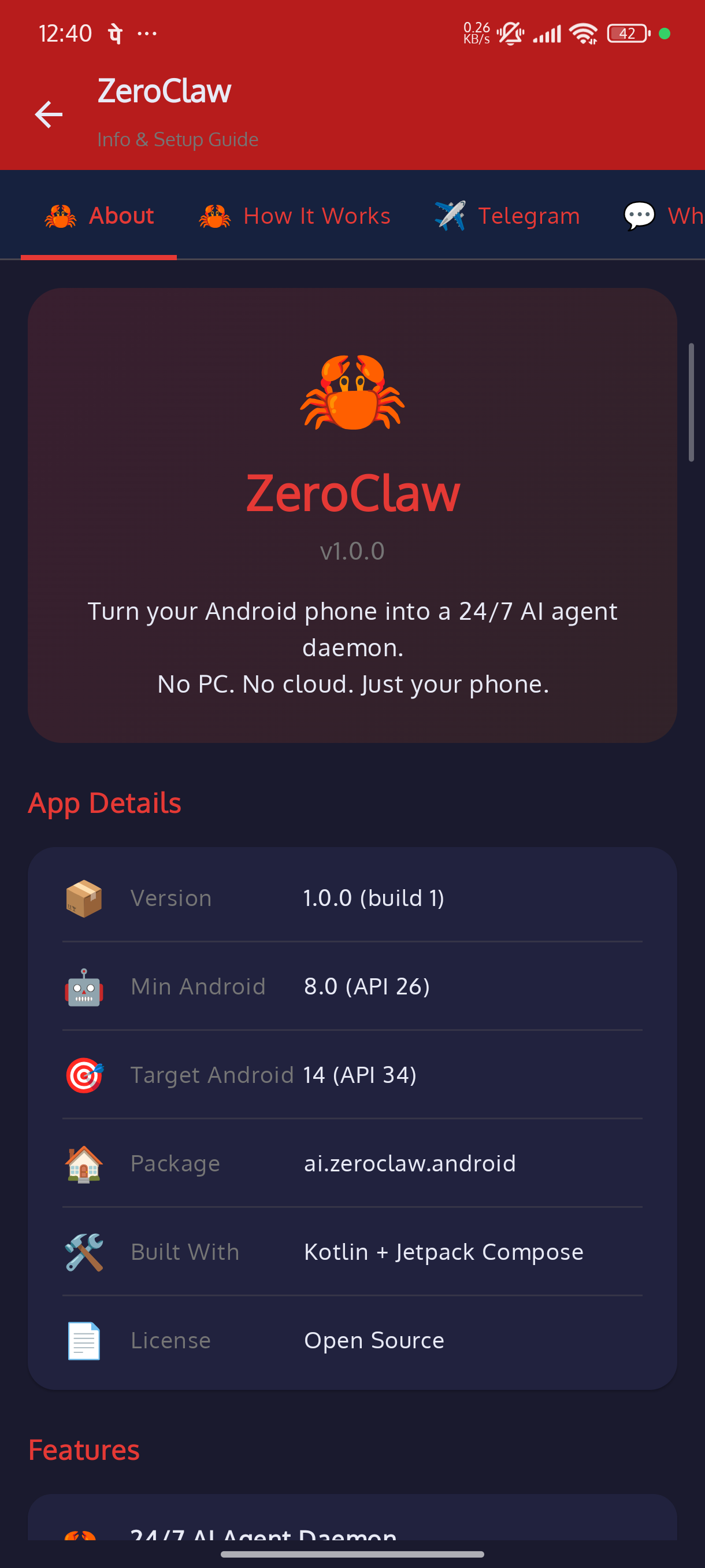
| Agents | Info & Setup Guide |
|---|---|
 |
 |
✨ Features
🕷️ Autonomous Agents 


Set up agents that monitor things for you and send updates to your chat apps automatically.
| What | Details |
|---|---|
| 📦 25+ templates | Crypto, gold, stocks, weather, news, sports, GitHub trending, YouTube, IPO, earthquakes... |
| ⚡ 21 free APIs | CoinGecko, AlphaVantage, Metals.live, wttr.in, USGS, and more — no API keys needed |
| 🕸️ Web scraping | Monitor any URL, AI extracts what you want |
| 🔍 web_search + web_fetch | No URL needed — agent searches the web dynamically each run and summarises (tool-based discovery, selectable from the target picker) |
| 📢 Delivery | Telegram, Discord, Slack, WhatsApp, Email |
| ⏱️ Schedule | Every 5 min to 24 hours |
| 🔄 Smart updates | Only sends when content actually changes |
| ▶️ Run Now | Test any agent instantly |
| 🔗 Multi-channel | Same agent can push to multiple chat apps |
| 🔔 Completion notifications | High-priority Android notification on every agent run — tap to jump straight to that agent's run history |
| 📊 Per-agent Results screen | Filterable, expandable run history with status chips, delivery channels, and full extracted/raw content |
| 🔌 Results API | GET /api/agents/results — query agent data from any app (JS, Python, cURL) |
| 📖 Built-in API Guide | Edit any agent → see copy-paste code for your language + live tunnel URL |
🧪 Tool Playground 

Test any tool live before using it in real conversations.
- 🎛️ Enable/disable each tool individually
- 🧩 Pick which AI model to use for testing
- 📋 All test results logged on Home Screen
💬 11 Messaging Channels 


All opt-in — enable only what you use.
| Channel | Channel | ||
|---|---|---|---|
| ✈️ | Telegram (+ groups) | 🎮 | Discord (+ servers) |
| 💼 | Slack (+ channels) | 💬 | WhatsApp (Twilio + native QR/pair-code 🚧) |
| 🔗 | Matrix (federated) | 💻 | IRC (TCP socket) |
| 🏢 | Microsoft Teams | 🎬 | Twitch (!commands) |
| 🟢 | LINE | 📡 | Signal (bridge) |
| 🌐 | WebChat (voice + TTS) |
🧰 30 AI Tools 


|
🔵 Core (10)
|
🟢 Extended (14)
|
🟣 Advanced (6)
|
🤖 Multi-Provider AI Support 


Add unlimited API keys. If one fails, it automatically tries the next.
| Provider | What you get |
|---|---|
| 🔵 Google Gemini | Streaming, search grounding, model picker |
| 🟢 OpenAI | GPT-4o, o1, o3-mini, Whisper, DALL-E |
| 🟠 Anthropic | Claude with extended thinking |
| 🌐 OpenRouter | 400+ models from all providers |
| 🏠 Ollama | Run local models on your device |
| 📴 Offline (Gemma 4) | LiteRT LM — Gemma 4/3, 32K context, streaming, thinking mode |
| ⚙️ Custom | Any OpenAI-compatible API endpoint |
- 🔑 Unlimited API keys with priority ordering
- 📋 cURL import — paste a cURL to add a key
- 🧪 Test any key with one tap
- 📊 Usage stats per key
- 🎯 Smart routing — use
hint:reasoning,hint:fast,hint:codeetc. to pick the best AI
☁️ Cloudflare Tunnel 


Access your ZeroClaw from anywhere in the world — not just your local network.
| Feature | Details |
|---|---|
| ☁️ Quick Tunnel | Free trycloudflare.com URL — no account needed |
| 🔑 Named Tunnel | Persistent URL with your own domain (needs Cloudflare token) |
| 📦 Bundled Binary | cloudflared ARM64 ships inside the APK — zero setup |
| 🔧 Auto DNS Fix | Handles Android's broken Go DNS transparently |
| 🔄 Auto-connect | Tunnel starts with the service, URL shown in Live Logs |
Settings → Cloudflare Tunnel → Quick Tunnel (default)
Your public URL appears in Live Logs → Server Address dialog.
📖 See our Cloudflare Tunnel on Android Guide for the full technical story — every problem we hit and how we solved it.
🌐 API Server 


Any app that works with OpenAI can connect to ZeroClaw with zero code changes.
| Setting | Value |
|---|---|
| 🔗 Base URL | http://<your-phone-ip>:8088/v1 |
| 🔑 API Key | zc-no-key-needed |
| 🤖 Model | zeroclaw |
Works with: Continue.dev, Cursor, Open WebUI, LangChain, AutoGen, CrewAI, Aider, and any OpenAI SDK app.
📡 All Endpoints| Method | Endpoint | What it does |
|---|---|---|
POST |
/v1/chat/completions |
🤖 Full AI pipeline — tools, memory, thinking mode |
GET |
/v1/models |
📋 List available models |
POST |
/api/chat |
💬 Simple chat with session memory |
POST |
/api/generate |
⚡ Raw AI generation (no tools). Supports json_mode |
GET |
/api/agents/results |
🕷️ Query agent run results (filter by agent, paginate) |
DELETE |
/api/agents/results |
🗑️ Delete agent results (by ID, agent, or age) |
GET |
/api/discover |
🔍 Service discovery |
GET |
/ or /chat |
🌐 Web chat UI in browser |
from openai import OpenAI

client = OpenAI(
    base_url="http://<DEVICE_IP>:8088/v1",
    api_key="zc-no-key-needed"
)

response = client.chat.completions.create(
    model="zeroclaw",
    messages=[{"role": "user", "content": "Search the web for today's top tech news"}]
)
print(response.choices[0].message.content)
import OpenAI from 'openai';

const client = new OpenAI({
  baseURL: 'http://<DEVICE_IP>:8088/v1',
  apiKey: 'zc-no-key-needed'
});

const response = await client.chat.completions.create({
  model: 'zeroclaw',
  messages: [{ role: 'user', content: 'Translate "hello" to Japanese, Spanish, and French' }]
});
console.log(response.choices[0].message.content);
🧠 Memory & Smart Search 


| Feature | What it does |
|---|---|
| 💾 Vector Memory | AI remembers your conversations using embeddings |
| 🔎 Smart Search | Combines keyword + meaning-based search for best results |
| 🎯 Diverse Results | Filters out repetitive answers automatically |
| ⚡ Response Cache | Skips AI call if a similar question was asked recently |
| 🧹 Auto Cleanup | Archives old memories (7d), deletes archived (30d) |
| 📝 Session Tracking | Per-session history with auto-summarization |
🤖 Advanced AI 


| Feature | What it does |
|---|---|
| 👥 Multi-Agent | Multiple AI agents working together in a pipeline |
| 🎭 Agent Profiles | Named personas (coder, analyst, creative, tutor) |
| 🤝 Delegate & Spawn | Hand off tasks to other agents or run them in background |
| 📋 Workflows | Multi-step pipelines with conditions |
| 💭 Thinking Mode | Extended reasoning (Claude, OpenAI o1/o3) |
| 🛡️ Loop Detection | Prevents AI from getting stuck in infinite loops |
🔒 Infrastructure 


| Feature | What it does |
|---|---|
| 🪝 Hooks | Run custom logic before/after any AI action |
| 🔌 Plugins | Install .zip plugin packages to add new features |
| 🔐 Biometric Lock | Fingerprint/face unlock to protect the app |
| 📜 Audit Log | Logs every tool action with tamper detection |
| ⏱️ Rate Limits | Control how many messages each user can send |
| ✅ Approval System | Require your OK before dangerous actions run |
| 🔄 Auto-Recovery | Watchdog that restarts if something crashes |
| 📱 Device Sync | Pair multiple devices and sync settings |
🎨 Configuration & UX 


| Feature | What it does |
|---|---|
| 🎨 Themes | 10+ color palettes, dark/light/system mode |
| 💾 Backup/Restore | Export everything encrypted, restore on new device |
| 📝 Custom Prompts | Different AI personality per chat channel |
| 📊 Usage Dashboard | Charts showing AI usage, costs, top tools |
| 🏷️ Labels | Tag conversations with colors, auto-label by keywords |
| 📱 Home Widget | Quick status + start/stop from your home screen |
| 🎙️ Voice Input | Talk to AI in WebChat, hear responses read aloud |
| 👥 Group Chats | Works in Telegram/Discord/Slack groups with @mention |
| 🔔 Smart Notifications | Reply from notification shade without opening app |
🔌 Integrations 

| Integration | What it does |
|---|---|
| 🔗 Composio | Connect to 1000+ apps (GitHub, Gmail, Jira, Notion...) |
| 🔧 MCP Client | Connect to any MCP server and use its tools |
| 🤝 A2A Protocol | Other AI agents can discover and talk to ZeroClaw |
| 🔔 Pushover | Send push notifications to any device |
💡 All integrations are disabled by default — enable only what you need.
📴 Offline AI — Gemma 4 On-Device 


Run Google Gemma 4 and other models 100% on your phone. No internet, no cloud, no data leaves your device.
| Feature | What it does |
|---|---|
| 🧠 LiteRT LM Engine | Google's next-gen on-device LLM runtime (replaces MediaPipe) |
| 📥 One-Tap Download | Browse model catalog in Settings, tap Download — auto-fetches from HuggingFace |
| ⏸️ Resume Downloads | Connection drops? Resumes from where it stopped (5 retries, HTTP Range) |
| 🔄 Streaming | Token-by-token output — see the response appear word by word |
| 💭 Thinking Mode | Chain-of-thought reasoning visible in chat (Gemma 4 only) |
| 📊 Token Stats | Every reply shows: tokens, speed (tok/s), latency, provider badge |
| ⚙️ Model Settings | Temperature, Top-K, Max Tokens sliders per model (Edge Gallery style) |
| 🔧 Smart Fallback | Detects bad offline replies and retries with web data |
Available models (one-tap download):
| Model | Size | Context | Features |
|---|---|---|---|
| Gemma 4 E2B | 2.6 GB | 32K | Vision, Audio, Thinking — recommended |
| Gemma 4 E4B | 3.7 GB | 32K | Larger, smarter (needs 12GB RAM) |
| Gemma 3n E2B | 3.7 GB | 4K | Vision, Audio |
| Gemma 3 1B | 584 MB | 1K | Tiny, fast, text-only |
| DeepSeek R1 1.5B | 1.8 GB | 4K | Reasoning model, text-only |
💡 You can also import your own
.binor.litertlmmodel files via the file picker.
🏗️ Architecture
📂 Project Structureapp/src/main/java/ai/zeroclaw/android/
│
├── 📱 ui/ → Screens (Home, Agents, Playground, Settings...)
├── 🕷️ agents/ → Agent system + 21 free API sources
├── 🧰 tools/ → 30 AI tools
├── 🤖 data/ → LLM routing, API keys, settings
├── 🧠 ai/ → Multi-agent, workflows, thinking mode
├── 💾 memory/ → Vector search, cache, session tracking
├── 🔒 infra/ → Hooks, plugins, security, recovery
├── 💬 channels/ → 11 messaging channel implementations
├── ⚙️ service/ → Background daemon + boot receiver
└── 🌐 webchat/ → HTTP API server (port 8088)
🚀 Getting Started
What You Need
- 📱 Android 8.0+ device (or emulator)
- 🔧 Android Studio
- 🔑 At least one AI API key (Gemini, OpenAI, etc.)
Build & Run
git clone https://github.com/ashokvarmamatta/ZeroClawAndroid.git
cd ZeroClawAndroid
# Open in Android Studio → Run
First-Time Setup
- 📖 Tap info on home screen for the setup guide
- 🔑 Go to Settings → Manage API Keys → add your key
- 🧪 Tap Test Key → Check All Models
- 💬 Add your chat app tokens (Telegram, Slack, etc.)
- 🧰 Enable tools you want in Settings → AI Tools
- ▶️ Tap Start — done!
🛠️ Tech Stack






| Layer | Technology |
|---|---|
| 🟣 Language | Kotlin |
| 🎨 UI | Jetpack Compose + Material Design 3 |
| ⚙️ Background | Foreground Service + WorkManager |
| 🌐 HTTP | OkHttp + Retrofit + SSE streaming |
| 💾 Storage | Room + DataStore |
| 🔍 Search | BM25 + cosine similarity + RRF |
| 🔐 Security | BiometricPrompt + AES-256-GCM |
| 🧠 Offline AI | MediaPipe LlmInference |
| 🎨 Image Gen | Pollinations.ai / DALL-E 3 |
| 🎤 Speech | Whisper (STT) + Android TTS |
⚠️ Work in Progress
This project is actively being developed. Some features may not work perfectly yet. I'm continuously fixing bugs and adding improvements.
| Status | What it means |
|---|---|
 |
Working and tested |
 |
Being worked on — may have issues |
 |
Has known issues tracked in BUGS.md |
Found a bug? Check BUGS.md first — it might already be tracked. If not, open an issue and I'll look into it.
Feature not working? Some features depend on specific API keys or device capabilities. Check the in-app Info Guide (tap ℹ️ on any Settings section) for setup instructions.
🤝 Contributing
Contributions welcome! Fork the repo, create a feature branch, and open a Pull Request.
📄 License
MIT License — see LICENSE for details.
🙏 Acknowledgements
Built on ZeroClaw by ZeroClaw Labs. Advanced features inspired by NullClaw and OpenClaw.




Reviews (0)
Sign in to leave a review.
Leave a reviewNo results found