SnapSort
Health Gecti
- License — License: MIT
- Description — Repository has a description
- Active repo — Last push 0 days ago
- Community trust — 10 GitHub stars
Code Gecti
- Code scan — Scanned 12 files during light audit, no dangerous patterns found
Permissions Gecti
- Permissions — No dangerous permissions requested
Bu listing icin henuz AI raporu yok.
SnapSort is a cross-platform desktop application for offline, face-based image sorting and viewing.
SnapSort
SnapSort is an open-source, cross-platform desktop application for offline, AI-powered image sorting, semantic searching, and face tagging. Select a folder of photos and instantly browse thumbnails; in the background, SnapSort will detect faces, extract semantic text-to-image embeddings, build a searchable embedding index, and let you:
- Search for photos by typing descriptions (e.g., "tree in sunset", "group of people outdoors").
- Search for photos by typing a specific person's name (e.g., "Rahul hiking").
- Click any photo to see the faces it contains, and tag them with names.
- Click a face thumbnail to filter the gallery down to every image where that person appears.
- Merge multiple occurrences of the same person.
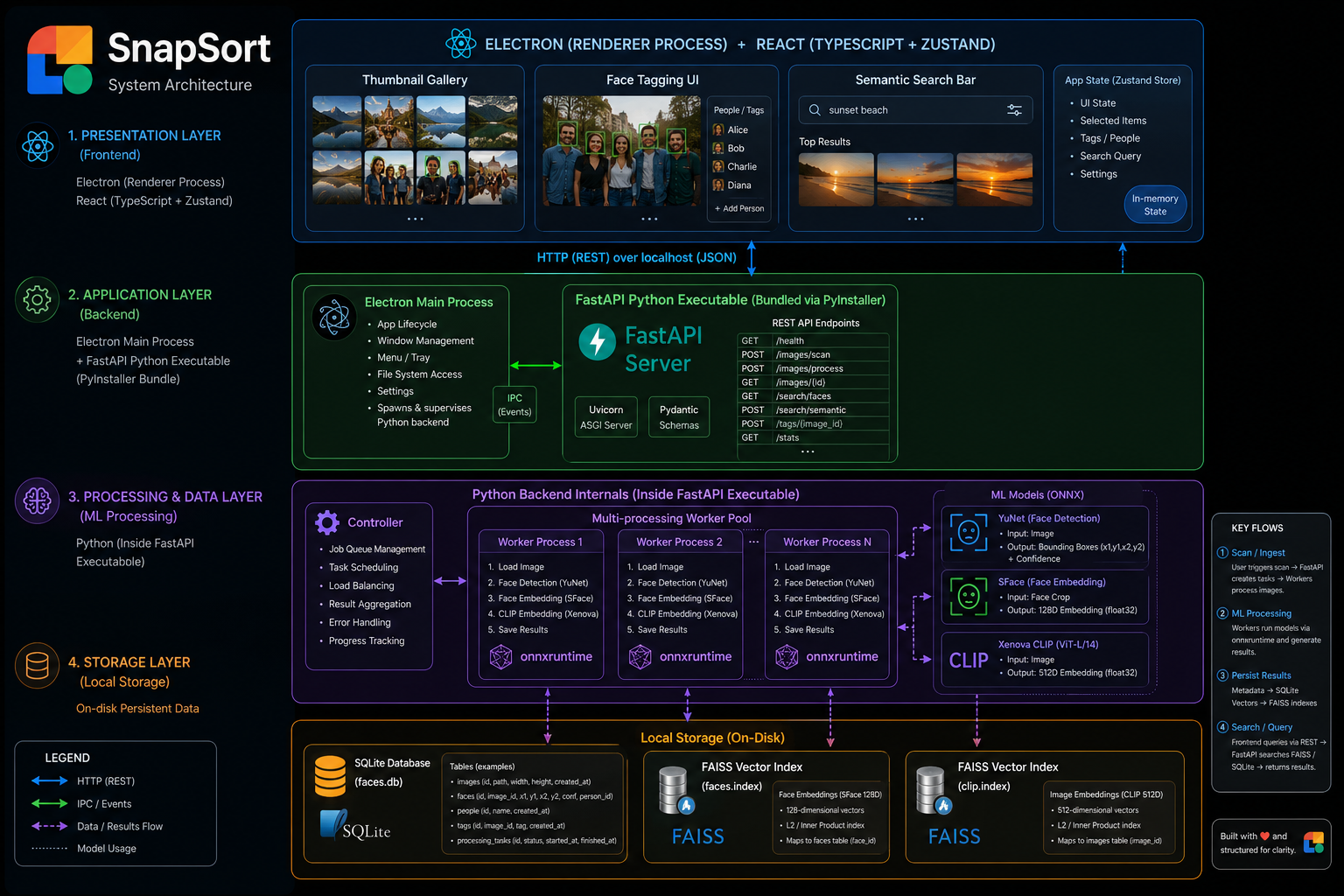
Everything runs locally—no cloud uploads. SnapSort uses an Electron + React (TypeScript) frontend and a Python backend (FastAPI) utilizing onnxruntime with OpenCV (YuNet + SFace + CLIP) for machine learning, SQLite for metadata, and Faiss for fast vector search.
Website: https://snapsort-website.vercel.app/
📌 Want to see what's coming next? Check out the todo.md for upcoming features, fixes, and improvements.
Architecture
Features
- Instant Thumbnail Gallery: Loads and displays all images in a selected folder immediately, with a masonry layout.
- Background AI Processing: Uses multiprocessing to detect faces (YuNet), extract face embeddings (SFace), and compute semantic image embeddings (CLIP) without blocking the UI.
- Semantic Search & Name Recognition: Type what you're looking for, or type a tagged person's name to instantly find matching photos using advanced cosine-similarity FAISS search and fuzzy text matching.
Performance & Benchmarks
SnapSort runs an incredibly heavy and accurate machine learning pipeline 100% offline on your local CPU using onnxruntime and a multi-worker processing architecture. The pipeline performs the following for every single image:
- Face Detection (
YuNet) - Facial Feature Extraction (
SFace- 128D embedding per face) - Semantic Image Embedding (
Xenova CLIP- 512D text-to-image feature)
Benchmark Results (4-Core CPU Processing):
- Throughput: ~2.5 to 3 images per second
- Time per image: ~0.38 seconds
- 1,000 Photo Gallery: Completely indexed in roughly 6.5 minutes
Note: Future updates aim to support GPU execution providers (CUDA/CoreML) which could theoretically increase processing speeds by 10x or more.
Want to benchmark your own hardware? You can run the included benchmark script:
python scripts/benchmark.py /path/to/your/photos
- Persistent Index & Metadata: Stores high-dimensional vector embeddings in Faiss (
data/faces.index,data/clip.index) and records image/face occurrences in a local SQLite database (data/faces.db). - CPU-Optimized & Lightweight: Uses highly optimized ONNX models that run incredibly fast on standard consumer CPUs.
- Privacy First: 100% offline, local processing.
Installation
Download the latest installer for your platform from the GitHub Releases page.
macOS
Download the .dmg installer directly from the Releases page. If Gatekeeper blocks the app, you can bypass it by running the following command in your terminal after installation:
xattr -rd com.apple.quarantine /Applications/SnapSort.app
Note: Give your terminal Full Disk Access in System Settings > Privacy & Security to grant you access and then run the above command.
Windows
Download the .exe installer directly from the Releases page.
Linux
Three packages are published to the Releases page for each version. Pick the one that matches your distro:
Debian / Ubuntu / Pop!_OS (.deb)
sudo apt install ./SnapSort-Linux-latest.deb
Arch / Manjaro (.pacman)
sudo pacman -U SnapSort-Linux-latest.pacman
Any distro (.AppImage)
chmod +x SnapSort-Linux-*.AppImage
./SnapSort-Linux-*.AppImage
Development Setup
SnapSort is divided into an Electron frontend (desktop/) and a Python backend (backend/).
Requirements
- Node.js (v18+)
- Python ≥ 3.10
1. Backend Setup
Install uv, then install dependencies:
curl -LsSf https://astral.sh/uv/install.sh | sh   # skip if uv is already installed
uv sync
This creates .venv and installs the exact locked dependency versions. Prefix backend commands with uv run (e.g. uv run python scripts/download_models.py), or source .venv/bin/activate once.
Download the required AI models:
uv run python scripts/download_models.py
2. Frontend Setup
Install Node dependencies:
cd desktop
npm install
3. Run Development Server
cd desktop
npm run dev
The Vite development server will start, launch the Electron app, and automatically spawn the Python backend subprocess.
Contributing
Contributions are welcome! To help:
- Fork the repository.
- Create a feature branch:
git checkout -b my-cool-feature - Commit your changes:
git commit -am "Add new feature" - Push to the branch:
git push origin my-cool-feature - Open a Pull Request.
Please see AGENTS.md for architectural guidelines and AI-assisted development instructions.
License
This project is licensed under the MIT License. See the LICENSE file for details.
Yorumlar (0)
Yorum birakmak icin giris yap.
Yorum birakSonuc bulunamadi