Klear-Team-Brain
Health Gecti
- License — License: Apache-2.0
- Description — Repository has a description
- Active repo — Last push 0 days ago
- Community trust — 17 GitHub stars
Code Basarisiz
- spawnSync — Synchronous process spawning in cli/brain.mjs
- rm -rf — Recursive force deletion command in cli/brain.mjs
- network request — Outbound network request in cli/brain.mjs
- network request — Outbound network request in client/sync.mjs
- network request — Outbound network request in client/viewer.mjs
- network request — Outbound network request in core/gitea.mjs
- network request — Outbound network request in core/github.mjs
Permissions Gecti
- Permissions — No dangerous permissions requested
Bu listing icin henuz AI raporu yok.
Turn your team's AI coding sessions, GitHub code, and docs into one shared, searchable memory — a self-hosted git truth store you query right from your editor over MCP.
Klear-Team-Brain



Your team's collective memory for AI-assisted coding. Self-hosted, ultra-light, zero extra effort for the people doing the work.
English | 中文
The problem
Your team codes with Claude Code / Codex — but the context that actually matters (the reasoning, the why-it-changed, the dead ends) is trapped in each person's local AI chat, and it's gone the moment they close the tab. So:
- "Why was this feature designed this way?" — not in any PR; the discussion happened inside someone's chat, not the commit message.
- "Who's working on this refactor, and how far along is it?" — you ask around, or wait for standup.
- A teammate goes on leave or quits, and last week's reasoning leaves with them.
Knowledge depends on "ask the right person." The moment they're busy or gone, the context breaks.
Klear-Team-Brain automatically pools your whole team's AI sessions into one shared memory, fused with live GitHub code state and your team's docs. Then you ask straight from your editor, or browse in a web UI:
"Where did the auth refactor land?"
"How was the billing schema decided?"
"Who's been touching the ETL this week?"
You get an answer synthesized across the team's sessions + code + docs, with citations. People doing the work do nothing; people who want to understand just ask — or open the dashboard.
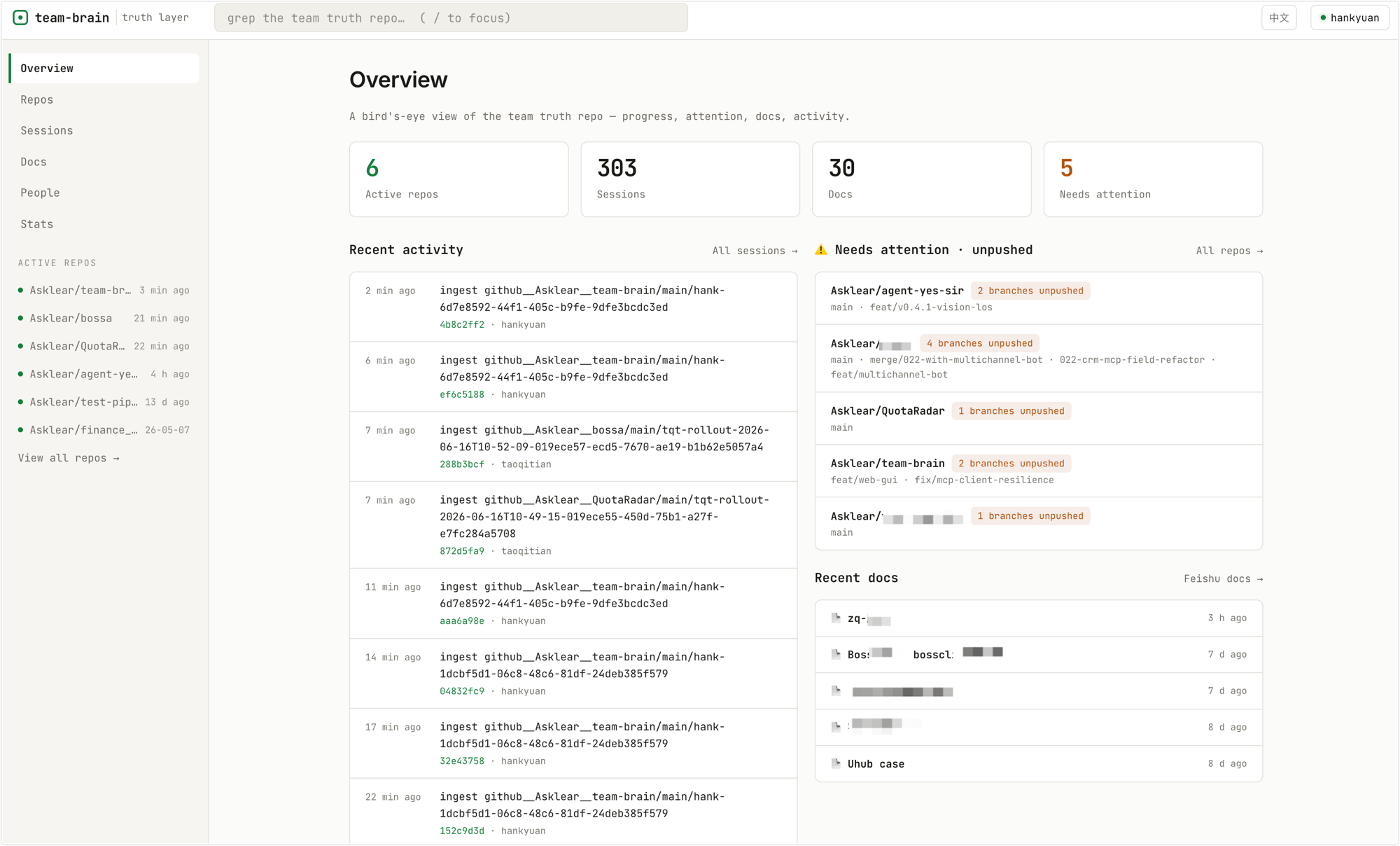
Highlights
- Zero-effort capture — everyone keeps using CC/Codex; a background collector flows sessions into the memory automatically, no manual steps.
- Two ways to query — ① ask in natural language from your editor (MCP); ② browse a web dashboard (filter sessions by person/repo/time, see progress and usage stats).
- Ultra-light, self-hosted — the server is just one git repo + one Node process + a static frontend: no database, no queue, no vector store. One small VPS (runs fine on low memory) is enough. Queries run on
git grepwith zero server-side LLM calls — the understanding happens in the agent inside your editor. - Privacy-first — only allowlisted directories upload; secrets are redacted client-side before upload; all data stays on your own infrastructure.
Quick start
Prerequisites: Node 22+, and an MCP-capable editor/CLI (Claude Code or Codex) to ask from.
No npm/SaaS install — it's self-hosted by design. There's no public package or hosted service: clone this repo to run the server (or to trial it locally), and your teammates pull the client straight from your server with
curl …/get | bash— see Deploy for your team.
Try it locally first (≈5 min — no VPS, no HTTPS, no invite token)
Want to kick the tires before standing up a server? Run the whole thing on your own machine as a single user:
git clone https://github.com/Asklear/Klear-Team-Brain.git && cd Klear-Team-Brain
npm install
npm run quickstart        # one-time: mint a local identity + token, point the client at localhost, wire up MCP
npm run server            # starts the truth store on http://127.0.0.1:8787 — leave this running
Then, in a second terminal, capture your local sessions:
npm run sync -- --once # capture once (or `npm run sync` to keep watching in the background)
Now ask from your editor, or open http://127.0.0.1:8787/ to browse. Everything stays on your machine. Prefer a containerized server? Use docker compose up -d — see DEPLOY.md.
Deploy for your team
- Stand up a server (one small VPS) — manually or with one command via
docker compose. See DEPLOY.md — install Node, clone, setTRUTH_DIR, add a roster + tokens, put HTTPS in front, run as a service. - Onboard each member — point the client at your server:
curl -fsSL https://your-server.example.com/get | bash # downloads the client + registers the `brain` command brain join <YOUR_INVITE_TOKEN> # verify + pick workspaces + wire up MCP + first sync + install resident - Start using it — ask from your editor, or open
https://your-server.example.com/to browse the dashboard.
Once onboarded, the collector watches your AI sessions in the background and uploads each one as it stabilizes — no manual steps after that.
Two ways to query
① Ask from your editor (MCP)
With MCP wired up, ask in plain language inside CC / Codex ("where did the auth refactor land?"). The agent treats the memory as a read-only folder and uses a handful of Unix-style primitives to locate, read, and synthesize — all tied together by a truth-store-relative path:
| Tool | What it does |
|---|---|
grep |
Search content (regex full-text via git grep). Defaults to redacted transcripts; raw=true includes raw jsonl. |
find |
Find files by name/glob (complementary to grep: one searches content, one searches names). |
read |
Read any file by path (paginate large files with offset/limit). |
ls |
Inspect structure: which spaces exist, branches, session counts. |
sessions |
Find sessions by person + work time (who did what, in a given window). |
stats |
Aggregate token usage / session counts / turns by day/week/person/repo/tool. |
log |
Activity timeline (the git history; narrow by space/author/since). |
read_github |
Reach out to GitHub / GitLab / Gitea (incl. self-hosted) for live code state or a file's current contents (code itself isn't stored). |
Server-side queries run via git grep / git ls-files / git log / fs — execFile, no shell, locked inside TRUTH_DIR, read-only — with zero server-side LLM calls.
Wiring other editors: the MCP server is a stdio server; the command is always
<node> <install-dir>/mcp/server.mjs(brain mcpprints your exact path). Add that as a stdio MCP server in Claude Code, Codex, or any MCP-capable client (Gemini CLI / Cursor / Cline / opencode…).Remote / cloud agents (HTTP transport): an agent that can't run the local stdio binary can mount the memory over HTTP instead — same tools, no local install. Point any MCP client at
POST https://your-server/mcpwith your member token as aBearerheader.Claude Code:
claude mcp add --transport http team-brain https://your-server/mcp \
  --header "Authorization: Bearer <your-member-token>"
Cursor / Cline / any
mcp.json:{ "mcpServers": { "team-brain": { "type": "http", "url": "https://your-server/mcp", "headers": { "Authorization": "Bearer <your-member-token>" } } } }Smoke-test from a shell (the endpoint accepts plain JSON-RPC — no special
Acceptheader needed):curl -s https://your-server/mcp -H "Authorization: Bearer <token>" \ -H "Content-Type: application/json" \ -d '{"jsonrpc":"2.0","id":1,"method":"tools/list"}'It's a stateless, one-shot endpoint (POST in, JSON out — no session, no server-side LLM); multi-turn context stays on the calling agent's side.
② Browse the web UI
The server hosts a static dashboard at / (nothing extra to deploy) — for people who'd rather scan than type: see overall team progress, filter sessions by person/repo/time, view token-usage and activity stats, and skim mirrored docs.
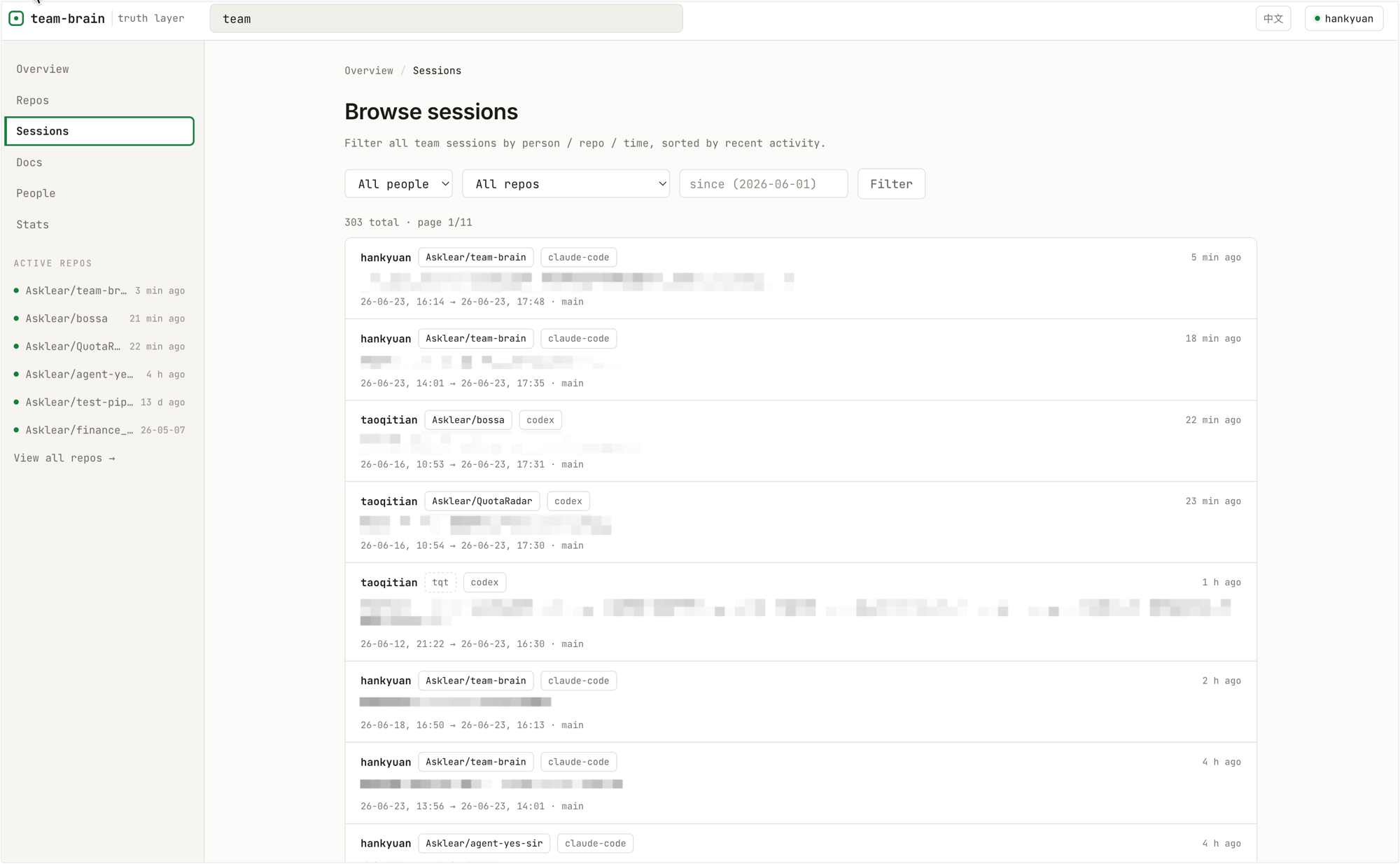
Browse sessions — filter by person/repo/time, sorted by recent activity:
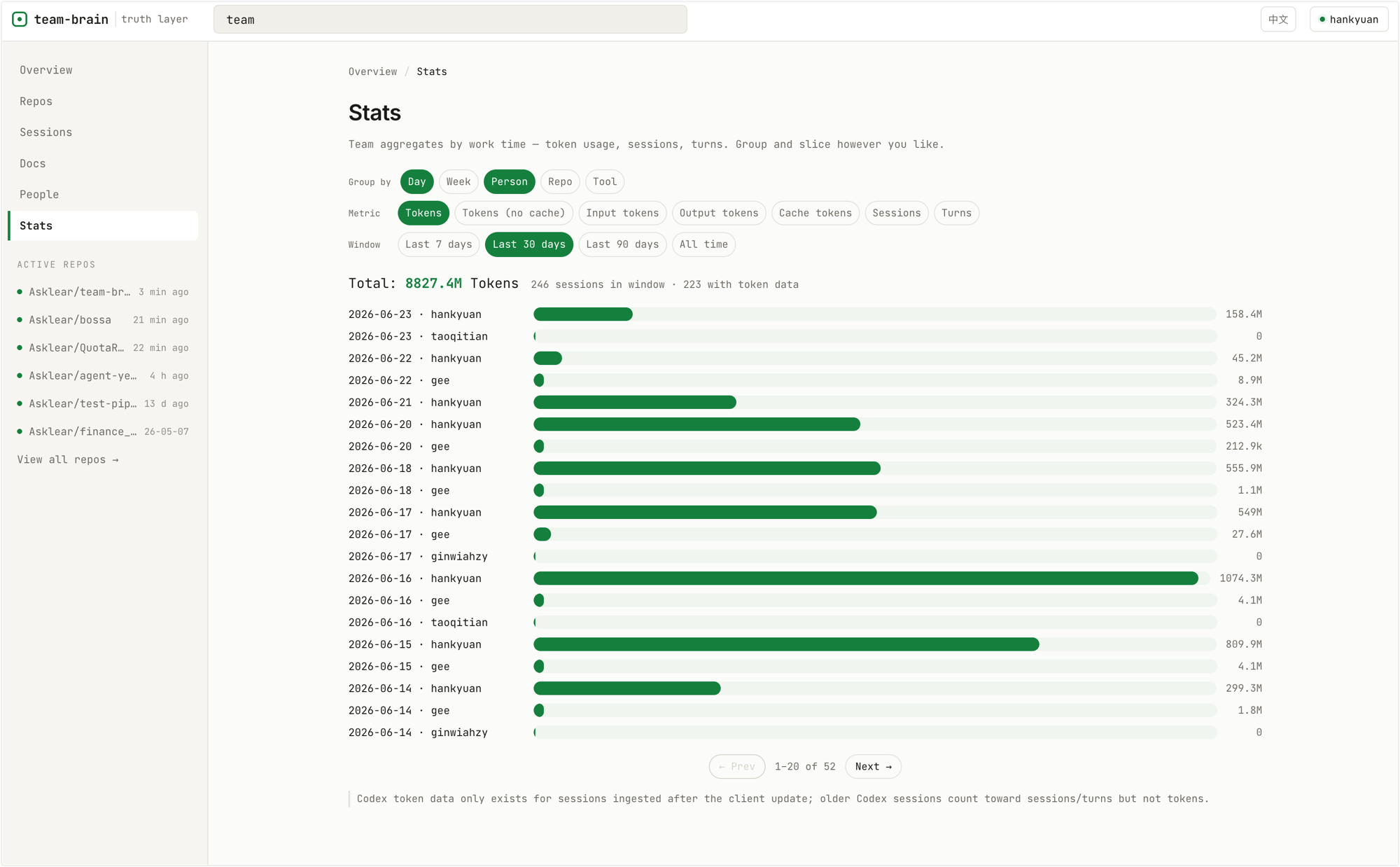
Usage stats — aggregate tokens, sessions, and turns by day/week/person/repo/tool:
How it works
each machine (client)                          your server (self-hosted)
┌────────────────────────┐            ┌──────────────────────────────────┐
│ ① collector client/sync │  gzip+token │ ② server/server.mjs (HTTP, HTTPS  │
│   resident, watches AI   │ ──────────▶ │   via a proxy like Caddy)         │
│   sessions; gated to the │            │   /ingest → git truth store        │
│   allowlisted circle     │            │   TRUTH_DIR + 4h repo poll →       │
│                          │            │   code-state                       │
│ query A: ask in editor   │  search+fetch│  /grep /find /read /ls /log       │
│ query B: open the web UI │ ◀────────── │   + static dashboard hosted at /  │
└────────────────────────┘            └──────────────────────────────────┘
The memory is a single git repository fusing three sources — each captured where it naturally lives:
| What you want to know | Lives mainly in | How it enters the memory |
|---|---|---|
| Progress · reasoning | CC/Codex sessions | distilled + redacted, stored as full-text transcript |
| Code state | GitHub / GitLab / Gitea (incl. self-hosted) | not stored; fetched on demand + 4h poll into code-state |
| Goals · decisions (human-written) | Team docs (Feishu/Lark wiki · Notion · Google Docs) | one-way mirror of doc bodies; grep/read it, edit at the source |
Design trade-off: only the "truth" (raw material + metadata) is kept clean and complete — because it's expensive and can't be rebuilt; "views" (queries / indexes / the dashboard) are swappable and throwaway. Sessions enter distilled (inline images stripped, giant tool outputs truncated — signal, not bytes); the byte-exact original stays on the producer's machine (
~/.codex/~/.claude).
Privacy & security
- Scope gate: a session is uploaded only if its working directory is under your machine's
upload_foldersallowlist — inside the circle is shared by default, outside is private by default. - Redaction: secrets/tokens + home-directory paths are stripped client-side before upload, with second passes when the server projects the
.mdand at the/readexit. Each producer can also keep a personal redaction wordlist (client names, code names…) that's stripped before anything leaves their machine. - Producer transparency & control: run
brain viewerfor a local console (127.0.0.1, only you can see it) that shows, per session, exactly what was uploaded vs skipped — and lets you exclude individual sessions, retract ones already in the shared store, or add personal redaction terms. - Credentials never stored: member tokens, GitHub PATs, and doc-source credentials all live server-side and are gitignored; the roster (no secrets) can be committed.
- The memory is the whole value — never push it to a public remote, and back it up. Self-host on infrastructure open only to your circle.
Status: early, self-hosted, single-tenant. You run your own server; nothing leaves your infrastructure.
Optional: mirror team docs (Lark / Feishu)
If your team keeps human-written docs (goals, decisions, notes) in a Lark/Feishu wiki, the server can one-way mirror those doc bodies into the memory, so the asking agent can grep/read them alongside sessions and code. Set it up once:
Create a custom app in the Lark/Feishu developer console (an enterprise custom app); note its App ID + App Secret.
Enable read scopes under Permissions:
docx:document.readonly,drive:drive.readonly,wiki:wiki.readonly, then publish a version and have an admin approve it. (No search scope needed — the mirror is searched locally.)Authorize the app on the whole wiki — the non-obvious step, and the one that actually gates access. A tenant-token app can only see wikis it's been explicitly added to, and the console won't let you add an app directly. Instead:
- Create a group / chat.
- Add this app's bot to that group — it must be the bot of the same App ID (adding the wrong bot is the most common failure).
- In the wiki, go to Settings → Members → Roles & permissions → Admins → Add admin and add that group.
The app then has read access to the entire wiki (propagation takes ~1–2 minutes).
Drop credentials on the server: copy
feishu.example.yaml→feishu.yaml(secret → gitignored), fill inapp_id/app_secret, and restart. Leave it out entirely and the doc layer stays quietly off.Verify: after a poll cycle, the docs appear under
feishu/<wiki>__<id>/…in the memory, searchable viagrep.
China Feishu (
open.feishu.cn) and international Lark (open.larksuite.com) are isolated platforms — create the app on whichever one your team uses. Create a new wiki later? Repeat step 3 for it, or the brain won't see it.
Other doc sources (Notion · Google Docs)
Doc mirroring is provider-pluggable — the same sync engine (server/docsync.mjs) backs every source, so each one is just a small adapter (core/<provider>.mjs + server/<provider>docs.mjs). Two more ship today, both gated by their own *.yaml (leave it out → that layer stays off) and both following the same "share with the bot, then it mirrors" model:
- Notion — create an internal integration at https://www.notion.so/my-integrations (read-only); share the pages/databases with it (page → ••• → Connections); copy
notion.example.yaml→notion.yaml, fillapi_token, restart. Pages land undernotion/<workspace>/…. - Google Docs — create a service account (enable the Drive API), download its JSON key, and share the docs/folders with the service account's email (read-only); copy
google.example.yaml→google.yaml, point it at the key, restart. Docs land undergoogle/<workspace>/…. (Auth is a self-signed JWT — no extra SDK.)
Unshared pages/docs stay invisible (the share is the real access gate); sub-pages and folder contents inherit. After a poll cycle everything is searchable via grep.
Confluence can follow the same adapter shape — contributions welcome.
Changelog
What changed in each release: Changelog (中文).
Non-goals
It aggregates and helps you understand what's in CC/Codex sessions + GitHub + docs. It is not an IM, a project manager, or a code host, and doesn't replace them.
Contributing
Issues and PRs welcome — see CONTRIBUTING.md and SECURITY.md. This project is developed internally and mirrored here; external contributions are reviewed and merged upstream, then flow back out.
License
Apache-2.0 © Asklear
Yorumlar (0)
Yorum birakmak icin giris yap.
Yorum birakSonuc bulunamadi