HomeCloud
Health Uyari
- No license — Repository has no license file
- Description — Repository has a description
- Active repo — Last push 0 days ago
- Low visibility — Only 5 GitHub stars
Code Gecti
- Code scan — Scanned 12 files during light audit, no dangerous patterns found
Permissions Gecti
- Permissions — No dangerous permissions requested
This MCP server acts as a peer-to-peer bridge allowing you to remotely access and control your devices over the internet. It gives AI agents deep system integration, enabling them to manage files, view screens, execute terminal commands, and sync clipboards across different operating systems.
Security Assessment
Overall Risk: High. Although the automated code scan found no dangerous patterns or hardcoded secrets, the core purpose of this tool is inherently risky. By design, it exposes highly sensitive system components—specifically file systems, screen sharing, clipboards, and terminal access—to external networks. It makes network requests to establish peer-to-peer connections over the internet. Giving any AI agent unrestricted terminal execution and file access capabilities presents a significant security threat if misused or compromised.
Quality Assessment
The project is very new and currently has low visibility with only 5 GitHub stars, meaning it has not undergone broad community testing. However, it is actively maintained, with the most recent code push occurring today. A major drawback is the complete lack of a license file, meaning the legal terms of use and redistribution are strictly undefined. Community trust should currently be considered low given the early stage of development.
Verdict
Use with extreme caution: while the code appears clean, exposing remote terminal and file system access to an AI agent over the internet carries substantial inherent risk, and the project currently lacks the maturity and licensing of a production-ready tool.
Easiest way to access your devices from anywhere.
HomeCloud

Access and control all your devices from anywhere.
Files, photos, clipboard, screen, terminal, over any network.
Download · Get Started · Report Bug
HomeCloud is a free, open-source device bridge that connects your phones and computers across any network. Unlike tools that only work on the same WiFi (KDE Connect, LocalSend), HomeCloud connects your devices over the internet too, while staying fully peer-to-peer, no VPN setups needed.
What HomeCloud means for you:
- 🔁 AirDrop that works with any platform including Windows, Android, macOS, iOS.
- 🐧 KDE Connect that actually connects, not just on same WiFi. With or without internet.
- 🛠️ Give AI agents access to your devices via MCP: files, screen, terminal, photos.
- 🤖 Automations and workflows for power users.
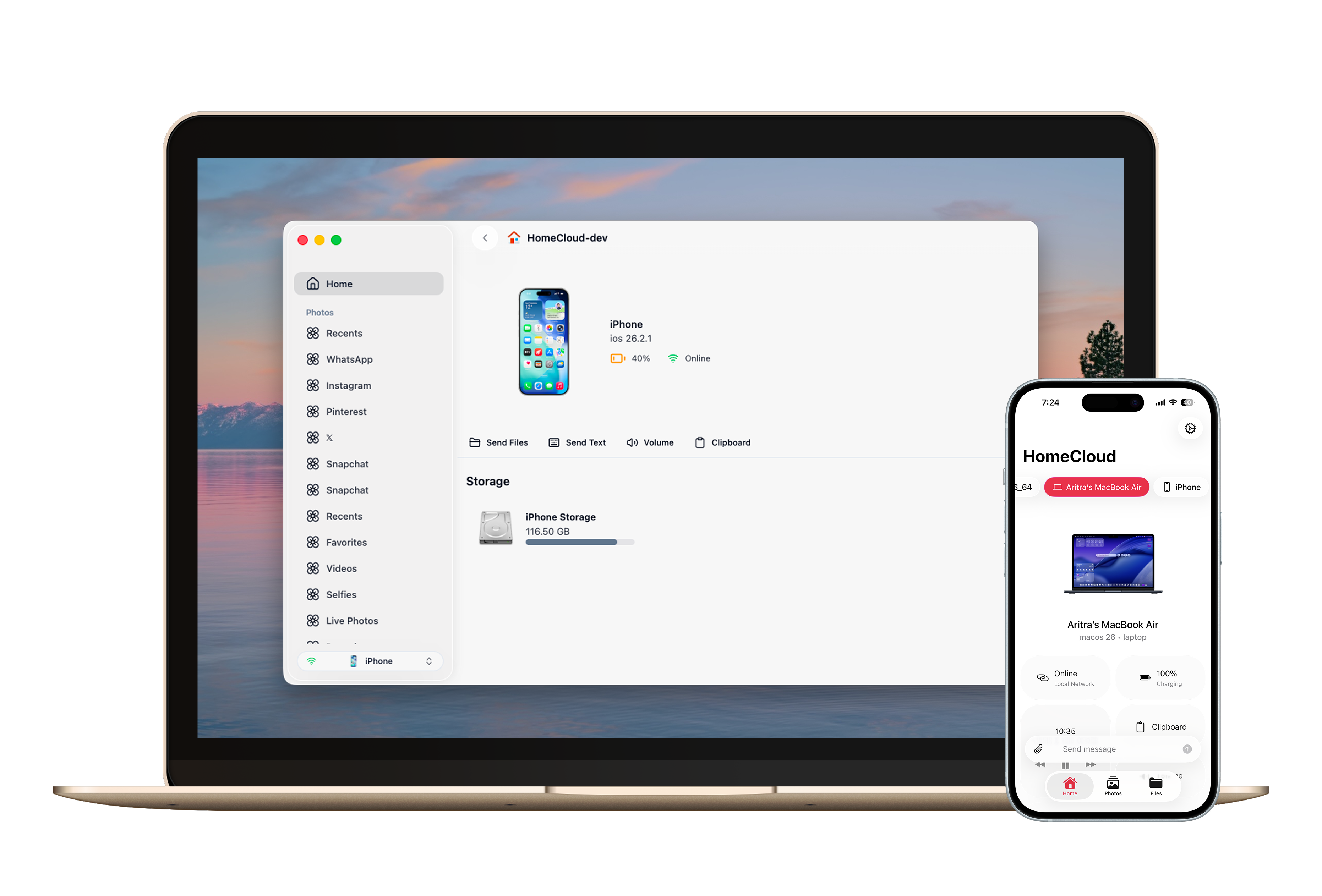
Features
| Feature | Description |
|---|---|
| 📁 File Access | Browse, download, open, and edit files on any connected device |
| 📸 Photo Library | View and manage phone photos and camera roll from your computer (including HEIC) |
| 📋 Clipboard Sync | Copy on one device, paste on another — works across any OS |
| 📤 Send Anything | Send files, texts, and links instantly with no size limits |
| 🖥️ Remote Screen | View and control your devices remotely |
| 💻 Terminal | Open a terminal session to any connected device |
| 🎵 Media Control | Control desktop media playback and volume from your phone |
| 🤖 AI Agents | Run AI agent like Claude Code in the background and chat from any device. |
| ⚡ Workflows | Create and run automated tasks across your devices |
What makes HomeCloud different
| HomeCloud | KDE Connect | LocalSend | |
|---|---|---|---|
| Works over internet (P2P) | ✅ | ❌ Same WiFi only | ❌ Same WiFi only |
| Truly cross-platform | macOS, Windows, iOS, Android (Linux soon) | Weak on Mac/iOS | All, but file transfer only |
| File transfer | ✅ | ✅ | ✅ |
| Clipboard sync | ✅ | ✅ | ✅ |
| Remote screen | ✅ | ❌ | ❌ |
| Remote terminal | ✅ | ❌ | ❌ |
| Phone photos on desktop | ✅ | ❌ | ❌ |
| Workflows / automation | ✅ | ❌ | ❌ |
| No VPN or port forwarding | ✅ | Needs VPN for remote | Needs VPN for remote |
AI Agents
HomeCloud can also serve as the device layer for AI agents. Connect any AI agent or tool to your devices using industry-standard protocols:
- MCP (Model Context Protocol): Any MCP-compatible AI agent can get access to your device's files, photos, system info, and more through HomeCloud. Works with Claude, Copilot, and other MCP-enabled tools.
- ACP (Agent Communication Protocol): See and control AI agents running on any of your devices from anywhere - your phone, laptop, or tablet.
How it works
- Peer-to-peer networking. Local devices discover each other via mDNS. Remote devices connect directly over UDP.
- End-to-end encrypted. Devices authenticate using on-device public key cryptography. Your data stays private and fully under your control.
- Lightweight broker. HomeCloud uses an authentication and broker service only for device discovery and connection setup. Your actual data is always transferred peer-to-peer and never reaches our servers.
Get started
Download and install HomeCloud on your phones, laptops, and iPads.
- Desktop: Download for macOS, Windows. Linux coming soon.
- Mobile: Currently in early testing - Download.
- Server: you can also run HomeCloud on your home server without a GUI - learn more.
See the Get Started for setup instructions.
Why HomeCloud?
Most device bridge tool like KDE Connect, LocalSend, Sefirah breaks the moment you leave your home WiFi. People set up entire VPN infrastructure just to get clipboard sync working at the office or a coffee shop.
HomeCloud was built to work on any network, local or internet, while staying peer-to-peer. No VPN, no port forwarding, no firewall configs. It just connects.
But connectivity is just the foundation. HomeCloud also gives you things no other device bridge does: browse your phone's photo library from your computer, open remote terminal sessions, run automated workflows, and connect AI agents to your devices, all from anywhere, on any OS.
Contributing
Contributions are welcome! Here's how you can help:
- Report bugs or suggest features via GitHub Issues
- Test the app on your devices and share your experience
- Star the repo if you find it useful ⭐
For development setup and architecture details, see the Development Guide.
License
MIT
Yorumlar (0)
Yorum birakmak icin giris yap.
Yorum birakSonuc bulunamadi