facilitator
Health Uyari
- License — License: NOASSERTION
- Description — Repository has a description
- Active repo — Last push 0 days ago
- Low visibility — Only 6 GitHub stars
Code Basarisiz
- network request — Outbound network request in app/board-settings.js
- network request — Outbound network request in app/bridge_gate.py
- exec() — Shell command execution in app/card-markdown.js
- exec() — Shell command execution in app/card-report.js
Permissions Gecti
- Permissions — No dangerous permissions requested
Bu listing icin henuz AI raporu yok.
An opinionated interface to orchestrate subagents, stay in the loop, and get more done

About
Facilitator is an open-source alternative to the Claude Code/Codex desktop app, and it works with your existing subscriptions.
It is an interface built to resolve the bottleneck when coding with agents: understanding.
It does not have a traditional chat interface. Instead, each project on the app is linked to an orchestrator agent. To build a feature or resolve a bug, you create a card (Command + T), send a message, and the orchestrator assigns that task to a subagent in a worktree. Repeat this a bunch until you have several tasks running in the background, and you will be surprised how quickly you can iterate on a product!
The Facilitator makes it super easy to:
- Parallelize work. There are often feature builds or bugs that do not require a lot of discussion and can be dealt with by agents while you work on heftier tasks.
- See which subagents/tasks are awaiting further instructions. It is easy to lose track of several terminal windows, but color-coded UI in a box? Hard to miss.
- Stay in the loop. I genuinely don't think you can build anything substantive without understanding what is going on. Active cards on the Facilitator keep your mental model up-to-date. Have a doubt? Want to explore multiple approaches for a feature? Just ask!
- Triage. Choosing what to build later or what not to build at all is important if you want to ship! Click the moon or hit Ctrl + Shift + \ to defer a card!
- Bonus: after a while, all the cards and the conversations within them act as a searchable knowledge base for that project!
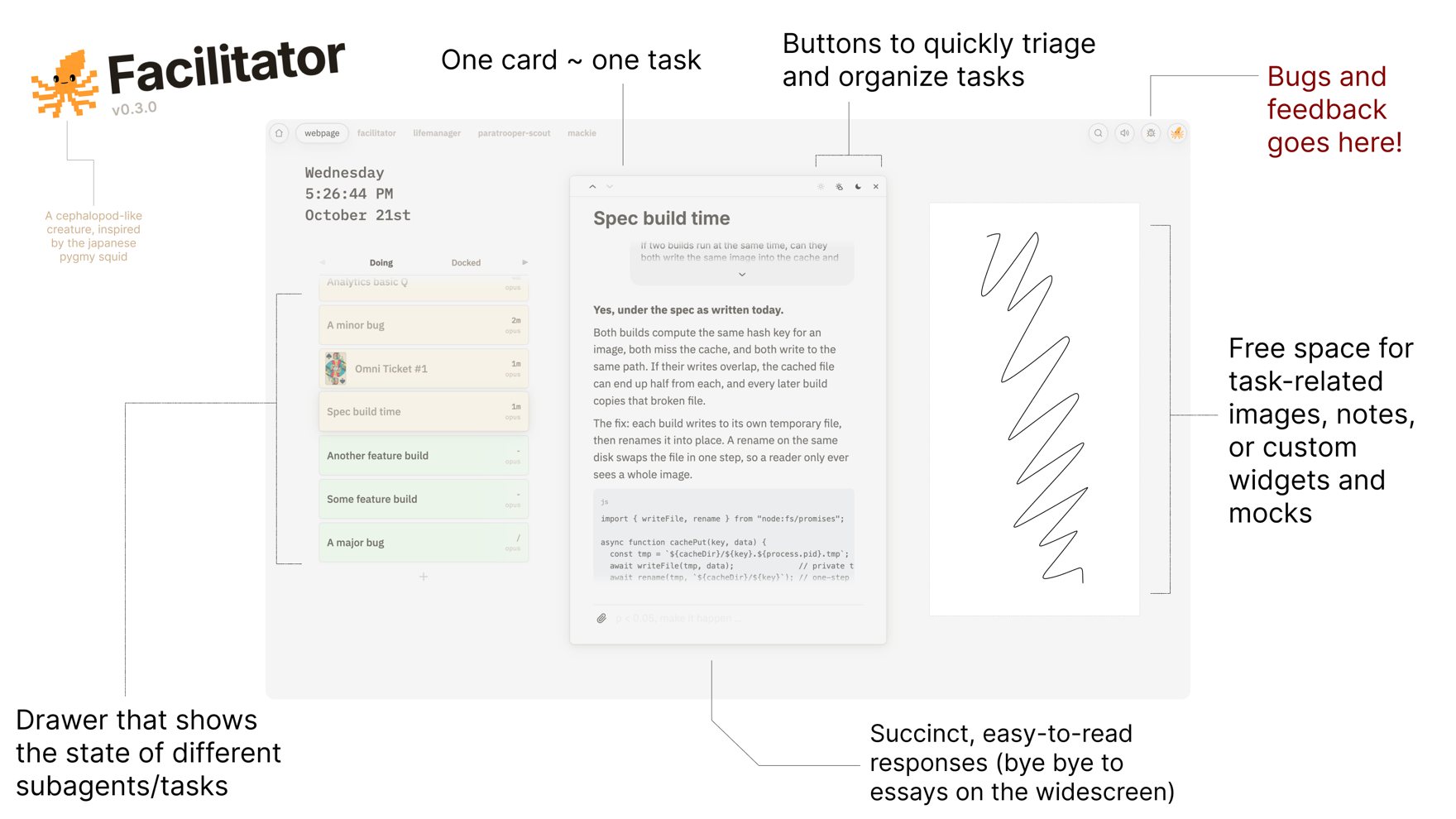
Facilitator is meant to complement your existing development workflow. To make the best of the Facilitator:
- Atomize your asks
- Learn the hotkeys
- Dispatch subagents
- Triage & ship!
Installation
Pre-requisites:
- Claude Code or Codex
- Google Chrome
- macOS 11 or later
Installing the Facilitator is easy:
git clone https://github.com/AsteroidHunter/facilitator.git
cd facilitator
./install.sh
Once installed
- On a new tab on your favorite terminal, then run:
facilitator run - Open the project you want to work one via the facilitator
- Navigate to that folder on your terminal, start your terminal agent you usually do, and run
/facilitator onboardon claude (or$facilitator onboardon codex)
You are ready to start shipping!
Mobile version

The Facilitator comes with a mobile version. The mobile version is fun to use when paired with an external keyboard.
If you have an always on machine (or like to leave your laptop running), you can access your project on the Facilitator and direct agents as long as you have Tailscale installed on both your mac and the iPhone.
If you skipped the mobile client set up during the regular installation, you can set up the phone client by running:
facilitator bridge setup
If you set up the mobile during the initial installation, here's how to use the mobile version (one time set up):
- Run
facilitator bridge - Scan the QR code using your phone
- Add the web app to your home screen
- Enter the password you set during installation
- Continue shipping!
Once the mobile app is set up, you can use it like a regular app and it will work as long as Tailscale is active on both your home device and the phone.
The password is required once during the initial set up; it prevents other members in your tailscale account from accessing your data. If you ever accidentally log out of the phone app and forget the password, or wish to update it, you can do so by running the following on your mac's terminal:
facilitator password set
Forgot the phone's password or want to change it?
Updating the Facilitator
Facilitator is still in development and will be constantly updated. When a new version is out, the board asks whether to update; say Yes and it downloads the update, restarts if it needs to and reloads itself. To update from the terminal instead, run:
facilitator update
Bonus
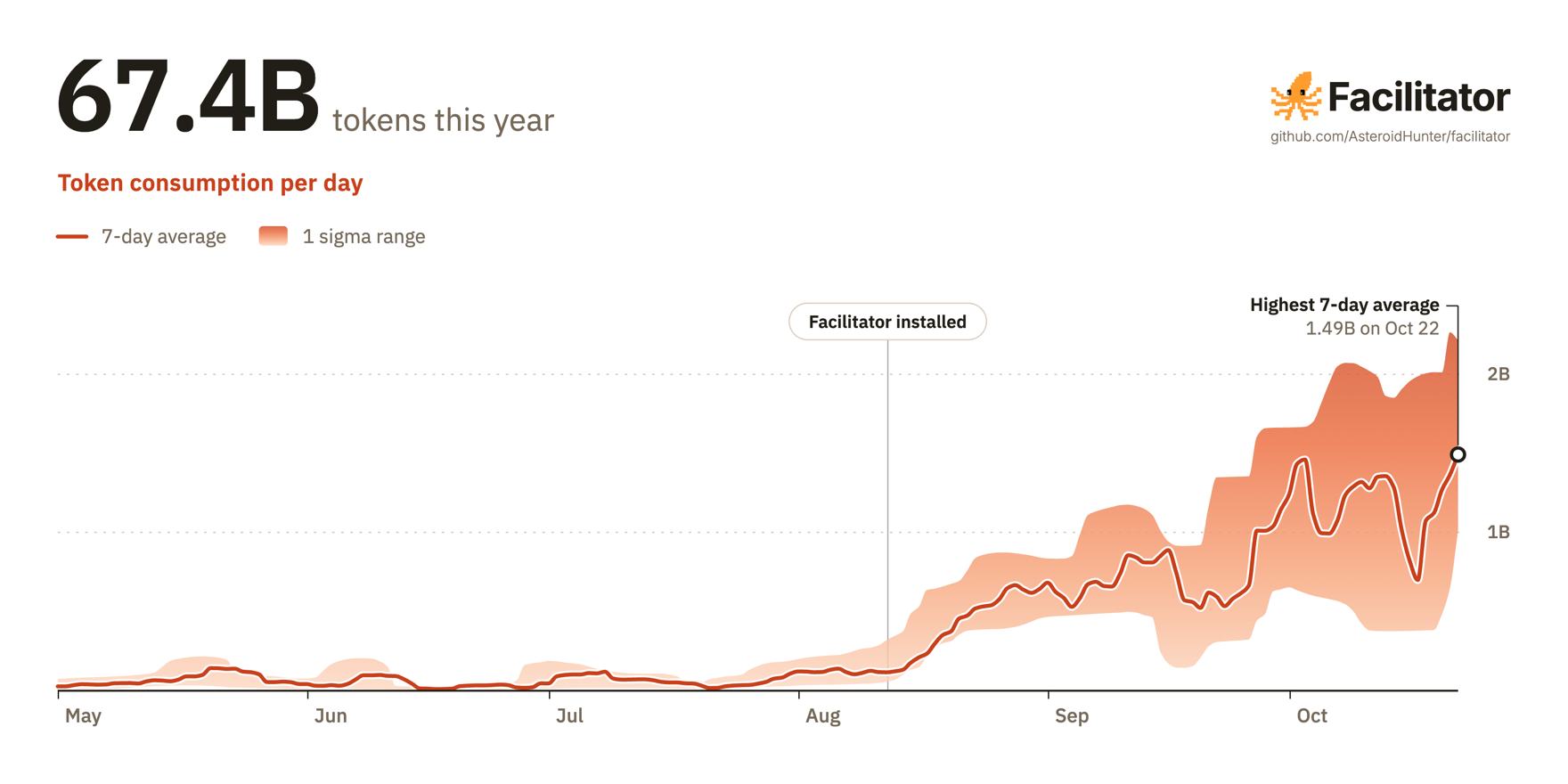
The Facilitator's home page charts how many tokens your Claude Code and Codex sessions use each day, read from their session logs on your Mac. Press the download button on the chart to save a shareable picture of your year, like this one:
License
This project is released under the Facilitator License 1.0.0. Contributions are accepted under the terms in CONTRIBUTING.md.
The bundled CodeMirror editor (app/cm-markdown.js) is included under its own MIT license, and the bundled d3-force (app/graph-force.js) under its own ISC license; see THIRD-PARTY-NOTICES.md.
Yorumlar (0)
Yorum birakmak icin giris yap.
Yorum birakSonuc bulunamadi