atalay-terminal
Health Uyari
- License — License: MIT
- Description — Repository has a description
- Active repo — Last push 0 days ago
- Low visibility — Only 7 GitHub stars
Code Basarisiz
- exec() — Shell command execution in app/Resources/web/git-editor.js
Permissions Gecti
- Permissions — No dangerous permissions requested
Bu listing icin henuz AI raporu yok.
A HUD for running many Claude Code sessions on a Mac: live orbit map, a window per chat that keeps running, friends and levels
Atalay's Terminal
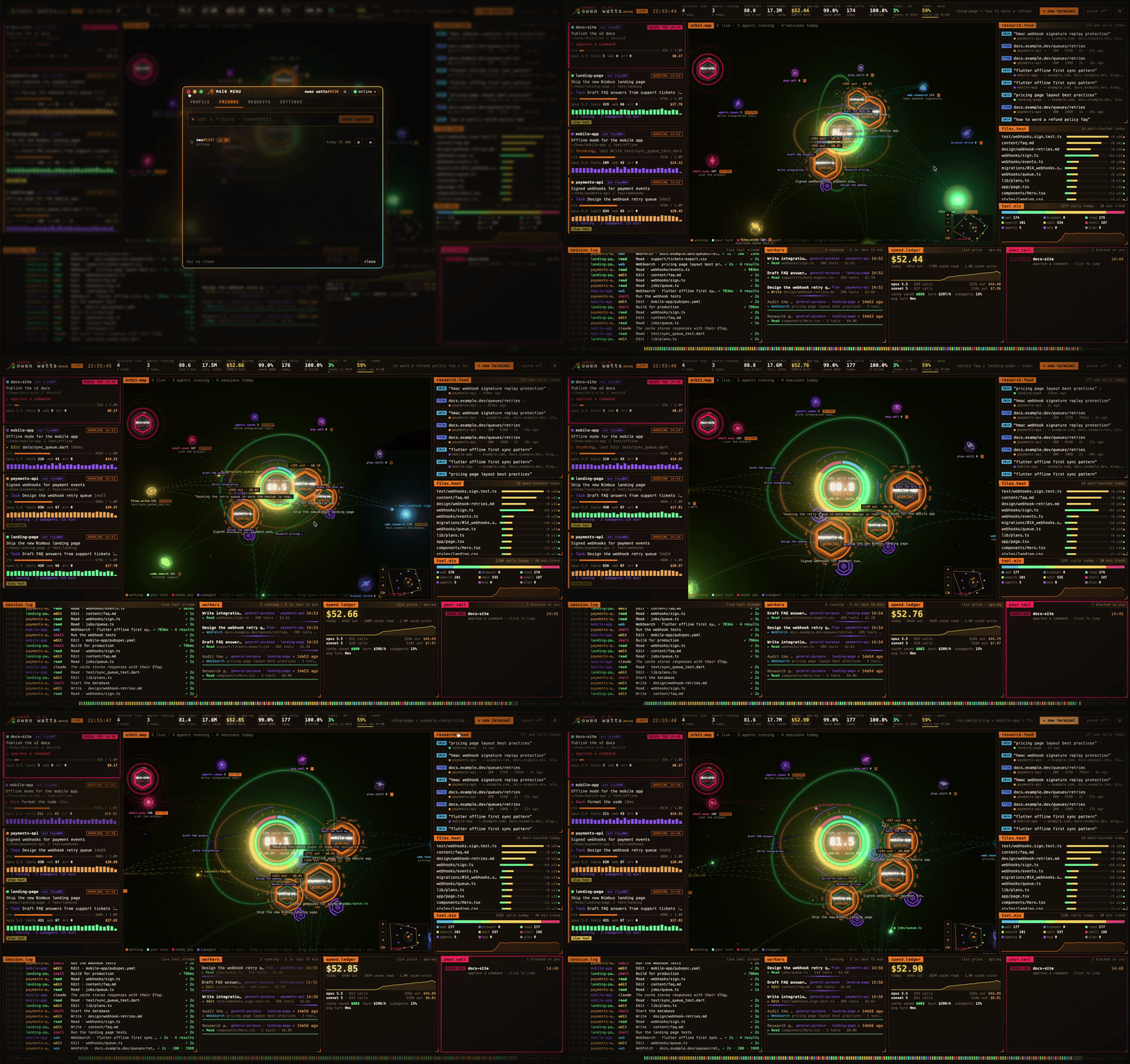
A HUD for running many Claude Code sessions on a Mac or on Windows: every session on a live orbit map, each chat in its own window that keeps running in the background, terminals as flying cars, and friends with messages and levels.
⬇ Download for macOS · ⬇ Download for Windows · Install notes and screenshots
What it does
- Every Claude Code session on one screen. Busy, waiting for you and asking for approval each have their colour;
subagents, tool calls, the files they touch, web research, tokens and spend (at API list prices) update live. - Each chat in its own window, running in a detached session: close the window or quit the app and Claude keeps
working; the window comes back with its history. - Terminals for dev servers and tests fly around the orbit as cars and park when they're idle.
- Source Control as in VS Code, for every repo your sessions work in: changes, commit, the history graph and diffs.
- Themes: twelve colour themes (Dracula, Tokyo Night, Catppuccin, Nord…) for the whole app, terminals included.
- Friends: add people by
name#tag, message them, see who's online. - Levels: the time you actively work earns XP, ranks go from Academy Student to Kage, and a leaderboard shows the
week.
macOS 13 or later, Apple Silicon and Intel; Windows 10 or 11, 64-bit (the Windows app is in windows/).
Works with Claude Code; not affiliated with Anthropic.
Privacy
- The dashboard reads Claude Code's own files on your Mac (
~/.claude: the session list and transcripts), read only.
None of it leaves your Mac: no prompts, no code, no transcripts, no file names, no token counts. - The app talks to its server only for the social parts, feedback and updates: your hacker name and tag, the app and
macOS version, whether you're working each minute (for XP) and your time zone, your friends, requests, messages and
status, the leaderboard, and the feedback you send (kept with your name#tag and the time, no e-mail). - Your Mac is known to the server by a salted hash of its hardware UUID (never the UUID itself) and a random token
kept on the Mac. - On Windows the same goes for your PC: Claude Code's files are in
%USERPROFILE%\.claude, the server gets the
Windows version, and the PC is known by a salted hash of Windows' MachineGuid. - Messages are stored on the server so they reach your friends; they aren't end-to-end encrypted.
- Settings can hide your active time from friends and your name on the leaderboard.
- No analytics or tracking libraries. Updates come from this project's GitHub releases; on the Mac they're signed and
the app checks the signature before installing, on Windows (not code-signed yet) it checks each download against
the checksum published with it.
How it works
app/is the Mac app: Swift (SwiftPM), AppKit and SwiftTerm. Every
chat and terminal runs in a detached/usr/bin/screensession, which is why they survive the app quitting.- The dashboard is a web page in a
WKWebView(app/Resources/web); the app feeds it and answers its requests. The
orbit map is three.js (app/orbit, built intoapp/Resources/web/orbit.js). - Source Control looks like VS Code because it's made from it:
app/tools/vscode-assets.pytakes VS Code's icon font,
its syntax highlighter and grammars, and the user's colour and file icon themes from the VS Code on the Mac intoapp/Resources/web(their licences are kept with them). - Themes:
app/Resources/web/themes/themes.jsonholds each theme's terminal palette and accent, andapp/Sources/AtalayTerminal/Themes.swiftmakes every colour of the app from them: the page's CSS variables
(style.css), the terminals' and the native views'. The orbit map keeps the default theme's colours. - The server behind friends, messages and levels (Fastify and Postgres) is hosted and isn't part of this repository.
Build from source
Needs Xcode or the Command Line Tools (Swift 5.9+).
cd app
./build-app.sh --open      # builds "build/Atalay's Terminal.app" and opens it
A build from source has everything that runs on your Mac. Friends, messages and levels need the released app: its
calls to the server are signed with a key that isn't in this repository.
After a change to the orbit map:
cd app/orbit
npm install
npm run build              # → app/Resources/web/orbit.js
License
MIT
Yorumlar (0)
Yorum birakmak icin giris yap.
Yorum birakSonuc bulunamadi