atc-agentic-toolkit
Health Uyari
- License — License: MIT
- Description — Repository has a description
- Active repo — Last push 0 days ago
- Low visibility — Only 5 GitHub stars
Code Basarisiz
- rm -rf — Recursive force deletion command in .claude-plugin/marketplace.json
- rm -rf — Recursive force deletion command in plugins/atc-blast-radius/.claude-plugin/plugin.json
- rm -rf — Recursive force deletion command in plugins/atc-blast-radius/hooks/detect.test.ts
Permissions Gecti
- Permissions — No dangerous permissions requested
Bu listing icin henuz AI raporu yok.
A curated collection of prompts, skills, plugins, and best practices for AI coding agents. Standardize and accelerate agent setup across teams.
ATC Agentic Toolkit

Standardize and accelerate AI-assisted development across teams
A curated collection of prompts, skills, plugins, and best practices for AI coding agents. The ATC Agentic Toolkit provides production-ready configurations and reusable components for Claude Code and GitHub Copilot, with a focus on .NET development and enterprise patterns.
📑 Table of Contents
💡 What is ATC Agentic Toolkit?
AI coding assistants like Claude Code and GitHub Copilot are transforming software development, but without standardized configurations, teams face:
- Inconsistent agent behavior across projects and developers
- Repeated context setup for common tasks
- Lost productivity gains from reinventing prompts and workflows
- Knowledge silos where effective patterns aren't shared
ATC Agentic Toolkit solves this by providing:
- Reusable Components - Skills and plugins that work out of the box
- Team Consistency - Standardized configurations that ensure predictable AI behavior
- Enterprise-Ready - Production patterns for .NET, Azure, and enterprise development
- Extensible Framework - Custom marketplace system for distributing internal tooling
🚀 Quick Start
🖥️ Copilot CLI / Claude Code
- Launch Copilot CLI or Claude Code
- Add the marketplace:
/plugin marketplace add atc-net/atc-agentic-toolkit - Install a plugin:
/plugin install <plugin>@atc-agentic-toolkit - Restart to load the new plugins
- View available skills:
/skills - View available agents:
/agents - Update plugin (on demand):
/plugin update <plugin>@atc-agentic-toolkit
🆚 VS Code
Turn on agent plugins and add the marketplace in your settings.json:
// settings.json
{
  "chat.plugins.enabled": true,
  "chat.plugins.marketplaces": ["atc-net/atc-agentic-toolkit"]
}
Then browse and install the plugins in one of these ways:
- In the Extensions view, search for
@agentPlugins. - Run Chat: Open Customizations from the Command Palette and open Plugins.
The first install from the marketplace asks you to trust it. chat.plugins.marketplaces is still marked experimental, and your organization may limit which plugins and marketplaces you can use. See Agent plugins in VS Code.
🔌 Available Plugins
Everything below is a plugin, installed from the same marketplace. They come in three kinds.
Skill plugins
Skills, agents and MCP servers. They work in Claude Code and GitHub Copilot.
| Plugin | Description |
|---|---|
| aspire | Aspire distributed application orchestration skills |
| atc | ATC.NET library skills including REST API source generation from OpenAPI specs, WPF controls, and cross-platform XAML development |
| azure | Azure services skills covering 200+ cloud services, IoT, AI, data, networking, and more |
| bicep | Azure Bicep IaC best practices, naming conventions, modularization, and security patterns |
| common | Common base skills including documentation generators, implementation planning, and utility tools |
| cosmosdb | Azure Cosmos DB data modeling workflow and best-practice rules for partitioning, queries, SDK usage, indexing, and more |
| dataverse | Microsoft Dataverse and Power Platform skills covering connection setup, data, queries, schema, solutions, administration, and security |
| docker | Docker and containerization best practices covering Dockerfile optimization, multi-stage builds, security, and orchestration |
| dotnet | C#/.NET development skills including refactoring, testing, async patterns, and NuGet management |
| git | Git workflow utilities including commit message generators and PR descriptions |
| github | GitHub platform skills including CI/CD workflow conventions for GitHub Actions and GitHub issue management |
| playwright | Browser automation and testing skills using Playwright |
| powershell | PowerShell cmdlet development and scripting best practices based on Microsoft guidelines |
| security | Security best practices and OWASP Top 10 guidelines for secure coding across all languages and frameworks |
| web | Web development skills covering HTML, CSS, JavaScript, web APIs, security, performance, and accessibility |
Hooks
Shell hooks that run on Claude Code events. Claude Code only.
| Plugin | Description |
|---|---|
| hooks | Automation hooks for Claude Code sessions: notifications and workflow enhancements |
Mods
Mods change Claude Code itself while it runs: a bar above the prompt, a side pane, a check before a risky command. They need Claude Code 2.1.287 or newer. See 🧩 Mods for the list, with what each one shows, its commands and its settings.
🧩 Mods
Mods are plugins that change Claude Code itself while it runs. They can add a bar above the prompt, a side pane, slash commands, or react to tool calls, using Claude Code's function-hooks API (hooks/hooks.json → hooks/register.tsx).
[!IMPORTANT]
Mods require Claude Code 2.1.287 or newer (check withclaude --version, update withclaude update). They are Claude Code only: GitHub Copilot doesn't load them, so they're listed only in the Claude marketplace. The oldCLAUDE_CODE_ENABLE_FUNCTION_HOOKSflag is no longer needed and is ignored.
| Mod | What it shows | Commands | Settings |
|---|---|---|---|
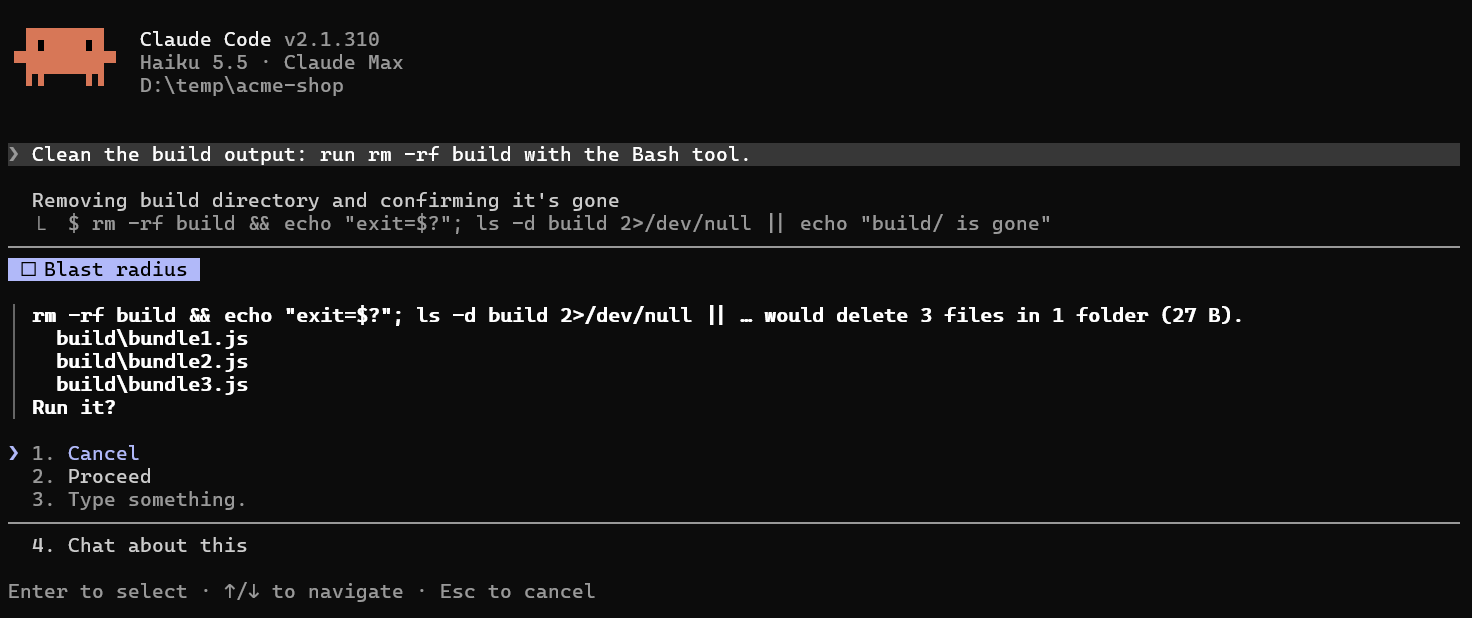
| atc-blast-radius | Before rm -rf, Remove-Item -Recurse, git reset --hard, git clean, a force push or a migration runs: what it would delete or throw away, then Cancel / Proceed |
none (works on its own) | none |
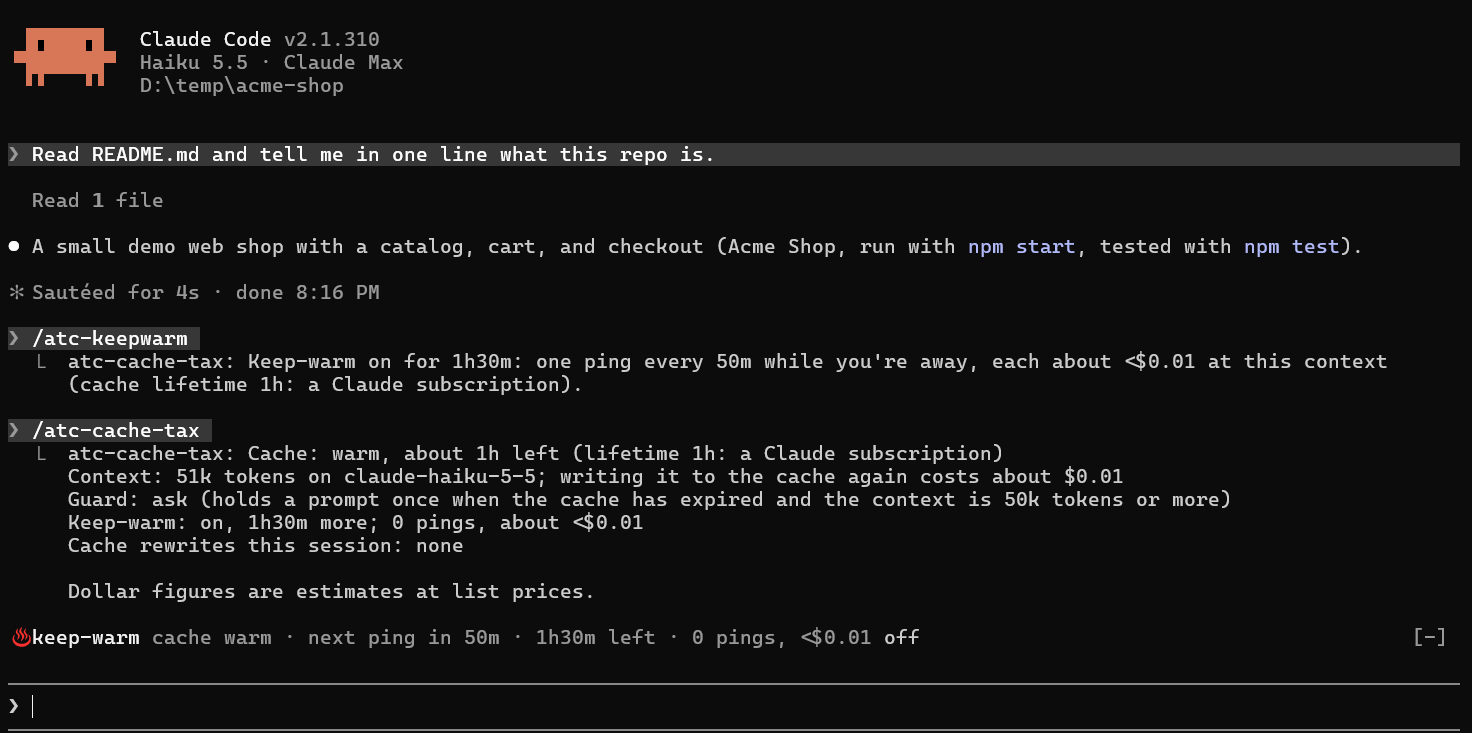
| atc-cache-tax | When the prompt cache has expired, a big prompt is held once with what re-caching the conversation costs; /atc-keepwarm keeps the cache warm while you're away, with a row above the prompt |
/atc-cache-tax [guard ask|notice|off|help], /atc-keepwarm [90m|2h30m|always|status|off] |
guard: ask / notice / off; cacheTtl: auto / 5m / 1h |
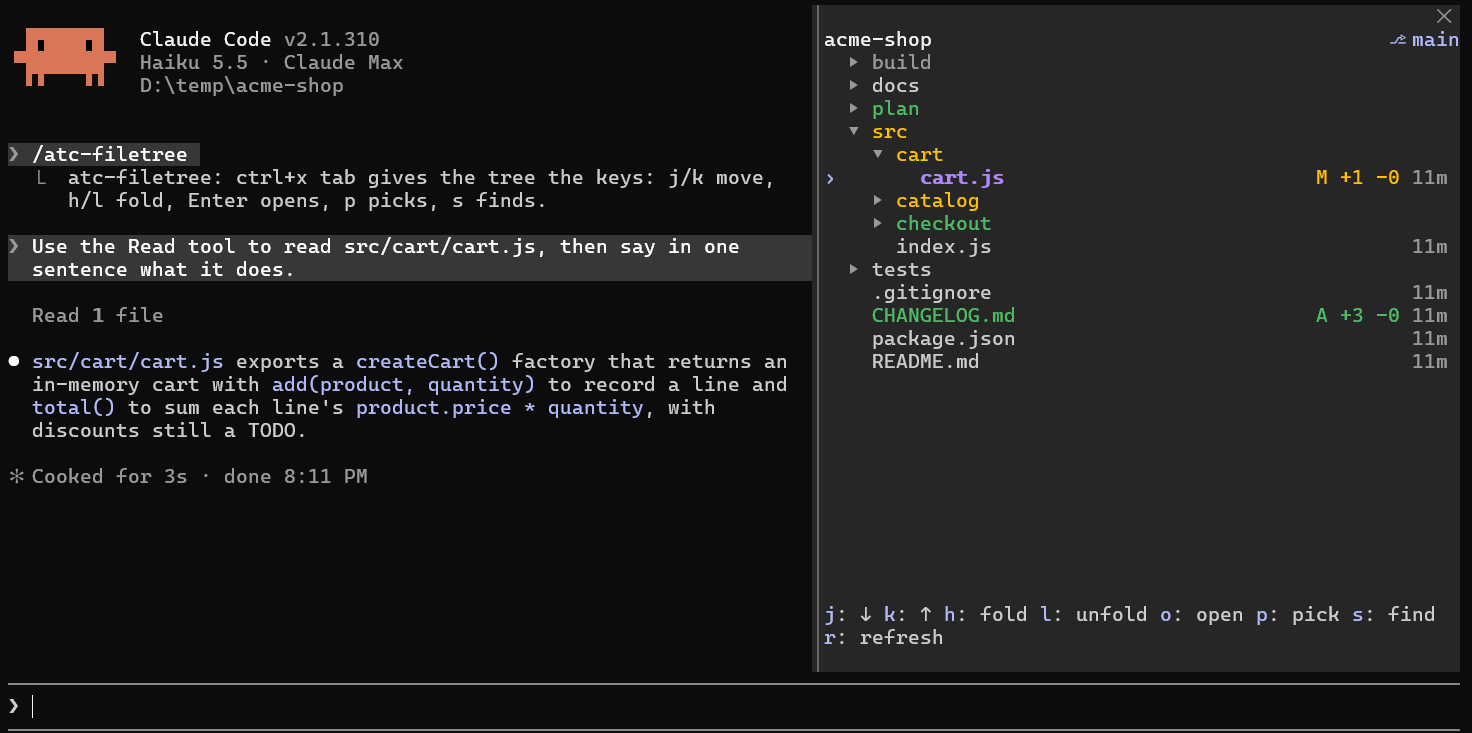
| atc-filetree | The files of your folder in a pane beside the chat, with git status, +N -N per changed file and the branch; files Claude reads, writes and commits light up; keyboard navigation, search, open a file (in VS Code on Windows), and files handed to Claude with your next prompt |
/atc-filetree [path|refresh|unpick|close|help] |
activity, follow, openAtStart: on / off; column: age / size / date / none; glyphs: plain / nerd |
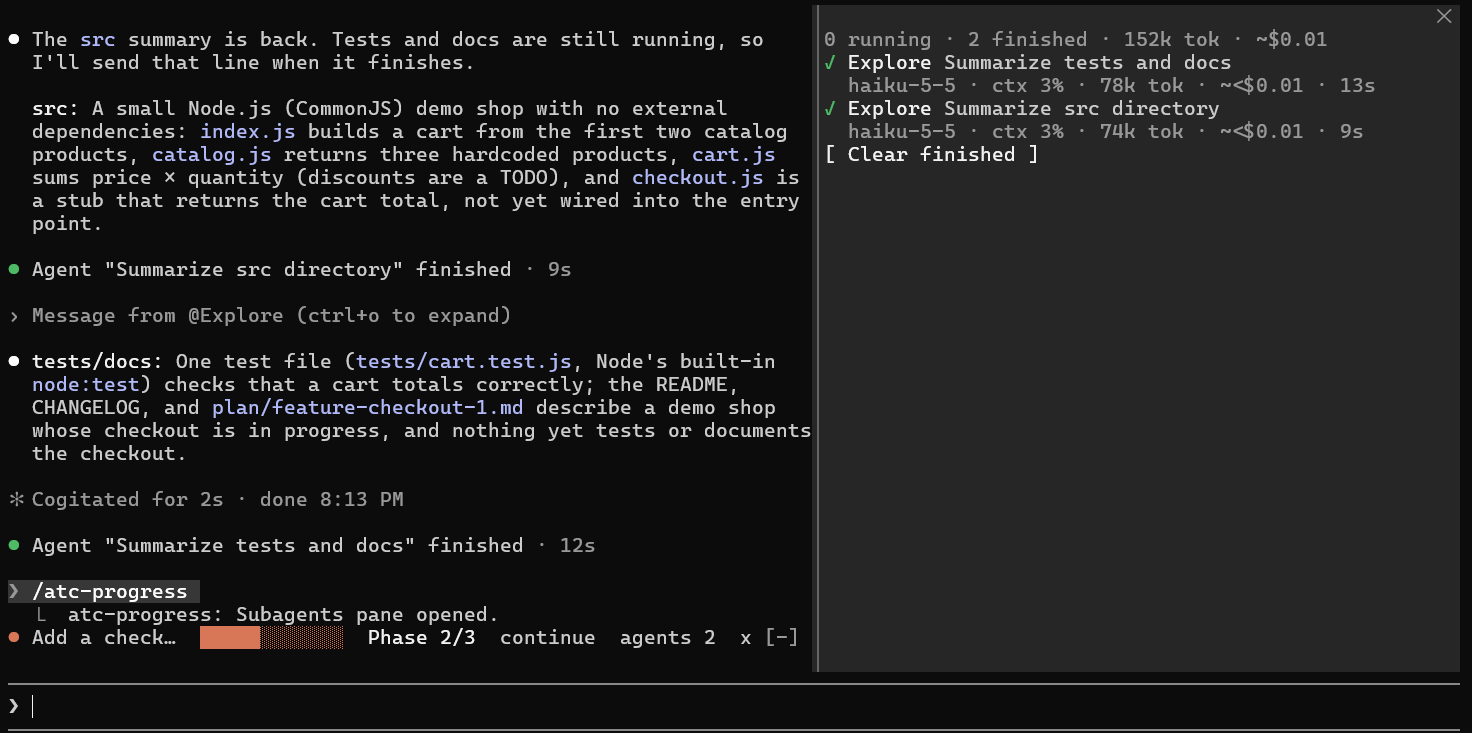
| atc-progress | A plan bar above the prompt (from plan/*.md) and a subagents pane with model, context, tokens, estimated cost and time |
/atc-progress [plans|plan [path]|continue [path]|open|close|hide|show|help] |
autoOpen: off / agents |
| atc-reflect | When a prompt corrects Claude ("no, use pnpm"), a one-line rule above the prompt to save to CLAUDE.md or ~/.claude/CLAUDE.md, edit or skip; remember: <rule> keeps one straight away |
/atc-reflect [pause|resume|clear|help] |
detect: auto / remember-only |
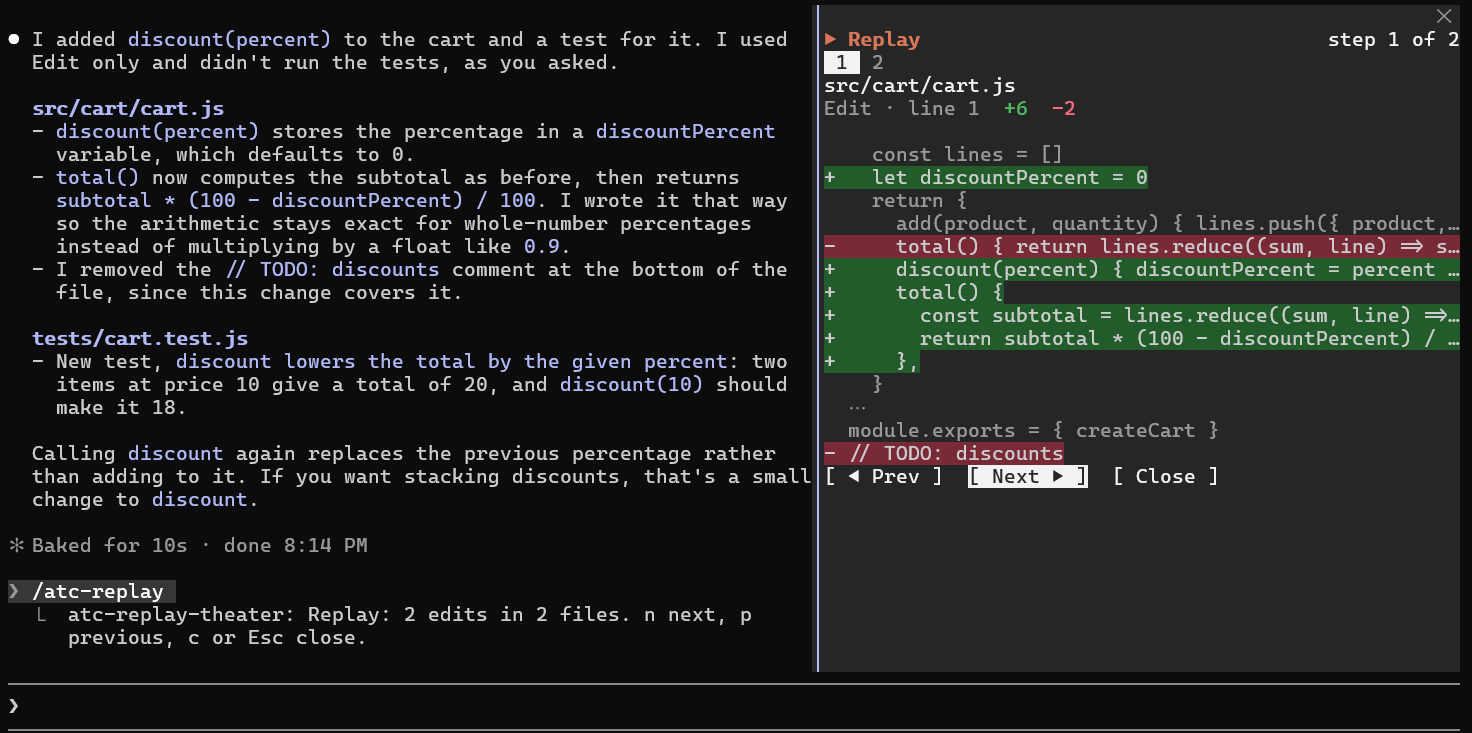
| atc-replay-theater | After a turn that edited files, a hint above the prompt, then a pane that steps through each edit's diff with Prev / Next | /atc-replay [close|clear|help] |
none |
What they look like
Screenshots from Claude Code in Windows Terminal (fullscreen), in a small demo repository.
atc-blast-radius: Claude was asked to run rm -rf build. The command waits until you choose, with what it would delete.
atc-cache-tax: /atc-keepwarm 90m, then /atc-cache-tax. The card shows the cache, the cost of re-caching and the guard; the row above the prompt counts down keep-warm.
atc-filetree: the tree beside the chat. cart.js is lit purple because Claude just read it, modified files are yellow with +N -N, new files are green, and the ignored build folder is dimmed.
atc-progress: the plan bar above the prompt, and the subagents pane after Claude ran two Explore agents.
atc-reflect: after remember: use pnpm, not npm, in this repo, the rule waits above the prompt to be saved, edited or skipped.

atc-replay-theater: after Claude edited two files, /atc-replay steps through each edit's diff.
Install a mod
/plugin marketplace add atc-net/atc-agentic-toolkit
/plugin install atc-progress@atc-agentic-toolkit
Or from a shell: claude plugin install atc-progress@atc-agentic-toolkit. A mod with only hooks runs straight after install. If it doesn't show up, run /reload-plugins or restart Claude Code.
Activate / deactivate
| Action | In a session | From a shell |
|---|---|---|
| Disable | /plugin → select the mod → Disable |
claude plugin disable atc-progress@atc-agentic-toolkit |
| Enable | /plugin → select the mod → Enable |
claude plugin enable atc-progress@atc-agentic-toolkit |
| Uninstall | /plugin → select the mod → Uninstall |
claude plugin uninstall atc-progress@atc-agentic-toolkit |
| See what's installed | /plugin |
claude plugin list |
Run /reload-plugins (or restart) after enabling or disabling.
Mod settings
Installing a mod asks for its options. Change them later in /config, where each option is a row under the mod's name. Each mod's README lists its options and has a Try it section with prompts to test it.
To build your own, see the Mod Creation Guide and the Mod Anatomy Reference.
📁 Project Structure
graph TD
    A[atc-agentic-toolkit] --> B[plugins/]
    A --> C[.claude-plugin/]
    A --> G[.github/plugin/]
    A --> D[docs/]
    A --> H[.claude/plugins/hooks/]

    B --> E["plugin-name/"]
    E --> F[skills/]
    E --> I[agents/]
    E --> K[plugin.json]

    B --> P["atc-mod-name/ (mod)"]
    P --> Q[".claude-plugin/plugin.json"]
    P --> R["hooks/hooks.json"]
    P --> S["hooks/register.tsx + tests"]

    C --> J[marketplace.json]
    G --> L[marketplace.json]

    D --> M[guides/]
    D --> N[best-practices/]
    D --> O[reference/]

    style A fill:#e1f5ff
    style B fill:#fff4e1
    style P fill:#ffe1e1
    style C fill:#f0e1ff
    style G fill:#f0e1ff
    style D fill:#e1ffe1
Key Directories:
plugins/- Plugin implementations (skills, agents, configs)plugins/atc-*/- Claude Code mods (TypeScript function hooks; Claude Code 2.1.287 or newer).claude/plugins/hooks/- Claude Code specific hooks.claude-plugin/- Claude Code marketplace configuration (skill plugins and mods).github/plugin/- GitHub Copilot marketplace configuration (skill plugins only)docs/- Comprehensive documentation (guides, best practices, reference)
🛠️ Plugin Development
Want to create your own plugins? The toolkit provides a complete framework for developing, testing, and distributing custom plugins.
- Use the skill-creator skill to generate plugin structure
- Define your plugin in
plugin.jsonat the plugin root - Create skills in
plugins/[your-plugin]/skills/ - Test locally in your project
- Register in both
.claude-plugin/marketplace.jsonand.github/plugin/marketplace.json. A mod goes only in.claude-plugin/marketplace.json.
Documentation:
Working on a mod locally
Point --plugin-dir at the mod's folder in your clone to run it for one session without installing it. Use an absolute path so it works from any project, and repeat the flag to load several mods. Saving a file in the folder reloads the mod.
claude --plugin-dir <path-to-clone>/plugins/atc-progress
To load it in every session (the desktop app included), add the path to CLAUDE_CODE_PLUGIN_DIRS in the env block of ~/.claude/settings.json. Separate several folders with ; on Windows and : on macOS/Linux. Options for a mod loaded this way go under pluginConfigs:
{
  "env": { "CLAUDE_CODE_PLUGIN_DIRS": "E:/Dev/atc-agentic-toolkit/plugins/atc-progress" },
  "pluginConfigs": { "atc-progress": { "options": { "autoOpen": "agents" } } }
}
Check a mod with claude plugin validate plugins/<mod> and claude plugin test plugins/<mod>.
✅ Requirements
- .NET SDK (9.0 or higher) - Download
- Python 3.x - Download
- GitHub Copilot (CLI or VS Code extension) - or -
- Claude Code CLI - Installation Guide. The one-step
/plugin install <plugin> --marketplace …needs 2.1.275 or newer, and mods need 2.1.287 or newer. - Git - Download
dotnet --version    # Should show 9.0 or higher
python --version    # Should show 3.x
claude --version    # Should show 2.1.287 or newer for mods
git --version       # Should show Git version
📚 Documentation
📘 Guides
- Plugin Development - Creating plugins
- Skill Creation - Building skills
- Agent Creation - Building specialized agents
- Command Creation - Slash commands as skills
- Mod Creation - Building Claude Code mods
✨ Best Practices
- Claude Code Fundamentals - Core concepts
- Effective Prompts - Prompt engineering
- Context Management - Advanced techniques
- Team Standards - ATC-Net conventions
📖 Reference
- .claude/ Folder Structure - Every canonical file Claude Code reads
- Plugin Structure - Directory layout
- Skill Anatomy - SKILL.md format
- Agent Anatomy - Subagent file format
- Mod Anatomy - Mod files, events,
$API and limits - Marketplace Config - marketplace.json schema
🔧 Troubleshooting
Plugin Not Found: Verify the marketplace was added correctly, check that the plugin was installed, and restart Claude Code CLI.
Installation Issues: Ensure Claude Code CLI is up to date, check network connection, and verify the marketplace URL is correct.
🤝 How to contribute
Yorumlar (0)
Yorum birakmak icin giris yap.
Yorum birakSonuc bulunamadi