tradingview-mcp
Health Pass
- License — License: MIT
- Description — Repository has a description
- Active repo — Last push 1 days ago
- Community trust — 490 GitHub stars
Code Pass
- Code scan — Scanned 12 files during light audit, no dangerous patterns found
Permissions Pass
- Permissions — No dangerous permissions requested
No AI report is available for this listing yet.
Advanced TradingView MCP Server for AI-powered market analysis. Real-time crypto & stock screening, technical indicators, Bollinger Band intelligence, and candlestick patterns. Works with Claude Desktop & AI assistants. Multi-exchange support (Binance, KuCoin, Bybit+). Open source trading toolkit.
📈 AI Trading Intelligence Framework — MCP Server
The most complete AI-powered trading toolkit for Claude and MCP clients.
Backtesting + Live Sentiment + Yahoo Finance + 30+ Technical Analysis Tools — all in one MCP server.






⭐ If this tool improves your workflow, please star the repo and consider sponsoring — it keeps the project alive and growing!
-Sponsor-orange?style=for-the-badge&logo=github-sponsors)
-Sponsor-blueviolet?style=for-the-badge&logo=github-sponsors)
-Sponsor-gold?style=for-the-badge&logo=github-sponsors)
🎥 Framework Demo
🏗️ Architecture
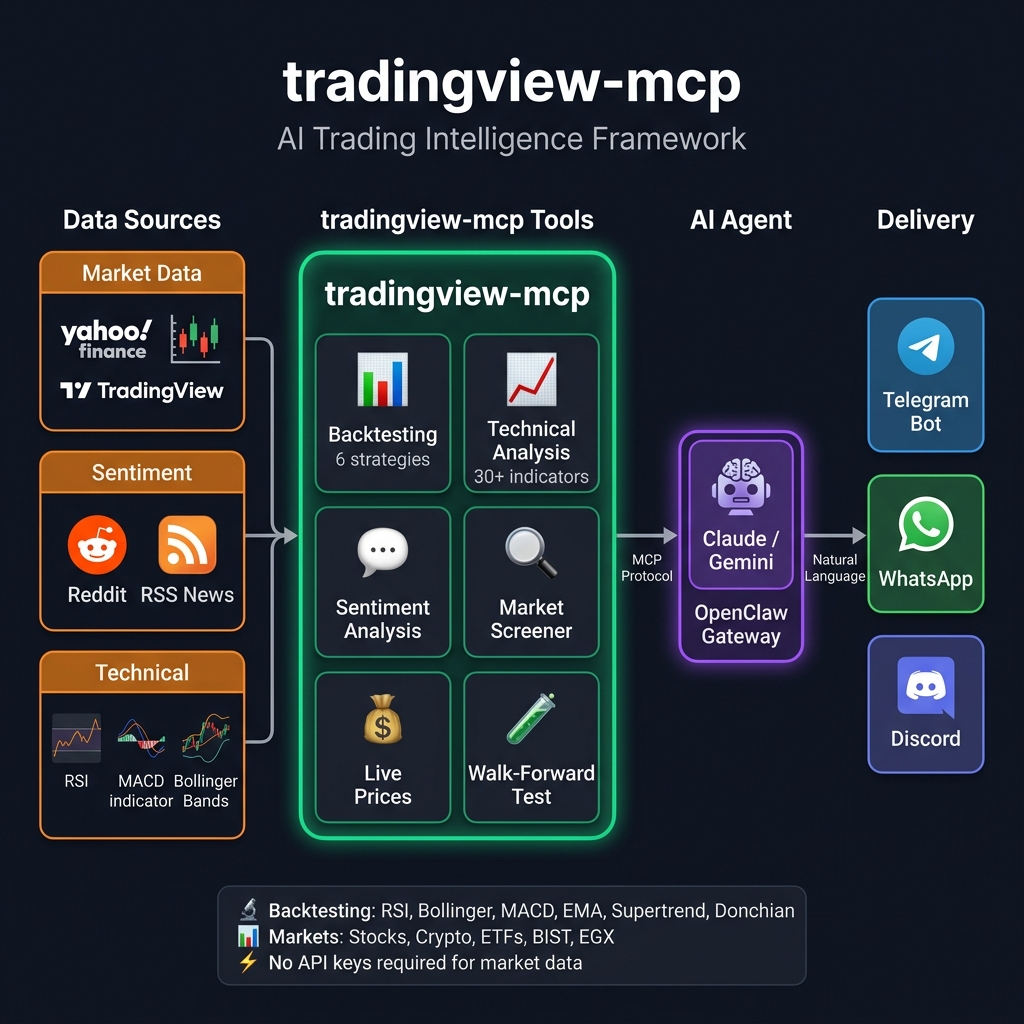
✨ Why tradingview-mcp?
| Feature | tradingview-mcp |
Traditional Setups | Bloomberg Terminal |
|---|---|---|---|
| Setup Time | 5 minutes | Hours (Docker, Conda...) | Weeks (Contracts) |
| Cost | Free & Open Source | Variable | $30k+/year |
| Backtesting | ✅ 6 strategies + Sharpe | ❌ Manual scripting | ✅ Proprietary |
| Live Sentiment | ✅ Reddit + RSS news | ❌ Separate setup | ✅ Terminal |
| Market Data | ✅ Live / Real-Time | Historical / Delayed | Live |
| API Keys | None required | Multiple (OpenAI, etc.) | N/A |
🚀 Quick Start (5 Minutes)
Install via pip
pip install tradingview-mcp-server
Claude Desktop Config (claude_desktop_config.json)
{
  "mcpServers": {
    "tradingview": {
      "command": "uvx",
      "args": ["tradingview-mcp-server"]
    }
  }
}
Or run from source
git clone https://github.com/atilaahmettaner/tradingview-mcp
cd tradingview-mcp
uv run tradingview-mcp
📱 Use via Telegram, WhatsApp & More (OpenClaw)
Connect this server to Telegram, WhatsApp, Discord and 20+ messaging platforms using OpenClaw — a self-hosted AI gateway. Tested & verified on Hetzner VPS (Ubuntu 24.04).
How It Works
OpenClaw routes Telegram messages to an AI agent. The agent uses
trading.py— a thin Python wrapper — to calltradingview-mcpfunctions and return formatted results. No MCP protocol needed between OpenClaw and the server; it's a direct Python import.
Telegram → OpenClaw agent (AI model) → trading.py (bash) → tradingview-mcp → Yahoo Finance
Quick Setup
# 1. Install UV and tradingview-mcp
curl -LsSf https://astral.sh/uv/install.sh | sh && source ~/.bashrc
uv tool install tradingview-mcp-server

# 2. Configure OpenClaw channels
cat > ~/.openclaw/openclaw.json << 'EOF'
{
  channels: {
    telegram: {
      botToken: "YOUR_BOT_TOKEN_HERE",
    },
  },
}
EOF

# 3. Configure gateway + agent
openclaw config set gateway.mode local
openclaw config set acp.defaultAgent main

# 4. Set your AI model (choose ONE option below)
openclaw configure --section model

# 5. Install the skill + tool wrapper
mkdir -p ~/.agents/skills/tradingview-mcp ~/.openclaw/tools
curl -fsSL https://raw.githubusercontent.com/atilaahmettaner/tradingview-mcp/main/openclaw/SKILL.md \
  -o ~/.agents/skills/tradingview-mcp/SKILL.md
curl -fsSL https://raw.githubusercontent.com/atilaahmettaner/tradingview-mcp/main/openclaw/trading.py \
  -o ~/.openclaw/tools/trading.py && chmod +x ~/.openclaw/tools/trading.py

# 6. Start the gateway
openclaw gateway install
systemctl --user start openclaw-gateway.service
Choose Your AI Model
OpenRouter is not required — use whichever provider you have a key for:
| Provider | Model ID for OpenClaw | Get Key |
|---|---|---|
| OpenRouter (aggregator — access to all models) | openrouter/google/gemini-3-flash-preview |
openrouter.ai/keys |
| Anthropic (Claude direct) | anthropic/claude-sonnet-4-5 |
console.anthropic.com |
| Google (Gemini direct) | google/gemini-2.5-flash |
aistudio.google.com |
| OpenAI (GPT direct) | openai/gpt-4o-mini |
platform.openai.com |
# Examples — set your chosen model:
openclaw config set agents.defaults.model "openrouter/google/gemini-3-flash-preview"  # via OpenRouter
openclaw config set agents.defaults.model "anthropic/claude-sonnet-4-5"               # Anthropic direct
openclaw config set agents.defaults.model "google/gemini-2.5-flash"                   # Google direct
⚠️ Important: Prefix must match your provider.
google/...needs a Google API key.openrouter/...needs an OpenRouter key.
⚠️ Common Mistakes
| Symptom | Cause | Fix |
|---|---|---|
Unrecognized keys: mcpServers |
mcpServers not supported in this version |
Remove from config, use bash wrapper |
No API key for provider "google" |
Used google/model but only have OpenRouter key |
Use openrouter/google/model instead |
which agent? loop |
acp.defaultAgent not set |
openclaw config set acp.defaultAgent main |
| Gateway won't start | gateway.mode missing |
openclaw config set gateway.mode local |
Test Your Bot
Once running, send your Telegram bot:
market snapshot
backtest RSI strategy for AAPL, 1 year
compare all strategies for BTC-USD
Unlike basic screeners, this framework deploys specialized AI agents that debate findings in real-time:
- 🛠️ Technical Analyst — Bollinger Bands (±3 proprietary rating), RSI, MACD
- 🌊 Sentiment & Momentum Analyst — Reddit community sentiment + price momentum
- 🛡️ Risk Manager — Volatility, drawdown risk, mean-reversion signals
Output: STRONG BUY / BUY / HOLD / SELL / STRONG SELL with confidence score
🔧 All 30+ MCP Tools
📊 Backtesting Engine (New in v0.6.0)
| Tool | Description |
|---|---|
backtest_strategy |
Backtest 1 of 6 strategies with institutional metrics (Sharpe, Calmar, Expectancy) |
compare_strategies |
Run all 6 strategies on same symbol and rank by performance |
6 Strategies to Test:
rsi— RSI oversold/overbought mean reversionbollinger— Bollinger Band mean reversionmacd— MACD golden/death crossema_cross— EMA 20/50 Golden/Death Crosssupertrend— ATR-based Supertrend trend following 🔥donchian— Donchian Channel breakout (Turtle Trader style)
Metrics you get: Win Rate, Total Return, Sharpe Ratio, Calmar Ratio, Max Drawdown, Profit Factor, Expectancy, Best/Worst Trade, vs Buy-and-Hold, with realistic commission + slippage simulation.
Example prompt: "Compare all strategies on BTC-USD for 2 years"
→ #1 Supertrend: +31.5% | Sharpe: 2.1 | WR: 62%
→ #2 Bollinger:  +18.3% | Sharpe: 3.4 | WR: 75%
→ Buy & Hold:    -5.0%
💰 Yahoo Finance — Real-Time Prices (New in v0.6.0)
| Tool | Description |
|---|---|
yahoo_price |
Real-time quote: price, change %, 52w high/low, market state |
market_snapshot |
Global overview: S&P500, NASDAQ, VIX, BTC, ETH, EUR/USD, SPY, GLD |
Supports: Stocks (AAPL, TSLA, NVDA), Crypto (BTC-USD, ETH-USD, SOL-USD), ETFs (SPY, QQQ, GLD), Indices (^GSPC, ^DJI, ^IXIC, ^VIX), FX (EURUSD=X), Turkish (THYAO.IS, SASA.IS)
🧠 AI Sentiment & Intelligence (New in v0.5.0)
| Tool | Description |
|---|---|
market_sentiment |
Reddit sentiment across finance communities (bullish/bearish score, top posts) |
financial_news |
Live RSS headlines from Reuters, CoinDesk, CoinTelegraph |
combined_analysis |
Power Tool: TradingView technicals + Reddit sentiment + live news → confluence decision |
📈 Technical Analysis Core
| Tool | Description |
|---|---|
get_technical_analysis |
Full TA: RSI, MACD, Bollinger, 23 indicators with BUY/SELL/HOLD |
get_multiple_analysis |
Bulk TA for multiple symbols at once |
get_bollinger_band_analysis |
Proprietary ±3 BB rating system |
get_stock_decision |
3-layer decision engine (ranking + trade setup + quality score) |
screen_stocks |
Multi-exchange screener with 20+ filter criteria |
scan_by_signal |
Scan by signal type (oversold, trending, breakout...) |
get_candlestick_patterns |
15 candlestick pattern detector |
get_multi_timeframe_analysis |
Weekly→Daily→4H→1H→15m alignment analysis |
🌍 Multi-Exchange Support
| Exchange | Tools |
|---|---|
| Binance | Crypto screener, all pairs |
| KuCoin / Bybit+ | Crypto screener |
| NASDAQ / NYSE | US stocks (AAPL, TSLA, NVDA...) |
| EGX (Egypt) | egx_market_overview, egx_stock_screener, egx_trade_plan, egx_fibonacci_retracement |
| Turkish (BIST) | Via TradingView screener |
💬 Example AI Conversations
You: "Give me a full market snapshot right now"
AI: [market_snapshot] → S&P500 -3.4%, BTC +0.1%, VIX 31 (+13%), EUR/USD 1.15

You: "What is Reddit saying about NVDA?"
AI: [market_sentiment] → Strongly Bullish (0.41) | 23 posts | 18 bullish

You: "Backtest RSI strategy on BTC-USD for 2 years"
AI: [backtest_strategy] → +31.5% return | 100% win rate | 2 trades | B&H: -5%

You: "Which strategy worked best on AAPL in the last 2 years?"
AI: [compare_strategies] → Supertrend #1 (+14.6%, Sharpe 3.09), MACD last (-9.1%)

You: "Analyze TSLA with all signals: technical + sentiment + news"
AI: [combined_analysis] → BUY (Technical STRONG BUY + Bullish Reddit + Positive news)
💖 Support the Project
This framework is free and open source, built in spare time. If it saves you hours of research or helps you make better decisions, please consider sponsoring:
| Tier | Monthly | What You Get |
|---|---|---|
| ☕ Coffee | $5 | Heartfelt gratitude + name in README |
| 🚀 Supporter | $15 | Above + priority bug fixes |
| 💎 Pro | $30 | Above + priority feature requests |

Every sponsor directly funds new features like Walk-Forward Backtesting, Twitter/X sentiment, and managed cloud hosting.
📋 Roadmap
- TradingView technical analysis (30+ indicators)
- Multi-exchange screener (Binance, KuCoin, EGX, US stocks)
- Reddit sentiment analysis
- Live financial news (RSS)
- Yahoo Finance real-time prices
- Backtesting engine (6 strategies + Sharpe/Calmar/Expectancy)
- Walk-forward backtesting (overfitting detection)
- Twitter/X market sentiment
- Paper trading simulation
- Managed cloud hosting (no local setup)
📄 License
MIT License — see LICENSE for details.
Disclaimer: This tool is for educational and research purposes only. It does not constitute financial advice. Always do your own research before making investment decisions.
Reviews (0)
Sign in to leave a review.
Leave a reviewNo results found