overwatchr
Health Pass
- License — License: MIT
- Description — Repository has a description
- Active repo — Last push 0 days ago
- Community trust — 11 GitHub stars
Code Fail
- rm -rf — Recursive force deletion command in install.sh
- rm -rf — Recursive force deletion command in scripts/build_app_bundle.sh
- rm -rf — Recursive force deletion command in scripts/deploy_site.sh
Permissions Pass
- Permissions — No dangerous permissions requested
No AI report is available for this listing yet.
Native macOS menu bar attention layer for terminal AI agents.
overwatchr


overwatchr is a native macOS menu bar utility for terminal-based AI agents. It watches for turns that need a human, keeps a queue in the menu bar, and jumps you back to the right terminal tab before your attention gets shredded.
It is built with Swift, SwiftUI, and native macOS APIs only. No Electron. No tmux dependency. No Hammerspoon.
Positioning Snapshot
- Core promise: never miss agent handoffs and recover focus instantly to the right terminal tab.
- Primary users: solo builders and small engineering teams running multiple local terminal agents.
- Secondary users: devrel and AI-heavy product teams that demo or operate parallel agent workflows.
Screenshots
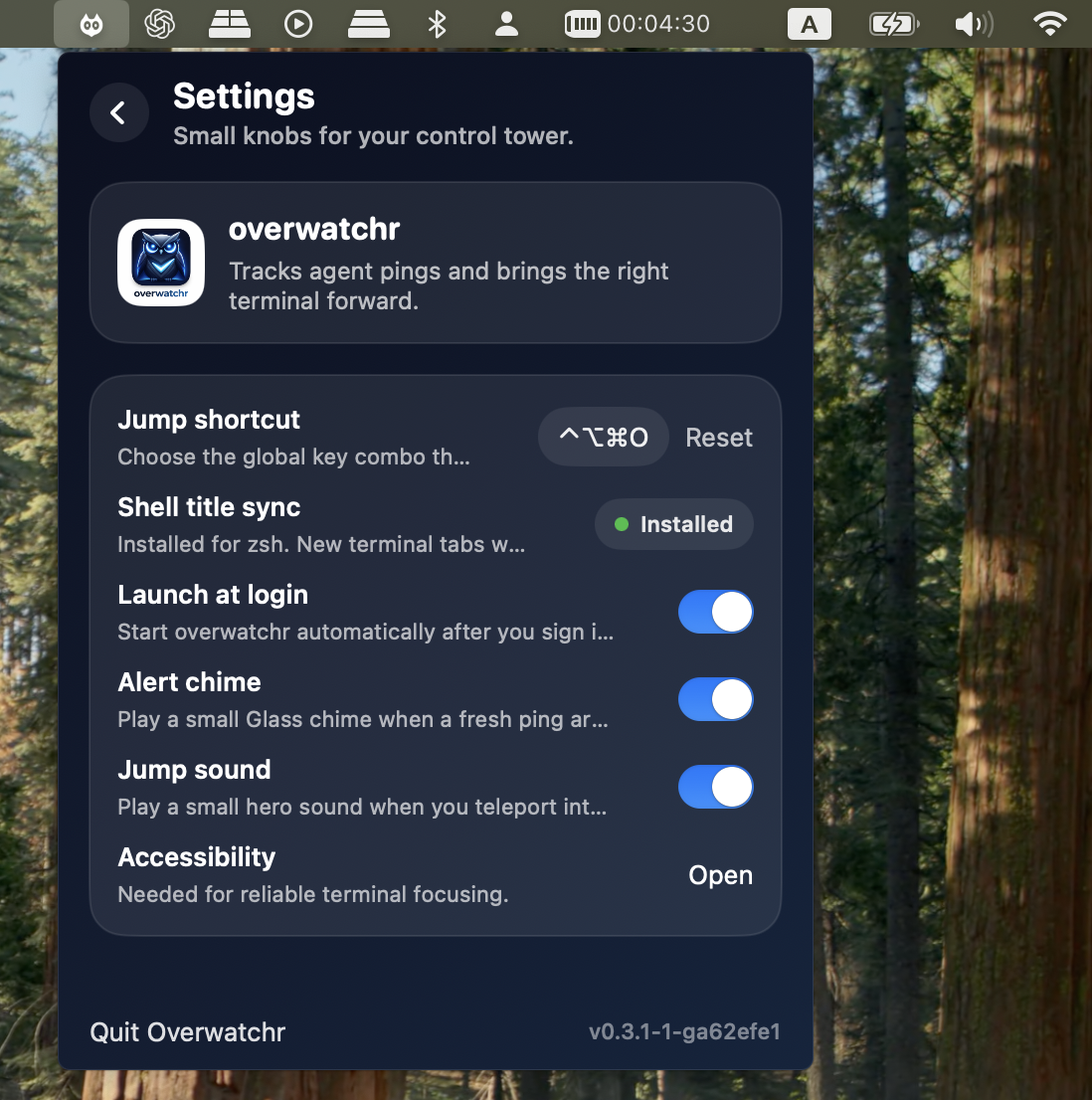
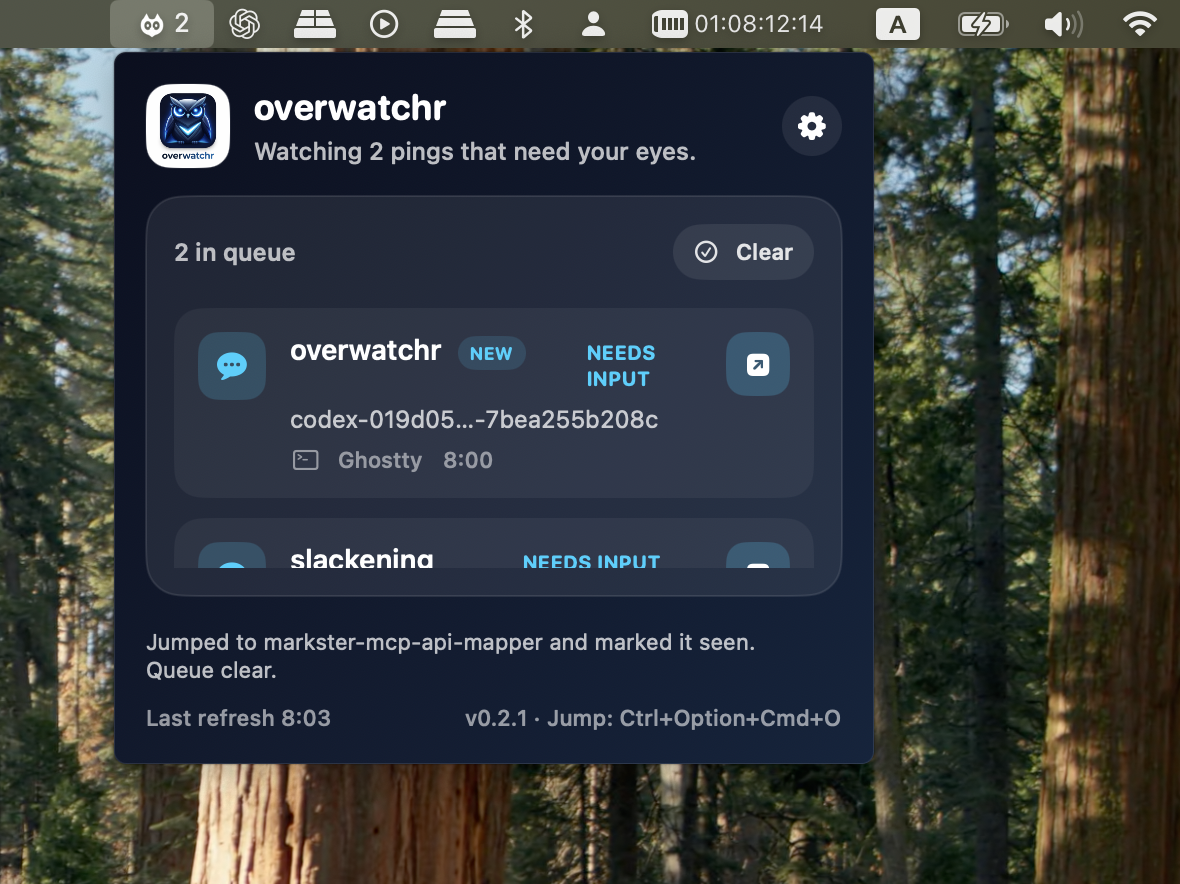
Why it exists
When Codex, Claude Code, OpenCode, or other terminal agents are running in parallel, the hard part is not starting them. It is noticing the exact moment one of them needs you, then getting back to the correct tab fast.
overwatchr gives you:
- a menu bar queue of live agent pings
- a global jump shortcut you can change in settings
- a hold-to-talk voice shortcut for dictating into the focused app with Azure Speech
- native terminal focusing for Ghostty, iTerm, and Terminal.app
- local
seenbehavior so opened alerts drop out until the next new event - hook installers for Codex CLI, Claude Code, and OpenCode
Install
One-line install:
curl -fsSL https://raw.githubusercontent.com/atiti/overwatchr/main/install.sh | bash
One-line install plus user-wide hook setup:
curl -fsSL https://raw.githubusercontent.com/atiti/overwatchr/main/install.sh | INSTALL_HOOKS=1 bash
By default, the installer:
- puts the CLI in
/usr/local/binif writable, otherwise~/.local/bin - installs
Overwatchr.appinto/Applicationsif writable, otherwise~/Applications - leaves hook config untouched unless you opt into
INSTALL_HOOKS=1
From a local checkout:
./install.sh
If you only want the CLI:
INSTALL_APP=0 ./install.sh
If you want release artifacts without installing:
scripts/build_app_bundle.sh
Quick Start
- Install the app and launch
Overwatchr.app. - Grant Accessibility access so terminal focusing works reliably.
- Install hooks for the tools you use:
overwatchr hooks install all --scope user
overwatchr shell install --shell zsh
That sets up:
- Codex CLI via
~/.codex/config.tomland~/.codex/hooks.json - Claude Code via
~/.claude/settings.json - OpenCode via
~/.config/opencode/plugins/overwatchr.js - interactive shell title syncing via
~/.config/overwatchr/shell.zsh
Voice Input
Overwatchr can dictate into the currently focused app. In settings, save an Azure Speech key, set the Speech resource region such as eastus, and optionally adjust the locale list. Then hold the voice shortcut, speak, and release to insert the transcription.
Defaults:
- Voice shortcut:
⌃⌥⌘Space - Provider: Azure Speech Services short-audio recognition
- Locales:
en-USby default, or comma-separated candidates such asen-US,hu-HUfor automatic best-result selection - Submit phrase mode: strips terminal phrases such as
press enterand sends Return
The Azure Speech key is stored in Keychain. For development runs launched from a shell, these environment variables are also recognized:
AZURE_SPEECH_KEY=...
AZURE_SPEECH_REGION=eastus
AZURE_SPEECH_ENDPOINT=https://your-resource.cognitiveservices.azure.com
Voice input requires Microphone permission to capture audio and Accessibility permission to paste text and send Return.
Project-local setup also works:
overwatchr hooks install all --scope project
First 10 Minutes
Use this loop to validate that setup is complete and jump-back behavior works end to end.
- Install and launch:
curl -fsSL https://raw.githubusercontent.com/atiti/overwatchr/main/install.sh | bash
- In macOS Settings, allow Accessibility for
Overwatchr.app. - Install hooks and shell sync:
overwatchr hooks install all --scope user
overwatchr shell install --shell zsh
- Trigger deterministic test alerts:
overwatchr alert --agent onboarding-smoke --project first-run --terminal ghostty --title "onboarding smoke"
overwatchr error --agent onboarding-smoke --project first-run --terminal ghostty --title "error path smoke"
- Confirm success criteria:
- the menu bar queue count increases after the test events
- selecting an alert (or pressing your global shortcut) jumps to the expected terminal tab
- focused alerts disappear from queue as
seen
If activation fails
- Accessibility denied: reopen macOS Settings -> Privacy & Security -> Accessibility, enable
Overwatchr.app, then relaunch app. - Hooks missing/stale: rerun
overwatchr hooks install all --scope userand verify your hook files in~/.codex,~/.claude, or~/.config/opencode. - Shell title sync missing: run
overwatchr shell install --shell zsh, restart shell, then retry test alert. - Unsupported terminal: use Ghostty, iTerm, or Terminal.app; other terminals may emit events but cannot be focused reliably.
Manual CLI Usage
You can also write events directly:
overwatchr alert --agent copy --project landing --terminal ghostty --title "landing:copy"
overwatchr error --agent api --project backend --terminal iTerm2 --title "backend:api"
overwatchr done --agent copy --project landing
Events are appended to ~/.overwatchr/events.jsonl.
Queue behavior:
alertanderrorcreate or refresh an active alert for that agent- if the stopping session is already frontmost, overwatchr records the event but auto-marks it seen so you do not get a redundant queue item
- opening an alert marks it
seenlocally, so it disappears until a newer event arrives doneclears it from the active stream- optional alert chime lives in the menu bar settings pane
Maintenance commands:
overwatchr events stats
overwatchr events compact
overwatchr events prune --older-than 30d
compact keeps the latest event per agent and writes a timestamped backup. prune drops older history while preserving the latest known event for every agent.
Hook Bridge
overwatchr includes a native bridge for hook-enabled tools:
overwatchr hook-run codex
overwatchr hook-run claude
overwatchr hook-run opencode
You usually do not call these by hand. The generated hook configs call them for you.
Supported Terminals
- Ghostty
- iTerm
- Terminal.app
Overwatchr now prefers exact tty session matching for iTerm and Terminal.app when the hook process can see a controlling terminal, then falls back to title matching. Ghostty still uses Accessibility window matching plus the Window menu fallback because its scripting surface is more limited.
For Ghostty and other terminals that honor standard OSC title sequences, install the shell integration too:
overwatchr shell install --shell zsh
That keeps OVERWATCHR_TITLE and the terminal tab title aligned to the current project directory, and appends a short terminal suffix like ttys099 when available so same-project tabs stay distinguishable.
Development
swift build
swift test
swift run overwatchr-app
scripts/build_app_bundle.sh
The repository layout is:
App/: menu bar appCLI/:overwatchrexecutableCore/: shared queue, store, focus, hook, and installer logicscripts/: build and smoke helpersTests/OverwatchrCoreTests/: unit tests
Release Flow
- CI builds and tests on macOS via
.github/workflows/ci.yml - Tagged releases package the CLI and app via
.github/workflows/release.yml - release tags should use
v*, for examplev0.1.0 - tagged GitHub releases require Developer ID signing and notarization secrets; the workflow fails rather than publishing a Gatekeeper-blocked app
- required release secrets are
MACOS_CODESIGN_IDENTITY,MACOS_CERTIFICATE_P12_BASE64,MACOS_CERTIFICATE_PASSWORD,APPLE_ID,APPLE_TEAM_ID, andAPPLE_APP_SPECIFIC_PASSWORD - local signed builds use
CODESIGN_IDENTITY; notarization can use eitherNOTARY_KEYCHAIN_PROFILEor direct Apple ID credentials
Local signed release example:
CODESIGN_IDENTITY="Developer ID Application: Example, Inc. (TEAMID1234)" \
APPLE_ID="[email protected]" \
APPLE_TEAM_ID="TEAMID1234" \
APPLE_APP_SPECIFIC_PASSWORD="xxxx-xxxx-xxxx-xxxx" \
VERSION=0.2.1 \
scripts/build_app_bundle.sh
Roadmap
- more hook targets
- better terminal title inference
- optional richer notifications beyond the menu bar
Contributing
Bug reports, hook integrations, terminal support fixes, and installer hardening are all welcome. See CONTRIBUTING.md.
Reviews (0)
Sign in to leave a review.
Leave a reviewNo results found