Tego
Health Uyari
- License — License: Apache-2.0
- Description — Repository has a description
- Active repo — Last push 0 days ago
- Low visibility — Only 5 GitHub stars
Code Basarisiz
- exec() — Shell command execution in .github/workflows/ci.yml
- rm -rf — Recursive force deletion command in .github/workflows/ci.yml
Permissions Gecti
- Permissions — No dangerous permissions requested
Bu listing icin henuz AI raporu yok.
Run AI coding agents under rules you write. Linux enforces the files, programs and hosts an agent may use, and every run leaves a hash-chained record.

Run AI coding agents under rules you write, enforced from outside the agent.




Quickstart · How it works · Docs · Known limits · Contributing · Security
Tego runs an AI coding agent under rules you write. The Linux kernel and Tego's supervisor, a process outside the
agent, enforce them.
It refuses what the contract rules out (files, programs, network hosts), can pause a file open or a connection until
you answer, and keeps a hash-chained record of each run. What that record holds depends on the tier: by default, tier 1
records programs, writes and connections, and no file reads.
The agent is an ordinary process: Tego does not need to know what it is, and it never calls a model itself.
Why it exists. A coding agent runs as you, next to your keys and your network, and a mistake or a prompt
injection can reach all of them. Rules that live inside the agent hold only while the agent follows them, so Tego keeps
them outside it, and a prompt-injected or mistaken agent cannot talk its way past them.
[!IMPORTANT]
Tego limits only what the contract names, and each tier has limits of its own. Read
Known limits and docs/GAPS.md before you rely on it.
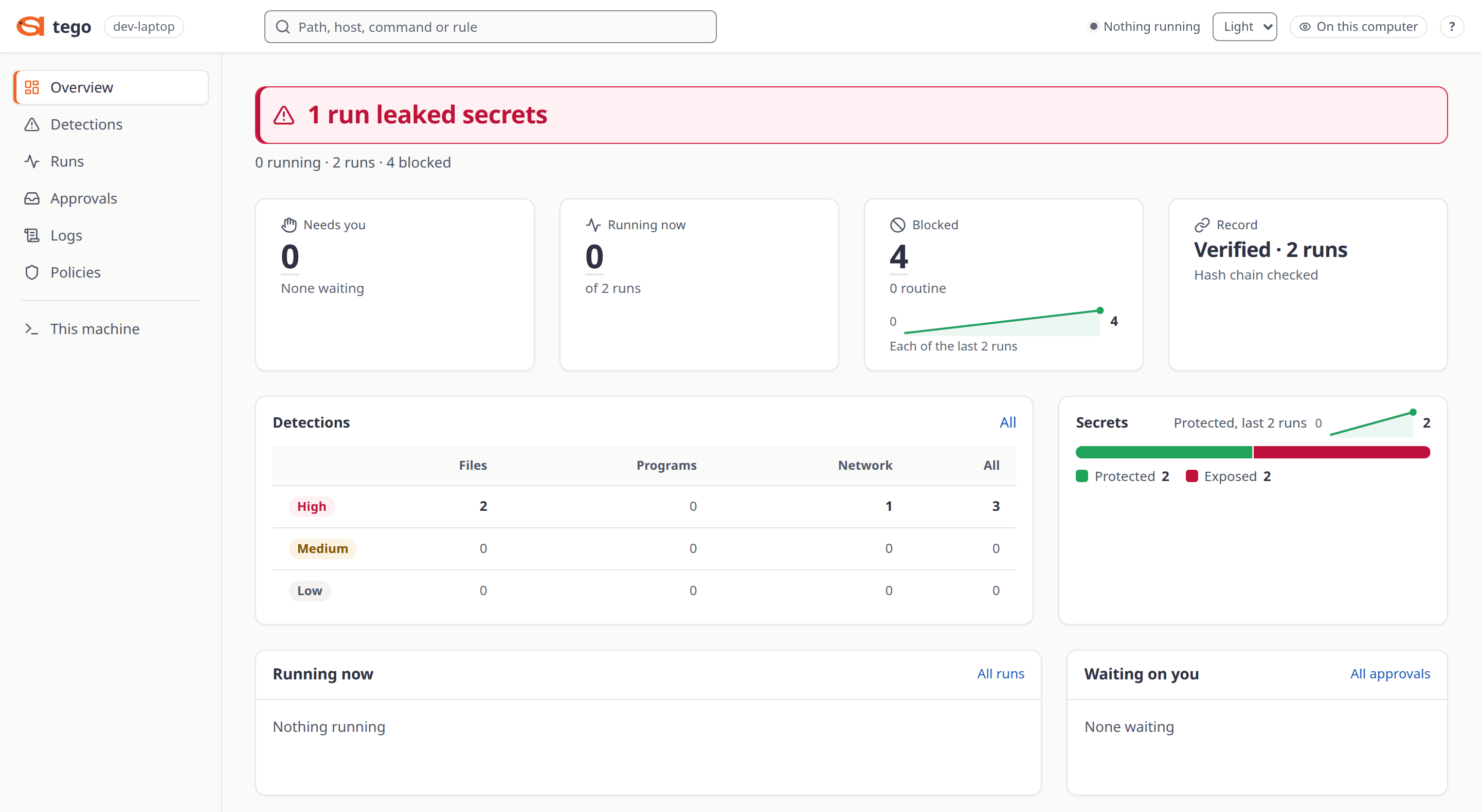
The dashboard after the supply-chain demo's backup step, which runs the project's tests with no agent and fake secrets: one run only watched, one run protected.
Features
This repository holds the engine, the tego command, the three enforcement tiers, a dashboard for one person on
their own machine, and the kernel programs.
| Feature | What you get |
|---|---|
 Contracts |
An unmodified agent process runs under a per-agent contract, a YAML file. tego init starts one from presets, tego compile prints its rule table, and tego learn proposes one from a finished run. |
 Enforcement outside the agent |
At every tier the kernel refuses writes and programs outside the contract. Hosts are decided by Tego's supervisor at tier 1 and by the kernel at tiers 2 and 3. |
 Held actions |
An ask rule on a file or a connection holds it until you allow or deny it, with tego approve, tego deny or the dashboard. Held file reads (fs.ask_read) are tier 1 only, and exec.ask is reserved: it refuses. |
 Live control |
tego pause, resume, stop and block act on a running run. An Adjustable run (tiers 2 and 3, which need root) can also be loosened while it runs. |
 Hash-chained record |
Every run writes one. tego receipt and tego events read it, tego events <run> --verify checks its chain, tego drift compares what was allowed with what was used, and the dashboard shows it. |
 Run limits |
A run that passes its limits (tokens, cost, time, stall, repeats) ends with exit code 124. |
 Watch any agent |
tego watch runs any command as a black box and records it. tego agents lists the agents running here, and tego adopt, which needs root, governs one already running. |
 Local dashboard |
tego serve --open serves runs, logs, refusals and held requests on 127.0.0.1, for one person. |
 MCP tool rules |
A relay can allow, hold or deny single tools of an MCP server, and tego mcp changes that live (guide). |
 Nothing sent home |
No telemetry, no update check, no crash reports. Tego's only traffic is DNS lookups and the connections a contract asks it to make for the agent (the full list). |
examples/agents/ has contracts for Claude Code, OpenAI Codex, the Claude Agent SDK, the
Anthropic Python SDK and an agent of your own.
Quickstart
Install from source
You need Linux, git, make and Go 1.27.
git clone https://github.com/Attention-Span-AI/Tego
cd Tego
make build
mkdir -p ~/.local/bin
install -m 0755 bin/tego bin/tego-control ~/.local/bin/
export PATH="$HOME/.local/bin:$PATH"
Keep tego and tego-control in the same directory: tego serve hands off to the tego-control beside it and
refuses any other. Add the export to your shell's profile if your login does not already put ~/.local/bin onPATH. There is no tagged release yet, so source is the way to install. docs/INSTALL.md has the
details.
First run
Run these in a plain terminal, as yourself. Over SSH, first start a shell in your user's cgroup withsystemd-run --user --scope bash (docs/INSTALL.md).
tego version
tego doctor
tego test
mkdir demo && cd demo
tego init --preset no-secrets,repo-only-writes --write ./out
tego compile agent.yaml
tego run agent.yaml
tego receipt --last
tego test runs four harmless actions against decoy files and shows Tego refusing each one; it needs no root. On a
fresh Ubuntu 24.04 it prints:
Tego self-check: 4 actions, 4 refused at tier landlock

  ACTION                                               WITHOUT TEGO  UNDER TEGO  REFUSAL
  read a fake SSH key in a fake home                   succeeded     refused     read-denied: fs.deny_read[<tmp>/work/home/.ssh/]
  write a file outside the project's writable folder   succeeded     refused     write-outside-contract: no entry of the contract allows it
  run a program the contract does not list             succeeded     refused     exec-not-allowed: no entry of the contract allows it
  connect to a local port the contract does not allow  succeeded     refused     net-not-allowed: no entry of the contract allows it

Each action works on this machine without Tego, and Tego refused and recorded every one.
The actions ran on decoys in a temporary folder, removed now, and the four runs' records went there too.
The rest writes a small contract, shows its rule table, runs a demo command under it and prints what its record holds.
docs/QUICKSTART.md walks through each step and explains the output.
Run a real agent
Copy claude-code-interactive.yaml, codex.yaml or codex-chatgpt.yaml from
examples/agents/ and change the paths it marks CHANGE. With claude or codex on PATH,
this starts the agent under the contract with no login and no prompt, the quickest check that a copy works on your
machine (for a Codex contract, use codex --version):
tego run <contract> -- claude --version
How it works
flowchart LR
    contract["agent.yaml<br/>your contract"] -->|compiled to rule tables| supervisor
    supervisor["Tego supervisor<br/>a process outside the agent"] -->|starts it under the rules| agent["AI agent<br/>an unmodified process"]
    agent -->|system calls| kernel["Linux kernel<br/>Landlock, seccomp, BPF"]
    kernel -->|refuses writes and programs<br/>outside the contract| agent
    kernel <-->|tier 1: the supervisor decides hosts| supervisor
    supervisor -->|appends each event| ledger[("Hash-chained<br/>record")]
    ledger -->|reads| dashboard["Dashboard<br/>on 127.0.0.1"]
    dashboard -->|allow, deny, block, stop| supervisor

    style supervisor stroke:#F26327,stroke-width:3px
    style kernel stroke:#F26327,stroke-width:3px
tego runvalidates the contract and compiles it to rule tables for the tier your machine allows.- The supervisor starts the command inside its own cgroup, under those rules. A
claudecommand started without root
gets--settingswith a per-run file, so that refusals reach the agent through a hook, and--mcp-configwhen the
contract relays MCP servers;harness: noneturns both off. Everything the agent forks or executes stays in the run. - What the contract rules out fails with an ordinary system call error. The agent is not asked to cooperate. At tier 1
Tego's supervisor decides hosts, and at tiers 2 and 3 the kernel does. - Each event goes into the run's hash-chained record, which
tego receipt,tego eventsand the dashboard read.
docs/ARCHITECTURE.md has the full design.
Protection levels
| Tier | Needs | Gives |
|---|---|---|
1, landlock |
Landlock ABI 2 or newer (Linux 5.19 or later, or RHEL 9's 5.14; tested from 6.1 and on RHEL 9), cgroup v2 with a subtree delegated to your user, no root | Landlock and a seccomp supervisor: file, program and network rules, held requests, a record of exec, write and connect, not of reads |
2, cgroup |
root (sudo), Landlock ABI 2 or newer, cgroup v2, BTF |
cgroup-attached BPF and fanotify: the kernel records reads too |
3, bpflsm |
root, and bpf in the kernel's boot LSM list |
Tier 2, with the decision plane running as BPF LSM hooks |
All three tiers are in the binary that make build produces. tego doctor says which tier your machine gets, and each
run records the tier it had. Details, including the one boot line Ubuntu needs for tier 3, are in
docs/TIERS.md.
Dashboard
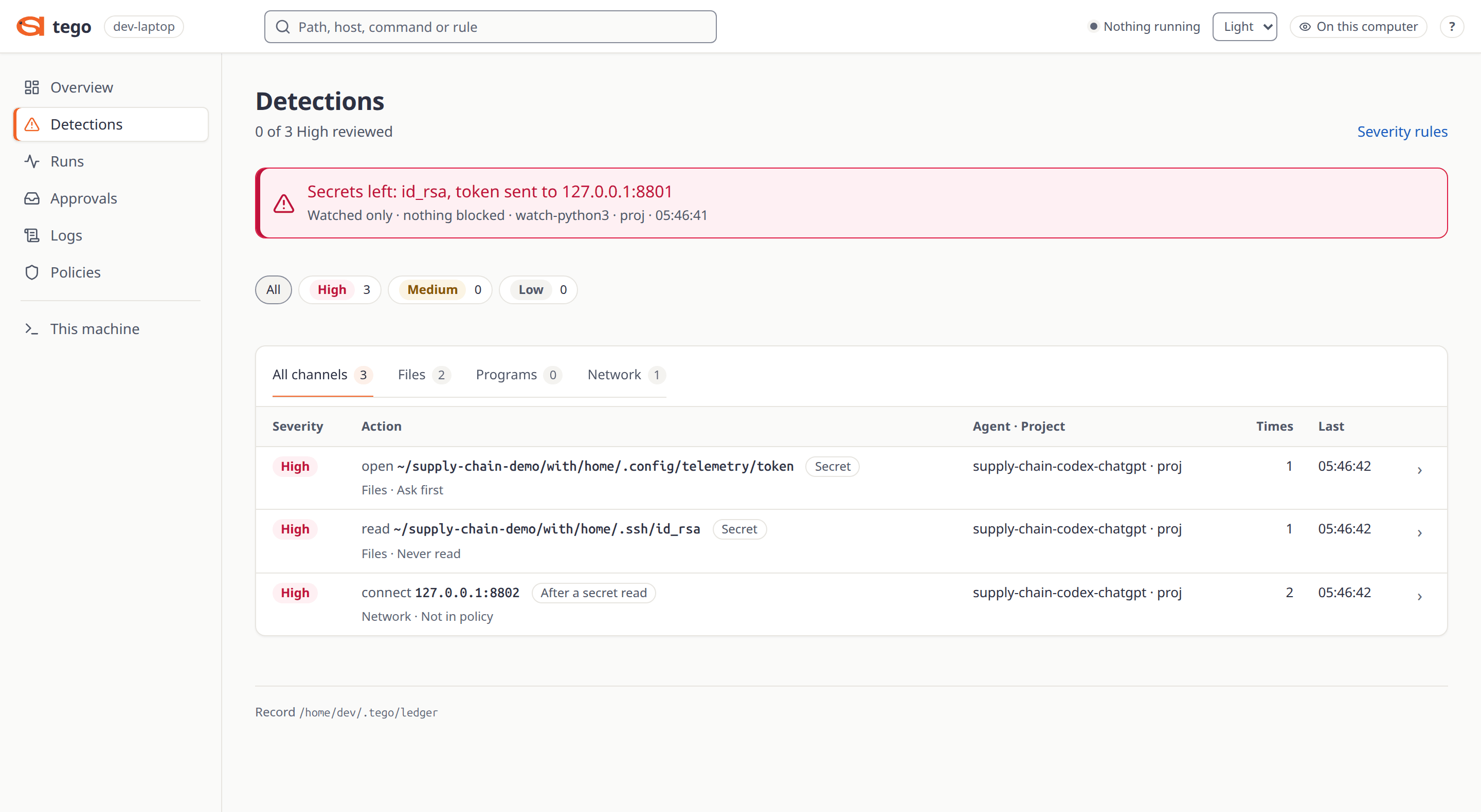
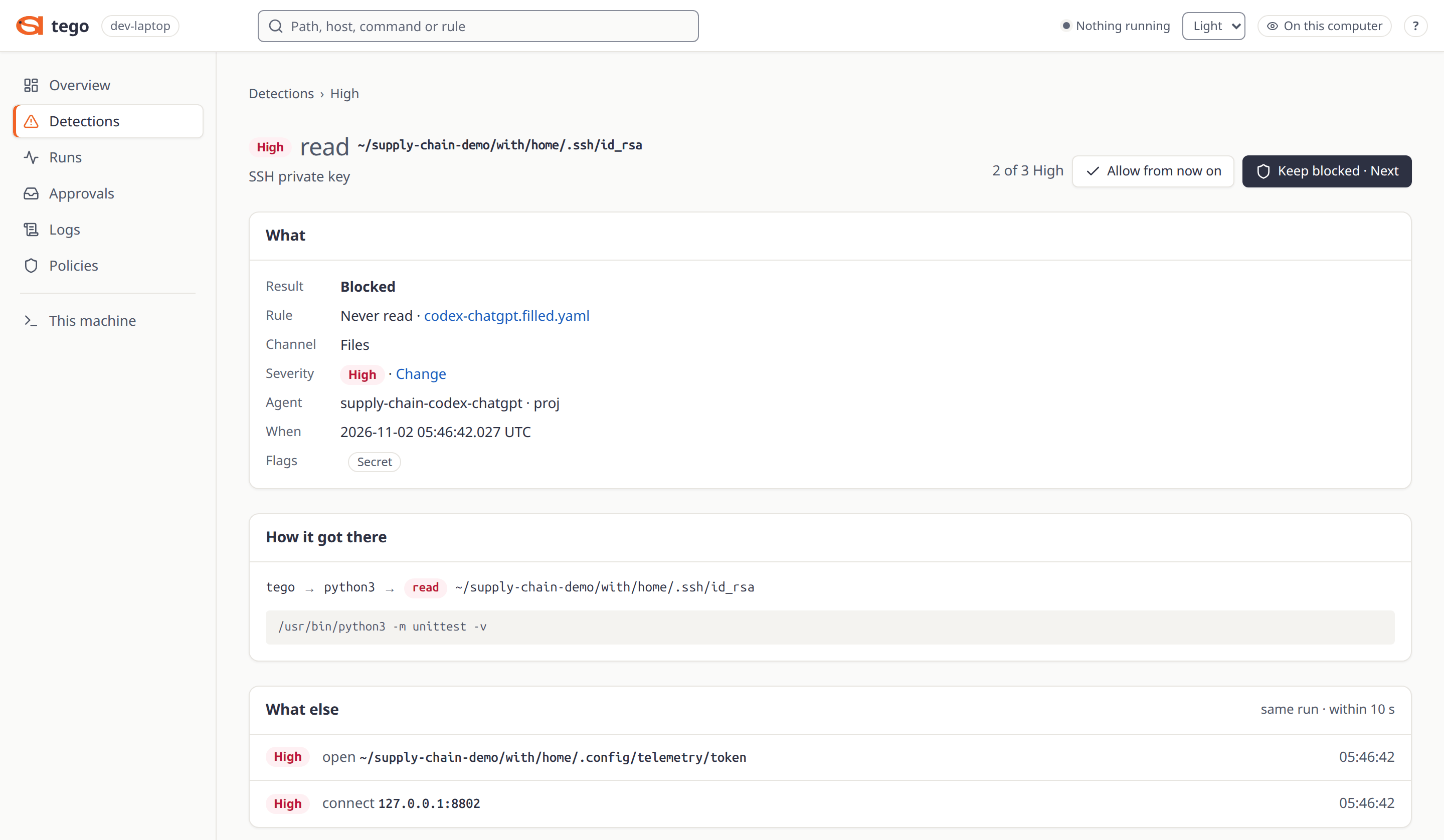
tego serve --open starts a dashboard on 127.0.0.1 for one person: runs, logs, refusals, held requests you can allow or
deny, each run's rules, and a way to stop a run or block something while it runs. A run started with sudo is root's
until it ends, so the dashboard shows it only then; until then use sudo "$(command -v tego)" status.--preview also lists the pages for MCP tool rules and model routes. See docs/DASHBOARD.md.
 |
 |
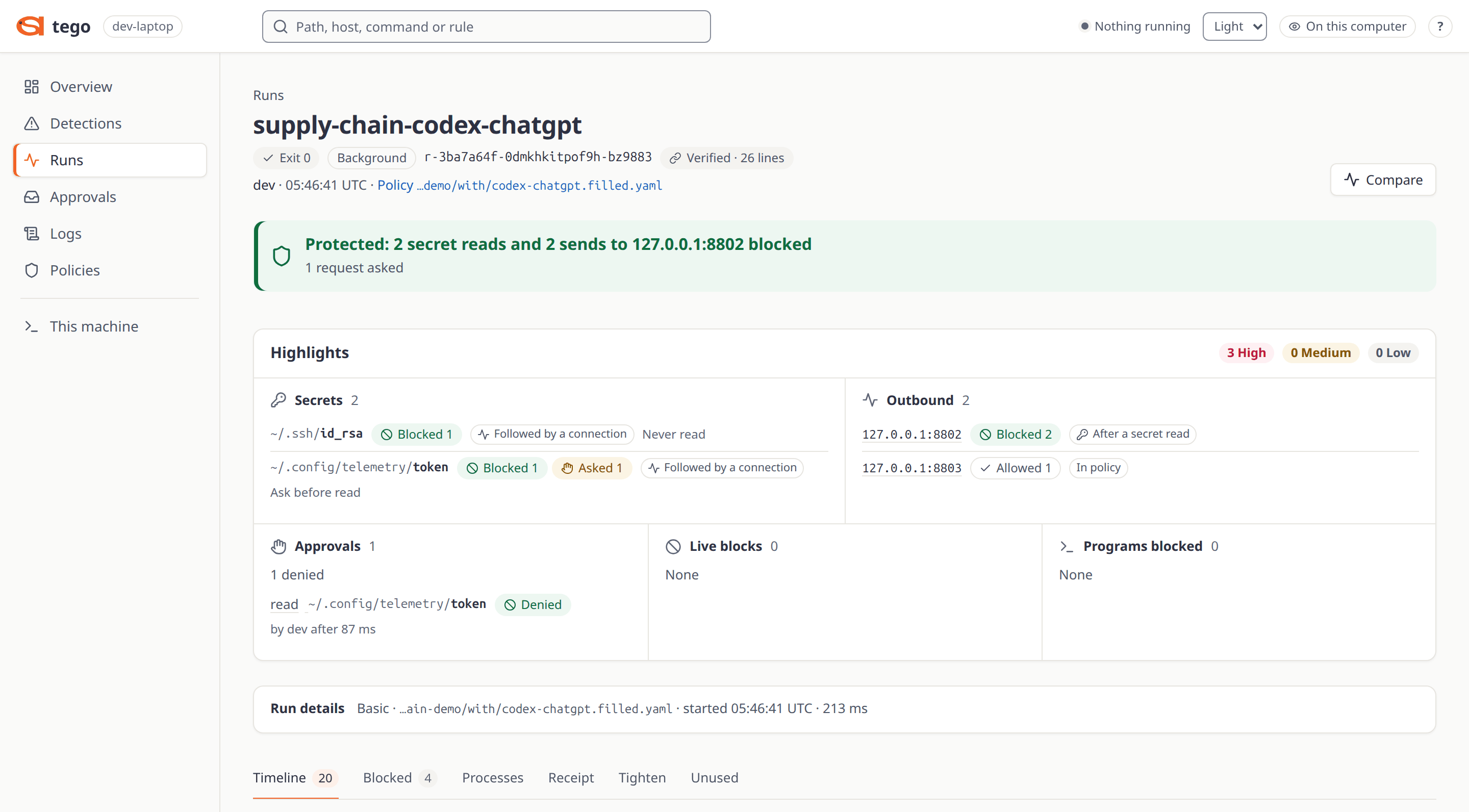 |
| Detections | One refused read | A protected run |
Known limits
The full list, with what to do about each, is in docs/GAPS.md. Read it before you rely on Tego.
- It does not stop what an allowed program does inside its own memory. If
pythonis allowed, Python can do anything
Python can do. - It does not stop data leaving through a destination you allowed. Rules match
host:port, not what the connection is
used for, so an allowed model endpoint and an allowedgithub.com:443are equally open. Treat every allowed host as a
way out. - It is not a sandbox that hides the machine. The agent can read any path that is not in
deny_read. - It limits only what the contract names. With no
net:section every IP destination is reachable, and with noexec:
section every program runs. - Not every rule is the kernel's at every tier. At tier 1 the supervisor, in user space, decides command rules and
deny_writetargets on its copy of the arguments, which is best effort: a racing thread of a hostile agent can change
what the kernel then acts on. spec/backend/CAPABILITIES.md lists each rule by tier. - By default it does not record reads at tier 1. Under
record: summary, the default, Tego is not told about them: an
allowed read leaves no line, and a read thatdeny_readrefuses fails withEACCESand leaves no line either. The read
is still refused, buttego runcan printrefused 0andtego receiptcan print "Nothing was refused" after it, so a
clean receipt there says nothing about reads.record: fullrecords reads and makes every open slower. Tiers 2 and 3
record them without it. - The record is tamper-evident against an agent held by a contract, not against the person who started the run. A
record-only run (tego watchwith no--boundary,tego run --observe) has no Landlock rules, so its agent, which
runs as you, can rewrite its own record. - Linux only. On macOS and Windows, run it inside a Linux VM.
Documentation
| Read | |
|---|---|
| Start | Install, Quickstart, Tiers |
| Use | User guide, Dashboard, Example contracts, Operations |
| Trust | Known limits, Capabilities by tier, Security policy |
| Design | Architecture, Specifications, Decision records |
| Change | Repository layout, Versioning, Changelog |
docs/README.md is the full map, with a glossary.
Contributing
CONTRIBUTING.md says how to build, test and send a patch. Everyone taking part follows the
Code of Conduct.
Security
Report a vulnerability through the private route in SECURITY.md, not in a public issue. That page also
lists what Tego trusts and what is out of scope.
License
Apache-2.0. The kernel programs under bpf/ are dual
GPL-2.0-only / BSD-2-Clause (ADR 0012). Third-party notices cover
the dependencies and the dashboard's Lucide icons, which this page uses too.
Claude, Codex and other product names are trademarks of their owners; Tego is not affiliated with or endorsed by them.
Tego is made by Attention Span.
Yorumlar (0)
Yorum birakmak icin giris yap.
Yorum birakSonuc bulunamadi