autonomous-os
Health Gecti
- License — License: Apache-2.0
- Description — Repository has a description
- Active repo — Last push 0 days ago
- Community trust — 80 GitHub stars
Code Basarisiz
- rm -rf — Recursive force deletion command in devices/reachy-mini/install.sh
- rm -rf — Recursive force deletion command in devices/reachy-mini/spike-device.sh
- rm -rf — Recursive force deletion command in devices/reachy-mini/spike-hal.sh
Permissions Gecti
- Permissions — No dangerous permissions requested
Bu listing icin henuz AI raporu yok.
The open-source operating system for robots — install it and your robot comes alive
Autonomous OS: The "Android" for Robots
Robots have been around for years but have never been autonomous — someone has to drive them with a remote, and they've stopped at scripted demos. Autonomous OS brings autonomy to robots: install it on your robot and it comes alive.
- Your robot thinks. Everything it sees and hears goes to an agentic reasoning engine running on the robot itself — Hermes, Claude Code, or whichever you choose — that decides what to do next.
- Your robot acts. It guards the house, knows your face, follows you as you move, reads the mood on your face, sets the light — and does the desk work too: Gmail, GitHub, your Mac. Each one is a skill — install more from the Skill Store, or write your own.
- Your robot grows. It has a built-in learning loop. It creates skills from experience, sharpens them as it uses them, keeps what it learns, searches its own past conversations, and builds a deeper picture of you with every session.
Autonomous OS is a fully customizable operating system for robots. Every component is swappable — engine, model, voice, skills, board. Your robot declares what it has in a DEVICE.md, and the OS mounts exactly that. When a better one ships, your robot gets it the same day — and gets better without new hardware.
Quick start
The simplest way in is a robot we have already tested it on. What each of them can do: robot comparison.
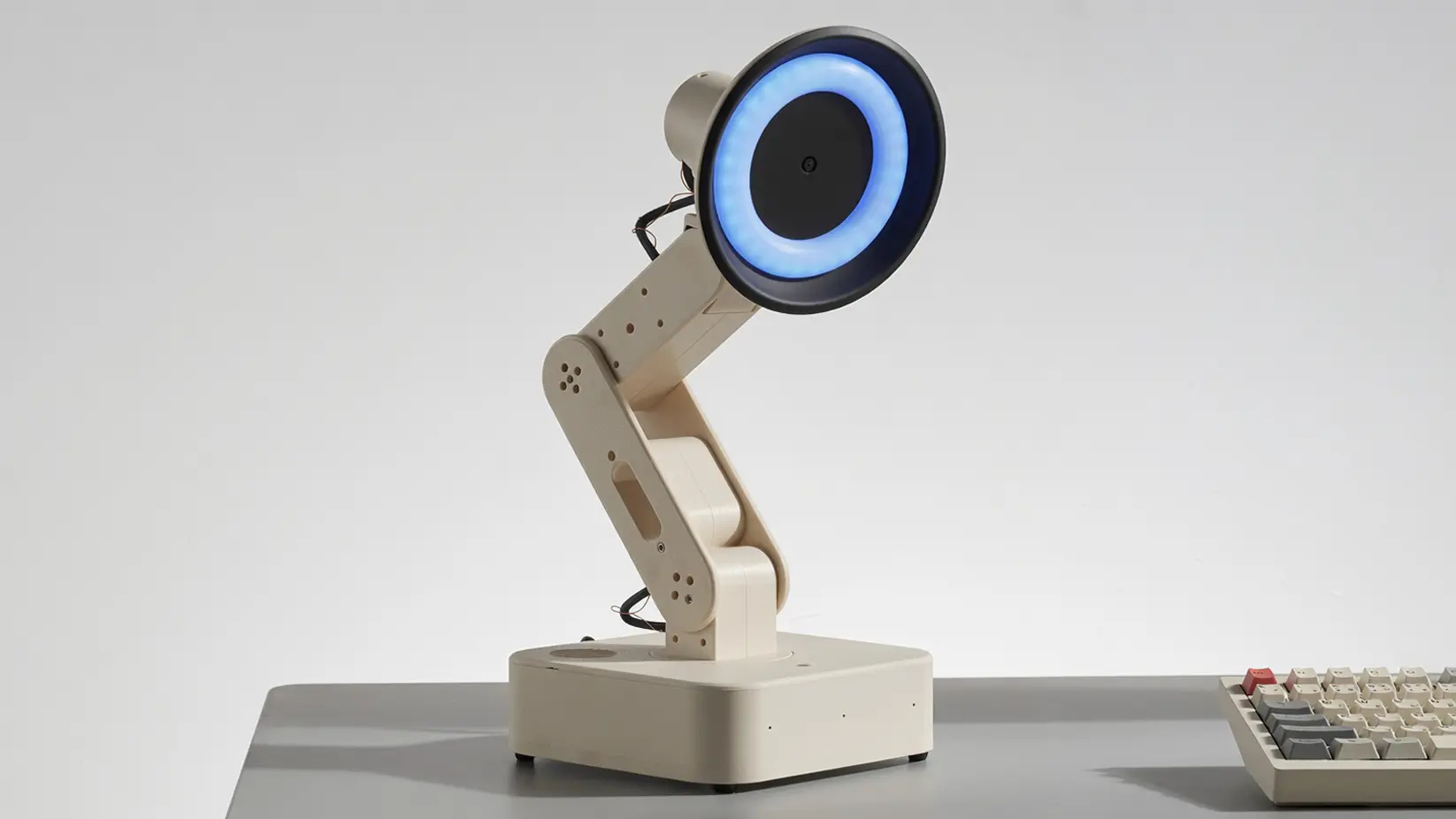
Autonomous Lamp
Lamp is the robot that shows the whole OS — it sees, hears, speaks, moves, and ships with Autonomous OS on it.
- Add it. In the Autonomous app (iOS | Android), tap Add robot → Lamp.
- Set up Wi-Fi. Pick your network in the app; it joins the robot's hotspot and hands over the keys and pairing.
- Interact with Lamp. Say something, it turns to look at you, the ring lights up, and it answers.
- Install a skill from the Skill Store — one tap, live on the next conversation.
- Build your own skill. Type what you want it to do in the app and it writes the skill.
- Give it a character. Edit
SOUL.mdand it is someone else on the next turn.
Reachy Mini
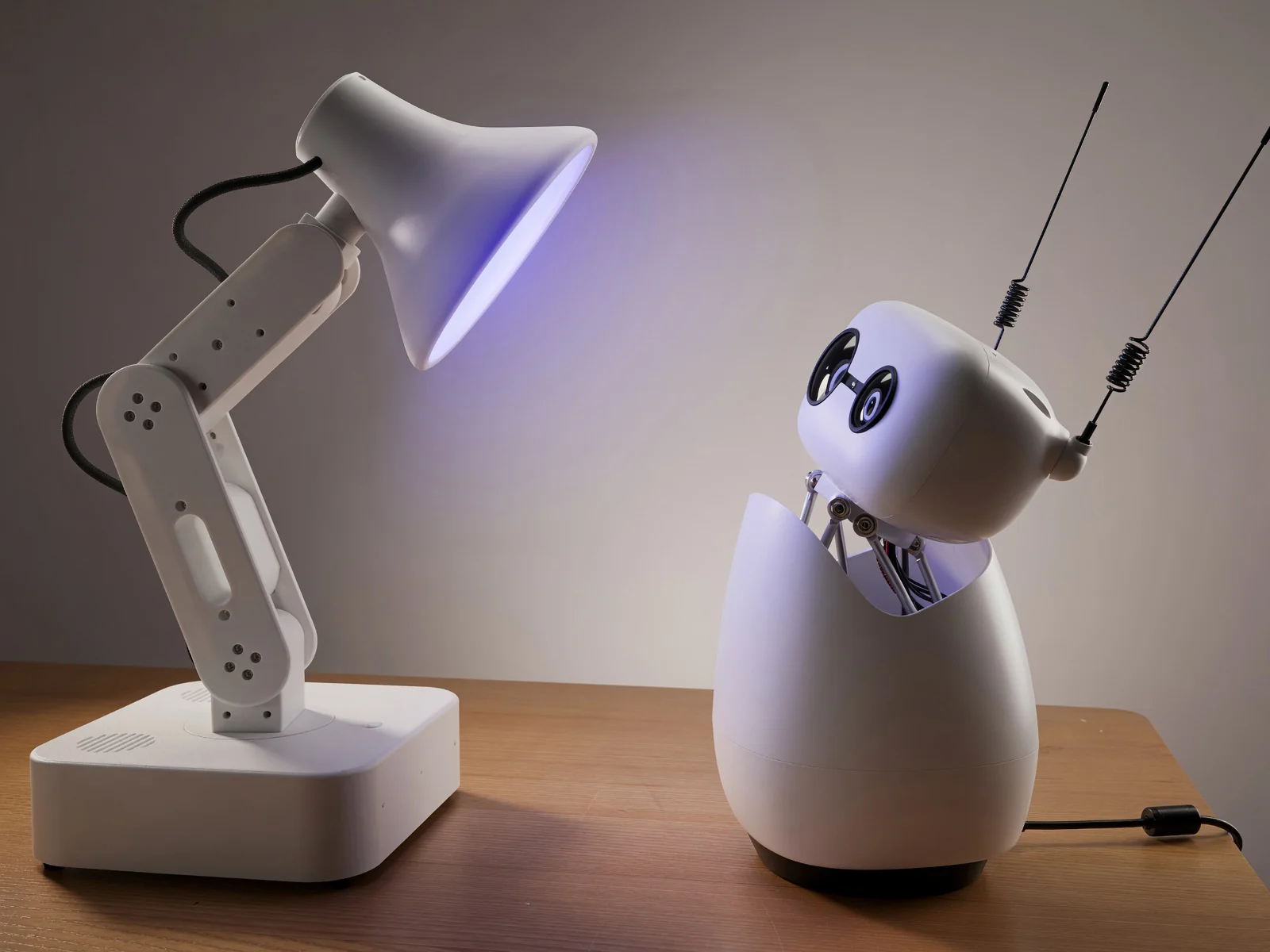
Reachy Mini is Hugging Face's desk robot, running our OS beside its own stack.
- SSH in —
ssh [email protected]. - Run one command. Nothing is flashed; the Reachy daemon keeps the motors.
curl -fsSL https://raw.githubusercontent.com/autonomous-ai/autonomous-os/main/devices/reachy-mini/install.sh | sudo bash - Add it. In the app, tap Add robot → Reachy Mini and give it
reachy-mini.local. - Interact with it. Say something — the head tilts, the antennas lift, and it answers.
- Install a skill from the Skill Store, or type what you want it to do and it writes one.
- Give it a character. Edit
/opt/devices/reachy-mini/SOUL.md. Everything else, including how to undo the install:devices/reachy-mini/README.md. - Put it next to a Lamp. Each one hears the other's answer as its next input, so the two of them will hold a conversation until you stop them.
Autonomous Intern
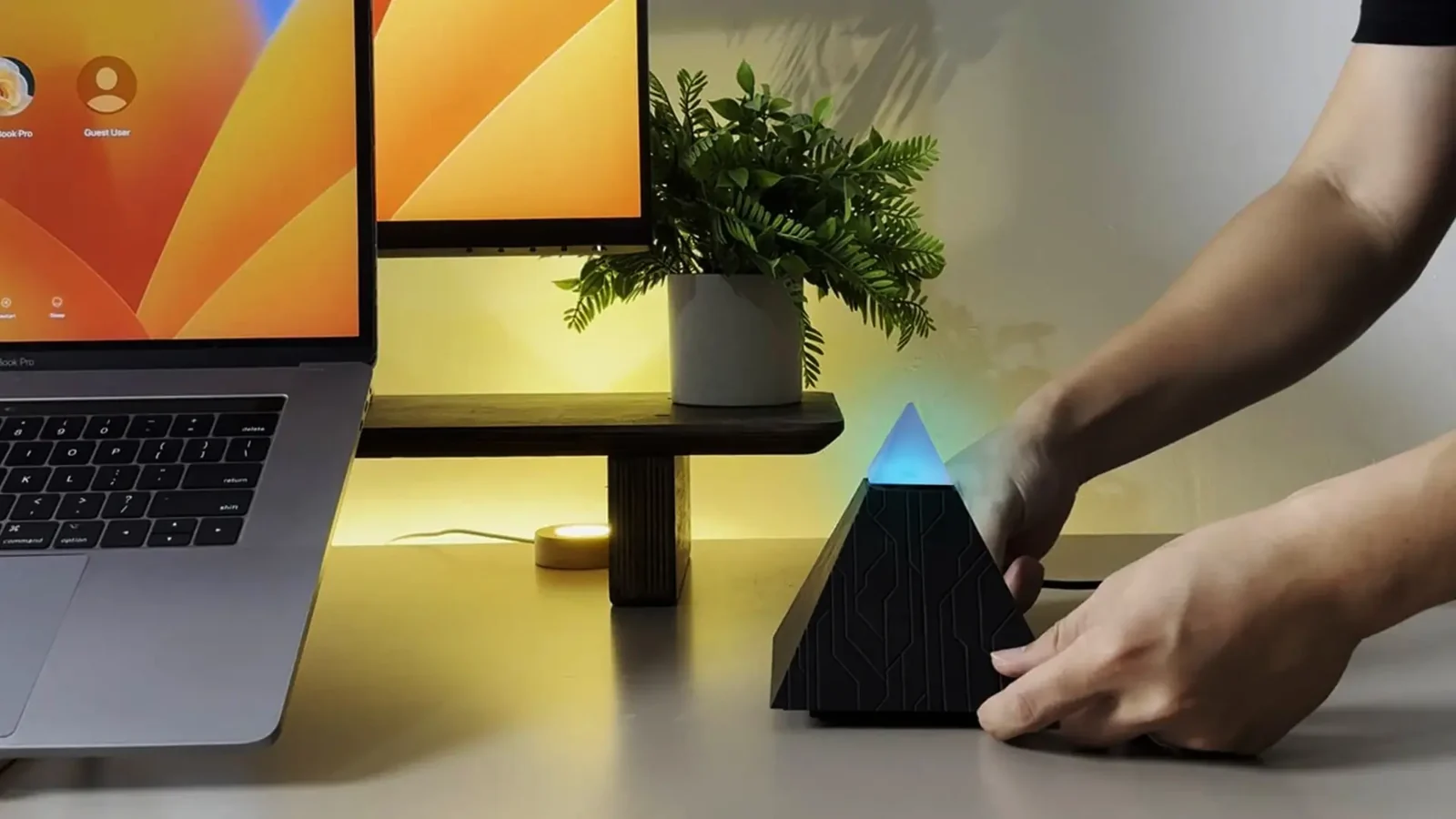
Intern is the always-on desk agent: mic, speaker, LED ring.
- Add it. In the app, tap Add robot → Intern.
- Set up Wi-Fi. Same flow as Lamp: pick your network and it handles the keys and pairing.
- Interact with it. Say something and it answers; the ring shows what it is doing.
- Install a skill from the Skill Store.
- Build your own skill. Type what you want in the app; it is live on the next conversation.
- Give it a character. Edit
/opt/devices/intern-v2/SOUL.md.
Bring your own robot
Autonomous OS runs on any robot you can describe in four markdown files.
DEVICE.md— the body: the board and the hardware it has.SOUL.md— the self: who it is and how it talks.SAFETY.md— the bounds: how fast, how bright, how late.SKILL.md— the hands: one thing it can do.
Follow the full guide.
Platform architecture
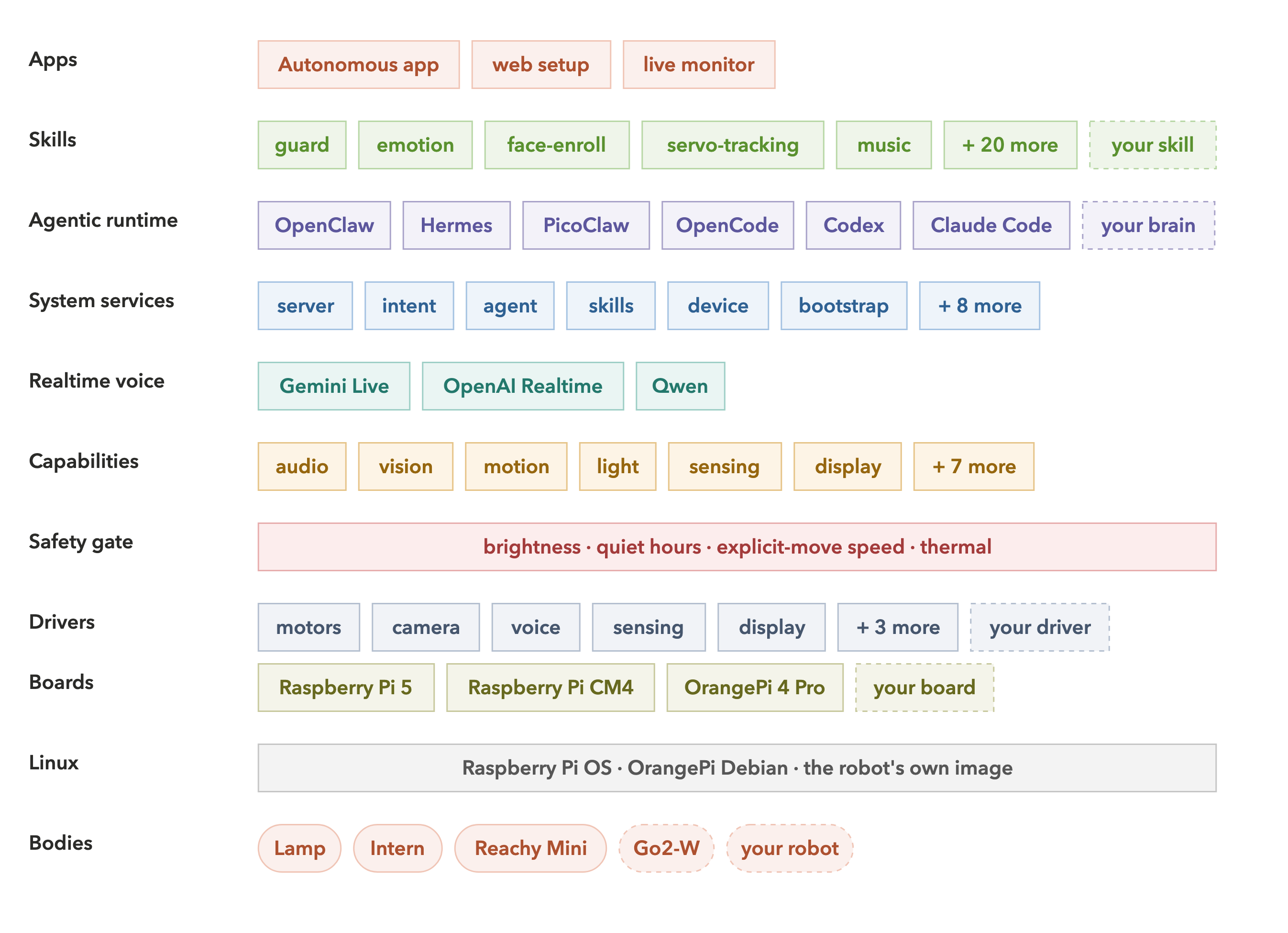
Autonomous OS is a software stack. Each layer uses only the layer below it, so any layer can be replaced without touching the others. Every layer is a folder in this repo.
Apps
What a person touches. The Autonomous app adds a robot, sets up Wi-Fi, installs skills from the Skill Store and switches brains; the robot also serves its own setup and monitor UI from system/web/. Both talk to os-server on :5000.
Skills
One folder per behavior, one SKILL.md inside: markdown the agent reads. A skill acts by writing [HW:/path:{json}] markers in its reply, so it never touches a servo bus or a GPIO pin. Each skill declares the capabilities it needs and installs on every robot that has them.
Agentic runtime
The engine that thinks. Six of them — Hermes, OpenClaw, PicoClaw, Codex, Claude Code, OpenCode — behind one 76-method AgentGateway. It reads the robot's SOUL.md and its installed skills. Switch live from the web UI; persona, memory and connectors move with it.
System services
The Go daemon os-server on :5000, one package per box in the figure. intent answers fixed commands from a local table with no model; server strips [HW:…] markers out of a reply and POSTs them to HAL before the words are spoken; agent switches engines; bootstrap is OTA, its own binary.
Realtime voice
Gemini Live, OpenAI Realtime or Qwen, hosted inside HAL and running beside the main path. A spoken turn lands here first: it answers directly, or hands the turn up to the engine.
Capabilities
The 13 names a robot may declare — audio, vision, sensing, presence, motion, light, display, expression, lifelike, media, connectivity, companion, system. Ten mount HTTP routes on :5001 (111 endpoints, live Swagger at /api/hardware/docs); presence and lifelike are loops with no route, companion lives in os-server. HAL mounts only what DEVICE.md declares and fails loud on a missing required driver.
Safety gate
A pure function of SAFETY.md, below the engine and in every request path: brightness, quiet hours, explicit-move speed. No model in the loop — the same clamp whoever asked. What it does not cover yet: docs/safety.md.
Drivers
One folder per subsystem: motors, rgb, camera, voice, display, sensing, tracking, and the media handover a third-party daemon needs. New hardware is one class and one factory line.
Boards
One JSON entry per board, matched against /proc/device-tree/model. Raspberry Pi 4, Pi 5, CM4 and OrangePi 4 Pro today. A new board is an entry, not a code change.
Linux
The vendor kernel — Raspberry Pi OS, OrangePi Debian, or the robot's own image. We do not ship one, and nothing above the drivers has a real-time deadline: position control closes in the servo firmware, or in the robot's own daemon.
Bodies
Four markdown files and a driver per robot. Declarations, not forks — a body is a PR.
Long form: architecture · HAL · device spec · capabilities · safety · developer guide.
Contribute
The easiest way in is a skill: one markdown file, no Go, no hardware, and it lands on every robot that has the parts. PRs welcome, vibe-coded ones included. Questions, half-built ports and show-and-tell go in Discussions; gaps we would love help with are labelled claim-me — comment to take one.
| You want to… | You write… | Start from |
|---|---|---|
| Teach every robot something new | skills/<name>/SKILL.md |
skills/guard/ · skill-creator |
| Run Autonomous on your robot | devices/<id>/DEVICE.md + SAFETY.md + SOUL.md |
devices/reachy-mini/ — a third-party port, end to end |
| Support new hardware | a class in hal/drivers/<subsystem>/ + one factory line |
reachy_service.py |
| Support a new board | one entry in hal/board/boards.json |
boards.json |
| Add a brain | an AgentGateway implementation in runtimes/<name>/ |
adding-agent-runtime.md |
Seven more paths — apps, chat bridges, perception models, voices, safety bounds, CTS probes — and the norms: CONTRIBUTING.md. One rule worth knowing up front: devices/contract/ is the interface everyone builds on, so open an issue before you change it.
Build locally:
make os-build && make os-test          # Go daemon, cross-compiled to linux/arm64
(cd hal && uv sync) && make hal-dev    # HAL on :5001 with reload
make web-install && make web-dev       # setup + monitor UI
make cts                               # is this a valid Autonomous device?
License
Everything outside hal/ is Apache-2.0. hal/ is GPL-3.0, kept that way by choice so the tree has one license per top-level folder; a driver you commit there is GPL, so a closed vendor SDK wraps out of process.
A robot running this carries other people's work: Pollen's reachy_mini SDK, YOLOv8 for tracking (AGPL-3.0 — read it before you ship), TEN-VAD and Silero for hearing, LeRobot and the LeLamp Runtime under the motion code, and the brains we install but do not ship. All of it, including what we copied verbatim: CREDITS.md. Security issues: SECURITY.md.
Yorumlar (0)
Yorum birakmak icin giris yap.
Yorum birakSonuc bulunamadi