cto-legends
Health Uyari
- License — License: MIT
- Description — Repository has a description
- Active repo — Last push 0 days ago
- Low visibility — Only 7 GitHub stars
Code Gecti
- Code scan — Scanned 12 files during light audit, no dangerous patterns found
Permissions Gecti
- Permissions — No dangerous permissions requested
Bu listing icin henuz AI raporu yok.
Agent skills manager that registers one router skill with Claude Code, Codex or another coding agent, routes plain-English goals to 21 open-source modules and previews every hub change until --apply.
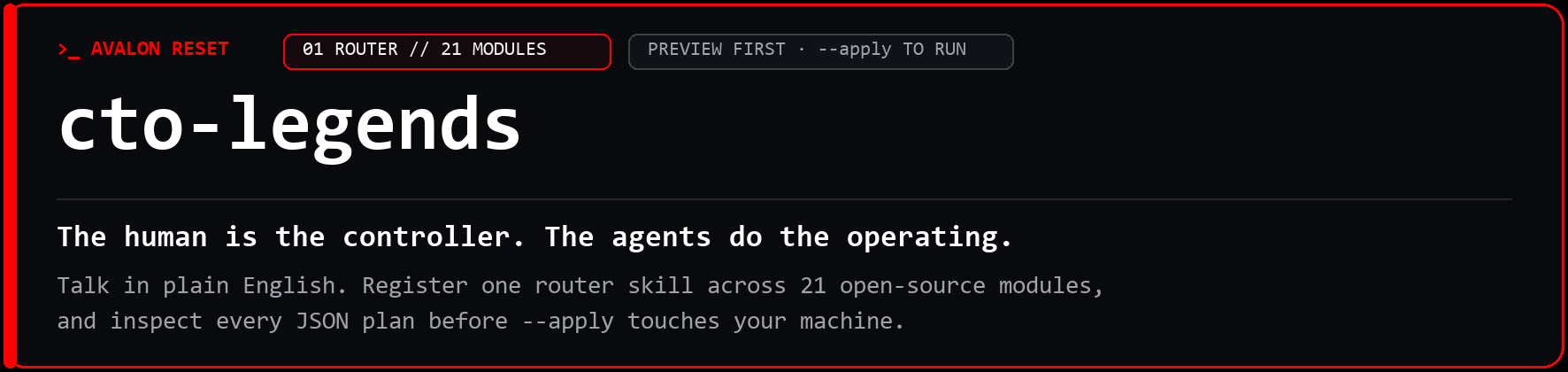
Agent skills that work in plain English and show the plan before anything installs


Most agent skills setups pile up one folder per tool before you can ask an ordinary question. With cto-legends, you register one lightweight router skill and talk to your coding agent in plain English: ask it to "study my business on Google Maps", "convert my WordPress site to Astro v7", "save this research in my vault", or "Can we generate some AI music?" One router reaches 21 independent CLI modules on demand, reads a module's recipe only when the job calls for it, and prints a JSON plan before --apply changes anything on disk.
Type cto-legends install legends-geogrid and nothing gets installed. You get the plan. Add --apply after you have read it.
>_ agent handoff (copy and paste into Claude Code, Codex, Gemini CLI, or OpenCode)
Install cto-legends from PyPI with python -m pip install cto-legends, then run
cto-legends agent-setup for this host without --apply and show me the JSON plan
before changing anything. Once I approve, register the single cto-legends skill
so we can route and preview any of the 21 Legends modules on demand.
>_ terminal quick start (Python 3.11+; pip installs the router, nothing else mutates disk without --apply)
python -m pip install cto-legends                # PyPI v0.2.11 (CLI alias: ctolegends)
cto-legends agent-setup claude                   # 1. look: prints JSON plan, changes nothing
cto-legends agent-setup claude --apply           # 2. do: writes ~/.claude/skills/cto-legends
cto-legends route "study my business on Google Maps"
cto-legends install legends-geogrid              # 1. look: previews v0.2.7 + transport plan
cto-legends install legends-geogrid --apply      # 2. do: verifies SHA-256 and builds isolated venv
Installation previews run offline, and --apply verifies pinned GitHub release archives without collecting credentials or triggering paid API calls. If you think agent skills should show the plan before touching your machine, star this repository on GitHub so the next developer can find it.
Talk in plain words, see the match before anything runs
Months of daily building with coding agents teach a clear lesson: the most productive sessions never start with you hunting through documentation for CLI flags, environment variables, or repository names. They start when you tell your agent the job in your own words, the way you would brief a sharp technical partner across the desk.
Sitting down with a coding agent feels natural when you can describe the outcome in plain English instead of memorizing module names and flag syntax. Hand a request to cto-legends route and the router scores your phrasing against the local catalog, returns ranked candidate modules with matched signals, and gives your agent the exact handoff command to load that module's recipe.
| What you say to your coding agent | Top route match |
Why the router picks it | What happens next |
|---|---|---|---|
"study my business on Google Maps" |
legends-geogrid (0.2.7) |
Matches google maps ranking grids, circular-lattice studies, and 21-page strategy reports |
Previews install (with legends-dataforseo transport), checks local deps via report-readiness, and loads the recipe via handoff |
"convert my WordPress site to Astro v7" |
legends-astro (0.2.4) |
Matches astro and astro v7 site migrations, source-audit contract extraction, and build parity checks |
Previews install, pairs with legends-firecrawl scrape exports when needed, and reads the migration workflow via handoff legends-astro |
"save this research in my vault" |
legends-empire (0.4.0) |
Matches vault Markdown memory, source-cited notes, and legends-vault-stewardship workflows |
Previews install and loads intake contracts without creating or altering any vault until you explicitly select one |
"Can we generate some AI music?" |
legends-stable-audio-3 (0.1.5) |
Matches ai music instrumental beds, sound effects, and crossfaded mixes |
Routes to the planning CLI, then warns to verify GPU VRAM, Hugging Face model access, and weights before promising generation |
Look, then do: why preview is the default
Traditional README quick starts assumed a human read each shell command before pasting it into a terminal. Today, your coding agent is usually the one typing install and configuration commands on your behalf, so mutating your filesystem on the first keystroke means finding out what changed after the fact.

Every state-changing command across the CLI (install, update, rollback, sync, agent-setup, install-skill, isolate-skills, restore-skills, startup-setup, startup-restore, and register-guide) returns a deterministic JSON preview whenever --apply is omitted. Here is the real preview output of cto-legends install legends-geogrid at v0.2.11:
{
  "preview": true,
  "changes": [
    {
      "id": "legends-geogrid",
      "version": "0.2.7",
      "action": "install",
      "commit": "a3055838ab4129abbcac66d3ce2b17c7a43e1bec",
      "dependencies": {
        "legends-dataforseo": "0.1.11"
      },
      "scope": "Self-contained static HTML competitive map companion (study.py --open), circular-lattice sampling, business-name review workbench..."
    }
  ]
}
Adding --apply fetches the pinned release archive from GitHub, verifies its commit SHA and SHA-256 digest against the active catalog, builds an isolated Python virtual environment under ~/.cto-legends/releases/, and retains your prior version on disk for instant rollback. Router previews inspect local catalog metadata and target paths only; they do not test external provider APIs or estimate what a third-party service will bill during downstream runs.
Across the 22 repositories in this family (cto-legends and its 21 modules), operational and cost guardrails are documented per repository rather than assumed globally:
- 12 of 22 repositories document a preview or dry run before changing state:
cto-legends,legends-ambient-intelligence,legends-astro,legends-buzz,legends-cloudflare,legends-empire,legends-github,legends-gohighlevel,legends-hetzner,legends-obs,legends-stripe, andlegends-yt-dlp. - 5 of 22 repositories document a spend ceiling, quota plan, or cost check before a paid call:
legends-dataforseo,legends-geogrid,legends-github,legends-stable-audio-3, andlegends-youtube.
One router instead of a growing shelf of agent skills
Open your coding agent's skills directory after a few months of heavy work and count the folders inside. Every folder was added for one specific afternoon: a search wrapper from Tuesday, a deployment helper from last month, a vault script from a weekend experiment. All of them stay registered on the days you are working on something completely different.
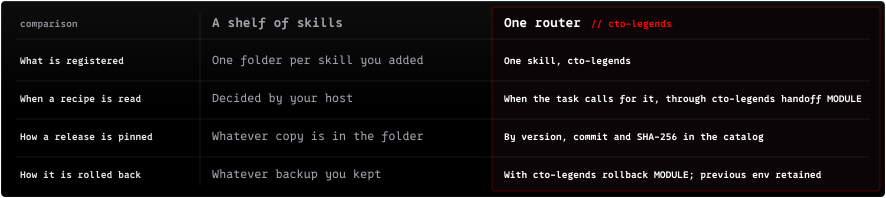
Registering cto-legends replaces per-module skill folders with one compact router (cto_legends/SKILL.md) and loads a module's operating instructions via handoff only when a task actually calls for them. Earlier releases of this ecosystem shipped 31 separate standalone skill folders before consolidating all of them behind the single router.
cto-legends
- 6 catalog-level duplicates:
cto-legends-library,legends-geogrid,legends-dataforseo,legends-dataforseo-kit,legends-github,legends-empire - 15 vault and wiki skills folded into
legends-empire:autoresearch,canvas,defuddle,obsidian-bases,obsidian-markdown,save,think,wiki,wiki-cli,wiki-fold,wiki-ingest,wiki-lint,wiki-mode,wiki-query,wiki-retrieve - 10 repository workflow skills folded into
legends-github:github,github-audit,github-community,github-dataforseo,github-empire,github-legal,github-meta,github-readme,github-release,github-seo
Migrating away from older per-module skill folders follows the same reversible look-then-do pattern:
cto-legends agent-audit claude                   # read-only inventory of overlapping skill folders
cto-legends isolate-skills claude                # 1. look: preview move plan and backup path
cto-legends isolate-skills claude --apply        # 2. do: move retired skills into ~/.cto-legends-skill-backups/<uuid>/
cto-legends restore-skills <manifest> --apply    # restore isolated folders from the backup manifest
Nothing is deleted during isolation because each relocated folder is tracked inside a manifest.json receipt for one-command restoration. Because agent-audit inspects filesystem directories only, host plugins, cached snapshots, and injected catalogs remain untouched until you confirm discovery in a fresh agent session.
One job start to finish: seven steps from plain words to output
Say "study my business on Google Maps" in normal conversation and watch what happens underneath. Whether your coding agent drives the session or you type every command yourself in a shell, the request moves through seven small, inspectable stages without hidden magic.

cto-legends route "study my business on Google Maps"   # 01 route: ranked candidates + matched signals
cto-legends install legends-geogrid                    # 02 look: offline JSON install plan
cto-legends install legends-geogrid --apply            # 03 do: SHA-256 check + isolated venv
cto-legends handoff legends-geogrid                    # 04 handoff: resolve this module's recipe paths
cto-legends doctor                                     # 05 doctor: verify managed CLI health
cto-legends report-readiness                           # 06 readiness: check GeoGrid map/report/transport deps
cto-legends run legends-geogrid -- --help              # 07 run: execute inside your current working directory
Notice how installing legends-geogrid pulls in its legends-dataforseo transport dependency (0.1.11) automatically, sparing you from chasing down provider packages by hand. Should doctor or report-readiness spot a missing local prerequisite in step 5 or 6, the workflow stops cleanly before a broken command fires.
Chaining sibling modules when the question grows
Real projects rarely stop at a single tool output. Once a neighborhood map grid finishes or a legacy site crawl lands on disk, sibling modules pass typed artifacts directly to the next stage without custom glue scripts.
| Starting module | Next module in the chain | Verified handoff across the two repos |
|---|---|---|
legends-geogrid |
legends-dataforseo + legends-jev |
GeoGrid submits Maps SERP and GBP tasks through DataForSEO, then passes storefront and Street View imagery to legends-jev for optical signage checks |
legends-firecrawl |
legends-astro + legends-stripe |
legends-astro source-audit parses Firecrawl JSON scrapes into a migration-contract.json, while legends-stripe emits drop-in Astro v7 checkout and webhook endpoints |
legends-hetzner |
legends-coolify + legends-cloudflare |
Operators size and provision CX/CAX Linux servers on Hetzner, inspect application deployments in Coolify, and preview DNS cutovers on Cloudflare |
legends-obs + legends-yt-dlp |
legends-captions + legends-youtube |
Studio 4K60 AV1 recordings and CrispASR/Parakeet word ledgers feed active-word .ass subtitles and SHA-256 frozen private-draft YouTube uploads |
| Research, infra, or media modules | legends-empire |
Verifies portable research-evidence packets from DataForSEO and Firecrawl, imports distilled transcripts, and attaches SHA-256 knowledge packs from 8 sibling modules |
Wire your host: Claude skills, Codex skills, and portable agent skills
Developers rarely stay inside one coding environment all week, so host setup uses named presets rather than manual file copying. Pick your primary harness below or wire multiple hosts side by side on the same machine in two previewed commands.
Claude preset
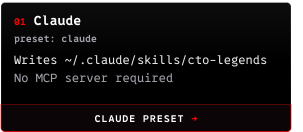
Teams organizing claude skills often end up maintaining dozens of per-tool Markdown folders or running a persistent claude code mcp server in the background just to call local CLIs. Registering cto-legends writes one plain Markdown file to ~/.claude/skills/cto-legends/SKILL.md with no daemon required, while startup-setup links a marker-delimited capability index into ~/.claude/CLAUDE.md backed by a SHA-256 restoration manifest.
cto-legends agent-setup claude
cto-legends agent-setup claude --apply
cto-legends startup-setup claude
cto-legends startup-setup claude --apply
Codex preset
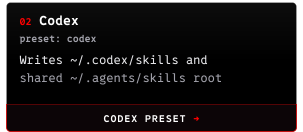
Engineers managing codex skills across terminal projects get both ~/.codex/skills and the shared ~/.agents/skills root populated in a single previewed pass. Pairing agent-setup codex with startup-setup codex updates ~/.codex/AGENTS.md (or $CODEX_HOME/AGENTS.md) inside fenced <!-- cto-legends startup:begin --> markers while preserving every line of your existing instructions for startup-restore.
cto-legends agent-setup codex
cto-legends agent-setup codex --apply
cto-legends startup-setup codex
cto-legends startup-setup codex --apply
cto-legends startup-status codex
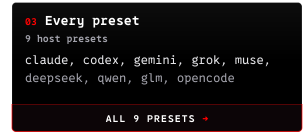
All 9 presets
Your choice of editor on Wednesday afternoon does not force you to rebuild how tools are discovered, whether your workflow leans on claude skills, codex skills, Gemini CLI, or multi-provider harnesses like OpenCode. Each preset below writes strictly to documented host roots and refuses to overwrite hand-edited or unmanaged files.
| Host preset | Skill directories written by agent-setup |
Default startup-setup file |
|---|---|---|
claude |
~/.claude/skills |
~/.claude/CLAUDE.md |
codex |
~/.codex/skills, ~/.agents/skills |
~/.codex/AGENTS.md |
gemini |
~/.gemini/skills, ~/.gemini/config/skills |
~/.gemini/GEMINI.md |
grok |
~/.grok/skills |
~/.grok/AGENTS.md |
muse |
~/.agents/skills |
Pass --instruction-file ./AGENTS.md |
deepseek |
~/.deepseek/skills, ~/.config/opencode/skills, ~/.agents/skills |
Pass --instruction-file ./AGENTS.md |
qwen |
~/.qwen/skills, ~/.agents/skills |
~/.qwen/QWEN.md |
glm |
~/.zcode/skills, ~/.config/opencode/skills, ~/.agents/skills |
Pass --instruction-file ./AGENTS.md |
opencode |
~/.config/opencode/skills, ~/.agents/skills |
~/.config/opencode/AGENTS.md |
Legacy host aliases (antigravity/agy, cursor, windsurf, aider, metamuse, qwen-code, zai/zcode) and explicit custom roots (cto-legends install-skill --directory /path/to/skills --apply) remain supported for existing scripts. Windows and WSL maintain separate home directories, and writing a skill file onto disk never proves live loading by itself, so reload your host and confirm discovery in a clean session (docs/AGENT-HOSTS.md, docs/STARTUP.md).
Private team workflows outside the public catalog ride the exact same router via cto-legends register-guide my-notes /path/to/SKILL.md --apply. Registered local Markdown files resolve through capabilities, route, and handoff without executing code, and legends-empire also supports optional headless AI Marketing Hub Home compatibility on a shared workspace root without needing a second skill.
Twenty-one pinned modules, grouped by the job you ask for
Every capability in this ecosystem lives in its own open-source repository rather than disappearing inside a monolithic framework, and all 22 family repositories (cto-legends plus its 21 modules) carry tagged releases dated 2026-11-11 or 2026-11-12. Twenty modules install into isolated CLI environments (19 Python virtualenvs plus a verified prebuilt Node.js 22+ package for legends-obs), while the one native desktop app (legends-hyperyap) uses cto-legends guide legends-hyperyap so the router never runs an OS installer behind your back. Browse the interactive web directory at cto-legends.com/modules, inspect exact commit and SHA-256 pins locally with cto-legends catalog, or jump straight to Local search and research, Web stack, Recording, audio, and video, or Memory.
Local search and research

Questions about Google Maps visibility, keyword demand, competitor pages, repository positioning, or public funding start in these six evidence-gathering tools. Under the hood, legends-dataforseo handles live search transport for both legends-geogrid and legends-github, while legends-jev verifies whether keywords in a competitor's Google Business Profile title appear on physical Street View signage.
| Module | What it handles | Plain-English prompt example | Runtime and setup notes |
|---|---|---|---|
legends-geogrid 0.2.7 |
Google Maps rank grids, local visibility matrices, GBP title audits, and 21-page HTML/PDF reports | "study my business on Google Maps" | Managed Python venv; installs legends-dataforseo automatically; browser/system libs via module setup |
legends-dataforseo 0.1.11 |
SERP rankings, keyword demand, Google Business Profile tasks, /goto redirect unmasking, and portable evidence |
"pull SERP rankings and keyword demand for this domain" | Managed Python venv + CLI + portable evidence exporter |
legends-jev 0.2.4 |
Typed OCR, Street View storefront signage verification, and optical grounding on supplied images | "check whether these GBP titles match Street View signage" | Managed isolated Python CLI; operator validates before actuation |
legends-firecrawl 0.3.6 |
Web search, scraping, full-site crawling, SERP inner-URL resolution (resolve), and Alexandria queries |
"crawl this documentation site into clean Markdown" | Managed Python client + offline catalog; vendor CLI and API key via module setup |
legends-github 0.2.4 |
Repository audits, DataForSEO keyword research, README/metadata/topic workflows, and release checks | "audit our repository releases, topics, and search demand" | Managed headless Python workflows; uses gh auth for remote GitHub actions |
legends-grant 0.3.3 |
Business, nonprofit, tribal, and government grant discovery, matching, verification bundles, and proposals | "find non-dilutive grants and track our application deadlines" | Managed Markdown lanes + verified federal API routes |
Web stack

From bare Linux server sizing to checkout webhooks, seven infrastructure and commerce tools connect along one preview-first deployment pipeline. Operators provision cloud capacity with legends-hetzner, check live container health in legends-coolify, validate dist/ parity in legends-astro, wire DNS and Stripe endpoints through legends-cloudflare and legends-stripe, and govern CRM sub-accounts or private Nostr relays with legends-gohighlevel and legends-buzz.
| Module | What it handles | Plain-English prompt example | Runtime and setup notes |
|---|---|---|---|
legends-hetzner 0.1.5 |
Hetzner Cloud inventory, CX/CAX stock radar, server sizing, 10-check preflight, and guarded VPS provisioning | "size and preview a Hetzner Cloud server for Coolify" | Managed Python CLI over hcloud; ships attachable Empire knowledge pack |
legends-coolify 0.2.3 |
Coolify inventory, deployment history, service health, environment audits, and backup schedule planning | "check application health and deployments on our Coolify host" | Managed read-only Python CLI; ships attachable Empire knowledge pack |
legends-cloudflare 0.1.3 |
Cloudflare zone and DNS inventory, nameserver checks, preview-first DNS record upserts, and live readback | "audit DNS records and preview zone updates on Cloudflare" | Managed dependency-free Python CLI; ships attachable Empire knowledge pack |
legends-astro 0.2.4 |
Astro v7 readiness, WordPress/HTML migration contract extraction (source-audit), Content Layer ingest, and dist/ checks |
"convert my WordPress site to Astro v7" | Managed Python and Node CLI; parses legends-firecrawl scrapes; attachable knowledge pack |
legends-stripe 0.1.3 |
Stripe catalog lint, .env price-ID governance, test/live ladder sync, fee-drag telemetry, dunning radar, and Astro endpoints |
"inspect Stripe products, price maps, and webhook endpoints" | Managed dependency-free Python CLI; emits Cloudflare custom-domain DNS previews |
legends-gohighlevel 0.3.5 |
GoHighLevel CRM, Workflows v3, Voice/Conversation AI, Snapshots V2 batch cloning, PIT minting, and SaaS rebilling governance | "review GoHighLevel pipelines, snapshots, and rebilling settings" | Managed dependency-free Python CLI; preview-first mutations and API readback |
legends-buzz 0.1.1 |
Self-hosted Block Buzz Nostr relay ops, 26-domain agent routing, relay readiness probes, and NIP-29 membership diagnostics | "probe readiness and NIP-29 groups on our Block Buzz relay" | Managed dependency-free Python CLI; 9 server/ACP templates and attachable knowledge pack |
Recording, audio, and video

Studio capture, live voice dictation, word-level subtitle rendering, instrumental music beds, and YouTube packaging pass transcripts and media cleanly across seven creative tools. Recorded takes from legends-obs, downloaded clips from legends-yt-dlp, continuous voice notes from legends-ambient-intelligence, and live cursor dictation from legends-hyperyap all feed .ass caption normalization in legends-captions and SHA-256 frozen private-draft uploads in legends-youtube.
| Module | What it handles | Plain-English prompt example | Runtime and setup notes |
|---|---|---|---|
legends-obs 0.1.5 |
OBS Studio profile planning, 4K60 AV1 recording canaries, scene verification, and optional cursor overlay | "verify OBS Studio scenes and run a 4K60 recording canary" | Managed prebuilt Node CLI (requires Node.js 22+); live control targets Windows; never alters OBS on install |
legends-captions 0.1.4 |
Technical term normalization, forced-alignment timing, active-word .ass subtitle rendering, and proof frames |
"render active-word .ass captions from this transcript" | Managed stdlib Python CLI; optional speech alignment environments |
legends-youtube 0.1.0 |
Channel inventory, ETag-guarded metadata updates, quota wave planner, retention X-ray, chapter/quiz lint, and private-draft uploads | "package chapters and check quota budget for our YouTube channel" | Managed dependency-free Python CLI; ships attachable Empire knowledge pack |
legends-yt-dlp 0.1.5 |
Paced video and transcript pulls, CrispASR/NeMo word ledgers, clip building, and Obsidian transcript vault pages | "pull transcripts and word-level timestamps from this video" | Managed Python CLI; yt-dlp binary, ffmpeg, and opt-in Mullvad via module setup |
legends-stable-audio-3 0.1.5 |
Instrumental music beds, sound effects, crossfaded continuous mixes, and VRAM-aware batch planning | "Can we generate some AI music?" | Managed Python planning CLI; install never downloads model weights, PyTorch, or paid credits |
legends-hyperyap 0.1.4 |
Local desktop voice typing and HTTP transcription with NVIDIA Parakeet on Windows, macOS, and Linux | "show setup instructions for HyperYap local voice dictation" | Guided native setup (cto-legends guide legends-hyperyap) with pinned release checksums |
legends-ambient-intelligence 0.1.4 |
Continuous audio capture, deduplicated archiving, offline Whisper/Parakeet transcription, and vault note distillation | "transcribe our studio voice recorder audio into vault notes" | Managed Python CLI; ffmpeg and speech backends configured per module recipe |
Memory

Raw outputs lose their value quickly when rank grids, scraped pages, grant packets, and transcripts end up scattered across temporary folders. legends-empire gives your workspace a source-cited Markdown ontology, verifying portable research-evidence packets from legends-dataforseo and legends-firecrawl while transactionally attaching SHA-256 knowledge packs shipped inside eight sibling modules.
| Module | What it handles | Plain-English prompt example | Runtime and setup notes |
|---|---|---|---|
legends-empire 0.4.0 |
Digital ontology, source-cited vault memory, legends-vault-stewardship, research-evidence intake, and optional Home adapter |
"save this research in my vault" | Managed Python 3.11+ venv; POSIX/WSL and native Windows NTFS transactions; installing never creates or alters a vault |
Day-two upkeep: catalog syncs, updates, and instant rollbacks
Months after your initial setup, new modules and updated release pins arrive through catalog syncs while the single skill file registered in your coding agent stays untouched. Whenever route meets an unfamiliar goal or handoff spots a newer pin upstream, cto-legends performs a bounded, read-only remote catalog peek in memory and tells you when sync will unlock it (pass --no-remote-peek for strictly offline runs).
cto-legends check-updates                    # compare installed, local catalog, and upstream
cto-legends sync                             # 1. look: preview upstream catalog changes
cto-legends sync --apply                     # 2. do: adopt new catalog (retains previous copy)
cto-legends update                           # 1. look: preview updates for installed modules
cto-legends update --apply                   # 2. do: build and probe new module environments
cto-legends rollback legends-geogrid         # 1. look: preview retained prior environment
cto-legends rollback legends-geogrid --apply # 2. do: switch back without re-downloading
Failed upgrades leave your working setup intact because every freshly built environment must pass its offline readiness probes before state.json switches the active pointer. Reverting a catalog (cto-legends sync --rollback --apply) or switching a module back (cto-legends rollback <module> --apply) restores the retained environment immediately, though rollback never undoes external files or provider API calls a module already executed.
Command reference by job
Both cto-legends and the un-hyphenated ctolegends binary accept identical arguments, and python -m cto_legends (or python -m ctolegends) works cleanly whenever your Python scripts folder is not on PATH. Every command below emits structured JSON by default (capabilities --markdown prints human-readable Markdown), making outputs equally straightforward for agents and shell scripts to inspect.
Discovery and recipes
When you are figuring out which tool fits a task, five read-only commands search your active local catalog first and only peek upstream on a local miss.
| Command | Mutates disk? | What it returns |
|---|---|---|
cto-legends route "<goal>" [--no-remote-peek] |
No | Ranked candidate modules with matched signals, purpose, scope, and handoff command |
cto-legends handoff <module> [--no-remote-peek] |
No | Installed recipe paths, setup notes, and non-blocking upstream update hints |
cto-legends capabilities [--markdown] |
No | Outcome-grouped capability directory across public modules and registered local Markdown files |
cto-legends guide <module> |
No | Platform requirements, release URLs, and published SHA-256 checksums for guided native apps |
cto-legends catalog |
No | Active catalog.json payload with pinned versions, commits, and SHA-256 archive digests |
Lifecycle and execution
Once you pick a module, the manager unpacks verified archives under ~/.cto-legends/releases/ while running each CLI inside your current working directory so generated reports stay inside your project.
| Command | Mutates disk? | What it returns |
|---|---|---|
cto-legends install <modules...> [--apply] |
Only with --apply |
Offline install plan (preview: true), or verified archive extraction and isolated venv probe |
cto-legends run <module> -- <args...> |
Module-dependent | Runs the installed module CLI inside your current working directory without shell interpolation |
cto-legends status |
No | Active release paths, runtime interpreters (null for Node), retained rollbacks, and local guides |
cto-legends check-updates |
No | Drift comparison across installed releases, your active catalog, and upstream tags |
cto-legends sync [--apply] [--rollback] |
Only with --apply |
Previews or adopts the canonical upstream catalog (or restores catalog.previous.json) |
cto-legends update [modules...] [--apply] |
Only with --apply |
Previews or upgrades already installed modules to your active catalog's pins |
cto-legends rollback <module> [--apply] |
Only with --apply |
Previews or swaps an installed module back to its retained previous environment |
Offline readiness checks
Before kicking off a live study or render, three local diagnostic commands verify virtual environments, headless browser libraries, and environment variable presence without making paid provider requests.
| Command | Mutates disk? | What it returns |
|---|---|---|
cto-legends doctor |
No | Runs closed-vocabulary import, CLI, and version-floor probes across active managed modules |
cto-legends report-readiness |
No | Verifies legends-geogrid report libraries, basemap helpers, and DataForSEO client wiring |
cto-legends task-readiness [all|reports|research|evidence|github] |
No | Checks Chromium launch (--browser-library-directory PATH on Linux), artwork libs, and env keys |
Host wiring and shelf cleanup
Whenever you connect a coding harness or archive retired skill folders, nine commands preview exact target file paths and write verified backup manifests before touching your configuration.
| Command | Mutates disk? | What it returns |
|---|---|---|
cto-legends agent-setup <host> [--directory PATH] [--apply] |
Only with --apply |
Previews or writes cto-legends/SKILL.md into the chosen host's skill root(s) |
cto-legends install-skill --directory PATH [--apply] |
Only with --apply |
Previews or writes cto-legends/SKILL.md into an explicit custom skill directory |
cto-legends agent-audit <host> [--directory PATH] |
No | Scans host skill roots for the 31 retired standalone skill folders replaced by this router |
cto-legends isolate-skills <host> [--directory PATH] [--apply] |
Only with --apply |
Moves overlapping retired skills into a manifest-tracked backup directory |
cto-legends restore-skills <manifest> [--apply] |
Only with --apply |
Restores isolated skill folders from a backup manifest |
cto-legends startup-setup <host> [--instruction-file PATH] [--apply] |
Only with --apply |
Appends or refreshes the marker-delimited startup index with a SHA-256 backup manifest |
cto-legends startup-status <host> [--instruction-file PATH] |
No | Reports whether the host's startup instruction block is present and matches the active index |
cto-legends startup-restore <manifest> [--apply] |
Only with --apply |
Restores a startup instruction file from its verified backup manifest |
cto-legends register-guide <name> <path.md> [--apply] |
Only with --apply |
Registers a private local .md file in local-guides.json without executing code |
Disk layout, verification, and licenses
By default, managed releases, synced catalogs, and install.log build traces live under ~/.cto-legends (override with CTO_LEGENDS_HOME or pass --home PATH before the subcommand). Catalog syncs and module installs fetch pinned release archives directly from GitHub while provider credentials remain in your local environment, and every --apply verifies the archive's SHA-256 digest before any module code runs. Keep ~/.cto-legends at its original path once created because Python virtual environments are not relocatable, confirm any interrupted process has exited before removing a stale operation.lock, and note that the manager refuses symlinks, Windows NTFS junctions, and reparse points across all managed home and host startup paths.
Contributors testing changes locally can run the unit suite and package checks with standard Python 3.11+ tooling:
python -m unittest discover -s tests -v
python -m pip install build twine
python -m build
python -m twine check dist/*
Deeper architecture contracts and contributor policies live in docs/ARCHITECTURE.md, docs/CAPABILITY-DISCOVERY.md, CONTRIBUTING.md, and SECURITY.md. cto-legends is released under the MIT License, while individual modules keep their own package and model terms documented in THIRD_PARTY_NOTICES.md (legends-stable-audio-3 uses Apache-2.0, legends-hyperyap uses AGPL-3.0, and the optional OBS Cursor extra uses GPL-2.0-or-later).
Put one router to work
Two commands take you from a clean Python 3.11+ shell to a previewed host registration:
python -m pip install cto-legends
cto-legends agent-setup claude && cto-legends agent-setup claude --apply
If you think agent tools should keep your context clean and show their plan before touching disk, star this repository on GitHub so the next developer can find it.
Founders, operators, and technical leaders who want this way of working applied directly to their own stack can send a note to the async message desk at cto-legends.com/dm, built and maintained by Avalon Reset.

Yorumlar (0)
Yorum birakmak icin giris yap.
Yorum birakSonuc bulunamadi