poe2-exile-architect
Health Uyari
- License — License: MIT
- Description — Repository has a description
- Active repo — Last push 0 days ago
- Low visibility — Only 5 GitHub stars
Code Gecti
- Code scan — Scanned 12 files during light audit, no dangerous patterns found
Permissions Gecti
- Permissions — No dangerous permissions requested
Bu listing icin henuz AI raporu yok.
Research, create, and understand Path of Exile 2 builds with AI agents and Path of Building.
Exile Architect



Research, create, and understand Path of Exile 2 builds with your AI agent.
Exile Architect connects Codex, OpenCode, and DeepSeek Harness to Path of Exile 2 game data, a local build knowledge base, and Headless Path of Building (PoB). Your agent makes the design decisions; PoB supplies the calculations and the build checks.
Install · Usage · Showcase · FAQ · Contributing
Local knowledge base and PoB validation
Local knowledge base
Research turns mechanics, component interactions, and usage conditions from existing builds into research records stored on your computer. The knowledge carries across conversations, and Create retrieves relevant records when designing a new build, reusing earlier research.
Local execution
Game data queries, knowledge storage, and PoB calculations run on your machine, and build files are saved locally. The model uses your agent host's existing configuration; whether online research and model calls use remote services depends on the task and host settings.
PoB validation
The equipment, skills, and passives designed by the agent are written into PoB before damage, defense, and resource data are read back. The numbers correspond to a specific build and combat configuration and can be checked. Mechanics that PoB does not cover are documented separately, and estimates are shown separately from calculated results.
Three workflows
| I want to… | Use | What I get |
|---|---|---|
| Extract useful knowledge from an existing build | Research · poe-bd-research |
Saved explanations of mechanics, component synergies, requirements, and failure cases that future builds can draw on |
| Design a build for a class, skill, and target level | Create · poe-bd-create |
Skill, equipment, and passive choices; PoB checks; local build files and a playstyle explanation |
| Understand how an existing build works | Learning · poe-bd-learn |
An HTML learning guide with component icons, combat-loop diagrams, explanations, navigation, and search |
Research builds the knowledge base. Create uses it to design builds. Learning teaches you a build without adding it to the knowledge base. You can use each workflow on its own.
Build your own local knowledge base
Study builds you are interested in with Research and keep the findings for later use. Research saves explanations of skill interactions, equipment roles, passive choices, resource recovery, and defenses, along with their requirements, failure conditions, and game versions. Accepted findings stay on your machine and remain available in future conversations.
When you ask for a new build, Create searches this knowledge base for research relevant to the class, skills, and target version. Your agent uses those findings to make design decisions, assembles a build at the requested level, and checks it with PoB. Studying builds in a playstyle you enjoy can give future Create requests more mechanics and alternatives to consider.
For example, research a few Spark builds, then ask Create for a level 90 Spark build using the related local research. The saved knowledge informs the new design; its equipment, resource requirements, and calculated performance are checked again for the new build. Missing evidence and unmodelled mechanics remain explicit in the result.
Install
Exile Architect installs from a source checkout, and your agent starts its tools from that folder — keep it in place after installation.
1. Install the prerequisites
- Git and uv. uv can install the required Python version for you.
- An agent host: Codex, OpenCode, or DeepSeek Harness, with model access already configured. Research requires a host that gives subagents access to MCP tools.
- LuaJIT 2.1, used to run the PoB calculation engine:
| System | LuaJIT installation |
|---|---|
| Windows | Install MSYS2, open its UCRT64 terminal, and run pacman -S mingw-w64-ucrt-x86_64-luajit. The standard C:\msys64\ucrt64\bin\luajit.exe location is detected automatically. |
| macOS | With Homebrew installed, run brew install luajit. |
| Ubuntu / Debian | Run sudo apt-get update followed by sudo apt-get install luajit. |
For a nonstandard LuaJIT location, set POB_LUAJIT to the executable's absolute path in the environment used by your agent host. Node.js 20+ is optional, for Build Planner .build export.
2. Download the project and PoB
Run these commands in PowerShell on Windows, or a terminal on macOS / Linux:
git clone https://github.com/avdergh/poe2-exile-architect.git
cd poe2-exile-architect
uv sync --python 3.12

git clone --filter=blob:none --no-checkout https://github.com/PathOfBuildingCommunity/PathOfBuilding-PoE2.git pob/PathOfBuilding-PoE2
git -C pob/PathOfBuilding-PoE2 config core.autocrlf false
git -C pob/PathOfBuilding-PoE2 checkout ce566eac45ea8a86477f513c7ee65a1ebe60014e
Use this pinned PoB revision with the patches below. Installing the PoB desktop application alone does not supply this headless runtime.
3. Apply the patches and connect your agent
Choose your system. The examples install for Codex; replace codex with opencode if you use OpenCode. DeepSeek Harness installs through its own preset — see the end of this step.
Windows PowerShell
Get-ChildItem .\pob\patches\*.patch | Sort-Object Name | ForEach-Object {
    git -C pob/PathOfBuilding-PoE2 apply --ignore-whitespace $_.FullName
    if ($LASTEXITCODE -ne 0) { throw "PoB patch failed: $($_.Name)" }
}
.\install.ps1 -FromCheckout codex
macOS / Linux
(cd pob/PathOfBuilding-PoE2 && git apply --ignore-whitespace ../patches/*.patch)
bash install.sh --from-checkout codex
Apply the patches once to a fresh PoB checkout. The installer registers the four local MCP servers and installs the workflow skills. Windows is the primary development platform; macOS has not completed real-machine certification.
DeepSeek Harness
DeepSeek Harness has a native MCP client, so Exile Architect installs as an agent preset instead of a host config. Finish steps 1 and 2 first: the four MCP servers start the same headless PoB engine, so they need the pinned PoB checkout, its patches, and LuaJIT.
.\install.ps1 -FromCheckout dsh
bash install.sh --from-checkout dsh
This places the poe-bd preset in ${DSH_HOME:-$HOME/.dsh}/.agent-presets/poe-bd with your checkout path already filled in, and writes a ready-to-use copy of the layer-1 MCP patch beside it. Start DSH, pick poe-bd in a new session, then ask it to call engine_health. .\install.ps1 -Doctor dsh (or bash install.sh --doctor dsh) checks the placed preset.
Pick one registration path: either the preset, or dsh web --patch <preset dir>/poe-bd.mcp.cordis.yml to register the servers for every session. Applying both starts a second MCP client per server — two PoB engines — and exposes the tools to every session. DeepSeek Harness host acceptance is not complete yet; DSH setup (Chinese) covers the details and the known limits.
4. Verify the installation
Restart your agent host, open a new conversation, and send:
Check that the Exile Architect tools are available. Call engine_health,
then confirm that poe-bd-research, poe-bd-create, and poe-bd-learn are available.
engine_health observes process and tool activity without starting or resetting PoB. not_started is normal before the first calculation, and busy means work is still running; neither certifies the build or calls for new_build. If the tools or the engine are missing, see Troubleshooting.
Usage
Send these requests in your agent conversation, with the relevant file attached. These are example prompts, not terminal commands. You can also select the named skill through your host's skill menu.
Research — save reusable build knowledge
Export a build from PoB as an import code and save it in a text file. Supply the build's actual game patch so the research can be versioned correctly.
Use /poe-bd-research to study the attached my-build.txt.
Its game patch is [the build's actual patch].
Explain its core mechanics, required synergies, and failure conditions,
and save the reusable findings to the local knowledge base.
Research analyzes the build, checks the evidence, and stores accepted findings. Later Create requests can retrieve them. You receive a summary of what was learned and what still needs verification.
Create — design a build
Use /poe-bd-create to make a level 90 Sorceress build centered on Spark.
Use relevant research from the local knowledge base to guide the design.
Focus on endgame mapping and bosses. Explain the skill setup, equipment,
passives, and combat loop, and export the local PoB files.
Create designs one build at the requested level, checks it with PoB, and explains the result. You do not need to provide an existing build. Matching Research knowledge guides the design; missing knowledge or unmodelled mechanics are called out in the result.
Learning — understand a build
Use /poe-bd-learn to explain the attached my-build.txt to a new player.
Start with the combat loop, then explain the skills, equipment, passives,
resource recovery, and defensive layers. Deliver an English HTML guide.
Open the generated HTML file in a browser. The guide includes component explanations, diagrams, and search, so you can read from start to finish or look up a specific part. Learning does not write Research knowledge or create a new build.
Long support and socket optimizations can also run in the background: background=true returns an operation ID, so get_compute_operation can retrieve the complete result without restarting the search, and cancel_compute_operation requests cancellation at a safe calculation boundary. Only one calculation runs per session, and results are retained in that server process, not across restarts. Finishing the search is not the same as passing the audit; final support checks use purpose="final_audit".
Outputs follow the language of your request unless you specify another language.
Showcase
Real output from the workflows above. Each example links to notes that separate what PoB verified from what still needs verification.
A Learning guide: level 100 Twister Gemling Legionnaire
English introduction · Complete 14-chapter guide (Chinese) · HTML reader (ZIP)
The guide walks through a level 100 Gemling Legionnaire chapter by chapter: the combat loop, skill interactions, equipment, and passive choices. Read it in full on GitHub, or download the archive, extract it, and open Twister-learning-guide.html in a browser for embedded icons, search, and interactive component explanations.
A Create build: level 99 Deadeye Ice Shot
Example notes · Build on poe.ninja
Ice Shot and two Mirage setups, supported by Freezing Mark, Snipe, and Tornado Shot, using endgame trade gear with Headhunter and Lineage supports.
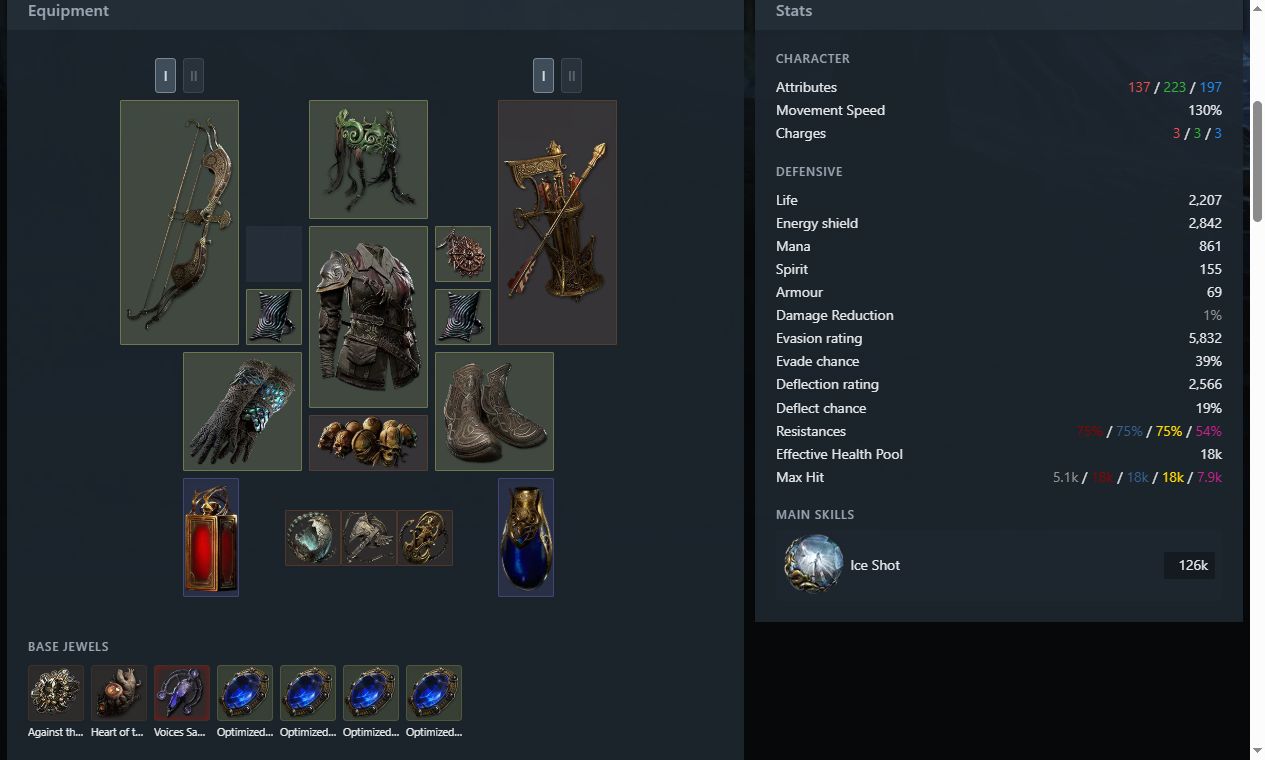
This example includes all four Create deliverables:
| Output | Purpose | View or download |
|---|---|---|
| Complete PoB XML | Inspect and edit skills, equipment, passives, and configuration | PoB file |
| PoB import code | Paste into PoB to import the build | Import code |
Official .build file |
Import into the official Build Planner | .build file |
| Online share page | Browse and share the build | poe.ninja page |
The main Ice Shot reads approximately 126.2k DPS in PoB's Pinnacle boss configuration. Complete damage from the Mirage setups and some recovery mechanics still require verification. Parts of the .build export are represented as descriptive text; use PoB for the full configuration. See the example for details.
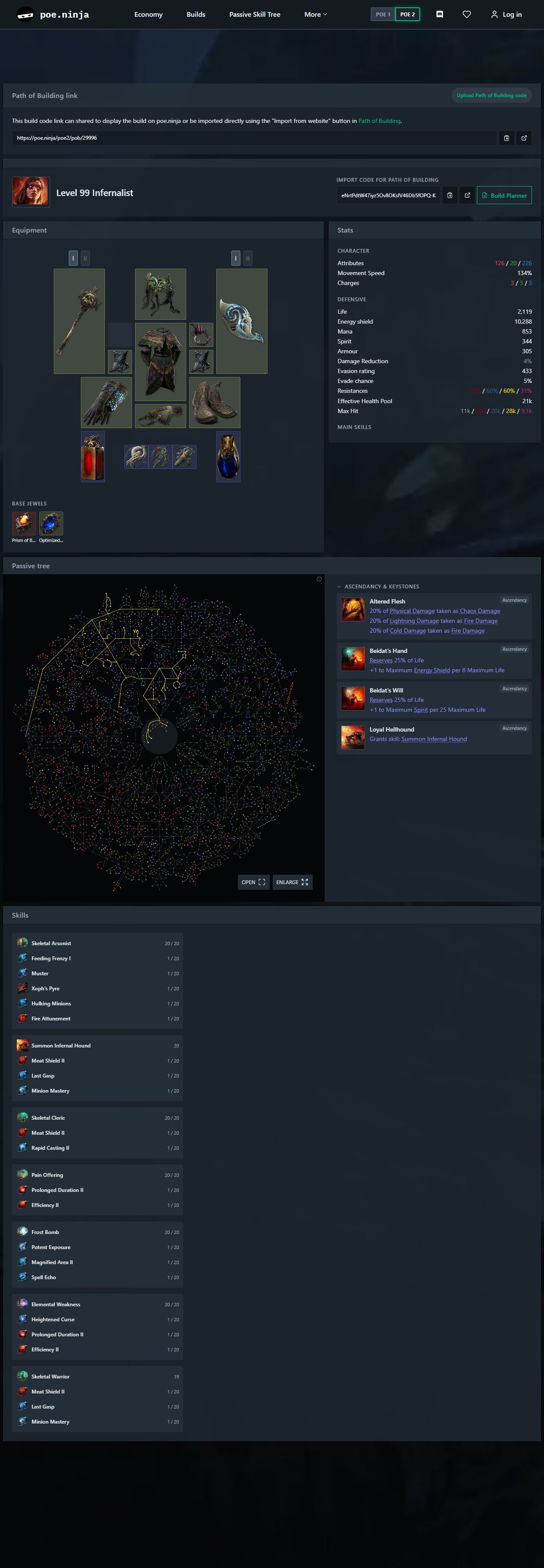
A Create build without memory: level 99 Infernalist
This build was generated in without-memory (--no-memory) mode, without retrieving Research knowledge or Learning Memory. The agent used game data and PoB tools to design a minion build centered on Skeletal Arsonist, with Summon Infernal Hound and Skeletal Cleric.
The full screenshot below includes equipment, stats, the passive tree, ascendancy choices, and all skill groups. Click it to open the build on poe.ninja.
Common questions
Which agent hosts are supported?
Codex and OpenCode are configured by the installer. DeepSeek Harness installs as an agent preset. Research additionally needs a host that lets subagents call MCP tools.
Do I need my own model API key?
Use the model access already configured in your agent host. Exile Architect does not run a separate model service.
Where are my builds and research stored?
In the operating system's local user-data directory under poe2-build-mcp. Research knowledge persists outside the conversation, so new conversations using the same data directory can retrieve it. Set POE2_MCP_DATA to use another location. Your agent returns the paths to generated files.
Can it make a complete leveling guide?
Create currently delivers a build at a target level, not a full campaign-to-endgame progression. Learning explains the build you supply.
What does “candidate” mean?
Some mechanics or resource conditions still need verification. Reports separate PoB observations, estimates, and unknowns; passing a check does not establish in-game performance.
Is poe-bd-learning-loop the Learning guide?
It is a separate experimental workflow that compares reference builds with independently generated builds and records reviewed lessons. For a player-facing guide, use poe-bd-learn.
How do I update?
Run git pull --ff-only and uv sync in the project folder, rerun the installer for your host, and restart it. If the pinned PoB revision changes, also update the headless runtime following pob/PINNED.md. Reinstalling the DeepSeek Harness preset keeps the previous version as a poe-bd.bak recovery point; the install after that reports a conflict until you pass -Force / --force, which rotates that recovery point to a timestamped name instead of deleting it.
Troubleshooting
The tools do not appear. Check for poe_knowledge_mcp, poe_build_mcp, poe_research_mcp, and poe_learning_mcp in the host's MCP configuration, then restart the host and open a new conversation. In DeepSeek Harness the tools appear only in a session that uses the poe-bd preset; .\install.ps1 -Doctor dsh (bash install.sh --doctor dsh) reports whether the placed preset is complete.
The engine cannot start. Check LuaJIT and the pinned PoB checkout from steps 1 and 2, including the applied patches. engine_health reports what the engine process is doing; POB_LUAJIT selects a nonstandard LuaJIT installation.
Contributing
Open an issue with your host, operating system, game patch, steps to reproduce, and the error message. Keep credentials and private build exports out of reports. Pull requests should include relevant verification.
Workflow instructions: Research · Create · Learning.
License and credits
Code is licensed under MIT. Built on poe2-build-mcp and PathOfBuilding-PoE2; the converter provider retains its upstream notice. Third-party game data and artwork retain their respective rights.
This product is not affiliated with or endorsed by Grinding Gear Games.
Yorumlar (0)
Yorum birakmak icin giris yap.
Yorum birakSonuc bulunamadi