beatos
Health Pass
- License — License: Apache-2.0
- Description — Repository has a description
- Active repo — Last push 0 days ago
- Community trust — 20 GitHub stars
Code Fail
- rm -rf — Recursive force deletion command in .claude/settings.json
- process.env — Environment variable access in apps/desktop/scripts/diagnose-playback.mjs
- network request — Outbound network request in apps/desktop/scripts/diagnose-playback.mjs
- process.env — Environment variable access in apps/desktop/scripts/inspect-table-widths.mjs
- network request — Outbound network request in apps/desktop/scripts/inspect-table-widths.mjs
- network request — Outbound network request in apps/desktop/scripts/smoke/editor.mjs
Permissions Pass
- Permissions — No dangerous permissions requested
No AI report is available for this listing yet.
Local-first beat library for music producers. MCP server (Claude Code / Claude Desktop) for AI-driven cataloging, tagging, and multi-platform publishing.

BeatOS
The operating system for beat producers.
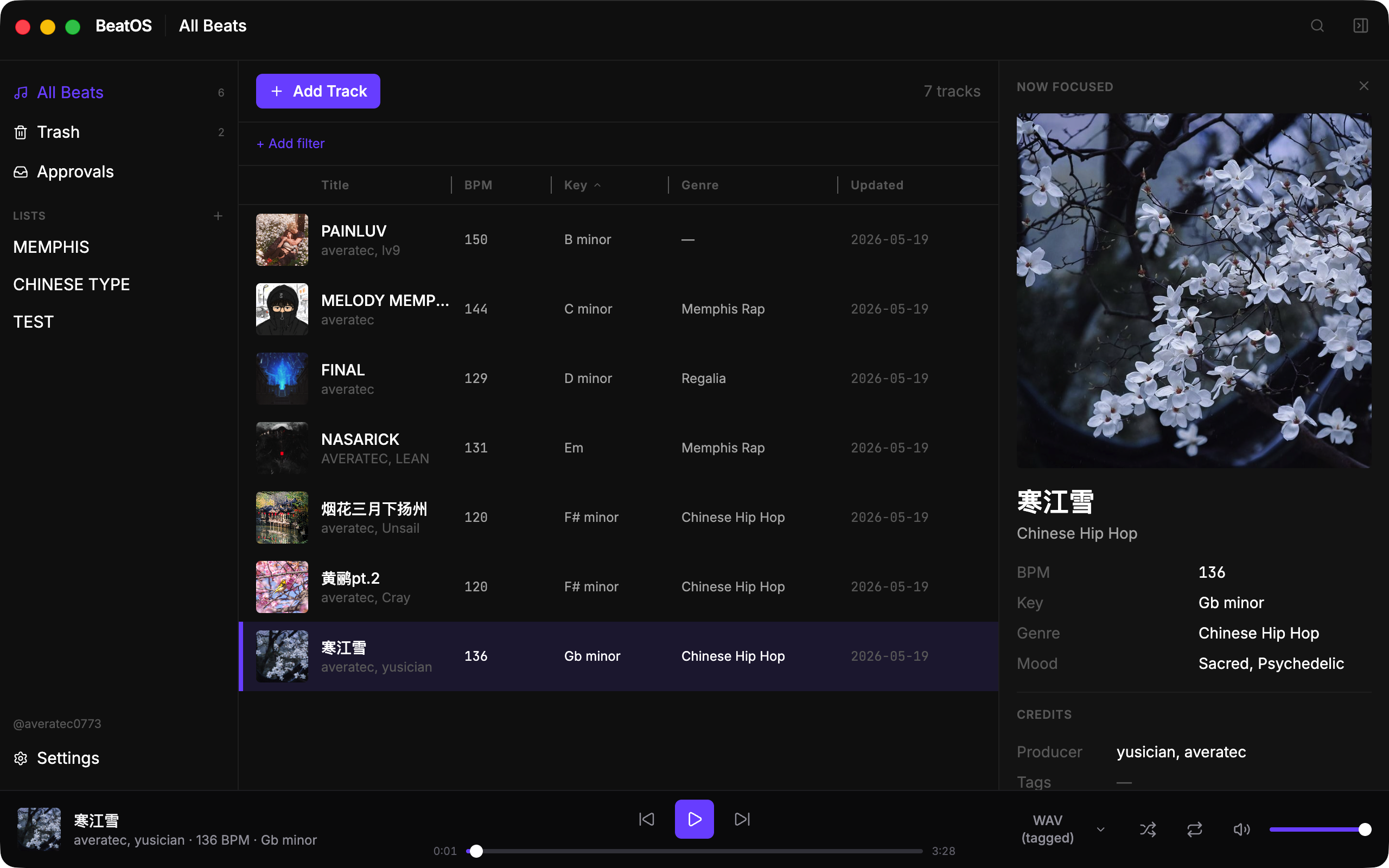
A local-first desktop library that holds every beat on your hard drive — catalog it once, then ship it to every platform with an AI co-pilot doing the metadata grind for you.





The problem
A working beat producer ends up with hundreds of WAV/MP3 files on disk, two versions of each (tagged + untagged), cover art that isn't always next to the file, and a different metadata vocabulary for every platform:
- NetEase / QQ Music / Suno / BeatStars / YouTube — different genre trees, different mood tags, different description lengths, different price models.
- A track that's "Trap" on one site is "Hip Hop · 暗黑" on another, "Aggressive Lo-Fi" on a third, "未分类" on a fourth.
- Every release means re-typing the same data in a different costume. Multiply by 50 unfinished beats and 4 platforms — that's 200 metadata blocks to maintain by hand. Which is why most producers just don't publish.
BeatOS fixes this by keeping one canonical catalog locally, then letting either you or an AI agent translate it into the per-platform metadata block on demand.
What it does today
1. Local catalogA real SQLite database for every beat: title, BPM, key, genre (multi-value), mood (multi-value), producer credits, tags, license type, price, description, audio assets (WAV/MP3 × tagged/untagged), cover art. Soft-delete trash with restore. Lists for curation. Rename + merge a producer across every track in one click. |
2. AI co-pilot (MCP)A first-class MCP (Model Context Protocol) server exposes the library to Claude Code, Claude Desktop, and any MCP client. 20 tools: read your catalog, draft per-platform descriptions, rename producers, propose batch attachments. Every write goes through a |
3. Player + analysisSpotify-style bottom bar (Tone.js + Web Audio). Plays the FLOAT-32 WAVs your DAW actually exports. Four audio roles per track with instant switch; queue follows the visible filter; shuffle + repeat. On-demand BPM/key analysis via librosa (HPSS → beat-tracking + Krumhansl-Schmuckler) with per-field confidence scores. |
AI integration
BeatOS is the first beat library built for the AI-agent era. The MCP surface is not a side feature — it's how publishing is going to scale to 10 platforms without manual labor.
Verified clients: Claude Code CLI · Claude Desktop · any MCP client speaking stdio JSON-RPC.
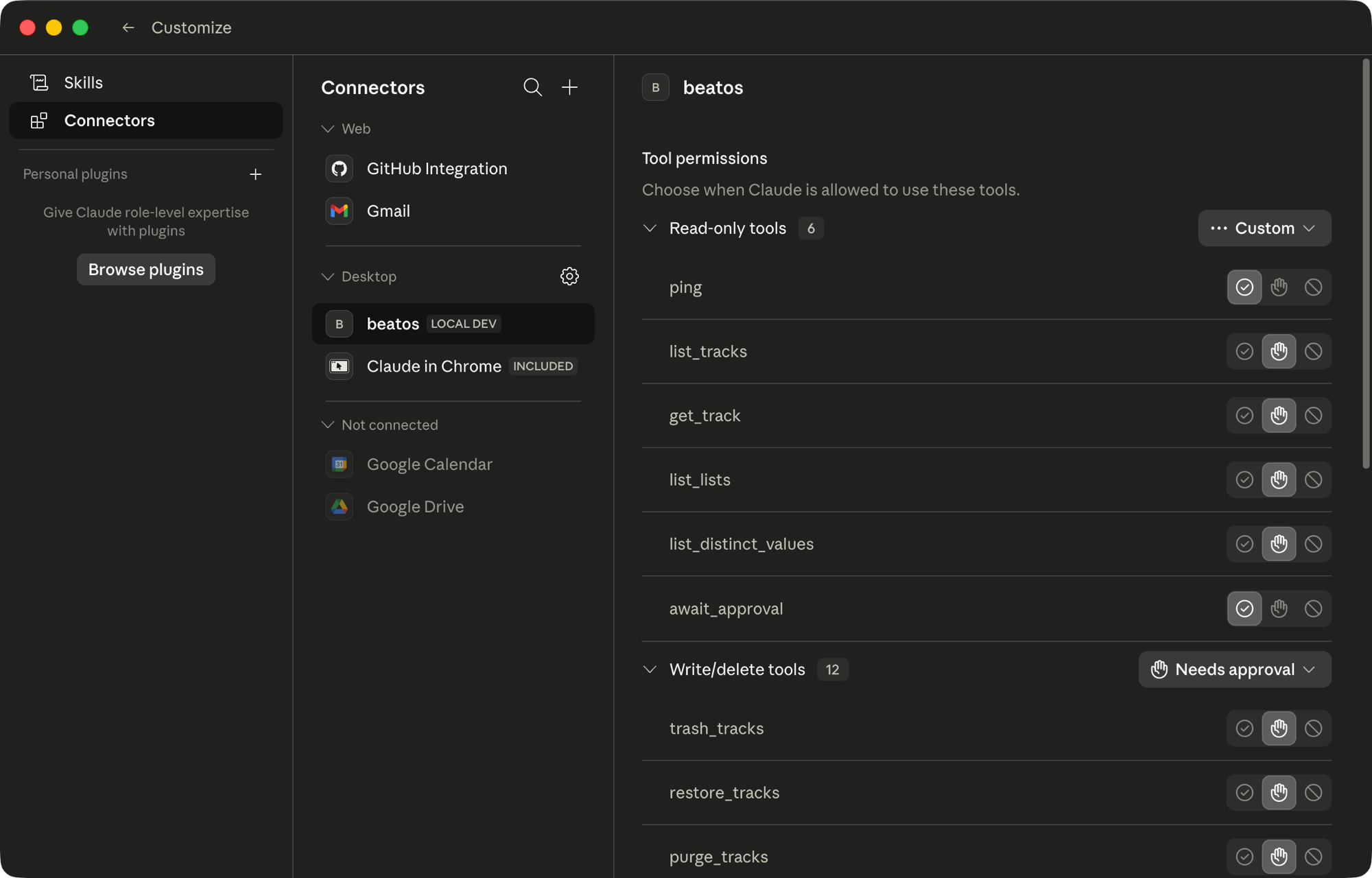
BeatOS registered as a Desktop MCP connector in Claude Desktop — read-only tools auto-allowed, writes gated behind approval.
Tools shipping today (20 total):
| Surface | Tools |
|---|---|
| Read | list_tracks, get_track, list_lists, list_distinct_values, ping |
| Lifecycle | create_tracks, trash_tracks, restore_tracks, purge_tracks |
| Lists | create_list, update_list, delete_list, add_tracks_to_list, remove_tracks_from_list, reorder_list |
| Metadata | update_tracks, merge_metadata |
| Assets | attach_assets, detach_assets |
| Flow control | await_approval |
Why two-phase commit? Every write tool returns a token (preview only) — nothing touches the database. The token surfaces in the Approvals panel in BeatOS; you review the diff, then confirm. The agent calls await_approval to learn the outcome. An AI can never silently mutate your catalog, batch-edit your producer credits, or trash a track without you signing off.
Why batches? A folder-import of 50 tracks × 2 audio assets would otherwise be 100 approval clicks. create_tracks (≤100), attach_assets (≤500), detach_assets (≤500) all batch — one token, one click, atomic rollback if any file vanishes mid-approve.
Example flow (driven by Claude Code from your terminal):
You:    "Tag every beat above 140 BPM that has no genre with 'Trap' or 'Drill'
         based on the cover art and title. Show me the diff before applying."

Claude: [calls list_tracks(bpm_min=140) → 12 tracks]
        [reads metadata, drafts a patch]
        [calls update_tracks(items=[...]) → returns token abc123]

You:    [opens BeatOS Approvals panel, sees 12 proposed edits with rationale]
        [reviews 3, rejects 1, approves the batch]

Claude: [await_approval → status=approved, applies, reports back]
The same pattern will drive per-platform description generation, NetEase publish drafts (v0.1), and self-corpus RAG drafts (v0.2).
Local-first, by design
| No server. | The sidecar binds 127.0.0.1 on an ephemeral port. Nothing leaves the machine — including conversations with the MCP agent. |
| No account. | Single-user. No login, no sync, no cloud. |
| No telemetry. | Zero outbound calls from the app itself. |
| Your files stay put. | BeatOS references paths; nothing is moved or renamed unless you ask. |
| Your data is yours. | One SQLite file under ~/Library/Application Support/BeatOS/ (macOS). Open it with any tool. |
Install
Packaged installers will arrive at
v0.1.0together with the first publish adapter. Until then, run from source — see Develop below.
Targets: macOS 12+ · Windows 10+. Linux works for development but isn't a supported install target.
Develop
Prerequisites
- Node ≥22 LTS
- Python 3.11.x
uv—brew install uv(macOS) orpipx install uv
Setup
make sync                              # resolve Python workspace
cd apps/desktop && npm install
Run
npm run dev:fresh                      # kill orphans + launch Electron + sidecar
npm run logs:tail                      # follow main.log + sidecar.jsonl
Wire up the MCP server (Claude Desktop / Claude Code)
The MCP server lives at packages/beatos-mcp and speaks stdio. Add to your MCP client config:
{
  "mcpServers": {
    "beatos": {
      "command": "uv",
      "args": ["run", "--directory", "/absolute/path/to/beatos", "beatos-mcp"]
    }
  }
}
Then list_tracks and friends will be available as tools inside Claude.
Test
npx vitest run                         # renderer + main (249 tests)
uv run pytest                          # sidecar (347 tests)
npm run build && npm run smoke         # Playwright _electron end-to-end
Stack
Electron 39 · React 19 · Vite · Tailwind · Radix UI · Zustand · TanStack Virtual · dnd-kit · Tone.jsPython 3.11 · FastAPI · aiosqlite · structlog · mcp (FastMCP) · librosa · PlaywrightSQLite · Pydantic v2
Repository
apps/desktop/              Electron shell + React renderer
packages/
  beatos-core/             Pure Python business logic (no web/RPC deps)
  beatos-http/             FastAPI facade for the renderer
  beatos-mcp/              stdio MCP server for AI agents
  beatos-platforms/        Per-platform vocab maps (v0.1+ adapters)
conventions/               Architecture and design references
screenshots/               README assets
Full architecture notes live in conventions/architecture.md.
Roadmap
v0.0.25 is the dogfood baseline — UI/UX iterations land here as 0.0.25.1, 0.0.25.2, ... while the feature surface stays stable. Then:
v0.0.26— Replace librosa with essentia for fast + accurate BPM/Key. Re-enable auto-analyze on import.v0.0.27— Smart search syntax (bpm:>140 genre:trap producer:smoke) over existing filter primitives.v0.1.0— First publish adapter (NetEase Cloudmusic). Browser automation in your own Chrome with manual confirm at submission.v0.2.0— Self-corpus RAG. Generate platform-tailored descriptions in your voice from your own back catalog.v0.3.0— Audio-content RAG.find_similarover CLAP embeddings, locally.v0.4.0— DAW export integration (FL Studio / Ableton / Logic).
Full plan: ROADMAP.md · Shipped history: CHANGELOG.md.
License
Apache License 2.0 — see LICENSE and NOTICE.
Copyright 2026 Scott Huang (averatec0773).
Made by averatec0773 · averatec.studio
Reviews (0)
Sign in to leave a review.
Leave a reviewNo results found