clodex
Health Warn
- License — License: Apache-2.0
- Description — Repository has a description
- Active repo — Last push 0 days ago
- Low visibility — Only 6 GitHub stars
Code Fail
- fs.rmSync — Destructive file system operation in agent-transport.js
- fs module — File system access in agent-transport.js
- os.homedir — User home directory access in argv-merge.js
- fs module — File system access in argv-merge.js
- exec() — Shell command execution in auth-token.js
- fs module — File system access in basket-retrieve.js
- child_process — Shell command execution capability in build/afterPack.js
- execSync — Synchronous shell command execution in build/afterPack.js
- fs module — File system access in build/afterPack.js
- process.env — Environment variable access in build/build-web.js
- fs module — File system access in build/build-web.js
- child_process — Shell command execution capability in build/dev-rename-electron.js
- fs module — File system access in build/dev-rename-electron.js
- fs module — File system access in build/fix-pty-helper.js
Permissions Pass
- Permissions — No dangerous permissions requested
No AI report is available for this listing yet.
A visual manager for fleets of Claude Code and Codex agents — real terminals, live context and cost, agents that message each other, across your Mac and any Linux box.
Clodex
A visual manager for fleets of coding agents.




Install · Feature tour · clodexctl · Plugins · How it works
Run Claude Code and Codex sessions on your Mac, on any Linux box you can ssh to, and on cloud instances you can't — and actually see their work: what each agent is doing right now, what it costs, what's in its context window, which files it's touching, and who spawned whom. Every session is a real terminal. Agents message each other, spawn each other (locally or across machines), and manage their own context; you watch and steer from one sidebar, a browser tab, or a terminal (clodexctl).
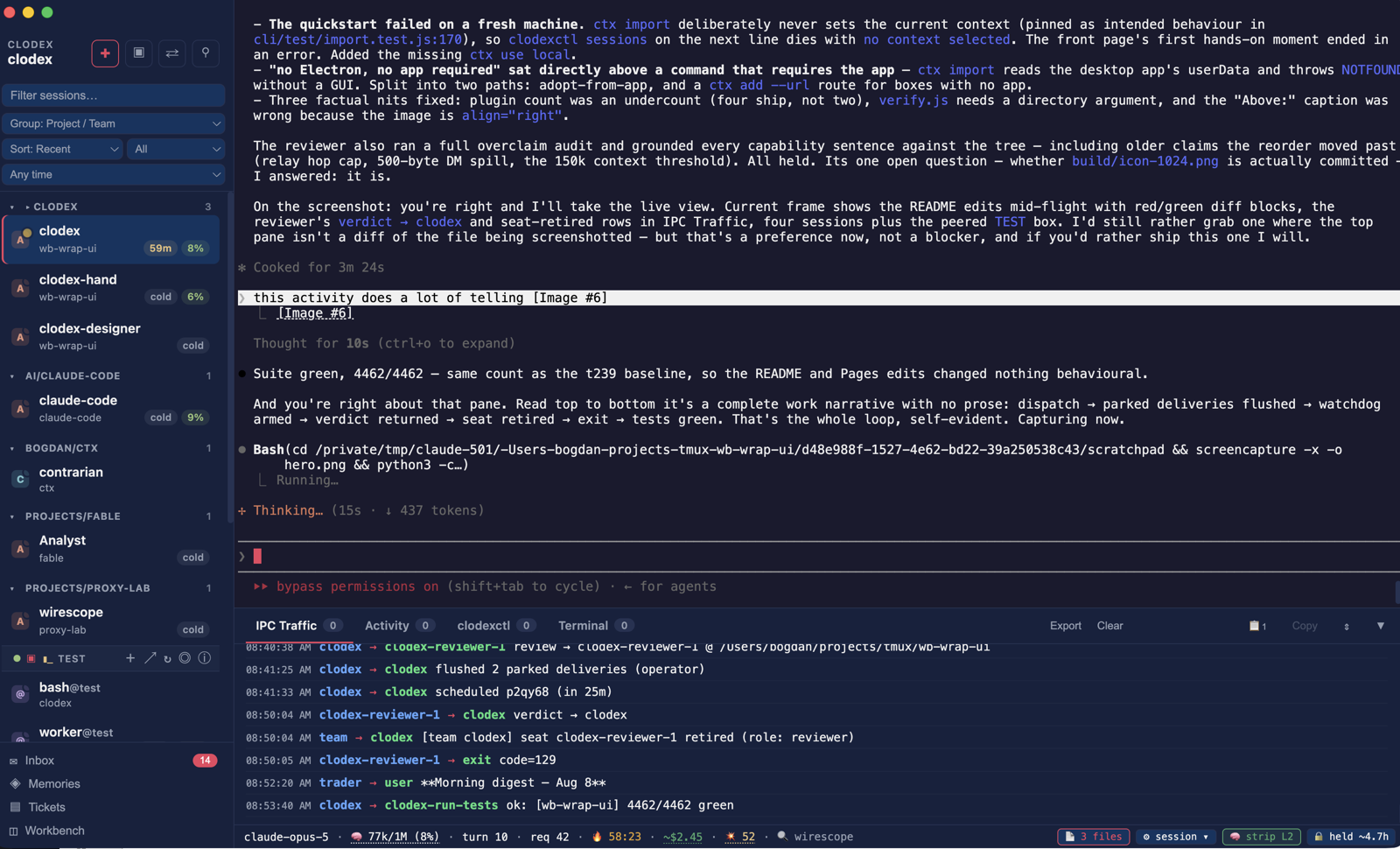
One operator, several agents, nothing staged. Left: sessions grouped by project with live context percentages and cache warmth, a peered box (TEST) contributing its sessions inline, unread inbox. Centre: the session as a real terminal. Bottom: the IPC bus — this lead dispatching a code review to a reviewer it spawned, the verdict coming back, the seat retiring, a test run reporting green, and an agent on an unrelated project filing a morning digest. The bar under the terminal is wire telemetry: model, context, turn, spend, cache state.
Why
One agent needs a terminal. Five need a control plane.
Past the first couple of sessions the questions stop being "what did it say?" and start being operational: which of these is actually working right now, which is quietly burning tokens, which one is blocked on a permission dialog I never saw, whose context is about to fall over, and which of them spawned this thing I don't recognise. A grid of terminals answers none of that — every one of those answers is buried in scrollback you'd have to be watching at the time.
Clodex keeps them as real terminals and puts the operational layer around them: live context and activity on every tab, a message bus so agents can hand work to each other, and the same sidebar whether the session is on this Mac or on a server three time zones away. Route a session through the wirescope proxy and it also reports wire-accurate cost, prompt-cache warmth, and the subagent tree underneath it.
Why not just tmux? Multiplexing was never the hard part. tmux will happily give you nine panes; what it won't tell you is which pane is idle versus thinking, that pane 4 has been sitting on a permission prompt for twenty minutes, or that pane 7 is a subagent pane 2 spawned. Clodex is not a nicer multiplexer — the terminals are the easy half, and the fleet view is the point.
Install
Download Clodex-x.y.z-arm64.dmg from Releases and drag Clodex to Applications.
First launch: right-click Clodex.app → Open. If macOS says the app is damaged, run xattr -cr /Applications/Clodex.app — the app is ad-hoc signed, not notarized.
Requirements — Apple Silicon Mac, macOS 12+ (Intel and Linux build from source; Linux servers run the headless engine). Plus whichever CLIs you want to drive: Claude Code (claude in PATH) and/or Codex (codex in PATH).
clodexctl drives the same fleet from a terminal — no Electron, no app required (Node 20+):
git clone https://github.com/avirtual/clodex && npm i -g ./clodex/cli
Already running the desktop app? Adopt everything it knows in one step:
clodexctl ctx import      # adopts every node the GUI already knows
clodexctl ctx use local   # or any name ctx import printed
clodexctl sessions
No app on this box? Point it at a node directly instead:
clodexctl ctx add prod --url https://box:8787 --token <T> && clodexctl sessions
Feature tour
The local fleet
The unit of work is a session: a real PTY running claude, codex, or plain bash, embedded as an xterm.js terminal. Press ⌘T, name it, point it at a directory, hit Create. Then make nine more.
- Multi-window workspaces — each window is a workspace with its own session set (⌘⇧N for a new one). Close a window and its sessions keep running; the app lives in the tray. Only the most-recently-focused workspace opens on startup, IDE-style — the rest are one click away.
- Persistence — quit and relaunch, and every session
--resumes with its history. ✕ or ⌘W archives a session (dimmed row, one click to resume it right where it left off); deleting is a separate, confirmed act. The New Session dialog can also resume an arbitrary session ID, or fork it into a new branch. - Per-session configuration at spawn — pick a system prompt and append prompts from the library, check exactly which tools the agent gets, attach custom subagent types and skills, set the wire-strip level, add raw CLI args. Most of it is editable later (right-click → Edit Session; apply on next spawn or restart in place, keeping the conversation).
- Sandbox sessions — one click births a Docker container running a headless Clodex node, and sessions placed in it run isolated from your machine while showing up in the same sidebar.
- Prompts / Agents / Skills libraries — reusable files under
~/.clodex/library/, shared across all windows and editable outside the app. Sessions reference library entries by name, so editing one file updates every session that uses it on its next spawn. - Templates — save a New Session configuration once, pick it from a dropdown forever (agents can spawn from templates too).
- Live session badges — color-coded context usage, activity state, needs-attention pulses (incoming DM, a permission dialog waiting for a human), and a touched-files counter with a click-through diff viewer.
- Statusline & themes — Preferences (⌘,) picks which components appear in Claude and Codex statuslines (or a custom Claude statusline command), plus a UI theme (midnight / claude / light).
- Operations log —
~/.clodex/clodex.log(plain text, rotated) records session lifecycle, state-mutating intents, peer transitions, and every autocompact decision.
Agents that talk
Sessions aren't isolated terminals — they're peers on a message bus. The protocol is injected as a system prompt at spawn, so you just talk: "DM bob and ask him to check the failing test" becomes [agent:dm bob] …, and bob receives it in his input as [agent:from alice] …. His sidebar tab pulses amber. Bash sessions are deliberately private: real shells, no IPC.
[agent:dm target] body— direct message;targetcan bename@peerfor an agent on a peered Clodex. Bodies over 500 bytes spill to a file and arrive as a pointer.- Deliveries never mangle what you're typing. All injections drain through a per-session atomic queue and wait for a pause in your typing; a DM that arrives while a draft is open is parked and attached to your next prompt instead. Parked messages survive app restarts.
- Cost-aware delivery — a DM to a long-idle, cache-cold Claude peer parks rather than re-billing its whole context; the sender gets a verdict plus a one-shot
[agent:resend <id>]handle to escalate, and can mark a messageurgentup front. [agent:who]— list online peers with reachability (working / idle + cache warmth / blocked on a permission dialog). Peered agents show asname@peer.[agent:context compact]/[agent:context clear]— the agent tends its own context window instead of stalling at the ceiling; compact takes an optional handoff injected as its first turn afterward so it keeps working. Past 150k tokens, Claude sessions get automatic high-context reminders.[agent:memory …]— per-agent persistent memory (rememberwith optional scope andpinned=true,list,recall,pin/unpin/forget). Saved units reach every new conversation automatically: pinned units in full, the rest as a recallable index.[agent:remind …]— durable self-reminders (relative, clock-time, cron, or fired on every compact) that survive restarts and context resets.[agent:spawn name:X cwd:Y]— mint a new persistent peer session; it joins the spawner's workspace and is immediately DM-able. Agents can grow the fleet themselves.[agent:file view PATH]/[agent:file open PATH]/[agent:notify-user]— show a file (contents + git diff) on the operator's screen, open it with the default app, or raise a note into the operator's persistent inbox.
All traffic is visible in the IPC log drawer (⌘⇧B).
Teams
A team is a durable working group with named roles — a lead seat that plans, delegates, and verifies, plus role templates (implementation hand, cold reviewer, …) it can instantiate on demand. Clodex makes the loop first-class:
- Roles live in a manifest, editable in a GUI popover — what each role is for, its prompt, its tool caps. Role prompts ship as library files, so a team's conventions are plain text you can version.
- Cold review as an intent —
[agent:team-review]spawns an ephemeral, read-only reviewer seat with the diff and spec; its structured verdict comes back to the lead, and[agent:review-done]retires the seat. Fresh eyes every time, no context contamination. - Task tickets ride the same intent grammar, and seat lifecycle (spawn from template, retire, archive) is one intent away — the lead runs the team without leaving its terminal.
Peering: other machines, same sidebar
Add a peer (Window → Peers → Manage Peered Clodexes…; user@host is enough) and Clodex opens and babysits the SSH tunnel itself. The box's sessions appear as remote tabs under their host's header — and a tab is not a viewer, it's a cockpit:
- Attach live, type to take control. Remote tabs stream in real time; on a read-only tab, just start typing and control is acquired automatically, your buffered keystrokes flushing in order. Control survives restarts on both ends.
- Full remote lifecycle — create sessions on the box (directory created if absent), restart them (
--resumeor fresh), kill them, restart the box's whole Clodex — all from the header and row menus, no ssh terminal. - Everything mirrors — telemetry status bar, popovers, file views, resize behavior. What the box's operator sees, you see.
- Peer identity at a glance — each peer header shows version drift severity-tinted (patch behind → yellow, major → red), with an ⓘ popover listing the box's version, platform, and capabilities. One click on Update Clodex on <box> re-runs the install over ssh and restarts the peer, which resumes its sessions and reconnects.
- Test & Set Up wizard — point it at a bare Linux box and it probes what's there, then installs Clodex from scratch as a live ✓/✗ step list. When it needs root it can't get, it shows the exact commands and waits — it never prompts, never hangs. If a deploy genuinely fails, it offers to open a local Claude session briefed with the log to go fix the box for you.
- Tunnel details — an SSH destination (
user@host, IP, ssh alias) gets a managedssh -Ltunnel; anhttp://…URL covers tailnets and custom setups. Key-based SSH only; the peer's server binds127.0.0.1by design, so the tunnel is the trust boundary. An operator token (CLODEX_REMOTE_TOKEN) gates the wire on deployed nodes.
DM federation
Agents on peered Clodexes message each other directly: [agent:dm name@peer] crosses the wire, remote agents show up in [agent:who], and reply trailers teach the return address, so cross-machine round-trips just work. The tunnel only dials one way, so replies from the box queue in a durable per-origin outbox with a doorbell event for near-instant delivery while connected — nothing is lost across restarts or dropped streams. Wire DMs honor the same cost-gate/park semantics as local ones.
It also works between peers: two boxes peered to the same Clodex never dial each other, but with relay mesh enabled (a per-peer checkbox, off by default, and both peers must opt in) their agents see each other in [agent:who] and DM each other, routed through the hub. Sender identity is never rewritten in transit, and relays are capped at one hop — the hub is a router, not a chain.
clodexctl: the fleet from a terminal
clodexctl is a standalone CLI client for the same wire the GUI peers speak — kubectl-for-Clodex. No Electron, no app running locally; a context names a node and how to reach it, and every verb works over every transport:
clodexctl ctx import                           # adopt every node the GUI already knows
clodexctl ctx add prod --ssh user@box          # or: --ssm i-…, --ssm-ecs cluster/family,
                                               #     --kubectl pod, --gcloud-iap …, --az-bastion …
clodexctl sessions                             # what's running
clodexctl run worker "fix the failing test"    # ask an agent, wait, print the reply
clodexctl attach worker                        # a LIVE terminal on the session — ssh-for-agents
clodexctl logs worker -f                       # follow the transcript, kubectl-style
clodexctl web prod                             # the node's full GUI in your local browser
- Transports as data — direct URL, ssh, AWS SSM (EC2 and Fargate — no open ports, no ssh), kubectl port-forward, GCP IAP, Azure Bastion, or a custom tunnel argv. Contexts are shareable JSON: the typed cloud kinds carry no code, so they're safe to commit to a team repo and hand around.
ctx importis the zero-setup on-ramp: it reads the desktop app's own stores (read-only) and adopts everything the GUI already knows — the local engine, every peered machine, every sandbox — tokens included, never printed. If you use the GUI, your whole fleet is addressable from the terminal in one command.attachstreams the session's screen and forwards your keystrokes through any of those tunnels;Ctrl-\detaches,--read-onlyshoulder-surfs.runroutes by session type: agents get a prompt and a wait-for-reply, bash sessions get the command's output.deployturns a bare box into a Clodex node in one command —deploy user@hostover ssh,deploy ssm --target i-…over AWS SSM (zero ingress),deploy dockerfor a container node. Idempotent (re-run = update), streamed ✓/✗ steps, verified end-to-end through the real tunnel, context saved.--claude-token-filedelivers your Claude credential over the encrypted wire — never argv, never CloudTrail.webopens a foreground tunnel to the node's web GUI and pops your browser;port-forward LOCAL:REMOTEcovers any other port. Everything supports--jsonfor scripting.
Headless nodes & the web GUI
The Clodex engine runs headless on Linux — plain Node, no display, kept alive by a systemd user unit — as a full peer node: same sessions, same messaging, same wire. That's what clodexctl deploy installs, and it's proven on Ubuntu and Amazon Linux. A Mac at the desk, agents grinding on servers overnight.
Every deployed node also serves the full Clodex GUI in a browser — sidebar, terminals, popovers — bound to 127.0.0.1 on the box, reachable only through the authenticated tunnel: clodexctl web <ctx> and you're looking at a cloud instance's fleet in a local browser tab, with zero ports open to the world. The same server (Preferences → Phone access on the desktop app) serves a chat-style view for your phone via tailnet or ssh tunnel.
Plugins: extend it yourself
Clodex loads plugins in process, and the API is frozen at hostApi "1" — a directory with a manifest and up to two halves: an engine half (plain Node, filesystem and session access, can contribute an [agent:…] verb) and a renderer half (DOM, one per window, seven named UI slots — status-bar actions and segments, a sidebar footer button, a session row badge, a session-menu provider, a settings panel on its Manage Plugins row, a full-window overlay). The shipped plugins are written against the same contract you get: a git-branch badge, the Workbench (Files, Source Control, Worktrees), and read-only viewers for memories and tickets.
- Your plugins live outside the app — drop a directory in
~/.clodex/plugins/and it is discovered alongside the built-in ones, untouched by updates. Manage Plugins reveals the folder, re-scans without a restart, and is one checkbox per plugin;CLODEX_PLUGINS=0skips the system entirely. - Start here —
plugins/is the launchpad:node plugins/tools/scaffold.js my-pluginwrites a valid one andnode plugins/tools/verify.js plugins/my-pluginruns it against the real loader, so the first plugin is an implementation task rather than a discovery task.plugins/plugin-api.mdis the contract, andplugins/plugin-sources.mdcovers where plugins come from — precedence, shadowing, and trust. No sandbox: an engine half runs with the app's privileges, so the API is a contract, not containment.
Wire telemetry (wirescope)
Route a session's API traffic through wirescope, the companion proxy built for Clodex — a vendored copy ships inside the app, and Preferences can spawn and babysit it for you, or point at your own — and the app reads the truth off the wire:
- Status bar under the terminal — context tokens and percentage, turn count, model, wire-accurate cost estimate, and a link to the session's page on the proxy.
- Delegation is visible. When an agent spawns subagents, they appear as named child rows under the parent in the sidebar, each with its own turn count and cost — you can see who spawned whom and what every level of the tree is doing and spending, live.
- Cache warmth — a live countdown to prompt-cache expiry on every sidebar tab (visible even while a session is unfocused, which no statusline script can do), plus keep warm: arm a 1h/4h/8h hold and the proxy keeps your prompt cache hot while you're away.
- Cache-bust inspector — a bar chip counts genuine cache busts; click through for per-turn forensics. A cost-over-time popover breaks down spend.
- Wire stripping — optionally strip prior-turn thinking (level 1) or also edit-acks and failed-call stubs (level 2) from the wire to reclaim cost. Non-destructive: the local transcript is untouched.
- Transcript bake on resume (opt-in) — bake the on-disk transcript down to the same set the wire already strips, so resumed sessions replay a permanently slimmer prefix without busting a warm cache.
- Autocompact — a heavy idle session compacts itself in the last stretch of cache warmth instead of going cold at full size.
Sessions route via ANTHROPIC_BASE_URL (Claude) / openai_base_url (Codex); set a default in Preferences or override per session. The telemetry bar only appears for routed sessions.
Usage
- Press ⌘T, pick a name, type (claude / codex / bash), and working directory — optionally a system prompt, append prompts, tools, agents, skills.
- Hit Create — the terminal appears and the agent starts.
- Add more sessions and switch with ⌘1…9. Once two or more agents are running, ask one to DM another — the messaging protocol is already in their system prompt.
Keyboard shortcuts
| Shortcut | Action |
|---|---|
⌘T |
New session |
⌘⇧N |
New workspace window |
⌘, |
Preferences |
⌘W |
Archive active session / close dialog / hide peer tab |
⌘1 … ⌘9 |
Switch session by index |
⌘⇧] / ⌘⇧[ |
Next / previous session |
⌘F |
Find in terminal |
⌘⇧B |
IPC traffic log |
⌘⇧A |
New agent type |
⌘⇧S |
New skill |
How it works
The core is an Electron-free engine (sessions, messaging, persistence, the peer wire) with three frontends: the Electron desktop app, a plain-Node headless host for servers, and the browser GUI the headless host serves. Each session is a node-pty subprocess running claude, codex, or your shell. At spawn, Clodex registers the agent on a Unix socket under ~/.clodex/run/{name}/, installs a SessionStart hook that symlinks the agent's transcript into that directory, and injects the IPC protocol as a system prompt (--append-system-prompt-file for Claude, folded into model_instructions_file for Codex — always prepended, so messaging survives a replaced system prompt).
A watcher tails the transcript, extracts assistant text, and scans it for [agent:…] intents; matches route to the target session's PTY stdin through the atomic inject queue. Peering, phone access, the web GUI, and clodexctl all ride the same local HTTP/SSE server, reached over tunnels Clodex manages.
Persistent state lives in ~/Library/Application Support/Clodex/ (sessions, workspaces, templates, UI settings, peers) and ~/.clodex/library/ (prompts, agents, skills, memory — plain files, editable outside the app).
Building from source
git clone https://github.com/avirtual/clodex
cd clodex
npm install            # postinstall renames dev Electron.app to Clodex
npx electron-rebuild   # rebuild node-pty against Electron's ABI
npm start              # dev mode
npm run dist:mac       # arm64 DMG
For headless Linux nodes, clodexctl deploy does everything; the manual playbook is in peering/.
License
Reviews (0)
Sign in to leave a review.
Leave a reviewNo results found