agent-memory-kit
Health Gecti
- License — License: MIT
- Description — Repository has a description
- Active repo — Last push 0 days ago
- Community trust — 31 GitHub stars
Code Gecti
- Code scan — Scanned 12 files during light audit, no dangerous patterns found
Permissions Gecti
- Permissions — No dangerous permissions requested
This provides a ready-to-use project structure that gives AI coding agents a persistent memory. It allows the agent to remember project context, decisions, and progress across different sessions, surviving context compression.
Security Assessment
The overall risk is Low. It does not request dangerous permissions and the automated code scan found no malicious patterns, hardcoded secrets, or dangerous behaviors. Since it is written in Shell, users should be aware that it executes local filesystem commands. However, the setup simply creates local directories and files (like a memory folder and journal). There are no signs of unauthorized network requests or external data transmission. Your project data remains strictly on your local machine.
Quality Assessment
The project is highly active, with its last push occurring today. It uses the standard permissive MIT license. The documentation is excellent, clearly explaining the setup and how the multi-project tracking system works. The only notable drawback is its low community visibility, currently sitting at only 6 GitHub stars. This means it has not yet been widely vetted by a large audience, so you are relying primarily on the creator's code rather than broad community testing.
Verdict
Safe to use.
Memory for Claude Code that survives the session boundary — install the plugin into any repo: a hot cache injected every session under three hook-enforced caps, per-session handoffs, audit-driven promotion into knowledge and rules, plus agent orchestration and QA layers. Zero deps.

Claude Memory Kit
The memory plugin for Claude Code.
Your agent remembers every client, every brief, every decision — across sessions. Three lines to install, nothing to maintain.



"I wake up already knowing where we left off." — the agent this kit builds.
Install it into a repository you already have:
/plugin marketplace add awrshift/claude-memory-kit
/plugin install memory-kit@memory-kit
/memory-kit:setup
Then work as usual, and type /memory-kit:close-session when you're done. That's the whole
loop. Free — it runs on your existing Claude Pro or Max subscription and calls nothing else.
Upgrading later takes two steps, and the second one needs the FULL plugin@marketplace
identifier — the bare name resolves to nothing and the CLI answers Plugin "memory-kit" not found:
claude plugin marketplace update memory-kit     # refresh the catalog
claude plugin update memory-kit@memory-kit      # then the plugin itself
Restart the session to apply. Your repository is untouched by an upgrade — memory, handoffs and
knowledge live in your repo, never in the plugin — so /memory-kit:setup does not need re-running.
The problem
Every session starts from zero. Yesterday you locked the brand voice; today you explain it
again. Last week you found the right angle; this week you can't reconstruct how. The first ten
minutes of every session go to re-explaining what Claude already knew.
Built for people running many projects or clients — one install per repository, each with
its own accumulated memory, all with the same working discipline.
(The story: 1000+ sessions, 12 months in production, one operator.)
What the three lines do
/memory-kit:setup reads what your repository already has, then proposes — never writes first:
- the memory layers it is missing (
.claude/memory/MEMORY.md,context/handoffs/,knowledge/); - who owns memory: the kit, or Claude Code's built-in auto memory. Running both means two
writers and two truths, so the kit makes you pick (why it matters); - permission rails (
denyon forced pushes and secret reads,askon the destructive classes); - the
.gitignorelines — private memory by default, shared if your team wants it.
Nothing else changes in your repo. Your CLAUDE.md is yours; the kit never writes to it.
Starting from zero instead of an existing project? Make an empty folder, run claude in it, and
use the same three lines.
[!TIP]
Say/memory-kit:tourafter setup — Claude walks you through the system using your own files.On v5 (the clone-the-repo layout)? Your memory files stay where they are:
migration in 4 steps.
Who it's for
| ✅ You, if | you work with Claude Code daily across sessions · you juggle several projects or clients · you keep re-explaining the same context · you build with subagents and want the discipline that keeps them honest |
| ❌ Not for you, if | you use Claude Code occasionally for one-off edits · you want zero process (this kit asks you to close sessions) · you need memory shared live across a team (it is files in git, not a service) |
Before / after
| Without Memory Kit | With Memory Kit | |
|---|---|---|
| New session | "What were we working on?" | Opens with last session's handoff already loaded |
| After 10 sessions | Nothing accumulates | Searchable base of decisions, tones, patterns |
| Multiple clients | Chaos | Each client has its own folder, everything in place |
| Context compaction | Silently loses data | Hook blocks compaction until state is saved |
| Memory bloat | Grows until useless | Three size caps, watched automatically every session |
How a session works

Three steps. That's the entire workflow:
1. Open a session — Claude wakes up already knowing where you left off
A hook injects, before you type anything: your hot cache, the handoff the previous
session left, memory-health stats, and the knowledge index. You do nothing — you just see
"here's where we left off" and continue. (After a /compact, it re-injects what compaction
dropped.)
2. Work as usual — the habits run without you asking
Talk to Claude. Write copy. Do research. Lock the tone. When something worth keeping comes up,
Claude saves it as a dated one-liner and tells you "saved". Hooks run silently: compaction is
blocked until state is written, and an edit to an existing test file has to be confirmed.
3. Close the session — the note to tomorrow's you
Say /memory-kit:close-session. Claude doesn't just dump logs — it audits: "noticed you rejected
em-dashes on three different dates — make it a tone-of-voice rule?" You say "yes", it writes.
Then it leaves a note for tomorrow-you. Tomorrow's session opens with that note
already loaded.
Where memory lives
flowchart LR
    T([you talk]) --> H[".claude/memory/MEMORY.md<br/>hot cache · dated one-liners<br/>180 lines / 32 KB / 3000 chars"]
    H -->|"/close-session"| N["context/handoffs/*.md<br/>one note per session"]
    H -->|"same pattern on 3+ dates<br/>and you say yes"| K["knowledge/concepts/*.md<br/>facts + rationale"]
    K -->|"stable, mechanical"| R[".claude/rules/*.md<br/>always / never"]
    N -->|"newest one injected"| S([next session])
    H -->|"injected in full"| S
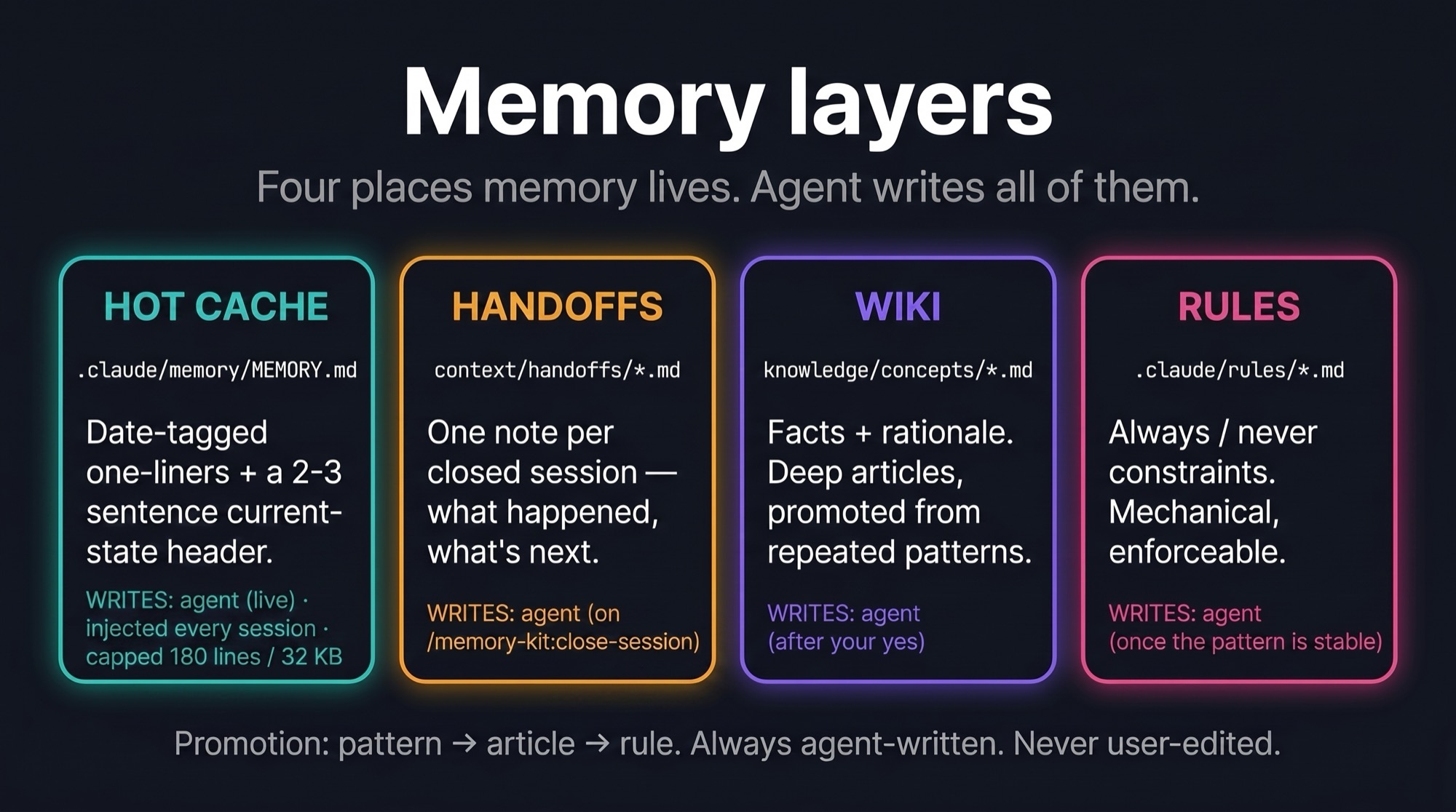
Four places, each answering a different question. Claude writes all of them — you only talk.
| Layer | Site calls it | Answers | Written |
|---|---|---|---|
.claude/memory/MEMORY.md |
hot memory | "what patterns repeat" + "where things stand" | while you talk |
context/handoffs/*.md |
the note to tomorrow's me | "what happened, session by session" | at /close-session |
knowledge/concepts/*.md |
cold memory | "facts and rationale by topic" | after your "yes" |
.claude/rules/*.md |
habits | "what must always / never happen" | after months of stable pattern |
A pattern's journey: noticed in conversation → saved as a dated line in MEMORY →
repeats on 3+ dates → Claude proposes promotion → your "yes" → becomes a knowledge article or
a rule, and the raw lines are pruned. Observation → candidate → law. You approve every step.

Why it doesn't rot
Memory systems don't usually die loudly — they rot quietly: a "current state" file that froze
three weeks ago but still looks authoritative; a memory file that grew so dense it's unreadable.
It is built around the failure modes we hit in real long-running use:
- Three size caps on MEMORY.md (180 lines / 32 KB / 3000 chars per line), checked by a hook
at every session start. Three, because line count alone lies — content can densify into
ever-longer lines while the line count stays flat. When a cap trips, the session opens with
an audit prompt instead of silently growing. - Handoffs instead of a rolling status file. One immutable note per closed session; the
newest one is injected automatically. A note that says its date can't pretend to be current. - Stale-reference detector. Every session start, file paths mentioned in memory are checked
against disk; anything that moved or vanished is flagged. A memory that references dead files
is the #1 way agents confidently act on outdated beliefs. - The header rule. The top of MEMORY.md is "current state in 2-3 sentences", replaced at
every close — never a stack of "previous session" paragraphs. - The memory is actually in context. v6 injects the hot cache itself at session start, and
re-injects it after compaction. (v5 only measured it while claiming it was always loaded —
a year-long silent failure, found by asking "prove it's in context", not by reading the code.)
Multiple clients
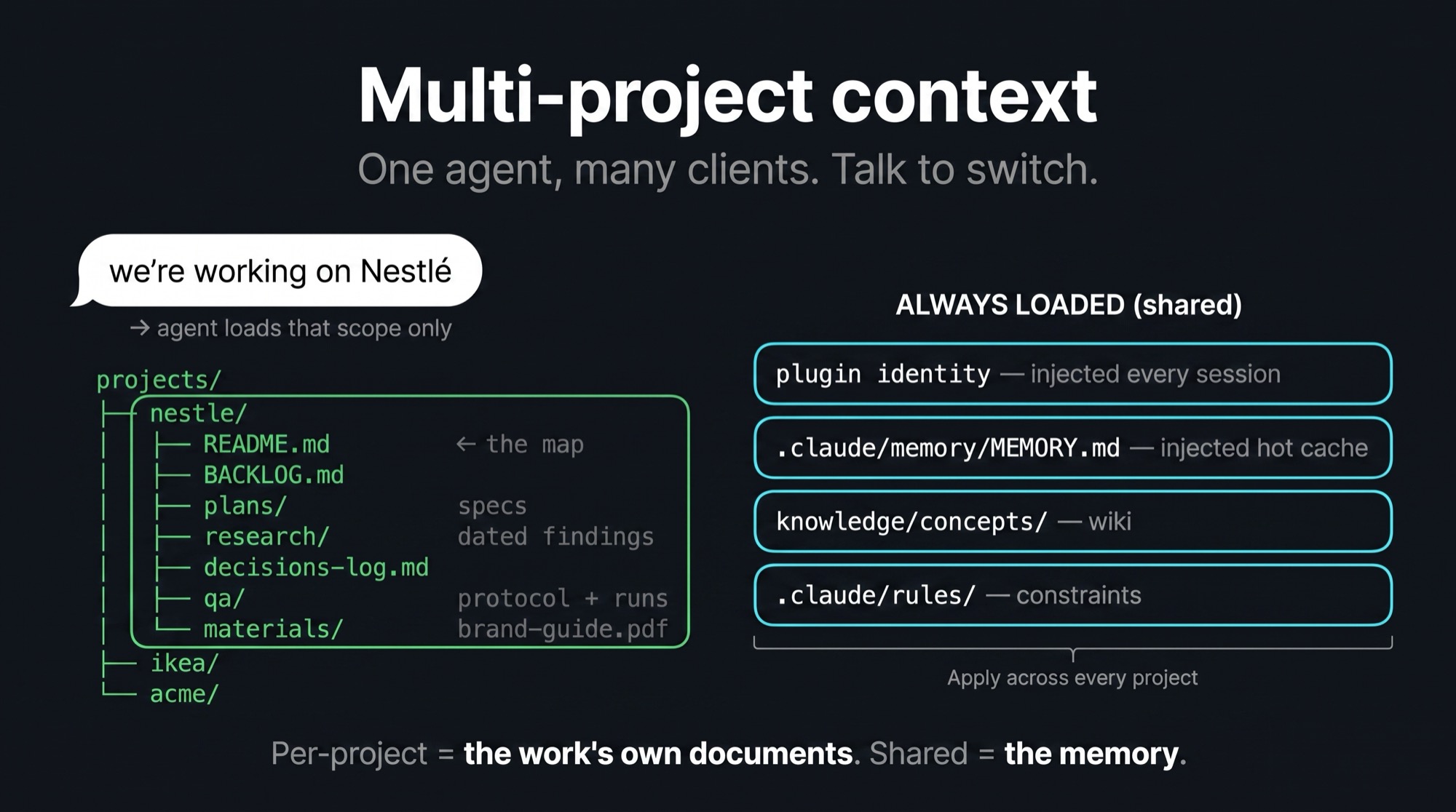
Two shapes, both supported. One repo per client — install the plugin in each, and every
client gets its own memory with the same discipline. Or one workspace, many client folders:/memory-kit:setup creates projects/<name>/ per client (plus experiments/<name>-YYYYMMDD/
for throwaway R&D), shared layers (memory, wiki, rules) load for all of them, and one project's
own documents load when you name it.
The line between the two is memory vs paperwork: what Claude learned is shared — patterns,
knowledge articles, rules. What the work produced belongs to one project: its backlog, its
specs, its research, its decisions ledger, its QA protocol. Each project folder opens with aREADME.md that maps where those live, so "where does this plan go" has exactly one answer. A
single-product repository gets one project folder — same shape, count of one.
Say "we're working on Nestlé" — Claude unloads the other clients and loads that scope only.
Hooks and skills

Four hooks run silently, all inside the plugin — nothing to maintain in your repo. One injects
your memory and the working agreement at every session start (and after each compaction), one
blocks compaction until state is saved, one asks before an existing test gets edited, one logs
the close.
Everything else is a skill, and skills cost nothing until you invoke them:
| Skill | For |
|---|---|
/memory-kit:close-session |
the end-of-session ritual — capture, promote, hand off |
/memory-kit:memory-audit |
the cap-trip surgery: what leaves the hot cache, by approved plan |
/memory-kit:system-audit |
the periodic seven-lens sweep of the whole system, evidence-backed |
/memory-kit:setup · :tour |
adopt the kit here · walk through it on your own files |
/memory-kit:session-review · :second-opinion |
adversarial review of a session · of one decision |
/memory-kit:qa-sweep |
multi-lens agent QA of a running product |
Everything in plain text files. No databases. No external services. git checkout restores anything.
Beyond Claude Code
Your memory never lives inside the plugin — it is plain markdown in your repository, and other
agents can follow it too. On Codex CLI the very same manifests install directly:
codex plugin marketplace add awrshift/claude-memory-kit
codex plugin add memory-kit@memory-kit
All the kit's skills appear in a Codex session (memory-kit:<name>). On Cursor, the same
git URL adds the marketplace (cursor-agent plugin marketplace add …), all 8 skills load, and
its CLI even executes the session-start hook — memory injection included. Elsewhere the hooks
don't run, so /memory-kit:setup offers a small protocol block for your AGENTS.md: read
memory first, respect the caps, save before compaction, close with the ritual. Three honest
tiers: enforcement on Claude Code (and, measured, session-start injection on Cursor) · the
same discipline as instruction on hosts that auto-load AGENTS.md (verified on Codex and
Cursor) · and plain files anywhere else, including CI. Per-host reality checks:
docs/specs/.
Agent-orchestrated work (opt-in)
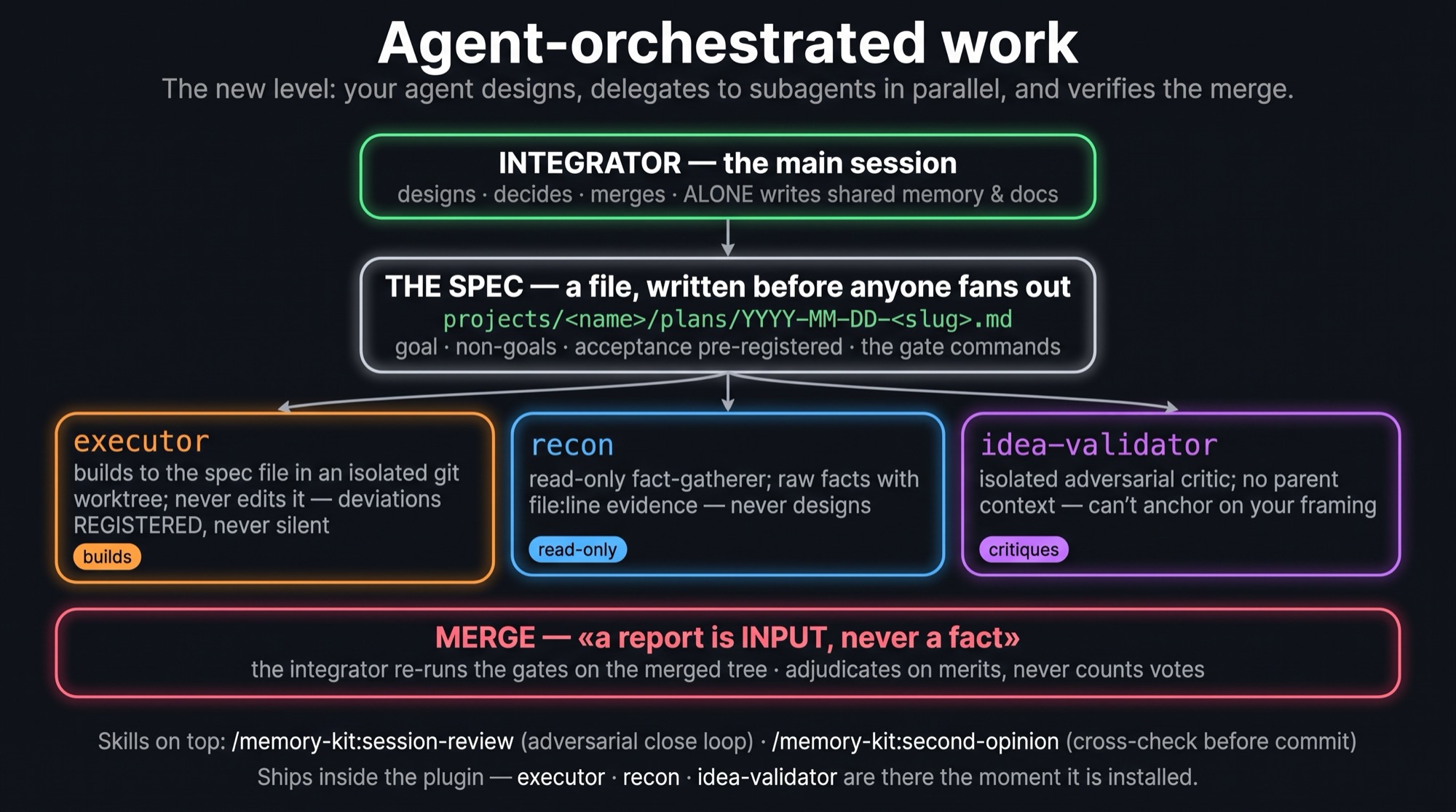
When you use the kit to BUILD things — software, agent systems, research pipelines — there's a
next level: your agent stops doing everything in one thread and starts orchestrating agents.
The main session designs and decides — writing the spec as a FILE
(projects/<name>/plans/YYYY-MM-DD-<slug>.md, acceptance pre-registered before anything is
built); executor subagents build to that spec in isolated git worktrees; recon gathers facts
read-only; idea-validator attacks the design from a fresh context. The integrator merges, re-runs the gates on the merged tree, and treats every subagent
report as INPUT — never as a fact.
Two skills close the loop: /session-review (an adversarial review of the session's work by
independent reviewers before it sets) and /second-opinion (cross-check a high-stakes answer
before committing to it).
v5.2 makes the loop self-improving. Every nontrivial diff passes an automated code review
before merge; every confirmed finding is logged by class, and a class that recurs three times
is promoted into the cheapest layer that prevents it forever — a lint rule, a line in an agent
definition, a review-brief line. Rules that stop firing get dropped. Your review process
compounds instead of repeating itself.

And when what you're building is a user-facing product, the QA layer puts agents on the
other side of the screen: /qa-sweep fans out qa subagents over the running app — five
adversarial lenses (user-flow · edge-state · honesty · contract · ux-critique), parallel
isolated browsers, findings that must carry machine-checkable evidence — and nothing becomes a
ticket until the integrator reproduces it. A calibration ladder (seeded-defect recall runs,
brief edits kept only on a measured delta) keeps the lenses sharp.
All of it ships in the same plugin — the agents and skills are simply there when you invoke
them. The one always-on piece is optional and deliberately tiny: /memory-kit:setup offers to
drop a ~20-line orchestration.md into .claude/rules/, which is what makes the invariants
binding rather than advisory. Depth stays in the plugin's reference/, read on demand.
Distilled from hundreds of real multi-agent sessions in the maintainers' production repos.
FAQ
How is this different from Claude Code's built-in memory?Claude Code ships auto memory: Claude writes notes to itself as it works, and the index is
loaded every session. It is effortless and it is good — but nobody decides what enters it, the
notes are Claude's own summary rather than your words, and the record lives outside your repo
(machine-local, not in git, not reviewed in a PR).
The kit is the opposite trade: nothing is remembered without a decision. Every entry is
dated, so repetition across days is visible; anything promoted to a knowledge article or a rule
needs your yes; everything is a plain file in your repository, so git log shows how the
project's memory evolved and a teammate can read it.
They overlap enough that running both means two writers and two truths, so/memory-kit:setup asks you to pick. Either answer is legitimate — and if you pick the kit, it
switches the built-in one off explicitly rather than leaving you with a silent second memory.
Yes. You talk to Claude in plain language. "Read the client brief and propose three newsletter
topics" — works. Install is one command. You never edit the memory files yourself — that's the
kit's first rule: you only talk, Claude writes.
The kit itself is free, open source. You need a Claude Pro or Max subscription (which you
probably already have). No additional cost.
Yes. Everything is stored on your computer in plain text files. Nothing leaves. Your personal
layers — MEMORY.md and the session handoffs — are gitignored by default, so they stay private
even if you push the repo (the kit creates your MEMORY.md from a template on first run).knowledge/ articles and .claude/rules/ ARE tracked — they're your curated wiki, meant to
live in the repo; keep the repo private (or prune them) before publishing it anywhere.
Yes. On install, tell Claude you already have a project — it analyses it and integrates.
What if I forget to run /close-session?Nothing breaks. Safety hooks save progress automatically every ~50 messages and before any
context compaction. /close-session is the cherry on top — the deliberate audit where patterns
get promoted to permanent knowledge and the handoff note gets written.
The kit's tracked files revert with one git checkout. Your private layers (MEMORY.md,
handoffs) are gitignored, so git can't restore those — but the hooks checkpoint them
continuously, and if MEMORY.md ever disappears the session-start hook recreates it from the
template. If you want your private memory versioned too, remove those two lines from.gitignore in your own (private) clone.
Retired in v6. It was demoted to opt-in in v5 for a reason — in long-running use the chronicle
was the layer that silently rotted whenever a day got skipped — and in practice nobody enabled
it: /close-session covers the same ground per session and cannot go stale unnoticed. The code
is still in git history if you want it back.
Keep your repo, install the plugin into it, and delete the copies it replaces. Your memory
entries, handoffs, knowledge articles and rules stay exactly where they are — v6 reads the same
paths. Mechanical steps: docs/CHANGELOG.md.
What's inside
This repository is the marketplace; the plugin is what you install.
.claude-plugin/marketplace.json   ← the catalog (one plugin)
plugins/memory-kit/
  .claude-plugin/plugin.json      ← the manifest
  context/identity.md             ← the working agreement, injected every session
  hooks/                          ← session-start · pre-compact · protect-tests · session-end
  skills/                         ← close-session, memory-audit, system-audit, setup, tour,
                                    session-review, second-opinion, qa-sweep
  agents/                         ← executor · recon · idea-validator · qa
  templates/                      ← what /memory-kit:setup scaffolds into YOUR repo
  reference/                      ← depth, read on demand (fact-check, parallel dev,
                                    doc governance, decisions log, review loop, QA protocol,
                                    project extensions)
docs/                             ← architecture · changelog · contributing
In your repository the kit owns only state: the shared memory layers
(.claude/memory/MEMORY.md, context/handoffs/, knowledge/, .claude/rules/), oneprojects/<name>/ folder per client or product for the work's own documents, and — if you want
it — experiments/<name>-YYYYMMDD/ for hypotheses (rough OK, distil on close, then delete).
Full architecture: docs/ARCHITECTURE.md
Version history: docs/CHANGELOG.md
Contributing: docs/CONTRIBUTING.md
Open decisions: docs/DECISIONS.md · Diagram state: docs/ASSETS.md
Origin

This is not a template written in an afternoon — it's an architecture distilled from
1000+ real sessions over 12 months of continuous daily Claude Code work, by one operator,
across very different verticals: marketing, sales, lead generation, business analysis,
research & development, and shipping production code side-by-side with backend and frontend
engineers.
One person. One agent architecture. Installed per project — each repository accumulating its
own memory, rules, and knowledge base while the working discipline stays identical. That's
exactly who it fits best: automators and consultants running many clients — three lines per
client, and memory keeps every engagement scoped, accumulated, and instantly resumable.
Everything here survived that year of production use — including the scars: the parts that
quietly rotted (the daily chronicle, the rolling status file) were retired, and what remains
is what kept earning its place. The operator's own write-up lives at
awrshift.com.
Help
Issues and PRs welcome. See docs/CONTRIBUTING.md.
License
MIT — see LICENSE.
Yorumlar (0)
Yorum birakmak icin giris yap.
Yorum birakSonuc bulunamadi