sample-aws-genai-db-modernizer
Health Uyari
- License — License: MIT-0
- Description — Repository has a description
- Active repo — Last push 0 days ago
- Low visibility — Only 6 GitHub stars
Code Gecti
- Code scan — Scanned 12 files during light audit, no dangerous patterns found
Permissions Gecti
- Permissions — No dangerous permissions requested
Bu listing icin henuz AI raporu yok.
Assess a relational database for modernization on AWS. Analyzes your real schema and queries, scores each query pattern against purpose-built engines (DynamoDB, DocumentDB, Aurora, OpenSearch, ElastiCache), and produces schema designs, migration waves and cost estimates. Runs locally with Claude Code.
Database Modernizer Assessment


Disclaimer: This is a sample project intended for educational and evaluation purposes. It requires proper review, testing, and modification before use in production environments. Use at your own risk.
The help site is at aws-samples.github.io/sample-aws-genai-db-modernizer. It has the same quick start plus other ways to run the tool, how to read the results, a sample report, an FAQ and how to contribute. The overview and quick start below are the source for those pages on the site.
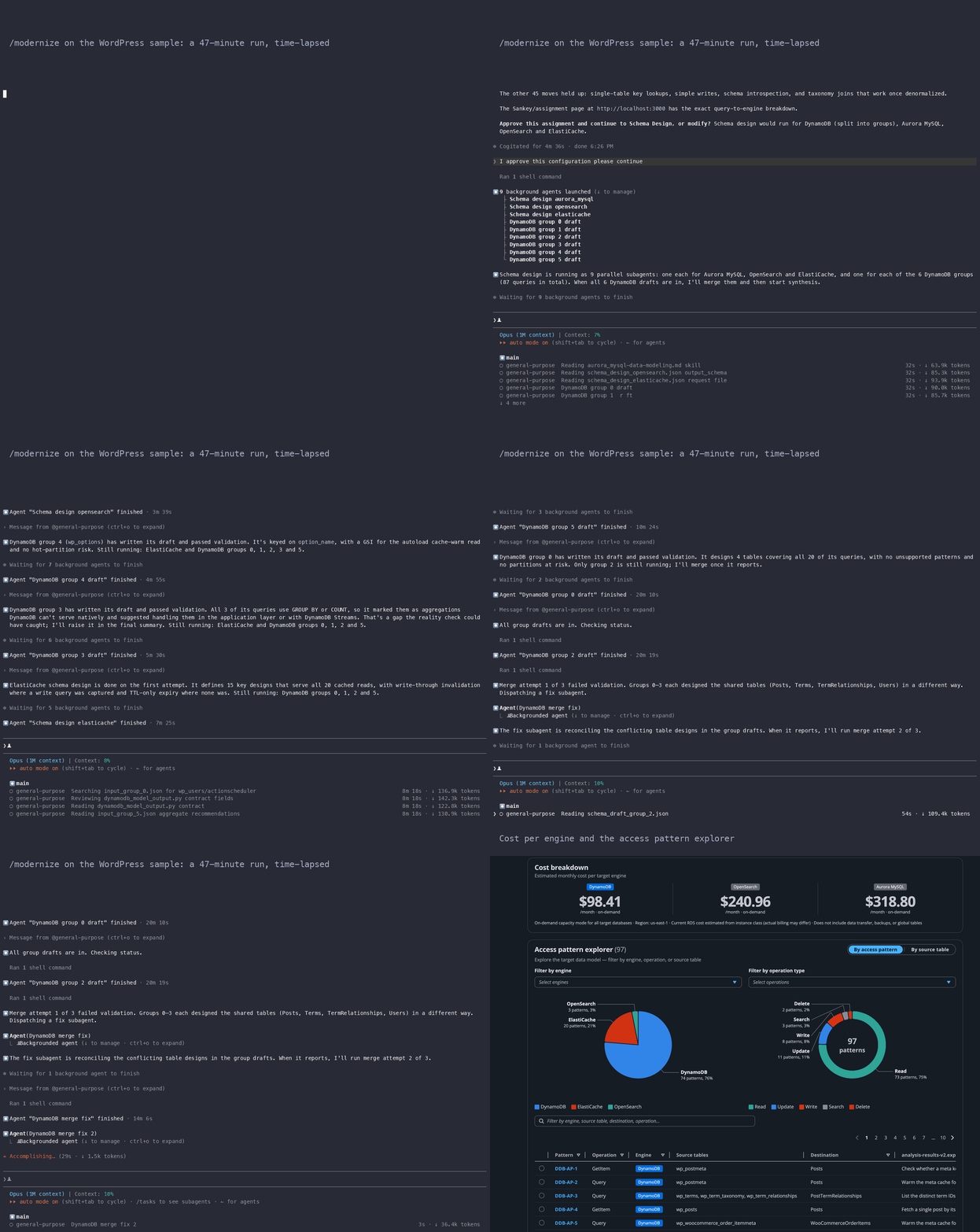
A full /modernize run on the WordPress sample (47 minutes, time-lapsed), then the local UI: the executive summary, the query flow, the cost per engine and the access pattern explorer.
Moving off a monolithic relational database raises hard questions. Which queries belong in DynamoDB? Which need a document store? What stays relational? A wrong answer can force a redesign in the middle of the project.
Database Modernizer Assessment answers these questions using your real workload. Give it the collected schema and queries of a PostgreSQL, MySQL, SQL Server or Oracle database. It analyzes every query pattern, scores each one against 6 AWS purpose-built engines, checks the resulting architecture, and produces schema designs and TCO projections you can implement.
Supported sources: PostgreSQL, MySQL, MariaDB. SQL Server and Oracle collect too (scripts/collect-sqlserver.sql, scripts/collect-oracle.sql); neither has an Aurora dialect of its own, so both Aurora engines compete on the collected workload and the assessment picks exactly one. Today that is Aurora PostgreSQL unless Aurora MySQL scores clearly higher. The move is cross-engine (dialect and schema conversion), not a lift-and-shift.
Target engines: DynamoDB, DocumentDB, Aurora PostgreSQL, Aurora MySQL as query owners, plus ElastiCache as a cache layer and OpenSearch as a search read model
Note: This project originally shipped with a hosted deployment option. Following customer feedback, it became a local tool built around Claude Code, to keep the open-source release simple to adopt.
Who is this for?
This tool is for teams that have decided to refactor their application to use purpose-built databases. It helps you figure out which queries go where and what the target schemas should look like.
Who is this NOT for?
- Lift-and-shift migrations: If you're moving a database as-is to RDS or Aurora without changing the data model, you don't need this tool.
- Tight deadline migrations: This tool guides application refactoring, which takes time. If you need to migrate by next week, use AWS DMS for a straight move.
- Teams that haven't committed to refactoring: If you're still deciding whether to modernize, start with the AWS Migration Evaluator or a Well-Architected review first.
How It Works
The modernizer runs a pipeline of phases. Each phase narrows the choice, from every possible target engine down to one checked architecture:
Collect --> Triage --> Analyze --> Assign --> Reality Check --> Schema Design --> Synthesis
| Phase | What it does |
|---|---|
| Collect | Connects to the source database (or parses offline output), extracts schema + query patterns |
| Triage | Detects workload signals (key-value lookups, text search, time-series, etc.) and selects candidate engines |
| Analyze | Runs parallel analysis agents per engine, deterministic scoring + optional LLM advisor |
| Assign | Resolves query-to-engine assignments using confidence scores and co-dependency analysis |
| Reality Check | Consolidates under-committed engines, validates with LLM, redirects unserviceable queries |
| Schema Design | Designs target schemas per engine (DynamoDB tables, DocumentDB collections, OpenSearch indices, etc.) |
| Synthesis | Produces the final migration assessment report with TCO, risk analysis, and recommendations |
The pipeline through Reality Check is deterministic. Pattern detection, scoring, assignment and consolidation run without a model. A model writes the schema designs and the executive summary, but the analysis and the engine recommendations come out the same on every run and can be audited.
See Understand the results on the help site for what each deliverable shows and how to read an assignment.
Quick Start
Prerequisites
- Python 3.12+ and uv
- Claude Code for the full pipeline (schema design and synthesis need a model); Node 22 if you want the local UI
- No AWS account, no API keys, no Docker required for the steps below
Install
git clone https://github.com/aws-samples/sample-aws-genai-db-modernizer.git
cd sample-aws-genai-db-modernizer
uv sync
Run the sample assessment with Claude Code
The repo ships a WordPress + WooCommerce sample (50 tables, 107 queries) as a zip, so unzip it first:
unzip docs/examples/wordpress/wordpress.zip -d docs/examples/wordpress/
Open the repository in Claude Code and run, with the collector file as the argument:
/modernize docs/examples/wordpress/wordpress-collection.json
By default /modernize opens the local UI next to the chat. The chat reports each phase, and the UI shows the assignment, the schema designs and the full report. When the chat says the UI is ready, open http://localhost:3000.
The run stops once, after Reality Check, for your approval. The chat shows the final engine assignment and asks you to approve it. Outside chat-only mode it first points you to the Sankey and assignment view in the UI. After you approve, the run goes on by itself through Schema Design and Synthesis to the finished deliverables. For a terminal-only run (no browser, or a headless environment), use /modernize docs/examples/wordpress/wordpress-collection.json --mode chat.
The individual commands (/collect, /triage, /analyze, /assign, /reality-check, /design-schema, /synthesize) run one phase at a time. See Use Claude Code on the help site.
Prefer no LLM, or no Claude Code?
uv run python scripts/run_assessment.py --file docs/examples/wordpress/wordpress-collection.json --db wordpress --llm-mode none
runs the deterministic pipeline (Collect through Reality Check) with no credentials and no network calls. See
Other ways to run it for the deterministic CLI, Amazon Bedrock, the local UI on its own, and how to analyze your own database.
Run It For You (early, opt-in)
For customers who can't run the collector scripts themselves, the API has an opt-in path that provisions an SSM automation instance in your VPC and runs the collection on your behalf against an RDS cluster you name. It is gated behind an environment variable because it is not yet wired end to end (tracked in #342):
export MODERNIZER_ENABLE_AUTOMATION=1
This is an early preview and not supported yet. The automation instance ID is not yet threaded through to the collector environment, the region is hard-coded, and the instance and its ingress rule have no automated teardown. Until #342 lands, run the collector scripts yourself (see Other ways to run it).
Development
# Install with dev dependencies
uv sync --extra dev

# Code quality: ruff, black, isort, mypy, markdownlint, the command validator
make lint         # or: uv run pre-commit run --all-files

# Unit, contract, property and graph tests (no network, no integration/e2e)
make test         # or: ./ci/test.sh --cov=src --cov-report=term

# Deterministic end-to-end: full pipeline, rendered HTML/PDF, UI smoke test
# (needs the `e2e` extra, Node 22 and Playwright browsers; ci/e2e.sh
# installs and builds them for you)
make e2e          # or: ./ci/e2e.sh

# Headless /modernize --auto run against a real model (both mode by
# default, chat or ui also work, on the wordpress or discourse sample),
# checked with the same deliverable checks plus a rubric-based quality
# judge; needs model access and costs real tokens
make e2e-llm      # or: ./ci/e2e-llm.sh both wordpress

# Full dev setup (pre-commit hooks, cfn-nag, etc.)
./scripts/setup_dev.sh
AGENTS.md is the working guide for coding agents, and a quick
map for everyone else: the full repo map, the test-tier table, and the
headless /modernize --auto rules. What each CI script runs and why is in
ci/README.md. Every change is also checked by an internal
validation pipeline before it merges.
Local Web UI
Run the React web interface locally to visualize results, follow each query through the context graph, and review schema designs:
# Start the API server
ARTIFACT_DIR=./artifacts uv run uvicorn src.api.main:app --host 127.0.0.1 --port 8000

# Build and serve the UI (in another terminal)
cd src/ui && npm ci
REACT_APP_API_URL=http://localhost:8000/api/v1/ npm run build
npm run serve
npm run serve uses the serve dev dependency pinned in package.json, so it works offline after the first install. It runs in single-page-app mode, so deep links such as /analysis/monitor/summary/<job_id> load on refresh.
The local API only answers requests addressed to localhost, 127.0.0.1 or ::1. To reach it under another host name, set MODERNIZER_ALLOWED_HOSTS to a comma-separated list of names.
Then open http://localhost:3000 to browse your modernization results.
Project Structure
src/
  agents/           # Pipeline agents (collector, analysis, referee, schema_design)
  contracts/        # Pydantic I/O contracts between phases
  orchestrator/     # Local phase orchestrator (the Step Functions path was removed, #175)
  storage/          # Artifact store (local filesystem, or S3 for the AWS Transform integration only)
  tools/            # Analysis tools, scoring, pattern catalogs
  api/              # FastAPI backend (local-only)
  ui/               # React frontend
  atx_orchestrator/ # AWS Transform integration (separate from the local API/UI)
scripts/            # CLI entry points and collection scripts
infrastructure/     # agent-load-test Docker image; example-ci-runner-iam.yaml and automation.yaml (opt-in live-collection bastion, #342) remain; the hosted deployment templates were removed, #175
docs/               # Help site sources, architecture docs, contracts, guides
tests/              # Unit, contract, and integration tests
Documentation
The help site is the primary place to read about using this tool. For browsing the repository directly:
| Document | Description |
|---|---|
| Architecture | System architecture and decisions |
| Agent Contracts | Pydantic I/O specifications |
| Implementation Guides | Development patterns |
Contributing
- Read the Contribute page on the help site (architecture overview, the LLM seam pattern, contracts, writing Claude Code commands, testing, release process)
- Follow TDD: write the contract, then the tests, then the code
- Submit PR with tests and documentation
See CONTRIBUTING.md for details.
Security
See CONTRIBUTING for more information.
License
This library is licensed under the MIT-0 License. See the LICENSE file.
Yorumlar (0)
Yorum birakmak icin giris yap.
Yorum birakSonuc bulunamadi