sample-okf-llm-wiki
Health Uyari
- License — License: MIT-0
- Description — Repository has a description
- Active repo — Last push 0 days ago
- Low visibility — Only 9 GitHub stars
Code Gecti
- Code scan — Scanned 12 files during light audit, no dangerous patterns found
Permissions Gecti
- Permissions — No dangerous permissions requested
Bu listing icin henuz AI raporu yok.
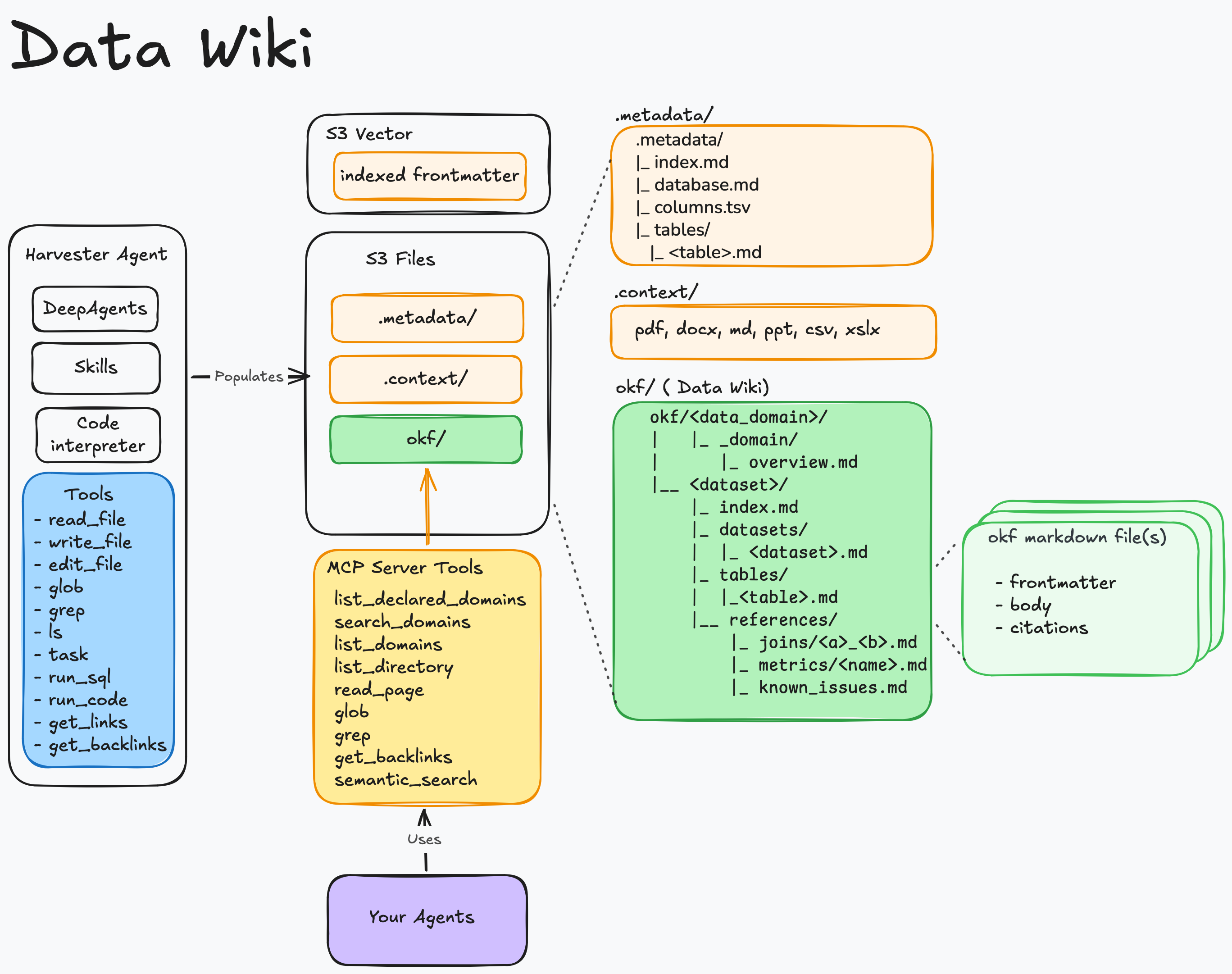
Data Wiki turns data into portable knowledge bundles following Open Knowledge Format (OKF) and serves them to AI agents over the Model Context Protocol (MCP).
Data Wiki: AI-powered knowledge bundles for your AWS data, served to agents over MCP
Data Wiki turns your AWS data sources into portable knowledge bundles and serves them to AI agents over the Model Context Protocol (MCP). It reads a source's catalog, has an LLM author a set of markdown documents describing each dataset — its tables, joins, metrics, and known issues — keeps those documents in sync as the source changes, and exposes them to agents through an MCP server. The result: agents that understand what your data means, not just what columns exist.
Two source types are supported today: the AWS Glue Data Catalog (queried via Amazon Athena) and Amazon Redshift (provisioned clusters or Serverless, via the Redshift Data API). The architecture is source-pluggable — see docs/DATA_SOURCES.md for how a source is implemented and how to add another.
The bundles are Open Knowledge Format (OKF) bundles — a bundle is a directory of markdown files with YAML frontmatter. Data Wiki maps OKF's model onto AWS as data domain → dataset → table (a dataset is a Glue database or a Redshift database). The okf/OKF_ prefix on code identifiers, resource names, and env vars refers to the format, not the product.
Note: This is a sample implementation provided for educational and demonstration purposes. You should review, test, and customize this code for your specific requirements before deploying to any environment.
Quick Links
- 📚 Using the Console — register a dataset, harvest, and browse a bundle
- 🔌 Connect an Agent (MCP) — mint credentials and query bundles from your agents
- 🚀 Getting Started — prerequisites and one-command deploy
- 🏗️ Architecture — how the pieces fit and the reasoning behind them
- 🔗 Data Sources — the Glue + Redshift sources and how to add another
- 📐 Conventions — the contract between services (S3 layout, DynamoDB shapes, env vars)
- 📘 API Reference — external API shapes the code was written against
- 📊 Benchmark — BIRD mini_dev text-to-SQL evaluation (EX 74.0, report PDF)
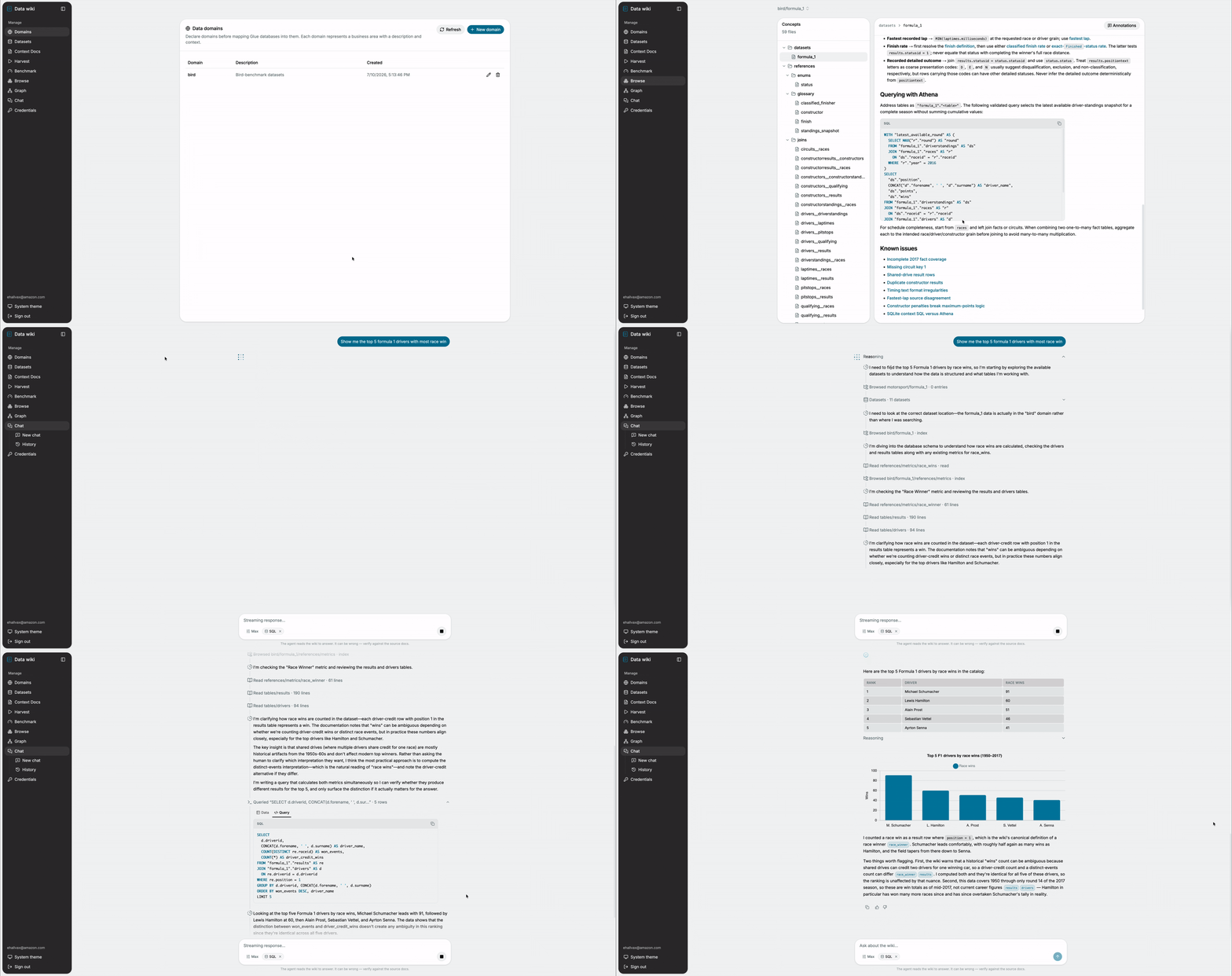
Features
- Automated Induction - An AI agent reads your source catalog (Glue or Redshift), samples real data, and authors a knowledge bundle describing tables, joins, metrics, and known issues — in the source's own SQL dialect and type vocabulary.
- Pluggable Data Sources - Harvest from the AWS Glue Data Catalog (via Athena) or Amazon Redshift (via the Redshift Data API); a Redshift mapping is self-describing, so any cluster/workgroup in the account is selectable in the console. The source layer is an extensible seam for adding more.
- Grounded in Your Docs - Attach your own source documents (DDL, data dictionaries, runbooks, specs) so the bundle reflects your organization's knowledge, not just the raw schema.
- Self-Healing Freshness - Glue catalog changes automatically trigger scoped re-harvests, and the semantic search index stays in sync with the bundle on every write. (The event-driven path is Glue-only; Redshift datasets refresh via full/scheduled harvests.)
- Served Over MCP - Any MCP-capable agent can discover, read, and semantically search your bundles with
list_domains,list_directory,read_page,glob,grep,get_backlinks, andsemantic_search. - Machine Credentials - Mint scoped OAuth2 credentials so applications and agents can call the MCP server programmatically.
- Web Console - Register datasets, upload context docs, run and watch harvests, browse bundles, and explore the link graph from a React UI.
Benchmark
Does an OKF bundle carry enough about a database for an agent to answer real analytical questions — without ever seeing the schema? We tested this on BIRD mini_dev, 500 curated text-to-SQL questions across 11 databases, using the official bird-bench grader on the original SQLite databases.
An agent whose only knowledge source was the OKF wiki (read over MCP, ~4.5 reads per question) scored EX = 74.0 — above every published leaderboard entry — reconstructing every table, column, join, and value format from the bundle alone.
| EX (Execution Accuracy) | |
|---|---|
| agent + OKF wiki | 74.0 |
| TA + GPT-4o (best published) | 63.0 |
| GPT-4 | 47.8 |
Full methodology, per-database breakdown, and operational KPIs (tool usage, agent duration) in the benchmark report (PDF) and the detailed results. The benchmark is fully reproducible from this repo — see benchmark/mini_dev/.
Architecture
Solution Architecture
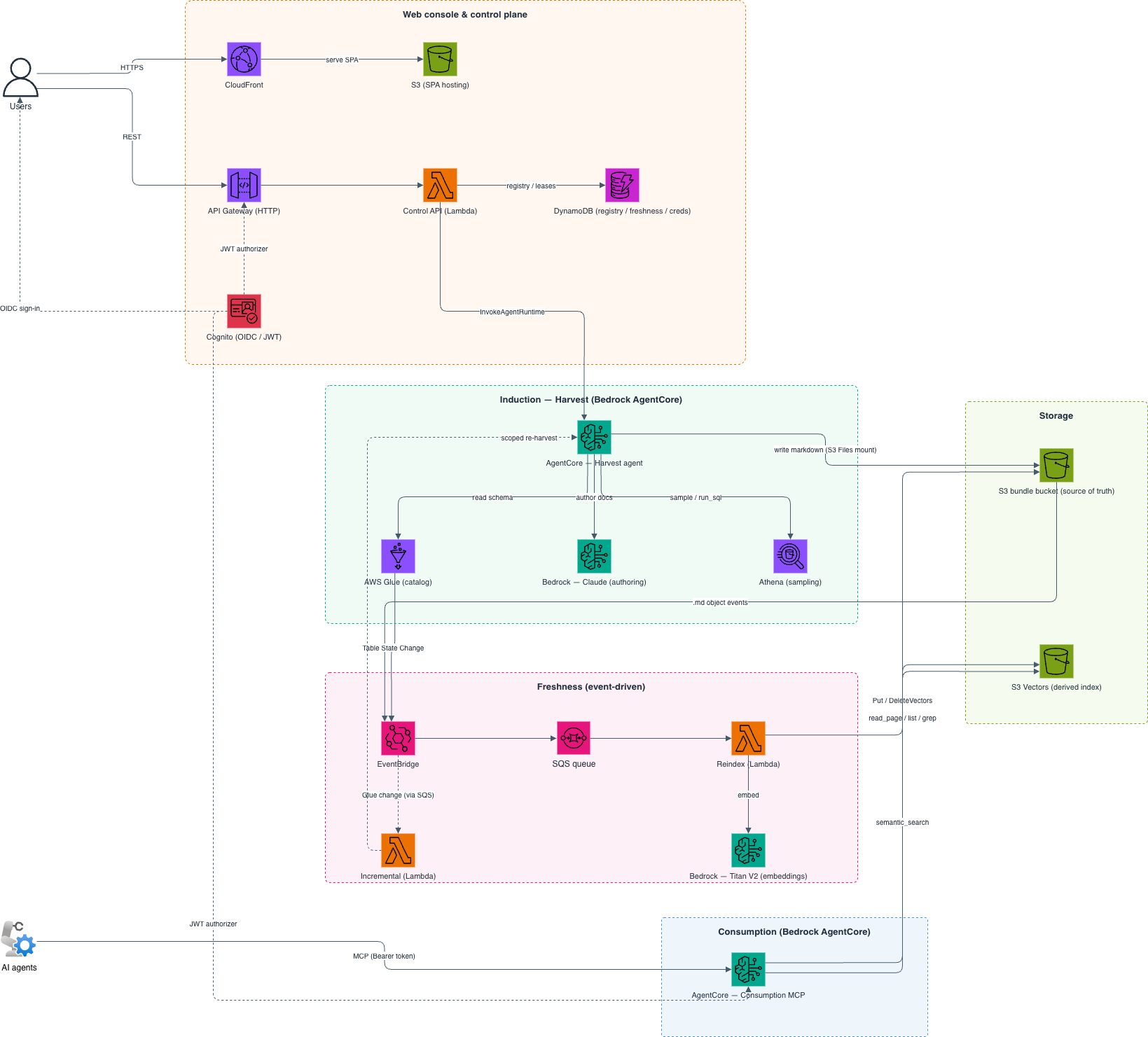
AWS Services Used:
- Amazon S3 (bundle storage) and S3 Vectors (semantic index)
- AWS Glue + Amazon Athena and/or Amazon Redshift (source catalogs + data sampling)
- Amazon Bedrock (Claude for induction, Titan V2 for embeddings)
- Amazon Bedrock AgentCore Runtime (harvest + consumption MCP)
- AWS Lambda (Control API, reindex, incremental)
- Amazon API Gateway (HTTP API) and Amazon Cognito (auth)
- Amazon EventBridge + Amazon SQS (event-driven freshness)
- Amazon DynamoDB (registry, freshness, credentials)
- Amazon CloudFront (SPA delivery)
Repository Layout
data-wiki/
├── services/
│   ├── okf_core/        # pure-Python OKF primitives (no AWS or agent deps)
│   ├── okf_aws/         # shared boto3 helpers: Titan embed, S3 Vectors, S3 keys
│   ├── harvest/         # induction: deepagents agent on AgentCore
│   ├── reindex/         # freshness: S3 events → S3 Vectors Lambda
│   ├── incremental/     # Glue change → scoped re-harvest + nightly reconcile
│   ├── control_api/     # Cognito-authed REST (API GW + Lambda)
│   └── consumption_mcp/ # streamable-HTTP MCP server on AgentCore
├── infra/
│   ├── durable/         # S3 buckets, S3 Vectors index, Cognito, DynamoDB
│   ├── compute/         # Lambdas, API GW, AgentCore runtimes + IAM, EventBridge/SQS, CloudFront
│   └── modules/lambda/  # reusable zip-Lambda + least-privilege role
├── ui/                  # React SPA (JS), shadcn/ui + Tailwind, Cognito OIDC
├── okf-mcp/             # Claude Code plugin: connect an agent to the MCP server
├── scripts/             # run_tests.sh, build_lambdas.sh, deploy.sh
├── quick-start-guide/   # task-oriented guides for using the console
└── docs/                # ARCHITECTURE.md, CONVENTIONS.md, DATA_SOURCES.md, API_REFERENCE.md
See docs/ARCHITECTURE.md for how the pieces fit together and the reasoning behind the main decisions.
Getting Started
Prerequisites
Required Tools:
The following tools must be installed on your local machine:
- AWS CLI configured with appropriate credentials
- Terraform CLI
- Docker running (with
buildxfor ARM64 image builds) - Node.js and npm
- Python (v3.12 or later)
- jq
AWS Setup:
- A pre-created, versioned S3 bucket for Terraform state (the deploy uses split state and won't create this for you).
- Amazon Bedrock model access enabled in your region for the Claude induction model and Amazon Titan Text Embeddings V2. Follow the instructions here; without access you'll get an
AccessDeniedExceptionduring a harvest. - A data source with tables to harvest — at least one AWS Glue database, and/or an Amazon Redshift cluster/workgroup. Redshift support is off by default; enable it with
TF_VAR_enable_redshift=truebefore deployingcompute(seedocs/DATA_SOURCES.md). Each Redshift mapping supplies its own connection (cluster/workgroup + a Secrets Manager secret) in the console, so no per-cluster deploy config is needed. The secret must hold a read-only DB user (Redshift SQL runs with that user's privileges) and be named with theokf-prefix by default (var.redshift_secret_name_prefix) — the IAM grants are scoped to that pattern.
Note: S3 Vectors and Bedrock AgentCore Runtime are used by this stack. Verify they are available in your target region before deploying.
Installation and Deployment
- Clone the Repository
git clone <your-repo-url>
cd sample-okf-llm-wiki
- Authenticate to AWS
# Option I: Export AWS temporary credentials
export AWS_ACCESS_KEY_ID="your_temp_access_key"
export AWS_SECRET_ACCESS_KEY="your_temp_secret_key"
export AWS_SESSION_TOKEN="your_temp_session_token"
export AWS_DEFAULT_REGION="your_region"

# Option II: Export AWS Profile
export AWS_PROFILE="your_profile_name"
- Run the deployment
./scripts/deploy.sh # full pipeline (prompts on first run)
On the first run, you'll be prompted for:
- The AWS region
- The Terraform state bucket name (pre-created, versioned)
- The initial admin user (email and name)
These are saved to scripts/.deployment.config and reused on subsequent runs. The deploy then runs all five stages: push the container images, apply both Terraform stacks, wire the CloudFront URL into Cognito, and sync the SPA.
Note: The admin user is created in the Cognito User Pool from your inputs; Cognito emails a temporary password to that address.
Accessing the Console
After a successful deploy, print the deployed URLs:
./scripts/deploy.sh summary
Open the CloudFront URL, sign in with the admin credentials from your email, and follow Using the Console to register your first dataset and run a harvest.
Configuration Options
Deploy Stages
deploy.sh orchestrates the full pipeline, but each stage can be run on its own — useful for iterating on one layer without re-running everything:
./scripts/deploy.sh <durable|images|compute|cognito-urls|ui|summary|destroy>
| Stage | What it does |
|---|---|
durable |
S3 buckets, S3 Vectors index, Cognito, DynamoDB (the long-lived stack). |
images |
Build and push the harvest + consumption container images to ECR. |
compute |
Lambdas, API Gateway, AgentCore runtimes, EventBridge/SQS, CloudFront. |
cognito-urls |
Re-apply the durable stack to inject the CloudFront URL into Cognito. |
ui |
Build the React SPA and sync it to S3 / CloudFront. |
summary |
Print the deployed URLs. |
destroy |
Tear everything down (prompts for confirmation). |
A few things the deploy handles that would otherwise be manual:
- The harvest runtime's VPC (2 private subnets + NAT) is auto-provisioned, since S3 Files mounts require VPC networking. Bring your own with
TF_VAR_harvest_vpc_subnet_ids/TF_VAR_harvest_vpc_security_group_ids. - The S3 Files file system, mount target, and access point are managed by Terraform and mounted at
/mnt/data. - The Cognito callback/logout URLs get the CloudFront URL through the
cognito-urlsre-apply, not the console. - Image URIs and the CloudFront URL flow between stages via
.deployment.configand Terraform outputs.
Connecting Agents (MCP)
Once bundles are harvested, agents consume them over the MCP server. Mint a machine credential in the console's Credentials view, then connect:
- From Claude Code — use the bundled
okf-mcpplugin, which handles token refresh automatically. - From any MCP client — exchange your credential for a bearer token at the Cognito token endpoint and call the runtime directly.
See Connect an Agent (MCP) for both paths.
Local UI Development
To run the console against your deployed backend on localhost:
cd ui
npm run dev:env    # writes ui/.env.local from the compute stack outputs
npm install        # first run only
npm run dev        # http://localhost:5173
Port 5173 is whitelisted in Cognito for the OIDC redirect, so local dev works against the real deployed Cognito and Control API. See ui/README.md for details.
Running the Tests
The suite runs entirely offline: moto mocks S3 and DynamoDB, and the remaining clients (s3vectors, bedrock-runtime, glue, athena, agentcore) are injected fakes. There are no live AWS calls.
python3 -m venv .venv && source .venv/bin/activate
pip install -e services/okf_core -e services/okf_aws         # shared libs
pip install -e services/harvest -e services/reindex -e services/incremental \
            -e services/control_api -e services/consumption_mcp --no-deps
pip install pytest "moto[s3,dynamodb]" "markdown-it-py>=3.0"
./scripts/run_tests.sh          # unit tests + the offline end-to-end harvest test

cd ui && npm ci && npm run build
cd ../infra/durable && terraform init -backend=false && terraform validate
cd ../compute && terraform init -backend=false && terraform validate
tests/test_e2e_harvest_offline.py drives the non-LLM half of the harvest pipeline end to end (Glue source → guard engine → link-graph impact analysis → finalize_bundle) against a fake F1-shaped Glue/Athena source and asserts the output is a valid OKF bundle. Actual Bedrock calls, S3 Vectors queries, and AgentCore hosting need a real account and aren't exercised here.
Clean Up
To tear down everything the deploy created:
Export AWS credentials (same as the deploy step above).
Run the destroy stage:
./scripts/deploy.sh destroy
This tears down both Terraform stacks (durable and compute). The Terraform state bucket you pre-created is not managed by the deploy — remove it manually if you no longer need it.
Warning: This permanently deletes the harvested bundles, the vector index, and all registry/credential state. The underlying source data (Glue databases, Redshift clusters) is not touched.
Contributing
See CONTRIBUTING for more information.
License
This project is licensed under the MIT License. See the LICENSE file.
Authors
The following authors have contributed this sample within AWS and prepared it for open-source release:
Special thanks to Bruno Dhefto for his thorough review and suggestions that helped improve the solution.
Yorumlar (0)
Yorum birakmak icin giris yap.
Yorum birakSonuc bulunamadi