pytorch_template
Health Pass
- License — License: MIT
- Description — Repository has a description
- Active repo — Last push 0 days ago
- Community trust — 10 GitHub stars
Code Fail
- eval() — Dynamic code execution via eval() in analyze.py
- eval() — Dynamic code execution via eval() in callbacks.py
- eval() — Dynamic code execution via eval() in cli.py
Permissions Pass
- Permissions — No dangerous permissions requested
This project provides a config-driven PyTorch research pipeline. It allows developers to manage deep learning experiments, including hyperparameter optimization, training loops, and real-time monitoring, entirely through a single YAML configuration file.
Security Assessment
The overall risk is rated as Medium. The repository does not request any overtly dangerous system permissions and contains no hardcoded secrets. However, the automated scan flagged multiple instances of dynamic code execution via `eval()` across three files (`analyze.py`, `callbacks.py`, and `cli.py`). While the YAML-driven architecture relies on dynamic imports (like `importlib`) to load models and datasets, the presence of `eval()` introduces a potential vector for arbitrary code execution. If a maliciously crafted YAML config file is loaded, it could exploit these `eval()` statements to compromise the host system. The tool also features network requests via optional integrations with Weights & Biases (W&B) and external package updates.
Quality Assessment
The project appears to be well maintained and recently active. It utilizes the highly permissive and standard MIT license. Community trust is currently very low, as indicated by a minimal footprint of only 10 GitHub stars. The documentation is comprehensive, featuring bilingual instructions, clear dependency management, and robust CLI tooling to ensure reproducibility.
Verdict
Use with caution — while the pipeline is highly functional and recently updated, the presence of `eval()` in the codebase requires that you strictly audit and trust any YAML configuration files before executing them.
AI-agent-friendly PyTorch research pipeline — one YAML config drives preflight, training, Optuna HPO, and real-time TUI monitoring
PyTorch Template





One YAML. One command. Full research pipeline.
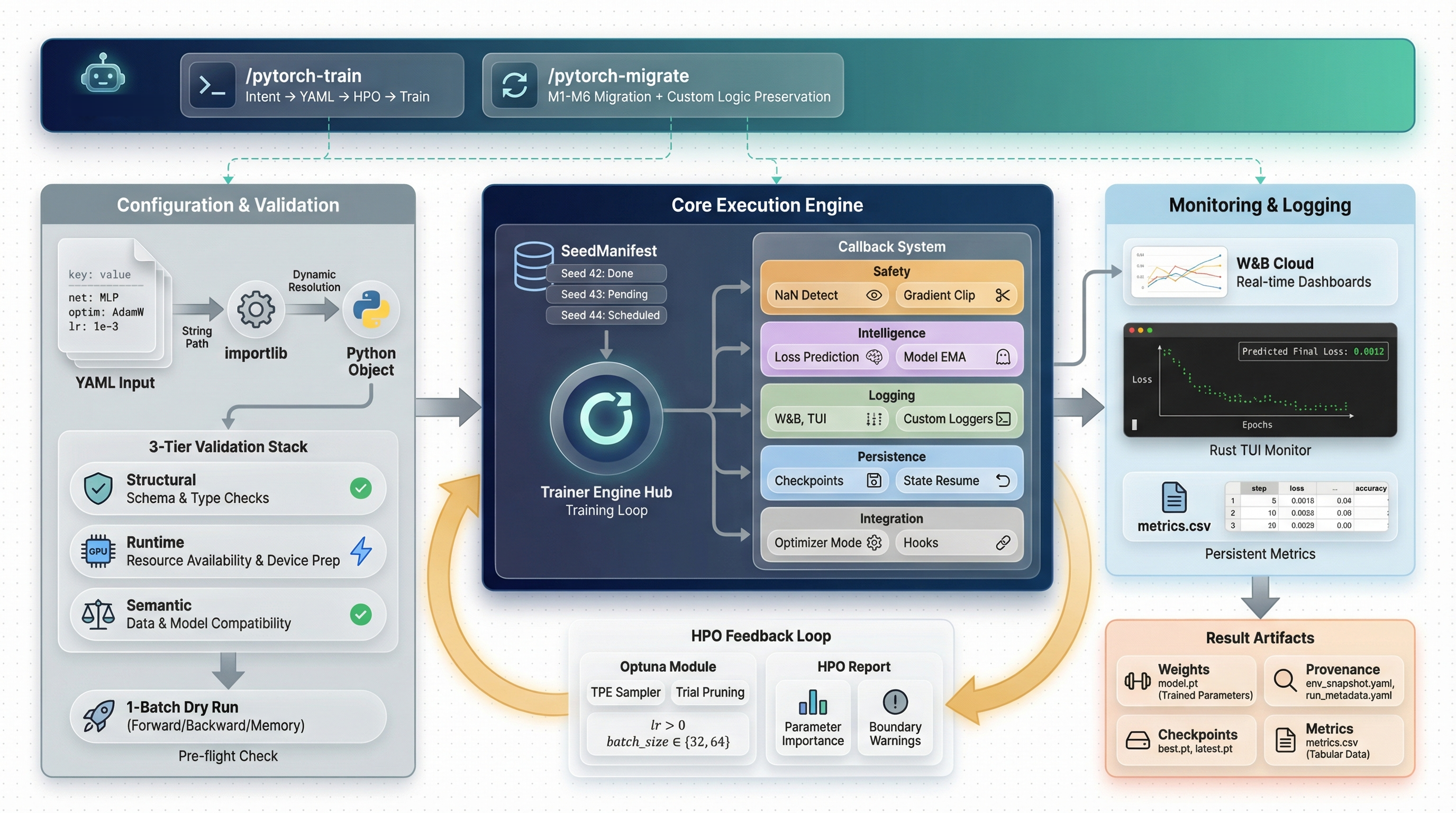
Config-driven experiment pipeline with dual logging, real-time TUI monitor, and AI agent skills.
Why This Template?
| Problem | Solution |
|---|---|
| Config errors discovered after hours of GPU time | preflight runs 1-batch forward+backward in seconds |
| Rewriting training loops for every project | Callback-based loop — extend without modifying the core |
| "Which logging do I use?" | Choose wandb or tui per config — CSV always saved |
| Can't see training progress without W&B | Rust TUI monitor renders loss curves in real-time from CSV |
| Manual hyperparameter tuning | Optuna + PFL pruner prunes unpromising trials early |
| HPO is a black box after it finishes | hpo-report shows parameter importance and boundary warnings |
| Silent overfitting or exploding gradients | Auto-detected by callbacks, logged to W&B/TUI/CSV |
| "It worked on my machine" | Full provenance: Python / PyTorch / CUDA / GPU / git hash |
Quick Start
git clone https://github.com/Axect/pytorch_template.git && cd pytorch_template

# Install (uv recommended)
uv venv && source .venv/bin/activate
uv pip install -U torch wandb rich beaupy numpy optuna matplotlib \
  scienceplots typer tqdm pyyaml pytorch-optimizer pytorch-scheduler

# Check your environment
python -m cli doctor

# Validate → Preview → Train → Analyze
python -m cli preflight configs/run_template.yaml
python -m cli preview configs/run_template.yaml
python -m cli train configs/run_template.yaml --device cuda:0
python -m cli analyze
How It Works
Everything is YAML
project: MyProject
device: cuda:0
logging: tui                                           # 'wandb' or 'tui'
net: model.MLP                                         # any importlib-resolvable path
optimizer: pytorch_optimizer.SPlus
scheduler: pytorch_scheduler.ExpHyperbolicLRScheduler
criterion: torch.nn.MSELoss
data: recipes.regression.data.load_data                # plug in any load_data() here
seeds: [89, 231, 928, 814, 269]                        # multi-seed reproducibility
epochs: 150
batch_size: 256
net_config:
  nodes: 64
  layers: 4
optimizer_config:
  lr: 1.e-1
scheduler_config:
  total_steps: 150
  upper_bound: 300
  min_lr: 1.e-6
All module paths are resolved via importlib. Three layers of validation run before a single GPU cycle is consumed:
- Structural — format checks, non-empty seeds, positive epochs/batch_size
- Runtime — CUDA availability, all import paths resolve
- Semantic —
upper_bound >= total_steps, lr positivity, unique seeds
Dual Logging
The logging field controls where metrics are displayed:
logging: |
Display | W&B | CSV | latest_model.pt |
|---|---|---|---|---|
wandb |
W&B dashboard + periodic console print | Yes | Always | Always |
tui |
Every-epoch terminal output (agent-friendly) | No | Always | Always |
CSV and latest model are always saved, regardless of logging mode. This means:
- Agents can read
metrics.csvandlatest_model.ptmid-training - The TUI monitor can render loss curves from any run
- No data is lost even without W&B
Callback Architecture
The training loop emits events; behaviors are independent, priority-ordered callbacks:
| Callback | Priority | Purpose |
|---|---|---|
NaNDetectionCallback |
5 | Detect NaN loss, signal stop |
OptimizerModeCallback |
10 | SPlus / ScheduleFree train/eval toggle |
GradientMonitorCallback |
12 | Track gradient norms, warn on explosion |
LossPredictionCallback |
70 | Predict final loss via shifted exponential fit |
OverfitDetectionCallback |
75 | Detect train/val divergence |
WandbLoggingCallback |
80 | Log to W&B (when logging: wandb) |
TUILoggingCallback |
80 | Terminal logging (when logging: tui) |
CSVLoggingCallback |
81 | Write metrics.csv every epoch (always active) |
PrunerCallback |
85 | Report to Optuna pruner |
EarlyStoppingCallback |
90 | Patience-based stopping |
CheckpointCallback |
95 | Periodic + best-model checkpoints |
LatestModelCallback |
96 | Save latest_model.pt every epoch (always active) |
Add your own by subclassing TrainingCallback — zero changes to the training loop:
class GradientClipCallback(TrainingCallback):
    priority = 15  # runs right after GradientMonitorCallback

    def on_train_step_end(self, trainer, **kwargs):
        torch.nn.utils.clip_grad_norm_(trainer.model.parameters(), 1.0)
Loss Prediction
The LossPredictionCallback fits a shifted exponential decay model to the validation loss history:
L(t) = a · exp(-b · t) + c
The predicted final loss is c (the asymptotic floor). The fitting uses EMA-smoothed data with a 3-point anchor method, which:
- Works with positive and negative losses
- Handles plateau, oscillation, and non-convergent patterns
- Returns raw loss values (same units as input)
Real-time TUI Monitor
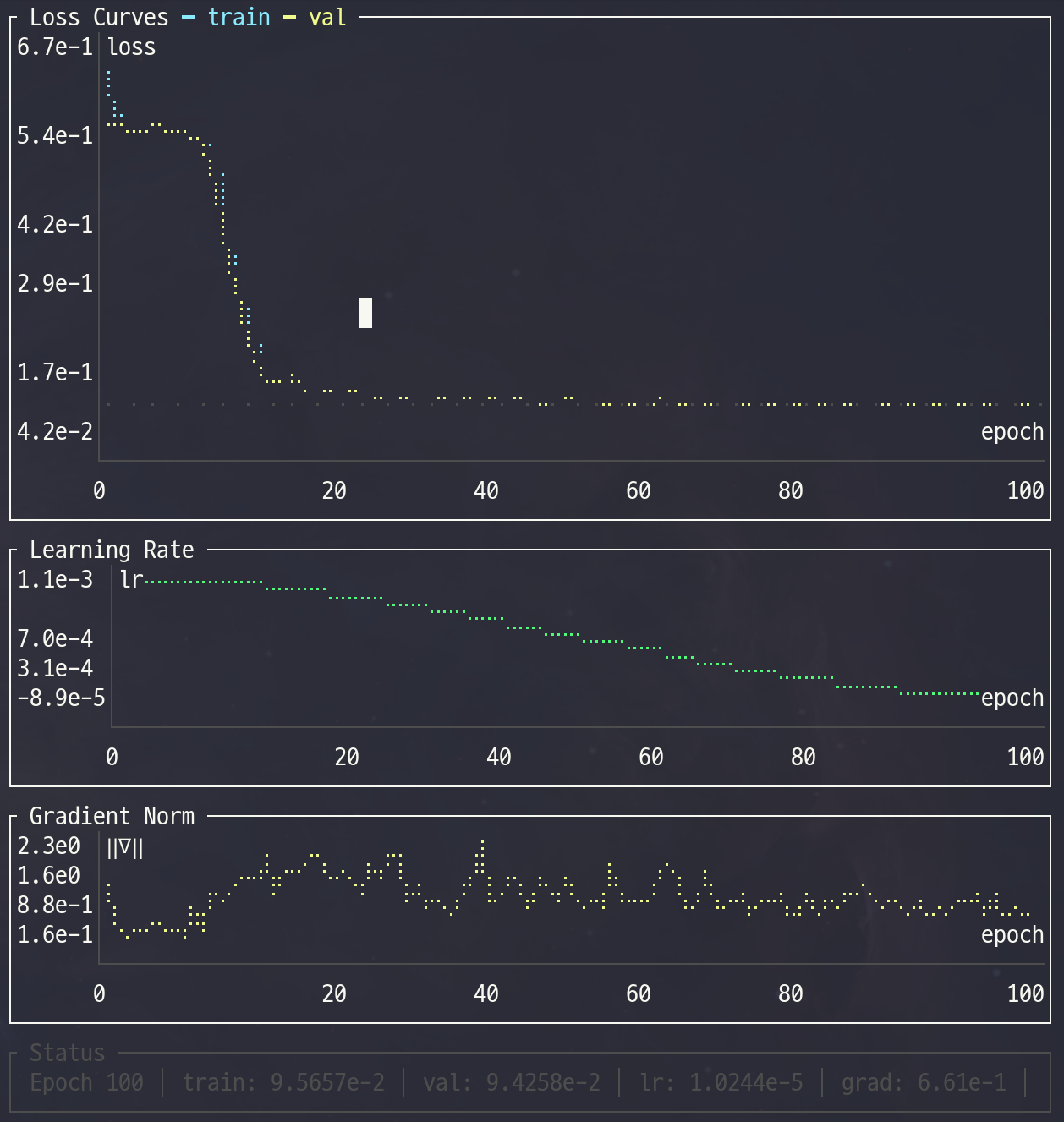
A Rust-based terminal UI reads metrics.csv and renders live charts:
Features:
- Loss curves (train/val) with Braille sub-pixel rendering
- Learning rate schedule and gradient norm history
- Predicted final loss overlay
- Log scale toggle:
log₁₀for positive data,symlog₁₀for mixed-sign - Status bar with current metrics and time since last update
- 1.2 MB static binary — no runtime dependencies
Usage:
# Build once (requires Rust toolchain)
cd tools/monitor && cargo build --release && cd ../..

# Run alongside training (in a separate terminal)
python -m cli monitor                                      # auto-detect latest run
python -m cli monitor runs/MyProject/group/42/metrics.csv  # specific file

# Or run the binary directly
./tools/monitor/target/release/training-monitor runs/MyProject/group/42/
| Key | Action |
|---|---|
q / Esc |
Quit |
l |
Toggle log scale |
← / → |
Switch metric tabs (when custom metrics are logged) |
Pre-flight Check
Catches problems in seconds — not after hours of GPU time:
                         Pre-flight Check
┌─────────────────────────┬────────┬──────────────────────────────────┐
│ Check                   │ Status │ Detail                           │
├─────────────────────────┼────────┼──────────────────────────────────┤
│ Import paths & device   │  PASS  │                                  │
│ Semantic validation     │  PASS  │                                  │
│ Object instantiation    │  PASS  │                                  │
│ Data loading            │  PASS  │ train=8000, val=2000             │
│ Forward pass            │  PASS  │ output=(256, 1), loss=0.512341   │
│ Shape check             │  PASS  │                                  │
│ Gradient check          │  PASS  │ grad norm=0.034821               │
│ Optimizer step          │  PASS  │                                  │
│ Scheduler step          │  PASS  │                                  │
│ GPU memory              │  PASS  │ peak=42.3 MB (1 batch)           │
└─────────────────────────┴────────┴──────────────────────────────────┘
All pre-flight checks passed.
Use --json for machine-readable output (used by AI agent skills for automated parsing).
HPO with Optuna
# Run HPO
python -m cli train configs/my_run.yaml --optimize-config configs/my_opt.yaml

# Analyze results
python -m cli hpo-report --opt-config configs/my_opt.yaml
The custom PFL (Predicted Final Loss) pruner fits shifted exponential decay to early loss history and prunes trials before they waste GPU time.
Study: my_study (MyProject_Opt.db)
Trials: 50 total, 38 completed, 11 pruned, 1 failed

Best Trial #23
  Value: 0.003241

         Parameter Importance
┌─────────────────────────┬──────────────────────────────────────┐
│ Parameter               │ Importance                           │
├─────────────────────────┼──────────────────────────────────────┤
│ optimizer_config_lr     │ 0.8741 ██████████████████████████    │
│ net_config_layers       │ 0.1259 ████                          │
└─────────────────────────┴──────────────────────────────────────┘

Boundary Warnings:
  optimizer_config_lr=0.231 at UPPER boundary [1e-3, 1e+0]
A boundary warning means the optimizer would benefit from a wider search range.
AI-Assisted Training (Claude Code Skill)
This template ships with a built-in Claude Code skill that guides you through the entire experiment lifecycle:
You: "Set up HPO for my FluxNet model, version 0.3"

Agent: Creates configs/SolarFlux_v0.3/fluxnet_run.yaml
       Creates configs/SolarFlux_v0.3/fluxnet_opt.yaml
       Runs preflight to catch any config issues
       Launches HPO with SPlus + ExpHyperbolicLR defaults
       Runs hpo-report to analyze results
       Extracts best params → fluxnet_best.yaml
       Launches final multi-seed training
The skill encodes domain knowledge: correct lr ranges for SPlus (1e-3 to 1e+0), why total_steps must not be synced to HPO epochs for hyperbolic schedulers, and how to interpret boundary warnings.
See
.claude/skills/pytorch-train/for details.
Migrating Existing Projects
If you have a project based on an older version of this template, the pytorch-migrate skill can detect your current version and apply incremental updates automatically.
Install skills globally (once):
python -m cli update-skills          # symlink (auto-updates with git pull)
python -m cli update-skills --copy   # or copy if you prefer
Use in any project:
cd ~/my-project  # any pytorch_template-based project
# In Claude Code:
/pytorch-migrate
The skill detects which features are missing (v1 through v6) and applies only the needed migrations, preserving your custom models, data loaders, and callbacks.
Extend It
Custom Model# my_model.py
class MyTransformer(nn.Module):
def __init__(self, hparams: dict, device: str = "cpu"):
super().__init__()
self.d_model = hparams["d_model"]
net: my_model.MyTransformer
net_config:
  d_model: 256
  nhead: 8
criterion: my_losses.FocalLoss
criterion_config:
  gamma: 2.0
  alpha: 0.25
Create a module with a load_data() function that returns (train_dataset, val_dataset):
# recipes/myproject/data.py
def load_data():
    return train_dataset, val_dataset
data: recipes.myproject.data.load_data
See recipes/regression/ and recipes/classification/ for complete examples.
from metrics import MetricRegistry
registry = MetricRegistry(["mse", "mae", "r2", "my_module.MyMetric"])
results = registry.compute(y_pred, y_true)
Project Structure
pytorch_template/
├── cli.py              # CLI: train, preflight, validate, preview, doctor, analyze, hpo-report, monitor
├── config.py           # RunConfig (frozen, 3-tier validation) + OptimizeConfig
├── util.py             # Trainer, run(), predict_final_loss()
├── callbacks.py        # 12 built-in callbacks + CallbackRunner
├── checkpoint.py       # CheckpointManager + SeedManifest
├── provenance.py       # Environment capture + config hashing
├── pruner.py           # PFL pruner for Optuna
├── metrics.py          # Metric registry (MSE, MAE, R2)
├── model.py            # Built-in MLP
├── configs/            # YAML config templates
├── recipes/            # Example recipes (regression, classification)
├── tools/monitor/      # Rust TUI monitor (ratatui)
├── tests/              # Unit tests
├── docs/               # Human Skill Guide
└── .claude/skills/     # AI Skills (pytorch-train, pytorch-migrate)
Output per Seed Run
runs/{project}/{group}/{seed}/
├── model.pt            # Final model state_dict
├── latest_model.pt     # Updated every epoch
├── metrics.csv         # Real-time CSV log (all metrics)
├── env_snapshot.yaml   # Environment metadata
├── run_metadata.yaml   # Training metadata
├── best.pt             # Best checkpoint (if enabled)
└── latest.pt           # Full checkpoint (if enabled)
CLI Reference
| Command | Description |
|---|---|
train <config> [--device DEV] [--optimize-config OPT] |
Train or run HPO |
preflight <config> [--device DEV] [--json] |
1-batch forward+backward check |
validate <config> |
Structural + runtime config validation |
preview <config> |
Show model architecture and param count |
doctor |
Check Python, PyTorch, CUDA, wandb, packages |
hpo-report [--db DB] [--opt-config OPT] [--top-k K] [--json] |
HPO analysis: param importance, boundary warnings |
analyze [--project P] [--group G] [--seed S] |
Evaluate a trained model |
monitor [PATH] [--interval MS] [--list] |
Launch real-time TUI monitor (or list available runs) |
update-skills [--copy] [--uninstall] |
Install/update Claude Code skills to ~/.claude/skills/ |
All commands are invoked via python -m cli <command>.
Documentation
| AI Agent Skill | Human Guide | |
|---|---|---|
| Location | .claude/skills/pytorch-train/ |
docs/ |
| Teaches | Config rules, param ranges, CLI commands | Design decisions, trade-offs, workflow intuition |
Read the Human Skill Guide — 5 chapters covering the full pipeline.
License
Acknowledgments
- pytorch-optimizer — optimizers including SPlus
- pytorch-scheduler — schedulers including ExpHyperbolicLR
- Optuna — hyperparameter optimization framework
- ratatui — Rust TUI framework for the training monitor
Reviews (0)
Sign in to leave a review.
Leave a reviewNo results found