llm-usage-metrics
Health Pass
- License — License: MIT
- Description — Repository has a description
- Active repo — Last push 0 days ago
- Community trust — 35 GitHub stars
Code Warn
- fs module — File system access in .github/workflows/ci.yml
Permissions Pass
- Permissions — No dangerous permissions requested
No AI report is available for this listing yet.
Token and cost reports for 17 AI coding agents (Claude Code, Codex, Gemini CLI, OpenCode, Copilot, pi and more), read from local session logs across all your machines

llm-usage-metrics
Usage reports for AI coding tools, across all your machines.



Documentation · Getting started · CLI reference · Contributing
llm-usage-metrics reads local session data from 17 AI coding tools, on this machine and on others you reach over ssh, and converts it into one normalized usage history. Use it to review tokens and estimated cost by day, hour, project or session, compare periods, check usage against 5-hour plan windows and subscription prices, correlate usage with local Git activity, explore it all in an interactive HTML report, or export the events.
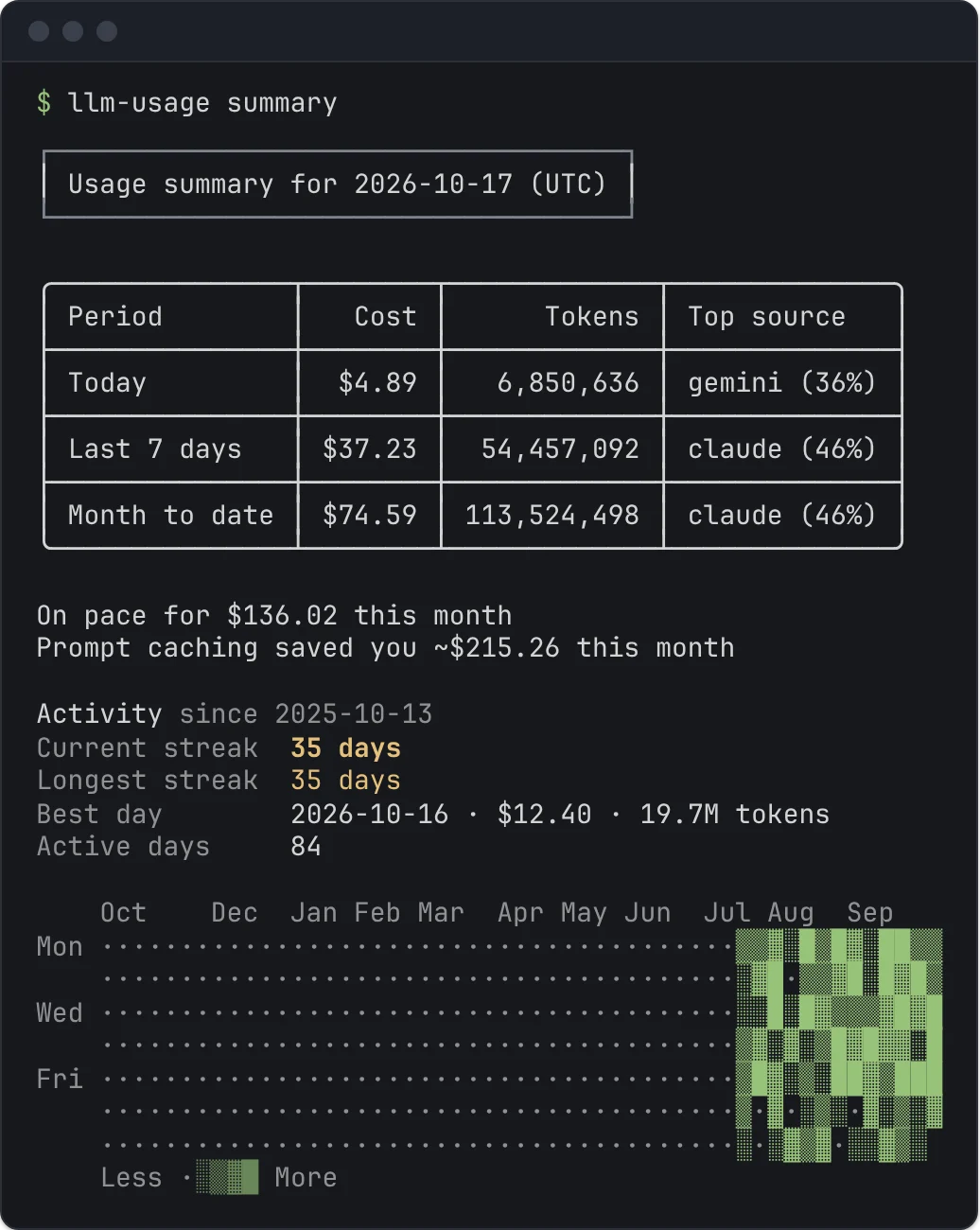
The CLI parses session content on your machine. It discovers standard source locations and includes a bundled pricing snapshot, so the first report can run without configuration or network access.
See Privacy for what it reads, stores, and sends over the network.
Quick start
Requires Node.js 22.16+ or 24+ (Node 23 lacks the SQLite busy timeout the ledger uses), or Bun 1.4+.
# Run without installing
npx --yes llm-usage-metrics@latest

# Or install it: the package provides `llm-usage` and the alias `llm-usage-metrics`
npm install -g llm-usage-metrics
llm-usage

# Or with Bun (--bun runs the CLI on Bun instead of Node)
bunx --bun llm-usage-metrics@latest

# Optional: tab completion (bash shown; zsh and fish work the same way)
echo 'source <(llm-usage completion bash)' >> ~/.bashrc
With no command, llm-usage prints cost and tokens for today, the last 7 days, and month to date, a month-end projection (checked against monthlyBudgetUsd when you set one), what prompt caching saved you this month, a note when a day of the last 7 cost at least $1 and at least 3 times your median active day, then your current and longest streak, best day, and a year-long activity heatmap. llm-usage daily breaks the last 7 days down by day and source, and llm-usage weekly covers the last 8 weeks; add --since YYYY-MM-DD or --all for older usage.
If the report is empty, check source discovery. doctor lists the paths each source searched and marks it found, not installed, or unparseable:
llm-usage doctor
Reports
| Question | Command |
|---|---|
| What did I spend today, this week, and this month? | llm-usage |
| How much did I use by day, week, or month? | llm-usage daily, weekly, monthly |
| How did today go, hour by hour? | llm-usage hourly |
| How did one period change from another? | llm-usage compare |
| Which conversations or repositories used the most? | llm-usage session |
| What did each project cost? | llm-usage projects |
| Why did one session cost what it did? | llm-usage session --id <id> --timeline |
| Which sessions send the largest prompts? | llm-usage context --by-session |
| Which tools do my agents call, and which fail? | llm-usage tools |
| Which estimated 5-hour plan windows did I use? | llm-usage blocks |
| How does API-priced usage compare with my plan price? | llm-usage value |
| Which price does a model name get, and why? | llm-usage pricing <model> |
| How is daily usage moving? | llm-usage trends |
| How does repo-attributed usage line up with Git activity? | llm-usage efficiency monthly |
| What would the same token mix cost on another model? | llm-usage optimize monthly --candidate-model <model> |
| What did the year add up to? | llm-usage wrapped |
| Can I explore the numbers in a browser? | llm-usage monthly --share |
| What can my status bar show? | llm-usage statusline |
| How do I get the raw normalized events out? | llm-usage events |
| Which sources and local stores are healthy? | llm-usage doctor |
| Which departed files can leave the event ledger? | llm-usage prune --suppressed |
| Which settings apply, and where does each come from? | llm-usage config show, config path |
| Which JSON Schema does my installed version emit? | llm-usage schema usage, schema --list |
Common examples:
# A chosen calendar range
llm-usage monthly --since 2026-06-01 --until 2026-06-30

# Current month to date compared with the same days of the previous month
llm-usage compare

# Ten highest-cost conversations
llm-usage session --top 10

# Usage grouped by project
llm-usage session --by-repo

# One session request by request, with its tool calls and running cost
llm-usage session --id 486c3261 --timeline

# Tool calls of the last 7 days, split by source
llm-usage tools --by-source

# Cost per project, and daily rows split by project
llm-usage projects
llm-usage daily --by-repo

# Estimated 5-hour blocks for Claude Code today, including the active one
llm-usage blocks --source claude --last 1

# API-priced cost per month against a subscription price
llm-usage value --plan claude-max-5x

# How a model name resolves to a LiteLLM price
llm-usage pricing claude-sonnet-4-5

# Last 14 local days as a token series
llm-usage trends --metric tokens --last 14

# Candidate-model pricing against observed usage
llm-usage optimize monthly \
  --provider openai \
  --candidate-model gpt-4.1 \
  --candidate-model gpt-5-codex

# One line for the Claude Code status line, tmux, or starship
llm-usage statusline

# Normalized events as JSONL, e.g. total tokens per line via jq
llm-usage events --since 2026-06-01 | jq '.totalTokens'
Supported sources
| Source | Local format | Real logs |
|---|---|---|
| pi | JSONL | checked |
| codex | JSONL | checked |
| Gemini CLI | JSON | checked |
| Droid CLI | settings JSON | not yet |
| OpenCode | SQLite | checked |
| OpenClaw | JSONL | not yet |
| Claude Code | JSONL | checked |
| GitHub Copilot CLI | OTEL JSONL | not yet |
| Goose | SQLite | not yet |
| Amp | JSON | not yet |
| Qwen CLI | JSONL | not yet |
| Kimi CLI and Kimi Code | wire JSONL | not yet |
| Cline | task JSON | not yet |
| RooCode | task JSON | not yet |
| KiloCode | task JSON | not yet |
| Antigravity | SQLite | checked |
| DeepSeek Harness | JSONL + zstd | not yet |
In the Real logs column, checked means the adapter was compared with real logs from that tool; not yet means it is built from the tool's upstream code and synthetic fixtures. If a report disagrees with your tool, open an issue with the llm-usage doctor --source <source> output; leave out log contents.
Each source adapter owns discovery and source-specific token normalization. Reports operate on the same UsageEvent shape after parsing. The source documentation lists default paths, override flags, and adapter-specific semantics.
SQLite-backed sources use the built-in node:sqlite module.
Filters and configuration
# Filter by source tool
llm-usage monthly --source codex,claude

# Filter by normalized billing provider
llm-usage monthly --provider openai

# Filter by exact model or substring
llm-usage monthly --model codex

# Filter by project: a path matches that root and the roots under it, a name matches the end of a root
llm-usage monthly --repo ~/work/api --repo web

# Create a commented TOML config with editor schema support
llm-usage config init
--source identifies the tool that wrote an event. --provider identifies the billing entity behind its model. A Codex session can have source=codex and provider=openai.
The config precedence order is CLI flags, environment variables, TOML config, then built-in defaults. See Configuration for every key and source path override.
Pricing
The CLI keeps a valid cost supplied by a source. When a source has no cost, it estimates one from LiteLLM pricing. A source that logs $0 for a request that used tokens gets an estimate too, and stderr names those sources. --cost-mode explicit reports logged costs only and keeps $0; --cost-mode estimated prices every event from its tokens.
Pricing loads from a fresh cache, a network refresh, a stale cache, or the bundled snapshot. Use offline mode to skip the network request:
llm-usage monthly --pricing-offline
Cost rendering makes incomplete data visible:
$12.34means the full row has resolved cost.~$12.34means the known cost is partial.-means no contributing event has a resolved cost.
When any cost is marked ~, stderr names how many of the shown events have no known price and their models. --quiet and --no-cost hide that line.
The pricing request never includes session content. See Pricing for rate matching, overrides, and error behavior.
Local event ledger
A SQLite event ledger stores normalized events and parse diagnostics. Unchanged files can skip parsing on later runs. Reports also include retained history for files that have left the disk (Claude Code, for example, deletes old transcripts), with moved or copied files suppressed. Leave it out with --no-history:
llm-usage monthly --no-history
prune is a dry run unless you pass --apply:
llm-usage prune --suppressed
llm-usage prune --departed-before 2026-01-01 --apply
Deleting the ledger also deletes retained history. Read Caching before clearing it as a troubleshooting step.
Multiple machines
Reports can include your other machines' usage over ssh. Install llm-usage-metrics there, make sure ssh logs in without a prompt, then:
llm-usage machine add laptop         # syncs over ssh laptop; see the docs for other destinations
llm-usage monthly                    # this machine and the laptop, fetched when due
llm-usage monthly --machine laptop   # only the laptop
llm-usage                            # the summary splits this month's cost by machine
A session that reached both machines (a copied or synced ~/.claude) is counted once. See Multiple machines.
Use with coding agents
The repository ships an agent skill that teaches Claude Code, Codex, Pi, and other agents which llm-usage command answers a spend or usage question, and to read the --json output instead of guessing. Install it with the skills CLI:
npx skills add ayagmar/llm-usage-metrics --skill llm-usage-metrics --agent claude-code
Use --agent codex, --agent pi, or another agent id, and -g to install it for all projects. See Use with coding agents.
Output
llm-usage daily --all --json
llm-usage daily --markdown
llm-usage daily --compact
llm-usage monthly --share
llm-usage weekly --last 1 --no-cost
Terminal tables fit the terminal width: on a narrow terminal, token counts are abbreviated and less-used columns are hidden, with a stderr note saying what was left out. When no table fits, as on a phone, each row is listed as labelled values instead. --compact asks for the short table directly. --last N covers the last N days, weeks, or months, counting the current one, and --no-cost leaves spend out of tables and share reports.
Report data goes to stdout. Diagnostics go to stderr as one summary line plus any warnings, which keeps JSON and Markdown safe to redirect; --quiet keeps only warnings and --verbose adds per-source and skipped-row detail. JSON output is wrapped in a versioned envelope: { "schemaVersion": 1, "report": "usage", "data": ... }. Scripts written against pre-0.8.0 JSON should follow the migration guide.
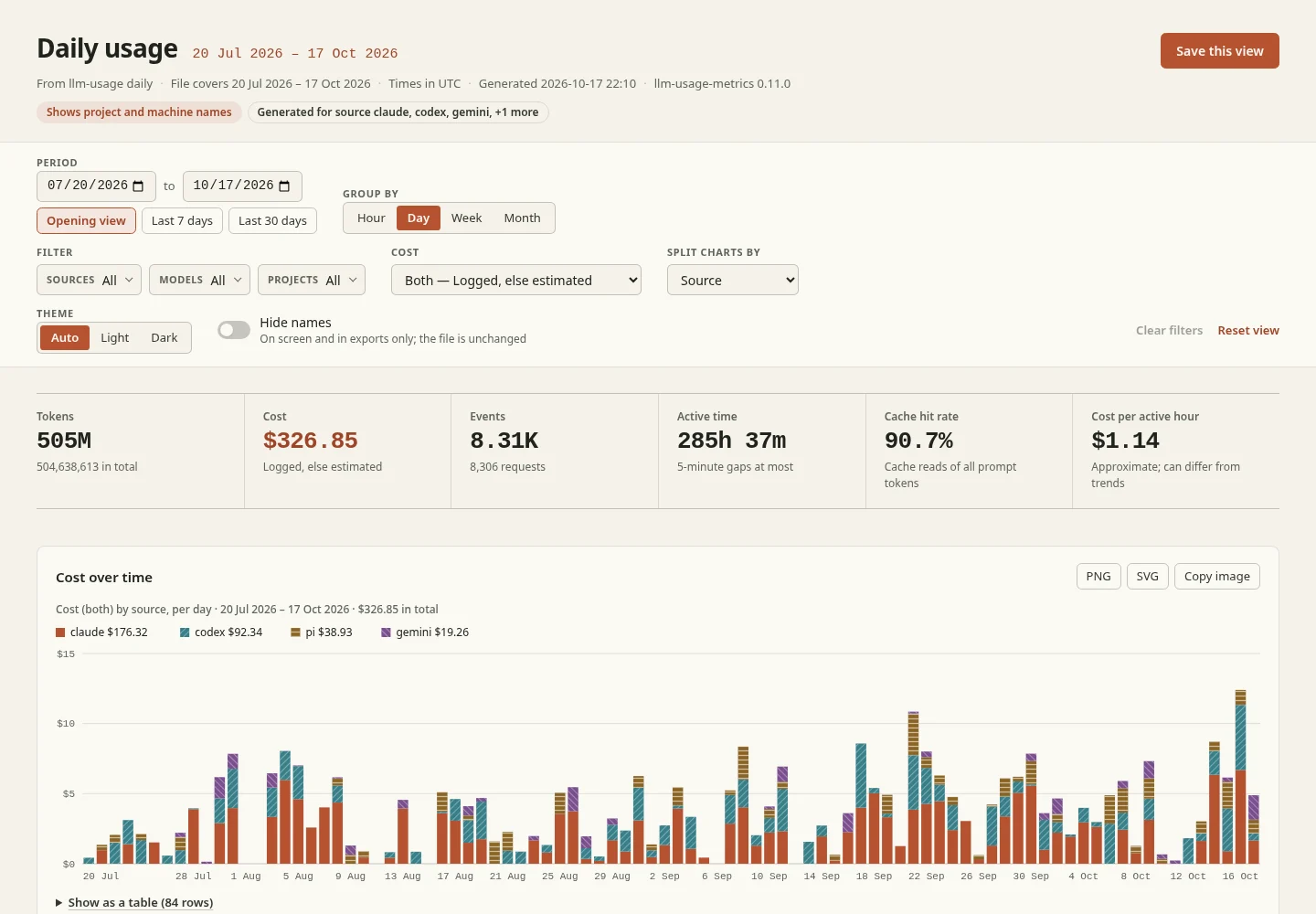
Terminal, JSON, and Markdown availability varies by report. Summary, usage, compare, trends, wrapped, efficiency, and optimize can write a share report with --share: one self-contained HTML file with charts, filters, sortable tables, and a drill-down from projects to sessions, that exports each chart as PNG or SVG in your browser and loads nothing from the network. --redact replaces project, machine and local model names in the file, and --share --no-open writes it without opening it. The output guide contains the format matrix and file names.
Library
The parsers behind the CLI are a separate package, @ayagmar/agent-sessions, for Node.js scripts and tools that want the same events without pricing, the ledger or reports. It reads all 17 sources into one event shape (token usage, and for Claude Code, codex and pi also messages, tool calls and session facts), has no runtime dependencies, and never touches the network. It is not on npm yet. See the library docs for how to build it from this repository and use it.
Performance
The repository publishes runtimes for llm-usage and ccusage on stable snapshots of real local logs. Since ccusage 20.0.0 moved to a native binary behind a small Node launcher, this compares Node against native code. In the October 2026 run, ccusage was faster on Codex daily --json and llm-usage was faster on Claude Code daily --json. A separate monthly terminal check shows how much npx ccusage@... adds at the shell. The page records the machine, versions, exact commands, application state, dataset size and run counts.
Read and reproduce the benchmark before applying its results to another workload.
Development
pnpm install
pnpm run lint
pnpm run typecheck
pnpm run test
pnpm run format:check
pnpm run build
The website has a docs overview and a report chooser for finding the right command. Its landing page and source navigation use the CLI source registry; regenerate CLI and security references after behavior changes.
For LLMs and agents, the docs are also published as llms.txt (plus llms-full.txt with every page inlined).
Site commands:
pnpm run site:docs:generate
pnpm run site:check
pnpm run site:build
pnpm run site:dev
See CONTRIBUTING.md and docs/development.md for the contributor workflow.
License
Reviews (0)
Sign in to leave a review.
Leave a reviewNo results found