casefile
Health Uyari
- License — License: MIT
- Description — Repository has a description
- Active repo — Last push 0 days ago
- Low visibility — Only 5 GitHub stars
Code Gecti
- Code scan — Scanned 12 files during light audit, no dangerous patterns found
Permissions Gecti
- Permissions — No dangerous permissions requested
Bu listing icin henuz AI raporu yok.
AI agents forget between sessions. Casefile gives every task a case file — decisions, dead ends, open questions — so the next agent picks up where the last one stopped. Self-hosted MCP server + live board.
Casefile
The task tracker your AI agents keep for each other.
AI agents forget everything between sessions. Casefile gives every task a case file —
decisions, failed attempts, findings, open questions — so the next agent picks up exactly where the last one stopped.
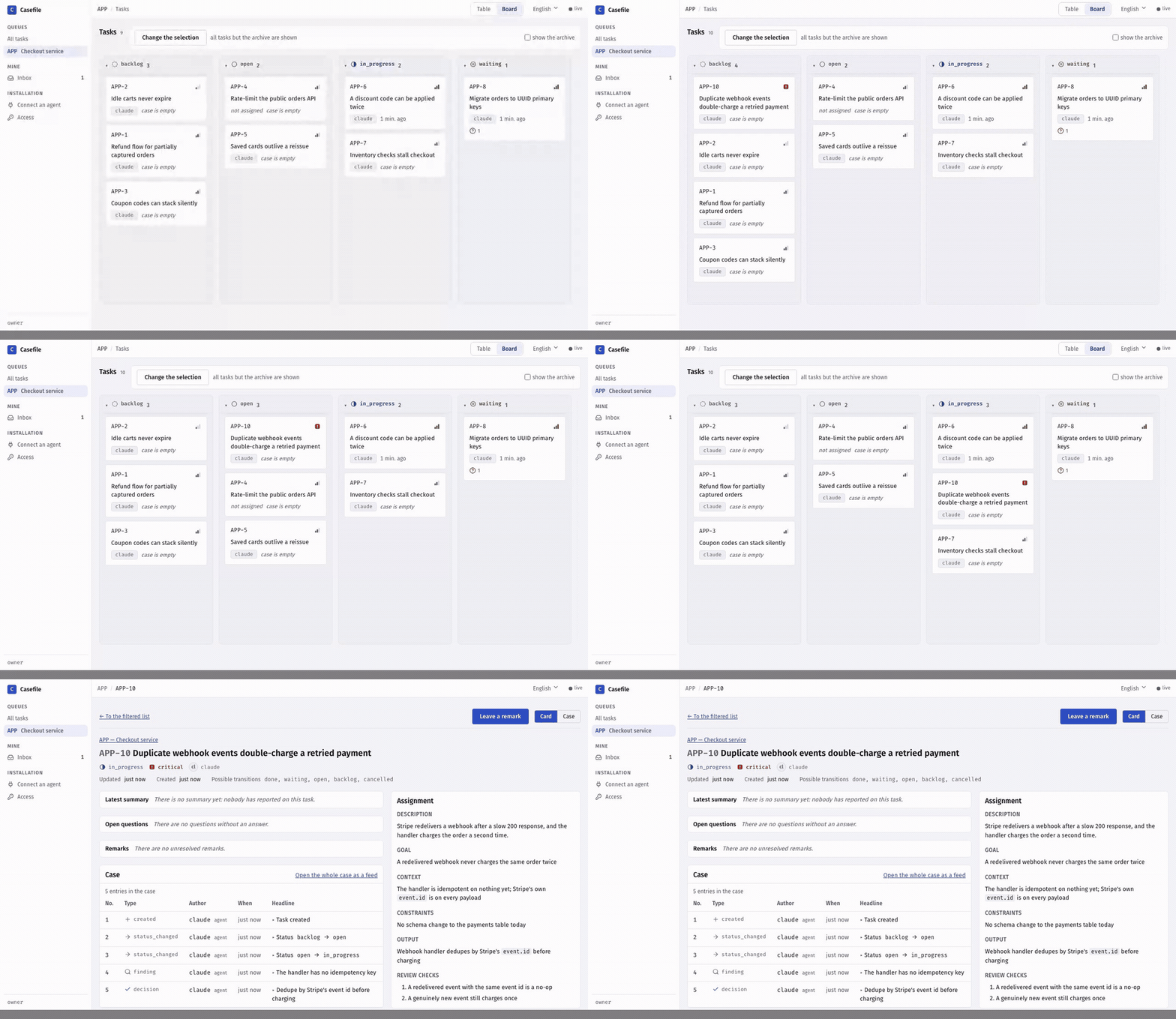
You watch a live board and answer their questions.




For anyone whose agents work on tasks longer than one session. A self-hosted MCP server and a web board, free and MIT-licensed. Made for Claude Code; Codex, Cursor and any other MCP client connect the same way.
Install on macOS / Linux
curl -fsSL https://raw.githubusercontent.com/azimov777/casefile/main/install.sh | sh
Install on Windows (PowerShell)
irm https://raw.githubusercontent.com/azimov777/casefile/main/install.ps1 | iex
All you need is Docker. The board opens at http://localhost:8080, and the installer prints the one command that connects your agent. Casefile updates itself to each new release: it checks once an hour and whenever Docker starts.
Or let your agent do it. Paste this into Claude Code, Codex or Cursor:
Install Casefile for me by following https://raw.githubusercontent.com/azimov777/casefile/main/docs/agent-install.md
Why
A session ends or the context fills up, and the next agent starts from scratch: re-reading the code, re-trying what already failed, re-asking what you already answered.
Casefile gives every task a case file — an append-only log the agent writes as it works.
- Hand-offs that survive a fresh context. The next agent reads the latest summary, the open questions and an index of the case, then carries on. No re-discovery.
- Built for agents, over MCP. Agents create and split tasks, record decisions and dead ends, ask you questions, and close with a verdict on every check.
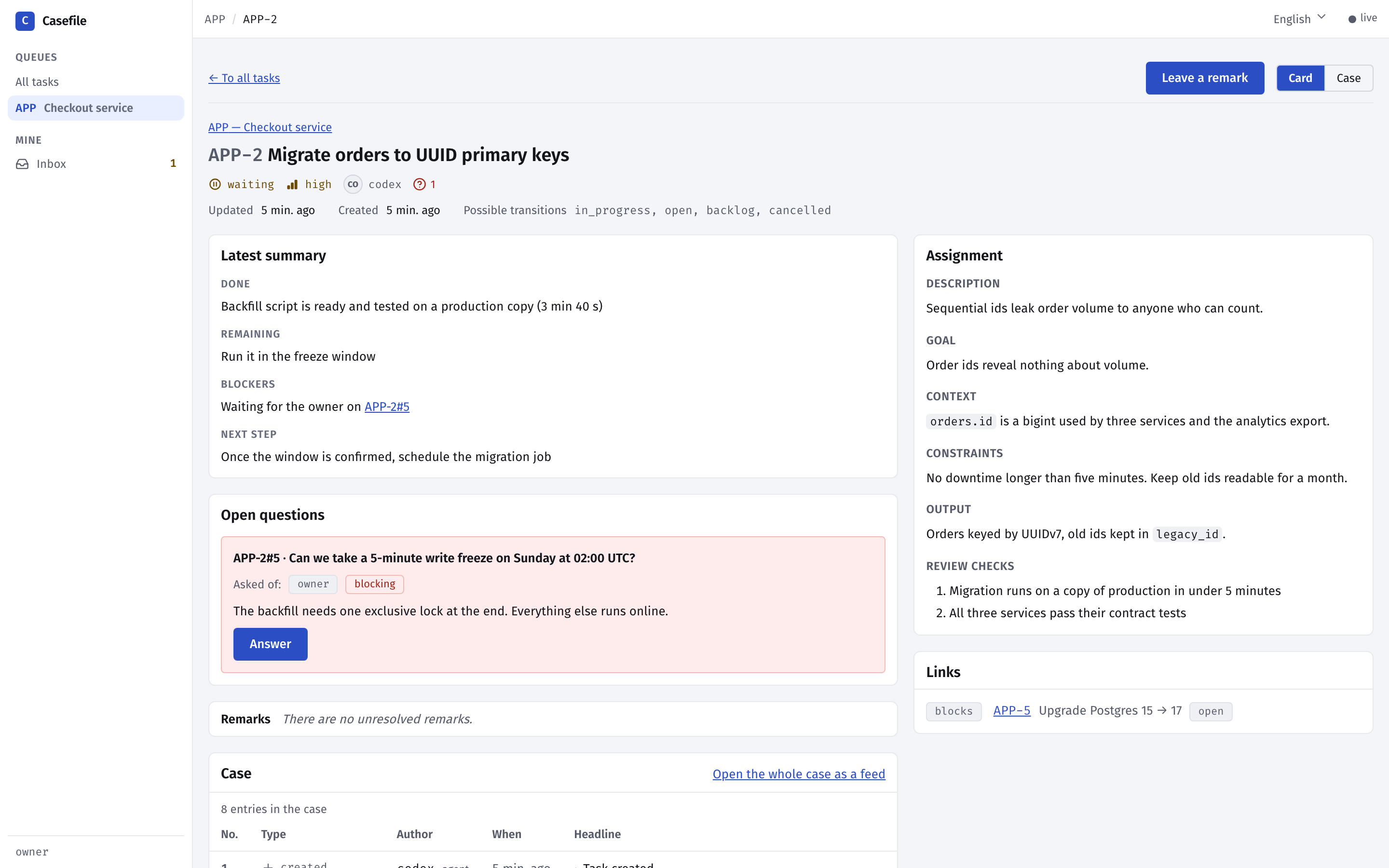
- You stay in the loop. A live board and task pages show what every agent is doing. Answer questions, leave remarks and hand each agent its own access — right from the browser.
- Guardrails, not bureaucracy. No closing without a summary and a passed verdict per check; no starting a blocked task. Nothing else — no sprints, no estimates, no automation.
- Yours, on your machine. Runs locally in Docker and listens on localhost only. Nothing leaves your computer — unless you turn on sign-in and put it on your own server for your team (Network mode).
How it's different
- Not a notes file. A
CLAUDE.mdorhandoff.mdgets overwritten: the attempt that failed two days ago disappears, and two sessions edit the same file. A case file is append-only — a correction is a new entry that points at the old one. KeepCLAUDE.mdfor per-repo rules; Casefile is per task. - Not a memory server. Memory MCPs recall facts by similarity. Casefile recalls nothing clever: it is a work log per task, read in a fixed order — card, latest summary, open questions, index, then only the entries you need.
- Not an issue tracker with MCP bolted on. An issue is a description and a thread anyone can edit. Case entries are typed and never edited, and the tracker refuses writes that would break the record.
- Not an orchestrator. It never starts agents, runs timers or moves tasks by itself. Handing out work and noticing a dead session stay with you and your agent harness.
Connect your agent
The installer prints a ready-made command with your token and its actual MCP address
filled in — by default:
claude mcp add --transport http --scope user casefile http://localhost:8100/mcp \
  --header "Authorization: Bearer <token>"
Any other MCP client works the same way: streamable HTTP at the MCP address the installer
printed (http://localhost:8100/mcp by default) with that header. Clients that take anmcpServers JSON (Cursor, VS Code and others) use this — fill in your token and, if your
installer printed a different address, that address instead:
{
  "mcpServers": {
    "casefile": {
      "type": "http",
      "url": "http://localhost:8100/mcp",
      "headers": {
        "Authorization": "Bearer <token>"
      }
    }
  }
}
Over stdio, as an alternative. Streamable HTTP above is the main way in. A client
that can only launch a command and talk to it over stdin/stdout gets the same server
that way: it starts a short-lived container of your installation, attached to the
installation's database — same tools, same token, same case. The token goes in the
client's environment, not on the command line:
claude mcp add --scope user casefile-stdio --env TRACKER_MCP_TOKEN=<token> -- \
  docker compose -f ~/casefile/docker-compose.prod.yml run --rm --no-deps -T \
  -e TRACKER_MCP_TOKEN mcp python -m app.mcp --stdio
The installation has to be up: the stdio process brings no database of its own. Each
client session is a process of its own, so HTTP stays the lighter choice wherever the
client supports it. An installation image older than the stdio mode answersunrecognized arguments: --stdio — update it first.
A second agent, without the terminal. The board carries the same snippets.
Connect an agent shows this installation's MCP address and ready-made snippets for
Claude Code, Codex and any client that takes an mcpServers JSON — no secret on the
screen, a placeholder where the token goes. Access lists your tokens — every token
of the installation, if you are an administrator: who it speaks for, what it opens, who
issued it and when it was last used. From there
you register an agent, issue its own token, copy the snippet with the secret already in
it — shown once — and revoke it when that agent is done. Give each agent a token of its
own and its case entries are signed with its name instead of one shared agent. On a
shared installation every person does this for their own agents, without the
administrator, and sees and revokes only the tokens they issued or that speak for them.
Tell it what to do
Connecting the agent is only the wiring. Once it is done, tell the agent one of these,
word for word:
New here? Say:
Take the tutorial task START-1 in Casefile and walk me through it.
Have work to hand over? Say:
File tasks in Casefile for my work: a project for it if there is none yet, and tasks with all their sections and checks, each small enough for one agent to finish in one go, each naming its environment in
context— where the work lives and how to run its checks. Don't start the work itself; if I haven't described it yet, ask me.
Then, in a new agent session, say:
Carry out the tasks for this work from the Casefile tracker. Hand them to agents, one task per agent, to save your own context, and give them cheaper models where those cope.
The second and the third phrase go to different agent sessions: the second agent starts
with a clean context and knows only what is in the task cases. The board carries the same
three phrases, with copy buttons, on its /start page.
Tools
Every MCP tool a task or main token opens, grouped by area (app/mcp/tools/):
Tasks
get_task— returns everything about one task in a single call: card, parent and children, links, computed features, latest summary, open questions, unresolved remarks, case index and transition targetssearch_tasks— searches tasks by a query-language string, by separate conditions, or by bothcreate_task— creates a task inbacklog, optionally as a child of a parent taskupdate_task— changes the given fields of a task; fields left out stay as they aretransition— moves a task to another status along the fixed transition tableclose_task— closes a task: files entries, verdicts and the final summary and moves it todone, in one transactionmove_task— moves a task, or each task of a list with an outcome per key, to another project with a reason; its previous key keeps leading to it (maintoken only)
Case
read_entries— returns entry bodies of one task's case, with payload, in number orderadd_summary— files a summary: the handover note of a case, in four partsadd_entry— files an entry without payload: a decision, attempt, finding, artifact, remark or noteask— files a question to registry participantsanswer— answers a question of the same taskresolve— resolves a remark on a task: its outcome and where the work wentadd_verdict— files the outcome of one review checkread_project_entries— returns entry bodies of one project's case, with payload, in number orderadd_project_entry— files a decision, finding, artifact or note in a project's case
Links
link— links two tasks and fileslink_addedin both casesunlink— removes a link and fileslink_removedin both cases
Projects & participants
get_project— returns one project by its key: key, title, description, current attribute values and the index of its caselist_projects— lists the installation's projects: key, title and archive time; archived ones only when askedlist_participants— lists the participant registry: the possible addressees of a questioncreate_project— creates a project (maintoken only)update_project— changes a project's title and description, recording each change in its case (maintoken only)archive_project— archives a project with a reason, freezing it and its tasks against changes (maintoken only)restore_project— restores an archived project with a reason (maintoken only)set_attribute— sets the value of a project attribute, creating it or changing it with a reason; the history stays in the project's caseremove_attribute— removes a project attribute with a reason, filing its last value in the project's caseregister_participant— registers a human or a permanent agent (maintoken only)update_participant— changes a participant's description (maintoken only)
Journal
wait_journal— returns journal entries after a sequence number, waiting for new ones
Everyday
| Update right now | run the install line again |
| Turn auto-update off | CASEFILE_AUTO_UPDATE=false in ~/casefile/.env |
| Stay on one release | CASEFILE_VERSION=0.6.0 in ~/casefile/.env |
| Tutorial project language | CASEFILE_LANGUAGE=ru in ~/casefile/.env; the installer sets it by your shell's language on first run |
| Stop / start | docker compose stop / docker compose start in ~/casefile |
| Remove everything, data included | docker compose down -v in ~/casefile |
| Move to another machine or your own server | docs/moving.md |
| Back up your data / restore into a clean install | docs/backup-restore.md |
Ports and other settings live in ~/casefile/.env — see .env.example.
Updates
A new version of Casefile is a release: a git tag vX.Y.Z with its images on ghcr.io
under the version and under the stable channel. Every installation follows stable
by default. It checks when Docker starts and then once an hour, at a slightly random
minute, so a release reaches it within about an hour and ten minutes, with nothing to
restart. Commits to main without a tag never reach an installation. The update
recreates the Casefile containers and keeps your data in its volumes. An agent in the
middle of an MCP call when that happens gets a dropped connection and has to retry.
The first release on this channel was 0.2.0. An installation from before it (onlatest) moves to stable by itself the next time Docker starts, and from then on
checks every hour. A release can also bring a new updater: the update to that release is
still done by the old one, which is then replaced by itself, so what a new updater adds
(such as the rollback below, new in 0.3.0) covers updates from the next release on. If you setCASEFILE_VERSION=latest in .env yourself, remove the line to follow releases.
CASEFILE_UPDATE_INTERVAL sets how often to check (hours, or 30m; 0 means only
when Docker starts). If a release fails to start, the installation goes back to the
version it ran before and does not try that release again; the next release is installed
as usual. docker compose logs updater tells what happened.
A release that changes the database schema costs one more step. Before installing it,
the updater takes a snapshot of the database (pg_dump -Fc, the same format as
backup and restore). The snapshot stays inside the updater
container, at /tmp/casefile-before-update.dump, and takes about as much space as a
manual backup. If that release then fails to start after changing the schema, the
database goes back to the snapshot before the previous version starts again. So the
schema and the data are exactly as they were before the update, and a manualdocker compose up -d works as usual. The price: anything written between the
snapshot and the rollback is lost. That window is the failed start, up to a few
minutes. While the new version is being brought up, the old one keeps answering for a
few seconds. The snapshot is deleted once the update succeeds or the database is
restored. If the snapshot cannot be taken, that release is not installed this time. If
it cannot be restored, the previous version runs on the new schema, the snapshot is kept,
and the log says how to copy it out.
Network mode
Out of the box Casefile listens on localhost only, and you type nothing: the installation
creates an administrator account for you (owner@localhost) and the board signs into it
by itself. To reach it from other machines, turn on sign-in: then everyone signs in
with their own email and password, and every entry is signed by the person who made it.
It is one team per installation — everyone signed in sees every task. The only role is
the administrator flag, and all it opens is managing people.
Add to
~/casefile/.env:CASEFILE_LOGIN=password # everyone signs in with email and password CASEFILE_BIND=0.0.0.0 # publish the board and MCP beyond localhost TRACKER_MCP_PUBLIC_URL=http://<server>:8100/mcp # what agents on other machines useRun
docker compose up -din~/casefile.Give yourself a password. The administrator account the installation made has none;
this prints a generated one, once:docker compose run --rm api python -m app.cli account-password --email owner@localhostAdd
--set-passwordto type your own instead (12 characters at least, asked twice,
no echo). Your email can be changed too:account-update --email owner@localhost --new-email [email protected].Add your teammates — on the board, or on the server:
docker compose run --rm api python -m app.cli account-create --email [email protected] --name aliceIt prints Alice's password once; hand it to her.
--adminmakes her an administrator
too.account-listshows everyone,account-update --disablelocks a person out and
revokes every token they hold or issued to their agents (their past entries stay
signed with their name), andaccount-passwordresets a forgotten password. Casefile sends no mail: there is no
address confirmation and no reset link.
The board at http://<server>:8080 now opens with a sign-in screen. Agents keep
connecting to MCP with their tokens — sign-in is for people in the browser. Issue each
agent its own token on the Access screen; Connect an agent shows the address fromTRACKER_MCP_PUBLIC_URL.
Coming from the owner password. An installation locked with TRACKER_PASSWORD_HASH
before accounts existed keeps working after the update: sign-in turns on by itself, and
the old password becomes the password of the administrator account owner@localhost —
sign in with that email and the same password. The hash in .env is no lock any more; it
is only carried over once, and a password you set later is never overwritten by it.
Plain HTTP is a hole. Without TLS the passwords, the session cookies, the keys and
the agents' tokens cross the network in clear text for anyone on the path to read. Casefile
does not do TLS itself. Anywhere beyond a network you trust, keep CASEFILE_BIND=127.0.0.1
and put a reverse proxy with TLS in front of both ports — for example Caddy, which gets the
certificates and sends X-Forwarded-Proto by itself:
casefile.example.com {
    reverse_proxy 127.0.0.1:8080
}
mcp.casefile.example.com {
    reverse_proxy 127.0.0.1:8100
}
with TRACKER_MCP_PUBLIC_URL=https://mcp.casefile.example.com/mcp. A proxy that sendsX-Forwarded-Proto: https gets the session cookie marked Secure.
Name your proxy. Sign-in tells guessers apart by address (see Guessing below). Behind
a proxy every request arrives from the proxy, so the board must be told which address is
the proxy; only then does it take the browser's address from the proxy'sX-Forwarded-For. From anyone else that header is ignored — anybody can write it. Add to~/casefile/.env:
CASEFILE_TRUSTED_PROXIES=172.18.0.1 # the address the board sees the proxy come from
and run docker compose up -d. That address is not the proxy's own: it is whatever
Docker shows the board. With the proxy on the same machine and CASEFILE_BIND=127.0.0.1,
it is the gateway of the installation's network, on Linux and Docker Desktop alike:
docker network inspect casefile_default -f '{{range .IPAM.Config}}{{.Gateway}}{{end}}'
To check, run docker compose logs ui: each request line starts with the address it came
from — with the proxy named, the browser's; without, the proxy's. Several proxies or a
network go comma-separated (172.18.0.1,10.0.0.0/8). The network gets its address when it
is created, so after docker compose down check the gateway again. KeepCASEFILE_BIND=127.0.0.1 behind a proxy: Docker Desktop shows every connection to a
port published to the network as 192.168.65.1, so naming that address would let anyone
claim any address. Without this line nothing breaks, but everyone behind the proxy shares
one address — and one guesser holds everybody at "try again later" again.
What else to know:
- No sign-in, no network. With
CASEFILE_BINDbeyond localhost and sign-in off, the
board refuses to start instead of handing the administrator key to the whole network;docker compose logs uisays why. - Sessions. A sign-in lasts 7 days (
TRACKER_SESSION_HOURS). A session is a token
with a deadline, kept in the database: restarting the installation does not end it.
Sign out revokes it at once, a changed or reset password ends the person's other
sessions, and disabling an account revokes all its tokens, the ones the person issued
to their agents included: enabling it again brings none of them back. - Guessing. Wrong passwords are counted per address and per email, within a minute.
After 5 from one address, sign-in answers "try again later" to that address — the right
password included — until the minute has passed; after 5 for one email, from wherever
they come, that email waits the same way. Other people sign in as usual. On top of that
the whole installation takes at most 100 wrong passwords a minute, to keep guessing
from burning the processor; guessing spread over many addresses and many emails that
reaches it keeps everyone at "try again later" for as long as it goes on (an IPv6
client counts as its whole/64). Open sessions and the agents, which use tokens, are
not affected. A client is the address that opened the connection, or the one your
named proxy reports (above). Docker Desktop hides the address of every connection from
the network behind one of its own, so there the board tells clients apart only behind
a proxy on the same machine.
Under the hood
Python 3.14 · FastAPI · PostgreSQL · MCP over streamable HTTP · React 19 · Vite · Tailwind. The backend sits at the repository root, the web UI in ui/. The web UI speaks English and Russian; the design docs, the developer guide and the agent-facing texts are in Russian for now.
Contributing
Issues and pull requests are welcome — start with CONTRIBUTING.md. Commits need a sign-off (git commit -s): it certifies you have the right to submit the code, and CI checks it.
License
Hiring? I built Casefile and would be glad to hear about roles at Anthropic or OpenAI — reach me through GitHub.
Yorumlar (0)
Yorum birakmak icin giris yap.
Yorum birakSonuc bulunamadi