sessionport
Health Warn
- License — License: MIT
- Description — Repository has a description
- Active repo — Last push 0 days ago
- Low visibility — Only 5 GitHub stars
Code Fail
- exec() — Shell command execution in src/importers/opencode.ts
Permissions Pass
- Permissions — No dangerous permissions requested
No AI report is available for this listing yet.
Port AI coding sessions and plans between Claude Code, OpenCode and Codex — without losing tool calls, timestamps or context.
sessionport
Port AI coding sessions between tools — Claude Code ↔ OpenCode ↔ Codex.
Move a whole conversation, or just the plan you worked out, from one tool to
another — keeping the messages, tool calls, reasoning, timestamps and working
directory intact instead of flattening it all into a pasted transcript.
Install
npm install -g sessionport
Or run it without installing anything:
npx sessionport
Using it
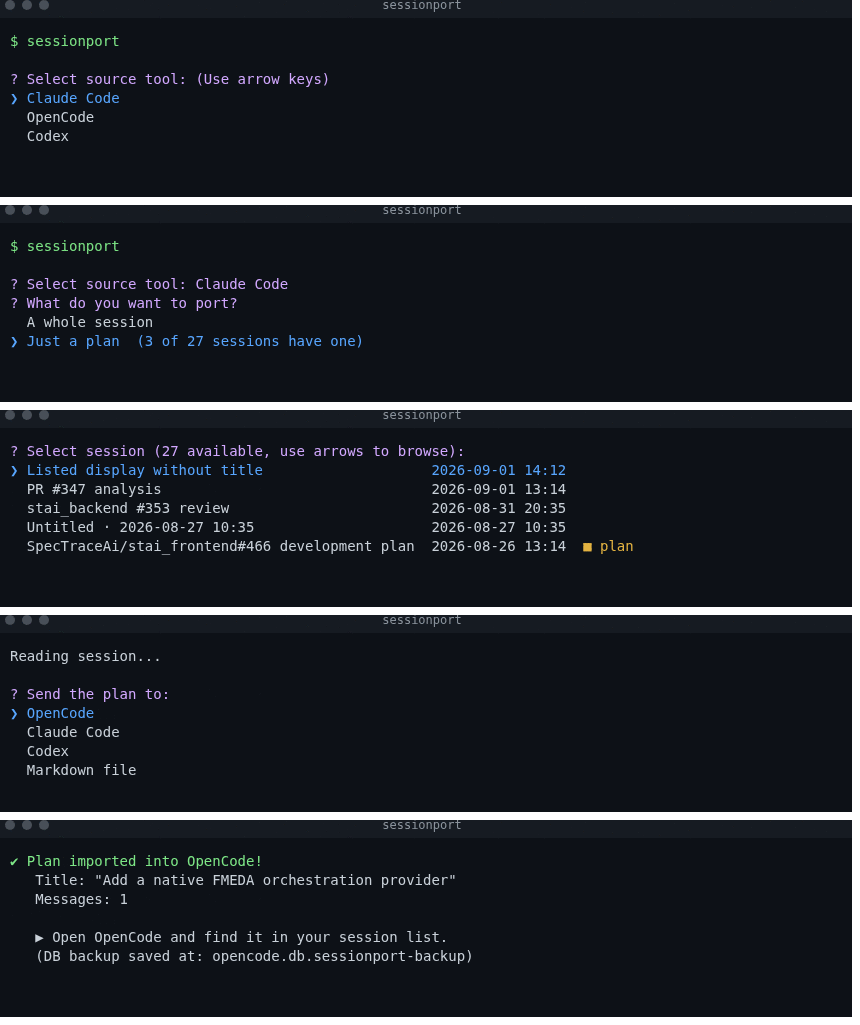
Run it with no arguments. That is the main way to use sessionport — it walks
you through the whole thing with arrow keys, and you never have to look up a
session ID.
sessionport
1. Where are you coming from?
? Select source tool: (Use arrow keys)
❯ Claude Code
  OpenCode
  Codex
2. A whole session, or just a plan?
This question only appears when the source actually has sessions that recorded a
plan, so it stays out of the way the rest of the time.
? What do you want to port?
❯ A whole session
  Just a plan  (3 of 27 sessions have one)
Picking the plan narrows the next list down to just those sessions.
3. Pick the session.
Sessions are listed newest first, by name, with the ones carrying a plan marked.
Sessions that never got a name fall back to their last message, and then to the
time they were last touched — so every row says something useful.
? Select session (27 available, use arrows to browse):
❯ Listed display without title                                 2026-09-01 14:12 [claude-opus-5]
  PR #347 analysis                                             2026-09-01 13:14 [claude-opus-5]
  stai_backend #353 review                                     2026-08-31 20:35 [claude-opus-5]
  First chapter review                                         2026-08-30 14:35 [claude-opus-5]
  Untitled · 2026-08-27 10:35                                  2026-08-27 10:35
  SpecTraceAi/stai_frontend#466 development plan               2026-08-26 13:14 [claude-opus-5]  📋 plan
(Use arrow keys to reveal more choices)
4. How much of it do you want?
? Export mode: (Use arrow keys)
❯ As-is (full conversation history)
  Compacted (summarized tool calls/outputs, trimmed reasoning)
5. Where is it going?
Import writes straight into the other tool, ready to open. Export writes a file.
? Target:
❯ 📥 Import into Claude Code
  📥 Import into OpenCode
  📥 Import into Codex
  ───── Export to file ─────
  📄 Portable JSON (.session.json)
  📄 Readable markdown (.md)
  🌱 Seed prompt for OpenCode
  🌱 Seed prompt for Claude Code
  🌱 Seed prompt for Codex
  🌱 Seed prompt (generic)
That is the whole flow. sp is a shorter alias for the same command.
CLI commands
Every step above has a non-interactive equivalent, for scripts, aliases and CI.
sessionport list <source>
List all sessions from a tool.
sessionport list claude
sessionport list opencode
sessionport list codex
sessionport export <source> <id>
Export a session to file.
| Option | Default | Description |
|---|---|---|
-t, --to |
markdown |
Output format: json, markdown, opencode, claude, codex, generic |
-m, --mode |
as-is |
as-is (full) or compacted (summarized) |
-o, --out |
./export |
Output directory |
-q, --quiet |
— | Suppress progress output |
sessionport export claude <id> --to markdown
sessionport export opencode <id> --to json --mode compacted
sessionport export codex <id> --to codex --out ./backup
sessionport export-all <source>
Export every session from a tool at once.
sessionport export-all claude --to markdown
sessionport export-all opencode --to json --out ./opencode-sessions
sessionport import <source> <id> <target>
Import a session directly into another tool's database.
sessionport import claude <id> opencode
sessionport import opencode <id> claude
sessionport import codex <id> opencode --mode compacted
Supports Claude JSONL, OpenCode SQLite (v2's session_v2 + session_message,
and the legacy session, message, part, event, event_sequence tables),
and Codex rollout JSONL.
sessionport plan <source> <id>
Port just the plan from a session that used plan mode, instead of the whole
conversation. Claude Code records a plan as the input to the tool call that
leaves plan mode; this extracts it and hands it to the target tool as the
opening user message, so the session is ready to be executed.
sessionport plan claude <id>                    # straight into OpenCode
sessionport plan claude <id> --to markdown      # write it to ./export
sessionport plan claude <id> --to stdout        # read it in the terminal
sessionport plan claude <id> --all              # keep every revision
The imported OpenCode session is titled after the plan's own heading, opens on
the plan agent, and keeps the original working directory. A session can hold
several plans — one per revision — and the final one is used unless --all is
given. Sessions that never used plan mode exit with an error rather than
exporting an empty document.
Running sessionport with no arguments offers the same thing as step 2 of the
walkthrough above, and finds the plan-bearing sessions for you.
sessionport inspect <source> <id>
Preview a session as formatted markdown in the terminal.
sessionport inspect claude <id>
sessionport inspect opencode <id> --mode as-is
sessionport convert <file>
Convert a raw session file without scanning source directories.
sessionport convert session.jsonl --from claude --to markdown
sessionport convert rollout.jsonl --from codex --to json
sessionport cleanup opencode
Remove orphaned sessions from OpenCode (sessions with no event history).
sessionport cleanup opencode          # delete all orphans
sessionport cleanup opencode --dry-run  # list without deleting
Modes
| Mode | Description |
|---|---|
as-is |
Full fidelity — all messages, tool calls, outputs, reasoning |
compacted |
Tool calls → one-liners, tool outputs → [N lines, ok], reasoning truncated, system/meta noise removed |
Export Targets
| Target | Output | Use case |
|---|---|---|
json |
.session.json — full IR, machine-readable |
Programmatic processing |
markdown |
.md — readable transcript |
Sharing, review, documentation |
opencode |
.seed.md — context handoff prompt |
Paste as first message in OpenCode |
claude |
.seed.md — context handoff prompt |
Paste as first message in Claude Code |
codex |
.seed.md — context handoff prompt |
Paste as first message in Codex CLI |
generic |
.seed.md — model-agnostic handoff prompt |
Paste into any AI chat |
Import Targets
| Source → Target | Format |
|---|---|
| Claude Code → OpenCode | Writes directly to ~/.local/share/opencode/opencode.db (session_v2 + session_message on OpenCode 2.x; the event-sourced tables on older versions) |
| OpenCode → Claude Code | Writes JSONL to ~/.claude/projects/<slug>/<uuid>.jsonl |
| Claude Code → Codex | Writes rollout JSONL + index to ~/.codex/sessions/ |
| Codex → OpenCode | Writes directly to OpenCode SQLite |
| OpenCode → Codex | Writes rollout JSONL + index |
| Codex → Claude Code | Writes JSONL to Claude projects directory |
Supported Sources
- Claude Code — reads
~/.claude/projects/*/*.jsonl - OpenCode — reads
~/.local/share/opencode/opencode.db(SQLite, v2 and legacy sessions) - Codex — reads
~/.codex/session_index.jsonl+ rollout JSONLs
Programmatic Usage
import { ClaudeReader, OpenCodeReader, CodexReader } from 'sessionport/readers/*';
import { ClaudeImporter, OpenCodeImporter, CodexImporter } from 'sessionport/importers/*';
import { compactSession } from 'sessionport/render/*';
import { renderJson, renderMarkdown, renderSeed } from 'sessionport/render/*';

// Read
const reader = new ClaudeReader();
const sessions = reader.listSessions();
const session = reader.readSession(sessions[0].id);

// Compact
const compacted = compactSession(session);

// Export
const json = renderJson(compacted);
const md = renderMarkdown(session, { compacted: false });
const seed = renderSeed(session, 'opencode');

// Import into OpenCode
const importer = new OpenCodeImporter();
const result = importer.importSession(session);
// { target: 'opencode', sessionId: 'ses_...', path: '...', messageCount: 42 }
ID Generators
import {
  opencodeSessionId, opencodeMessageId, opencodePartId, opencodeEventId, opencodeSlug,
  claudeUuid, claudeProjectSlug,
  codexSessionId, codexTurnId, codexCallId, codexToolCallId,
} from 'sessionport/importers/*';
Architecture
source (native format)
  └─ reader ──> SessionIR (canonical model)
                   ├─ compactor ──> SessionIR (compacted)
                   └─ renderers ──> json / markdown / seed prompts
The Intermediate Representation (SessionIR) normalizes all tool formats into:
Session → Message[] (role: user/assistant/system)
         → Part[] (text / reasoning / tool_call / tool_result / file / agent)
Database Safety
- OpenCode imports create a backup at
opencode.db.sessionport-backupbefore writing. - Full transactional insert — if any event fails, nothing is committed.
- Cleans up orphaned sessions that have no event history via
sessionport cleanup opencode.
Releasing
Every push to main and every pull request runs .github/workflows/ci.yml
(build + tests on Node 20 and 22, plus a npm pack --dry-run check of the
published file list).
Releases are cut by tagging — .github/workflows/publish-npm-package.yml does the rest:
npm version patch      # or minor / major — commits and tags vX.Y.Z
git push --follow-tags
The publish workflow re-runs the build and tests, refuses to continue if the
tag and package.json version disagree or if that version is already on npm,
publishes with provenance, and opens a GitHub release with generated notes.workflow_dispatch runs the same pipeline manually, which is the way to retry
a publish that failed after the tag was already pushed.
One-time auth setup. Publishing uses npm trusted publishing, so there is no
token to store or rotate. On npmjs.com, open the package's
Settings → Trusted publishers and add a GitHub Actions publisher with:
| Field | Value |
|---|---|
| Organization or user | azizmass |
| Repository | sessionport |
| Workflow filename | publish-npm-package.yml |
| Environment | (leave empty) |
The workflow's id-token: write permission does the rest. To use an automation
token instead, add it as the NPM_TOKEN secret and restore the NODE_AUTH_TOKEN
env block noted in publish-npm-package.yml.
Publishing by hand still works (npm run build && npm test && npm publish) and
requires npm login.
License
MIT
Reviews (0)
Sign in to leave a review.
Leave a reviewNo results found