kryton
Health Uyari
- License — License: Apache-2.0
- Description — Repository has a description
- Active repo — Last push 0 days ago
- Low visibility — Only 5 GitHub stars
Code Basarisiz
- rm -rf — Recursive force deletion command in .github/workflows/nas-packages.yml
- rm -rf — Recursive force deletion command in .github/workflows/release.yml
Permissions Gecti
- Permissions — No dangerous permissions requested
Bu listing icin henuz AI raporu yok.
A shared brain for people and AI. Self-hosted knowledge base with built-in MCP server, wiki-linking, graph visualization, mobile sync, and plugin ecosystem.

A shared brain for people and AI. Self-hosted knowledge base with built-in MCP server, wiki-linking, graph visualization, and real-time collaborative editing.
For everyone who wished Obsidian was a server app.



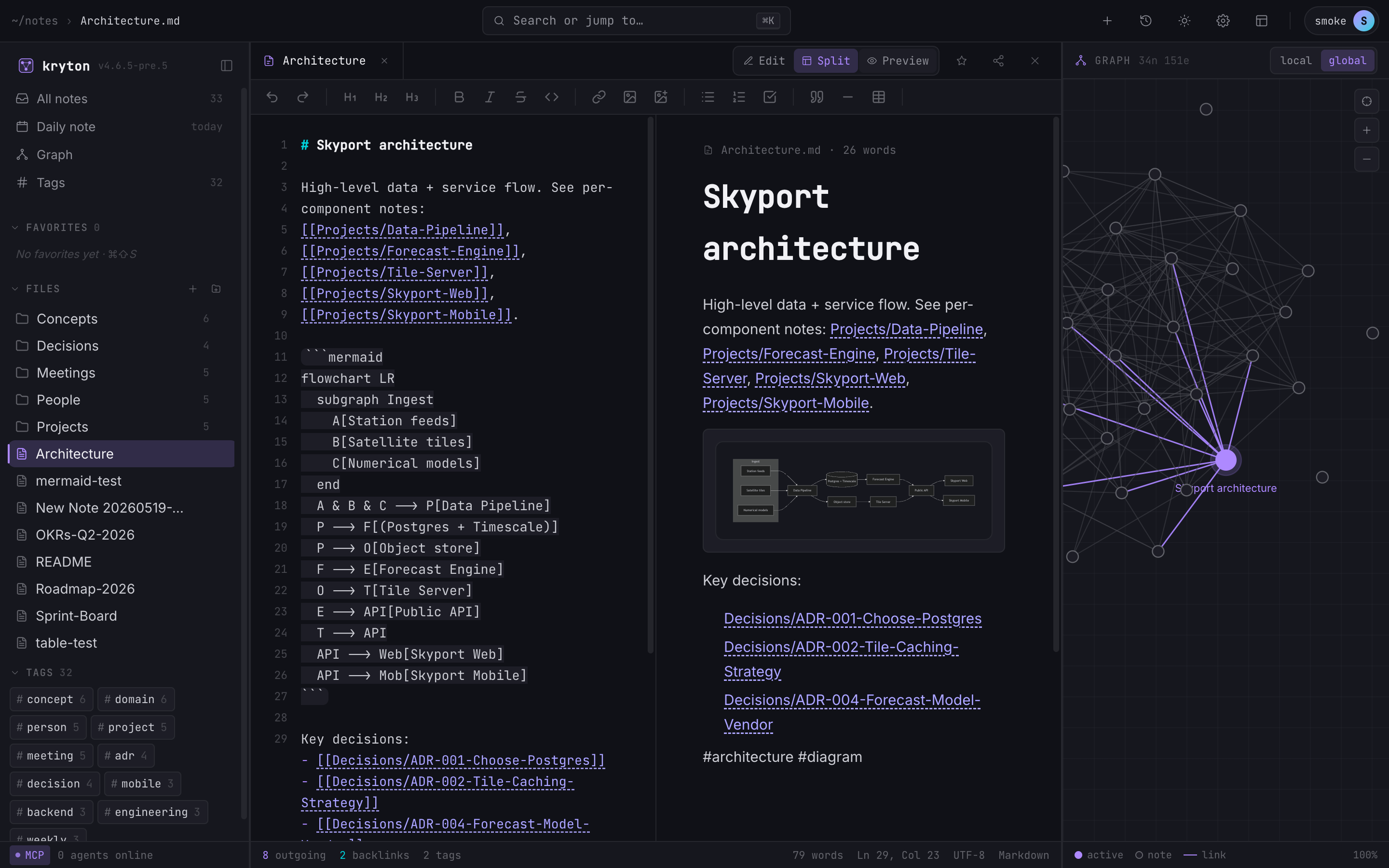
Recent UI improvements
- Editor tabs — open notes stack into a tab strip with a soft cap of 4 simultaneous tabs; oldest is evicted FIFO when you open a fifth.
- Customizable sidebar — move plugin panels between the left/right rails and reorder them up/down. Layout persists per user.
- Inline plugin settings — every plugin's configuration renders directly beneath its card in the admin panel, no separate dialog.
Why Kryton?
Your notes shouldn't live in a silo. Kryton is a knowledge base that both humans and AI agents can read, write, and reason over — through the same API, the same notes, the same graph.
For humans: A full-featured note-taking app with wiki-links, graph view, markdown editor, mobile app, and multi-user sharing.
For AI agents: A built-in MCP server gives Claude Code, Cursor, Windsurf, and any MCP-compatible agent direct access to your knowledge base — search notes, read context, create documents, traverse the knowledge graph, and use templates. Your AI assistant becomes a collaborator that remembers everything you've written.
Together: Humans write notes, AI reads them for context. AI generates documentation, humans review and refine it. Both contribute to a shared, interconnected knowledge graph.
Built-in MCP Server
Kryton ships with a production-ready MCP server at /api/mcp. No sidecar, no proxy, no extra setup — it's part of the app.
What AI Agents Can Do
| Tool | Description |
|---|---|
list_notes |
Browse all notes with paths and titles |
read_note |
Read any note's markdown content |
create_note |
Create new notes |
update_note |
Edit existing notes (full replace) |
append_to_note |
Append markdown to the end of an existing note |
rename_note |
Rename or move a note (keeps wiki-links intact) |
delete_note |
Remove notes |
search |
Full-text search across the entire knowledge base |
get_backlinks |
Find all notes linking to a given note |
get_graph |
Traverse the full wiki-link graph (nodes + edges) |
list_tags / list_notes_by_tag |
Browse tags and filter notes by tag |
list_folders / create_folder |
Navigate and create folders |
get_daily_note / write_daily_note |
Access or write today's daily note |
list_templates / create_note_from_template |
Use templates |
list_favorites / add_favorite / remove_favorite |
Manage starred notes |
list_recent_notes / list_daily_notes / get_note_metadata |
Discovery helpers |
list_trash / restore_from_trash / empty_trash |
Recover or purge deleted notes |
rename_folder / delete_folder |
Folder organisation |
list_shares / list_shares_with_me / share_note / unshare_note |
Share notes with other users |
| + Plugin tools | Plugins that register API routes are automatically exposed as MCP tools |
Connect Your AI Agent
One-shot install (recommended)
npx @azrtydxb/kryton-init
That single command:
- Asks for your Kryton server URL (defaults to
https://kryton.ai) - Signs you in and mints an API key
- Detects every supported AI tool on your machine
- Writes the correct MCP config to each one (HTTP for hosts that support it, stdio shim via
@azrtydxb/kryton-mcpfor the rest)
It's idempotent — re-running replaces previous Kryton entries instead of duplicating them, and backs up any config it touches.
Supported hosts: Claude Code, Cursor, Claude Desktop, Codex, OpenCode, Cline, Continue, KiloCode, RooCode (macOS + Linux).
Other commands: uninstall removes Kryton from every host, status shows which hosts are wired, detect previews without writing. Full reference in docs/CLI.md.
Manual wiring (escape hatch)
If you'd rather edit the config yourself:
1. Create an API key in Kryton: Account Settings > API Keys > Create (read-write scope)
2. Configure your agent:
Claude Code / Claude DesktopAdd to your MCP settings (~/.claude.json or project .mcp.json):
{
  "mcpServers": {
    "kryton": {
      "type": "streamable-http",
      "url": "https://your-kryton-instance/api/mcp",
      "headers": {
        "Authorization": "Bearer kryton_your_key_here"
      }
    }
  }
}
{
  "mcpServers": {
    "kryton": {
      "type": "streamable-http",
      "url": "https://your-kryton-instance/api/mcp",
      "headers": {
        "Authorization": "Bearer kryton_your_key_here"
      }
    }
  }
}
3. Start using it: Ask your AI to "search my notes for...", "create a note about...", "what notes link to X?", or "read my project roadmap and suggest next steps."
Security
- Scoped API keys — read-only or read-write, with optional expiration
- Per-user isolation — each key accesses only that user's notes
- 256-bit entropy — keys use
kryton_prefix for secret scanning detection - Rate limited — 300 requests / 15 minutes per key
- No admin access — API keys cannot access admin functions
See API Keys & MCP docs for the full reference.
Features
Editor & Notes
- Markdown Editor — in-house editor with syntax highlighting, formatting toolbar, slash commands, and a host-provided suggestion popup (no external CodeMirror/Monaco dependency)
- Live Preview — rendered markdown with wiki-links, frontmatter display, and code fences
- Auto-save — 2-second debounce saves automatically while editing
- Wiki-style Linking —
[[double brackets]]with autocomplete and broken link detection - Full-text Search — instant results across all notes
- Version History — browse and restore previous versions of any note
- Image Upload — drag into editor or use toolbar button
- Frontmatter — YAML metadata parsing with styled display
- Templates and Daily Notes for quick creation
- Trash — soft delete with restore capability (auto-purge after 30 days)
- PDF Export for any note
- Breadcrumb Navigation — clickable path segments above notes
Knowledge Graph
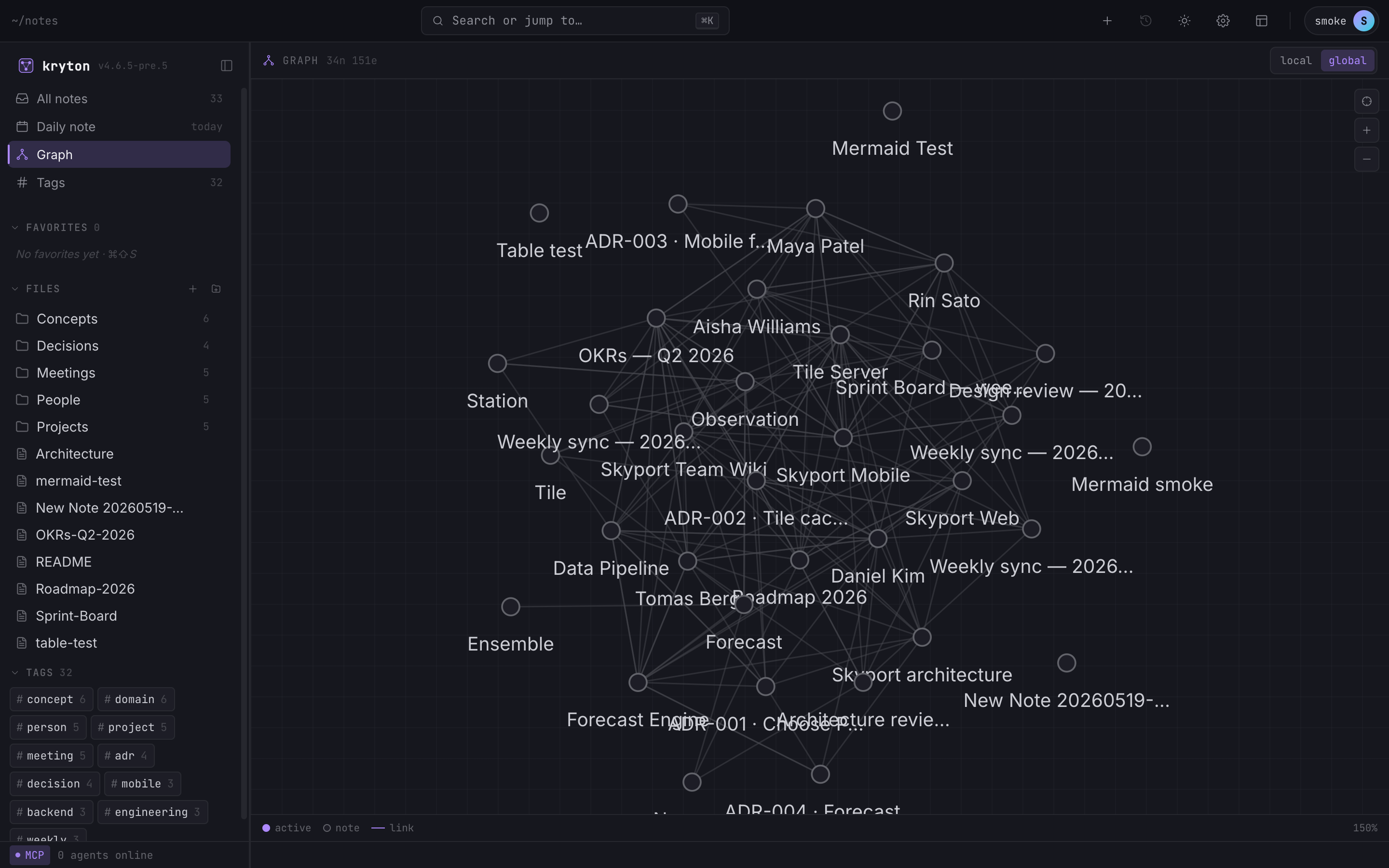
- Interactive D3.js graph with zoom, pan, and drag
- Local/Full view toggle
- Color-coded nodes — active (green), starred (yellow stars), shared (orange), default (purple)
- Mobile graph overlay — mini expandable graph on phone screens
Mobile App (React Native)
- Online-only client — talks to the Kryton server over REST + WebSocket; no local database
- Full feature parity — notes, search, graph, tags, settings, daily notes, templates, trash, history, sharing, admin
- WebView editor — wraps the same in-house web editor inside a React Native WebView so mobile and desktop stay in lock-step
- Real-time collaboration — Yjs over WebSocket for live multi-device editing
- Android APK available via EAS Build
- Version compatibility — enforces major-version match with server
Multi-User & Security
- Authentication — email/password, OAuth (Google, GitHub), passkeys (WebAuthn)
- Two-Factor Authentication — TOTP with QR code setup and backup codes
- Per-user isolation — each user has their own notes directory
- Note Sharing — share notes/folders with read or read-write permissions
- Access Requests — request access to notes via wiki-links
- API Keys — scoped bearer tokens for programmatic and AI agent access
- Admin Panel — manage users, invite codes, registration mode
REST API
- Swagger/OpenAPI docs at
/api/docs— interactive API explorer - 30+ REST endpoints — notes, search, graph, settings, sharing, auth, admin
- Yjs WebSocket —
/ws/yjs/:docIdfor real-time collaborative editing of note content - Version endpoint —
GET /api/versionfor compatibility checks
UI & Layout
- Three-panel layout — sidebar, content, graph+outline (all resizable)
- Dark/Light theme with system preference detection
- Favorites sidebar — quick access to starred notes
- Drag-and-drop file tree — move files and folders by dragging
- Toast notifications — global info/success/error feedback
- Responsive mobile layout — optimized for phone screens
- Full WCAG accessibility — ARIA roles, keyboard navigation, focus management
Plugin Ecosystem
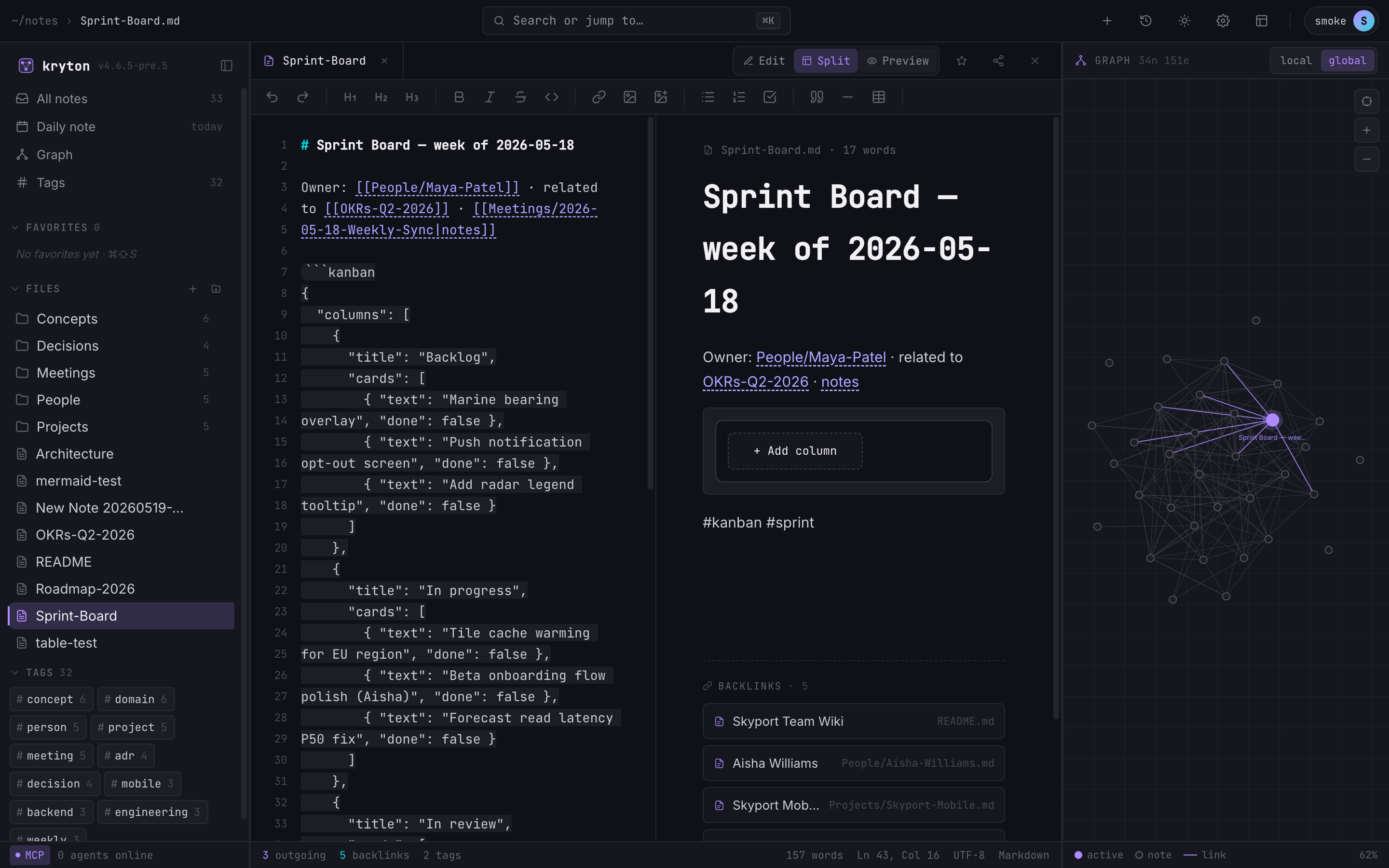
24 official plugins covering kanban, mermaid, excalidraw, git backup, calendar journal, flashcards, slash commands, theme presets, and more. Browse the full catalogue at azrtydxb/kryton-plugins.
Vim keybindings are no longer maintained as a built-in or shipped plugin.
Plugin APIs are automatically exposed as MCP tools — install a plugin and your AI agent can use it immediately.
Tech Stack
| Component | Technology |
|---|---|
| Frontend | React 19, Vite 8, TypeScript 5.9, Tailwind CSS 4 |
| Backend | Fastify 5, Drizzle ORM, TypeScript 5.9 |
| Database | Postgres 16 with pgvector and tsvector |
| Mobile | Expo SDK 55, React Native (online-only against the server API) |
| Editor | In-house markdown editor with plugin-extensible suggestions and commands |
| Graph | D3.js force-directed |
| Auth | better-auth (sessions, OAuth, passkeys, 2FA) |
| AI Integration | MCP SDK (Model Context Protocol) |
| Runtime | Node.js 24 |
Quick Start
Docker (recommended)
The simplest path. The repo ships a docker-compose.yml that brings up a pgvector/pgvector:pg16 Postgres alongside the Kryton server — no separate database install needed.
git clone https://github.com/azrtydxb/kryton.git
cd kryton
docker compose up --build -d
Open http://localhost:3000 — the first user to register becomes admin.
From Source
Requires Postgres 16+ with the pgvector extension. The fastest way is to run just the Postgres service from the bundled compose file and run the app on the host:
git clone https://github.com/azrtydxb/kryton.git
cd kryton
docker compose up -d postgres        # Postgres 16 + pgvector on :5432
npm install
export POSTGRES_URL=postgres://kryton:kryton@localhost:5432/kryton
export BETTER_AUTH_SECRET=$(openssl rand -hex 32)
npm run dev
- Frontend: http://localhost:5173
- Backend: http://localhost:3001
- API Docs: http://localhost:5173/api/docs
If you'd rather use a Postgres you already have, make sure it's 16+ and run CREATE EXTENSION IF NOT EXISTS vector; once against the target database, then point POSTGRES_URL at it.
- Synology / QNAP NAS: see Install on Synology and Install on QNAP.
Deployment
Kryton supports three deployment surfaces, all version-locked to the same app image and kept in sync by a CI drift gate. Pick the one that matches your environment.
| Surface | Best for | Pros | Cons |
|---|---|---|---|
| Docker Compose | Single host, evaluation, small teams | One command, no orchestrator, Postgres bundled | No HA, manual upgrades, single node only |
| Helm chart | Kubernetes clusters, declarative config | Standard K8s, ingress / PVC / secrets handled, OCI distribution | You manage backups, plugins, multi-instance lifecycle yourself |
| Kubernetes Operator | Production K8s, multiple instances, managed lifecycle | Scheduled backups, plugin pre-install with sha256 verify, snapshots, multi-instance via CRDs | Extra moving piece, CRD install required |
Docker Compose
Single-host self-hosting using docker-compose.prod.yml:
git clone https://github.com/azrtydxb/kryton.git
cd kryton
cp .env.example .env   # fill in BETTER_AUTH_SECRET, POSTGRES_URL etc.
docker compose -f docker-compose.prod.yml up -d
Helm
Install on any Kubernetes cluster from the OCI registry:
helm install kryton oci://ghcr.io/azrtydxb/charts/kryton \
  --version 4.6.5 \
  --namespace kryton --create-namespace \
  --set ingress.enabled=true \
  --set ingress.hosts[0].host=kryton.example.com
Full values reference, Postgres options, ExternalSecrets, and troubleshooting in docs/HELM.md.
Operator
Manage one or more Kryton instances declaratively, with scheduled backups, plugin pre-installation, and snapshots:
kubectl apply -f https://github.com/azrtydxb/kryton/releases/download/v4.6.5/kryton-crds.yaml
kubectl create namespace kryton-system
kubectl apply -n kryton-system \
  -f https://github.com/azrtydxb/kryton/releases/download/v4.6.5/kryton-operator.yaml

kubectl apply -f - <<'EOF'
apiVersion: kryton.azrtydxb.io/v1alpha1
kind: Kryton
metadata: { name: kryton, namespace: kryton }
spec:
  version: "4.6.5"
  values:
    ingress:
      enabled: true
      hosts:
        - host: kryton.example.com
          paths: [{ path: /, pathType: Prefix }]
EOF
CRD reference, example CRs (minimal, with backup, with plugins, multi-instance), backup/restore procedures, and troubleshooting in docs/OPERATOR.md.
Environment Variables
| Variable | Required | Description |
|---|---|---|
POSTGRES_URL |
Yes | Postgres connection string, e.g. postgres://kryton:kryton@localhost:5432/kryton. Target DB must have the pgvector extension installed. |
BETTER_AUTH_SECRET |
Yes | Auth secret (min 32 chars). Generate: openssl rand -hex 32 |
APP_URL |
No | Public URL (default: http://localhost:5173) |
PORT |
No | Server port (default: 3001) |
NOTES_DIR |
No | Notes directory path |
WEBAUTHN_RP_ID |
No | Passkey relying party ID (default: localhost) |
GOOGLE_CLIENT_ID |
No | Google OAuth — auto-hidden if not set |
GOOGLE_CLIENT_SECRET |
No | Google OAuth secret |
GITHUB_CLIENT_ID |
No | GitHub OAuth — auto-hidden if not set |
GITHUB_CLIENT_SECRET |
No | GitHub OAuth secret |
SMTP_HOST |
No | SMTP server for password reset emails |
SMTP_PORT |
No | SMTP port (default: 587) |
SMTP_USER |
No | SMTP username |
SMTP_PASS |
No | SMTP password |
SMTP_FROM |
No | From address for emails |
Mobile App
The React Native mobile app lives in its own repository: azrtydxb/kryton-mobile. It is an online-only client that talks to the Kryton server over REST and uses the Yjs WebSocket endpoint for real-time collaborative editing of note bodies.
Install on Android
Download the latest APK from EAS Build.
Collaboration & Note Content (Yjs)
Note bodies are stored and edited as Yjs CRDT documents. All clients (web, mobile, and future desktop) connect to the server's WebSocket endpoint at /ws/yjs/:docId for live, conflict-free collaborative editing — concurrent edits from multiple devices or users merge automatically with no data loss.
Everything else (folders, tags, shares, settings, graph edges, trash items, installed plugins) is plain relational data served by ordinary REST endpoints; clients fetch on demand and do not maintain a local mirror.
Cedar for agent identity
AI agents are first-class database entities with short-lived tokens and optional Cedar policy documents. The server evaluates the Cedar policy on every agent request — (principal, action, resource) — before executing the handler. Agents default to deny-all; permissions are granted explicitly per note, folder, or tag. Agent actions are attributed to Agent::<id> in audit logs, distinct from the owning user's actions.
Keyboard Shortcuts
| Shortcut | Action |
|---|---|
Ctrl+E |
Toggle edit mode |
Ctrl+B |
Toggle sidebar |
Ctrl+P |
Quick switcher |
Ctrl+N |
New note |
Ctrl+K |
Focus search |
Ctrl+Shift+S |
Toggle star |
F2 |
Rename note |
Architecture
┌─────────────────────────────────────────────────────────────┐
│  Browser (React 19 + Vite 8 + Tailwind CSS 4)               │
│  ┌─────────┬──────────────┬────────────┐                     │
│  │ Sidebar │  Preview/    │ Graph +    │                     │
│  │ (files, │  Editor      │ Outline    │                     │
│  │  tags,  │  (in-house   │ (D3.js)    │                     │
│  │  trash, │   markdown)  │            │                     │
│  │  favs)  │              │            │                     │
│  └─────────┴──────────────┴────────────┘                     │
└──────────────────────┬───────────────────────────────────────┘
                       │ REST API + Yjs WebSocket
┌──────────────────────┴───────────────────────────────────────┐
│  Fastify 5 Server                                             │
│  ├── Auth (better-auth + OAuth + passkeys + 2FA)              │
│  ├── Notes, Search, Graph, Tags, Trash, History               │
│  ├── Sharing & Access Requests                                │
│  ├── Yjs WebSocket (/ws/yjs/:docId) for live collab           │
│  ├── MCP Server (AI agent access — 33 tools + plugin tools)   │
│  ├── Plugin system (server + client)                          │
│  └── Swagger API Docs                                         │
├─────────────────┬────────────────────────────────────────────┤
│  Postgres 16    │  File System                                │
│  + pgvector     │  notes/{userId}/                            │
│  + tsvector     │  ├── Welcome.md                             │
│  (drizzle-orm — │  ├── .trash/                                │
│   search index, │  ├── .history/                              │
│   graph edges,  │  └── attachments/                           │
│   Yjs updates)  │                                             │
└─────────────────┴────────────────────────────────────────────┘
         ▲                           ▲
         │ REST + WS/Yjs             │ MCP Protocol (streamable HTTP)
┌────────┴────────────────┐  ┌───────┴──────────────────────────┐
│  React Native Mobile    │  │  AI Agents                        │
│  azrtydxb/kryton-mobile │  │  ├── Claude Code / Claude Desktop │
│  (online-only client)   │  │  ├── Cursor / Windsurf            │
│  └── Expo SDK 55        │  │  └── Any MCP-compatible tool      │
└─────────────────────────┘  └──────────────────────────────────┘
Database Migrations
Kryton uses Drizzle Kit against Postgres. Migrations live under packages/server/src/db/migrations/ and run automatically at server startup.
For developers, after editing any file under packages/server/src/db/schema/:
cd packages/server
POSTGRES_URL=postgres://kryton:kryton@localhost:5432/kryton npm run db:generate
Inspect and commit the generated .sql file alongside the schema change. See MIGRATIONS.md for details.
Development
npm install          # Install dependencies
npm run dev          # Start dev servers (frontend :5173, backend :3001)
npm run typecheck    # Type check
npm run lint         # Lint
npm run build        # Build for production
npm test             # Run all tests
Documentation
- API Keys & MCP — API key setup, MCP configuration, full tool reference
- Plugin Development — plugin API reference
- Migrations — database migration guide
- Architecture Decision Records — ADR-001 through ADR-006 covering scope, sync, Yjs, Cedar, schema gen, and publishing tokens
License
Apache License 2.0 — see LICENSE for details.
Trademark
"Kryton" and the Kryton logo are trademarks of Pascal Watteel. The Apache
2.0 license grants rights to use the software, but it does not grant
permission to use these trademarks. You may not use the "Kryton" name or logo
in a way that suggests endorsement of, or affiliation with, your fork or
derivative product. Forks distributed publicly must be renamed.
Contributing
Contributions are welcome. Before your first pull request, please read and
sign the Contributor License Agreement. The CLA Assistant bot will
prompt you on your first PR — sign by commenting:
I have read the CLA Document and I hereby sign the CLA
Yorumlar (0)
Yorum birakmak icin giris yap.
Yorum birakSonuc bulunamadi