3pi-desk-for-claude-code
Health Warn
- License — License: MIT
- Description — Repository has a description
- Active repo — Last push 0 days ago
- Low visibility — Only 5 GitHub stars
Code Warn
- fs module — File system access in .github/workflows/ci.yml
- fs module — File system access in .github/workflows/release.yml
Permissions Pass
- Permissions — No dangerous permissions requested
No AI report is available for this listing yet.
3PI Desk for Claude Code — Claude Code 图形化界面/GUI 桌面客户端,支持第三方 Anthropic 兼容 API(DeepSeek/Kimi/GLM/MiniMax/Ollama)、Linux/WSL2/macOS。Unofficial local Electron GUI.
3PI Desk for Claude Code




Claude Code 图形化界面 / GUI 桌面客户端
支持第三方 Anthropic 兼容 API(DeepSeek、Kimi、GLM、MiniMax、Ollama、OpenCode Go 等),
覆盖 Linux、Windows WSL2/WSLg 与 macOS,无需从终端操作 Claude Code。
中文简介
3PI Desk for Claude Code 是一个面向中文用户的 Claude Code 图形化界面(GUI),也可以理解为
Claude Code 的桌面客户端。它让你继续使用 Claude Code 的工作区、工具、权限、插件和会话体系,
同时把模型指向任意 Anthropic Messages 兼容 API:DeepSeek、Kimi(Moonshot)、GLM(Z.ai)、
MiniMax、Ollama 本地模型以及其他自定义网关。
- 不用记忆 CLI 命令:工作区、标签页、文件面板、斜杠命令、权限确认都在图形界面完成。
- 不用手动改环境变量:设置 → API 会写入
~/.claude/settings.json,并自动选择ANTHROPIC_AUTH_TOKEN/ANTHROPIC_API_KEY。 - 不用单独安装 Claude Code:发布包内置官方 SDK,并优先复用本机已安装的 Claude Code CLI;
没有时会按需下载(约 146 MB),也可以手动选择现有安装。 - 多平台:Linux、Windows WSL2/WSLg、macOS(Apple Silicon;Intel 可从源码构建)。
- 中文文档 / 中文界面:README、安装教程、WSL 指南均为中文优先,界面可切换中文。
- 对话可编辑 / 撤回:发送后的用户消息可在输入框原地修改,或确认后撤回,不新开分支。
常见搜索关键词
Claude Code 图形化界面、Claude Code GUI、Claude Code 桌面客户端、Claude Code 中文版、Claude Code
中文界面、Claude Code 第三方 API、Claude Code 免安装 CLI、Claude Code DeepSeek、Claude Code
Kimi、Claude Code GLM、Claude Code Ollama、Claude Code WSL2、Claude Code WSLg、Claude Code
macOS、Claude Code 插件市场、Claude Code 多标签、Claude Code 非官方客户端。
Introduction (English)
3PI Desk for Claude Code is a local desktop GUI for Claude Code that keeps the Claude Code
workflow while letting you point it at any Anthropic-Messages-compatible API provider (DeepSeek,
Kimi/Moonshot, GLM/Z.ai, MiniMax, Ollama, OpenCode Go, or a custom gateway). It runs on Linux,
Windows WSL2/WSLg, and macOS. The packaged app bundles the official SDK and reuses an installed
Claude Code CLI (or downloads one on first use), so a separate CLI install is optional. The UI is
English by default with a 中文 toggle; the documentation is Chinese-first with a full English
section below.
Keywords: Claude Code GUI, Claude Code desktop app, Claude Code graphical interface, Claude Code
third-party API, Claude Code DeepSeek, Claude Code Kimi, Claude Code GLM, Claude Code Ollama,
Claude Code WSL2, Claude Code macOS, Claude Code plugin marketplace.
源码 / Source
- GitHub(主仓库,含 Releases 安装包):
https://github.com/BA4RNJ/3pi-desk-for-claude-code
中文文档
项目状态与声明
当前提供 Electron 与 macOS SwiftUI 两条界面通道,但它们使用同一个版本号、同一个 GitHub Release:
- Linux、WSL2/WSLg 使用 Electron 包;
- macOS 使用原生 SwiftUI 包;
- 三平台资产都发布在同一个 release 中,文件名用
linux/wsl/macos区分; - 应用数据目录、Claude 配置和聊天记录保持兼容。
当前版本:0.4.3。
- 为什么做这个项目。 它面向希望继续使用 Claude Code 工作流、但把模型指向第三方
Anthropic Messages 兼容 API 的用户。界面、模型选择器、供应商预设和配置写入都是围绕这个
场景设计的。 - 当前阶段。 项目仍处于初始创建和测试阶段,会有不少 bug、粗糙之处和未完成的功能,会逐步
完善。欢迎反馈问题和提交改进。 - 底层是什么。 会话由官方 Claude Agent SDK 执行;Claude Code CLI 优先复用本机安装,
没有时按需下载。桌面端只是界面和配置层,没有重新实现 Agent 循环,因此核心行为仍然是
Claude Code。 - 关于 API Key。 密钥只会写入本机 Claude Code 配置
~/.claude/settings.json(权限0600),不会发送给项目作者;渲染进程只拿到掩码。如果你不信任本客户端,可以完全不用面板
填写密钥,直接在 Claude Code CLI 或~/.claude/settings.json中配置;面板会读取现有配置,
仅显示掩码。详见docs/SETUP.md。 - 非官方项目。 本项目不是 Anthropic 产品,与 Anthropic 无隶属或背书关系。
- 许可证范围。 本仓库代码使用 MIT 许可证;Claude Agent SDK 和 Claude Code CLI 是
© Anthropic PBC 的专有组件,不适用 MIT 许可证,使用和再分发受 Anthropic 条款约束。详见THIRD_PARTY_NOTICES.md。
界面预览
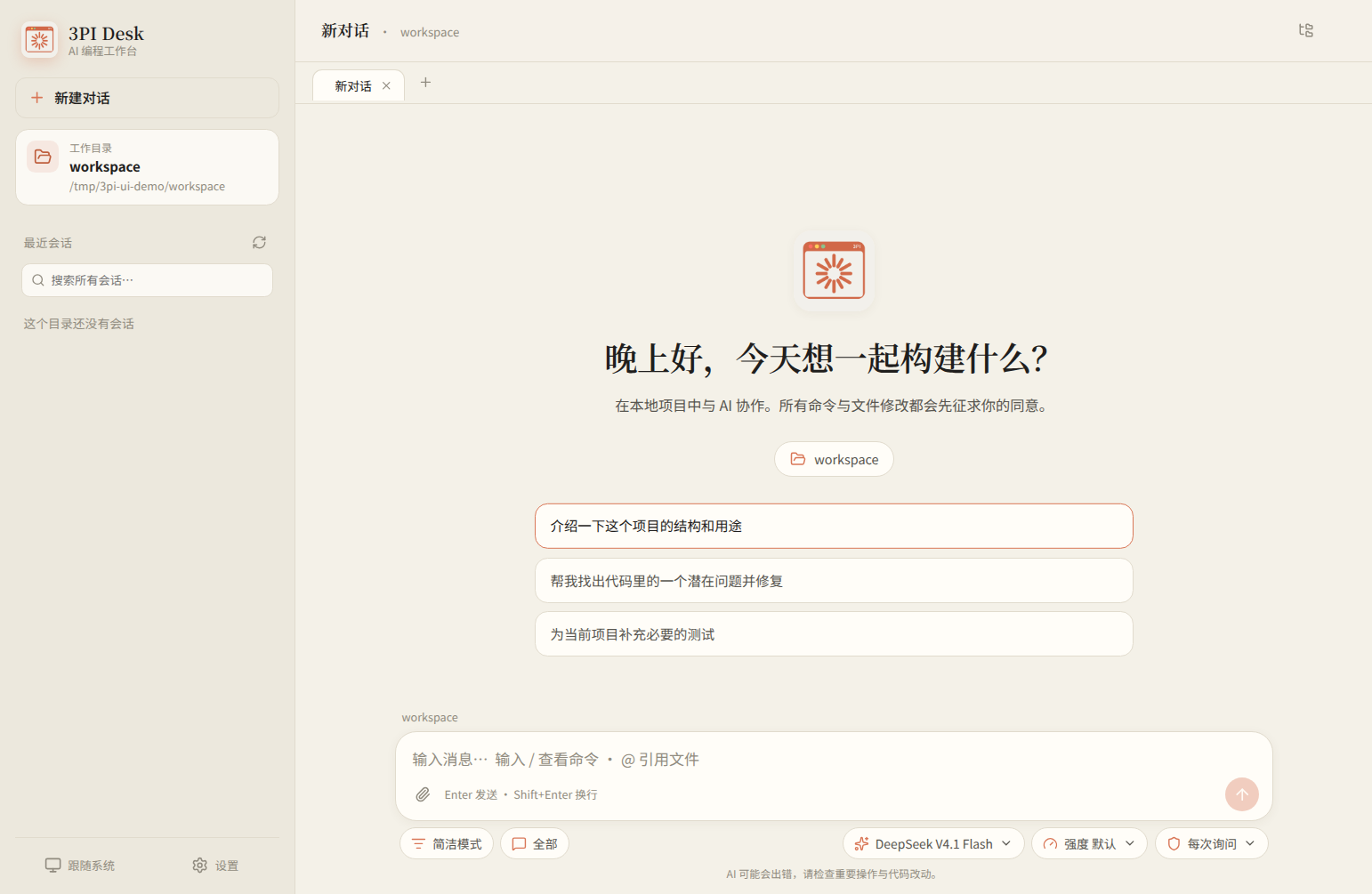
主界面:模型、强度、权限模式都移到了输入框下方,右上角只保留标题、文件面板、用量和任务状态。
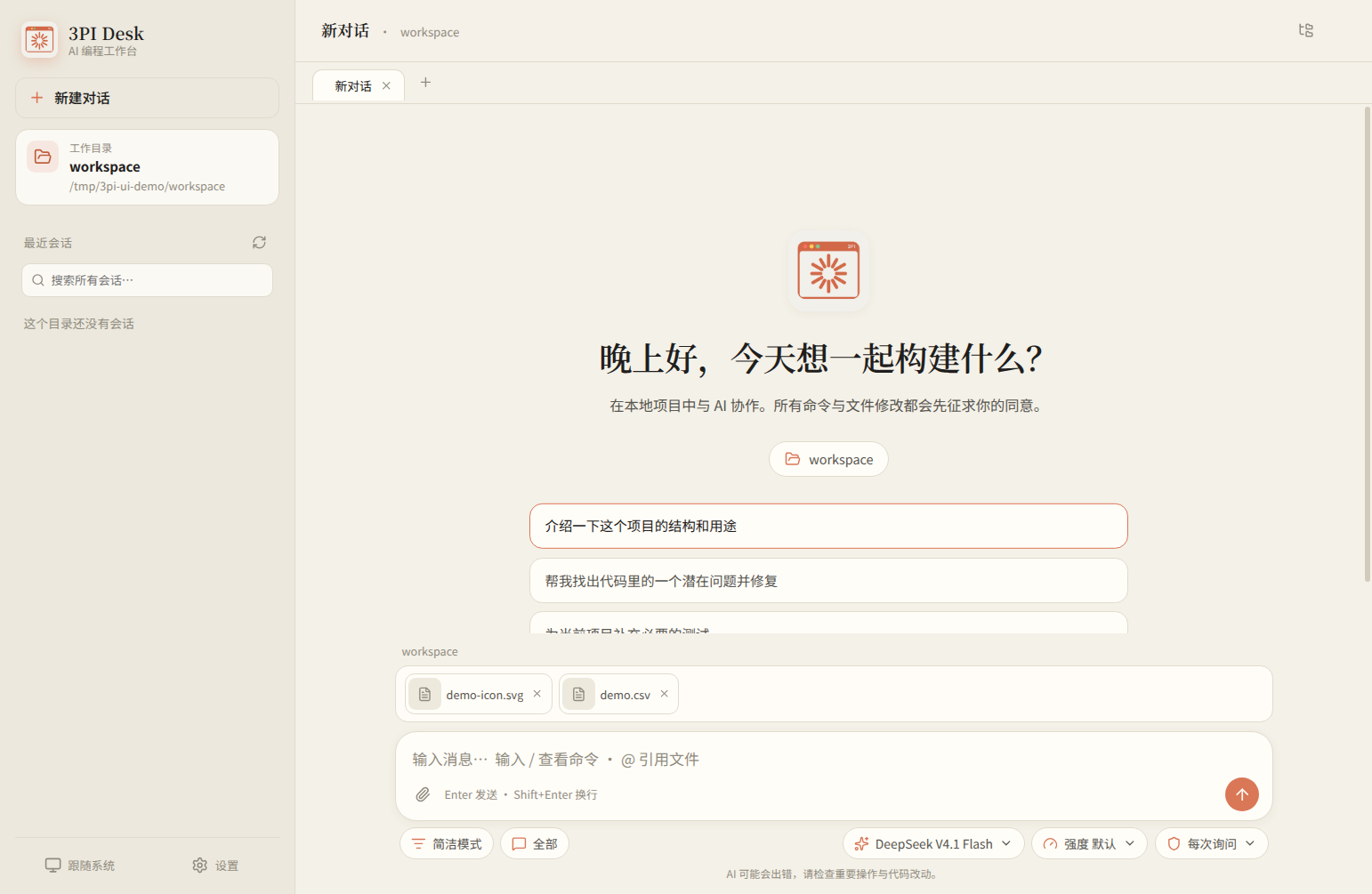
附件栏:附件单独放在一个矮框中,可横向滚动;支持多选、拖拽和粘贴。
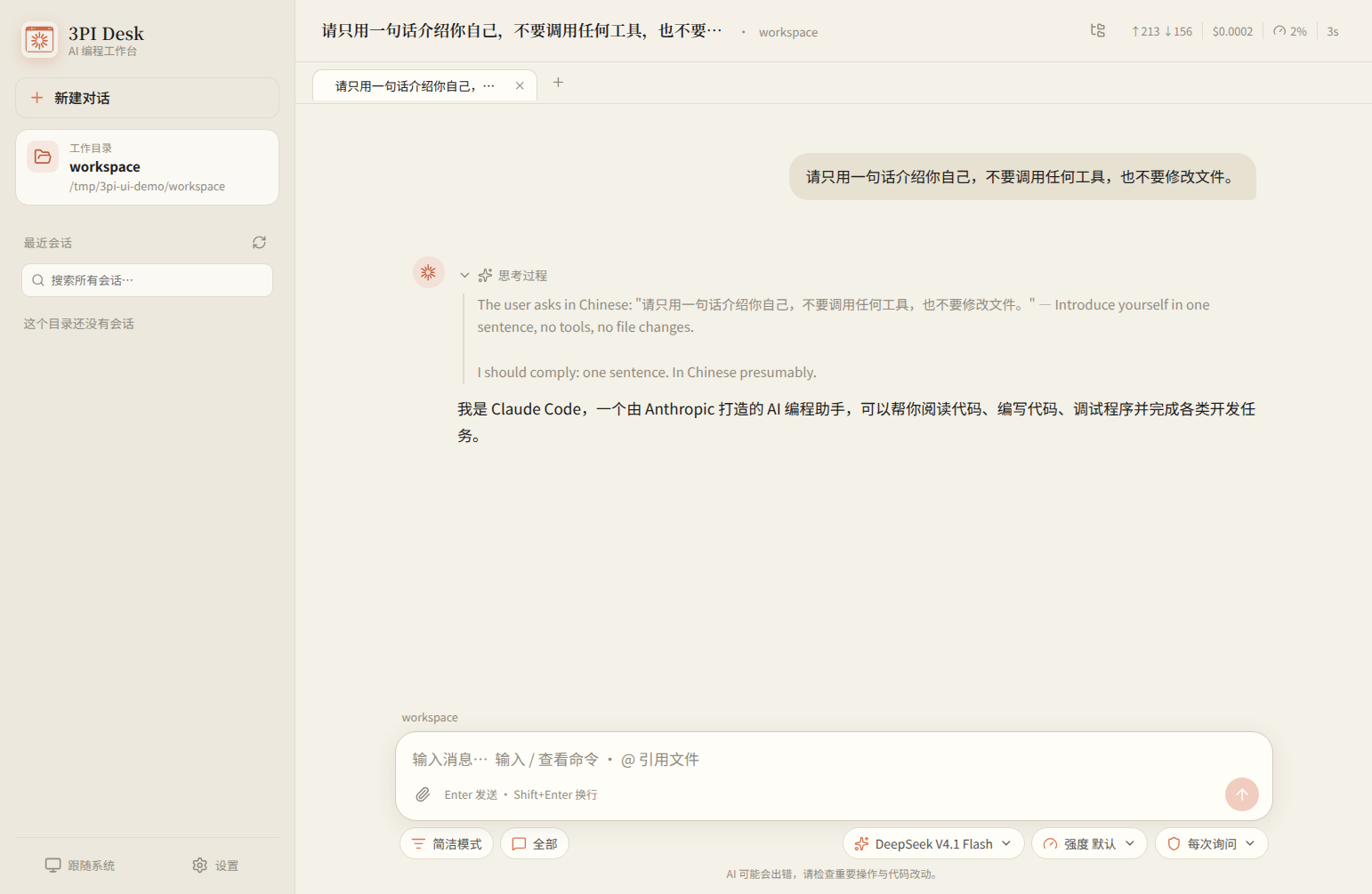
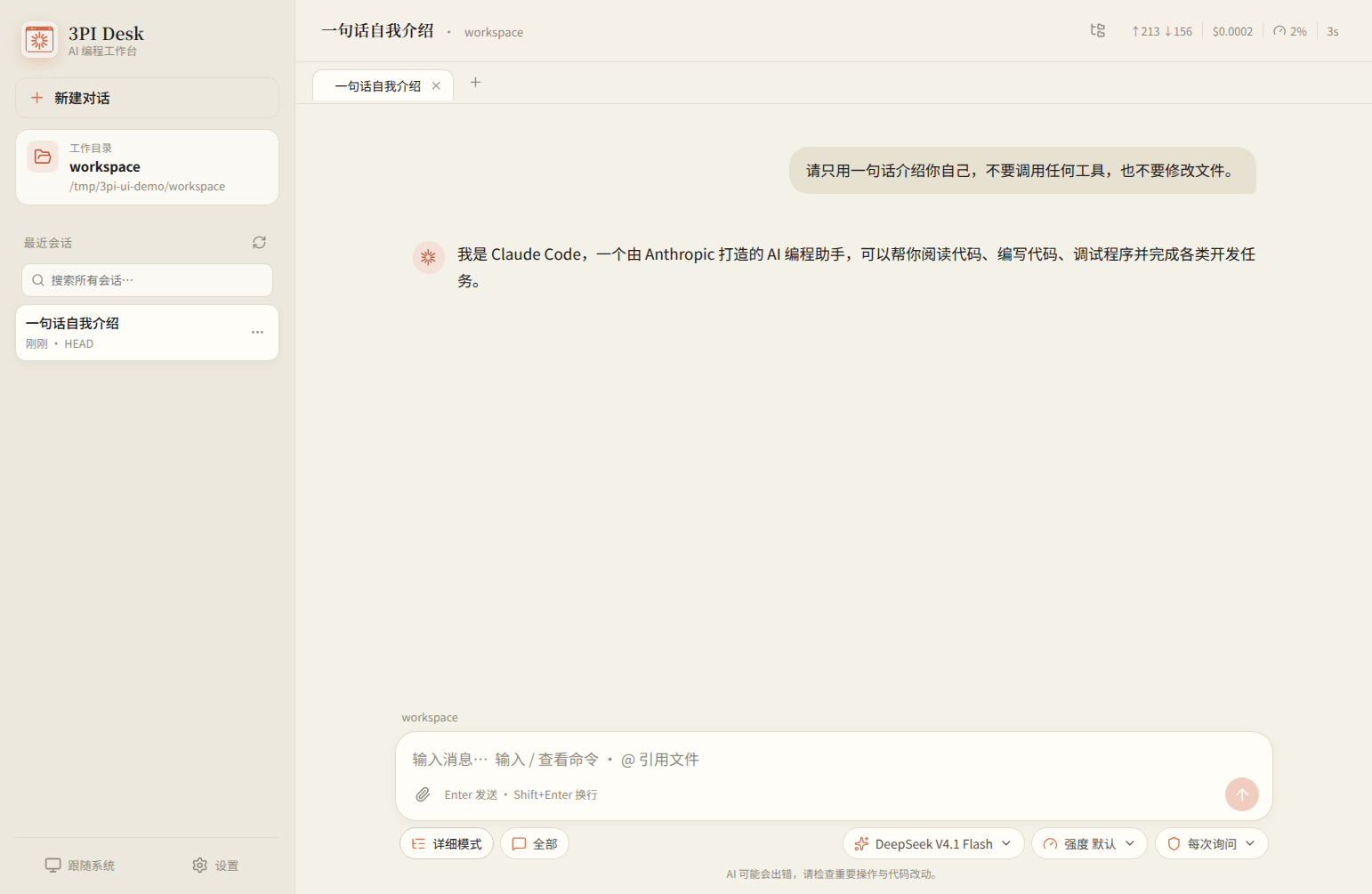
详细对话与简洁模式:简洁模式会折叠思考过程、工具卡片和信息提示,只保留对话正文。
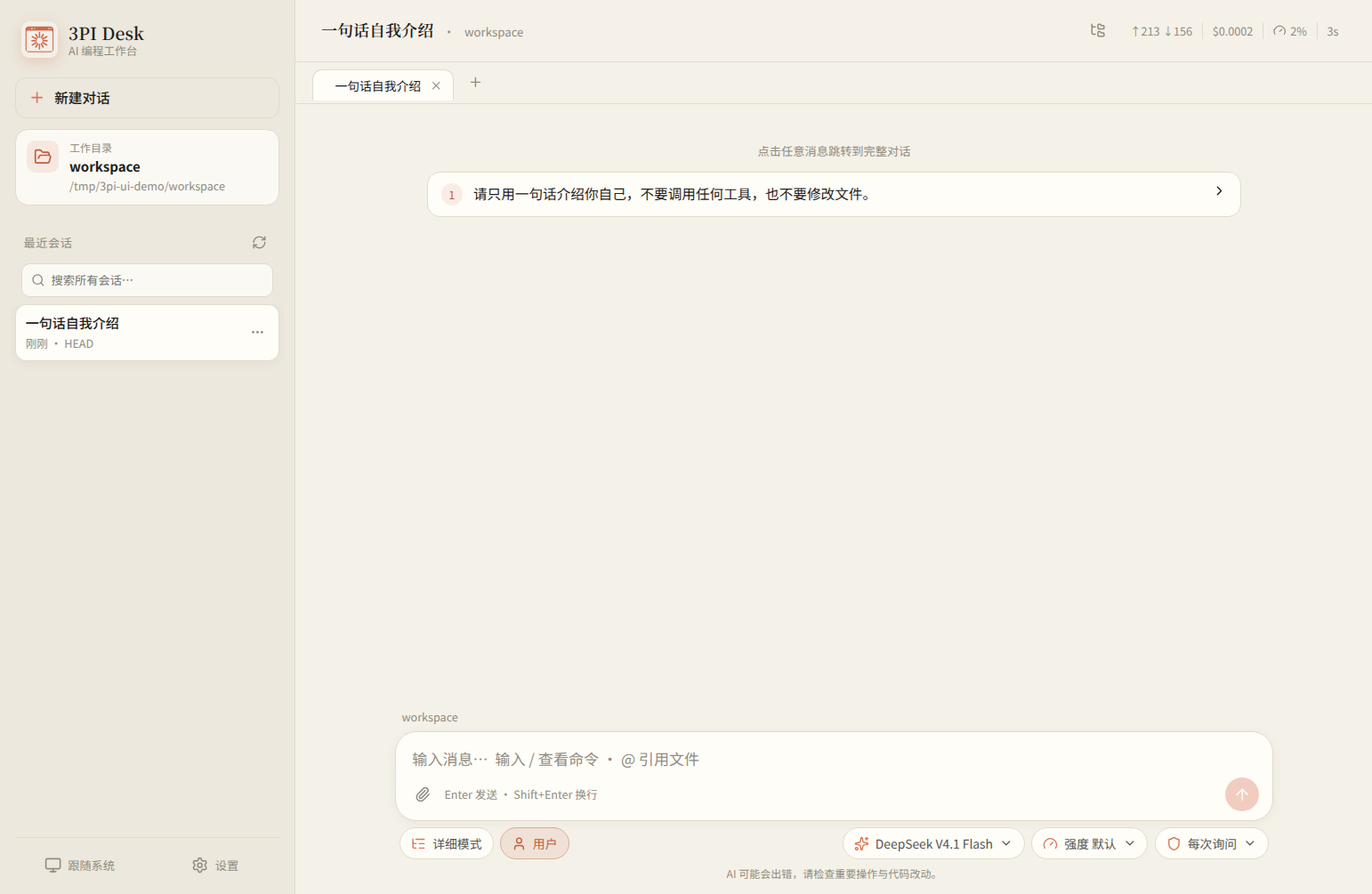
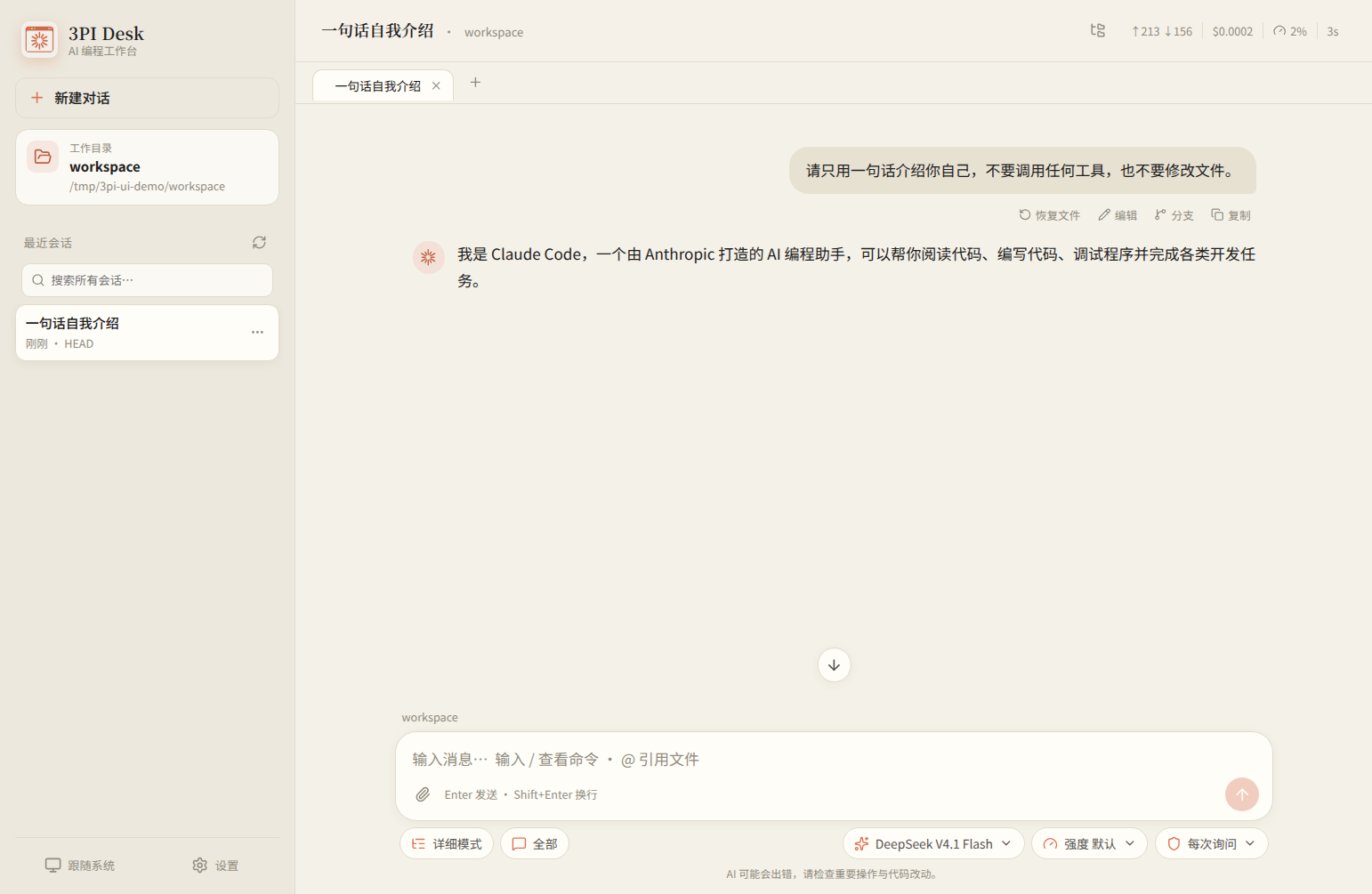
用户 / 全部:点击按钮在“用户”和“全部”之间切换。选择“用户”时只列出你发送的消息,点击任意
一条可跳回完整对话的对应位置;跳转后位置保持不变,不会自动回到底部。
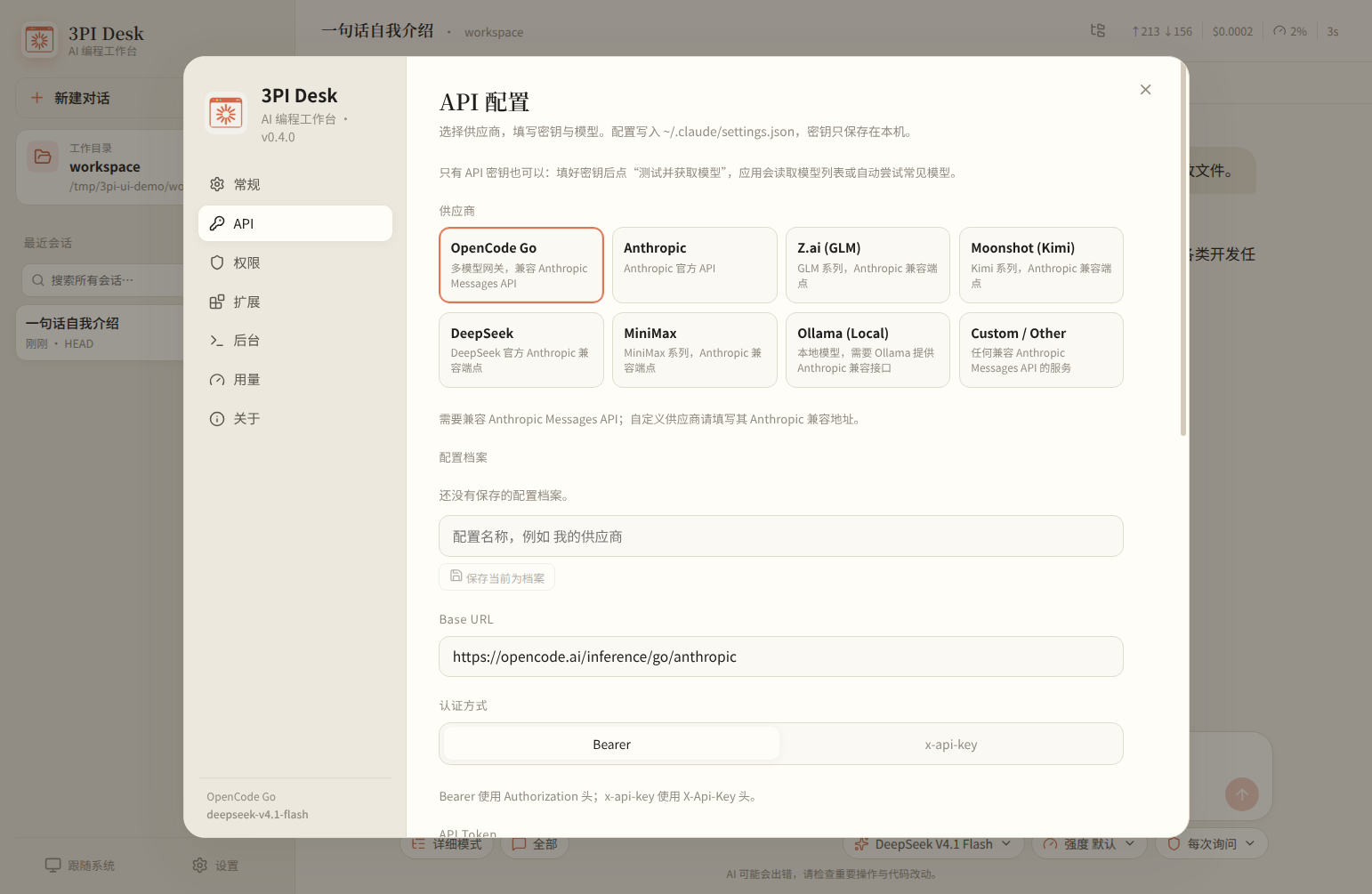
设置 → API:内置 OpenCode Go、Anthropic、Z.ai、Moonshot、DeepSeek、MiniMax、Ollama 和自定义
供应商。
主要功能
- 项目主页:首页是项目目录,可搜索项目;点击项目进入项目页,顶部是新建对话输入框,下面是该项目的全部会话,可搜索。侧栏和顶栏都有返回项目主页的按钮。
- 工作区与多标签:会话属于某个工作区(项目文件夹);每个标签可以独立运行一个对话。
每个对话有独立的未发送草稿(文字和附件),切换标签不会互相覆盖。 - 行内权限确认:权限请求、澄清问题和计划审批显示在输入框上方,不遮挡整个界面。
- Agent 能力:流式回复、思考块、工具卡片(Bash、编辑、diff、读取/搜索、子代理、待办)、
文件检查点恢复、斜杠命令、模型与思考强度切换、上下文和费用估算;顶部显示 AI 实时工作时长。 - 对话视图:简洁 / 详细模式一键切换;用户 / 全部切换按钮支持一键跳转到完整对话。
- 会话内搜索与提问目录:
Ctrl/Cmd + F在当前对话中搜索并高亮定位;右上角「提问目录」
可直接跳转到本会话的任意历史提问,无需切换视图。 - 编辑与撤回:用户消息可以原地编辑或撤回。编辑不弹窗,原消息会回到输入框;撤回需要确认。
两者都只回退当前对话,不新开标签或改变对话名;旧记录作为隐藏备份保留在本机。 - 检查点差异预览:恢复文件前可逐个文件展开,预览回滚前后的具体代码差异。
- 附件:图片、PDF、文本/代码/配置/CSV/SVG 等;失败的附件会显示具体原因。
- 扩展:管理 MCP、插件市场、Hooks、Skills 和 Agents;MCP 支持查看工具列表、重连和登录提示。
- 订阅 / 账号切换:可预存多个供应商或同一供应商的多个 plan/token。设置 → API 默认显示
配置列表,点击「添加新配置」才展开表单;在模型下拉菜单中上方「API 配置 / 订阅」框切换账号、
下方「模型」框选择模型。切换后当前会话会用新账号重启并保留上下文。 - 联网搜索:内置 MCP 搜索工具,支持 DuckDuckGo、Bing、Baidu(均免密钥)、SearXNG、Tavily 和 Brave;
第三方 Anthropic 兼容接口也能使用。可在输入框下方与模型/强度/权限同级快速开关,也可在
设置 → 常规 配置和测试。 - 运行中排队:模型工作时仍可继续发送消息,消息会排队执行;可单独停止后台/子代理任务。
- 工作区搜索:
Ctrl/Cmd + Shift + F搜索文件内容,Ctrl/Cmd + P搜索文件名;Ctrl/Cmd + K打开命令面板。 - 文件与 Git 变更:工作区文件树、文本编辑和图片预览;右侧面板可切到「Git 变更」,查看
未提交文件的状态与增删行数、点击查看 Git Diff,并可一键让 Claude 审查改动或生成提交信息。 - 本机用量看板:设置 → 用量 汇总今日与近 7 天的费用、Token、模型排行和项目排行,数据只保存在本机。
- 后台会话:启动、查看日志、停止和移除
claude --bg会话。 - 安全优先:从界面删除会话前一定先备份;应用不会自动删除聊天。
- 诊断与备份:关于页可导出脱敏诊断日志、浏览和导出会话备份。
- 会话复制/迁移:可把会话复制成独立会话,或迁移到其他项目(原记录隐藏但保留)。
- 外观:明/暗/跟随系统;卡其暖色、黑白、蓝白、绿白四种配色。黑白/蓝白/绿白使用白色底,
只让按钮、选中态等控件着色;预设或自定义色盘的强调色;设置面板为不透明背景,关闭/保存固定在
顶部;字号、紧凑间距、托盘、关闭到托盘和全局快捷键。
项目主页
应用启动后先进入项目目录,而不是直接打开输入框:
- 顶部搜索框可以按项目名或路径筛选项目。
- 点击项目卡片进入项目页,列出该项目的全部会话;可以搜索会话、开始新对话、搜索项目文件。
- 点击左侧品牌或文件夹卡片可以回到项目目录;打开的聊天仍保留在顶部标签栏。
- 每个对话有独立的未发送草稿(文字和附件),切换标签不会共享或覆盖。
- 会话菜单提供 复制/迁移:复制会创建独立会话;迁移会把新会话放到目标项目,并从列表隐藏原会话(原记录仍在本机)。
- 顶部显示 AI 在本对话中的累计工作时长,运行期间实时更新。
系统要求
- Linux(主要在 Ubuntu 24.04 + GNOME 上验证)或 macOS(Apple Silicon / Intel)。
- macOS 安装包目前未签名、未公证;首次打开请右键 → 打开,或执行
xattr -dr com.apple.quarantine "/Applications/3PI Desk for Claude Code.app"。 - 打包版已经包含 Electron 和 Claude Code 原生二进制,不需要另外安装 Claude Code。
- 任意 Anthropic Messages 兼容 的 API 供应商。默认是 OpenCode Go /
deepseek-v4.1-flash;供应商没有列出的模型可以手动添加,并填写上下文窗口。 - 从源码构建需要 Node.js 24+、npm 11+。
下载
从 Releases 下载:
- Linux AppImage:
chmod +x 3pi-desk-*-linux-*.AppImage后直接运行。 - Linux deb:
sudo apt install ./3pi-desk-*-linux-*.deb。 - macOS:下载
3pi-desk-*-macos-*.dmg(当前 CI 产物未签名,文件名包含架构)。如果产物
架构与你的 Mac 不匹配,请从源码构建,见下文。 - 每个版本附带
SHA256SUMS(macOS 为SHA256SUMS-macos,WSL 为SHA256SUMS-wsl)、LICENSE和THIRD_PARTY_NOTICES.md。
发布包内包含 Anthropic 的 Claude Code CLI;再分发和使用该二进制需遵守 Anthropic 的条款。
WSL2 / WSLg
在 Windows 上通过 WSLg 使用时,请下载带 wsl 字样的产物:
- deb:
sudo apt install ./3pi-desk-*-wsl-*.deb,然后运行3pi-desk-wsl。 - AppImage:
chmod +x 3pi-desk-*-wsl-*.AppImage后运行;WSL 中通常需要libfuse2t64。
WSL 版与 Linux 版共用源码,但使用独立的可执行文件、deb 包名和桌面入口,可以并存。它会自动
关闭系统托盘和全局快捷键,并优先通过 Windows 默认浏览器/应用打开链接和文件。完整说明、
字体依赖、代理和已知限制见 docs/WSL.md。
需要单独安装 Claude Code 吗?
通常不需要。 默认安装包不再内置 CLI,应用按以下顺序查找:
CLAUDE_CODE_EXECUTABLE环境变量;- 设置 → 通用 → Claude Code CLI 中手动指定的路径;
- 应用内置的 CLI(仅离线构建
npm run package:offline); - 之前下载到应用数据目录的副本(Linux:
~/.config/claude-desk/claude-cli/;macOS:~/Library/Application Support/claude-desk/claude-cli/); - 系统安装:
PATH中的claude、~/.local/bin/claude、官方安装器的~/.local/share/claude/versions/*、Homebrew 路径等。
如果都没有找到,设置页和主界面会提示下载官方 CLI(约 146 MB),或手动选择已有的 claude。
- Linux:默认 deb/AppImage 不包含 CLI;离线包
npm run dist:linux:offline会把它放在resources/app.asar.unpacked/node_modules/@anthropic-ai/claude-agent-sdk-linux-x64/claude。 - macOS:Electron 版同上;原生 SwiftUI 版(同一 release 的
3pi-desk-0.4.3-macos-arm64.zip)自带 Node、SDK 和 ARM64 CLI。 - 源码版:
npm install会安装当前平台的 CLI 包(约 314 MB),开发时直接使用它。
如果你已经安装过 Claude Code,应用会优先复用它(通过 PATH 或官方安装器路径),并共享~/.claude/ 下的设置、MCP 配置、Skills、Agents、Hooks 和聊天记录。因此你已有的会话会出现在
应用里,应用里改的 API 配置也会被 CLI 看到。
连接第三方 API
打开 设置 → API,选择供应商(或“自定义 / 其他”),填入 Base URL、Token 和模型,点
测试并获取模型,选择可用模型后保存。面板会自动把需要的环境变量写入~/.claude/settings.json,不需要手动改 JSON:
| 变量 | 内容 |
|---|---|
ANTHROPIC_BASE_URL |
供应商 API 根地址(不要带 /v1/messages) |
ANTHROPIC_AUTH_TOKEN / ANTHROPIC_API_KEY |
Token;面板根据认证方式选择变量 |
ANTHROPIC_MODEL |
选择的模型 |
ANTHROPIC_DEFAULT_OPUS_MODEL / ..._SONNET_MODEL / ..._HAIKU_MODEL |
同一个模型,避免内置别名找不到模型 |
如果你想自己维护配置,也可以把同样的键写进 ~/.claude/settings.json 的 env 块;面板会识别
并以掩码显示。注意:只在 .bashrc / .zshrc 里 export 的变量,从桌面菜单启动应用时不会
被继承,因此推荐写进 ~/.claude/settings.json。
运行
从应用菜单搜索 3PI Desk for Claude Code,或运行:
3pi-desk
打包后的可执行文件位于:
# Linux
/path/to/3pi-desk-for-claude-code/release/linux-unpacked/3pi-desk

# macOS
/path/to/3pi-desk-for-claude-code/release/mac-arm64/3PI Desk for Claude Code.app
macOS 上也可以直接双击 .app,或把它拖进「应用程序」。应用自己的偏好保存在 Linux 的~/.config/claude-desk/、macOS 的 ~/Library/Application Support/claude-desk/,并复用~/.claude/ 里已有的 Claude Code 配置和聊天记录。
首次使用
- 打开 设置 → API,选择供应商并填入 Token。点 测试并获取模型:能列出模型时直接选择;
没有模型列表时手动填写模型 ID,也可以添加自定义模型和上下文窗口。保存。 - 点击侧边栏的工作区卡片,添加要工作的项目文件夹;每个文件夹成为一个工作区。
- 在输入框下方选择模型、思考强度和权限模式。右上角仅保留标题、文件面板、用量和任务状态。
- 发送消息。文件修改和命令会以行内卡片请求确认。
附件支持
附件栏是输入框上方的一个单独矮框,支持多选、拖拽和粘贴,内容过多时可以左右滚动。
| 类型 | 支持情况 |
|---|---|
| 图片 | PNG、JPEG、GIF、WebP(Anthropic Messages API 支持的图片格式) |
| 作为文档块发送;是否可用取决于模型/网关 | |
| 文本 | 源码、配置、JSON、YAML、CSV、XML、日志、HTML、CSS、Markdown 等 |
| SVG | 按文本(源码)发送,因为 API 不接受 image/svg+xml 图片块 |
| 其他二进制 | 明确提示“不支持的文件类型”,不会静默丢弃 |
- 文本支持 UTF-8、带 BOM 的 UTF-16,以及 GB18030 中文编码回退。
- 上限:图片 12 MB、PDF 20 MB;文本 512 KB 以内全量发送,超过则截取前 200 KB 并标注截断。
- 不支持、过大、为空或无法读取的文件会在附件框内显示文件名和原因。
对话视图
- 简洁模式 / 详细模式:输入框下方的按钮一键切换。简洁模式隐藏思考过程、工具卡片和信息提示,
只保留用户消息和模型正文;详细模式显示完整过程。 - 用户 / 全部:一个按钮在两种视图之间切换。选择“用户”时只列出你发送的内容。点击任意一条
会跳转到完整对话的对应位置,并保持当前滚动位置;模型继续回复时不会自动跳回底部。需要回到
底部时点右下角的向下箭头;切回“全部”恢复完整对话。 - 模型、强度、权限模式位于输入框下方,和 OpenCode 的控制方式类似。
权限
行内权限卡片会显示工具、命令/路径预览和操作:
- 拒绝 / 允许一次 / 本对话内始终允许
- 澄清问题:选择选项或输入自定义答案后发送。
- 计划审批:展开计划后 批准并运行,或继续规划。
只有在权限模式菜单里明确选择“跳过所有确认”时,应用才不会询问。
工作区与会话安全
聊天记录由 Claude Code 以 JSONL 保存在 ~/.claude/projects/。应用按工作区目录分组,不会自动
删除任何聊天记录。
从界面删除会话时:
- 先要求确认;
- 把转录复制到
~/.config/claude-desk/session-backups/; - 再删除原文件。
工作区窗口里的 打开备份文件夹 可以打开备份目录。恢复时,把对应的 .jsonl 复制回~/.claude/projects/ 下匹配的项目目录并刷新。
扩展
- MCP:以 JSON 编辑用户/项目/本地 MCP 配置;应用里同时显示实时连接状态。
- 插件:预置官方市场,可搜索、安装、更新、卸载或添加其他市场;安装过程可取消。
- Skills:扫描
~/.claude/skills/<name>/SKILL.md和项目.claude/skills/,可创建、编辑、
删除和打开。 - Hooks:编辑用户或项目
settings.json里的hooks对象。 - Agents:在
~/.claude/agents/或项目.claude/agents/下创建、编辑和删除 Markdown 定义。
联网搜索
设置 → 常规 → 联网搜索 可以启用内置搜索工具。它通过应用自己的 MCP 服务器运行,因此不依赖
推理服务是否实现 Anthropic 的服务端 WebSearch:
- DuckDuckGo:默认选项,无需密钥;可能受频率限制,部分网络不可达。
- Bing:无需密钥;DuckDuckGo 不可用时可直接切换。
- Baidu:无需密钥;适合中文网络和中文结果。
- SearXNG:填写实例地址,并确保实例允许 JSON 输出。
- Tavily / Brave Search:填写对应 API Key。
- WebFetch:仍然可用于抓取指定 URL;它由 Claude Code CLI 本地执行。
第一次搜索时,权限卡片会请求确认;也可以把 mcp__3pi-web-search__web_search 加入
设置 → 权限 的允许列表。使用官方 Anthropic API 时,原生 WebSearch 仍可用;第三方供应商下
应用会改用内置搜索工具。
手机 / 远程访问
电脑端保持运行,手机浏览器即可使用完整界面:
- 同一局域网:设置 → 远程访问 启用并设置密码,手机打开
http://<电脑 IP>:3789。 - 公网:内置 Cloudflare Tunnel。Quick Tunnel 一键生成临时
trycloudflare.com地址;
长期使用建议 Named Tunnel + Cloudflare Access。 - 扫码直连:远程访问面板生成二维码,手机扫码即可用 5 分钟有效的一次性配对码免密登录。
- 会话、标签页、权限审批、中断和设置两端实时同步;后台标签需要审批或回答时会推送通知并震动提醒。
- Cloudflare Tunnel 意外退出时会自动退避重连,无需回到电脑端手动重启。
- 详细步骤和安全建议见 docs/REMOTE.md。
后台会话
设置 → 后台 可以在工作区启动后台会话。首次需要信任目录;勾选 信任此目录 或使用
信任目录。面板会显示运行中的会话、日志以及停止/移除操作。云端会话需要 Anthropic 账号,
第三方供应商下通常不可用。
语言与外观
- 界面默认英文;在 设置 → 常规 可以切换为中文。
- 主题、强调色、字号和紧凑间距也在常规设置中。
- UI 源码字符串是中文,英文由运行时词典翻译;少量来自工具或模型的动态文本可能保持原文。
常见问题
- 无法连接 / 登录失败:在 设置 → API 运行 测试连接;确认 Base URL 到 API 根地址
(例如.../anthropic),不要带/v1/messages;确认 Token 属于该供应商。 - DNS / 代理问题:使用自定义 Base URL 时不需要访问
api.anthropic.com。供应商不可达时
检查 DNS/代理设置。 - 插件安装卡住:点插件市场横幅上的 取消。安装命令以关闭 stdin 的方式运行,可安全取消。
- 工作区是空的:点击工作区卡片确认目录;如果从界面删过聊天,去备份目录查找。
- 更新后窗口空白:彻底退出所有实例后重新启动;打包版更新后必须重启。
已知限制
- 云端会话和 Anthropic 账号用量/限额接口需要 Anthropic 账号,第三方供应商下不可用。
- 自动更新没有 release feed;只能通过“关于 → 检查更新”查看 SDK 版本和重建命令。
- PDF 支持取决于模型/网关。
- 全局快捷键在 Wayland 下可能无效。
- 英文由表现层翻译提供,少量动态/第三方字符串可能未翻译。
- 停止按钮会中断当前回合;已经排队的消息仍会依次执行。要丢弃排队消息请关闭标签页;停止任务按钮只用于后台/子代理任务。
- DuckDuckGo 搜索可能被限流或在部分网络不可达;可切换到 Bing / Baidu,或配置 SearXNG、Tavily、Brave。
- MCP 登录依赖
claude mcp login的浏览器回调;无浏览器环境需要手动打开 CLI 输出中的链接。 - 编辑/撤回会保留一个隐藏的旧会话快照;界面上的标题和会话保持不变,但内部会使用新的会话 ID 继续。
- 跨项目复制会重写会话记录里的
cwd;原会话不会被删除,迁移只是在列表中隐藏。 - 安装包较大,因为包含 Claude Code 原生二进制。
安全与隐私
- 私下报告漏洞:请按
SECURITY.md使用 GitHub 私有漏洞报告,不要开公开
issue。报告中不要包含 API Key、Token 或完整聊天记录。 - 无遥测:应用不包含分析、广告或远程账号系统;API Key 只保存在本机
0600文件中。详见PRIVACY.md。 - 权限风险:
跳过所有确认会让工具直接执行,请只在可信工作区使用。
贡献
欢迎提交问题和改进。请先阅读 CONTRIBUTING.md 和CODE_OF_CONDUCT.md;变更记录见 CHANGELOG.md。
从源码构建
cd /path/to/3pi-desk-for-claude-code
npm ci
npm run typecheck
npm test
npm run build

# Linux
npm run package:linux   # release/linux-unpacked/3pi-desk
npm run dist:linux      # AppImage + deb

# macOS(必须在 Mac 上执行)
npm run package:mac     # release/mac-<arch>/3PI Desk for Claude Code.app
npm run dist:mac        # dmg + zip(未签名)
构建输出在 release/。Linux 桌面入口和 3pi-desk 启动器指向 release/linux-unpacked/;
macOS 输出 release/mac-arm64/(Intel 为 release/mac/),默认未签名,分发前需要配置
Developer ID 签名与 Apple 公证。npm run package / npm run dist 会按当前平台构建。
架构和数据流见 docs/DEVELOPMENT.md;安装、第三方 API 配置和排错教程见
docs/SETUP.md。
English
Project status and disclaimer
- Why this project exists. It is a GUI rebuilt for people who want to keep the Claude Code
workflow while pointing it at a third-party, Anthropic-Messages-compatible API provider.
The interface, model picker, provider presets, and configuration writer are built around that
use case. - Early stage. The project is still in its initial creation and testing phase. Expect bugs,
rough edges, and incomplete features; it will be improved incrementally. Issue reports and
patches are welcome. - What runs underneath. Sessions are executed by the official Claude Agent SDK; the
Claude Code CLI is reused from the system or downloaded on first use. The desktop app is a UI
and configuration layer; it does not reimplement the agent loop, so the core behaviour is the
same Claude Code you already trust. - About API keys. The app writes your key only to the local Claude Code configuration
(~/.claude/settings.json, mode0600) and never sends it to the project author. The
renderer only receives a masked token. If you would rather not hand your key to this client at
all, configure the provider yourself in the Claude Code CLI or by editing~/.claude/settings.json; the app reads that configuration and displays only a mask. Seedocs/SETUP.md. - Unofficial. This is not an Anthropic product and is not affiliated with or endorsed by
Anthropic. - License scope. This repository's code is MIT-licensed. The Claude Agent SDK and Claude Code
CLI are proprietary components © Anthropic PBC, all rights reserved, and are not covered by
the MIT license; their use and redistribution are subject to Anthropic's terms. SeeTHIRD_PARTY_NOTICES.md.
Screenshots
Main window: model, effort, and permission controls now sit below the composer; the top-right
keeps only the title, file panel, usage, and task status.
Attachment bar: attachments live in a separate short box and scroll horizontally.
Detailed and compact chat views. Compact mode collapses thinking, tool cards, and informational
notices, leaving only the conversation text.
My-messages-only view: click any message to jump back to its position in the full conversation.
The position is preserved when model replies are shown again.
Settings → API:
Highlights
- Project home: the home screen is the project directory with project search. Opening a project
shows a composer at the top and the project's searchable chat history below; the sidebar and
top bar both have explicit home buttons. - Workspaces and tabs: chats belong to a workspace (a project folder). Each tab can run an
independent conversation. Every chat keeps its own unsent draft (text and attachments). - Inline approvals: permission requests, clarifying questions, and plan approval appear as a
compact card above the composer. They never cover the screen or block the rest of the app. - Failover retry: if the provider fails and you saved more than one API profile, the error
banner can switch profiles and resend the last turn in one click. - Agent features: streaming replies, thinking blocks, tool cards (Bash, edits, diffs,
reads/searches, subagents, todos), file checkpoint restore, slash commands, model and effort
selection, and context/cost estimates. - Chat views: one-click compact/detailed mode; a User/All toggle with jump-to-message.
- In-chat search and prompt timeline:
Ctrl/Cmd + Fsearches the current conversation with
highlighted matches; the prompt timeline jumps to any earlier question without leaving the chat. - Edit and withdraw: edit a sent user message in place (it returns to the composer without a
dialog), or withdraw it with confirmation. Both keep the same visible chat title and do not open
a new branch; the old transcript is kept as a hidden backup. - Checkpoint diff preview: before restoring files, expand any affected file to preview the
exact code diff that will be applied. - Attachments: images, PDF, text/code/config/CSV/SVG, and more; rejected files explain why.
- Extensions: manage MCP servers (tool list, reconnect, sign-in state), install/update/remove
plugins from the official marketplace, manage hooks, and create or edit skills and agents. - Subscriptions / accounts: store multiple providers or multiple plans/tokens for the same
provider. Settings → API shows a clean list by default; the provider/token/model form only opens
after Add configuration. The model picker has two independent boxes: API configuration /
subscriptions on top and Model below. Switching restarts the current chat with the new
account while preserving its context. - Web search: a built-in MCP search tool with DuckDuckGo, Bing, and Baidu (no key), SearXNG,
Tavily, and Brave.
It works with third-party Anthropic-compatible providers. Toggle it next to the model, effort,
and permission controls, or configure and test it in Settings → General. - Queued messages: keep sending while the model is working; messages run in order. Background
and subagent tasks can be stopped individually. - Workspace search:
Ctrl/Cmd + Shift + Fsearches file contents,Ctrl/Cmd + Psearches file
names, andCtrl/Cmd + Kopens the command palette. - Files and Git changes: a workspace file tree with text editing and image preview; the side
panel also lists uncommitted Git changes with status and line counts, opens a Git diff per file,
and can ask Claude to review the changes or draft a commit message. - Local usage analytics: Settings → Usage summarises today and the last 7 days by cost, tokens,
model, and project. The history stays on this machine. - Local background sessions: start and monitor Claude Code background sessions without using a
tab; stop, inspect logs, and remove them from the app. - Diagnostics and backups: export redacted diagnostics and browse or export session backups
from About. - Safety first: deleting a chat from the UI always keeps a local backup first. The app never
automatically deletes chats. - Chat copy/move: copy a chat as an independent session, or move it to another project (the
original is hidden but retained). - Customisation: light/dark/system theme, warm khaki / monochrome / blue / green palettes.
Monochrome/blue/green keep white surfaces and tint controls only; preset or custom accent
colour; opaque Settings with a fixed top bar for close/save; font size, compact spacing, tray,
close-to-tray, and a global shortcut.
Project home
The app opens on the project directory instead of a blank composer:
- Search projects by name or path.
- Open a project to use a composer with model/effort/permission/web-search controls, list and
search all of its chats, or search project files. - Use the brand or folder card to return to the project directory; open chats stay in the tab bar.
- Every chat keeps an independent unsent draft (text and attachments).
- The chat menu offers Copy/Move: copy creates an independent chat; move places the new chat in another project and hides the original from the list (the original transcript stays on disk).
- The top bar shows the AI's accumulated work time for the current chat and updates live while it works.
Requirements
- Linux (tested on Ubuntu 24.04 with GNOME) or macOS (Apple Silicon / Intel).
- macOS builds are unsigned and unnotarized; right-click → Open on first launch, or run
xattr -dr com.apple.quarantine "/Applications/3PI Desk for Claude Code.app". - The packaged build includes Electron and the Claude Code native binary; no separate Claude Code
install is required. - Any Anthropic Messages-compatible API provider. Settings → API includes presets for
OpenCode Go, Anthropic, Z.ai (GLM), Moonshot (Kimi), DeepSeek, MiniMax, and Ollama, plus a
custom option. The default is OpenCode Go withdeepseek-v4.1-flash. Models that the provider
does not list can be added manually with an optional context window. - For rebuilding: Node.js 24+ and npm 11+.
Download
Download Linux and macOS packages from
Releases:
- Linux AppImage:
chmod +x 3pi-desk-*-linux-*.AppImageand run it. - Linux deb:
sudo apt install ./3pi-desk-*-linux-*.deb. - macOS: download
3pi-desk-*-macos-*.dmg(current CI artifacts are unsigned; the filename
includes the architecture). If the architecture does not match your Mac, build from source; see
below. - Each release includes
SHA256SUMS(macOS usesSHA256SUMS-macos, WSL usesSHA256SUMS-wsl),LICENSE, andTHIRD_PARTY_NOTICES.md.
Release packages include Anthropic's Claude Code CLI; redistributing and using that binary is
subject to Anthropic's terms.
WSL2 / WSLg
On Windows, use the artifacts with the wsl suffix:
- deb:
sudo apt install ./3pi-desk-*-wsl-*.deb, then run3pi-desk-wsl. - AppImage:
chmod +x 3pi-desk-*-wsl-*.AppImageand run it; WSL usually needslibfuse2t64.
The WSL edition shares the source with the Linux edition but uses a separate executable, deb
package name, and desktop entry, so both can be installed side by side. It automatically disables
the system tray and global shortcuts, and opens links/files through the Windows default
browser/application. See docs/WSL.md for fonts, proxies, limitations, and
troubleshooting.
Do I need to install Claude Code?
Usually not. The default package no longer bundles the CLI. The app looks for it in this
order:
CLAUDE_CODE_EXECUTABLE;- the path selected in Settings → General → Claude Code CLI;
- the bundled CLI (offline build only);
- a previously downloaded copy under the app data directory;
- a system installation (
PATH,~/.local/bin/claude, the official installer's versions
directory, Homebrew paths).
If none is found, Settings and the main window offer a ~146 MB download or a file picker.
- Linux: the default deb/AppImage does not include the CLI;
npm run dist:linux:offline
builds a package that puts it underresources/app.asar.unpacked/.... - macOS: the Electron build follows the same rules; the native SwiftUI build
(3pi-desk-0.4.3-macos-arm64.zipin the same release) bundles Node, the SDK, and the ARM64 CLI. - From source:
npm installpulls the current platform CLI package (~314 MB) for development.
If you already have Claude Code installed, the app prefers it and shares the same~/.claude/ directory: settings, MCP configuration, skills, agents, hooks, and chat transcripts.
Existing chats therefore appear in the app, and API changes made in the app are visible to the
CLI as well.
Connecting a third-party API provider
Open Settings → API, choose a preset (or Custom / Other), paste the Base URL and token,
pick a model, click Test & fetch models, then save. The app writes the required environment
variables to ~/.claude/settings.json for you — no manual JSON editing is needed:
| Variable | Value |
|---|---|
ANTHROPIC_BASE_URL |
Provider API root (not /v1/messages) |
ANTHROPIC_AUTH_TOKEN / ANTHROPIC_API_KEY |
Token; the app chooses the variable from the auth mode |
ANTHROPIC_MODEL |
Selected model |
ANTHROPIC_DEFAULT_OPUS_MODEL / ..._SONNET_MODEL / ..._HAIKU_MODEL |
Same model, so built-in aliases resolve consistently |
If you prefer to manage the configuration yourself, put the same keys in the env block of~/.claude/settings.json; the app detects them and masks the token. Environment variables
exported only from a shell profile (.bashrc / .zshrc) are not inherited when the app is
launched from the desktop menu, so use ~/.claude/settings.json for configuration that both the
app and the CLI can see.
Run
From the application menu, search for 3PI Desk for Claude Code, or run:
3pi-desk
The unpacked build lives at:
# Linux
/path/to/3pi-desk-for-claude-code/release/linux-unpacked/3pi-desk

# macOS
/path/to/3pi-desk-for-claude-code/release/mac-arm64/3PI Desk for Claude Code.app
On macOS you can also double-click the .app or drag it into Applications. The app keeps its own
preferences in ~/.config/claude-desk/ on Linux and ~/Library/Application Support/claude-desk/
on macOS, and uses the existing Claude Code configuration and transcripts in ~/.claude/.
First run
- Open Settings → API and pick a provider (or Custom / Other). Paste the token and click
Test & fetch models. If the provider lists models, pick one; otherwise enter a model ID from
the provider documentation and add a custom model with an optional context window. Save. - Click the workspace card in the sidebar to open the Workspaces window. Add the project
folder you want to work in; each folder becomes a workspace and its own chat list. - Pick a model, an effort level, and a permission mode below the composer. The top-right keeps
the title, file panel, usage, and task status. - Send a message. File edits and commands ask for approval inline above the composer.
Attachments
Attachments appear in a separate short box above the composer, support multi-select, drag/drop,
and paste, and scroll horizontally when there are many.
| Type | Support |
|---|---|
| Images | PNG, JPEG, GIF, WebP (the image formats accepted by the Messages API) |
| Sent as a document block; availability depends on the model/gateway | |
| Text | source code, configs, JSON, YAML, CSV, XML, logs, HTML, CSS, Markdown, etc. |
| SVG | Sent as text (source), because the API does not accept image/svg+xml image blocks |
| Other binary | Reported as “unsupported file type” instead of silently dropped |
- Text supports UTF-8, UTF-16 with BOM, and GB18030 as a Chinese fallback.
- Limits: images 12 MB, PDF 20 MB; text up to 512 KB is sent in full, larger files are truncated
to 200 KB with a marker. - Unsupported, oversized, empty, or unreadable files show their name and reason in the attachment
box.
Chat views
- Compact / detailed: one-click toggle below the composer. Compact hides thinking blocks,
tool cards, and informational notices, leaving user messages and assistant text; detailed shows
everything. - User / All: a single toggle switches between the two views. Choose User to list only your
messages; click one to jump to its position in the full conversation. The scroll position is
preserved when model replies are shown again; use the down-arrow button to return to the bottom.
Switch back to All to restore the full conversation. - Model, effort, and permission controls are below the composer, similar to OpenCode.
Permissions
The inline permission card shows the tool, a short command/path preview, and the actions:
- Deny / Allow once / Allow for this chat
- For clarifying questions: choose options (or type another answer) and send.
- For plans: expand the plan and Approve and run, or keep planning.
The app does not bypass permissions unless you explicitly choose Skip all confirmations in the
permission-mode menu.
Workspaces and chat safety
Chats are persisted by the local agent engine as JSONL transcripts under ~/.claude/projects/.
The app groups chats by workspace directory and never deletes a transcript automatically.
Deleting a chat from the UI:
- asks for confirmation, then
- copies the transcript to
~/.config/claude-desk/session-backups/, then - removes the original.
Open backup folder in the Workspaces window opens that backup directory. To restore a chat,
copy the desired .jsonl file back into the matching project folder under~/.claude/projects/ and refresh the workspace.
Extensions
- MCP: edit the user/project/local MCP configuration as JSON; servers are also listed with live
connection state in the app. - Plugins: the official marketplace is preconfigured. Search, install, update, uninstall, or
add another marketplace. Plugin changes apply to new chats. - Skills: there is no separate skills marketplace. Skills ship inside plugins, or live in
~/.claude/skills/<name>/SKILL.md(user) and.claude/skills/(project). The Skills tab can
create, edit, delete, and open them. - Hooks: edit the
hooksobject in user or projectsettings.json. - Agents: create, edit, and delete Markdown agent definitions under
~/.claude/agents/or the
project.claude/agents/.
Web search
Settings → General → Web search enables the built-in search tool. It runs in the app's own MCP
server, so it does not depend on whether the inference provider implements Anthropic's server-sideWebSearch:
- DuckDuckGo: default, no API key required; may be rate limited or unreachable on some networks.
- Bing: no API key required; use it when DuckDuckGo is blocked.
- Baidu: no API key required; suited to Chinese networks and Chinese results.
- SearXNG: enter an instance URL and make sure JSON output is enabled.
- Tavily / Brave Search: enter the provider API key.
- WebFetch: still available for fetching a specific URL; it runs locally in the Claude Code CLI.
The first search asks for permission through the inline permission card. You can also addmcp__3pi-web-search__web_search to Settings → Permissions. With the official Anthropic API,
native WebSearch remains available; with third-party providers the app uses the built-in search
tool instead.
Phone / remote access
Keep the desktop app running and use the full UI from a phone browser:
- Same LAN: enable remote access in Settings → Remote access, set a password, then open
http://<computer IP>:3789on the phone. - Internet: built-in Cloudflare Tunnel. Quick Tunnel creates a temporary
trycloudflare.com
address; for long-term use prefer a Named Tunnel with Cloudflare Access. - QR pairing: the remote panel renders a QR code. Scanning it logs the phone in with a
single-use pairing token valid for 5 minutes, so no password typing is needed. - Tabs, sessions, approvals, interrupts, and settings stay in sync across both clients. When a
background tab needs approval or an answer, the phone gets a notification and vibration alert. - If the Cloudflare Tunnel process exits unexpectedly, it reconnects automatically with backoff.
- Full steps and security advice: docs/REMOTE.md.
Background sessions
Settings → Background starts a background session in a workspace. The first time, the
workspace must be trusted; tick Trust this directory or use Trust directory. The app shows
running sessions, logs, and stop/remove actions. Cloud sessions require an Anthropic account and
are usually unavailable with third-party providers.
Languages and appearance
- Default language: English. Switch to 中文 in Settings → General.
- Theme, accent colour, font size, and compact spacing are also in General.
- The UI source strings are Chinese and translated at runtime by the English dictionary. Some
dynamic messages from tools or the model may remain in their original language by design.
Troubleshooting
- Cannot connect / login: open Settings → API and run Test connection. Make sure the Base
URL ends at the API root (.../anthropic), not/v1/messages, and that the token belongs to the
selected provider. - DNS or proxy problems:
api.anthropic.comis not needed when a custom Base URL is used. If
the provider is unreachable, check DNS/proxy settings. - A plugin install hangs: use Cancel in the marketplace banner. Installs run with stdin
closed and can be cancelled. - Empty workspace: click the workspace card and confirm the folder. If chats were deleted from
the UI, look in the backup folder. - Window is blank after an update: quit all running instances completely and relaunch. The
packaged app is a native Electron build; restarting is required after an update.
Known limitations
- Cloud sessions and Anthropic account usage/limit APIs are unavailable with third-party
providers. - There is no release feed for automatic app updates. Use About → Check for updates and the
copyable rebuild command. - PDF input depends on what the configured model/gateway supports.
- The global shortcut may not work under Wayland.
- English is provided by a presentation-layer translator; a few dynamic/third-party strings may
remain untranslated. - Stop interrupts the current turn. Messages already queued still run in order; close the tab to
discard them. The per-task stop button only targets background/subagent tasks. - DuckDuckGo search can be rate limited or unreachable; switch to Bing or Baidu, or configure
SearXNG, Tavily, or Brave for a stable quota. - MCP sign-in relies on the browser callback from
claude mcp login; on a headless machine, open
the URL printed by the CLI manually. - Edit/withdraw keeps a hidden snapshot of the old transcript; the visible title/chat stays the
same, but a new internal session ID continues the conversation. - Cross-project copy rewrites
cwdfields in the transcript. The original is never deleted; a
move only hides it from the list. - The packaged app is large because it includes the Claude Code native binary.
Security and privacy
- Report vulnerabilities privately through GitHub Security Advisories as described in
SECURITY.md. Do not open a public issue with API keys, tokens, or chat content. - No telemetry: the app has no analytics, advertising, or remote account system. API keys stay
in local0600files. SeePRIVACY.md. - Permission risk:
Skip all confirmationsexecutes tools without prompts. Use it only in
trusted workspaces.
Contributing
Issues and improvements are welcome. Please read CONTRIBUTING.md andCODE_OF_CONDUCT.md; changes are recorded in CHANGELOG.md.
Rebuild from source
cd /path/to/3pi-desk-for-claude-code
npm ci
npm run typecheck
npm test
npm run build

# Linux
npm run package:linux   # release/linux-unpacked/3pi-desk
npm run dist:linux      # AppImage + deb

# macOS (must run on macOS)
npm run package:mac     # release/mac-<arch>/3PI Desk for Claude Code.app
npm run dist:mac        # dmg + zip (unsigned)
The unpacked build is written to release/. The Linux desktop entry and 3pi-desk launcher point
to release/linux-unpacked/; macOS output goes to release/mac-arm64/ (or release/mac/ on
Intel). macOS builds are unsigned by default; configure a Developer ID certificate and Apple
notarization before distributing. npm run package / npm run dist build for the host platform.
See docs/DEVELOPMENT.md for architecture, data flow, and maintenance
details, and docs/SETUP.md for installation and third-party API configuration.
Reviews (0)
Sign in to leave a review.
Leave a reviewNo results found