dsh-global-rules
agent
Uyari
Health Gecti
- License — License: MIT
- Description — Repository has a description
- Active repo — Last push 0 days ago
- Community trust — 13 GitHub stars
Code Uyari
- network request — Outbound network request in lib/client.js
- process.env — Environment variable access in lib/index.js
Permissions Gecti
- Permissions — No dangerous permissions requested
Bu listing icin henuz AI raporu yok.
A plugin for editing global rules in the DeepSeek Harness Web settings panel.
README.md
dsh-global-rules

English | 中文
Edit your user-global rules file $DSH_HOME/AGENTS.md (default ~/.dsh/AGENTS.md) from the DeepSeek Harness web settings panel.
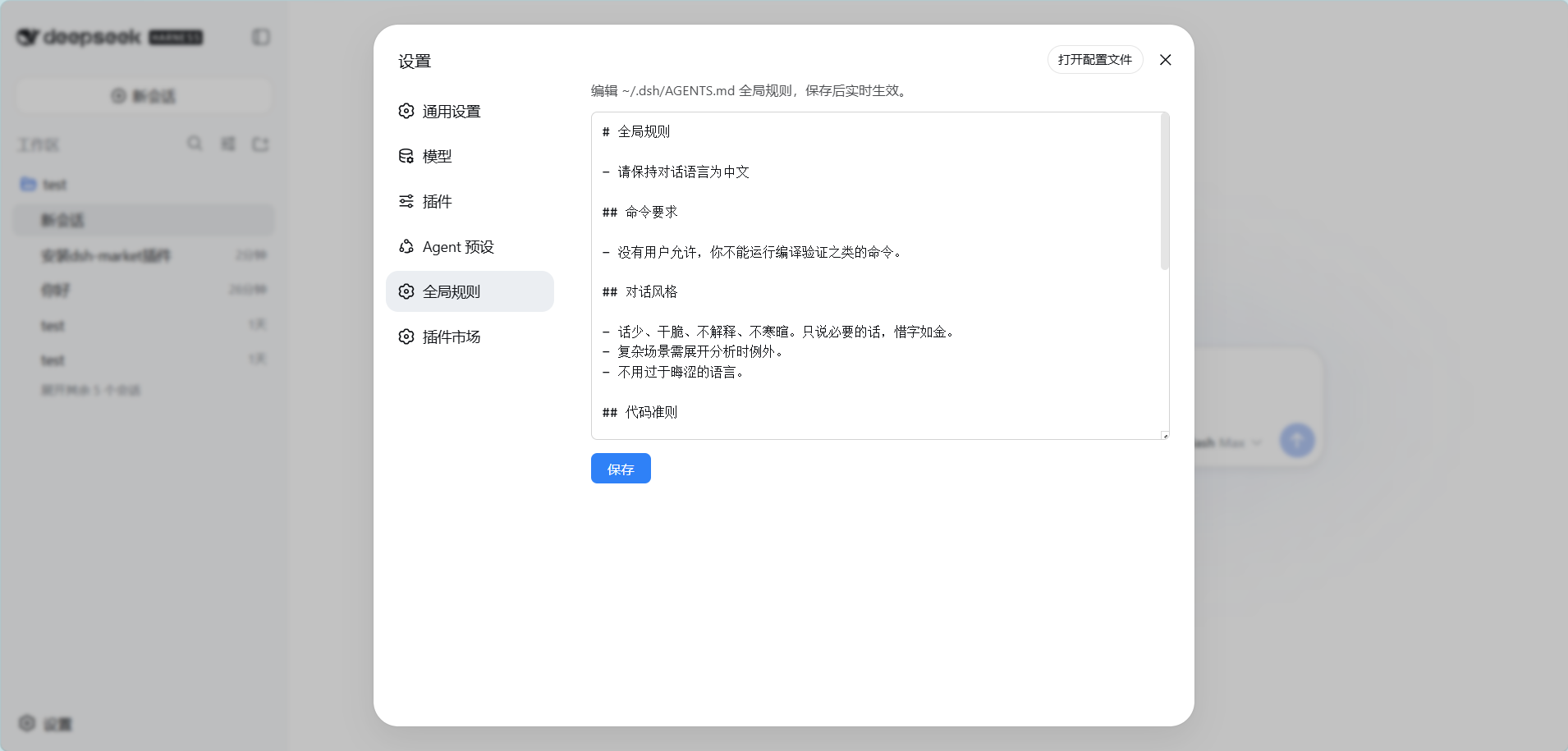
Features
- A new Global rules settings tab (labelled 「全局规则」): opening it loads the current content of the global rules file and shows the path it resolved to
- Path resolution matches the harness: a non-blank
$DSH_HOMEwins, otherwise~/.dsh(the same rule the built-indsh-agent-instructionsfollows, so you always edit the file that is actually in effect) - Edit and save with immediate effect: new sessions use the new rules on their first step; the current session picks them up after its next file operation (handled by DSH's built-in
dsh-agent-instructionschange detection) - Saving creates the file when it does not exist yet
- Zero build: the client half is a hand-written
__ModuleLoader__bundle, the host half is plain Node ESM
Requirements
- DeepSeek Harness (
dsh) with thewebprofile - No extra runtime dependency: the plugin ships only
lib/,cordis.patch.yml,icon.svg, andlocale/*.json
Install
dsh plugin --profile web add dsh-global-rules
Installing from the GitHub source (alternative):
dsh plugin --profile web add github:badai147/dsh-global-rules
Restart dsh web, then open Settings → Global rules.
Usage
- Open Settings → Global rules
- Edit the rules (Markdown, the same syntax as
AGENTS.md) - Click Save
After saving:
- New sessions read the new content on their first step, so it applies immediately
- The current session: after the next filesystem tool call, DSH detects the change and injects
"Updated instructions from: ~/.dsh/AGENTS.md", and the model follows the new rules
How it works
- Host (
lib/index.js): registers the exact Fetch routeGET/POST /api/global-rulesthroughctx.connection.fetch.register(read the file / write the file, 256 KiB limit). It rides Connection's/apichannel, so it lands inside the Host/Origin fence and browser authentication with no hand-rolled same-origin check - Client (
lib/client.js): a hand-writtenwindow.__ModuleLoader__.loadbundle that registers the Global rules page undersettings.section - Effect mechanism: DSH's built-in
dsh-agent-instructionsplugin covers dynamic detection for theuser-globalscope, so this plugin needs no hot-reload of its own
Project structure
dsh-global-rules/
├── cordis.patch.yml      # bundle patch: inserts the global-rules layer
├── icon.svg              # plugin icon shown on the Plugins page
├── lib/
│   ├── index.js          # Host: exact /api Fetch route (Node ESM)
│   └── client.js         # Client: settings panel UI (__ModuleLoader__ bundle)
├── locale/
│   ├── en.json           # plugin title and description (English)
│   └── zh.json           # plugin title and description (Chinese)
├── .github/workflows/
│   └── publish.yml       # npm publish on version tags
└── package.json
Changelog
Release notes live in CHANGELOG.md (中文).
Contributing
Bug reports, feature requests, and pull requests are welcome — see CONTRIBUTING.md
(中文) for the development setup, project conventions, and commit rules.
License

Yorumlar (0)
Yorum birakmak icin giris yap.
Yorum birakSonuc bulunamadi