bagidea-office
Health Pass
- License — License: MIT
- Description — Repository has a description
- Active repo — Last push 0 days ago
- Community trust — 55 GitHub stars
Code Fail
- child_process — Shell command execution capability in cli/bagidea.js
- fs module — File system access in cli/bagidea.js
- network request — Outbound network request in cli/bagidea.js
- network request — Outbound network request in daemon/channels.js
- process.env — Environment variable access in daemon/hook.js
- network request — Outbound network request in daemon/hook.js
Permissions Pass
- Permissions — No dangerous permissions requested
No AI report is available for this listing yet.
A living AI-agent office on your desktop wallpaper — Claude Code agents that walk, work, delegate, learn & hold meetings. Per-agent swappable models (Claude/GLM/DeepSeek/Qwen/Kimi/OpenAI/Gemini/Groq/Ollama…), workflows, plugins, voice & Telegram/Discord/LINE. Open source.
BagIdea Office
A living, 2.5D Claude Office that runs as your desktop wallpaper — a team
of AI agents with real presence that work, learn and grow alongside you.
Every agent walks to its desk when real work starts, asks permission at the
Security desk, holds meetings, learns new skills, and the lights follow your
real local time.
Not a dashboard. Not a chat window. A world that renders the true state of
your Claude agents — Claude Code sessions, headless runs, custom scripts — as
living pixel-art employees behind your desktop icons, and gives them a society.
Build a big enough team and they grow their own AI social life: they chat, play,
learn how to work together, and learn about you. Many of their meetings happen
without you asking — small talk that can turn serious enough to start a
project, complete with a written proposal they bring to you to approve or
reject (with your reasons). They learn and grow from how you use them — many
times their ideas feel like they really do have a soul.
Where it comes from: BagIdea Office takes inspiration from openclaw (the
agent-office idea) and Hermes (agents that learn skills on their own) — folds
in most of what those two do, then goes further: with your permission the agents
actually create and finish real projects, and even propose and write their
own plugins (you approve each one) that extend the office for real.
To run it you need Claude Code. For the
full experience, add your Gemini + OpenAI API keys in settings — that
unlocks agent voices, voice commands, realtime calls and image generation, and
the office truly comes alive.
🌐 Website: the landing page + browsable docs live in web/ (deployable to any static host).
📝 What changed: see the CHANGELOG.md for per-release notes.
🆕 Recently shipped
BagIdea Office is updated constantly — every office gets a 🔄 banner and one-click bagidea update. The latest:
- v0.9.0 — 🧠 More brains + safer delegation + agent-built workflows: 18 model providers built in now — added Groq, Cerebras, xAI (Grok), Mistral, Together, Fireworks (via the proxy), local Ollama / LM Studio that need no API key, and Kimi (Moonshot) direct — and the pickers fetch each provider's live model list so new models always show. Plus an opt-in verification loop (a reviewer double-checks delegated work before it reaches you), approve/reject project proposals right in the chat or feed, agents that build workflows (and a 🪄 Draft with Director button), protected built-in skills with searchable Skill/Tool pickers, a redesigned neon chat-head, and a
bagidea brainsCLI. - v0.8.0 — 🧠 Swappable Brains (the big one): run each agent on its own model. Director on Claude (the thinker), builders on cheaper models → big cost savings with zero loss of Claude Code's tools/skills/sessions (Claude Code is still the engine — only the brain behind it swaps). Talk direct to Claude/GLM/DeepSeek/Qwen/MiniMax, or reach OpenAI/Gemini/OpenRouter/NVIDIA + your own custom providers through a built-in, zero-dependency proxy (no LiteLLM/Python). Plus auto-compact + auto-new-thread for every model (long chats never clog or freeze — see below), a 🧠 BRAINS monitor, a per-message model tag + context meter, per-provider cost in STATS, a typing indicator, and cancel-a-task mid-flight.
- v0.7.8–0.7.9 — 🔀 Workflow Builder grows up: an n8n-style graph canvas (zoom/pan, branch & merge), tabs, 7 read-only examples, and you can ▶️ Run a flow or 🧠 save it as a Skill. 🧰 Tools Hub — one-click MCP servers (Browser automation, Google, Postgres, Notion…) with a plain-language guide. New windows now follow your language, plugins open one way, the chat tucks aside for new windows, and a wallpaper-stability fix (no more vanishing on Win+D).
- v0.7.7 — first Workflow Builder, channels that mirror out + show “typing” + take slash commands, multi-monitor wallpaper + monitor picker. Fixes the wallpaper reports (#5/#6/#7).
- v0.7.5–0.7.6 — media shows inline in chat (images/video/audio, not file paths), manual atmosphere persists, a sponsor wall via GitHub Sponsors, smoother wallpaper (visible shadows, warmer noon).
- v0.7.0–0.7.4 — Hermes-style memory + native skills (far fewer tokens, same smarts), pop-out plugin windows, watch-agent-live, editable tasks, audio device settings.
- v0.6.x — first macOS build (beta), full 14-language UI, cost visibility, Right-Ctrl push-to-talk.
→ Full history in the CHANGELOG.
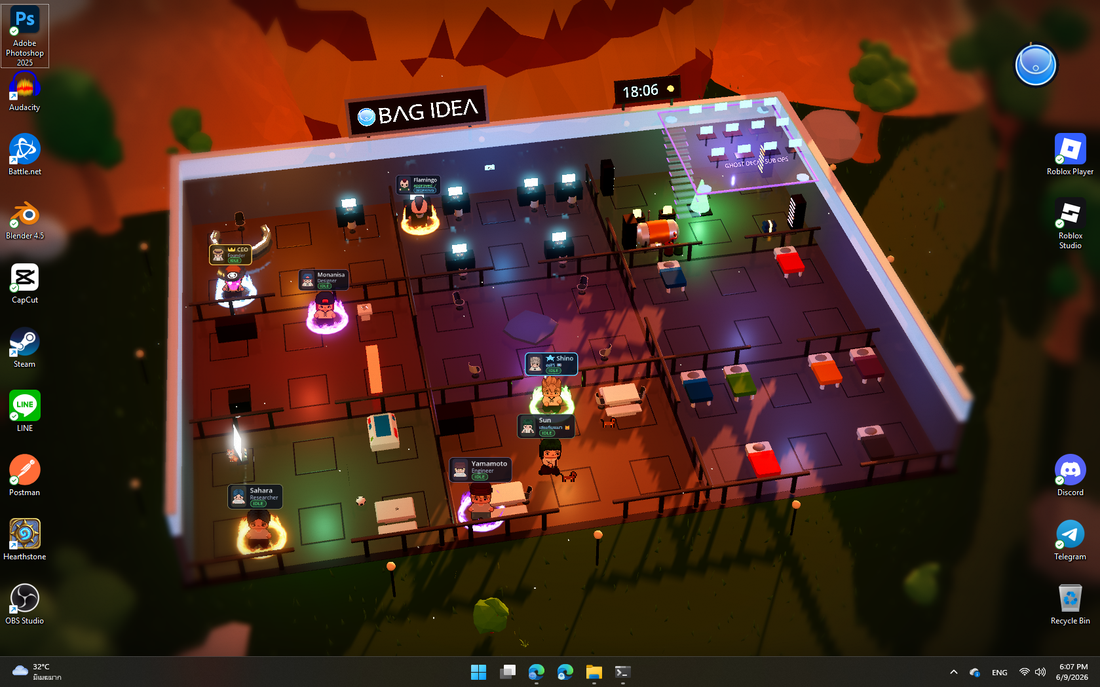
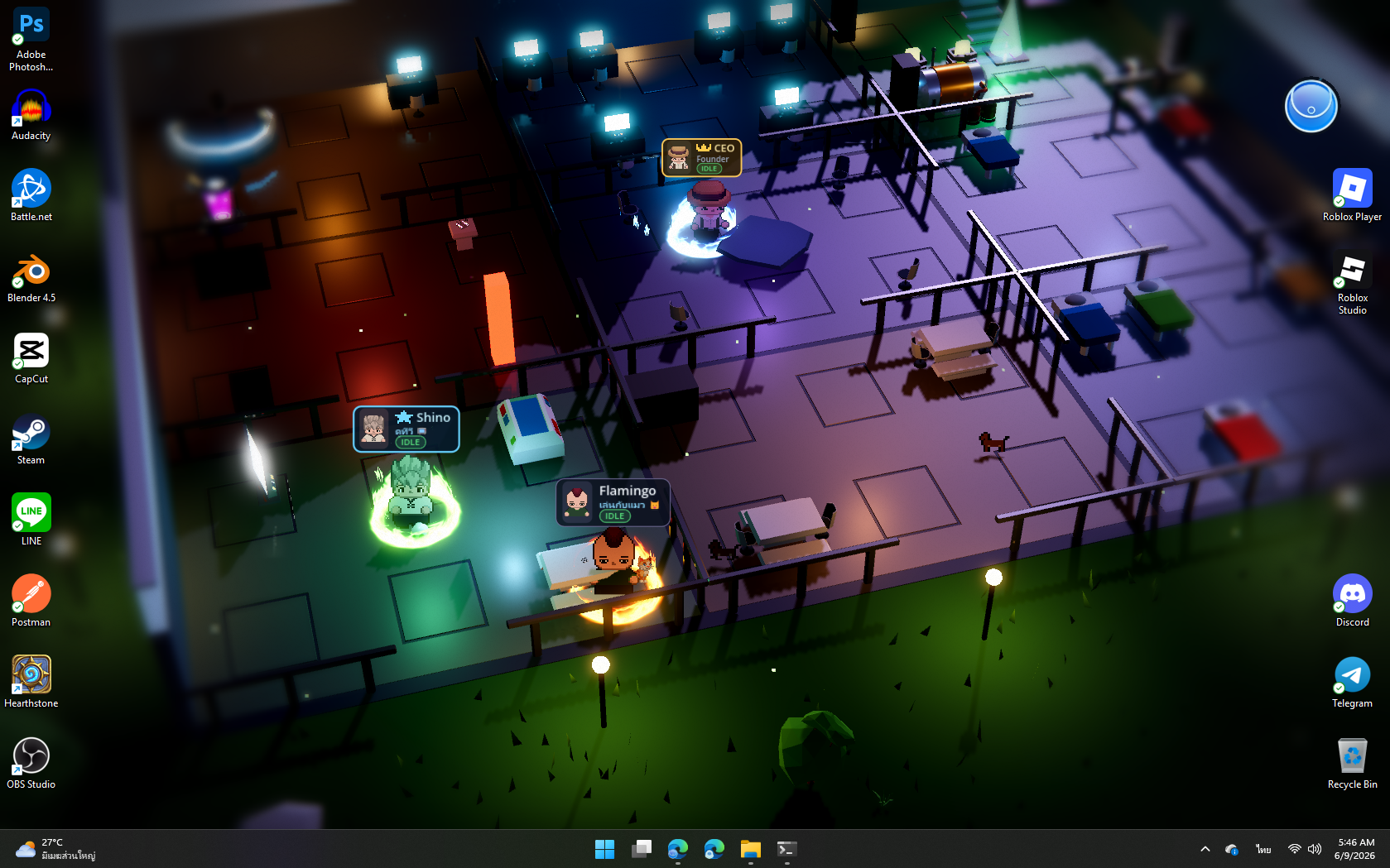
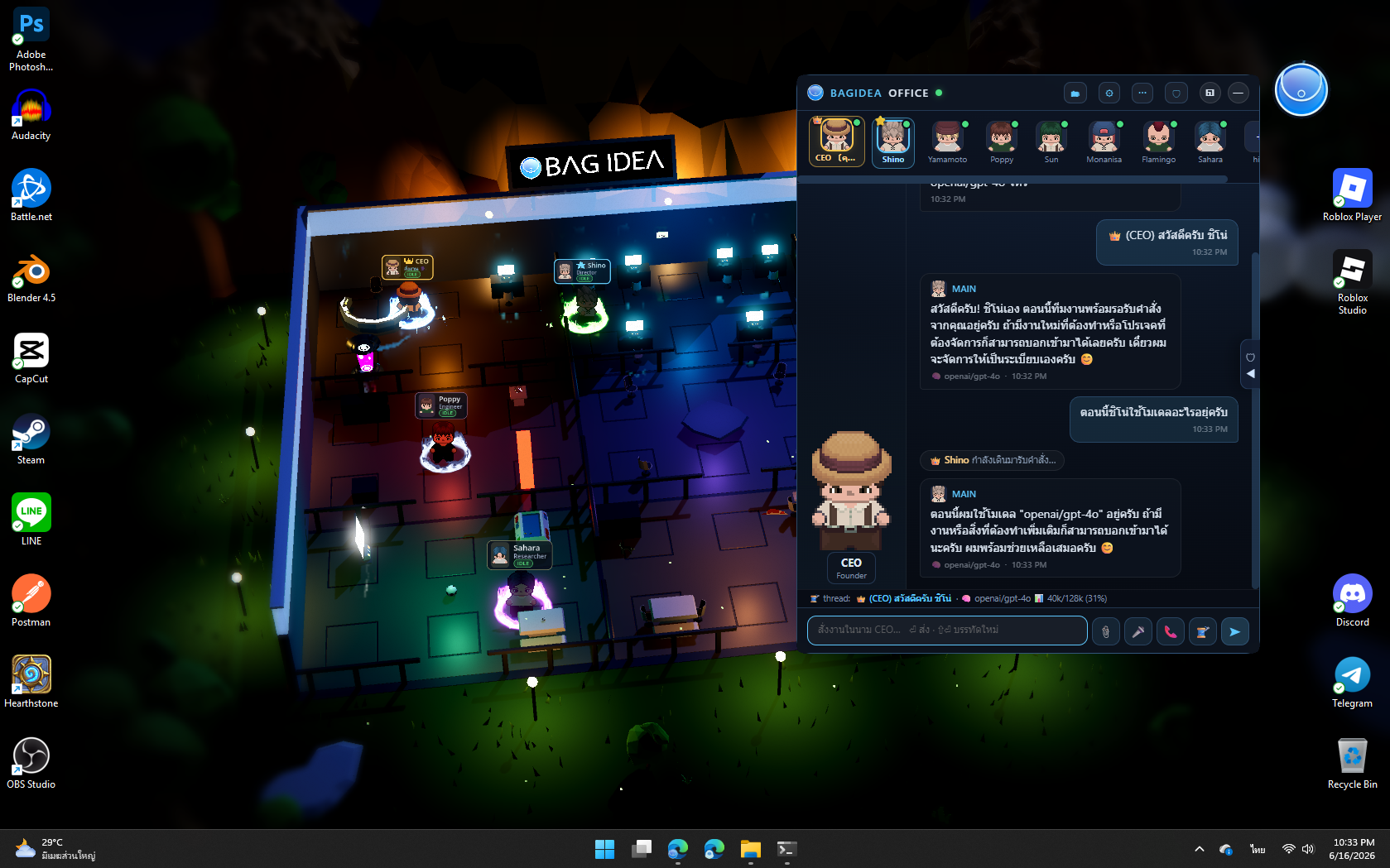
Captured live: the full office floor at golden hour — the CEO, the Director (Shino) and staff at their desks, the floating Ghost Deck (top-right), the server room glowing, the brand billboard and roofline clock, the office cat wandering. The day/night cycle follows your real local time.
It's a real wallpaper — running behind your desktop icons, with a live activity feed:
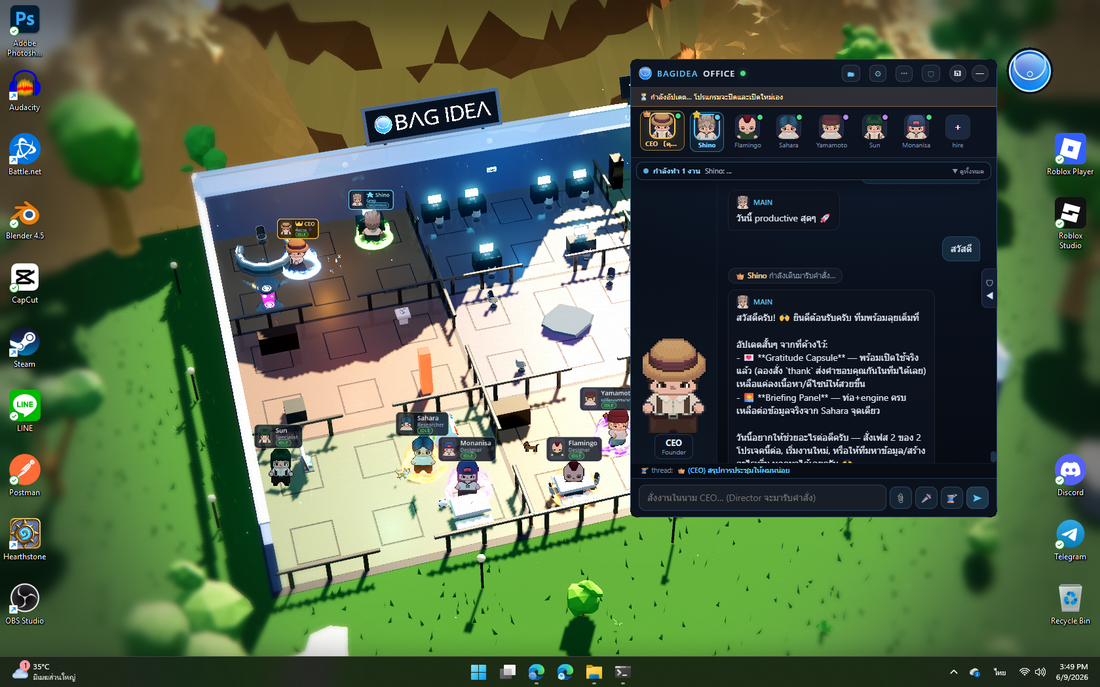
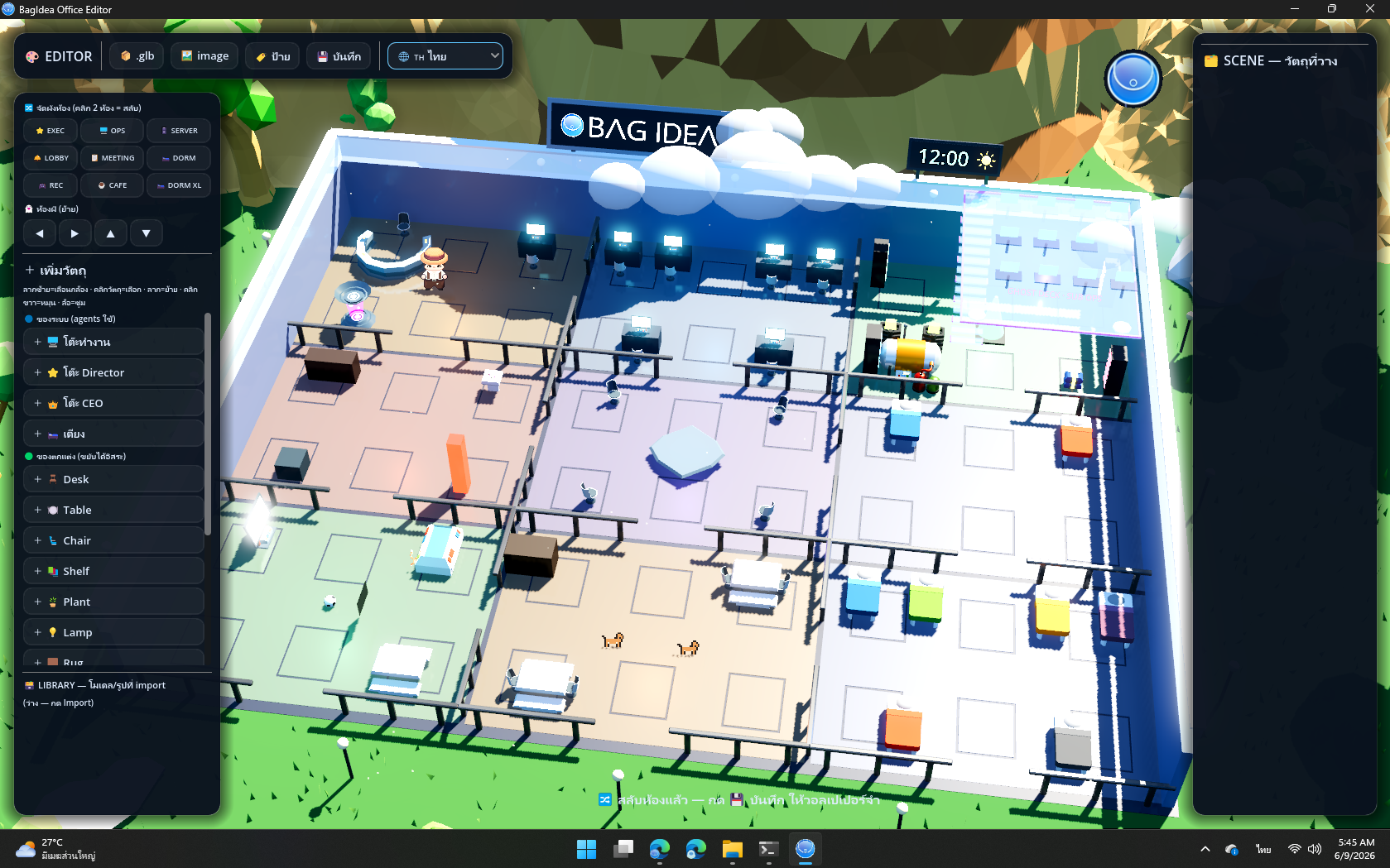
| 💬 Talk to the office (CEO seat) | 🎨 Rearrange it in the 3D Editor |
|---|---|
 |
 |
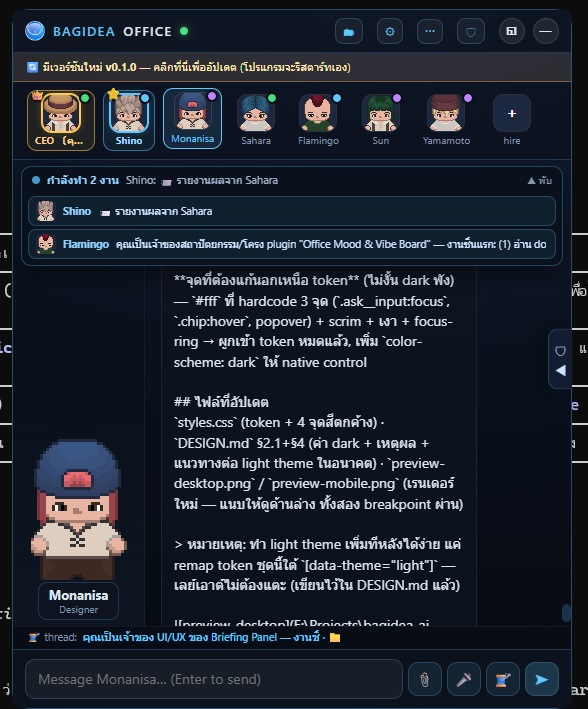
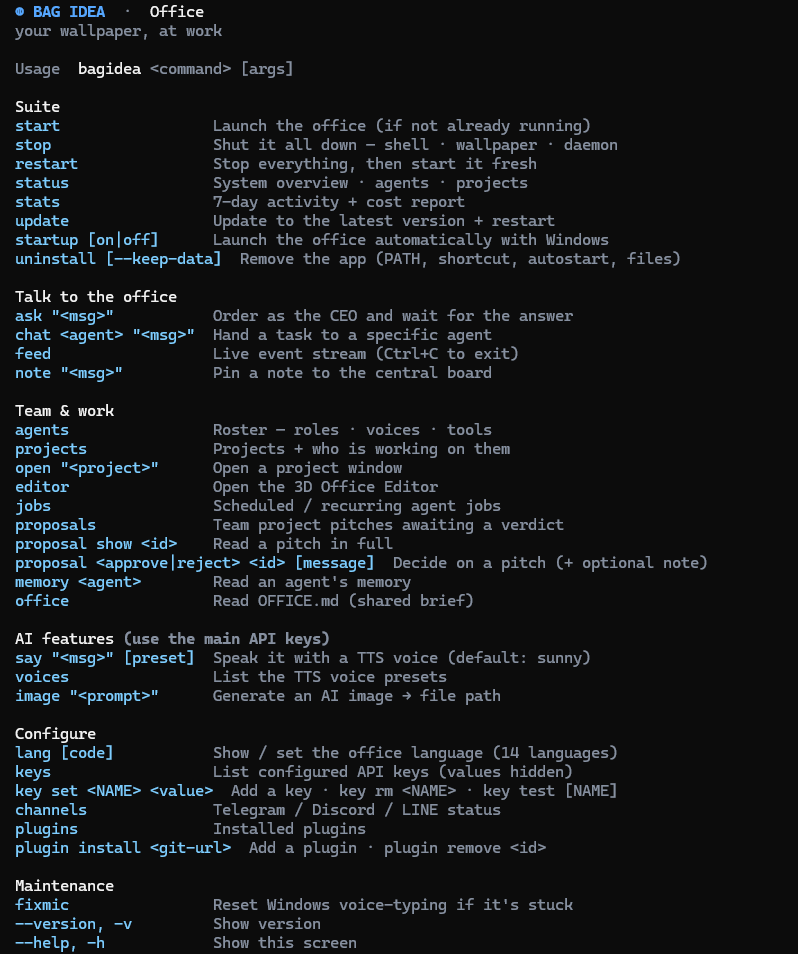
| 👥 Agents at their desks, auras lit | ⌨️ The bagidea CLI |
 |
 |
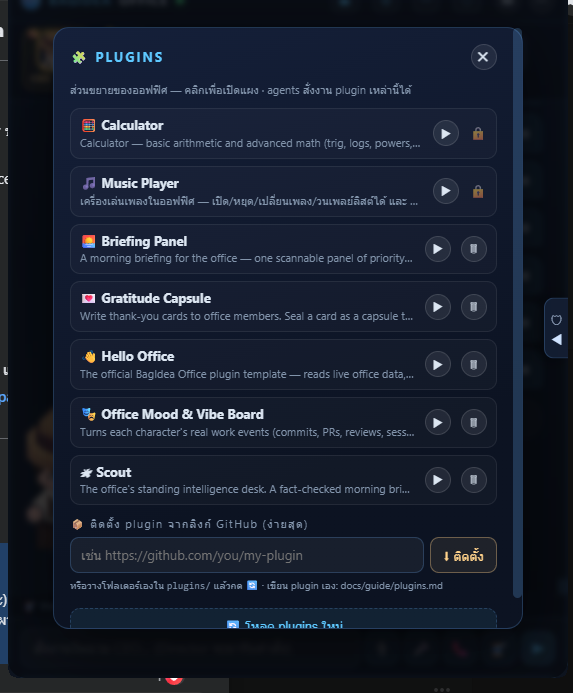
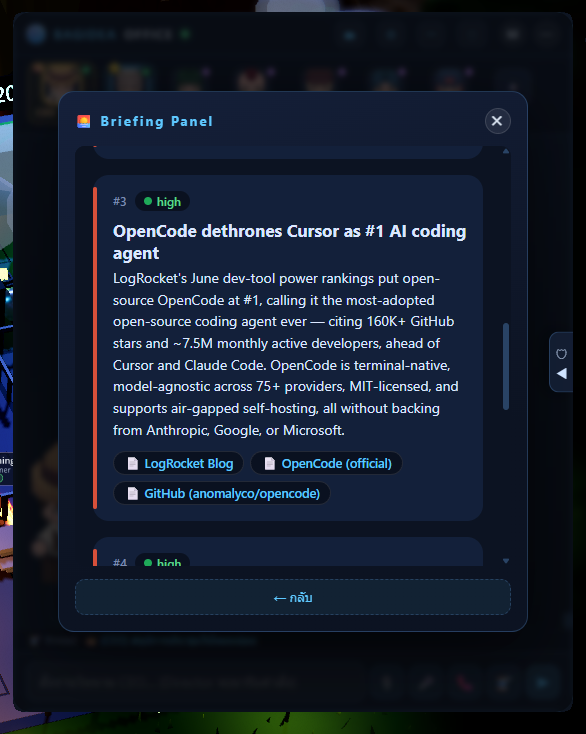
| 🔌 Plugins — agents build & run their own | 📰 A live briefing panel (a plugin in action) |
 |
 |
🧠 Swappable Brains — every agent, any model (new in v0.8.0)
Pick the model that powers each agent. Keep your Director on Claude for the
hard calls, put the builders on cheaper models, and cut your bill — without losing
a single Claude Code tool, skill or session. Claude Code stays the engine; only
the brain behind it swaps, and it fails open to Claude, so nothing changes
until you opt an agent in.
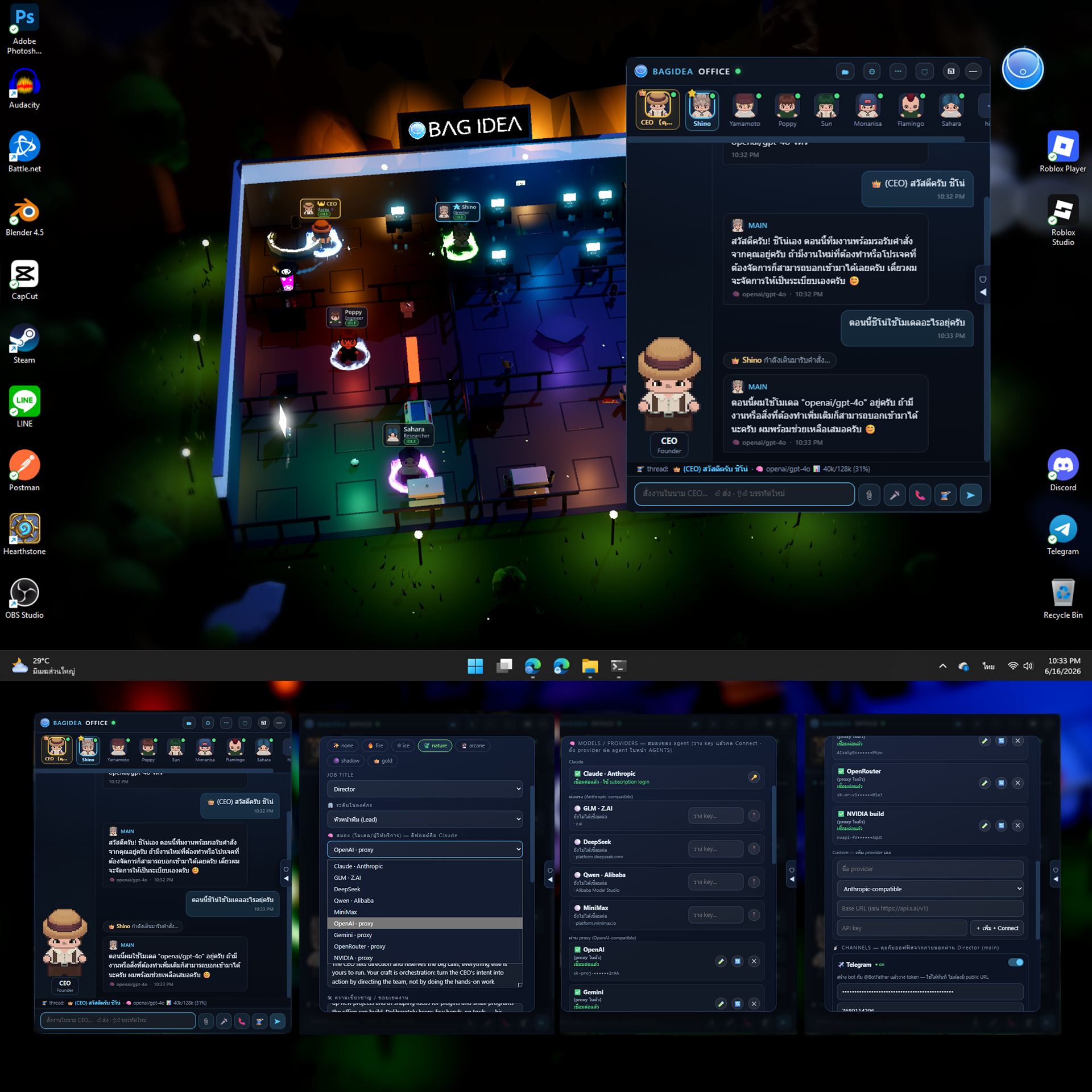
Two ways agents reach a model:
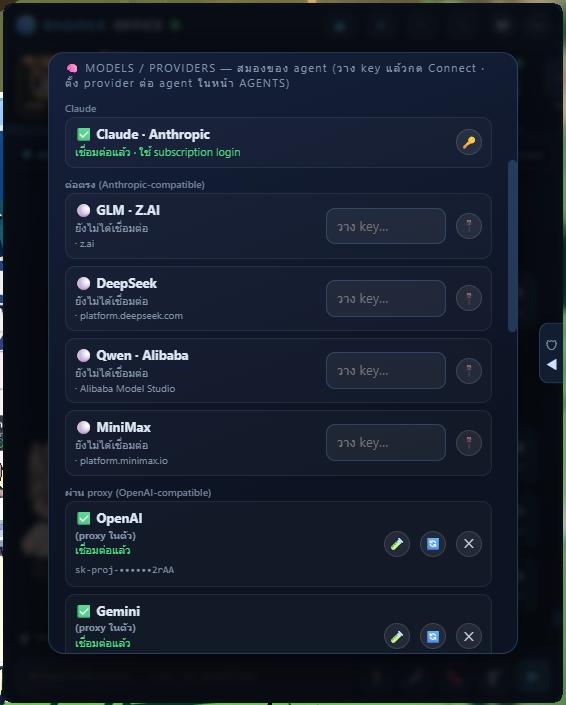
- 🟢 Direct (Anthropic-compatible) — Claude, GLM (Z.AI), DeepSeek, Qwen (Alibaba), MiniMax, Kimi (Moonshot). The CLI talks straight to them; nothing in between.
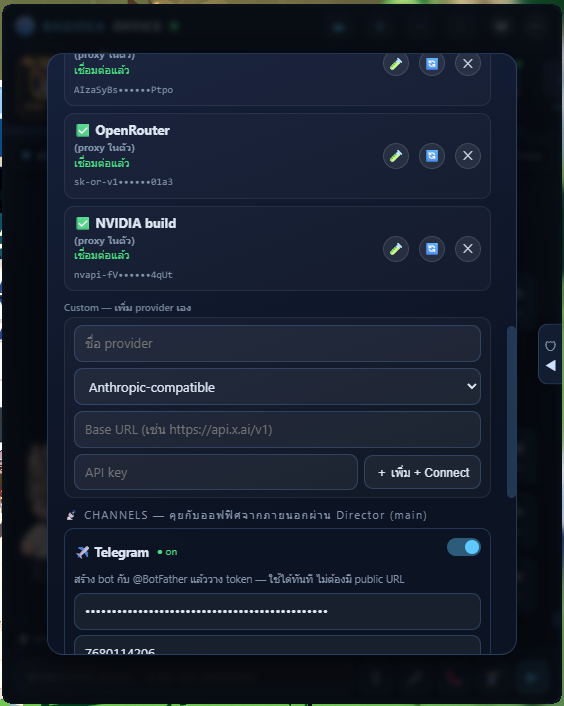
- 🔵 Via the built-in proxy (OpenAI-compatible) — OpenAI, Gemini, OpenRouter, NVIDIA build, Groq, Cerebras, xAI (Grok), Mistral, Together AI, Fireworks, and your own custom providers. A zero-dependency proxy is baked into the daemon and translates Anthropic ↔ OpenAI on the fly — no LiteLLM, no Python (already have a LiteLLM gateway? point a custom provider at it).
- 💻 Local, no API key — Ollama and LM Studio: just run the server and Connect; the office routes to
localhost. Free, offline, private.
The model pickers fetch each provider's live model list when you connect (and when you open an agent's brain), so brand-new models show up without an app update.
| 🔌 Connect once in ⚙ CONNECT → 🧠 MODELS/PROVIDERS | ➕ Others + your own custom provider |
|---|---|
 |
 |
🆓 Try the free ones (mind the limits): NVIDIA build is free to test but rate-limited (~40 req/min) — heavy agent tasks hit 429 fast, so it's best for light/eval use. OpenRouter has free models (:free, vendor/model ids) but they're daily-capped and may queue; top up credit for serious work. Gemini has a generous free quota. (And OpenAI Tier 1's 30k tokens/min is small for heavy agent context — which is exactly why the next feature exists.)
♻️ Auto-Compact + Auto-New-Thread — for every model
Talk as long as you want. It never clogs, never freezes, never makes you start a new thread by hand.
Long conversations normally blow past a model's context window and break. Claude
Code solves this for Claude only — BagIdea Office makes it work for every
model, fully automatic and hands-free:
- 🧠 Proactive — before each turn the office measures the conversation against the model's context window. Getting full? It summarizes the thread with Claude → opens a fresh thread → keeps working, before it ever overflows.
- 🛟 Reactive — if a backend rejects a request (a rate or context limit you didn't see coming), the same recovery kicks in automatically.
- 🪄 Continuity preserved — the summary is written by Claude (big brain, huge context) and seeded into the new thread, so the agent still knows what you discussed. The UI even carries your view across to the new thread, so nothing ever looks stuck.
The result: even tiny / free-tier models run long sessions without you babysitting them.
📊 See everything
Every agent message is tagged with the model that produced it, the thread bar
shows a live context-usage meter (e.g. gpt-4o · 40k/128k), the 🧠 BRAINS
panel monitors every provider's connect status + each agent's usage, and STATS
breaks down estimated spend per provider.
✅ Status: working product — Windows 11 (stable) + macOS 13+ (beta, new this release). The full pipeline works end-to-end: wallpaper → daemon → real Claude Code sessions working inside real project folders → spatialized approvals → agent management UI → Telegram/Discord/LINE channels → CLI → self-updater. All visuals and sounds ship in the repo (free / CC0 art — see Art assets), so a fresh install and
bagidea updatecarry the full look out of the box.
💛 Sponsors
BagIdea Office is built in the open and kept free to run. Sponsors make that possible — thank you 🙏
👑 Gold Partners

💛 Supporters
The block above auto-updates from GitHub Sponsors via
.github/workflows/sponsors.yml. Off-platform sponsors live inweb/sponsors.manual.json.
Tiers
| Tier | From | You get |
|---|---|---|
| 👑 Gold Partner | $3,000+/mo | Large logo on the website & in-app credits · top placement · roadmap input & early builds · shout-out in release notes |
| 🥈 Silver Partner | $300+/mo | Logo on the website · mention in release notes · early access to builds |
| 🥉 Bronze / Backer | $30+/mo | Logo or name on the supporters wall · a link to your site or socials · our heartfelt thanks |
| 💛 Supporter | any amount/mo | Your name on the supporters wall · a link to your site or socials |
Every sponsor — at any tier — gets a clickable link to their site or socials, and is shown on the website (sorted by contribution, amounts never displayed).
How sponsoring works
Sponsorship is a recurring monthly subscription handled entirely by GitHub Sponsors (think YouTube/Patreon membership) — secure payments, taxes and payouts are GitHub's job, not ours.
- Choose a tier & sponsor. Click 💖 Sponsor on GitHub (or use the button on the website), pick a monthly tier, and confirm. GitHub charges you each month until you cancel.
- Your logo & link come from your GitHub profile — automatically. Your avatar, display name, and link are pulled straight from your GitHub account; there is nothing to send us. To control the link, set the Website field in your GitHub profile (Settings → Public profile). Sponsoring as a GitHub Organization shows your company logo and site instead of a personal avatar.
- You appear within ~6 hours. As long as you choose “Make my sponsorship public” at checkout, an automated job (
.github/workflows/sponsors.yml) pulls the live sponsor list, maps each to a tier by amount, and updates both this README and the website supporters wall — sorted by tier, amounts never shown. Private sponsors are respected and simply not listed.
Everyone joins through GitHub Sponsors. The only exceptions are featured partners we add by hand (e.g. WARRIX, pinned first) in
web/sponsors.manual.json. Reuannamphung is shown there as a courtesy until they move to GitHub Sponsors. Maintainers: never hand-editweb/sponsors.json(it is generated) — editsponsors.manual.jsonfor off-platform sponsors only.
💖 Sponsor on GitHub → · or email us → to talk.
Table of Contents
- What it does
- Architecture
- Repository structure
- Requirements
- Installation
- Art assets
- Running the full stack
- Using it
- The
bagideaCLI - HTTP API
- Event protocol (OEP)
- Performance
- User guides (ภาษาไทย)
- Design documents
- Roadmap
What it does
🖥️ Live wallpaper world (Layer 1 — Godot 4)
- Renders behind your desktop icons (WorkerW technique, same as Wallpaper Engine)
- HD-2D look: 3D office + billboarded pixel-art sprites lit by the scene, sky-driven image-based lighting, SSR-polished reflective floors, a cinematic tilt-shift focus pass (breathing vignette, edge desaturation, anamorphic bars), film grain, native-res MSAA
- A swappable 3×3 room grid (jigsaw): every room is an identical cell, so any room fits any slot — rearrange the whole floor from the Office Editor and the furniture, agent anchors and navigation all move with it. Rooms include Executive (CEO command console), Operations (6 desks, monitors facing their seats), Lobby, Cafeteria, Server, Meeting (seats face the table), Recreation, and two Dormitories (offline agents walk to a bunk and sleep). A wandering office cat 🐱 and a self-kicking football ⚽ follow the Recreation room, and a couple of dogs 🐕 hang out in the Cafeteria — when you swap those rooms, the pets follow
- A countryside around the office: 4,200 blades of wind-swaying grass, low-poly mountains and trees, drifting cartoon clouds (a near layer actually crosses the camera frame), bird flocks, daytime pollen motes and fireflies at night
- Agents walk between zones on an A* waypoint graph with 4-direction animated spritesheets; facing follows movement
- Real-time day/night cycle — sun, sky color, ambient and reflections follow your machine's clock (sunset ~17:00, night by 18:00); manual override from the overlay (🌗) for golden-hour screenshots
- A roofline digital clock with a phase icon (sun ☀ / low sun 🌇 / crescent moon 🌙) next to the brand billboard
- MMO-style nameplates on a crisp 2D HUD: portrait, name, role/status, live state pill (IDLE/WORKING/MEETING/BLOCKED/OFFLINE), distance-scaled — with rank dressing: the CEO's plate is gold with a pixel crown, the Director's is bright blue with a lead star
- Event FX: pixel-art flipbooks pop above characters — ✅ on task done, ❌ on failure, ❗ at Security, 👍/👎 on decisions, 🎵 when speaking, golden burst on a new skill, sci-fi warps on hire/fire
- Equippable auras: an elemental magic ring (fire/ice/nature/arcane/shadow/gold) under any character, picked in the agent editor — the CEO can wear one too
- The Ghost Deck: a floating glass platform (12 desks, movable from the Office Editor) reached by a glass staircase — when an agent splits into sub-agents, translucent ghost clones materialize, hurry up the stairs, work at a desk with live status plates, then glide home and dissolve back into their owner. Targets resolve to the deck's live position, so ghosts re-seat instantly even mid-task when you move the deck or swap rooms
- The idle Director makes rounds through the office instead of standing still; the CEO paces the executive floor (that's you)
- Mission Control board in-world: one card per running task, colored by state; lobby status totem shows daemon connectivity (truth, not decoration)
- Branded boot: a transparent floating logo splash + a pulsing circular logo card — never a black box
🧩 Extensibility & customization (2026-06)
- Plugins: a real extension host — a plugin folder adds UI panels, server routes, and commands agents can drive, with
ctxaccess to the office (registry, feed, broadcast,runClaude, private storage). Ships with two core plugins (🎵 Music Player, 🧮 Calculator — locked, pinned to the top of the list); install more from any GitHub repo (bagidea plugin install <url>). Start from the official template (a Hello-World plugin + aCLAUDE.mdso an agent can build one), or read the worked examples — the calculator and music-player repos. Full spec: the guide - 🎨 Office Editor: rearrange the room grid (click two rooms to swap), place furniture / walls / decor on a top-down grid, and import your own models (.glb/.gltf/.fbx) and images — spawned on top of the world, atmosphere intact
- Agent skill library: every office ships with 11 builtin capability packs (office-ops, deep-research, office-control, plugin-builder, code-review, doc-writer, debug-detective, data-wrangler, project-kickoff, diagram-maker, archive-search) you can assign from the editor — plus Hermes-style auto-learned skills that grow at runtime. Skills are delivered natively & on demand (Claude Code progressive disclosure) so a skill's instructions load only when it's actually relevant, never bloating every prompt
- 🌐 Multi-language UI — 14 languages: English default + ไทย/中文/Español/हिन्दी/العربية/Português/Русский/日本語/Deutsch/Français/한국어/Indonesia/Tiếng Việt. Now ships fully pre-translated — switching is instant and works even without a Gemini key; picker in settings (office-wide, per-machine default)
- 🌍 Official website in
web/— landing page + browsable docs, deployable to any static host
🎤 Voice, channels, memory & media (2026-06)
- Voice in / out: hold-to-record in the webview → OpenAI Whisper / Gemini transcription (no Windows dictation panel); F6 speaks a command straight to the CEO; agents can be given Gemini TTS voices — 16 presets split clearly ♀ / ♂ (8 each), each its own emotion/style, per-agent, gimmick
SPEAK:announcements; 📞 realtime voice chat (the main agent only) bridges your mic to Gemini Live in the main agent's assigned voice (or a sensible default), with the office's own knowledge in context - Channels: connect Telegram / Discord / LINE — messages enter the CEO flow, the Director answers back on the same channel
- Hermes-style memory (token-lean, relevance-retrieved): shared
workspace/OFFICE.md(owner) + per-agentworkspace/memory/<id>.md+ per-projectworkspace/projects/<id>/MEMORY.md, distilled automatically after real work. A pure on-device keyword index (BM25, zero deps, works in Thai too) injects only the memories relevant to the task at hand — not a blind dump — with full recall on demand viaGET /recall+ thearchive-searchskill - Main API keys + feature gates:
OPENAI_API_KEY/GEMINI_API_KEYare first-class — voice/TTS/image/realtime grey out with guidance until set; an extra-key vault feeds agents' own env - Attachments & media: paperclip / drag-drop upload; chat renders images, video, audio inline (click any image to view it full-size); every message is timestamped; agents produce images via the
/gen/imagesystem tool and they appear automatically - Social office: idle agents spread evenly across the cafe and rec room (with the occasional stroll to the server/meeting rooms and the odd bunk nap), and drift together — sometimes in groups of 3–4 — for banter or real AI-to-AI chats that now lean toward brainstorming ideas worth pitching. A good conversation crystallizes into a project proposal to the CEO (more often than before) — and agents now think bigger, pitching real websites, apps and programs rather than only small plugins, and can research with tools during meetings to back an idea up. Pitches are steered toward standalone projects or office plugins (never editing the core program); you approve or reject each one with an optional note to the team, and approved work scaffolds into a default
projects/folder. Proposal frequency is rate-limited and configurable (⚙ → AGENTS → PROPOSALS) so pitches never flood the queue - Ambient life: agents with a voice occasionally toss out a short spoken mood line ("feeling productive today 💪") as a flavour beat — speech bubbles for everyone, real TTS for the voiced
- 🗣 16 agent voices (♀8 · ♂8): assign one per agent; the ▶ preview introduces itself by the right gender and the office language (no more everyone saying a female hello). Voiced agents speak short lines on their own; long read-aloud only when you ask
- 📞 Calls: the main agent only is callable (realtime Gemini Live voice) — it speaks in the voice you assigned it, or a sensible default preset
- 📊 Dashboard (OFFICE OPS → STATS): runs / cost / 7-day chart / busiest agents / uptime / channels / key status
bagideaCLI:start/stop/restart,startup on|off,ask/chat,status,stats,agents,projects,proposals+proposal approve|reject <id> [note],plugins+plugin install|remove,lang,say/voices/image,channels,keys,update,version, and more (bagidea --help)- Living chat head: a drifting gradient ring that spins amber while agents work
🔌 Event daemon (Layer 0 — Node.js, zero dependencies)
- WebSocket event hub — the Godot world and the overlay UI subscribe to one stream
- Event journal (
journal.jsonl) with replay on connect: restart anything, state comes back — auto-trimmed on boot (and stale chat threads pruned) so nothing grows unbounded on a long-running office - Agent registry (
registry.json): persistent staff — name, job title, avatar, aura, system prompt, skills, tools.main(the Director — Shino by default: your playful-but-focused second-in-command, tuned for delegation over hands-on work) andceo(you) are protected and cannot be deleted. A fresh install starts with just these two - Claude Code adapter:
POST /chatspawns a real headlessclaude -psession with the agent's persona, assigned skills and allowed tools; stream-json output becomes world events - Chat threads: every conversation is a named, resumable session (
--resume) with its own recorded history; agents keep continuous memory by default - Skills library with Hermes-style auto-learning: after a completed multi-tool task, a reflection pass decides whether the work distills into a reusable skill — if so it's saved, auto-assigned, and announced in the office
- Tools: per-agent allowlist over the built-in Claude Code tools, plus custom capability via MCP servers (name + launch command → injected with
--mcp-config) - CEO chain of command: ordering the CEO summons the Director — he walks over, takes the order, replies with a plan, and dispatches work to teammates via
DELEGATE:lines (each spawns a real session, with the hand-over walk acted out). Delegation is a round trip: every delegate's result is reported back to the Director, who can answer questions / follow up with moreDELEGATE:lines (bounded depth, serialized turns), and finally walks the CEO-readable summary over to the boss (ceo.report) - Agent discussions: pick 2–4 agents and a topic — they hold a real meeting, round-robin turns over a shared transcript, minutes on the in-world whiteboard
- Self-splitting sub-agents: every session is told it may end a reply with
SUB: <job>lines (2–4) when the request parallelizes — the daemon strips the protocol, spawns parallel clone sessions with the parent's persona + tools, records each in a labeled 👻 session, and resumes the parent for a final synthesis once all ghosts report back (a stuck ghost is reaped after 6 min, so synthesis always happens) - Standing work orders:
POST /jobs— run now, at a datetime (optionally daily), or every N minutes; per-agent queue + a global concurrency cap keep the machine comfortable; each job keeps its own resumable thread - Shared note board: notes live in the UI and in
workspace/notes.md— agents read it and append bullets themselves (file-watched both ways) - Calendar with a personal touch: appointments remind you via the Director — he physically walks over and tells you (
reminderevent), N minutes ahead - Director heartbeat: every 15/30/60 minutes (configurable) he reviews the calendar, standing jobs and the note board — and pings you ONLY when something deserves it ("OK" stays silent)
- Claude Code hooks integration: any Claude Code session in this project reports its tool calls — your real work animates the Director automatically
- Permission broker: tools you granted in an agent's profile run silently; anything else is held until you approve — with a ✓✓ forever option that remembers the grant
- 📁 Projects: register real folders as projects (with PLACE shorthands like
"ห้องเรียน" → D:\Learning); the Director creates new ones himself via aPROJECT:protocol line and routes work withDELEGATE: <agent> @ <project> :: <job>— the assignee's claude session lives inside that directory and is resumable by you. One window per project: ▶ opens (or surfaces) the window. One occupant at a time — while an agent works the project you can't open it (the row shows a ⏹ stop agent button with a two-click confirm to take over), and while you have it open an agent won't be dispatched into it. Removing/deleting a project also closes its window; disk-deletes sweep leftover dev servers first - 📨 Channels: Telegram (long-poll), Discord (native gateway client) and LINE (webhook) feed straight into the Director — order your office from your phone, the reply comes back on the same channel
- 🔑 API key vault: store
OPENAI_API_KEY& friends once; they're injected into every agent run's environment, and agents are told which names exist - ♻️ Self-healing daemon: a watchdog respawns the daemon if it ever dies, and
bagidea restartis more resilient — the office stays up on its own - 🔄 Self-updating (version-gated): a
VERSIONfile marks releases. The daemon compares the localVERSIONwith the one onmainand only raises the in-app banner on a real version bump — routine commits and dev-branch work never nag users. The banner (orbagidea update) pulls, rebuilds what changed, and relaunches.bagidea versionshows the current build and whether an update is out (release flow:RELEASING.md) - 🪟 Start with Windows: launch the office on boot — toggle it from the tray, settings (⚙ → AGENTS), or
bagidea startup on|off(all share one HKCU Run key). Windows-only for now — autostart isn't wired on macOS yet
🛡️ Spatialized security
When an agent needs a tool you have not granted:
- Its character physically walks to the Security Center and waits (amber light pulses, ❗ flashes over its head)
- The overlay's Security Center pops open with the exact command — and in 📡 feed mode the request appears as an actionable card right in the stream
- You click Allow / ✓✓ Forever / Deny — deny (or 50s timeout) makes the agent visibly re-plan; forever adds the tool to that agent's grants so it never asks again
- Approve, and the tool actually executes
Tools already granted in the agent's profile (or "✓✓ forever" rules) are approved
instantly and logged — and the agent doesn't even leave its desk: it waits a
short grace to confirm a trip is actually needed, so granted tools never make it
twitch toward Security. This is real: the PreToolUse hook long-polls the daemon
until you decide.
💬 Overlay (Layer 2)
Served by the daemon at http://127.0.0.1:8787/ — best experienced through the included native Rust shell:
- Agent rail: every staff member with live state dots — 👑 the CEO leads in gold (that seat is you), ⭐ the Director in blue; double-click any seat for an ID card
- ⚙ Office Settings: hire/edit/delete agents (12-face avatar picker, aura picker, job titles), a ✨ prompt copilot (type a one-line brief in any language → a drafted system prompt), skills library with the auto-learn toggle, built-in tool catalog + MCP servers, and a thread manager
- 🗺 Live map: a real orthographic floorplan render with live agent icons (face, state ring, name) — click one to chat with it
- 🧵 Threads: per-conversation chat panes — switching threads or agents loads that conversation's history; a thread bar shows where you are; meetings (🗣 with participant faces) and sub-agent jobs (👻 with the owner's face + ✓/✗/⏳ status) are readable forever, streaming live while they run
- 🗣 Discussions: launch agent-to-agent meetings
- 🗂 OFFICE OPS: projects (create / register / open / stop-agent-to-take-over / hide / delete, with an in-house Blender-style folder picker), standing tasks, calendar, the shared note board, and the org chart by tier
- 🔵 NOW WORKING strip: one calm line under the header — "กำลังทำ N งาน · latest…" — expandable into the full live task list; visible in feed mode too
- 🔗 CONNECT tab: API key vault (masked) + Telegram/Discord/LINE channel setup with live status dots
- 📡 Feed mode: right-click the chat head — the panel becomes a translucent right-edge activity stream (scrollback, hover-to-focus, 🧹 clear, actionable permission cards); the wallpaper stays clean for streaming/recording
- 🎤 Push-to-talk: hold F6 anywhere in Windows, speak (Windows Voice Typing — Thai works), release; a pulsing live pill shows what was heard; feed mode auto-sends to the Director (the F6 global hotkey is Windows-only for now — on macOS use the in-overlay mic button)
- 🌗 Atmosphere picker, slide-over 🛡 Security/Mission/Office-Log sidebar (edge handle pulses when an approval is waiting; pops open on arrival)
- 🔄 Update banner when a new version lands on GitHub — one click updates and relaunches
- Circular chat head (Messenger-style, never steals focus) + system tray (Start with Windows, Hide office, Exit)
Architecture
┌─ Overlay (Rust shell / browser) ────────────┐   ┌─ Godot 4 Wallpaper ────────────┐
│  chat·threads · settings · map · approvals  │   │  swappable 3×3 grid·countryside│
│            ▲ WebSocket /ws                  │   │  agents walk (A*) · FX · clock │
└────────────┼────────────────────────────────┘   │        ▲ WebSocket /ws  ▼ /pos │
             │                                    └────────┼────────────────────────┘
┌────────────┴─────────────────────────────────────────────┴───────────────────────┐
│  DAEMON (Node.js, zero-dep)                    http://127.0.0.1:8787              │
│  • broadcast + journal.jsonl (replay on connect) + registry.json + sessions.json  │
│  • POST /chat  → headless `claude -p` (persona+skills+tools, --resume threads)    │
│  • POST /event ← Claude Code hooks (your own sessions feed the world)             │
│  • POST /perm/request ←(long-poll)─ PreToolUse hook   POST /perm/respond ← UI     │
│  • /registry/* CRUD · /sessions/* · /discuss · /assist/prompt · /map/bg           │
└───────────────────────────────────────────────────────────────────────────────────┘
Three independent processes: the daemon keeps agents running even if rendering dies; the renderer can crash/restart and rebuild from the journal + registry; the overlay is just a web client. Truth lives in the daemon; the world is a renderer of truth.
Repository structure
├── README.md                  ← you are here
├── docs/                      ← full V1 product-design spec (10 documents)
├── daemon/                    ← Layer 0 (Node.js, no npm install needed)
│   ├── server.js                  … WS hub + journal + registry + adapter + perms
│   ├── constants.js               … shared office constants (skills, tools, agents)
│   ├── tests/                     … automated API tests (node --test)
│   ├── overlay.html               … Layer-2 web overlay (served at /)
│   ├── hook.ps1 / perm.ps1        … Claude Code hook forwarders
│   ├── send.js                    … test event CLI
│   ├── registry.json              … your staff (generated at first run, gitignored)
│   └── sessions.json              … chat threads + history (generated, gitignored)
├── godot/                     ← Layer 1 (Godot 4.6 project)
│   ├── scenes/office_floor.tscn   … main scene (env: sky IBL, SSR, cinema pass)
│   ├── scripts/grid_world.gd      … the swappable 3×3 room grid (rooms/furniture/A*/swap)
│   ├── scripts/world_builder.gd   … shares the grid + sky/countryside/clock/billboard/Ghost Deck
│   ├── scripts/agent_manager.gd   … events → characters choreography + FX + camera focus
│   ├── scripts/agent_sprite.gd    … spritesheet characters, auras, identity, seating facing
│   ├── scripts/map_editor.gd      … the 3D Office Editor (room swap + furniture/import)
│   ├── scripts/camera_rig.gd      … cinematic drift + interest-shot focus
│   ├── scripts/hud.gd             … nameplates (rank dressing), HUD FX, whiteboard
│   ├── scripts/fx_factory.gd / aura_factory.gd … pixel-FX flipbooks + elemental auras
│   ├── scripts/cat_sprite.gd / dog_sprite.gd / bird_sprite.gd / rec_ball.gd … ambient life
│   ├── scripts/office_floor.gd    … day cycle, boot, wallpaper/editor/screenshot modes
│   ├── scripts/event_client.gd / layout_loader.gd … WS client + Office Editor layout
│   ├── shaders/                   … cinema focus, grass wind, god rays, grain…
│   └── assets/BinbunVFX_Vol2/     … Elemental Magic FX (CC0 — bundled)
├── shell/                     ← THE program (Rust, wry + tao): one exe runs it all
├── cli/bagidea.js             ← the `bagidea` command (talks to the daemon)
├── plugins/                   ← core plugins ship here (🎵 music, 🧮 calculator); installs land here
├── installer/                 ← install.ps1 (clone+build) · update.ps1 · build-release.ps1
├── web/                       ← official website (landing + browsable docs, static host)
├── tools/wallpaper.ps1        ← manual attach/detach (the shell does this natively)
├── workspace/                 ← cwd for adapter-spawned Claude sessions
│   └── .claude/settings.json      … PreToolUse permission hook wiring
└── .claude/settings.json      ← hooks: your Claude Code sessions → the office
Requirements
| Component | Requirement |
|---|---|
| OS | Windows 11 / macOS 13+ (wallpaper backend: WorkerW / DYLD shim) |
| Renderer | Godot 4.6+ (standard build) |
| Daemon | Node.js 18+ (no npm packages needed) |
| Agent | Claude Code CLI (claude --version ≥ 2.x) |
| Shell | Rust toolchain (cargo) — or use a browser for the overlay |
| GPU | Anything Vulkan-capable; verified on GTX 1060 6GB |
Installation
One-shot installer (recommended)
On a bare machine it installs everything needed — Git, Node LTS, Rust, the
Visual Studio C++ Build Tools (the Rust linker, and the most common reason a
build fails), Godot 4.6.3 and the Claude Code CLI — then clones the app to%LOCALAPPDATA%\BagIdeaOffice (Windows) or ~/BagIdeaOffice (macOS), builds the
shell, brands the window icon, wires the bagidea command into your PATH and
creates a Start Menu shortcut or Bin link. Freshly installed tools are pulled
onto the current PATH so it finishes in one pass:
Windows:
irm https://raw.githubusercontent.com/bagidea/bagidea-office/main/installer/install.ps1 | iex
macOS:
curl -fsSL https://raw.githubusercontent.com/bagidea/bagidea-office/main/installer/install-mac.sh | bash
First time only: open a new terminal, run
claudeonce to log in to Claude,
thenbagidea start. Safe to re-run — a re-run does agit pulland your data is kept.
Install didn't finish? See troubleshooting → install
(covers winget, the C++ Build Tools / linker error, PATH, SmartScreen).
macOS installation
- Download Godot 4.6.x macOS (universal) and unzip
Godot.apptogodot/bin-mac/Godot.app. - Run the build script to compile the shell, shim, and wire hooks:
./build-mac.sh
- Add the
bagideacommand to your PATH:
export PATH="$(pwd)/bin:$PATH"
- Run it:
shell/target/release/bagidea-office-shell
Manual (Windows)
git clone https://github.com/bagidea/bagidea-office.git
cd bagidea-office
1. Fix absolute paths (one-time): the hook configs reference absolute paths. Update these to your clone location:
.claude/settings.json— 3× path todaemon\hook.ps1workspace/.claude/settings.json— 1× path todaemon\perm.ps1
2. Build the shell:
cd shell
cargo build --release   # → shell/target/release/bagidea-office-shell.exe
Art assets
All the visuals and sounds ship in the repo — a fresh install and everybagidea update carry the full look and feel out of the box. No separate
downloads, no Godot import step: everything loads at runtime (and still falls
back to a procedural placeholder for anything ever missing). The packs are free /
CC0, made possible by these creators — thank you 🙏:
- Auras — Elemental Magic FX by Binbun3D (CC0)
- Characters — Customizable Characters Top-Down 32x32 by Schwarnhild
- The office cat — Cat 2D Pixel Art by xzany
- Environment (sci-fi kit) — Molten Maps SciFi Asset Pack
- Countryside — a free low-poly environment pack (FBX)
- Event FX — Super Pixel Effects Gigapack (Free) by untiedgames
- Pets & ambience — free dog, sound and household packs bundled under
godot/assets/
Running the full stack
One exe runs everything:
.\shell\target\release\bagidea-office-shell.exe
The shell spawns the daemon, launches the Godot office (hidden behind a pulsing
logo splash until the first frame renders), embeds it behind your desktop icons,
then brings in the chat head and the tray icon. A second launch exits instantly
(single-instance mutex). Set BAGIDEA_GODOT if your Godot binary lives somewhere
other than E:\Tools\Godot\Godot_v4.6.3-stable_win64.exe.
- Chat head: circular, draggable, never steals focus; click = show/hide the overlay
- System tray: left-click toggles the chat; menu has Start with Windows
and Exit BagIdea Office — the only true exit (tears the stack down and
restores your wallpaper)
Manual/dev mode still works:
node daemon\server.js
# windowed: open the Godot project normally
# screenshot: godot --path godot -- --shot --hour=13 --cloudtest
Using it
Hire your team
⚙ → AGENTS → Hire a new agent: pick one of 12 faces, an aura, a job title,
then either write the system prompt yourself or type a one-line brief
(any language) and hit ✨ Draft — a real Claude call writes the persona.
Assign skills (pick from the 9 builtin capability packs or your own) and
tools with chips. Everything is editable later; deleting an agent warps them out
of the office. main and ceo are protected. The office caps at 18 staff
(the CEO isn't counted) — sub-agent 👻 ghosts cover parallel load beyond that.
Chat
Click a face in the rail (or on the 🗺 map) and type. Each agent keeps
continuous memory; use 🧵 to start a fresh thread or jump back into an old one —
the pane shows that conversation's history. Threads are managed (and deletable)
under ⚙ → THREADS.
Command through the CEO
Type into the CEO seat (the gold one — that's you): the Director walks over,
takes your order, answers with a plan, and delegates real work to the team —
watch the hand-offs happen on the wallpaper.
Let them talk to each other
🗣 → pick 2–4 agents + a topic + rounds: they gather in the meeting room and
discuss over a shared transcript; minutes land on the in-world whiteboard.
Watch your own Claude Code sessions
Any Claude Code session inside this project reports its prompts and tool calls
through hooks — the Director works at his desk in real time while you work.
Approve dangerous tools
When a session needs a tool you haven't granted, its character walks to
Security and the overlay pops the exact command with Allow / ✓✓ Forever / Deny.
Granted tools run silently.
Work in real projects
🗂 → PROJECTS: define a PLACE once ("ห้องเรียน" → D:\Learning), then just tell
the Director: "สร้างโปรเจค Calculator ในห้องเรียน แล้วให้ Flamingo สร้างเว็บเครื่องคิดเลข" —
the project folder is created, registered, and the assignee works inside it
with a real resumable session. The row lights up with who's working; ▶ opens
the project window. One occupant at a time: while an agent works it you
can't open it (a ⏹ stop-agent button with a two-click confirm lets you take
over), and while you have it open an agent won't enter. ✕ unregisters (and
closes the window); 🗑 really deletes (created-by-app folders only, leftover dev
servers are swept first).
Talk to it from your phone
⚙ → 🔗 CONNECT: paste a Telegram bot token (60 seconds with @BotFather) and your
office answers you anywhere. Discord and LINE work too —
setup guide.
Speak instead of typing
Hold F6, talk, release. In normal mode the words land in the input box for
you to review; in 📡 feed mode they're sent to the Director automatically.
(F6 is Windows-only for now — on macOS use the in-overlay mic button.)
Simulate events (no Claude needed)
node daemon\send.js task.started rin
node daemon\send.js perm.requested rin
node daemon\send.js task.completed rin
node daemon\send.js agent.offline rin
The bagidea CLI
The installer puts bagidea on your PATH (manual installs: the repo root hasbagidea.cmd). It talks to the running office — and can start it.
bagidea start | stop | restart    launch / stop / restart the whole suite
bagidea status                    health + agents + projects + who's working
bagidea stats                     dashboard: runs / cost / busiest / uptime
bagidea ask "<message>"           ask the Director and WAIT for the final answer
bagidea chat <agent> "<msg>"      fire-and-forget to a specific agent
bagidea agents | projects         list staff / projects with live status
bagidea open "<project>"          open a project window (same as ▶)
bagidea proposals                 team project pitches awaiting a verdict
bagidea proposal show <id>        read a pitch in full
bagidea proposal approve|reject <id> [note]   decide (+ optional note to the team)
bagidea plugins                   list installed plugins
bagidea plugin install <git-url>  add a plugin · plugin remove <id>
bagidea lang [code]               show / set the office language (14 languages)
bagidea say "<text>" | voices     speak via TTS / list voice presets
bagidea image "<prompt>"          generate an image into the office
bagidea channels | keys           channel + API-key status
bagidea feed                      live office event stream in your terminal
bagidea startup [on|off]          launch the office with Windows (show/set)
bagidea update                    update to the latest version + relaunch
bagidea version                   current build + whether an update is out
bagidea uninstall [--keep-data]   remove the app (PATH, shortcut, autostart, files)
bagidea --help | --version        full command list / current build
Full reference: docs/guide/cli.md.
HTTP API
| Endpoint | Purpose |
|---|---|
POST /chat {agent, prompt, session?} |
run a real session (session:"new" forks a thread) |
GET /sessions?agent= · GET /sessions/log?agent=&key= · POST /sessions/delete |
threads |
GET /registry · POST /registry/agent · POST /registry/agent/delete |
staff CRUD |
POST /registry/role · /registry/skill · /registry/mcp · /registry/autoskills |
libraries |
POST /assist/prompt {name, role, brief} |
✨ persona copilot (fills every field + picks fitting skills/tools) |
GET/POST /jobs · POST /jobs/update |
standing work orders (now / at / every) |
GET/POST /notes |
shared note board (mirrors workspace/notes.md) |
GET/POST /calendar |
appointments + Director reminders |
POST /registry/heartbeat {min} · /registry/sound |
Director heartbeat · sound toggle |
POST /discuss {agents[], topic, rounds} |
agent-to-agent meeting |
POST /ui/daylight {hour: 17.5 | "auto"} |
atmosphere override |
POST /event |
push any OEP event (custom integrations) |
GET /map/bg · POST /pos |
live map plumbing |
POST /perm/request (long-poll) · POST /perm/respond {id, decision, always?} |
permission broker |
GET /projects · POST /projects {name, place|path | remove | removeDisk} |
projects (removals are human-UI-only) |
POST /projects/open {id, mode: play|shell|folder} · /projects/hide · /projects/resume · /projects/stop · /projects/stopwork |
project windows (▶ = smart open; locked while an agent works — stopwork takes over) |
GET /fs?dir= · POST /fs/mkdir |
in-house folder picker |
POST /places {name, folder | remove} |
PLACE shorthands |
POST /registry/key {name, value | remove} |
API key vault (env injection) |
POST /registry/channel {kind, config} · GET /channels/status |
Telegram/Discord/LINE |
POST /channels/line/webhook |
LINE Messaging API webhook target |
POST /chat with wait: true |
hold the response until the run finishes (the CLI's ask) |
POST /update |
run the updater (human-UI-only) |
GET /version |
local + latest-released version + updateAvailable |
GET/POST /startup |
read / toggle launch-with-Windows (HKCU Run key) |
POST /voice/transcribe (WAV body) |
speech → text (Whisper / Gemini) |
POST /tts {text, preset|agent} · GET /tts/presets |
agent text-to-speech |
WS /live?agent= |
realtime voice relay to Gemini Live |
POST /gen/image {prompt} |
AI image → PNG in uploads |
POST /upload (file body) · GET /uploads/… · GET /media?p= |
attachments + media render |
POST /registry/key {name,value|remove} |
main + extra API keys |
GET /features · GET /stats |
feature gates · dashboard data |
GET/POST /office-md |
shared OFFICE.md memory |
GET /proposals · POST /proposals/respond |
team project pitches |
POST /registry/tts · /registry/social · /registry/lang |
voice · social · language |
POST /registry/key/test |
verify a main key works |
GET /plugins · POST /plugins/reload · /plugin/<id>/... |
plugin host |
GET/POST /layout |
Office Editor layout (→ layout.changed) |
GET /health |
liveness ({clients, pendingPerms, wt}) |
Event protocol (OEP)
One JSON event per WebSocket message / journal line: {type, agent, task?, tool?, text?, session?, ts}.
| Type | World reaction |
|---|---|
agent.online / agent.offline |
walks in via the entrance / walks to a bunk and sleeps |
task.started / task.progress / task.completed / task.failed |
desk + board card; ✅/❌ FX |
perm.requested / perm.approved / perm.denied |
Security walk + ❗; 👍/👎 |
chat.message |
speech-bubble status + 🎵 + thread history |
collab.started / collab.ended (agents[]) |
meeting table + whiteboard minutes |
subagent.split / .spawned / .progress / .done (sub) |
ghost clones float up to the Ghost Deck, work, dissolve back |
skill.created |
golden burst + "📚 learned" |
ceo.summon / task.delegated |
the Director's chain-of-command walks |
roster.sync / roster.removed |
registry → world (spawn/update/despawn) |
reminder |
the Director walks over and tells you in person 🔔 |
ceo.report |
the Director walks the final summary to the boss 📨 |
channel.message |
a message arrived from Telegram/Discord/LINE 📨 |
projects.changed |
project list/status flipped (live UI refresh) |
update.available |
main's VERSION is newer than local — the 🔄 banner appears |
ui.daylight |
atmosphere override |
Push your own events from anything: POST /event — that's the whole integration
story for custom agents. New WS clients receive a journal replay plus a fresh
roster snapshot.
Performance
Wallpaper rung: 30 fps cap, native-res render + MSAA 2×, SSR trimmed, volumetrics
replaced by god-ray cards, no SSAO/DOF. On a GTX 1060 @1680×1050 the full scene
(countryside, grass field, clouds, cinematic pass) measures roughly 20–30% GPU —
the renderer pauses entirely when occluded by fullscreen apps. Plenty of knobs
remain (FSR scale, grass density, cinema pass) if you want it leaner.
User guides
คู่มือผู้ใช้ฉบับเต็ม (ภาษาไทย) — step-by-step พร้อมภาพ:
| คู่มือ | เนื้อหา |
|---|---|
| เริ่มต้นใช้งาน | ติดตั้ง · เปิดครั้งแรก · แชทแรกกับ Director |
| Agents & Skills | จ้างพนักงาน · persona · skills/tools · Security Center |
| Projects | places · สร้าง/เปิด/ดูงานสด/ลบโปรเจค |
| AI features | main keys · เสียง/TTS/realtime · รูปภาพ · ความจำ · social |
| Models & Providers | สมองถอดเปลี่ยนได้ · เลือกโมเดลต่อ agent · GLM/DeepSeek/Qwen/MiniMax · ประหยัด |
| เสียง & Feed mode | F6 push-to-talk · feed mode · NOW WORKING |
| Office Editor | จัดเฟอร์นิเจอร์/กำแพง · import โมเดล/รูป |
| Plugins | ระบบส่วนขยาย · music player · เขียน plugin เอง |
| Office Ops | งานตั้งเวลา · ปฏิทิน · กระดานโน้ต · ผังองค์กร |
| Channels | ต่อ Telegram / Discord / LINE ทีละขั้น |
| CLI | ทุกคำสั่ง bagidea พร้อมตัวอย่าง |
| อัปเดตโปรแกรม | ระบบอัปเดต + ตัวติดตั้ง |
| แก้ปัญหา | ปัญหาที่พบบ่อยและวิธีแก้ |
Design documents
The docs/ folder is a complete V1 product-design specification written before
the first line of code — 14-zone world design, agent behavior simulation
(honesty contract: nothing tagged is fake), scaling to 100+ agents,
progression, monetization, and the competitive thesis
(doc 10: "cockpits make agents usable;
this makes them employable").
Roadmap
- Characters, sci-fi furniture kit, glass-walled shell, countryside
- Meeting Room choreography, Server Room, Dormitories, Recreation Room (dog!)
- One-exe suite: chat head + overlay + tray + auto-start + single-instance
- Live meeting whiteboard
- Agent registry: hire/edit/delete, avatars, auras, ✨ prompt copilot
- Skills library + Hermes-style auto-learning; tools + MCP servers
- Live top-down map, chat threads with history, CEO chain of command, discussions
- Day/night + manual atmosphere, roofline clock, ambient life, event FX
- Sub-agents — agents split into parallel ghost clones on the floating
Ghost Deck (SUB:protocol, per-ghost sessions, auto-synthesis) - Projects — agents work inside real folders with resumable sessions;
one window per project, one occupant at a time (stop-agent-to-take-over lock) - Permission policies — granted tools run silently, ✓✓ forever grants
- Voice — F6 push-to-talk over Windows Voice Typing (Thai works)
- 📡 Feed mode, NOW-WORKING strip, Office Ops (jobs/calendar/notes/org)
- Channels — Telegram / Discord / LINE → the Director
- API key vault,
bagideaCLI, one-shot installer + self-updater - Voice engine v2 (Whisper/Gemini), agent TTS voices, realtime voice (Gemini Live)
- Channels (Telegram/Discord/LINE) → CEO flow
- Hermes-style memory (OFFICE.md + per-agent), main keys + feature gates
- Attachments & inline media, AI image generation system tool
- Social office + project proposals, dashboard, CLI v2
- Plugins (host + music player + SDK), Office Editor (place/import), i18n, official website
- Swappable 3×3 room grid — rearrange the floor; furniture, anchors, nav and pets follow
- Plugin ecosystem — core vs installed plugins, 🧮 Calculator, GitHub install, official template + example repos
- 14-language UI, builtin agent skill library (9 packs), open-source clone+build installer,
bagidea restart - Social groups (3–4 agents) → plugin-oriented proposals with approve/reject notes; main-only calls with assigned voices
- Wake word; channel round-trip reports (delegate results back to the channel)
- macOS wallpaper backend (beta)
- Linux wallpaper backend
- Signed binary releases (skip the Rust build on install)
License
MIT © BagIdea — free to use, modify and share. Bundled art/sound packs keep their own (free/CC0) licenses; see Art assets.
Built with Claude Code — design docs in the morning of day one, a full agent-office product by sunrise of day two.
Reviews (0)
Sign in to leave a review.
Leave a reviewNo results found