octoboard
Health Uyari
- License — License: MIT
- Description — Repository has a description
- Active repo — Last push 0 days ago
- Low visibility — Only 5 GitHub stars
Code Gecti
- Code scan — Scanned 12 files during light audit, no dangerous patterns found
Permissions Gecti
- Permissions — No dangerous permissions requested
Bu listing icin henuz AI raporu yok.
The Programming Terminator. A desktop control board for orchestrating coding agents across multiple projects.
Octoboard
Programming ends here. Power to rival the Terminator.




Your agents. Your accounts. One workspace.
Octoboard is a local, open source development workspace for Claude Code, Codex, and Grok Build.
Bring your existing agents and accounts together, switch accounts while keeping the conversation, and hand tasks
between providers. Work on one project or choose an agent to coordinate work across several projects.
Website · Interactive preview ·
Releases
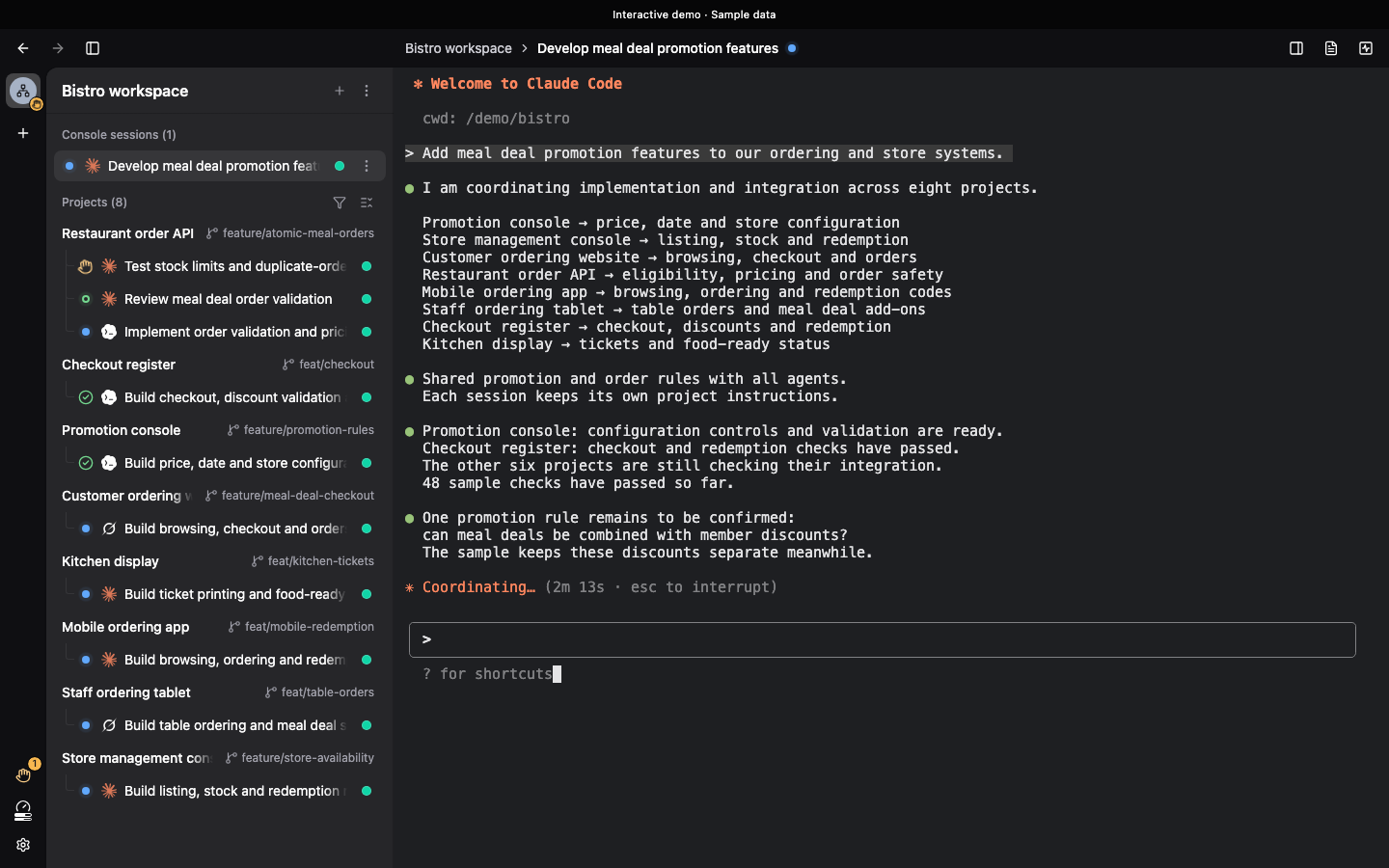
Actual application UI with sample data. Try the project overview, focus mode, and code review on the website.
Features
Accounts and usage
- Manage multiple accounts. View sign-in status, usage, and reset times in one place. Enable automatic account
selection to choose an available account for a new session based on its status and reset times. - Switch accounts and continue. Move a session to another account of the same agent while keeping its conversation
and task context. - Recover from usage limits. Enable automatic account switching to continue interrupted work on another available
account of the same agent. If no account is available, Octoboard waits and automatically resumes the task once updated
usage data confirms that an account has recovered its quota.
Context and continuity
- Watch context usage. See context size and window usage when reported by the agent, and pass the next stage to a
fresh session before the conversation gets too long. - Keep earlier conversations available. Revisit or resume an old session while the original agent still has its
conversation record, including to ask about earlier decisions. - Hand work to another provider. Give the next agent a handoff record of the task, current progress, and remaining
work so it can take over.
Agents and projects
- Coordinate across projects. A coordinating agent assigns work, follows dependencies, and brings reports together.
Choose the agent for the coordinator and each project independently. - Keep each project's setup. Each project runs an independent native session in its own directory, loading its
instructions, Skills, Hooks, and MCP configuration through the chosen agent's own mechanisms. - Follow the work and step in. See who is working and who needs your input. Open any assigned project session to
add context or steer the work, and browse project files and Git diffs to review the changes.
For example, a meal deal promotion can span an order API, an administration console, and customer apps. Give the goal
to a coordinator, let each project agent work with its own context, and follow their progress from one workspace.
Getting started
Octoboard is in beta, still in development. Features and workflows are still being refined.
- Install and configure the coding-agent CLIs you want to use: Claude Code, Codex, or Grok Build.
- Download the app from the releases: the
.dmgfor macOS, or
the Windows installer (see Installing on Windows). Or use the
development setup below to run from source. - Add an existing project folder without moving your code. The default account uses your existing CLI configuration;
additional accounts use separate configurations with optional sharing of supported settings. - Open a project session with your chosen agent and account. For work spanning projects, open a console session and
ask its agent to coordinate the relevant projects.
Octoboard is free under the MIT License. Agents and model services use your own accounts and follow the subscriptions
or billing terms of the providers you choose. If your agent supports a self-hosted model, you can keep that setup.
Platform support
| Form | Status |
|---|---|
| macOS app (Apple silicon and Intel, macOS 11 or later) | Beta, still in development |
| Windows app (x64, Windows 10 21H2 or later) | Beta, still in development |
| Linux server — the daemon on a headless server, the interface in a browser on the network | Planned |
| iOS app | Planned |
| Android app | Planned |
The desktop window, daemon, and projects currently share one machine. Linux is planned as a server for one person
accessing their own daemon through a browser; there is no Linux desktop app planned. Server deployment and running
project agents on remote hosts are not available yet. Multiple users sharing one daemon are outside this design.
Installing on Windows
- Download:
Octoboard_<version>_x64-setup.exefrom a release.
It installs Octoboard for your user account only; later versions arrive through the app's own updates. - Requirements: Windows 10 version 21H2 or later on x64; Windows 11 is the version it has been tested on. There is no
native ARM64 build yet: on Windows 11 on Arm the x64 app runs under emulation. The installer downloads and installs
Microsoft Edge WebView2 if it is missing, which needs an internet connection. - Agents: install the agent CLIs you want to use yourself, as on macOS; Claude Code and Codex also need
Git for Windows. Sharing the default account's configuration with additional accounts
needs Windows' Developer Mode turned on (then quit Octoboard and open it again); without it, sharing is unavailable
and each additional account keeps a configuration of its own. - Unsigned for now: the first Windows releases are not code-signed, so Microsoft Defender SmartScreen may show
"Windows protected your PC" when you run the installer. Select More info, then Run anyway to install it.
Code signing is planned for a later release.
FAQ
Do I need to configure my projects again?
Add the folders you already use. Your agent still loads its project instructions and tools. See
Launching agents for how the existing CLI setup is used.
Where do my code and conversations go?
Octoboard stores its application data locally and does not upload your code or conversations to servers operated by
its developer. Your configured agents and tools may send data to their providers, and collaboration may share task
information with multiple providers. See the privacy policy for details.
Can parallel sessions conflict?
Sessions share the project folder by default, so simultaneous edits to the same file can conflict. For parallel work,
ask the agents to use separate Git worktrees and review the changes before merging.
Can I return to the original CLI?
Yes. Project files stay in their original folders. While the original agent still has a conversation record, you can
resume it through that agent's CLI. With an additional account, launch the CLI using that account's configuration
directory.
More questions about collaboration and setup are answered on the website.
Develop
You need macOS, Node.js with pnpm, a Rust toolchain, and the agent CLIs you want to use. Octoboard launches the agents
from your shell environment; those agents are yours, including one you point at a model you host yourself. How a launch
is configured is in Launching agents.
pnpm install                                  # Install the workspace (and, in the main checkout, the git hooks).
pnpm --filter @octoboard/desktop build:daemon  # Build the daemon sidecar once (and again after daemon changes).
pnpm --filter @octoboard/desktop tauri dev     # Start the UI dev server and open the desktop window on it.
Each part has its own entry doc with the rest of its first-time flow:
| Part | What it is | Entry doc |
|---|---|---|
apps/desktop/ |
The desktop application for macOS and Windows (Tauri 2 shell) | apps/desktop/README.md |
apps/daemon/ |
octoboardd, the Rust daemon that owns agent processes and data |
apps/daemon/README.md |
packages/ui/ |
The React + HeroUI interface, also runnable in a browser | packages/ui/README.md |
apps/web/ |
The public website at octoboard.dev (Nuxt) | apps/web/README.md |
The git hooks format staged files on commit and run the affected checks on push; pnpm verify --dry-run shows which
checks a change selects and pnpm verify runs them. How the checks are scoped is in
scripts/verify/README.md.
The root commands cover the repository as a whole:
| Command | Purpose |
|---|---|
pnpm verify |
Run the checks selected by the changed files; --dry-run shows the plan. |
pnpm lint |
Lint JavaScript, TypeScript and Vue across the repository; add --fix to apply lint fixes. |
pnpm format |
Format supported source files across the repository with ESLint and rustfmt. |
pnpm format:staged |
Format only staged source files, preserving unstaged changes; also run by the commit hook. |
pnpm clippy:rust |
Run clippy for both Rust crates and all their targets. |
pnpm test:rust |
Run the Rust workspace tests. |
pnpm identity:sync |
Regenerate literal identity fields from config/app.json. |
pnpm identity:check |
Check that generated identity fields match their source. |
pnpm hooks:install |
Install or refresh the repository's Git hooks from the main checkout. |
prepare |
Lifecycle hook that installs Git hooks when dependencies are installed in the main checkout. |
Build, type-check, install and release commands belong to the package they operate on. For example,pnpm --filter @octoboard/ui typecheck, pnpm --filter @octoboard/web build,pnpm --filter @octoboard/desktop install:macos, andpnpm --filter @octoboard/desktop release:version <version> --notes-file <path>.
The desktop package's release procedure covers automated releases.
Where to read next: the documentation index answers which doc to open for which question, the
project map gives the technology stack and directory map, and
architecture explains why it is built this way.
This is an AI-native project
Octoboard is built around the belief that developers can spend their time on requirements, decisions, testing, and
product outcomes while AI handles implementation. Quality is judged through thorough testing against real needs.
Every line of code in this repository is written by AI. Humans set the direction, review the result, and decide
what gets built — they do not hand-write the code.
- Pull requests are not accepted. Any PR will be closed without review.
- Open an issue instead. Describe the bug, the missing
capability, or the idea. Once an issue is accepted, an AI agent is assigned to implement it.
License
Yorumlar (0)
Yorum birakmak icin giris yap.
Yorum birakSonuc bulunamadi